

Building a Web App for Compliance Management & Audit Trails
A practical blueprint for building a compliance web app with reliable audit trails: requirements, data model, logging, access control, retention, and reporting.
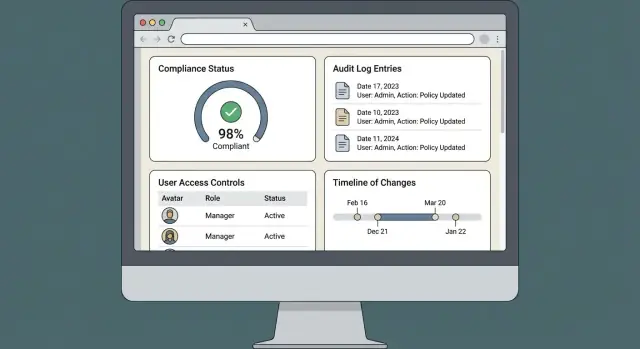
Building a compliance management web application is less about “screens and forms” and more about making audits repeatable. The product succeeds when it helps you prove intent, authority, and traceability—quickly, consistently, and without manual reconciliation.
Start with the Compliance Goals and User Stories
Before you pick a database or sketch screens, write down what “compliance management” actually means in your organization. For some teams, it’s a structured way to track controls and evidence; for others, it’s primarily a workflow engine for approvals, exceptions, and periodic reviews. The definition matters because it determines what you must prove during an audit—and what your app must make easy.
Define the goal in plain language
A useful starting statement is:
“We need to show who did what, when, why, and under whose authority—and retrieve proof quickly.”
That keeps the project focused on outcomes, not features.
Identify the roles (and what each needs)
List the people who will touch the system and the decisions they make:
- Admins: configure policies, users, integrations, retention settings.
- Managers / control owners: approve changes, review evidence, sign off on exceptions.
- End users: submit evidence, request exceptions, complete assigned tasks.
- Auditors (internal/external): read-only access, exports, and clear traceability.
Capture the core workflows
Document the “happy path” and the common detours:
- Approvals (policy updates, control changes, access requests)
- Exceptions (temporary deviations with expiry and justification)
- Evidence collection (uploads, links, attestations, system-generated logs)
- Reporting (control status, overdue items, change history)
Define success criteria for v1
For a compliance web application, v1 success is usually:
- Traceability: complete change history and accountable actors
- Searchability: find a decision or evidence item in seconds
- Tamper resistance: detect unauthorized edits and preserve originals
Keep v1 narrow: roles, basic workflows, audit trail, and reporting. Push “nice-to-haves” (advanced analytics, custom dashboards, broad integrations) to later releases once auditors and control owners confirm the fundamentals work.
Map Regulations and Standards to Concrete App Requirements
Compliance work goes sideways when regulations stay abstract. The goal of this step is to turn “be compliant with SOC 2 / ISO 27001 / SOX / HIPAA / GDPR” into a clear backlog of features your app must provide—and evidence it must produce.
Start by scoping what applies (and what doesn’t)
List the frameworks that matter for your organization and why. SOC 2 might be driven by customer questionnaires, ISO 27001 by a certification plan, SOX by finance reporting, HIPAA by handling PHI, and GDPR by EU users.
Then define boundaries: which products, environments, business units, and data types are in-scope. This prevents building controls for systems the auditors won’t even look at.
Translate requirements into system features
For each framework requirement, write the “app requirement” in plain language. Common translations include:
- Logging & audit trail: prove who did what, when, and from where.
- Access control: role-based access, least privilege, and separation of duties for sensitive actions.
- Retention & lifecycle: keep records for the required period, then archive or delete safely.
- Approvals & reviews: support sign-offs, periodic access reviews, and control attestations.
- Evidence collection: store exports, screenshots, attachments, and “proof of operation.”
A practical technique is to create a mapping table in your requirements doc:
Framework control → app feature → data captured → report/export that proves it
Define auditable events and how long they must remain available
Auditors usually ask for “complete change history,” but you must define it precisely. Decide which events are audit-relevant (e.g., login, permission changes, control edits, evidence uploads, approvals, exports, retention actions) and the minimum fields each event must record.
Also document retention expectations per event type. For example, access changes may require longer retention than routine view events, while GDPR considerations may limit retaining personal data longer than necessary.
Clarify evidence needs early
Treat evidence as a first-class product requirement, not an attachment feature bolted on later. Specify what evidence must support each control: screenshots, ticket links, exported reports, signed approvals, and files.
Define metadata you need for auditability—who uploaded it, what it supports, versioning, timestamps, and whether it was reviewed and accepted.
Align with auditors before you build
Schedule a short working session with internal audit or your external auditor to confirm expectations: what “good” looks like, what sampling will be used, and which reports they expect.
This upfront alignment can save months of rework—and helps you build only what actually supports an audit.
Design the Data Model for Controls, Evidence, and Reviews
A compliance app lives or dies by its data model. If controls, evidence, and reviews aren’t clearly structured, reporting becomes painful and audits turn into screenshot hunts.
Core entities to model
Start with a small set of well-defined tables/collections:
- Users and roles (plus a join table for many-to-many)
- Policies (high-level documents, e.g., “Access Control Policy”)
- Controls (the actionable requirements you test and collect evidence for)
- Tasks (work items like “Upload quarterly access review evidence”)
- Evidence (files, links, records, screenshots, tickets)
- Reviews/Tests (a control assessment instance: who checked, when, outcome)
Relationships that make audits easy
Model relationships explicitly so you can answer “show me how you know this control works” in one query:
- Control ↔ Evidence: usually many-to-many (one evidence item can support multiple controls)
- Control ↔ Tests/Reviews: one-to-many (each period produces a new review record)
- Owner ↔ Control: users can own multiple controls; controls may have a primary and backup owner
- Policy ↔ Controls: one-to-many (controls grouped under a policy)
Identifiers and versioning
Use stable, human-readable IDs for key records (e.g., CTRL-AC-001) alongside internal UUIDs.
Version anything that auditors expect to be immutable over time:
- policy versions (publish dates, effective dates)
- control definition versions (wording, frequency, scope)
- evidence metadata changes (keep a change history pointer, not overwrites)
Attachments: store files, not blobs
Store attachments in object storage (e.g., S3-compatible) and keep metadata in your database: filename, MIME type, hash, size, uploader, uploaded_at, and retention tag. Evidence can also be a URL reference (ticket, report, wiki page).
Fields that power reporting and filtering
Design for the filters auditors and managers will actually use: framework/standard mapping, system/app in scope, control status, frequency, owner, last tested date, next due date, test result, exceptions, and evidence age. This structure makes /reports and exports straightforward later.
Define an Audit Trail That Answers Auditor Questions
An auditor’s first questions are predictable: Who did what, when, and under what authority—and can you prove it? Before you implement logging, define what an “audit event” means in your product so every team (engineering, compliance, support) records the same story.
Define the minimum “who/what/when/where/why”
For each audit event, capture a consistent core set of fields:
- Who: user ID, role at the time, and (if relevant) acting-on-behalf-of / service account
- What: the action and the object (e.g., “update Control #184”)
- When: server timestamp (UTC) and, if needed, user-local time for display
- Where: tenant/org, environment, and request origin (IP)
- Why: reason/justification text for sensitive actions (permission changes, approvals, deletions)
Standardize event types you will report on
Auditors expect clear categories, not free-form messages. At minimum, define event types for:
- Create / update / delete of key records (controls, evidence, policies, findings)
- Authentication: login success/failure, logout, MFA enrollment/reset
- Authorization changes: role changes, permission grants/revokes, group membership
- Workflow actions: approvals, rejections, review sign-offs, “ready for audit” submissions
Capture before/after values (with safe redaction)
For important fields, store before and after values so changes are explainable without guessing. Redact or hash sensitive values (e.g., store “changed from X to [REDACTED]”) and focus on fields that affect compliance decisions.
Add request context for investigations
Include request metadata to tie events back to real sessions:
- IP address, user agent
- Session ID (or device ID)
- Correlation ID / request ID (so support can trace a full transaction)
Be explicit about what never gets logged
Write this rule down early and enforce it in code reviews:
- Passwords, MFA seeds, secret keys, access tokens
- Full payment card data, CVV, or similarly regulated data
A simple event shape to align on:
{
  "event_type": "permission.change",
  "actor_user_id": "u_123",
  "target_user_id": "u_456",
  "resource": {"type": "user", "id": "u_456"},
  "occurred_at": "2026-01-01T12:34:56Z",
  "before": {"role": "viewer"},
  "after": {"role": "admin"},
  "context": {"ip": "203.0.113.10", "user_agent": "...", "session_id": "s_789", "correlation_id": "c_abc"},
  "reason": "Granted admin for quarterly access review"
}
Implement Append-Only, Tamper-Evident Audit Logging
An audit log is only useful if people trust it. That means treating it like a write-once record: you can add entries, but you never “fix” old ones. If something was wrong, you log a new event that explains the correction.
Start with an append-only event store
Use an append-only audit log table (or an event stream) where each record is immutable. Avoid UPDATE/DELETE on audit rows in application code, and enforce immutability at the database level when possible (permissions, triggers, or using a separate storage system).
Each entry should include: who/what acted, what happened, what object was affected, before/after pointers (or a diff reference), when it happened, and where it came from (request ID, IP/device if relevant).
Add integrity so tampering is detectable
To make edits detectable, add integrity measures such as:
- Hashing and chaining: store a hash of the entry plus the previous entry’s hash, creating a chain.
- Signing (where appropriate): sign log batches/entries with a key stored outside the app runtime.
- Write-once storage for exports/archives: periodically seal and store log segments in immutable storage.
The goal isn’t crypto for its own sake—it’s to be able to show an auditor that missing or altered events would be obvious.
Separate user actions from system actions
Log system actions (background jobs, imports, automated approvals, scheduled syncs) distinctly from user actions. Use a clear “actor type” (user/service) and a service identity so “who did it” never becomes ambiguous.
Make time and retries predictable
Use UTC timestamps everywhere, and rely on a trustworthy time source (e.g., database timestamps or synchronized servers). Plan for idempotency: assign a unique event key (request ID / idempotency key) so retries don’t create confusing duplicates, while still allowing you to record genuine repeated actions.
Build Access Control and Separation of Duties
Access control is where compliance expectations become day-to-day behavior. If the app makes it easy to do the wrong thing (or hard to prove who did what), audits turn into debates. Aim for simple rules that reflect how your organization actually works, then enforce them consistently.
Start with RBAC and least privilege
Use role-based access control (RBAC) to keep permission management understandable: roles like Viewer, Contributor, Control Owner, Approver, and Admin. Give each role only what it needs. For example, a Viewer may read controls and evidence but can’t upload or edit anything.
Avoid “one super-user role” that everyone gets. Instead, add temporary elevation (time-boxed admin) when needed, and make that elevation auditable.
Define permissions by action and by scope
Permissions should be explicit per action—view / create / edit / export / delete / approve—and constrained by scope. Scope can be:
- A business unit or department
- A system/application
- A specific framework (e.g., SOX vs. internal controls)
- A project or audit period
This prevents a common failure mode: someone has the right action, but across too wide an area.
Make separation of duties enforceable
Separation of duties shouldn’t be a policy document—it should be a rule in code.
Examples:
- The person who requests a control change can’t approve it.
- The person who uploads evidence can’t mark it as reviewed for the same control.
- Admins can manage user access, but can’t edit compliance records without a second approver.
When a rule blocks an action, show a clear message (“You can request this change, but an Approver must sign off.”) so users don’t look for workarounds.
Treat role/permission changes as high-priority audit events
Any change to roles, group membership, permission scopes, or approval chains should generate a prominent audit entry with who/what/when/why. Include the previous and new values, plus the ticket or reason if available.
Add step-up authentication for sensitive actions
For high-risk operations (exporting a full evidence set, changing retention settings, granting admin access), require step-up authentication—re-enter password, MFA prompt, or SSO re-auth. It reduces accidental misuse and makes the audit story much stronger.
Handle Retention, Archiving, and Deletion Safely
Retention is where compliance tools often fail in real audits: records exist, but you can’t prove they were kept for the right duration, protected from premature deletion, and disposed of predictably.
Define retention by record type (not “the whole database”)
Create explicit retention periods per record category, and store the chosen policy alongside each record (so the policy is auditable later). Common buckets include:
- Audit logs (often longest): security, access, and admin activity
- Evidence and attachments: screenshots, PDFs, exports, approvals
- Reviews and sign-offs: control testing, exceptions, management attestations
- User accounts and roles: join/leave dates, role history
Make the policy visible in the UI (e.g., “kept for 7 years after close”) and immutable once the record is finalized.
Add legal hold as a first-class feature
Legal hold should override every automated purge. Treat it as a state with a clear reason, scope, and timestamps:
- who placed the hold, when, and why
- what it covers (tenant, project, control set, specific records)
- who can release it (typically a restricted role)
If your app supports deletion requests, legal hold must clearly explain why deletion is paused.
Automate retention schedules (archive, export, purge)
Retention is easier to defend when it’s consistent:
- Auto-archive older records to cheaper storage while keeping them searchable
- Export before purge (when required): generate a signed export package and log the handoff
- Purge rules that run on schedules, produce a report, and write an audit event for every batch
Backups and restoration tests are part of retention
Document where backups live, how long they’re kept, and how they’re protected. Schedule restoration tests and record the results (date, dataset, success criteria). Auditors often ask for proof that “we can restore” is more than a promise.
Deletion vs. redaction for privacy
For privacy obligations, define when you delete, when you redact, and what must remain for integrity (e.g., keep an audit event but redact personal fields). Redactions should be logged as changes, with the “why” captured and reviewed.
Create Reporting, Search, and Export Features Auditors Expect
Auditors rarely want a tour of your UI—they want fast answers that can be verified. Your reporting and search features should reduce back-and-forth: “Show me all changes to this control,” “Who approved this exception,” “What’s overdue,” and “How do you know this evidence was reviewed?”
Searchable audit log views (that feel like an investigation tool)
Provide an audit log view that’s easy to filter by user, date/time range, object (control, policy, evidence item, user account), and action (create/update/approve/export/login/permission change). Add free-text search over key fields (e.g., control ID, evidence name, ticket number).
Make filters linkable (copy/paste URL) so an auditor can reference the exact view they used. Consider a “Saved views” feature for common requests like “Access changes last 90 days.”
Reports that match real audit questions
Create a small set of high-signal compliance reports:
- Control status (implemented / in progress / not applicable), with owner and last review date
- Overdue reviews by team and severity
- Evidence completeness (required evidence vs. provided evidence), including review/approval state
Each report should clearly show definitions (what counts as “complete” or “overdue”) and the as-of timestamp of the dataset.
Exports auditors can trust (and you can defend)
Support exports to CSV and PDF, but treat exporting as a regulated action. Every export should generate an audit event containing: who exported, when, which report/view, filters used, record count, and file format. If feasible, include a checksum for the exported file.
To keep report data consistent and reproducible, ensure the same filters yield the same results:
- Use stable sorting (e.g., by ID + updated time)
- Capture the “as-of” time and query parameters
- Avoid mixing live-updating data into a single export without declaring it
“Explain this record” views
For any control, evidence item, or user permission, add an “Explain this record” panel that translates change history into plain language: what changed, who changed it, when, and why (with comment/justification fields). This reduces confusion and prevents audits from turning into guesswork.
Add Security Controls That Support Compliance
Security controls are what make your compliance features believable. If your app can be edited without proper checks—or your data can be read by the wrong person—your audit trail won’t satisfy SOX, GxP expectations, or internal reviewers.
Treat every request as untrusted
Validate inputs on every endpoint, not just in the UI. Use server-side validation for types, ranges, and allowed values, and reject unknown fields. Pair validation with strong authorization checks on every operation (view, create, update, export). A simple rule: “If it changes compliance data, it must require an explicit permission.”
To reduce broken access control, avoid “security by hiding UI.” Enforce access rules in the backend, including on downloads and API filters (for example, exporting evidence for one control must not leak evidence for another).
Protect against common web risks
Cover the basics consistently:
- Injection: parameterized queries, safe ORM usage, and strict input validation.
- XSS: output encoding, HTML sanitization for rich text fields, and a Content Security Policy.
- CSRF: anti-CSRF tokens for cookie-based sessions, plus same-site cookie settings.
- Session security: short-lived sessions for admins, re-authentication for sensitive actions.
Encrypt, isolate, and manage secrets
Use TLS everywhere (including internal service-to-service calls). Encrypt sensitive data at rest (database and backups), and consider field-level encryption for items like API keys or identifiers.
Store secrets in a dedicated secrets manager (not in source control or build logs). Rotate credentials and keys on a schedule, and immediately after staff changes.
Monitor and alert on suspicious activity
Compliance teams value visibility. Create alerts for failed login spikes, repeated 403/404 patterns, privilege changes, new API tokens, and unusual export volume. Make alerts actionable: who, what, when, and the affected objects.
Rate limits and lockout rules
Use rate limiting for login, password reset, and export endpoints. Add account lockout or step-up verification based on risk (e.g., lock after repeated failures, but provide a safe recovery path for legitimate users).
Test Traceability, Permissions, and Audit Readiness
Testing a compliance app isn’t just “does it work?”—it’s “can we prove what happened, who did it, and whether they were allowed to?” Treat audit readiness as a first-class acceptance criterion.
Verify audit logging with before/after precision
Write automated tests that assert:
- The right event is created (e.g.,
CONTROL_UPDATED,EVIDENCE_ATTACHED,APPROVAL_REVOKED). - The actor, timestamp, tenant/org, and object IDs are always present.
- Before/after values are captured for changes (including cleared fields).
- Sensitive fields are handled correctly (masked or excluded, depending on policy).
Also test negative cases: failed attempts (permission denied, validation errors) should either create a separate “denied action” event or be intentionally excluded—whatever your policy states—so it’s consistent.
Test permissions as “cannot,” not just “can”
Permissions testing should focus on preventing cross-scope access:
- A user cannot view, export, or search data outside their organization, program, or assigned system.
- Approval flows enforce separation of duties (no self-approval if your rules forbid it).
- Role changes take effect immediately and are reflected in audit events.
Include API-level tests (not only UI), since auditors often care about the true enforcement point.
Traceability drills: reconstruct the story
Run traceability checks where you start from an outcome (e.g., a control was marked “Effective”) and confirm you can reconstruct:
- what evidence supported it,
- who reviewed it,
- which policy/version was applicable,
- and what changed over time.
Performance tests for growing logs
Audit logs and reports grow quickly. Load test:
- event ingestion during peak activity,
- search/report queries over large time ranges,
- and exports (CSV/PDF) for realistic data volumes.
Build an “audit-ready” checklist and evidence package
Maintain a repeatable checklist (linked in your internal runbook, e.g., /docs/audit-readiness) and generate a sample evidence package that includes: key reports, access listings, change history samples, and log integrity verification steps. This turns audits from a scramble into a routine.
Deploy, Monitor, and Operate the App With Control
Shipping a compliance web application isn’t just “release and forget.” Operations is where good intentions either become repeatable controls—or turn into gaps you can’t explain during an audit.
Protect history with safe change management
Schema and API changes can silently break traceability if they overwrite or reinterpret old records.
Use database migrations as controlled, reviewable change units, and favor additive changes (new columns, new tables, new event types) over destructive ones. When you must change behavior, keep APIs backward-compatible long enough to support older clients and replay/reporting jobs. The goal is simple: historical audit events and evidence must remain readable and consistent across versions.
Separate environments and control deployments
Maintain clear environment separation (dev/stage/prod) with distinct databases, keys, and access policies. Staging should mirror production enough to validate permission rules, logging, and exports—without copying sensitive production data unless you have explicit, approved sanitization.
Keep deployments controlled and repeatable (CI/CD with approvals). Treat a deployment as an auditable event: record who approved it, what version shipped, and when.
Log deployments and configuration changes
Auditors often ask, “What changed, and who authorized it?” Track deployments, feature-flag flips, permission model changes, and integration configuration updates as first-class audit entries.
A good pattern is an internal “system change” event type:
SYSTEM_CHANGE: {
  actor, timestamp, environment, change_type,
  version, config_key, old_value_hash, new_value_hash, ticket_id
}
Monitor what threatens compliance
Set up monitoring that’s tied to risk: error rates (especially write failures), latency, queue backlogs (evidence processing, notifications), and storage growth (audit log tables, file buckets). Alert on missing logs, unexpected drops in event volume, and permission-denied spikes that might indicate misconfiguration or abuse.
Prepare incident response for integrity and access
Document “first hour” steps for suspected data integrity issues or unauthorized access: freeze risky writes, preserve logs, rotate credentials, validate audit log continuity, and capture a timeline. Keep runbooks short, actionable, and linked from your ops docs (for example, /docs/incident-response).
Support Ongoing Governance and Continuous Improvement
A compliance app isn’t “done” when it ships. Auditors will ask how you keep controls current, how changes are approved, and how users stay aligned with the process. Build governance features into the product so continuous improvement is normal work—not a scramble before an audit.
Keep change management visible and auditable
Treat app and control changes as first-class records. For each change, capture the ticket or request, the approver(s), release notes, and a rollback plan. Connect these directly to the impacted control(s) so an auditor can trace:
why it changed → who approved → what changed → when it went live
If you already use a ticketing system, store references (IDs/URLs) and mirror key metadata in your app to keep evidence consistent even if external tools change.
Version policies and controls (don’t overwrite history)
Avoid editing a control “in place.” Instead, create versions with effective dates and clear diffs (what changed and why). When users submit evidence or complete a review, link it to the specific control version they were responding to.
This prevents a common audit problem: evidence collected under an older requirement appearing to “not match” today’s wording.
Make training and evidence submission foolproof
Most compliance gaps are process gaps. Add concise in-app guidance where users act:
- What good evidence looks like (examples, acceptable formats)
- Naming conventions and required fields
- Common reasons submissions get rejected
Track training acknowledgements (who, what module, when) and show just-in-time reminders when a user is assigned a control or review.
Document the system like a product, not a binder
Maintain living documentation inside the app (or linked via /help) that covers:
- Data flows (where evidence originates, where it’s stored, who can view/export)
- Permissions model and role descriptions
- An audit event catalog (what events you log and which fields are captured)
This reduces back-and-forth with auditors and speeds up onboarding for new admins.
Schedule periodic reviews inside the workflow
Bake governance into recurring tasks:
- Access reviews: certify users/roles periodically, with approvals and exceptions recorded.
- Control reviews: confirm control owners, frequency, and evidence expectations; retire controls with a documented rationale.
When these reviews are managed in-app, your “continuous improvement” becomes measurable and easy to demonstrate.
Prototyping Faster (Without Compromising the Audit Story)
Compliance tools often start as an internal workflow app—and the fastest path to value is a thin, auditable v1 that teams actually use. If you want to accelerate the first build (UI + backend + database) while staying aligned with the architecture described above, a vibe-coding approach can be practical.
For example, Koder.ai lets teams create web applications through a chat-driven workflow while still producing a real codebase (React on the frontend, Go + PostgreSQL on the backend). That can be a good fit for compliance apps where you need:
- a clear RBAC model and separations of duties implemented in the backend,
- structured entities for controls, evidence, and reviews,
- append-only audit logging patterns from day one,
- and the ability to export source code or deploy/host with controlled environments.
The key is to treat the compliance requirements (event catalog, retention rules, approvals, and exports) as explicit acceptance criteria—regardless of how quickly you generate the first implementation.
FAQ
What’s the best way to define “compliance management” before building the app?
Start with a plain-language statement like: “We need to show who did what, when, why, and under whose authority—and retrieve proof quickly.”
Then turn that into user stories per role (admins, control owners, end users, auditors) and a short v1 scope: roles + core workflows + audit trail + basic reporting.
What should be in v1 of a compliance web application?
A practical v1 usually includes:
- Controls + ownership (who is responsible for what)
- Evidence collection (files/links + required metadata)
- Reviews/attestations (who reviewed, when, outcome)
- Approvals/exceptions (with justification and expiry)
- Audit trail (who/what/when/where/why)
- Search + a few core reports (status, overdue, evidence completeness)
Defer advanced dashboards and broad integrations until auditors and control owners confirm the fundamentals work.
How do I translate SOC 2 / ISO 27001 / SOX / HIPAA / GDPR into app requirements?
Create a mapping table that converts abstract controls into buildable requirements:
- Framework control → app feature → data captured → report/export that proves it
Do this per in-scope product, environment, and data type so you don’t build controls for systems auditors won’t examine.
What data model works well for controls, evidence, and periodic reviews?
Model a small set of core entities and make relationships explicit:
- Users, Roles (often many-to-many)
- Policies → Controls (one-to-many)
- Controls ↔ Evidence (often many-to-many)
- Controls → Reviews/Tests (one-to-many per period)
- Tasks for recurring work (e.g., quarterly reviews)
Use stable human-readable IDs (e.g., CTRL-AC-001) and version policy/control definitions so old evidence stays tied to the requirement that existed at the time.
What should an audit trail capture to satisfy auditors?
Define an “audit event” schema and keep it consistent:
- Who: actor ID + role at the time (and service identity if automated)
- What: action + resource type/ID
- When: server timestamp (UTC)
- Where: tenant/org + request origin (IP) + correlation/request ID
- Why: justification for sensitive actions
Standardize event types (auth, permission changes, workflow approvals, CRUD of key records) and capture before/after values with safe redaction.
How do I implement append-only, tamper-evident audit logging?
Treat audit logs as immutable:
- Use an append-only event store (no UPDATE/DELETE from app code)
- Add tamper detection (e.g., hash + previous-hash chaining)
- Optionally sign/seal batches and store archives in immutable/WORM storage
- Log system actions separately from user actions (actor type: user/service)
If something needs “correction,” write a new event that explains it rather than changing history.
How should access control and separation of duties be enforced?
Start with RBAC and least privilege (e.g., Viewer, Contributor, Control Owner, Approver, Admin). Then enforce scope:
- Business unit / system / framework / audit period
Make separation of duties a code rule, not a guideline:
- Requester ≠ approver
- Evidence uploader ≠ evidence reviewer (for the same control)
Treat role/scope changes and exports as high-priority audit events, and use step-up auth for sensitive actions.
How do I handle retention, archiving, legal hold, and deletion safely?
Define retention by record type and store the applied policy with each record so it’s auditable later.
Common needs:
- Long retention: audit logs, access/admin changes
- Medium: reviews/sign-offs, exceptions
- Variable: evidence/attachments (depends on framework and contracts)
Add legal hold to override purges, and log retention actions (archive/export/purge) with batch reports. For privacy, decide when to delete vs. redact while keeping integrity (e.g., retain the audit event but redact personal fields).
What reporting, search, and export features do auditors typically expect?
Build investigation-style search and a small set of “audit questions” reports:
- Filter audit logs by user/date/object/action, plus free-text search
- Reports: control status, overdue reviews, evidence completeness
For exports (CSV/PDF), log:
- who exported, when, which report/view, filters, record count, format
Include an “as-of” timestamp and stable sorting so exports are reproducible.
How do I test and operate the app so it stays audit-ready over time?
Test audit readiness as a product requirement:
- Automated checks that the right event types fire with required fields
- Before/after logging correctness (including cleared fields)
- Negative tests for forbidden actions (and whether denials are logged, per policy)
- API-level authorization tests to prevent cross-scope access
Operationally, treat deployments/config changes as auditable events, keep environments separated, and maintain runbooks (e.g., /docs/incident-response, /docs/audit-readiness) that show how you preserve integrity during incidents.