

How to Build a Web App for Customer Data Enrichment
Learn how to build a web app that enriches customer records: architecture, integrations, matching, validation, privacy, monitoring, and rollout tips.
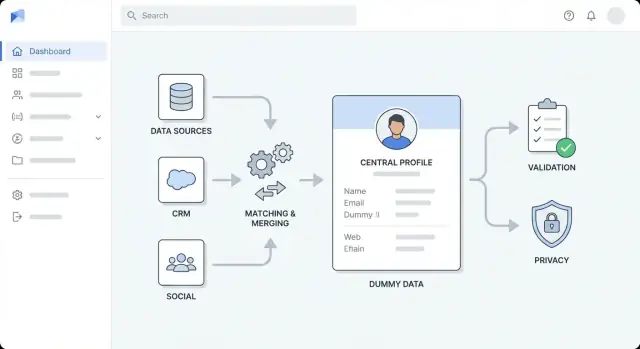
Define Goals, Users, and Enrichment Scope
Before you pick tools or draw architecture diagrams, get precise about what “enrichment” means for your organization. Teams often blend multiple types of enrichment and then struggle to measure progress—or argue about what “done” looks like.
What counts as enrichment?
Start by naming the field categories you want to improve and why:
- Firmographic: company size, industry, HQ location, funding stage
- Contact: job title, verified email/phone, seniority, role
- Behavioral: product usage signals, intent, engagement scores
- Custom fields: internal territory, account tier, ICP fit score
Write down which fields are required, which are nice-to-have, and which should never be enriched (for example, sensitive attributes).
Who will use the app—and for what?
Identify your primary users and their top tasks:
- Sales ops: reduce duplicates, standardize accounts, improve routing
- Marketing ops: enrich leads for segmentation and better targeting
- Support: surface account context during tickets
- Analysts: trustable datasets for reporting
Each user group tends to need a different workflow (bulk processing vs. single-record review), so capture those needs early.
Define outcomes, scope boundaries, and success metrics
List outcomes in measurable terms: higher match rate, fewer duplicates, faster lead/account routing, or better segmentation performance.
Set clear boundaries: which systems are in scope (CRM, billing, product analytics, support desk) and which are not—at least for the first release.
Finally, agree on success metrics and acceptable error rates (e.g., enrichment coverage, verification rate, duplicate rate, and “safe failure” rules when enrichment is uncertain). This becomes your north star for the rest of the build.
Model Your Customer Data and Identify Gaps
Before you enrich anything, get clear on what “a customer” means in your system—and what you already know about them. This prevents paying for enrichment you can’t store, and avoids confusing merges later.
Inventory your current fields and sources
Start with a simple catalog of fields (e.g., name, email, company, domain, phone, address, job title, industry). For each field, note where it originates: user input, CRM import, billing system, support tool, product sign-up form, or an enrichment provider.
Also capture how it’s collected (required vs optional) and how often it changes. For example, job title and company size drift over time, while an internal customer ID should never change.
Define your identity model: person, company, account
Most enrichment workflows involve at least two entities:
- Person (contact/lead): an individual with emails, phones, roles
- Company (organization): a business with a domain, location, firmographics
Decide whether you also need an Account (a commercial relationship) that can link multiple people to one company with attributes like plan, contract dates, and status.
Write down the relationships you support (e.g., many people → one company; one person → multiple companies over time).
Document common data problems
List the issues you see repeatedly: missing values, inconsistent formats ("US" vs "United States"), duplicates created by imports, stale records, and conflicting sources (billing address vs CRM address).
Choose required keys and set trust levels
Pick the identifiers you’ll use for matching and updates—typically email, domain, phone, and an internal customer ID.
Assign each a trust level: which keys are authoritative, which are “best effort,” and which should never be overwritten.
Clarify ownership and edit permissions
Agree who owns which fields (Sales ops, Support, Marketing, Customer success) and define edit rules: what a human can change, what automation can change, and what requires approval.
This governance saves time when enrichment results conflict with existing data.
Choose Enrichment Sources and Data Contracts
Before you write integration code, decide where enrichment data will come from and what you’re allowed to do with it. This prevents a common failure mode: shipping a feature that works technically but breaks cost, reliability, or compliance expectations.
Typical enrichment sources
You’ll usually combine several inputs:
- Internal systems: CRM, billing, support tickets, product analytics, email platform, data warehouse
- Third-party APIs: company firmographics, contact validation, industry codes, technographics, risk signals
- Uploaded lists: CSVs from sales, events, partners, or data providers
- Webhooks: real-time updates from tools that already observe changes (e.g., email verification, identity providers)
How to evaluate sources
For each source, score it on coverage (how often it returns something useful), freshness (how quickly it updates), cost (per call/per record), rate limits, and terms of use (what you may store, how long, and for what purpose).
Also check whether the provider returns confidence scores and clear provenance (where a field came from).
Define a data contract
Treat every source as a contract that specifies field names and formats, required vs optional fields, update frequency, expected latency, error codes, and confidence semantics.
Include an explicit mapping (“provider field → your canonical field”) plus rules for nulls and conflicting values.
Fallback and storage decisions
Plan what happens when a source is unavailable or returns low-confidence results: retry with backoff, queue for later, or fall back to a secondary source.
Decide what you store (stable attributes needed for search/reporting) versus what you compute on demand (expensive or time-sensitive lookups).
Finally, document restrictions on storing sensitive attributes (e.g., personal identifiers, inferred demographics) and set retention rules accordingly.
Design the High-Level Architecture
Before you pick tools, decide how the app is shaped. A clear high-level architecture keeps enrichment work predictable, prevents “quick fixes” from turning into permanent clutter, and helps your team estimate effort.
Pick an architecture style that fits your team
For most teams, start with a modular monolith: one deployable app, internally split into well-defined modules (ingestion, matching, enrichment, UI). It’s simpler to build, test, and debug.
Move to separate services when you have a clear reason—e.g., enrichment throughput is high, you need independent scaling, or different teams own different parts. A common split is:
- API service (sync requests, auth, record CRUD)
- Worker service (async enrichment, retries)
- UI (review, approvals, bulk actions)
Separate concerns into layers
Keep boundaries explicit so changes don’t ripple everywhere:
- Ingestion layer: imports from CRM/files and normalizes inputs
- Enrichment layer: calls vendors/internal sources and stores results
- Validation layer: applies data quality rules and flags exceptions
- Storage layer: customer profiles, raw source payloads, audit history
- Presentation layer: UI views, review queues, approvals
Design for async enrichment from day one
Enrichment is slow and failure-prone (rate limits, timeouts, partial data). Treat enrichment as jobs:
- API creates a job and returns quickly
- Workers process jobs via a queue (with retries and backoff)
- UI shows job status and allows re-run when needed
Plan environments and configuration
Set up dev/staging/prod early. Keep vendor keys, thresholds, and feature flags in configuration (not code), and make it easy to swap providers per environment.
Align with a one-page diagram
Sketch a simple diagram showing: UI → API → database, plus queue → workers → enrichment providers. Use it in reviews so everyone agrees on responsibilities before implementation.
Fast-path prototyping (optional)
If your goal is to validate workflows and review screens before investing in a full engineering cycle, a vibe-coding platform like Koder.ai can help you prototype the core app quickly: a React-based UI for review/approvals, a Go API layer, and PostgreSQL-backed storage.
This can be especially useful for proving out the job model (async enrichment with retries), audit history, and role-based access patterns, then exporting source code when you’re ready to productionize.
Set Up Storage, Queues, and Supporting Services
Before you start wiring enrichment providers, get the “plumbing” right. Storage and background processing decisions are hard to change later, and they directly affect reliability, cost, and auditability.
Primary database: profiles + history
Pick a primary database for customer profiles that supports structured data and flexible attributes. Postgres is a common choice because it can store core fields (name, domain, industry) alongside semi-structured enrichment fields (JSON).
Just as important: store change history. Instead of overwriting values silently, capture who/what changed a field, when, and why (e.g., “vendor_refresh”, “manual_approval”). This makes approvals easier and keeps you safe during rollbacks.
Queue: enrichment and retries
Enrichment is inherently asynchronous: APIs rate-limit, networks fail, and some vendors respond slowly. Add a job queue for background work:
- Enrichment requests (single record and bulk)
- Retries with backoff
- Scheduled refresh (e.g., every 30/90 days)
- Dead-letter handling for jobs that keep failing
This keeps your UI responsive and prevents vendor hiccups from taking down the app.
Cache: fast lookups and rate-limit tracking
A small cache (often Redis) helps with frequent lookups (e.g., “company by domain”) and tracking vendor rate limits and cooldown windows. It’s also useful for idempotency keys so repeated imports don’t trigger duplicate enrichment.
File storage and retention
Plan object storage for CSV imports/exports, error reports, and “diff” files used in review flows.
Define retention rules early: keep raw vendor payloads only as long as needed for debugging and audits, and expire logs on a schedule aligned with your compliance policy.
Build Ingestion and Normalization Pipelines
Your enrichment app is only as good as the data you feed it. Ingestion is where you decide how information enters the system, and normalization is where you make that information consistent enough to match, enrich, and report on.
Decide how data enters
Most teams need a mix of entry points:
- API endpoints for your product or internal tools to push new/updated customers
- Webhooks from CRMs or billing systems for near-real-time changes
- Scheduled pulls (nightly syncs) for systems that don’t support push
- CSV imports for backfills and one-off uploads
Whatever you support, keep the “raw ingest” step lightweight: accept data, authenticate, log metadata, and enqueue work for processing.
Normalize and standardize early
Create a normalization layer that turns messy inputs into a consistent internal shape:
- Names: trim whitespace, split full names when possible, handle casing
- Phones: convert to E.164 format and store country assumptions explicitly
- Addresses: standardize fields (street, locality, region, postal code) and keep the original text
- Domains/emails: lowercase, remove tracking parameters from URLs, validate syntax
Validate, quarantine, and stay idempotent
Define required fields per record type and reject or quarantine records that fail checks (e.g., missing email/domain for company matching). Quarantined items should be viewable and fixable in the UI.
Add idempotency keys to prevent duplicate processing when retries happen (common with webhooks and flaky networks). A simple approach is hashing (source_system, external_id, event_type, event_timestamp).
Track lineage per field
Store provenance for every record and, ideally, every field: source, ingestion time, and transformation version. This makes later questions answerable: “Why did this phone number change?” and “Which import produced this value?”
Implement Matching, Deduplication, and Merging
Getting enrichment right depends on reliably identifying who is who. Your app needs clear matching rules, predictable merge behavior, and a safety net when the system isn’t sure.
Define matching rules (and confidence thresholds)
Start with deterministic identifiers:
- Exact keys: email (normalized to lowercase), customer ID, tax/VAT ID, or verified domain
Then add probabilistic matching for cases where exact keys are missing:
- Fuzzy matches: name + company domain, name + location, phone similarity
Assign a match score and set thresholds, for example:
- Auto-merge only above a high threshold
- Queue for manual review in the “maybe” range
- Reject below the lower threshold
Plan deduplication and merge logic
When two records represent the same customer, decide how fields are chosen:
- Field precedence: “verified email beats unverified,” “newer timestamp wins,” “CRM overrides enrichment for contact owner”
- Source trust scores: rank sources (CRM, billing, enrichment providers) to resolve conflicts
- Conflict handling: keep both values where possible (e.g., multiple phone numbers) or store the losing value in history
Audit trail and review workflow
Every merge should create an audit event: who/what triggered it, before/after values, match score, and involved record IDs.
For ambiguous matches, provide a review screen with side-by-side comparison and “merge / don’t merge / ask for more data.”
Safeguards against accidental mass merges
Require extra confirmation for bulk merges, cap merges per job, and support “dry run” previews.
Also add an undo path (or merge reversal) using the audit history so mistakes aren’t permanent.
Integrate Enrichment APIs and Handle Reliability
Enrichment is where your app meets the outside world—multiple providers, inconsistent responses, and unpredictable availability.
Treat each provider as a pluggable “connector” so you can add, swap, or disable sources without touching the rest of your pipeline.
Build provider connectors (auth, retries, error mapping)
Create one connector per enrichment provider with a consistent interface (e.g., enrichPerson(), enrichCompany()). Keep provider-specific logic inside the connector:
- Authentication (API keys, OAuth tokens, token refresh)
- Standardized retries for transient failures
- Error mapping (turn provider errors into your own categories like
invalid_request,not_found,rate_limited,provider_down)
This makes downstream workflows simpler: they handle your error types, not every provider’s quirks.
Handle rate limits with throttling and backoff
Most enrichment APIs enforce quotas. Add throttling per provider (and sometimes per endpoint) to keep requests under limits.
When you do hit a limit, use exponential backoff with jitter and respect Retry-After headers.
Plan for “slow failure” too: timeouts and partial responses should be captured as retriable events, not silent drops.
Store confidence and evidence (within policy)
Enrichment results are rarely absolute. Store provider confidence scores when available, plus your own score based on match quality and field completeness.
Where allowed by contract and privacy policy, store raw evidence (source URLs, identifiers, timestamps) to support auditing and user trust.
Multi-provider strategy: “best available” selection
Support multiple providers by defining selection rules: cheapest-first, highest-confidence, or field-by-field “best available.”
Record which provider supplied each attribute so you can explain changes and roll back if needed.
Scheduled refresh rules
Enrichment goes stale. Implement refresh policies such as “re-enrich every 90 days,” “refresh on key field change,” or “refresh only if confidence drops.”
Make schedules configurable per customer and per data type to control cost and noise.
Add Data Quality Rules and Validation
Data enrichment only helps if the new values are trustworthy. Treat validation as a first-class feature: it protects your users from messy imports, unreliable third-party responses, and accidental corruption during merges.
Define field-level validation rules
Start with a simple “rules catalog” per field, shared by UI forms, ingestion pipelines, and public APIs.
Common rules include format checks (email, phone, postal code), allowed values (country codes, industry lists), ranges (employee count, revenue bands), and required dependencies (if country = US, then state is required).
Keep the rules versioned so you can change them safely over time.
Add quality checks that reflect real usage
Beyond basic validation, run data quality checks that answer business questions:
- Completeness: Do we have the minimum fields to use the record?
- Uniqueness: Are “unique” identifiers (domain, tax ID) duplicated?
- Consistency: Do related fields agree (country vs. phone prefix)?
- Timeliness: How old is a value, and should it be refreshed?
Score records and sources
Convert checks into a scorecard: per record (overall health) and per source (how often it provides valid, up-to-date values).
Use the score to guide automation—for example, only auto-apply enrichments above a threshold.
Route failures predictably
When a record fails validation, don’t drop it.
Send it to a “data-quality” queue for retry (transient issues) or manual review (bad input). Store the failed payload, rule violations, and suggested fixes.
Make errors understandable
Return clear, actionable messages for imports and API clients: which field failed, why, and an example of a valid value.
This reduces support load and speeds up cleanup work.
Create the UI for Review, Approvals, and Bulk Work
Your enrichment pipeline only delivers value when people can review what changed and confidently push updates into downstream systems.
The UI should make “what happened, why, and what do I do next?” obvious.
Core screens to design
Customer profile is the home base. Show key identifiers (email, domain, company name), current field values, and an enrichment status badge (e.g., Not enriched, In progress, Needs review, Approved, Rejected).
Add a change history timeline that explains updates in plain language: “Company size updated from 11–50 to 51–200.” Make every entry clickable to see details.
Provide merge suggestions when duplicates are detected. Display the two (or more) candidate records side-by-side with the recommended “survivor” record and a preview of the merged result.
Bulk work that matches real operations
Most teams work in batches. Include bulk actions such as:
- Enrich selected records (or enqueue for overnight processing)
- Approve/reject suggested merges
- Export results (CSV) for audits or offline review
Use a clear confirmation step for destructive actions (merge, overwrite) with an “undo” window when possible.
Fast search, filters, and field-level provenance
Add global search and filters by email, domain, company, status, and quality score.
Let users save views like “Needs review” or “Low confidence updates.”
For every enriched field, show provenance: source, timestamp, and confidence.
A simple “Why this value?” panel builds trust and reduces back-and-forth.
Guided workflows for non-technical users
Keep decisions binary and guided: “Accept suggested value,” “Keep existing,” or “Edit manually.” If you need deeper control, tuck it behind an “Advanced” toggle rather than making it the default.
Security, Privacy, and Compliance Basics
Customer enrichment apps touch sensitive identifiers (emails, phone numbers, company details) and often pull data from third parties. Treat security and privacy as core features, not “later” tasks.
Role-based access control (RBAC)
Start with clear roles and least-privilege defaults:
- Admin: manage users, roles, connectors, retention policies
- Ops: run enrichment jobs, resolve conflicts, approve merges
- Viewer: read-only access for reporting and support
Keep permissions granular (e.g., “export data”, “view PII”, “approve merges”), and separate environments so production data isn’t available in dev.
Protect sensitive data
Use TLS for all traffic and encryption at rest for databases and object storage.
Store API keys in a secrets manager (not env files in source control), rotate them regularly, and scope keys per environment.
If you display PII in the UI, add safe defaults like masked fields (e.g., show last 2–4 digits) and require explicit permission to reveal full values.
Consent and data-usage constraints
If enrichment depends on consent or specific contractual terms, encode those constraints in your workflow:
- Track data source, purpose, and allowed uses per field
- Document what you store and why (a short internal policy page like /privacy or /docs/data-handling helps)
- Avoid collecting fields you don’t need—less data reduces risk
Auditing, retention, and deletion
Create an audit trail for both access and changes:
- Log who viewed/exported records
- Log who changed what and when (before/after values, job ID, enrichment provider)
Finally, support privacy requests with practical tooling: retention schedules, record deletion, and “forget” workflows that also purge copies in logs, caches, and backups where feasible (or mark them for expiry).
Monitoring, Analytics, and Operational Controls
Monitoring isn’t just for uptime—it’s how you keep enrichment trustworthy as volumes, providers, and rules change.
Treat every enrichment run as a measurable job with clear signals you can trend over time.
Metrics that actually help
Start with a small set of operational metrics tied to outcomes:
- Job throughput (records/min) and time-to-complete per run
- Success rate vs. failure rate, split by failure type (validation, matching, provider)
- Provider latency (p50/p95) and timeouts per enrichment source
- Match rate (how often you confidently attach enrichment)
- Duplicates prevented (how many would have merged incorrectly without checks)
These numbers quickly answer: “Are we improving data, or just moving it around?”
Alerts and guardrails
Add alerts that trigger on change, not noise:
- Spikes in failures or quarantined records
- Queue backlogs or slow consumers (signals a stuck pipeline)
- Provider error bursts (429/5xx), elevated latency, or increased timeouts
Tie alerts to concrete actions, like pausing a provider, lowering concurrency, or switching to cached/stale data.
Admin dashboard for operators
Provide an admin view for recent runs: status, counts, retries, and a list of quarantined records with reasons.
Include “replay” controls and safe bulk actions (retry all provider timeouts, re-run matching only).
Traceability with logs
Use structured logs and a correlation ID that follows one record end-to-end (ingestion → match → enrichment → merge).
This makes customer support and incident debugging dramatically faster.
Incident playbooks and rollback
Write short playbooks: what to do when a provider degrades, when match rate collapses, or when duplicates slip through.
Keep a rollback option (e.g., revert merges for a time window) and document it on /runbooks.
Testing, Rollout, and Iteration Plan
Testing and rollout are where an enrichment app becomes safe to trust. The goal isn’t “more tests”—it’s confidence that matching, merging, and validation behave predictably under messy real-world data.
Test the risky parts first
Prioritize tests around logic that can silently damage records:
- Matching rules: unit tests for exact, fuzzy, and composite matches (e.g., email + company domain). Include near-duplicates and swapped fields.
- Merge outcomes: test field precedence (source priority), conflict handling, and “do not overwrite” rules.
- Validation edge cases: malformed emails, international phone formats, missing country, duplicate identifiers, and “unknown” values.
Use synthetic datasets (generated names, domains, addresses) to validate accuracy without exposing real customer data.
Keep a versioned “golden set” with expected match/merge outputs so regressions are obvious.
Stage the rollout to reduce blast radius
Start small, then expand:
- Pilot scope: one team or one segment (e.g., SMB leads only)
- Limited actions: begin with “suggested updates” that require approval before writing back to the CRM
- Ramp up: expand record volume, then enable automated writes for low-risk fields
Define success metrics before you start (match precision, approval rate, reduction in manual edits, and time-to-enrich).
Document workflows and integration checklist
Create short docs for users and integrators (link from your product area or /pricing if you gate features). Include an integration checklist:
- API auth method, rate limits, and retry behavior
- Required fields for enrichment requests
- Webhook/event payloads (and versioning)
- Error codes and “partial enrichment” rules
- Audit log expectations and data retention
For ongoing improvement, schedule a lightweight review cadence: analyze failed validations, frequent manual overrides, and mismatches, then update rules and add tests.
A practical reference for tightening rules: /blog/data-quality-checklist.
Build vs. accelerate: a practical note
If you already know your target workflows but want to shorten the time from spec → working app, consider using Koder.ai to generate an initial implementation (React UI, Go services, PostgreSQL storage) from a structured chat-based plan.
Teams often use this approach to stand up the review UI, job processing, and audit history quickly—then iterate with planning mode, snapshots, and rollback as requirements evolve. When you need full control, you can export the source code and continue in your existing pipeline. Koder.ai offers free, pro, business, and enterprise tiers, which can help you match experimentation vs. production needs.
FAQ
What should I define before building a customer enrichment app?
Start with the fields you need, the users who need them, and a measurable result such as higher verified-email coverage or fewer duplicate accounts. Limit the first release to a few systems and low-risk fields so the team can check results before expanding.
Which customer data fields should an enrichment app handle?
Most apps enrich company details, contact details, behavior signals, and internal scoring fields. Keep sensitive attributes out unless you have a clear reason, permission, and retention rule for using them.
How should I model people, companies, and accounts?
Use separate records for people and companies, then add an account record if you track a commercial relationship such as a plan or contract. Link records with trusted identifiers like verified email, company domain, and internal customer ID.
How can I prevent duplicate customer records?
Begin with exact matches on normalized email, verified domain, phone, or internal ID. Send uncertain matches to review instead of merging them automatically, and keep a record of every merge so someone can reverse a mistake.
Why should enrichment run in the background?
Treat enrichment as a background job. The app should accept the request, place work in a queue, let workers call providers with retries, and show progress in the UI. This keeps slow providers from blocking users.
How do I choose enrichment data providers?
Check coverage, freshness, cost, rate limits, permitted storage, and confidence scores for each source. Map provider fields to your own format and define which source wins when two sources disagree.
What should users see when reviewing enriched data?
Store the source, timestamp, confidence, and change reason with each enriched field. Show that information in the review screen so users can keep the current value, accept the suggestion, or edit it themselves.
What infrastructure does a customer enrichment app need?
Use a primary database for customer profiles and audit history, a queue for enrichment jobs and retries, and object storage for CSV files and reports. A cache can reduce repeated lookups and help track provider limits.
How should the app handle API failures and rate limits?
Give each source a connector that handles its authentication, request format, errors, throttling, and retries. Convert provider-specific failures into a small set of app errors, such as rate limited, not found, or temporarily unavailable.
How do I keep enriched customer data accurate?
Apply format and consistency checks before you use incoming data. Quarantine bad records with a clear reason and suggested fix, then let users correct and retry them rather than silently dropping them.