

How to Build a Web App for Customer Interview Insights
Plan, design, and ship a web application that stores interviews, tags insights, and shares reports with your team—step by step.
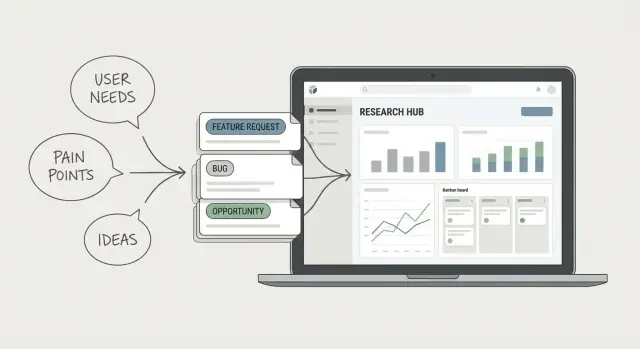
What You’re Building and Why It Matters
You’re building a web app that turns messy customer interview material into a shared, searchable source of truth.
Most teams already do customer interviews—but the output is scattered across docs, spreadsheets, slide decks, Zoom recordings, and personal notebooks. Weeks later, the exact quote you need is hard to find, the context is missing, and every new project “re-discovers” the same insights.
The problem it solves
This kind of tool fixes three common failures:
- Scattered notes: data lives in too many places, with no consistent structure.
- Hard-to-find insights: even good research gets lost because it isn’t searchable or reusable.
- Inconsistent reporting: different teams summarize interviews differently, making decisions harder to justify.
Who it’s for
A research repository isn’t just for researchers. The best versions support:
- Researchers capturing interviews and synthesizing patterns.
- Product managers and designers validating decisions with evidence.
- Support and success teams feeding real customer pain into product work.
- Leadership quickly understanding what’s true, what’s changing, and why.
The core outcome
The goal isn’t “store interviews.” It’s to convert raw conversations into reusable insights—each with source quotes, tags, and enough context that anyone can trust and apply them later.
Start small, then earn complexity
Set the expectation early: launch an MVP that people will actually use, then expand based on real behavior. A smaller tool that fits into daily work beats a feature-heavy platform no one updates.
What “good” looks like
Define success in practical terms:
- Less time spent searching for prior research
- More reuse of existing insights across projects
- Clearer, faster decisions backed by quotes and evidence
- Fewer repeated interviews on already-answered questions
Start With User Jobs and the Research Workflow
Before you pick features, get clear on the jobs people are trying to do. A customer-interview insights app succeeds when it reduces friction across the whole research cycle—not just when it stores notes.
Primary user tasks (what the app must support)
Most teams repeat the same core tasks:
- Capture: schedule, record, take notes, attach files
- Transcribe: bring in transcripts (manual or automated)
- Code/tag: highlight quotes, apply tags, link to themes
- Synthesize: group evidence, write insights, note confidence
- Share: publish summaries, export, notify stakeholders
These tasks should become your product vocabulary (and your navigation).
Map the interview-to-insight flow
Write the workflow as a simple sequence from “interview planned” to “decision made.” A typical flow looks like:
Scheduling → prep (guide, participant context) → call/recording → transcript → highlighting quotes → tagging → synthesis (insights) → reporting → decision/next steps.
Now mark where people lose time or context. Common pain points:
- Handoffs: one person interviews, another tags; context gets lost
- Duplicates: the same insight gets re-written across decks and docs
- Missing context: quotes without participant details, date, or research goal
- Fragmented tools: transcript in one place, tags in another, report in a third
Decide what your app owns vs integrates with
Be explicit about boundaries. For an MVP, your app should usually own the research repository (interviews, quotes, tags, insights, sharing) and integrate with:
- Calendar scheduling (Google/Microsoft)
- Video calls/recordings (Zoom/Meet/Teams)
- Transcription services (import files or connect via API)
This avoids rebuilding mature products while still delivering a unified workflow.
5–8 user stories to keep scope focused
Use these to guide your first build:
- As a researcher, I can create an interview record with participant context and a goal.
- As a researcher, I can import a transcript and link it to the interview.
- As a researcher, I can highlight text and save it as a quote.
- As a researcher, I can tag quotes and group them under themes.
- As a researcher, I can write an insight supported by multiple quotes.
- As a teammate, I can comment on an insight and ask for clarification.
- As a stakeholder, I can view a shareable summary without editing.
If a feature doesn’t support one of these stories, it’s probably not day-one scope.
Scope the MVP: Features You Need on Day One
The fastest way to stall this kind of product is to try to solve every research problem at once. Your MVP should let a team reliably capture interviews, find what they need later, and share insights without creating a new process burden.
A practical day-one feature set
Start with the smallest set that supports the end-to-end workflow:
- Projects: a place to group work by initiative (e.g., “Onboarding improvements Q1”).
- Interviews: a record with participant details, date, researcher, and links/files.
- Notes + quotes: highlightable snippets (manual is fine) tied to an interview.
- Tags: a lightweight way to label themes, personas, pain points, and features.
- Search + basic filters: search across titles, notes, and quotes; filter by tag and project.
- Export/share: share a project summary or export quotes/tags to CSV/PDF for stakeholders.
Must-have vs. nice-to-have
Be strict about what ships now:
- Must-have: capture, tag, search, and share.
- Nice-to-have (later): AI summaries, auto-clustering themes, sentiment analysis, advanced dashboards, Slack digests.
If you want AI later, design for it (store clean text and metadata), but don’t make the MVP depend on it.
Set limits to reduce complexity
Pick constraints that keep you shipping:
- Support one transcript format (e.g., paste text) before handling every vendor.
- Start with basic roles (Admin, Member, Viewer) instead of granular permissions.
- Use simple templates for interview notes (3–5 sections) rather than a template builder.
Define your first “real” usage target
Decide who you’re building for first: for example, a 5–15 person research/product team with 50–200 interviews in the first few months. This informs performance needs, storage, and permission defaults.
A simple release plan (2–3 milestones)
- Milestone 1: Projects + interviews + notes + tags (core capture).
- Milestone 2: Search/filters + export/share (make it useful across the team).
- Milestone 3: Quality improvements (bulk import, better tagging UX, audit log).
Design the Data Model for Interviews, Quotes, and Insights
A good research app fails or succeeds on its data model. If you model “insights” as just a text field, you’ll end up with a pile of notes that no one can confidently reuse. If you over-model everything, your team won’t enter data consistently. The goal is a structure that supports real work: capture, traceability, and reuse.
Key objects (the minimum useful set)
Start with a small set of first-class objects:
- Workspace: the organization boundary (billing, settings, members)
- Project: a research effort or initiative
- Interview: a session (date/time, method, source)
- Participant: who you spoke with (or a pseudonymous profile)
- Transcript: raw text tied to an interview
- Note: researcher observations and interpretation
- Insight: the “so what” that should be reusable
- Tag: a shared vocabulary for grouping
Relationships that protect context
Design your model so you can always answer “Where did this come from?”
- A Project has many Interviews.
- An Interview links to one Participant (or multiple, if you do group sessions).
- A Transcript belongs to an Interview.
- A Quote (or excerpt) belongs to a Transcript and can be referenced by multiple Insights.
- An Insight links to one or more Quotes, and also to the Project (and optionally to a product area or journey step via tags).
This traceability lets you reuse an insight while preserving evidence.
Metadata you’ll want sooner than you think
Include fields like date, researcher, source (recruiting channel, customer segment), language, and consent status. These unlock filtering and safer sharing later.
Attachments and external media
Treat media as part of the record: store audio/video links, uploaded files, screenshots, and related docs as attachments on the Interview (and sometimes on Insights). Keep storage flexible so you can integrate with tools later.
Design for change (without breaking history)
Tags, insight templates, and workflows will evolve. Use versionable templates (e.g., Insight has a “type” and optional JSON fields), and never hard-delete shared taxonomies—deprecate them. That way old projects stay readable while new ones get better structure.
Plan the UX: Capture, Tag, Synthesize, Share
A research repository fails when it’s slower than a notebook. Your UX should make the “right” workflow the fastest one—especially during live interviews, when people are multitasking.
Design the navigation around how teams think
Keep the hierarchy predictable and visible:
Workspaces → Projects → Interviews → Insights
Workspaces mirror organizations or departments. Projects map to a product initiative or research study. Interviews are the raw source. Insights are what the team actually reuses. This structure prevents the common problem of quotes, notes, and takeaways floating around without context.
Make capture feel instant
During calls, researchers need speed and low cognitive load. Prioritize:
- Quick notes with minimal required fields
- Timestamps (one click to insert “00:12:34”) so clips and quotes stay traceable
- Speaker labels (Participant, Interviewer, Stakeholder) to reduce cleanup later
If you add anything that interrupts note-taking, make it optional or auto-suggested.
Standardize synthesis with an “Insight Card”
When synthesis is free-form, reporting becomes inconsistent. An insight card pattern helps teams compare findings across interviews and projects:
- Claim: the takeaway in plain language
- Evidence: linked quotes or moments (with timestamps)
- Severity / impact: why it matters
- Segment: who it applies to (persona, plan, role)
- Confidence: how strongly you believe it, based on evidence
Saved views for everyday retrieval
Most users don’t want to “search”—they want a shortlist. Offer saved views such as by tag, segment, product area, and time range. Treat saved views like dashboards people return to weekly.
Sharing that respects context
Make it easy to distribute insights without exporting chaos. Depending on your environment, support read-only links, PDFs, or lightweight internal reports. Shared artifacts should always point back to the underlying evidence—not just a summary.
Permissions, Roles, and Team Collaboration
Permissions can feel like “admin work,” but they directly affect whether your repository becomes a trusted source of truth—or a messy folder people avoid. The goal is simple: let people contribute safely, and let stakeholders consume insights without creating risk.
Define clear roles (and keep them predictable)
Start with four roles and resist adding more until you have real edge cases:
- Owner: manages billing, workspace settings, deletes projects, and assigns admins.
- Admin: manages members, roles, and workspace-wide configuration; can access all projects by default.
- Editor: creates and edits interviews, quotes, and insights within projects they can access.
- Viewer: read-only access; can search and export (if you allow it) but cannot change content.
Make the permissions explicit in the UI (e.g., in the invite modal), so people aren’t guessing what “Editor” means.
Workspace-level vs project-level access
Model access at two layers:
- Workspace-level membership answers: “Is this person part of the team?”
- Project-level access answers: “Which research can they see and edit?”
A practical default: admins can access all projects; editors/viewers need to be added per project (or via groups like “Product,” “Research,” “Sales”). This prevents accidental over-sharing when new projects are created.
Guest access for stakeholders and contractors
If you need it, add Guests as a special case: they can be invited to specific projects only and should never see the full workspace directory. Consider time-bound access (e.g., expires in 30 days) and limit exports for guests by default.
Audit basics you’ll be grateful for later
Track:
- Who created/edited an interview, quote, or insight
- When it happened
- (Optional) what changed, at least for insights
This builds trust during reviews and makes it easier to clean up mistakes.
Handling sensitive interviews
Plan for restricted data from day one:
- Restricted projects with tighter membership rules
- Private notes visible only to specific roles (or to the author)
- Clear indicators when content is sensitive, so people don’t paste it into broad channels
Search, Filters, and Tagging That People Will Actually Use
Search is where your repository either becomes a daily tool—or a graveyard of notes. Design it around real retrieval jobs, not a “search bar for everything.”
Start with the top search use cases
Most teams repeatedly try to find the same kinds of things:
- A specific quote they remember (“the one about onboarding being confusing”)
- All insights tied to a theme (e.g., “pricing anxiety”)
- Everything from a participant, persona/segment, or company
- Interviews from a date range (e.g., “last quarter”) or a project
- Notes created by a particular researcher, or items needing review
Make these paths obvious in the UI: a simple search box plus visible filters that mirror how people actually talk about research.
Filters and sorting that match how decisions get made
Include a compact set of high-value filters: tag/theme, product area, persona/segment, researcher, interview/project, date range, and status (draft, reviewed, published). Add sorting by recency, interview date, and “most used” tags.
A good rule: every filter should reduce ambiguity (“Show insights about onboarding for SMB admins, Q3, reviewed”).
Full‑text search, plus guardrails for tagging
Support full-text search across notes and transcripts, not just titles. Let people search within quotes and see highlighted matches, with a quick preview before opening the full record.
For tags, consistency beats creativity:
- Suggest existing tags as the user types
- Prevent easy duplicates (case-insensitive, trim whitespace, warn on near-matches)
- Allow aliases or merging (e.g., “on-boarding” → “onboarding”)
Performance planning for growing workspaces
Search must stay fast as transcripts pile up. Use pagination by default, index your searchable fields (including transcript text), and cache common queries like “recent interviews” or “top tags.” Slow search is a silent adoption killer.
Reporting and Insight Reuse Across Projects
You’re not building a “report generator.” You’re building a system that turns interview evidence into shareable outputs—and keeps those outputs useful months later, when someone asks: “Why did we decide that?”
Define the outputs people actually want
Pick a small set of reporting formats and make them consistent:
- Insight report (for a specific study)
- Project summary (one-page narrative for stakeholders)
- Theme board (grouped insights by theme with supporting quotes)
- Weekly digest (new insights + decisions, delivered to Slack/email later)
Each format should be generated from the same underlying objects (interviews → quotes → insights), not copied into separate documents.
Use lightweight templates to keep quality high
Templates prevent “empty” reports and make studies comparable. Keep them short:
- Research question
- Method (interviews, usability test, etc.)
- Sample (who you talked to, how many)
- Key findings (3–7)
- Top quotes (with links back to source)
The goal is speed: a researcher should be able to publish a clear summary in minutes, not hours.
Make traceability non-negotiable
Every insight should link back to evidence:
- at least one quote (and ideally multiple)
- the interview it came from
- metadata like participant type, date, and project
In the UI, let readers click an insight to open its supporting quotes and jump to the exact transcript moment. This is what builds trust—and prevents “insights” from turning into opinions.
Export without losing context
Stakeholders will ask for PDF/CSV. Support exports, but include identifiers and links:
- Insight ID, theme, confidence/status
- Quote snippets and source interview reference
- Link paths back to the app (e.g., /projects/123/insights/456)
Turn insights into decisions
Decide how insights become actions. A simple workflow is enough:
- Status: proposed → accepted → in progress → done
- Owner: who’s responsible
- Follow-ups: tasks, experiments, or open questions
This closes the loop: insights don’t just get stored—they drive outcomes you can track and reuse across projects.
Integrations and Data Import Without Headaches
A research repository is only useful if it fits into the tools your team already uses. The goal isn’t “integrate everything”—it’s to remove the few biggest friction points: getting sessions in, getting transcripts in, and getting insights out.
Integrations people expect
Start with lightweight connections that preserve context rather than trying to sync entire systems:
- Video calls: store Zoom/Google Meet recording links (and optionally meeting IDs) alongside each interview.
- Calendar: pull in interview metadata (title, date/time, participants) from Google/Microsoft calendars.
- Transcription: accept files/exports from common tools, or connect to a transcription provider later.
- Docs: link to source notes in Google Docs/Notion/Confluence.
- Chat: send updates to Slack/Microsoft Teams when something changes.
Import paths: pick 2–3, not 10
Offer a clear “happy path” and a backup:
- Manual entry for one-off interviews (fast and forgiving).
- CSV upload for bulk migration from spreadsheets.
- API/Webhook for power users and future automation.
Keep the raw materials accessible: store original source links and allow downloading any uploaded files. That makes it easier to switch tools later and reduces vendor lock-in.
Notifications that help (not spam)
Support a few high-signal events: new insight created, @mention, comment added, and report published. Let users control frequency (instant vs. daily digest) and channel (email vs. Slack/Teams).
Document the limits upfront
Create a simple /help/integrations page that lists supported formats (e.g., .csv, .docx, .txt), transcript assumptions (speaker labels, timestamps), and integration constraints like rate limits, maximum file sizes, and any fields that won’t import cleanly.
Privacy, Consent, and Security Essentials
If you’re storing interview notes, recordings, and quotes, you’re handling sensitive material—even when it’s “just business feedback.” Treat privacy and security as core product features, not an afterthought.
Track consent as structured data
Don’t bury consent in a note. Add explicit fields like consent status (pending/confirmed/withdrawn), capture method (signed form/verbal), date, and usage restrictions (e.g., “no direct quotes,” “internal use only,” “OK for marketing with anonymization”).
Make those restrictions visible wherever quotes are reused—especially in exports and reports—so your team doesn’t accidentally publish something they shouldn’t.
Minimize the personal data you store
Default to collecting only what supports research. Often you don’t need full names, personal emails, or exact job titles. Consider:
- A participant alias (e.g., “P12”) plus company and role category
- Separate fields for “contact info” vs. “research data,” with tighter access to contact info
- Optional redaction for notes (remove names, specific locations, or unique identifiers)
Protect data end-to-end
Cover the basics well:
- Encryption in transit (HTTPS everywhere)
- Secure password storage (salted hashing via a proven auth library)
- Access logs for sensitive actions (exports, role changes, deletions, permission updates)
Also include least-privilege defaults: only the right roles should see raw recordings or participant contact details.
Retention, deletion, and cleanup controls
Retention is a product decision. Add simple controls like “archive project,” “delete participant,” and “delete on request,” plus a policy for stale projects (e.g., archive after 12 months). If you support exports, log them and consider expiring download links.
Operational readiness
Even an MVP needs a safety net: automated backups, a way to restore, admin controls to disable accounts, and a basic incident response checklist (who to notify, what to rotate, what to audit). This preparation prevents small mistakes from becoming big problems.
Architecture and Tech Choices (Keep It Simple)
The best architecture for a research insights app is the one your team can ship, operate, and change without fear. Aim for a boring, understandable baseline: a single web app, one database, and a few managed services.
A practical starter stack
Pick technology you already know. A common, low-friction option is:
- Web framework: Rails, Django, Laravel, or Node (Express/Nest). One monolith is fine.
- Database: Postgres (great for structured data and filtering).
- Search: start with Postgres full-text search; add OpenSearch/Meilisearch only when you feel real pain.
- File storage (audio, transcripts): S3-compatible object storage.
This keeps deployment and debugging straightforward while leaving room to grow.
Core modules to build first
Keep your “day one” surface area small:
- Auth (email + magic link or SSO later)
- Projects (workspaces for research initiatives)
- Interviews (metadata + transcript + attachments)
- Insights/quotes (highlighted snippets tied to interviews)
- Tagging (tags, themes, custom fields)
- Reporting (simple insight collections and exports)
API: clear, boring, and consistent
REST is usually enough. If you choose GraphQL, do it because your team is fluent and you need it.
- Versioning: start unversioned; introduce
/api/v1once you have external clients. - Error handling: consistent error shapes (message, code, details) and validation errors users can act on.
Faster prototyping (without committing to the final stack)
If you want to validate workflows before investing in a full build, a vibe-coding platform like Koder.ai can help you prototype the MVP quickly from a chat-based spec—especially the core CRUD surfaces (projects, interviews, quotes, tags), role-based access, and basic search UI. Teams often use this approach to get to a clickable internal pilot faster, then export the source code and harden it for production.
Environments and seed data
Use local → staging → production from the start.
Seed staging with realistic demo projects/interviews so you can test search, permissions, and reporting quickly.
Observability (don’t skip it)
Add basics early:
- Structured logs (request id, user id, project id)
- Simple metrics (response times, job failures)
- Error tracking (Sentry or similar)
These save hours when something breaks during your first real research sprint.
Testing, Launch, and Iteration After the MVP
Your MVP isn’t “done” when the features ship—it’s done when a real team can reliably turn interviews into insights and reuse them in decisions. Testing and launch should focus on whether the core workflow works end-to-end, not whether every edge case is perfect.
Test the flows that matter
Before you worry about scale, test the exact sequence people will repeat every week:
- Create an interview (participant, date, project, consent status)
- Add notes or transcript and pull out a few quotes
- Tag quotes and promote them into insights
- Search for a tag/topic and find something useful fast
- Share a short report with a teammate or stakeholder
Use a lightweight checklist and run it on every release. If any step is confusing or slow, adoption will drop.
Validate early with sample data
Don’t test with empty screens. Seed the app with sample interviews, quotes, tags, and 2–3 simple reports. This helps you validate the data model and UX quickly:
- Are tags too hard to apply consistently?
- Do people understand the difference between a quote and an insight?
- Can someone new find “all evidence for pricing confusion” in under a minute?
If the answer is “no,” fix that before adding new features.
Launch as a pilot (then expand)
Start with one team (or even one project) for 2–4 weeks. Set a weekly feedback ritual: 20–30 minutes to review what blocked people, what they wished existed, and what they ignored. Keep a simple backlog and ship small improvements weekly—this builds trust that the tool will keep getting better.
Measure adoption, not just usage
Track a few signals that indicate the app is becoming part of the research workflow:
- Weekly active users (by role: researchers, PMs, designers)
- Interviews created and completed
- Quotes tagged and insights created
- Searches performed (and whether results were clicked)
- Reports viewed/shared
These metrics reveal where the workflow breaks. For example, lots of interviews but few insights usually means synthesis is too hard, not that people lack data.
Plan the next iteration (optional AI included)
Your second iteration should strengthen the basics: better tagging, saved filters, report templates, and small automation (like reminders to add consent status). Only consider AI features when your data is clean and your team agrees on definitions. Useful “optional” ideas include suggested tags, duplicate insight detection, and draft summaries—always with an easy way to edit and override.
FAQ
What’s the smallest MVP feature set for a customer interview insights app?
Start with the smallest workflow that lets a team go from interview → quotes → tags → insights → sharing.
A practical day-one set is:
- Projects
- Interviews (metadata + attachments/links)
- Transcript or notes input
- Highlighted quotes
- Tags + basic filters
- Search across notes/quotes
- Share/export (read-only link or CSV/PDF)
What data model prevents the repository from becoming just a pile of notes?
Model insights as first-class objects that must be backed by evidence.
A good minimum is:
- Interview (date, researcher, method)
- Participant (often pseudonymous)
- Transcript (raw text)
- Quote/excerpt (text + optional timestamp)
- Insight (claim + links to one or more quotes)
- Tag (shared vocabulary)
This structure ensures you can always answer: “Where did this insight come from?”
How do you keep tagging consistent across a team?
Treat tags as a controlled vocabulary, not free-form text.
Helpful guardrails:
- Autocomplete existing tags while typing
- Prevent duplicates (case-insensitive, trimmed)
- Provide merging/aliases (e.g., “on-boarding” → “onboarding”)
- Keep a small starter taxonomy (themes, personas, product areas) and expand only when needed
What should search and filters include on day one?
Build search around real retrieval jobs, then add only the filters that reduce ambiguity.
Common must-have filters:
- Tag/theme
- Project
- Date range (interview date)
- Persona/segment
- Researcher
- Status (draft/reviewed/published)
Also support full-text search across notes, quotes, and transcripts, with highlighted matches and quick previews.
How should permissions and roles work for an early version?
Default to simple, predictable roles and keep project access separate from workspace membership.
A practical setup:
- Owner/Admin: manage workspace + access everything
- Editor: create/edit interviews, quotes, insights (in allowed projects)
- Viewer: read-only (optionally export)
Use project-level access to prevent accidental over-sharing when new research starts.
What privacy and consent features are essential even in an MVP?
Don’t bury consent in notes—store it as structured fields.
At minimum track:
- Consent status (pending/confirmed/withdrawn)
- Capture method (verbal/signed)
- Date
- Usage restrictions (e.g., “no direct quotes”)
Then surface restrictions anywhere quotes are reused (reports/exports), so teams don’t accidentally publish sensitive material.
Which integrations matter most, and what should the app “own”?
Own the repository objects, integrate with mature tools instead of rebuilding them.
Good early integrations:
- Calendar metadata (Google/Microsoft)
- Meeting/recording links (Zoom/Meet/Teams)
- Transcript import (file or paste)
- Slack/Teams notifications (high-signal events only)
Keep it lightweight: store source links and identifiers so context is preserved without heavy sync.
How do you turn raw interviews into reusable insights (not just summaries)?
Standardize synthesis with an “insight card” so insights are comparable and reusable.
A useful template:
- Claim (plain-language takeaway)
- Evidence (linked quotes + timestamps)
- Impact/severity
- Segment/persona
- Confidence
This prevents inconsistent reporting and makes it easier for non-researchers to trust findings.
What reporting formats encourage insight reuse across projects?
Pick a small set of consistent outputs generated from the same underlying objects (interviews → quotes → insights).
Common outputs:
- Project summary (one-page narrative)
- Insight report (3–7 findings)
- Theme board (grouped insights by tag)
If you support exports, include identifiers and deep links like /projects/123/insights/456 so context isn’t lost outside the app.
What architecture and tech choices work best to ship and iterate quickly?
Start with a boring, operable baseline and add specialized services only when you feel real pain.
A common approach:
- Monolith web app (Rails/Django/Laravel/Nest)
- Postgres for core data
- Postgres full-text search first; add OpenSearch/Meilisearch later
- S3-compatible object storage for files
Add observability early (structured logs, error tracking) so pilots don’t stall on debugging.