

Build a Web App for Renewal Forecasts and Expansion Tracking
Learn how to design and build a web app that tracks renewals, predicts revenue, and surfaces expansion opportunities with clear workflows, data, and alerts.
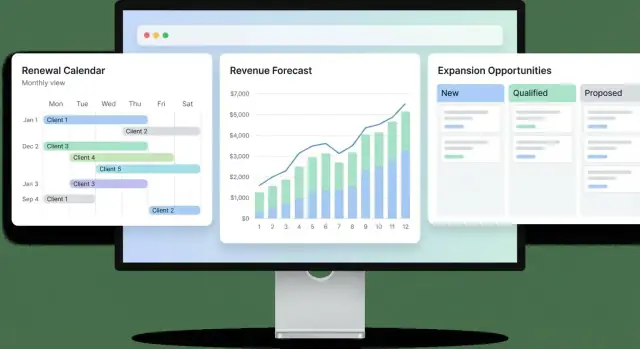
What the App Must Do (and for Whom)
A renewal-and-expansion app has one job: help your team see next quarter’s revenue risks and upside early enough to act. That means predicting renewal outcomes (with confidence levels) and surfacing expansion opportunities while there’s still time to influence them.
The goal: early, actionable revenue signals
Your app should turn scattered signals—contract dates, product usage, support history, stakeholder changes—into clear outputs that drive next steps.
If the system only produces a number, it won’t change behavior. If it produces a number and a reason and an action, it will.
Who uses it, and what each person needs
CSMs (Customer Success Managers) need a daily workspace: accounts needing attention, renewal dates, risk reasons, next-best actions, and a simple way to log notes and tasks.
Account executives / sales need an expansion view: qualified opportunities, buying signals, stakeholders, and handoff points that don’t require hunting through multiple tools.
Finance needs a dependable roll-up: forecast by month/quarter, scenarios (best/likely/worst), and auditability—what changed, when, and why.
Managers need coaching visibility: coverage (are renewals being touched?), pipeline hygiene, reps’ workload, and trends across segments.
Core outputs to design around
At minimum, your product should produce:
- Renewal risk (e.g., low/medium/high) with explainable drivers
- A renewal forecast view (by date, amount, confidence)
- An expansion pipeline (stage, value, timing, owner)
- Reports that answer “what changed since last week?”
Success criteria (so you know it’s working)
Define measurable outcomes upfront:
- Forecast accuracy target (e.g., within X% by 30/60/90 days to renewal)
- Adoption: weekly active users by role, and “accounts updated per week”
- Time saved: reduced hours spent building spreadsheets and status decks
- Action rate: % of high-risk renewals with a logged plan and next step
Key Data You Need: Renewals, Accounts, and Expansion
Getting renewal forecasting right starts with getting your data model right. If the app can’t consistently answer “what is renewing, when, for how much, and under what terms?”, every forecast becomes a debate.
Renewal data (what’s actually at risk)
A renewal record should be a first-class object, not just a date on an account. At minimum, capture:
- Account (who is renewing)
- Contract / subscription identifiers (what agreement it refers to)
- Renewal date and term (when and for how long)
- Amount (ARR/MRR or total contract value—pick one primary and derive the other)
- Products / plan included (what they’re paying for)
Also store practical flags that affect forecasting: auto-renew vs. manual, payment terms, cancellation notice window, and whether there are open disputes.
Expansion data (what could grow)
Expansion should be modeled separately from renewals so you can forecast “retain” and “grow” independently. Track an expansion opportunity with:
- Type: upsell, cross-sell, add-on, seat increase
- Products or add-ons being proposed
- Seats / usage tier changes (a common SaaS expansion driver)
- Value (expected ARR) and close probability
Link expansions to both the account and the renewal when relevant (many expansions close during renewal cycles).
Activity and health signals (why it will renew—or not)
Forecasting improves when you connect renewal outcomes to customer reality. Your core activity objects: tasks, notes, calls/emails, QBRs, and playbooks. Pair them with health signals such as product usage, support ticket volume/severity, NPS/CSAT, and billing issues.
The goal is simple: every renewal number should be explainable by a short trail of facts your team can verify.
User Workflows and Permissions
Clear workflows keep forecasts consistent, and permissions keep them trustworthy. Your app should make it obvious what happens next, who owns each step, and what changes are allowed—without turning the process into paperwork.
Renewal forecast workflow: intake → review → commit → closed
A renewal record typically starts as “intake” (created automatically from the contract end date, imported from CRM, or opened from a CSM’s queue). From there:
- Intake: capture baseline fields (account, renewal date, current ARR, term, products, customer contact). Allow CSMs to flag initial risk and add notes.
- Review: a manager (or renewals ops) checks quality: amounts, dates, probability, and whether risks have clear reasons. This is where missing data gets pushed back.
- Commit: the team agrees this renewal is included in the forecast. Editing becomes more controlled (see ownership rules below).
- Closed: the renewal is either renewed, churned, or delayed. Require a closure reason and final amount for reporting accuracy.
Expansion workflow: identify → qualify → propose → negotiate → won/lost
Expansion tracking works best as a lightweight “pipeline” tied to the same account:
- Identify: log a signal (usage growth, new team, feature request). Keep friction low: quick add with a rough range.
- Qualify: confirm budget, timeline, and stakeholder. At this point, amount and target date should be required.
- Propose / Negotiate: track proposal value, expected start date, and next step. Keep close dates editable but visible in the audit trail.
- Won/Lost: lock key fields and require outcomes (reason, competitor, discount notes if relevant).
Ownership rules and permission levels
Define roles up front (common: CSM, Sales/AE, Manager, Ops/Admin, Read-only/Finance). Then enforce edit rights per field:
- Amounts: editable by AE/Manager; CSM can suggest changes via comment or “request edit.”
- Dates and stages: editable by record owner and Manager; stage changes to “Commit” or “Closed” require Manager approval.
- Reasons (risk / loss): editable by owner; required when probability drops below a threshold or when closing.
Audit trail for forecast and risk changes
Every change to amount, close date, stage, probability, health/risk fields, and commit status should create an immutable event: who changed it, when, old value → new value, and an optional note. This protects forecasting integrity and makes coaching easier when numbers shift late in the month.
Information Architecture and Screen Layouts
Good information architecture keeps renewal forecasting fast. Users should always know:
- which accounts matter now,
- why they’re risky,
- what to do next.
Recommended navigation
Keep the primary navigation small and time-based:
- Accounts (search + saved views)
- Renewals (time window first)
- Pipeline (expansion + upsell)
- Dashboards (role-based)
- Settings (fields, permissions, integrations)
Account page (the “single source of truth”)
Design the account page so a CSM can understand the story in under 30 seconds:
- Header summary: ARR, renewal date, owner, region, current forecast category
- Health panel: health score, key drivers (usage trend, support tickets, NPS), last updated timestamp
- Renewals timeline: past renewals and upcoming renewal milestones (notice date, legal review, renewal sent)
- Open opportunities: expansion opportunities with stage, amount, probability, and the next step
A right-hand “Next actions” area works well: tasks, upcoming meetings, and risk flags.
Renewals list (work queue)
Make Renewals a true queue, not a static report. Default to next 90 days and support filters for date window, CSM, region, risk, and ARR. Include quick inline actions: update risk, set next step, assign task.
Pipeline view (simple, sales-friendly)
Use a stage-based view (Kanban or table) with amounts, probability, close dates, and next steps. Avoid hidden logic—show what drives probability.
Manager dashboard (rollups that answer “are we covered?”)
Give leaders coverage and exceptions:
- Forecast rollups by month/quarter
- At-risk totals and top drivers
- Coverage by owner/team and forecast vs. target
Keep drill-downs one click away to the Renewal or Account view.
Forecasting and Scoring Logic (Simple and Explainable)
Forecasting is only useful if people believe it. For a renewal and expansion app, that means using scoring that’s easy to understand, easy to challenge, and consistent across accounts.
Renewal risk score: simple factors, clear weights
Start with a renewal risk score built from a small set of inputs your team already discusses in QBRs and renewal calls. Keep it intentionally “boring”:
- Product usage trend (up/flat/down)
- Support signals (open escalations, time-to-resolution)
- Stakeholder strength (champion present, exec sponsor engaged)
- Commercials (price increase pending, contract complexity)
- Sentiment (CSM call notes, NPS/CSAT if you have it)
Make the score explainable by showing the exact factors and weights used for each account. For example:
Renewal Risk Score (0–100) =
  30% Usage Trend + 25% Support Risk + 25% Stakeholder Risk + 20% Commercial Risk
Translate the score into plain categories (Low/Medium/High risk) and show “why” in one sentence: “Usage down 18% and escalation open 12 days.”
Expansion forecasting: probability, expected value, confidence
For each expansion opportunity, store:
- Probability (0–100%)
- Expected value (Probability × expansion amount)
- Confidence level (High/Medium/Low) based on evidence (e.g., confirmed project vs. “might add seats”)
Confidence is not probability. It’s a trust flag that helps leaders understand what’s backed by real signals.
Manual overrides with accountability
Allow CSMs and managers to override renewal probability or expansion probability—but require a short reason (dropdown + free text). Show an audit trail of changes so the team can learn what was accurate and what wasn’t.
Transparency drives adoption
Avoid “mystery math.” Always show inputs, last update time, and who changed what. The goal isn’t perfect prediction—it’s consistent, explainable forecasts that the team will actually use.
Integrations: CRM, Billing, and Product Usage
Integrations determine whether your renewal forecast is trusted or ignored. For an MVP, keep it simple: connect the three systems that already “know” the truth about customers—your CRM, billing platform, and product analytics/usage source.
Minimum integrations to support renewals + expansion
CRM should provide accounts, contacts, open opportunities, owner assignments, and stage history. This is where customer context lives (stakeholders, notes, next steps).
Billing should be the source of contract start/end dates, current ARR/MRR, plan, discounts, and invoices. If CRM and billing disagree, default to billing for money and dates.
Product usage should answer: are they adopting? Track a few stable signals (active users, key feature events, seats used vs. purchased). Avoid dozens of metrics early—pick 3–5 that correlate with renewals.
Data sync: webhooks first, schedules second
Use webhooks where available (CRM updates, invoice paid, subscription changed) so CSMs see changes quickly.
For systems without reliable webhooks, run a scheduled sync (e.g., hourly for usage, nightly for billing history). Make sync status visible in the UI: “Last updated 12 min ago.”
Identity matching you can defend
Decide how a “customer” is identified across tools:
- Prefer stable IDs (CRM Account ID ↔ Billing Customer ID)
- Use domain matching as a fallback, with manual confirmation
- Map contacts carefully (email is usually best)
Provide an admin screen to resolve duplicates and mismatches instead of silently guessing.
Design for partial data (and make gaps actionable)
Real systems are messy. When data is missing, don’t block the workflow—surface it:
- Show a “Missing data” badge on accounts (e.g., no contract end date)
- Explain impact (“Forecast confidence reduced”)
- Offer a fix path: “Link billing customer” or “Select account domain”
If you need a reference implementation, keep integration setup separate from forecasting screens and link to it from /settings/integrations.
Database Design for Renewals and Expansion Tracking
A renewal and expansion app lives or dies on clean data modeling. The goal isn’t to build a perfect “enterprise” schema—it’s to make forecasts explainable, changes auditable, and integrations predictable.
Core tables (the minimum set)
Start with a small, well-linked backbone:
- accounts: the customer/company record (owner, segment, status, renewal day, timezone)
- contacts: people tied to an account (role, influence, email)
- contracts: commercial terms (plan, seats/units, billing cadence)
- renewals: the upcoming renewal event for a contract (date, expected amount, risk)
- opportunities: expansion motions (upsell, cross-sell, add-ons) tied to an account and optionally a contract
- activities: human work (calls, emails, notes) with optional links to renewals/opportunities
- events: system events (usage drop, invoice failed, contract amended) for timelines and automation
Model renewals as first-class records, not just a contract end date. That gives you a place to store forecast category, reasons, next steps, and “what changed since last week.”
Store money safely
Avoid floating-point for currency. Store amounts in minor units (e.g., cents) plus a currency code. Keep financial inputs explicit:
- list amount vs. net amount
- discount value and type (percent vs. fixed)
- proration (factor or prorated amount) with clear start/end dates
This prevents “mystery math” when reconciling with billing and makes revenue forecasting consistent.
Model history for trend reporting
To chart forecast movement, add a forecast_snapshots table (weekly/monthly). Each snapshot captures renewal/opportunity stage, expected amount, and probability at that point in time. Snapshots should be append-only so reporting can answer “what did we believe on Oct 1?”
Tags and custom fields without breaking the schema
Use tags for lightweight labeling (many-to-many). For flexible attributes, add custom_fields (definitions) and custom_field_values (per entity). This lets teams track “renewal reason” or “product tier” without shipping migrations every time someone wants a new field.
Backend Services and API Design
The backend is where your renewal and expansion data becomes consistent, auditable, and safe to automate. A good design keeps the UI fast while enforcing the rules that make forecasts trustworthy.
Core services (keep them small and focused)
Most teams do well with a few clear services or modules:
- Accounts service: who the customer is, ownership, segmentation, and key dates
- Renewals service: the renewal record, amount, renewal date, stage, risk reasons, and forecast category
- Opportunities service (expansion): upsell/cross-sell items, value, stage, and expected close date
- Activities service: notes, calls, emails, tasks, and meeting outcomes tied to an account/renewal
- Reporting service: pre-aggregated metrics and exports for common dashboards
Core API endpoints
Keep endpoints predictable and consistent across objects:
GET/POST /accounts,GET/PATCH /accounts/{id}GET/POST /renewals,GET/PATCH /renewals/{id}GET/POST /opportunities,GET/PATCH /opportunities/{id}GET/POST /activities,GET /reports/forecast,GET /reports/expansion
Support filtering that matches real workflows (owner, date range, stage, risk level), and include pagination.
Rules and validation (protect forecast integrity)
Define rules in the backend so every integration and UI path behaves the same:
- Required fields (e.g., renewal date, amount, owner, stage)
- Stage transitions (only allow certain moves; keep a history log)
- Close-date limits (prevent “forever open” expansions; enforce maximum slip windows)
Return clear error messages so users know what to fix.
Background jobs you’ll rely on
Use async jobs for anything slow or recurring:
- CRM/billing/product-usage sync
- Health scoring updates and forecast rollups
- Notifications (risk alerts, upcoming renewals)
- Report generation for heavy exports
Integration safety: rate limits and retries
External systems fail. Your backend should handle:
- Per-connector rate limits (queue calls, back off automatically)
- Retries with idempotency keys to avoid duplicates
- Dead-letter queues and alerting when syncs stall
This structure keeps your renewal forecasting dependable even as data sources and teams grow.
Security, Access Control, and Data Privacy
Security is a product feature, not a checklist you bolt on later. Renewal forecasts often mix sensitive inputs—contract value, discounting, risk notes, and executive relationships—so you want clear rules for who can see what, and a paper trail for how data changed.
Role-based access control (RBAC)
Start with a small set of roles that match how teams actually work:
- CSM: manage health, renewal dates, risks, and playbooks; limited access to pricing details if needed
- Sales: view renewal context, log expansion opportunities, update pipeline-related fields
- Admin: manage users, permissions, integrations, and data mappings
- Read-only finance: view totals, forecast rollups, and contract terms without editing operational notes
Keep permissions field-based where it matters (e.g., “view ARR” vs. “edit renewal risk”), not just screen-based. This avoids “everyone needs admin” situations.
Data privacy basics that pay off early
Use least privilege by default: new users should see only the accounts they own (or their team), then expand access intentionally.
Add audit logging for key actions: changes to renewal amount/date, stage, risk score overrides, and permission updates. When forecasts don’t match, the audit log becomes your fastest way to resolve disputes.
Store secrets safely. API keys and database credentials should live in managed secret storage (not in source code or shared spreadsheets), and rotate them on a schedule.
Multi-tenant decisions
If the app serves multiple business units—or external customers—decide upfront whether you need multi-tenancy. At minimum, separate data by tenant_id and enforce it at the query level. Even internal “tenants” (regions, subsidiaries) benefit from clean separation and simpler reporting.
Compliance: what to review (no promises)
Early in planning, align with security/legal on requirements that may apply, such as SOC 2 readiness, GDPR/CCPA data rights, SSO/SAML, retention policies, and vendor risk reviews. Document what you will (and won’t) store—especially free-text notes—and link to it in your internal docs (e.g., /security).
Notifications, Tasks, and Playbooks
Notifications are only useful when they consistently lead to the next right action. For a renewal forecasting and expansion tracking app, treat notifications as the “signal layer” and tasks/playbooks as the “action layer.”
Alerts that drive action
Focus alerts on events that change outcomes, not just data changes. Common triggers include:
- Renewal dates approaching (e.g., 90/60/30 days)
- Risk increases (health score drop, support escalations, missed usage milestones)
- Stalled expansion opportunities (no activity for N days, decision date passed)
Each alert should include: the account, what changed, why it matters, and a one-click next step (create task, open playbook, log a note).
Task queues that match how teams work
Instead of sending people hunting across accounts, provide a personal task queue that’s sortable by urgency and impact (renewal amount, risk level, close date). Keep tasks simple: owner, due date, status, and a clear definition of done.
Use tasks to bridge systems: when a rep marks “renewal call completed,” the app can prompt them to update the CRM stage or add a renewal forecast note.
Playbooks for repeatable motions
Playbooks turn best practices into checklists people actually follow. Examples:
- “30-day renewal rescue”: confirm champion, validate usage, align on outcomes, book exec touchpoint
- “Expansion discovery”: map stakeholders, identify trigger event, define pilot success criteria
Playbooks should be editable by admins and link to internal pages like /playbooks and /accounts/:id.
Digests and noise controls
Send a weekly digest (email and/or Slack) with rollups: renewals at risk, largest changes, new expansion opportunities, and overdue tasks.
Prevent alert fatigue with user-configurable thresholds (e.g., notify only if risk increases by 2+ points), deduping (bundle similar alerts), and quiet hours so notifications land when people can act.
Reporting and Metrics That Matter
A renewal and expansion app only earns trust when it can answer two questions quickly: “What revenue will we keep?” and “Where will growth come from?” The reporting layer should be built around a small set of shared KPIs, with enough drill-down to explain why the numbers moved.
The core KPIs (and how to read them)
Start with metrics that finance and customer success can agree on:
- Renewal rate: percent of contracts up for renewal that renewed
- Expansion rate: percent of accounts (or renewals) that increased ARR
- Gross retention / net retention: revenue kept vs. revenue kept plus expansion
- Forecast accuracy: variance between forecasted renewals/expansion and actuals (track by month/quarter)
Make sure each KPI has a clear definition in-app (tooltip or “Definitions” panel) so teams don’t argue about formulas.
Segment views that actually change decisions
A single top-line dashboard is useful, but action happens in slices. Provide standard segment filters and saved views such as plan, region, industry, customer tier, and CSM.
This lets leadership spot patterns (for example, a specific tier underperforming) and helps managers coach with data rather than anecdotes.
Forecast rollups: commit, best-case, pipeline
Renewal reporting should roll up into three totals—commit, best-case, and pipeline—with drill-down to accounts and line items. The goal is to let someone click from “commit is down $120k” to the exact renewals driving the gap and the stated risks.
Exports and scheduled delivery
Finance and leadership will ask for offline snapshots. Support CSV export and scheduled reports (email/Slack) for weekly renewals, monthly forecast, and quarter-end close. Include the “as of” timestamp so everyone knows what data the report reflects.
MVP Scope, Testing, and Launch Plan
An MVP for renewal forecasting should prove one thing: your team can see what’s renewing, why it’s at risk, and what number to commit—without fighting the tool. Start small, ship, and iterate based on real workflows.
MVP scope (weeks 1–4)
Focus on four core screens and a tiny set of rules:
- Renewals list: filter by date range, owner, risk level, and “needs attention”
- Account view: contract details, key contacts, last activity, renewal history, and a notes/timeline area
- Basic scoring: a simple, explainable health score (e.g., usage trend + support burden + payment status)
- Manual forecast: a per-renewal forecast category (Likely / At Risk / Commit) with an amount and close date, plus a reason field
Keep the first version forgiving: allow manual overrides, and show the factors that influenced a score so CSMs can trust (or correct) it.
If you want to prototype this kind of internal tool quickly, a vibe-coding workflow can help you get to a usable UI and backend faster than a traditional build. For example, Koder.ai lets teams generate a React-based web app with a Go backend and PostgreSQL by describing screens, entities, and workflows in chat—then iterate with planning mode, snapshots, and rollback. It’s a practical way to validate renewals queues, account pages, and audit trails with real users before investing heavily in custom scaffolding.
Add expansions next (weeks 5–8)
Once renewals are reliable, extend the same account page to include:
- Expansion opportunities: type (seats, plan upgrade, add-on), expected amount, stage, and target date
- Pipeline reporting: a simple view that rolls up renewals + expansions into a combined revenue forecast
Testing plan
Prioritize tests that prevent “silent” revenue errors:
- Unit tests for scoring: edge cases (missing usage, negative trends, overrides)
- Integration tests for sync: CRM/billing imports, deduping, and idempotent re-runs
- UX testing: 5–8 CSMs walking through “update forecast,” “log risk,” and “find next actions” with timed tasks
Launch checklist
- Data migration: validate renewal dates, amounts, and account ownership before go-live
- Training: one short live session + a 1-page cheat sheet
- Documentation: “how we define forecast categories” and “how scoring works”
- Iteration plan: weekly review of mismatches (forecast vs actual) and a small backlog to improve accuracy and usability
When you do launch, plan for deployment and hosting as part of the MVP—not an afterthought. Whether you build traditionally or use a platform like Koder.ai (which can handle deployment, hosting, custom domains, and source code export), the operational goal is the same: make it easy to ship changes safely and keep the forecasting system consistently available to the team.
FAQ
What are the minimum outcomes a renewal + expansion app should deliver?
Start by defining the primary outputs the app must produce:
- Renewal risk category (with explainable drivers)
- A time-based renewal forecast (date, amount, confidence)
- An expansion pipeline (stage, value, timing, owner)
- “What changed since last week?” reporting
If you can’t reliably answer what is renewing, when, and for how much, fix the data model before adding more UI.
Why should “renewals” be a first-class object instead of just a contract end date?
Because a renewal is an event with its own lifecycle (intake → review → commit → closed), not just a date on an account.
A first-class renewal record gives you a place to store:
- forecast category/probability and confidence
- risk reasons and next steps
- audit history of changes
- closure outcomes (renewed/churned/delayed) and final amounts
What data fields are required for accurate renewal forecasting?
Treat these as non-negotiable:
- Account (who)
- Contract/subscription identifiers (what)
- Renewal date + term (when/how long)
- Amount (pick one primary: ARR/MRR or total; derive the other)
- Products/plan included
Also add practical forecasting flags like auto-renew vs manual, notice window, payment terms, and open disputes.
How should expansion opportunities be modeled and linked to renewals?
Model expansion separately so you can forecast retain and grow independently.
Track an expansion opportunity with:
- type (upsell, cross-sell, add-on, seat increase)
- product(s) involved
- value (expected ARR) and probability
- target close date + stage
Link it to the account and (when relevant) the renewal cycle it’s likely to close within.
What’s the simplest way to build an explainable renewal risk score?
Use small, familiar factors and show the math:
- usage trend
- support risk
- stakeholder strength
- commercials (price increase/complexity)
- sentiment (notes/NPS/CSAT if available)
Publish the exact weights and a one-sentence explanation per account (e.g., “Usage down 18% + escalation open 12 days”) so users can verify and challenge it.
How do you set permissions so forecasts stay consistent and trustworthy?
Common roles are CSM, Sales/AE, Manager, Ops/Admin, Read-only Finance.
Keep permissions field-based where it matters:
- Amounts editable by AE/Manager; CSM can suggest via comment/request
- Dates/stages editable by owner + Manager; “Commit/Closed” may require approval
- Risk/loss reasons required when probability drops or on close
This prevents “everyone needs admin” and keeps forecasts trustworthy.
What should the audit trail capture for forecasting integrity?
Log immutable events for changes to:
- amount, close date, stage, probability
- risk/health fields and overrides
- commit/closed status
Each event should capture who, when, old → new, plus an optional note. This enables “what changed?” reporting and reduces end-of-month disputes.
Which integrations matter most for an MVP, and how should sync work?
For an MVP, integrate the three sources of truth:
- CRM: accounts, contacts, ownership, opportunity context
- Billing: contract dates, plan, discounts, invoices (default to billing for money/dates)
- Product usage: a small set of adoption signals (3–5 stable metrics)
Prefer webhooks for timeliness, fall back to scheduled syncs, and show “last updated” timestamps in the UI.
How do you track forecast movement over time without losing history?
Use two layers:
- Append-only snapshots (e.g.,
forecast_snapshots) to answer “what did we believe on Oct 1?” - Event/audit logs for per-change accountability
Snapshots are for trend reporting and rollups; audit logs are for traceability and coaching.
What’s a realistic MVP scope and launch plan for this kind of app?
Ship a renewal-focused MVP first:
- Renewals list as a work queue (next 90 days)
- Account view as the single source of truth
- Basic, explainable scoring
- Manual forecast categories (Likely / At Risk / Commit) with required reasons
Then add expansions (pipeline + rollups). Measure success with forecast accuracy (30/60/90 days out), adoption by role, time saved vs spreadsheets, and action rate on high-risk renewals.