

How to Build a Web App for Segmentation and Cohort Analysis
A practical, step-by-step guide to building a web app for customer segmentation and cohort analysis: data model, pipelines, UI, metrics, and deployment.
Start With Clear Use Cases and Success Metrics
Before you design tables or pick tools, get specific about what questions the app must answer. “Segmentation and cohorts” can mean many things; clear use cases prevent you from building a feature-rich product that still doesn’t help anyone make decisions.
Define the business questions
Start by writing the exact decisions people want to make and the numbers they trust to make them. Common questions include:
- Retention analysis: “What percentage of new users return in week 1, week 4, and week 12?”
- Activation: “Which onboarding steps correlate with reaching ‘aha’ within 24 hours?”
- Churn: “Which customer segments are most likely to cancel after a price change?”
- LTV (lifetime value): “Do users acquired via partner A generate higher LTV than paid search?”
For each question, note the time window (daily/weekly/monthly) and the granularity (user, account, subscription). This keeps the rest of the build aligned.
List who will use it—and what they need
Identify the primary users and their workflows:
- Marketing may need acquisition cohorts, campaign segmentation, and quick exports for reports.
- Product may need feature-adoption cohorts, funnel drop-offs, and annotations for releases.
- Support / Success may need account-level segments (e.g., “high-risk customers”) and simple filters to prioritize outreach.
Also capture practical needs: how often they check dashboards, what “one click” means to them, and what data they consider authoritative.
Decide MVP vs. later features
Define a minimum viable version that answers the top 2–3 questions reliably. Typical MVP scope: core segments, a few cohort views (retention, revenue), and shareable dashboards.
Save “nice to have” items for later, such as scheduled exports, alerts, automations, or complex multi-step segment logic.
If speed-to-first-version is critical, consider scaffolding the MVP with a vibe-coding platform like Koder.ai. You can describe the segment builder, cohort heatmap, and basic ETL needs in chat and generate a working React frontend plus a Go + PostgreSQL backend—then iterate with planning mode, snapshots, and rollback as stakeholders refine definitions.
Clarify success criteria
Success should be measurable. Examples:
- Reduce time-to-insight from days to minutes
- Replace recurring manual reports
- Increase self-serve usage (e.g., % of questions answered without data team help)
- Improve decision speed (e.g., faster iteration on onboarding changes)
These metrics become your north star when trade-offs appear later.
Identify Data Sources and Define Core Concepts
Before you design screens or write ETL jobs, decide what “a customer” and “an action” mean in your system. Cohort and segmentation results are only as trustworthy as the definitions underneath them.
Choose a customer identifier strategy
Pick one primary identifier and document how everything maps to it:
- user_id: best for product usage and retention at the person level.
- account_id: best for B2B, where multiple users roll up to one paying entity.
- anonymous_id: required for pre-signup behavior; you’ll need rules to merge it into a known user later.
Be explicit about identity stitching: when do you merge anonymous and known profiles, and what happens if a user belongs to multiple accounts?
Decide which data sources to include
Start with the sources that answer your use cases, then add more as needed:
- App events (event tracking): clicks, feature usage, sessions, onboarding milestones.
- CRM: lead source, sales stage, account owner, lifecycle status.
- Billing: plan, MRR, invoices, refunds, trial start/end, cancellations.
- Support: tickets, CSAT, resolution time, issue category.
For each source, note the system of record and refresh cadence (real-time, hourly, daily). This prevents “why don’t these numbers match?” debates later.
Standardize time, currency, and calendar rules
Set a single time zone for reporting (often the business time zone or UTC) and define what “day,” “week,” and “month” mean (ISO weeks vs. Sunday-start weeks). If you handle revenue, choose currency rules: stored currency, reporting currency, and exchange-rate timing.
Document key terms
Write down definitions in plain language and reuse them everywhere:
- Active user (example: performed at least one qualifying event in a period)
- Churned (example: canceled subscription, or no activity for N days)
- Conversion (example: trial → paid, signup → activation)
- Cohort start (example: signup date, first purchase date, or first “activated” date)
Treat this glossary as a product requirement: it should be visible in the UI and referenced in reports.
Design the Data Model for Segmentation
A segmentation app lives or dies by its data model. If analysts can’t answer common questions with a simple query, every new segment turns into a custom engineering task.
Start with an event schema you won’t regret
Use a consistent event structure for everything you track. A practical baseline is:
event_name(e.g.,signup,trial_started,invoice_paid)timestamp(store in UTC)user_id(the actor)properties(JSON for flexible details likeutm_source,device,feature_name)
Keep event_name controlled (a defined list), and keep properties flexible—but document expected keys. This gives you consistency for reporting without blocking product changes.
Model customer attributes separately from events
Segmentation is mostly “filter users/accounts by attributes.” Put those attributes in dedicated tables rather than only in event properties.
Common attributes include:
- Plan/tier (Free, Pro, Enterprise)
- Region/country
- Acquisition channel (organic, paid search, partner)
- Persona (if you maintain one)
This lets non-experts build segments like “SMB users in EU on Pro acquired via partner” without hunting through raw events.
Plan for slowly changing attributes
Many attributes change over time—especially plan. If you only store the current plan on the user/account record, historical cohort results will drift.
Two common patterns:
- Type 2 history table (recommended):
account_plan_history(account_id, plan, valid_from, valid_to). - Snapshot at event time: copy key attributes onto each event (faster queries, more storage, more ETL logic).
Pick one intentionally based on query speed vs. storage and complexity.
Use an “events + users + accounts” structure
A simple, query-friendly core model is:
- events: behavioral facts (
user_id,account_id,event_name,timestamp,properties) - users: person-level attributes (
user_id,created_at,region, etc.) - accounts: company/subscription-level attributes (
account_id,plan,industry, etc.)
This structure maps cleanly to both customer segmentation and cohort/retention analysis, and it scales as you add more products, teams, and reporting needs.
Plan Cohort Analysis Rules and Calculations
Cohort analysis is only as trustworthy as its rules. Before you build the UI or optimize queries, write down the exact definitions your app will use so every chart and export matches what stakeholders expect.
Choose cohort “start” types
Start by selecting which cohort types your product needs. Common options include:
- Signup cohort: users grouped by the date they created an account.
- First purchase cohort: customers grouped by the date of their first paid order.
- Feature adoption cohort: users grouped by the date they first used a key feature (e.g., “created first project,” “invited a teammate”).
Each type must map to a single, unambiguous anchor event (and sometimes a property), because that anchor determines cohort membership. Decide whether cohort membership is immutable (once assigned, never changes) or can change if historical data is corrected.
Define the cohort index logic
Next, define how you calculate the cohort index (the columns like week 0, week 1…). Make these rules explicit:
- Time grain: daily, weekly, or monthly.
- Index 0 meaning: usually the period containing the anchor date (e.g., signup date).
- Calendar alignment: weeks starting Monday vs Sunday; months as calendar months vs 30-day windows.
- Time zone: user time zone, workspace time zone, or UTC (pick one and stick to it).
Small choices here can shift numbers enough to cause “why doesn’t this match?” escalations.
Pick metrics per cell
Define what each cohort table cell represents. Typical metrics include:
- Retained users: count of users who were active in that period.
- Revenue: sum of paid amounts attributed to users in the cohort during that period.
- Orders: number of purchases in the period.
- Sessions / events: engagement volume.
Also specify the denominator for rate metrics (e.g., retention rate = active users in week N ÷ cohort size at week 0).
Handle edge cases up front
Cohorts get tricky at the edges. Decide rules for:
- Late events: if an event arrives days later, do you recompute historical cohorts or freeze results after a cutoff?
- Refunds / chargebacks: do you subtract revenue in the refund period, or restate the original purchase period?
- Reactivations: if a user returns after inactivity, do they count as retained in that later period (usually yes), and do you also track “resurrection” separately?
Document these decisions in plain language; your future self (and your users) will thank you.
Build the Data Pipeline: Collect, Clean, and Enrich
Your segmentation and cohort analysis are only as trustworthy as the data flowing in. A good pipeline makes data predictable: same meaning, same shape, and the right level of detail every day.
Ingestion options
Most products use a mix of sources so teams aren’t blocked by one integration path:
- Tracking SDK (client-side): Great for quick setup and capturing UI interactions (page views, button clicks). Be mindful of ad blockers and spotty mobile connectivity.
- Server-side events: Best for “source of truth” actions (payments, subscription changes, refunds) and for reducing spoofed or duplicated client events.
- Batch imports: Useful for historical backfills, CRM exports, or migrating from another analytics tool. Support CSV uploads and scheduled imports.
A practical rule: define a small set of “must-have” events that power core cohorts (e.g., signup, first value action, purchase), then expand.
Validation and hygiene checks
Add validation as close to ingestion as possible so bad data doesn’t spread.
Focus on:
- Required fields: event name, timestamp, user_id (or anonymous_id), and a stable identifier for the entity you segment on.
- Timestamp sanity checks: reject impossible dates (far future), normalize time zones to UTC, and flag events that arrive extremely late.
- Duplicate handling: dedupe using an event_id when available; otherwise use a safe composite (user_id + event_name + timestamp bucket + key properties).
When you reject or fix records, write the decision to an audit log so you can explain “why the numbers changed.”
Transformations and enrichment
Raw data is inconsistent. Transform it into clean, consistent analytics tables:
- Normalize names: standardize event and property naming (e.g., snake_case), and keep a mapping for legacy names.
- Map IDs: link anonymous activity to known users after login; connect user_id to account_id/organization_id for B2B segmentation.
- Enrich with attributes: join plan tier, region, acquisition channel, device type, or lifecycle status so segments don’t require complex joins later.
Scheduling, retries, and monitoring
Run jobs on a schedule (or streaming) with clear operational guardrails:
- Retries with backoff for transient failures
- Alerting when volume drops/spikes or freshness slips past an SLA
- Audit logs for every run (inputs, outputs, errors, versions)
Treat the pipeline like a product: instrument it, watch it, and keep it boringly reliable.
Pick Storage and Optimize for Fast Analytics Queries
Where you store analytics data determines whether your cohort dashboard feels instant or painfully slow. The right choice depends on data volume, query patterns, and how quickly you need results.
Choosing a storage engine
For many early-stage products, PostgreSQL is enough: it’s familiar, cheap to operate, and supports SQL well. It works best when your event volume is moderate and you’re careful with indexing and partitioning.
If you expect very large event streams (hundreds of millions to billions of rows) or many concurrent dashboard users, consider a data warehouse (e.g., BigQuery, Snowflake, Redshift) for flexible analytics at scale, or an OLAP store (e.g., ClickHouse, Druid) for extremely fast aggregations and slicing.
A practical rule: if your “retention by week, filtered by segment” query takes seconds in Postgres even after tuning, you’re nearing warehouse/OLAP territory.
Tables and views to support cohorts and segments
Keep raw events, but add a few analytics-friendly structures:
- cohorts: cohort definition and key dates (e.g., signup week)
- segment_membership: a mapping of user_id/account_id to segment_id, with valid_from/valid_to when membership can change
- aggregated_metrics (or materialized views): pre-summarized counts for retention, activation, conversion, revenue
This separation lets you recompute cohorts/segments without rewriting your entire events table.
Indexing and partitioning for speed
Most cohort queries filter by time, entity, and event type. Prioritize:
- Partitioning (or clustering) by event_time
- Indexes on user_id/account_id, event_name, and common filter columns (plan, country, platform)
- Composite indexes that match your most common WHERE clauses (e.g.,
(event_name, event_time))
Precompute what dashboards ask for most
Dashboards repeat the same aggregations: retention by cohort, counts by week, conversions by segment. Precompute these on a schedule (hourly/daily) into summary tables so the UI reads a few thousand rows—not billions.
Keep raw data available for drill-down, but make your default experience rely on fast summaries. This is the difference between “explore freely” and “wait for a spinner.”
Implement a Segment Builder That Non-Experts Can Use
A segment builder is where segmentation succeeds or fails. If it feels like writing SQL, most teams won’t use it. Your goal is a “question builder” that lets someone describe who they mean, without needing to know how the data is stored.
Make segment rules feel like plain English
Start with a small set of rule types that map to real questions:
- Filters (attributes):
Country = United States,Plan is Pro,Acquisition channel = Ads - Ranges (numeric/date):
Tenure is 0–30 days,Revenue last 30 days > $100 - Behaviors (events):
Used Feature X at least 3 times in the last 14 days,Completed onboarding,Invited a teammate
Render each rule as a sentence with dropdowns and friendly field names (hide internal column names). Where possible, show examples (e.g., “Tenure = days since first sign-in”).
Support AND/OR logic and saved segments
Non-experts think in groups: “US and Pro and used Feature X,” plus exceptions like “(US or Canada) and not churned.” Keep it approachable:
- Default to AND between rules.
- Allow adding an OR group (“Match any of these”).
- Support NOT as a simple toggle (“Exclude users who…”).
Let users save segments with a name, description, and optional owner/team. Saved segments should be reusable across dashboards and cohort views, and versioned so changes don’t silently alter old reports.
Explain segment size (and sampling) in plain language
Always show an estimated or exact segment size right in the builder, updating as rules change. If you use sampling for speed, be explicit:
- “Showing an estimate based on 10% of events (±2%).”
- Provide a “Calculate exact count” action when needed.
Also show what’s included: “Users counted once” vs “events counted,” and the time window used for behavioral rules.
Enable comparisons without extra setup
Make comparisons a first-class option: pick Segment A vs Segment B in the same view (retention, conversion, revenue). Avoid forcing users to duplicate charts.
A simple pattern: a “Compare to…” selector that accepts another saved segment or an ad-hoc segment, with clear labels and consistent colors across the UI.
Design the Cohort Dashboard and Reporting UI
A cohort dashboard succeeds when it answers one question quickly: “Are we retaining (or losing) people, and why?” The UI should make patterns obvious, then let readers drill into the details without needing to understand SQL or data modeling.
Make the heatmap readable first
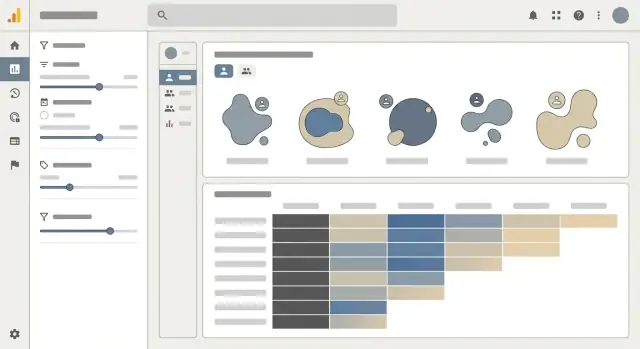
Use a cohort heatmap as the core view, but label it like a report—not a puzzle. Each row should clearly show cohort definition and size (e.g., “Week of Oct 7 — 3,214 users”). Each cell should support switching between retention % and absolute counts, because percentages hide scale and counts hide rate.
Keep column headers consistent (“Week 0, Week 1, Week 2…” or actual dates), and show the cohort size next to the row label so the reader can judge confidence.
Explain metrics where people hesitate
Add tooltips on every metric label (Retention, Churn, Revenue, Active users) that state:
- what the numerator and denominator are
- what time window is used
- whether it’s “users who returned” or “users who performed event X”
A short tooltip beats a long help page; it prevents misinterpretation at the moment of decision.
Filters that feel safe to use
Put the most common filters above the heatmap and make them reversible:
- Date range
- Cohort type (signup date, first purchase date, first session)
- Segment, plan, channel
Show active filters as chips and include a one-click “Reset” so people aren’t afraid to explore.
Sharing and exporting without chaos
Provide CSV export for the current view (including filters and whether the table is showing % or counts). Also offer shareable links that preserve the configuration. When sharing, enforce permissions: a link should never expand access beyond what the viewer already has.
If you include a “Copy link” action, show a brief confirmation and link to /settings/access for managing who can see what.
Handle Security, Privacy, and Access Control
Segmentation and cohort analysis tools often touch customer data, so security and privacy can’t be an afterthought. Treat them as product features: they protect users, reduce support burden, and keep you compliant as you scale.
Authentication and roles
Start with authentication that fits your audience (SSO for B2B, email/password for SMB, or both). Then enforce simple, predictable roles:
- Admin: manages workspaces, connections, retention settings, and permissions.
- Analyst: creates segments, cohorts, dashboards, and scheduled reports.
- Viewer: can view dashboards and saved segments, but can’t change definitions.
Keep permissions consistent across the UI and API. If an endpoint can export cohort data, the UI permission alone isn’t enough—enforce checks server-side.
Workspace isolation and row-level access
If your app supports multiple workspaces/clients, assume “someone will try to see another workspace’s data” and design for isolation:
- Every table that stores events, users, segments, and dashboards should include a workspace_id.
- Apply row-level security (RLS) or equivalent query filtering so all analytics queries automatically scope to the active workspace.
- Avoid “shared” caches across workspaces unless the cache key includes workspace_id.
This prevents accidental cross-tenant leakage, especially when analysts create custom filters.
PII handling: collect less, show less
Most segmentation and retention analysis works without raw personal data. Minimize what you ingest:
- Prefer stable internal IDs and hashed identifiers over emails/phone numbers.
- Store sensitive fields separately with stricter access rules.
- Mask values in the UI by default (e.g., show last 2–4 characters), and require elevated permission to reveal.
Also encrypt data at rest and in transit, and store secrets (API keys, database credentials) in a proper secrets manager.
Retention and deletion workflows
Define retention policies per workspace: how long to keep raw events, derived tables, and exports. Implement deletion workflows that actually remove data:
- Delete by user ID across raw events and derived aggregates.
- Recompute affected cohorts/segments (or mark them stale and refresh on next run).
- Log the request and outcome for auditing.
A clear, documented workflow for retention and user deletion requests is as important as the cohort charts themselves.
Test for Correctness, Data Quality, and Performance
Testing an analytics app isn’t only about “does the page load?” You’re shipping decisions. A small math mistake in cohort retention or a subtle filtering bug in segmentation can mislead an entire team.
Correctness: lock down the cohort math
Start with unit tests that verify your cohort calculations and segment logic using small, known fixtures. Create a tiny dataset where the “right answer” is obvious (e.g., 10 users sign up in week 1, 4 return in week 2 → 40% retention). Then test:
- Cohort assignment rules (signup date vs first event date)
- Time bucketing (day/week/month boundaries, timezone handling)
- Segment filters (AND/OR logic, inclusion/exclusion, null handling)
- Edge cases (users with no return events, late-arriving events)
These tests should run in CI so every change to query logic or aggregations is checked automatically.
Data quality: catch issues before users do
Most analytics failures are data failures. Add automated checks that run on every load or at least daily:
- Missing or duplicate identifiers (user_id, account_id)
- Event volume drops or spikes by event name (often indicates tracking broke)
- Schema changes (new/missing properties, type changes)
- “Impossible” values (negative durations, future timestamps)
When a check fails, alert with enough context to act: which event, which time window, and how far it deviated from baseline.
Performance: make heavy queries predictable
Run performance tests that mimic real usage: large date ranges, multiple filters, high-cardinality properties, and nested segments. Track p95/p99 query times and enforce budgets (e.g., segment preview under 2 seconds, dashboard under 5 seconds). If tests regress, you’ll know before the next release.
User acceptance: validate real questions
Finally, do user acceptance testing with product and marketing teammates. Collect a set of “real questions” they ask today and define expected answers. If the app can’t reproduce trusted results (or explain why it differs), it’s not ready to ship.
Deploy, Monitor, and Improve Over Time
Shipping your segmentation and cohort analysis app is less about a “big launch” and more about setting up a safe loop: release, observe, learn, and refine.
Choose a deployment approach
Pick the path that matches your team’s skills and your app’s needs.
Managed hosting (e.g., a platform that deploys from Git) is often the fastest way to get reliable HTTPS, rollbacks, and autoscaling with minimal ops work.
Containers are a good fit when you need consistent runtime behavior across environments or you expect to move between cloud providers.
Serverless can work well for spiky usage (e.g., dashboards used mostly during business hours), but be mindful of cold starts and long-running ETL jobs.
If you want an end-to-end path from prototype to production without rebuilding your stack later, Koder.ai supports generating the app (React + Go + PostgreSQL), deploying and hosting it, attaching custom domains, and using snapshots/rollback to reduce risk during iterations.
Separate environments without risky data
Use three environments: dev, staging, and production.
In dev and staging, avoid using raw customer data. Load safe sample datasets that still resemble production shape (same columns, same event types, same edge cases). This keeps testing realistic without creating privacy headaches.
Make staging your “dress rehearsal”: production-like infrastructure, but isolated credentials, isolated databases, and feature flags to test new cohort rules.
Observability you can act on
Monitor what breaks and what slows down:
- Logs with request IDs, user/org context, and cohort/segment IDs
- Error tracking for front-end and back-end exceptions
- Query timings for the dashboard’s slowest endpoints
- Pipeline health: last successful run, lag, and row counts per step
Add simple alerts (email/Slack) for failed ETL runs, rising error rates, or a sudden spike in query timeouts.
Improve through iteration
Plan monthly (or biweekly) releases based on feedback from non-expert users: confusing filters, missing definitions, or “why is this user in this cohort?” questions.
Prioritize additions that unlock new decisions—new cohort types (e.g., acquisition channel, plan tier), better UX defaults, and clearer explanations—without breaking existing reports. Feature flags and versioned calculations help you evolve safely.
If your team shares learnings publicly, note that some platforms (including Koder.ai) offer programs where you can earn credits for creating content about your build or referring other users—useful if you’re iterating fast and want to keep experimentation costs low.
FAQ
What’s the best way to scope an MVP for a segmentation and cohort analysis app?
Start with 2–3 specific decisions the app must support (e.g., week-1 retention by channel, churn risk by plan), then define:
- the time grain (daily/weekly/monthly)
- the entity (user/account/subscription)
- what “success” means (e.g., time-to-insight under 5 minutes, fewer manual reports)
Build the MVP to answer those reliably before adding alerts, automations, or complex logic.
Which core definitions should we document before building cohorts and segments?
Write definitions in plain language and reuse them everywhere (UI tooltips, exports, docs). At minimum, define:
- Active user (qualifying events + time window)
- Churned (canceled vs inactive for N days)
- Conversion (which funnel step transitions)
- Cohort start (signup/first purchase/first “aha”)
Then standardize timezone, week/month rules, and currency rules so charts and CSVs match.
How should we choose an identifier strategy (user_id vs account_id vs anonymous_id)?
Pick a primary identifier and explicitly document how others map to it:
user_idfor person-level retention/usageaccount_idfor B2B rollups and subscription metricsanonymous_idfor pre-signup behavior
Define when identity stitching occurs (e.g., on login), and what happens with edge cases (one user in multiple accounts, merges, duplicates).
What data model works best for cohort analysis and segmentation?
A practical baseline is an events + users + accounts model:
- events:
event_name,timestamp(UTC),user_id,account_id,properties(JSON) - users/accounts: stable attributes used for filtering
Keep event_name controlled (a known list) and properties flexible but documented. This combination supports both cohort math and non-expert segmentation.
How do we handle attributes that change over time (like plan tier)?
If attributes like plan or lifecycle status change over time, storing only the “current” value will make historical cohorts drift.
Common approaches:
- Type 2 history tables (recommended):
plan_history(account_id, plan, valid_from, valid_to) - Snapshot attributes onto events at write time (faster queries, more storage/ETL)
Choose based on whether you prioritize query speed or storage/ETL simplicity.
How should we define cohort start dates and cohort “week 0” rules?
Pick cohort types that map to a single anchor event (signup, first purchase, first key feature use). Then specify:
- time grain (day/week/month)
- what index 0 means
- calendar alignment (ISO weeks vs Sunday-start)
- the timezone used
Also decide whether cohort membership is immutable or can change if late/corrected data arrives.
What edge cases commonly break cohort metrics, and how do we prevent disputes?
Decide up front how you handle:
- Late events: recompute history vs freeze after a cutoff
- Refunds/chargebacks: subtract in refund period vs restate original purchase
- Reactivations: count as retained later (and optionally track “resurrection” separately)
Put these rules in tooltips and export metadata so stakeholders can interpret results consistently.
What’s a reliable approach to ingestion and data quality for analytics events?
Start with ingestion paths that match your sources of truth:
- Client SDK for UI interactions (expect blockers/spotty connectivity)
- Server-side events for payments and subscription changes
- Batch imports for backfills and CRM exports
Add validation early (required fields, timestamp sanity, dedupe keys) and keep an audit log of rejects/fixes so you can explain number changes.
When should we use Postgres vs a warehouse/OLAP store, and what should we precompute?
For moderate volumes, PostgreSQL can work with careful indexing/partitioning. For very large event streams or heavy concurrency, consider a warehouse (BigQuery/Snowflake/Redshift) or an OLAP store (ClickHouse/Druid).
To keep dashboards fast, precompute common results into:
segment_membership(with validity windows if membership changes)- summary tables/materialized views for retention and revenue
Keep raw events for drill-down, but make the default UI read summaries.
What security and privacy features are non-negotiable for a segmentation app?
Use simple, predictable RBAC and enforce it server-side:
- Admin manages workspaces, connections, retention, permissions
- Analyst creates segments/cohorts/dashboards
- Viewer reads only
For multi-tenant apps, include workspace_id everywhere and apply row-level scoping (RLS or equivalent). Minimize PII, mask by default, and implement deletion workflows that remove raw and derived data (or mark aggregates stale for refresh).