

How to Build a Web App for Data Quality Checks and Alerts
Learn how to plan and build a web app that runs data quality checks, tracks results, and sends timely alerts with clear ownership, logs, and dashboards.
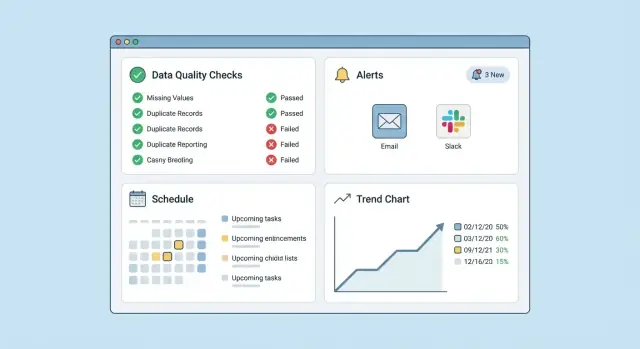
Clarify the Goal and Scope of Data Quality
Before you build anything, align on what your team actually means by “data quality.” A web app for data quality monitoring is only useful if everyone agrees on the outcomes it should protect and the decisions it should support.
Define “data quality” in your context
Most teams blend several dimensions. Pick the ones that matter, define them in plain language, and treat those definitions as product requirements:
- Accuracy: values reflect reality (e.g., revenue numbers match source systems).
- Completeness: required fields aren’t null; expected rows arrived.
- Timeliness: data is fresh enough for the decisions it supports.
- Uniqueness: no unintended duplicates (customers, orders, events).
These definitions become the foundation for your data validation rules and help you decide which data quality checks your app must support.
Map bad-data risks to real people
List the risks of bad data and who is impacted. For example:
- Finance closes with wrong figures → controllers and leadership lose trust.
- Marketing targets the wrong segment → wasted spend and annoyed customers.
- Operations uses stale inventory data → missed shipments.
This prevents you from building a tool that tracks “interesting” metrics but misses what actually hurts the business. It also shapes web app alerts: the right message should reach the right owner.
Decide on batch vs real-time checks
Clarify whether you need:
- Batch checks (common for ETL/ELT): run after daily/hourly loads; ideal for ETL data quality gates.
- Real-time checks: validate events or API writes as they arrive; useful for catching breakages quickly.
- Both: often the most practical—real-time for critical flows, batch for broader coverage.
Be explicit about latency expectations (minutes vs. hours). That decision affects scheduling, storage, and alert urgency.
Set success metrics that guide tradeoffs
Define how you’ll measure “better” once the app is live:
- Fewer production incidents caused by bad data
- Faster detection and time-to-resolution
- Lower false-alert rate (less noise)
- Higher ownership: alerts acknowledged and resolved
These metrics keep your data observability efforts focused and help you prioritize checks, including anomaly detection basics versus simple rule-based validation.
Inventory Your Data and Prioritize What to Monitor
Before you build checks, get a clear picture of what data you have, where it lives, and who can fix it when something breaks. A lightweight inventory now saves weeks of confusion later.
Start with a source map (and real owners)
List every place data originates or is transformed:
- Operational databases (Postgres/MySQL), analytics warehouses (BigQuery/Snowflake), event streams
- Files and extracts (S3/GCS, SFTP drops, CSV uploads)
- Third‑party APIs and SaaS connectors
For each source, capture an owner (person or team), a Slack/email contact, and an expected refresh cadence. If ownership is unclear, alerting will be unclear too.
Map “what breaks what”
Pick critical tables/fields and document what depends on them:
- Downstream dashboards (finance, growth, exec reporting)
- Customer-facing features (recommendations, billing, notifications)
- ML models, attribution pipelines, and key metrics
A simple dependency note like “orders.status → revenue dashboard” is enough to start.
Choose the first 5–10 must-not-break datasets
Prioritize based on impact and likelihood:
- High business impact if wrong
- Frequent change or brittle pipelines
- Hard to notice when broken
These become your initial monitoring scope and your first set of success metrics.
Capture today’s pain points
Document specific failures you’ve already felt: silent pipeline failures, slow detection, missing context in alerts, and unclear ownership. Turn these into concrete requirements for later sections (alert routing, audit logs, investigation views). If you maintain a short internal page (e.g., /docs/data-owners), link it from the app so responders can act quickly.
Choose the Checks Your App Will Support
Before you design screens or write code, decide which checks your product will execute. This choice shapes everything else: your rule editor, scheduling, performance, and how actionable your alerts can be.
Start with a small, high-value catalog
Most teams get immediate value from a core set of check types:
- Schema checks: expected columns, data types, allowed enum values.
- Null rate / completeness: “no more than 2% nulls in
email.” - Value ranges: “
order_totalmust be between 0 and 10,000.” - Referential integrity: “every
order.customer_idexists incustomers.id.” - Freshness: “table updated within the last 2 hours.”
- Duplicates: “
user_idis unique per day.”
Keep the initial catalog opinionated. You can add niche checks later without making the UI confusing.
Pick rule formats your users can actually maintain
You typically have three options:
- UI-based rules (dropdowns + fields): best for non-technical users and consistency.
- Templates (“uniqueness on column”, “freshness for table”): fast to set up and easy to version.
- Code-based checks (SQL or small scripts): most flexible, but requires guardrails.
A practical approach is “UI first, escape hatch second”: provide templates and UI rules for 80%, and allow custom SQL for the rest.
Define severity and trigger logic
Make severity meaningful and consistent:
- Info: unusual but not urgent (track trends).
- Warn: needs attention soon (ticket or review).
- Critical: likely breaks downstream reporting or operations (page/urgent alert).
Be explicit about triggers: single-run failure vs. “N failures in a row,” thresholds based on percentages, and optional suppression windows.
Plan for custom checks without creating a security hole
If you support SQL/scripts, decide upfront: allowed connections, timeouts, read-only access, parameterized queries, and how results are normalized into pass/fail + metrics. This keeps flexibility while protecting your data and your platform.
Design the User Experience and Main Flows
A data quality app succeeds or fails on how quickly someone can answer three questions: what failed, why it matters, and who owns it. If users have to dig through logs or decipher cryptic rule names, they’ll ignore alerts and stop trusting the tool.
Minimum viable screens (that still feel complete)
Start with a small set of screens that support the lifecycle end-to-end:
- Checks list: searchable, filterable by dataset, status, owner, and “failing now.”
- Check editor: create and edit data validation rules with a clear description and ownership.
- Run history: a timeline of results per check, with a “last run” summary and links to details.
- Alert settings: routing (email/Slack/etc.), severity, and noise controls.
- Dataset overview: what checks exist for this dataset, recent health, and primary owner.
The core workflow users should never lose
Make the main flow obvious and repeatable:
create check → schedule/run → view result → investigate → resolve → learn.
“Investigate” should be a first-class action. From a failed run, users should jump to the dataset, see the failing metric/value, compare with previous runs, and capture notes on the cause. “Learn” is where you encourage improvements: suggest adjusting thresholds, adding a companion check, or linking the failure to a known incident.
Roles and permissions (simple, but real)
Keep roles minimal at first:
- Viewer: can see checks and results.
- Editor: can create/edit checks and alert settings for assigned datasets.
- Admin: can manage users, global integrations, and permissions.
Design for clarity and ownership
Every failed result page should show:
- What failed: the exact rule, expected vs actual, and when it started.
- Why it matters: a short impact statement (e.g., “affects finance reporting”).
- Who owns it: the responsible team/person and where the alert will go.
Plan the Architecture: UI, API, Workers, and Storage
A data quality app is easier to scale (and easier to debug) when you separate four concerns: what users see (UI), how they change things (API), how checks run (workers), and where facts are stored (storage). This keeps the “control plane” (configs and decisions) distinct from the “data plane” (executing checks and recording outcomes).
UI: a focused dashboard
Start with one screen that answers, “What’s broken and who owns it?” A simple dashboard with filters goes a long way:
- Dataset/source
- Status (pass, warn, fail)
- Time window (last run, 24h, 7d)
- Owner/team
From each row, users should drill into a run details page: check definition, sample failures, and last known good run.
Backend API: stable contracts
Design the API around the objects your app manages:
- Checks (create/update/pause, parameters, schedule)
- Runs (trigger on-demand, list run history)
- Results (fetch summaries, failures, aggregates)
- Alerts (acknowledge, mute, routing rules)
- Users/teams (ownership, permissions)
Keep writes small and validated; return IDs and timestamps so the UI can poll and stay responsive.
Workers and scheduler: execute reliably
Checks should run outside the web server. Use a scheduler to enqueue jobs (cron-like) plus an on-demand trigger from the UI. Workers then:
- fetch the check config, 2) run the query/validation, 3) store results, 4) evaluate alert rules.
This design lets you add concurrency limits per dataset and retry safely.
Storage: separate stores for different needs
Use distinct storage for:
- Configuration store: check definitions and alert routing (transactional)
- Results store: run summaries and time-series metrics for trends
- Logs store: execution logs for debugging and audits
This separation keeps dashboards fast while preserving detailed evidence when something fails.
Faster prototyping option: generate the scaffolding
If you want to ship an MVP quickly, a vibe-coding platform like Koder.ai can help you bootstrap the React dashboard, Go API, and PostgreSQL schema from a written spec (checks, runs, alerts, RBAC) via chat. It’s useful for getting the core CRUD flows and screens in place fast, then iterating on the check engine and integrations. Because Koder.ai supports source code export, you can still own and harden the resulting system in your repo.
Define Your Data Model and Audit Trail
A good data quality app feels simple on the surface because the data model underneath is disciplined. Your goal is to make every result explainable: what ran, against which dataset, with which parameters, and what changed over time.
Core entities (and why they exist)
Start with a small set of first-class objects:
- Dataset: the thing being monitored (table, file, API endpoint). Store identifiers, connection reference, and a human name.
- Check: a reusable rule (e.g., “row count must be within ±10% of yesterday”). Include type, config, schedule, severity, and owner.
- CheckRun: an immutable execution record for a specific time and input. This is your audit backbone.
- ResultMetric: summarized outputs for charting (counts, percent nulls, min/max, anomaly score).
- AlertRule: logic that turns results into an alert (thresholds, consecutive failures, maintenance windows).
- Notification: each attempted delivery (Slack/email/PagerDuty), with status and provider response.
- Incident: a grouped, trackable problem (opened/acknowledged/resolved) that avoids spam.
- Ownership: mapping from datasets/checks to teams and escalation paths.
Store raw details and summary metrics
Keep raw result details (sample failing rows, offending columns, query output snippet) for investigation, but also persist summary metrics optimized for dashboards and trends. This split keeps charts fast without losing debugging context.
Make history immutable (and queryable)
Never overwrite a CheckRun. Append-only history enables audits (“what did we know on Tuesday?”) and debugging (“did the rule change or the data change?”). Track check version/config hash alongside each run.
Tags for filtering and access control
Add tags like team, domain, and a PII flag on Datasets and Checks. Tags power filters in dashboards and also support permission rules (e.g., only certain roles can view raw failing-row samples for PII-tagged datasets).
Build the Check Execution Engine
The execution engine is the “runtime” of your data quality monitoring app: it decides when a check runs, how it runs safely, and what gets recorded so results are trustworthy and repeatable.
Scheduler + queue: run checks reliably
Start with a scheduler that triggers check runs on a cadence (cron-like). The scheduler shouldn’t run heavy work itself—its job is to enqueue tasks.
A queue (backed by your DB or a message broker) lets you:
- absorb traffic spikes (many checks due at once)
- distribute work across workers
- pause/resume execution without losing tasks
Protect the data sources with timeouts and limits
Checks often execute queries against production databases or warehouses. Put guardrails in place so a misconfigured check can’t degrade performance:
- Timeouts per check run (e.g., 60–300 seconds)
- Retries with backoff for transient failures (network blips, brief warehouse overload)
- Concurrency limits per data source (e.g., max 3 parallel queries to the same warehouse)
- Hard failure modes for unsafe queries (optional allowlist/denylist patterns)
Also capture “in-progress” states and ensure workers can safely pick up abandoned jobs after crashes.
Make runs reproducible with full context
A pass/fail without context is hard to trust. Store run context alongside every result:
- the check definition version (or hash)
- query text (or reference) and parameters
- environment (prod/stage), timezone, and scheduling window
- connector details (which data source, schema, role), without storing secrets
This is what enables you to answer: “What exactly ran?” weeks later.
Safer onboarding: dry run and test connection
Before activating a check, offer:
- Test connection: validate credentials and permissions, run a lightweight query
- Dry run: execute the check once, show expected cost/time, and preview results without alerting
These features reduce surprises and keep alerting credible from day one.
Create Alerting That Is Actionable (Not Noisy)
Alerting is where data quality monitoring either earns trust or gets ignored. The goal isn’t “tell me everything that’s wrong”—it’s “tell me what to do next, and how urgent it is.” Make every alert answer three questions: what broke, how bad, and who owns it.
Define clear alert conditions
Different checks need different triggers. Support a few practical patterns that cover most teams:
- Threshold breaches (e.g., null rate > 2%)
- Change vs baseline (e.g., today’s row count is 40% lower than the last 7-day median)
- Consecutive failures (e.g., fail 3 runs in a row before alerting)
- Freshness breaches (e.g., dataset not updated within 6 hours)
Make these conditions configurable per check, and show a preview (“this would have triggered 5 times last month”) so users can tune sensitivity.
Reduce noise with deduping and cooldowns
Repeated alerts for the same incident train people to mute notifications. Add:
- Deduping: group alerts by check + dataset + failure reason.
- Cooldowns: don’t resend the same alert for a set window unless severity increases.
Also track state transitions: alert on new failures, and optionally notify on recovery.
Route alerts to the right owners
Routing should be data-driven: by dataset owner, team, severity, or tags (e.g., finance, customer-facing). This routing logic belongs in configuration, not code.
Start with email and Slack, add webhooks later
Email and Slack cover most workflows and are easy to adopt. Design the alert payload so a future webhook is straightforward. For deeper triage, link directly to the investigation view (for example: /checks/{id}/runs/{runId}).
Build Dashboards for Results, Trends, and Investigation
A dashboard is where data quality monitoring becomes usable. The goal isn’t pretty charts—it’s letting someone answer two questions quickly: “Is anything broken?” and “What do I do next?”
Status at a glance
Start with a compact “health” view that loads fast and highlights what needs attention.
Show:
- Recent failures and their impact (dataset, rule, severity, time)
- Top flaky checks (high fail/pass oscillation) so teams can fix noisy data validation rules
- Freshest datasets and their last successful update time (freshness)
This first screen should feel like an operations console: clear status, minimal clicks, and consistent labels across all data quality checks.
Drill-down that supports action
From any failed check, provide a detail view that supports investigation without forcing people to leave the app.
Include:
- Failed rule details (what was checked, expected vs actual)
- A sample of failed rows (with safe masking for sensitive columns)
- Related checks on the same dataset (often the “real” problem is upstream)
- A short “why it matters” note for non-technical stakeholders
If you can, add a one-click “Open investigation” panel with links (relative only) to the runbook and queries, e.g. /runbooks/customer-freshness and /queries/customer_freshness_debug.
Trends that reveal slow regressions
Failures are obvious; slow degradation isn’t. Add a trends tab for each dataset and each check:
- Null rate over time
- Freshness over time (minutes/hours late)
- Pass rate by week (or by deploy version)
These graphs make anomaly detection basics practical: people can see whether this was a one-off or a pattern.
Make results explainable and traceable
Every chart and table should link back to the underlying run history and audit logs. Provide a “View run” link for each point so teams can compare inputs, thresholds, and alert routing decisions. That traceability builds trust in your dashboard for data observability and ETL data quality workflows.
Add Security, Permissions, and Safe Handling of Sensitive Data
Security decisions made early will either keep your app simple to operate—or create constant risk and rework. A data quality tool touches production systems, credentials, and sometimes regulated data, so treat it like an internal admin product from day one.
Authentication: start simple, plan for SSO
If your organization already uses SSO, support OAuth/SAML as soon as practical. Until then, email/password can be acceptable for an MVP, but only with the basics: salted password hashing, rate limiting, account lockout, and MFA support.
Even with SSO, keep an emergency “break-glass” admin account stored securely for outages. Document the process and restrict its use.
Role-based permissions (RBAC) for checks and alerts
Separate “viewing results” from “changing behavior.” A common set of roles:
- Viewer: can see dashboards and runs
- Editor: can create/edit checks
- Operator: can manage alert routes and schedules
- Admin: can manage workspaces, users, and secrets
Enforce permissions on the API, not just the UI. Also consider workspace/project scoping so a team can’t accidentally edit another team’s checks.
Handle sensitive data safely by default
Avoid storing raw row samples that may contain PII. Store aggregates and summaries instead (counts, null rates, min/max, histogram buckets, failing row count). If you must store samples for debugging, make it an explicit opt-in with short retention, masking/redaction, and strict access controls.
Keep audit logs for: login events, check edits, alert-route changes, and secret updates. An audit trail reduces guesswork when something changes and helps with compliance.
Secrets management: credentials are product-critical
Database credentials and API keys should never live in plaintext in your database. Use a vault or environment-based secret injection, and design for rotation (multiple active versions, last-rotated timestamps, and a test-connection flow). Limit secret visibility to admins, and log access without logging the secret value.
Test the System and Monitor the Monitor
Before you trust your app to catch data problems, prove it can reliably detect failures, avoid false alarms, and recover cleanly. Treat testing as a product feature: it protects your users from noisy alerts and protects you from silent gaps.
Create “golden” datasets for each check type
For every check you support (freshness, row count, schema, null rates, custom SQL, etc.), create sample datasets and golden test cases: one that should pass and several that should fail in specific ways. Keep them small, version-controlled, and repeatable.
A good golden test answers: What’s the expected result? What evidence should the UI show? What should be written to the audit log?
Verify alert behavior, not just check results
Alerting bugs are often more damaging than check bugs. Test alert logic for thresholds, cooldowns, and routing rules:
- Threshold edges (exactly at the limit, just over, just under)
- Cooldowns and deduplication (avoid repeated notifications during ongoing incidents)
- Routing changes (team A vs team B, environment-based routing)
- Recovery behavior (clear “resolved” messages, not new incidents)
Monitor your app like production software
Add monitoring for your own system so you can spot when the monitor is failing:
- Job success rate and average runtime
- Queue depth and worker throughput
- API error rates, timeouts, and retries
- Notification provider failures (email/SMS/Slack)
Ship a troubleshooting page
Write a clear troubleshooting page covering common failures (stuck jobs, missing credentials, delayed schedules, suppressed alerts) and link it internally, e.g. /docs/troubleshooting. Include “what to check first” steps and where to find logs, run IDs, and recent incidents in the UI.
Roll Out, Iterate, and Expand Over Time
Shipping a data quality app is less about a “big launch” and more about building trust in small, steady steps. Your first release should prove the loop end-to-end: run checks, show results, send an alert, and help someone fix a real issue.
Start with an MVP that gets used
Begin with a narrow, reliable set of capabilities:
- A few high-value check types (for example: freshness, row count, and null/unique thresholds)
- One scheduler (simple cron-style schedules are enough)
- One alert channel (email or Slack—pick what the team already watches)
- One dashboard that answers: “What failed, when, and why?”
This MVP should focus on clarity over flexibility. If users can’t understand why a check failed, they won’t act on the alert.
If you’re trying to validate the UX quickly, you can prototype the CRUD-heavy parts (check catalog, run history, alert settings, RBAC) in Koder.ai and iterate in “planning mode” before committing to a full build. For internal tools like this, the ability to snapshot and roll back changes can be especially helpful when you’re tuning alert noise and permissions.
Deploy safely and keep changes reversible
Treat your monitoring app like production infrastructure:
- Separate environments (dev/staging/prod) so teams can test new checks without paging people
- Use database migrations and versioned releases so you can roll forward confidently
- Maintain backups and document how to restore them
- Have a rollback plan (including how to disable a noisy check quickly)
A simple “kill switch” for a single check or an entire integration can save hours during early adoption.
Onboard teams with templates and a quickstart
Make the first 30 minutes successful. Provide templates like “Daily pipeline freshness” or “Uniqueness for primary keys,” plus a short setup guide at /docs/quickstart.
Also define a lightweight ownership model: who receives alerts, who can edit checks, and what “done” means after a failure (e.g., acknowledge → fix → rerun → close).
Plan the next steps (without overbuilding)
Once the MVP is stable, expand based on real incidents:
- Incident workflow: acknowledgements, assignments, and status (open/in progress/resolved)
- Integrations: Jira, PagerDuty/Opsgenie, Teams, and data catalog links
- Better baselines: moving averages, seasonality-aware thresholds, and anomaly detection basics
- Smarter routing: alert only the owning team, with context and suggested next actions
Iterate by reducing time-to-diagnosis and lowering alert noise. When users feel the app consistently saves them time, adoption becomes self-propelled.
FAQ
What should we define before building a data quality monitoring web app?
Start by writing down what “data quality” means for your team—typically accuracy, completeness, timeliness, and uniqueness. Then translate each dimension into concrete outcomes (e.g., “orders load by 6am,” “email null rate < 2%”) and pick success metrics like fewer incidents, faster detection, and lower false-alert rates.
Should our app run batch checks, real-time checks, or both?
Most teams do best with both:
- Batch checks after ETL/ELT loads for broad coverage and gating.
- Real-time checks for critical event/API flows where fast detection matters.
Decide explicit latency expectations (minutes vs hours) because it affects scheduling, storage, and how urgent alerts should be.
How do we choose which datasets to monitor first?
Prioritize the first 5–10 must-not-break datasets by:
- Business impact if wrong
- Likelihood of breaking (frequent changes, brittle pipelines)
- How hard it is to notice issues without monitoring
Also record an owner and expected refresh cadence for each dataset so alerts can route to someone who can act.
What types of data quality checks should we support in an MVP?
A practical starter catalog includes:
- Schema checks (columns/types/enums)
- Completeness/null-rate thresholds
- Range checks
- Referential integrity
- Freshness checks
- Duplicate/uniqueness checks
These cover most high-impact failures without forcing complex anomaly detection on day one.
How should we let users define rules—UI, templates, or SQL?
Use a “UI first, escape hatch second” approach:
- UI rules/templates for common checks (consistent, easy to maintain)
- Optional custom SQL/scripts for edge cases
If you allow custom SQL, enforce guardrails like read-only connections, timeouts, parameterization, and normalized pass/fail outputs.
What screens are the minimum viable UI for a data quality app?
Keep the first release small but complete:
- Checks list (search/filter by dataset, status, owner)
- Check editor (rule + description + owner)
- Run history (timeline and last-run summary)
- Alert settings (routing, severity, noise controls)
- Dataset overview (health + checks + owner)
Each failure view should clearly show what failed, why it matters, and who owns it.
What architecture works best for a scalable data quality checks app?
Split the system into four parts:
- UI: dashboard and investigation flows
- API: stable objects (checks, runs, results, alerts, users/teams)
- Workers + scheduler: execute checks outside the web server
- Storage: separate config, results/time-series, and logs
This separation keeps the control plane stable while the execution engine scales.
What data model and audit trail should we implement?
Use an append-only model:
- Dataset, Check, CheckRun (immutable execution record)
- ResultMetric (summaries for charts)
- AlertRule, Notification, optional Incident
- Ownership mappings
Store both summary metrics and enough raw evidence (safely) to explain failures later, and record a config version/hash per run to distinguish “rule changed” from “data changed.”
How do we create alerts that people won’t ignore?
Focus on actionability and noise reduction:
- Triggers: thresholds, baseline change, consecutive failures, freshness breaches
- Deduping by check + dataset + failure reason
- Cooldowns to prevent repeated alerts during one incident
- Routing by owner/team/severity/tags
Include direct links to investigation pages (e.g., /checks/{id}/runs/{runId}) and optionally notify on recovery.
How do we handle security, permissions, and sensitive data safely?
Treat it like an internal admin product:
- RBAC enforced on the API (viewer/editor/operator/admin)
- SSO when possible; basic auth hygiene if starting with passwords
- Secrets in a vault or injected at runtime; design for rotation
- Default to aggregates over raw row samples; if samples are needed, make them opt-in with masking and short retention
- Audit logs for logins, check edits, alert-route changes, and secret updates