

Build a Web App to Track Feature Ownership Across Teams
Learn how to design and build a web app that maps product features to owners across teams, with roles, workflows, integrations, and reporting.
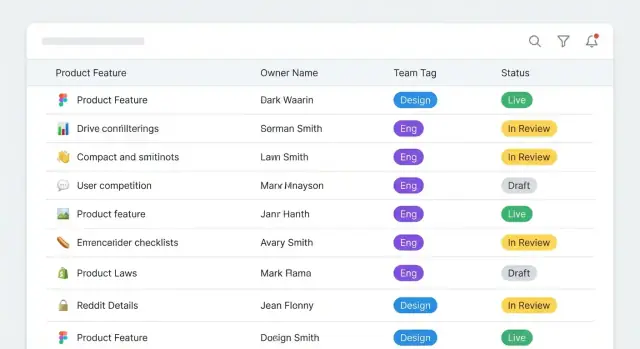
Problem Definition and Success Criteria
Feature ownership tracking solves a specific kind of confusion: when something changes, breaks, or needs a decision, nobody is sure who is accountable—and the “right” person depends on context.
What “feature ownership” means (make it explicit)
Define ownership as a set of responsibilities, not a name in a field. In many organizations, a single feature has multiple owners:
- Product ownership: prioritization, customer impact, roadmap decisions.
- Engineering ownership: implementation quality, reliability, on-call expectations, technical decisions.
- Support/Operations ownership: escalation path, known issues, support playbooks.
Decide whether your app supports one primary owner plus secondary roles, or a role-based model (e.g., Product Owner, Tech Owner, Support Lead). If you already use RACI terminology, state how it maps (Responsible/Accountable/Consulted/Informed).
Primary users and what they need to do
List the groups who will rely on the system day-to-day:
- PMs: find the decision-maker, validate roadmap impact, coordinate handoffs.
- Engineering managers and tech leads: ensure coverage, manage transitions, approve changes.
- Support leads: know who to page, what’s safe to tell customers, and where docs live.
Also note occasional users (execs, QA, security). Their questions will shape reporting, workflows, and permissions.
The top questions the app must answer
Write these as acceptance tests. Common must-answer questions include:
- Who owns this feature right now, and in what role?
- Who approves ownership changes?
- Who should I contact for an outage, a bug, or a roadmap question?
- What changed recently, and why? (audit trail)
Scope decisions that prevent rework
Be clear about the unit you’re tracking:
- Feature-only, or also components, services, APIs, docs, and runbooks.
If you include multiple asset types, define relationships (a feature depends on a service; a runbook supports a feature) so ownership doesn’t fragment.
Success criteria
Pick measurable outcomes, such as:
- Reduce “who owns this?” requests in chat by X%.
- Ownership listed for 95%+ of active features.
- Median time to find the correct contact drops to < 2 minutes.
- All ownership changes have an approver and appear in history within 24 hours.
Requirements and MVP Scope
A feature ownership tracker only works if it answers a few questions quickly and reliably. Write requirements in terms of everyday actions—what someone needs to do in 30 seconds, under pressure, during a release or incident.
Core use cases (must be easy)
The MVP should support a small set of workflows end-to-end:
- Find the owner: search by feature name, product area, or tag and see the current accountable team/person plus backup.
- Update the owner: change ownership with a clear reason and an effective date.
- Request a change: propose a new owner when you’re not allowed to edit directly.
- Escalation path: if the listed owner is wrong or unresponsive, show who to contact next (manager, on-call alias, or platform lead).
If the app can’t do these four reliably, extra features won’t save it.
Non-goals (keep v1 focused)
To avoid turning this into “yet another planning tool,” explicitly exclude:
- Full project management (tickets, sprints, roadmaps)
- Detailed incident management
- Replacing your source-of-truth systems (HRIS, IAM, org charts)
- Deep workflow automation beyond simple approvals
Data freshness expectations
Decide what “accurate” means:
- Manual-first: owners maintain entries directly. Simple, but needs reminders and accountability.
- Synced: pull teams/people from a directory and optionally pull feature lists from a repo or backlog tool.
For an MVP, a common compromise is: people/teams synced nightly, ownership updated manually, with a visible “last confirmed” date.
MVP vs later enhancements
Define what ships now versus later to prevent scope creep.
MVP: search, feature page, owner fields, change request + approval, basic audit history, and exports.
Later: advanced reporting dashboards, RACI views across initiatives, Slack/Teams workflows, automated stale-data detection, and multi-source reconciliation.
The goal of v1 is a trustworthy directory of accountability—not a perfect mirror of every system you use.
If you want to validate this quickly before committing to a full build pipeline, a vibe-coding platform like Koder.ai can help you prototype the core flows (search → feature page → change request → approval) via chat, then iterate with stakeholders using snapshots and rollback.
Feature Catalog and Taxonomy
A feature ownership app only works if everyone agrees what a “feature” is. Start by picking a consistent definition and writing it down in the UI where people will see it.
Define what counts as a “feature”
Choose one of these and stick to it:
- Product feature: a user-visible capability (“Export to CSV”).
- Capability: a broader promise the product makes (“Data export”).
- Module/component: a bounded part of the system (“Reporting service”).
Teams can still discuss these differently, but the catalog should represent one level. A practical choice is user-visible features, because they map cleanly to tickets, release notes, and support escalations.
Identifiers and naming conventions
Names change; identifiers should not. Give every feature a stable key and a readable URL slug.
- Feature key: immutable, short, unique (e.g.,
FEAT-1427orREP-EXPORT). - Slug: derived from name but editable to avoid breaking links (
export-to-csv).
Define naming rules early (sentence case, no internal abbreviations, include product area prefix, etc.). This prevents “CSV Export”, “Export CSV”, and “Data Export” from becoming three different records.
Taxonomy that supports search and reporting
A good taxonomy is just enough structure to filter and group ownership. Common fields:
- Product area (Billing, Reporting, Admin)
- Team (current responsible team)
- Platform (Web, Mobile, API)
- Customer segment (SMB, Enterprise, Internal)
- Lifecycle status (Proposed, Active, Deprecated, Retired)
Keep values curated (dropdowns) so reporting stays clean.
Owner types: clarify responsibility
Ownership is rarely a single person. Define owner roles explicitly:
- Primary owner: accountable for decisions and roadmap.
- Secondary owner: backup for continuity.
- Approver: required sign-off for changes (often a manager or architect).
- On-call contact: the fastest escalation route during incidents.
If you already use a RACI model, reflect it directly so people don’t have to translate concepts.
Data Model: Features, Teams, People, and History
A clear data model is what makes ownership searchable, reportable, and trustworthy over time. The goal isn’t to model every org nuance—it’s to capture “who owns what, since when, until when, and what changed.”
Core entities (the nouns)
Start with a small set of first-class entities:
- Feature: the thing being owned (e.g., “Billing Settings”, “Search Filters”). Store name, description, status, and a stable internal ID.
- Team: the accountable group (e.g., “Payments Squad”).
- Person: an individual who can be an owner, approver, or editor.
- OwnershipAssignment: the relationship that answers the question “who owns this feature right now?”
- Tag: lightweight classification such as product area, platform, customer segment, risk level.
- System: external tools you may sync from (HRIS, Okta, Jira, GitHub, etc.).
Ownership as a time-bounded record
Model ownership as records with dates, not as a single mutable field on the Feature. Each OwnershipAssignment should include:
feature_idowner_type+owner_id(Team or Person)role(e.g., DRI, backup, technical owner)start_dateand optionalend_datehandover_notes(what the next owner needs to know)
This structure supports clean handovers: ending one assignment and starting another preserves history and prevents silent ownership changes.
History you can trust: an audit log
Add an AuditLog (or ChangeLog) that captures every important write:
- who made the change (Person)
- what changed (entity + record ID)
- when it changed (timestamp)
- why it changed (free-text reason)
Keep the audit log append-only. It’s essential for accountability, reviews, and answering “when did ownership switch?”
Imports and syncing: plan for external IDs
If you’ll import teams or users, store stable mapping fields:
external_system(System)external_id(string)
Do this for Team and Person at minimum, and optionally for Feature if it mirrors Jira epics or a product catalog. External IDs let you sync without duplicate records or broken links when names change.
Authentication, Roles, and Permissions
Getting access control right is what keeps a feature ownership app trustworthy. If anyone can change an owner, people stop relying on it. If it’s too locked down, teams work around it in spreadsheets.
Pick an authentication approach that matches your company
Start with the login method your organization already uses:
- SSO (SAML): best for mid-to-large companies with an identity provider (Okta, Azure AD). Centralized onboarding/offboarding and fewer password headaches.
- OAuth/OIDC: great if you’re integrating with Google Workspace or Microsoft Entra ID without full SAML setup. Typically simpler to implement.
- Email/password (fallback): consider only for very small orgs or external collaborators. If you use it, enforce MFA and strong password policies.
A practical rule: if HR can disable an account in one place, your app should follow that same switch.
Define clear roles (and keep them boring)
Use a small set of roles that map to real work:
- Viewer: can search, filter, and export ownership views, but can’t edit.
- Editor: can propose updates to ownership for areas they’re responsible for.
- Approver: can approve/reject changes (often a product lead, engineering manager, or platform owner).
- Admin: manages system settings, integrations, and role assignments.
Permission rules: scope matters more than the role name
Role alone isn’t enough—you need scope. Common scoping options:
- By product area (e.g., “Checkout,” “Billing”)
- By team (e.g., “Payments Squad”)
- By feature group/taxonomy node (useful when features roll up under a hierarchy)
For example: an Editor can edit ownership only for features within “Billing,” while Approvers can approve changes across “Finance Products.”
Build a “request access” path at the permission wall
When a user tries to edit something they can’t, don’t just show an error. Provide a Request access action that:
- pre-fills the requested scope (team/product area)
- routes to the right approver/admin
- captures a short reason
Even if you start with a simple email or inbox workflow, a clear path prevents shadow documents and keeps ownership data centralized.
Information Architecture and UI Flows
A feature ownership app succeeds when people can answer two questions in seconds: “Who owns this?” and “What should I do next?” Your information architecture should center on a small set of pages with predictable navigation and strong search.
Core screens (and what each is for)
Feature List is the default landing page. It’s where most users start, so optimize it for scanning and narrowing down. Show a compact row layout with: feature name, product area, current owner (team + primary person), status, and “last updated.”
Feature Details is the source of truth. It should clearly separate ownership from description, so updates don’t feel risky. Put the ownership panel at the top with plain labels like Accountable, Primary contact, Backup contact, and Escalation path.
Team Page answers “What does this team own?” Include the team’s channels (Slack/email), on-call info (if relevant), and a list of owned features.
Person Page answers “What is this person responsible for?” It should show active ownership assignments and how to reach them.
Search, filters, and scannability
Make search always available (header search is ideal) and fast enough to feel instant. Pair it with filters that match how people think:
- Product area
- Team
- Status
- Tags
On the list and details pages, make ownership information highly scannable: consistent badges, clear contact methods, and a one-click “Copy escalation message” or “Email owner” action.
Low-friction edits without chaos
Use a single, consistent edit flow across pages:
- Click Edit ownership (or Edit on a section).
- Form with validation (required fields, valid team/person, no conflicting owners).
- Preview changes showing “before → after,” including who will be notified.
- Save, with a clear confirmation and a link back to the updated record.
This keeps edits safe, reduces back-and-forth, and encourages people to keep ownership data current.
Workflows: Updates, Approvals, and Handover
Ownership data stays accurate only if changing it is easier than working around it. Treat updates like small, trackable requests—so people can propose changes quickly, and leaders can trust what they see.
Updates as change requests
Instead of editing ownership fields directly, route most edits through a change request form. Each request should capture:
- What is changing (feature, current owner, proposed owner)
- Reason (free text + optional category like “team reorg”, “new service boundary”, “incident follow-up”)
- Effective date (immediate vs scheduled)
Scheduled effective dates are useful for reorganizations: the new owner shows up automatically on the date, while the audit trail preserves who owned it before.
Approvals for sensitive changes
Not every change needs a meeting. Add lightweight approvals only when risk is higher, for example:
- Changing the primary owner
- Updates to critical features (tagged as “tier 0/1”)
- Removing an owner (potentially leaving “no owner”)
A simple rule engine can decide: auto-approve low-risk edits, but require 1–2 approvers for sensitive ones (e.g., current owner + receiving team lead). Keep approval screens focused: proposed values, diff view, reason, and effective date.
Handover workflow (make it hard to forget essentials)
When ownership moves between teams, trigger a handover checklist before the change becomes effective. Include structured fields such as:
- Docs link (design/spec)
- Runbooks/on-call link
- Open risks (short description + severity)
- Known dependencies (optional)
This turns ownership into something operational, not just a name.
Conflict rules and UI flags
Define conflicts explicitly and flag them where people work:
- No owner: highlight in red, add a “claim ownership” action, and escalate if unresolved.
- Multiple primary owners: block approval unless the feature allows co-ownership; otherwise require resolution.
Surface conflicts on the feature page and in a dashboard view (see /blog/reporting-dashboards), so teams can clean up issues before they become incidents.
Notifications and Escalations
A feature ownership app only works if people notice when something needs attention. The goal is to prompt action without spamming everyone.
What should trigger a notification?
Start with a small set of high-signal events:
- Ownership change (new owner assigned, owner removed, team changed)
- Pending approval (someone proposed a change that requires review)
- Stale records (no update for X days, or owner hasn’t confirmed ownership since the last reorg)
For each event, decide who gets notified: the new owner, previous owner, the feature’s team lead, and optionally a program/product operations inbox.
Digests to reduce noise
Real-time alerts are great for approvals and owner changes, but reminders can quickly become background noise. Offer digests such as:
- Daily summary: items awaiting your approval, features you own that are now stale
- Weekly summary: unowned features in your area, upcoming ownership reviews
Make digests configurable per user and per team, with sensible defaults. A simple “snooze for 7 days” option also prevents repeated pings during busy periods.
Escalation when ownership is missing
Unassigned ownership is where projects stall. Create an escalation path that’s predictable and visible:
- Notify the default team contact (e.g., engineering manager for the responsible team)
- If still unassigned after a defined window, notify the next level (director/group lead) or a shared escalation channel
- Optionally create an “Ownership needed” queue that ops can triage
Keep escalation rules transparent in the UI (e.g., “Escalates to X after 5 business days”) so notifications don’t feel arbitrary.
Integrations without hard-coding
Don’t bake in a single chat tool. Provide a generic webhook notification target so teams can route alerts to Slack, Microsoft Teams, email gateways, or incident tools.
At minimum, include: event type, feature ID/name, old/new owner, timestamps, and a deep link back to the record (e.g., /features/123).
Integrations and Data Sync Strategy
A feature ownership app only stays useful if it reflects reality. The fastest way to lose confidence is stale data: a team rename in HR, a feature moved in the issue tracker, or an owner who left the company. Treat integrations as a core part of the product, not an afterthought.
Prioritize the systems people already trust
Start with a small set of high-signal sources:
- Directory (users/teams): your identity provider or HR directory should be the source for names, emails, team membership, and active/inactive status.
- Issue tracker (Jira, Linear, Azure DevOps): useful for linking a feature to epics/projects, current status, and the owning team as expressed in delivery work.
- Service catalog (Backstage, OpsLevel): often has “system owner” and on-call info that complements feature-level ownership.
- Docs (Confluence, Notion, Google Drive): ownership decisions usually live in writing—store canonical links rather than duplicating documents.
Keep the first iteration simple: store IDs and URLs, and display them consistently. You can add deeper synchronization after teams rely on the app.
Choose your sync direction deliberately
Decide whether your app is:
- Read-only from source systems: safest. Your app becomes a curated view with extra structure (like an ownership matrix), while edits happen in the original tools.
- Bi-directional (write-back): convenient but riskier. If you allow updating an “owner” field in the app that writes back to Jira or a service catalog, you’ll need conflict handling, permissions mapping, and clear audit logs.
A practical middle ground is read-only sync plus “propose changes” workflows that notify the right owner to update the source.
Support CSV import/export for bootstrapping
Even with integrations, you’ll need bulk operations:
- Initial import to seed features and owners from an existing spreadsheet.
- Bulk updates during reorganizations.
- Export for offline reviews and quarterly audits.
Make CSV templates strict (required columns, valid team/user IDs) and provide error reports that non-technical users can fix.
Make freshness visible to prevent trust issues
Every synced field should show:
- Last synced timestamp
- Sync status (ok, warning, failed)
- Source of truth (directory, issue tracker, manual override)
If a sync fails, show what’s impacted and what still might be correct. This transparency keeps teams using the app instead of reverting to side spreadsheets.
Reporting, Dashboards, and Ownership Matrix
Reporting is where your app stops being a database and becomes a daily tool. The goal is to answer the most common ownership questions in seconds: Who owns this? Is it current? What’s risky right now?
Dashboards that surface risk
Start with a small set of dashboards that highlight operational gaps rather than vanity metrics:
- Unowned features: anything missing a primary owner (and optionally missing a secondary/backup).
- Stale ownership: features whose owner assignment hasn’t been confirmed in X days (e.g., 90), or where the owning team no longer exists.
- High-risk areas: features tied to critical systems, high ticket volume, recent incidents, or upcoming releases—but lacking clear ownership.
Each card should be clickable into a filtered list, with an obvious next step (“Assign owner”, “Request confirmation”, “Escalate”). A simple mental model: treat dashboards as queues.
Ownership matrix (feature × team)
An ownership matrix view helps cross-team groups (support, SRE, release managers) see patterns at a glance.
Make it a grid: rows = features, columns = teams, cell = relationship (Owner, Contributor, Consulted, Informed). Keep it readable:
- Allow grouping rows by product area or system.
- Provide quick filters: “only show gaps”, “only upcoming release scope”, “only my teams”.
- Add a “single feature drill-in” that explains why a team is marked (links to service, repo, on-call, or tickets).
RACI-like export (without the ceremony)
Not everyone needs to use the app to benefit from it. Add a one-click export that produces a RACI-style table for a chosen scope (product area, release, or tag). Provide:
- CSV for spreadsheets
- PDF for leadership reviews
Keep definitions consistent across the UI and exports so people don’t argue about what “Accountable” means.
Saved views for different audiences
Saved views prevent dashboard sprawl. Offer curated defaults plus personal/team saves:
- Support: “Top contacted features with owner + backup + escalation channel.”
- Release managers: “Release-tagged features missing confirmed ownership.”
- Leadership: “Coverage trend and top risk buckets.”
Audit and compliance views
Ownership changes have process impact, so reporting should include trust signals:
- Change history per feature (who changed what, when, and why)
- Approval status for sensitive areas
- Access logs for admin actions
Link these views from feature pages and admin screens (see /blog/access-control for role design patterns).
Implementation Plan, Deployment, and Ongoing Governance
A feature-ownership tracker succeeds when it’s easy to ship, safe to change, and clearly owned itself. Treat implementation, deployment, and governance as part of the product—not afterthoughts.
Pick a stack your team can maintain
Start with what your team can comfortably support.
If you want fast delivery and simple operations, a server-rendered app (e.g., Rails/Django/Laravel) with a relational database is often enough. If you already have strong front-end expertise and need highly interactive workflows (bulk edits, inline approvals), a SPA (React/Vue) plus an API can fit—just budget time for API versioning and error handling.
Either way, use a relational DB (Postgres/MySQL) for ownership history and constraints (e.g., “one primary owner per feature”), and keep the audit trail immutable.
If you prefer to accelerate delivery without rebuilding a full pipeline upfront, Koder.ai can generate a working React UI and Go/PostgreSQL backend from a chat-driven spec, then let you export the source code when you’re ready to bring it fully in-house.
Deployment basics: environments and reliability
Set up three environments early: dev, staging, production. Staging should mirror production permissions and integrations so approvals and sync jobs behave the same.
Plan these basics up front:
- Migrations: run automatically in CI/CD; practice rollbacks.
- Backups: automated, tested restores, and retention rules.
- Monitoring: uptime checks, error tracking, and alerts for failed syncs/approval bottlenecks.
If you maintain internal docs, add a short runbook under /docs/runbook with “how to deploy,” “how to restore,” and “where to look when sync fails.”
Test the risky parts first
Prioritize tests where mistakes create real damage:
- Access control: roles, row-level visibility, “who can change owner” rules.
- Approval workflows: state transitions, rejections, and re-requests.
- Sync jobs: retries, idempotency, and conflict resolution.
Governance: keep the tracker trustworthy
Assign clear maintainers for the taxonomy (teams, domains, feature naming rules). Set a review cadence (monthly or quarterly) to clean up duplicates and stale ownership.
Finally, define a definition of done for ownership, such as: named primary owner, backup owner, last reviewed date, and a link to the team channel or on-call rotation.
FAQ
What does “feature ownership” mean in this tracker?
Feature ownership is a defined set of responsibilities for a feature, often split by role:
- Product: prioritization and roadmap decisions
- Engineering: implementation quality, reliability, and technical decisions
- Support/Operations: escalations, playbooks, and customer comms
Write this definition into the app UI so “owner” doesn’t become an ambiguous name field.
What are the must-answer questions the app should support?
Most teams need answers to a few high-pressure questions:
- Who owns this feature right now, and in what role?
- Who do I contact for an outage vs a roadmap question?
- Who can approve an ownership change?
- What changed recently, and why? (audit trail)
Design the MVP to answer these in under a minute from search.
What belongs in the MVP vs later enhancements?
A practical MVP is a “trustworthy directory of accountability,” not a planning tool. Include:
- Fast search and a clear Feature Details page
- Owner fields (primary/accountable + backup + escalation contact)
- Change request + approval flow
- Basic audit history (who/what/when/why)
- CSV import/export for bootstrapping and reviews
Defer dashboards, deep automations, and chat workflows until usage is stable.
Should we track user-visible features, components, or services?
Pick one level and enforce it:
- Product feature (user-visible capability) is often best because it maps to support escalations and release notes.
If you also track services/docs/runbooks, define relationships (e.g., “Feature depends on Service”) so ownership doesn’t fragment across disconnected records.
How do we prevent duplicate or inconsistent feature records?
Use stable identifiers that don’t change when names do:
- Immutable feature key (e.g.,
FEAT-1427) - Human-friendly slug (editable, used in URLs)
Also add naming conventions (case, prefixes, banned abbreviations) to prevent duplicates like “CSV Export” vs “Export CSV.”
How should ownership be modeled in the data model?
Model ownership as time-bounded records (not a single mutable field):
feature_id,owner_id,rolestart_dateand optionalend_datehandover_notes
This lets you end one assignment and start another cleanly, preserves history, and supports scheduled handovers during reorganizations.
Why is an audit log necessary, and what should it record?
An append-only audit log keeps the system trustworthy. Capture:
- who made the change
- what changed (entity + record)
- when it changed
- why it changed (reason)
It’s how you answer “when did ownership switch?” during incidents, reviews, and compliance checks.
What roles and permissions should the app support?
Keep roles simple, then add scope:
- Viewer, Editor, Approver, Admin
- Scope by product area, team, or feature group
Also add a “Request access” path when users hit a permission wall so they don’t create shadow spreadsheets. For more patterns, see /blog/access-control.
How should ownership updates, approvals, and handovers work?
Treat changes as requests with an effective date and reason:
- Auto-approve low-risk edits
- Require 1–2 approvals for sensitive changes (e.g., primary owner or tier-0 features)
For cross-team transfers, require a handover checklist (docs, runbooks, risks) before the change becomes effective.
How do we handle notifications and escalation without spamming teams?
Use high-signal notifications with optional digests:
- Real-time: ownership changed, approval needed
- Digest: stale records, unowned features
Make escalation rules explicit (e.g., “escalates after 5 business days”) and integrate via webhooks so teams can route alerts to their tools without hard-coding a single chat platform.