

Build a Web App to Track Hardware Assets and Depreciation
Learn how to plan and build a web app for tracking hardware assets, ownership, maintenance, and depreciation—plus reports, audits, and integrations.
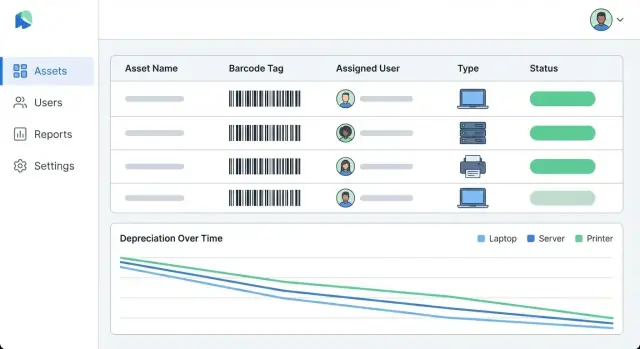
Goals, Users, and Scope
Before you pick a database or design screens, get clear on what this app is for. A hardware asset tracking app succeeds when everyone trusts the register and can answer common questions quickly:
- What do we own?
- Where is it?
- Who’s responsible?
- What’s it worth on the books today?
What the app will track
At minimum, treat each asset as a living record with both operational and financial meaning:
- Assets: laptops, servers, networking gear, printers, mobile devices, lab equipment.
- Ownership & responsibility: assigned user, department/cost center, and a clear “custodian” (who should be contacted).
- Locations: office/site, room, rack, or “remote/at home,” with an effective date.
- Lifecycle events: purchased → deployed → repaired → transferred → retired/disposed, with notes and attachments (invoice, warranty).
- Depreciation: purchase date, cost, useful life, method, and the resulting depreciation schedule and current book value.
Who uses it (and what they need)
Different teams look at the same asset through different lenses:
- IT needs fast intake, barcode/QR tagging, assignment changes, and maintenance tracking.
- Finance needs a clean fixed asset register, consistent depreciation rules, and month-end reporting.
- Operations needs visibility into what’s available where, and what is due for refresh.
- Auditors need evidence: an audit trail of changes, who approved disposals, and exports that align with accounting periods.
Core outcomes and scope boundary
Keep the outcomes simple and measurable:
- An accurate, reconciled register (one source of truth)
- Faster audits (proof of existence, history, and approvals)
- Consistent depreciation reports (repeatable rules, fewer spreadsheet errors)
Set a firm boundary for version 1: hardware first. Keep software licenses, subscriptions, and SaaS access as an optional later module—those usually come with different rules, data, and renewal workflows.
This post aims for ~3,000 words overall, with practical examples and “good enough” defaults you can implement quickly, then refine.
Requirements and Workflows Checklist
Before you write tickets or pick a database, get very clear on what the app must do on day one. Asset systems fail most often because teams try to “track everything” without agreeing on workflows, required fields, and what counts as a trustworthy record.
Minimum workflows (the non-negotiables)
Start by documenting the smallest set of end-to-end actions your team performs. Each workflow should specify who can do it, what data is required, and what gets recorded in history.
- Add asset (single entry) and bulk import (CSV)
- Assign an asset to a person, team, or location
- Move/transfer between locations or owners
- Repair/maintenance event (with notes, vendor, cost, downtime)
- Retire (end of use) and dispose (sold, recycled, lost, stolen)
“Must-have” fields for a usable fixed asset register
Be strict here—optional fields tend to stay empty. At minimum, capture:
- Asset identifier (tag ID), serial number, model
- Purchase date, purchase cost, currency
- Vendor and order/invoice reference
- Warranty start/end (or duration)
- Category (laptop, server, network gear) and condition/state
If you need depreciation, confirm that purchase date and cost are always present, and decide how you’ll handle unknowns (block save vs. “draft” status).
Define what “tracking” means
Decide whether you only need the current state (who has it now, where it is now), or a full history of changes. For audits, investigations, and write-offs, history matters: every assignment, move, and status change should be time-stamped and attributable to a user.
Compliance, approvals, and retention
Identify any approval steps (e.g., disposal requires manager sign-off), how long records must be retained, and what must be in the audit log (who, what, when, and from where).
Success metrics to validate the build
Pick a few measurable outcomes:
- Time to complete a physical audit
- Percentage of assets with complete required fields
- Reduction in “missing” assets and unassigned items
Data Model for Assets, Ownership, and History
A clear data model is what turns a “spreadsheet replacement” into a reliable system you can trust for audits, reporting, and depreciation. Aim for a small set of core tables, then extend with finance and history.
Core entities (the fixed asset register)
Start with entities that describe what the asset is and where/who it belongs to:
- Asset: the individual item (laptop, server, router). Key fields: asset name, status, purchase date, in-service date, serial number, tag code, condition.
- Category: classification for reporting and depreciation rules (e.g., “Laptops”, “Network gear”).
- Location: building, room, rack, or remote (“Home office”).
- Person/Team: the custodian (employee) or owning department.
- Assignment: links an Asset to a Person/Team over time (start/end dates).
- Vendor: where it was purchased or serviced.
Finance entities (depreciation and exports)
To support asset depreciation without mixing accounting logic into the Asset table:
- Purchase: invoice number, vendor, subtotal/tax, currency, capitalization flag.
- DepreciationMethod: straight-line, declining balance, useful life, convention rules.
- DepreciationRun: the monthly/quarterly “calculation batch” with a timestamp and parameters.
- JournalExport: the resulting entries formatted for accounting (CSV/JSON), tied back to the run.
History as immutable events
Instead of overwriting fields, model an AssetEvent stream: created, assigned, moved, repaired, returned, disposed. Each event is append-only and includes who did it and when—giving you a reliable audit trail and clean timelines.
Attachments and constraints
Use an Attachment table (file metadata + storage key) linked to Asset and/or Purchase: invoices, photos, warranty PDFs.
Enforce uniqueness where it matters:
- serial_number must be unique (or unique within a vendor/model if your reality requires it).
- tag_code (barcode/QR) must be unique—this prevents “two assets, one tag” errors.
Depreciation Basics and Business Rules
Depreciation is where “asset tracking” becomes a true fixed asset register. Before you write any code, agree on the rules—because small details (like proration and rounding) can change totals and reports.
Key inputs to capture per asset
At minimum, store these depreciation inputs alongside the asset record:
- Acquisition cost: purchase price plus any capitalized costs (shipping, setup) if your policy allows.
- Salvage value: expected value at end of life (often set to 0 for IT hardware, but don’t assume).
- Depreciation start date: commonly the in-service date, not the purchase date.
- Useful life: in months or years (e.g., 36 months for laptops).
Optional but useful fields:
- Depreciation method (default per category, override per asset)
- Cost center / department (for reporting)
- Currency (if you operate in multiple currencies)
Methods to support (keep it simple first)
For most teams, straight-line depreciation covers the vast majority of needs:
- Depreciable base = acquisition cost − salvage value
- Monthly depreciation = base ÷ life (months)
If you want an upgrade path, add declining balance later as an optional method. If you do, define whether/when it switches to straight-line (common in accounting), and make sure reports clearly label the method.
Partial-month (proration) and rounding rules
Proration is the most common source of “why doesn’t this match Finance?” questions. Pick one rule and apply it consistently:
- Full-month convention: if placed in service any day in the month, take a full month’s depreciation.
- Daily proration: depreciate based on days in service during the month.
Then define rounding:
- Round per period (e.g., to cents) and adjust the final period to ensure total depreciation equals the depreciable base.
Write these conventions into your requirements so depreciation schedules are repeatable and auditable.
Asset statuses and their effect on depreciation
Statuses should drive depreciation behavior—otherwise your register will drift from reality:
- In-service: depreciation accrues.
- In-repair: decide whether depreciation continues (often yes for routine repair) or pauses (sometimes for major refurbishments).
- Retired: depreciation stops as of the retirement effective date.
- Disposed: depreciation stops; capture disposal date and proceeds to support gain/loss reporting later.
Keep the status-change history in your audit trail so you can justify why depreciation paused or stopped.
How to store depreciation results
You have two common approaches:
-
Store per-period schedule rows (recommended early)
- Pros: fast reporting, easy exports, supports audit snapshots.
- Cons: more storage; you must regenerate carefully if inputs change.
-
Calculate on demand
- Pros: fewer rows; changes reflect instantly.
- Cons: slower reports and trickier “as-of” historical reporting.
A practical compromise is to store schedule rows for closed/locked periods (or after approval), and calculate future periods dynamically until finalized.
UX and Screen Map
A hardware asset tracking app succeeds when everyday tasks take seconds: receiving laptops, assigning them, tracking depreciation, and producing reports for finance or audits. Start with a small set of screens that mirror this end-to-end flow.
A simple end-to-end journey
Design the primary path as: intake → tagging → assignment → depreciation → reports.
- Intake: create an asset from a purchase, shipment, or manual entry.
- Tagging: print/apply a barcode or QR tag and confirm the tag ID is unique.
- Assignment: check out to a person, team, or location.
- Depreciation: show current book value and schedule status.
- Reports: export a fixed asset register, depreciation summary, and audit logs.
Core screens (minimum viable map)
Assets list should be the home base: fast search (tag ID, serial, user), filters (status, location, category, vendor, date range), and bulk actions (assign, transfer, mark lost, export). Keep table columns readable; allow users to choose columns and sort.
Asset detail should answer “what is it, where is it, what happened to it, and what is it worth?” Include:
- Overview (tag ID, serial, model, purchase info)
- Assignment card (current custodian + history)
- Depreciation card (method, start date, current value)
- Activity timeline (check-out/in, transfers, maintenance, edits)
Forms, validation, and lifecycle actions
For intake/edit forms, require only what users can reliably provide (e.g., category, purchase date, cost, location). Validate in-line with clear messages (“Serial number is required” vs. “Invalid input”). Prevent duplicates for tag IDs and serials when possible.
Add prominent lifecycle actions: check-out/in, transfer, mark lost, and dispose (require a reason and date).
Accessibility and clarity
Support keyboard navigation for tables and dialogs, use clear labels (not placeholders), and ensure status is conveyed without color alone. Provide consistent date/currency formatting and confirmation steps for destructive actions.
Choosing a Tech Stack and Architecture
A hardware asset tracking app is mostly “forms + search + reports,” with a few heavy operations (bulk imports, depreciation runs, export generation). A simple, reliable stack will get you to a usable fixed asset register faster than a complex microservices setup.
A straightforward, proven stack
A practical default looks like:
- PostgreSQL for the core data store (assets, owners, locations, depreciation schedules, audit trail). It’s strong on relational integrity and reporting queries.
- A mainstream web framework you can hire for (Rails, Django, Laravel, or Express/Nest with TypeScript). Prioritize built-in migrations, validation, and admin tooling.
- A background job system (Sidekiq/Celery/Resque/BullMQ) backed by Redis or your framework’s queue.
This combination supports IT asset management needs like barcode and QR tagging, maintenance tracking, and asset reporting without exotic infrastructure.
Why background jobs matter
Some tasks should not run inside a web request:
- Depreciation engine runs (monthly/quarterly): recalculating depreciation across many rows can take seconds to minutes.
- Bulk import (CSV) with validation, de-duplication, and attachment handling.
- Exports (Excel/PDF) and scheduled email delivery.
Putting these into background jobs keeps the UI responsive, allows retries, and gives you progress/status screens (“Import processing… 62%”).
File storage for attachments
Assets often have receipts, warranties, photos, and disposal documents. Plan an abstraction layer:
- Local storage for development.
- Object storage (e.g., S3-compatible) for production, ideally via a single interface so you can swap providers.
Store only metadata (filename, content type, checksum, storage key) in Postgres.
Environments and performance basics
Set up dev → staging → production early so you can test imports, role-based access control, and audit trails against production-like data.
For performance, bake in:
- Indexes on common filters (asset tag, serial number, status, location, assigned user, purchase date).
- Pagination everywhere lists can grow.
- Server-side filtering/sorting so large tables stay fast and consistent.
Authentication, Roles, and Audit Trail
If your app tracks asset value and depreciation, access control isn’t just a convenience—it’s part of your financial controls. Start by defining roles that match how decisions are made, then map each role to specific actions.
Roles that fit real workflows
A practical baseline is:
- Admin: manages users, roles, system settings, and templates.
- IT Manager: creates/updates asset records, assigns devices, manages tags, records maintenance.
- Finance: manages cost fields, useful life, depreciation methods, and runs/locks depreciation periods.
- Read-only / Auditor: can view assets, reports, and history, but cannot change data.
Permissions mapped to actions (not screens)
Avoid “can access page X” permissions. Instead, use action-based permissions that match risk:
- Edit acquisition cost, capitalization date, useful life, residual value
- Change depreciation method or schedule
- Run depreciation for a period (and close/lock a period)
- Export reports (CSV/PDF) and access sensitive fields (e.g., serial numbers)
- Dispose, write-off, or transfer ownership
Add approvals where mistakes are expensive
Some changes should require a second set of eyes:
- Disposal approval: IT can request disposal; Finance approves; Admin can override with reason.
- Cost edits / life changes: require approval and capture justification (e.g., “invoice corrected”).
This keeps the workflow moving while preventing silent value changes.
Audit logging: who, what, when, and from where
Log every material change as an immutable event: user, timestamp, IP/device, action, and before/after values (or a diff). Include “why” notes for sensitive fields.
Make audit history easy to access per asset (a “History” tab) and searchable across the system for auditors.
Secure defaults
Use least privilege by default (new users start with minimal access), enforce session timeouts, and consider MFA for Admin/Finance. Treat exports as sensitive: log them, and restrict who can generate them.
Asset Intake, Tagging, and Bulk Import
Getting assets into the system quickly (and consistently) determines whether your register stays trustworthy. Design intake and tagging as a low-friction path, then add guardrails for data quality.
Decide on asset tags (barcode/QR) and what the code means
Start by choosing label type and encoding rules. A practical default is to encode a stable internal Asset ID (e.g., AST-000123) rather than “meaningful” data like model or location, which can change.
QR codes scan faster and can hold more characters; barcodes are cheaper and more universally supported. Either way, print labels with human-readable text (Asset ID + short name) so people aren’t stuck when scanning fails.
Fast intake flow: scan, fill essentials, attach proof
Make the primary intake screen optimized for speed:
- Scan tag (or type Asset ID).
- Enter only key fields: category, make/model, serial number, purchase date, cost, assigned owner/location.
- Attach invoice/receipt (PDF/image) and any warranty document.
Keep optional fields collapsed behind “More details” so the core path stays quick. If you plan to track maintenance later, add a simple “notes” field now so teams can capture context without breaking flow.
Bulk onboarding: CSV import with validation and preview
CSV import should include:
- Template download with example rows.
- Field mapping (for messy real-world spreadsheets).
- Validation before import: required fields, date formats, numeric cost, known categories.
- A preview step that highlights errors per row and lets users fix and re-upload.
Duplicate handling: serial/tag conflicts and merging
Duplicates are unavoidable. Define rules:
- Serial number conflict: warn and block by default, with an admin override.
- Tag conflict: never allow two active assets with the same tag.
- Merge strategy: allow merging records (e.g., an imported “stub” merged into a fully captured asset), preserving history and attachments.
Warranty/support dates and reminders
Capture warranty end, support contract end, and lease end dates. Then generate reminders (e.g., 30/60/90 days) and a simple “Upcoming expirations” list to prevent surprise renewals and missed claims.
Building the Depreciation Engine
A depreciation engine turns “purchase facts” (cost, date in service, method, useful life, residual value) into a period-by-period schedule you can trust and audit.
Generate a schedule per asset (period-by-period)
For each asset, store the inputs that drive depreciation (cost basis, placed-in-service date, useful life, residual value, method, and depreciation frequency such as monthly). Then generate a schedule as rows like:
- period (e.g., 2025-01)
- depreciation expense for the period
- accumulated depreciation (running total)
- book value (cost basis minus accumulated depreciation)
- status flags (posted/locked, reversed, superseded)
Persist the results once they’re “posted” so reports remain stable over time.
Run depreciation as a batch (pick period, lock results, rerun rules)
Most teams depreciate by period (monthly/quarterly). Implement a batch run:
- Select target period (e.g., March 2025).
- Include eligible assets (in service, not fully depreciated, not disposed before period end).
- Calculate amounts.
- Lock/post results for that period.
Locking matters: once finance closes March, the March numbers should not change silently. If rules change (say useful-life policy updates), support a controlled rerun by creating a new batch version that either (a) affects only open periods or (b) produces adjustments in the next open period.
Handle changes over time
Real assets change. Model events that alter future depreciation:
- Reclass (move to a different category/account): affects reporting and sometimes method.
- Useful life change: recalculate prospectively from the change date using current book value.
- Impairment: reduce book value immediately; future depreciation uses the new basis.
- Disposal: stop depreciation after the disposal date; calculate gain/loss using proceeds vs. book value.
Make book value and accumulated depreciation obvious
Every schedule line should show both. Users shouldn’t have to derive them in Excel.
Quick math example
Asset: laptop. Cost $1,200, residual $200, useful life 36 months, straight-line, monthly.
Depreciable basis = $1,200 − $200 = $1,000.
Monthly depreciation = $1,000 / 36 = $27.78.
- End of Month 1: Accum. dep. $27.78, Book value $1,172.22
- End of Month 2: Accum. dep. $55.56, Book value $1,144.44
- End of Month 3: Accum. dep. $83.34, Book value $1,116.66
If the laptop is disposed after Month 10, stop future periods and compute disposal using the Month 10 book value.
Reports, Dashboards, and Exports
Reporting is where your hardware asset tracking app becomes something finance, IT, and auditors will rely on. Start by deciding which outputs are “must-have” for day one, then layer in convenience features.
Must-have reports
At minimum, ship these core reports:
- Fixed asset register: one row per asset with tag, serial, category, purchase date, cost, current book value, location, owner, and status.
- Depreciation by month: a time-based view that matches your schedules and supports month-end close.
- Disposed assets: what left the business, when, and why (sale, scrap, loss), including proceeds and gain/loss if you track it.
Filtering and grouping that people expect
Most report “requirements” are really filter requirements. Make every report filterable by category, location, cost center, and owner. Add grouping options (e.g., “group by location, then category”) so managers can answer questions without exporting to Excel.
Exports (and an API for BI)
Offer CSV for analysis and PDF for sharing and sign-off. For PDFs, include a header with date range, filters applied, and who generated it.
If your users have BI tools, consider an export endpoint (e.g., /api/reports/depreciation?from=...&to=...) so they can pull the same filtered dataset on a schedule.
Audit-friendly outputs
Auditors often ask for proof, not just totals. Include:
- Change history per asset (who changed what, when)
- A supporting documents list (invoice, warranty, disposal form) with references to uploaded files
Dashboards that prevent surprises
Keep dashboards simple: totals by category/status, upcoming warranty expirations, and a “needs attention” view for missing check-ins or overdue assignments.
Integrations and Data Exchange
Integrations turn a hardware asset tracking app from a standalone database into a system people can trust day-to-day. The goal is to avoid double entry, keep assignments accurate, and make depreciation-ready data available where finance already works.
Common integrations to plan for
Most teams start with a few high-value connections:
- SSO (Okta, Azure AD, Google Workspace): users sign in with existing accounts; fewer passwords and cleaner offboarding.
- HR directory (Workday, BambooHR): source of truth for employees, departments, cost centers, and manager chains.
- Accounting/ERP (NetSuite, QuickBooks, SAP): push fixed-asset register fields (capitalization date, cost, depreciation method) and pull posting status when needed.
- Ticketing (Jira Service Management, ServiceNow, Zendesk): link assets to incidents/requests so maintenance history is complete.
Import/export contracts (make them boring on purpose)
Define “contracts” for CSV import/export and stick to them. Publish a CSV template with required columns (e.g., asset_tag, serial_number, model, purchase_date, purchase_cost, assigned_to, location). Be explicit about:
- Date formats (e.g.,
YYYY-MM-DD) and time zones (or “dates only”). - Identifiers: which fields must be unique, and whether updates match on
asset_tagorserial_number. - Validation rules: what happens when a row is partially valid.
Sync strategy: webhooks vs. scheduled jobs
Use webhooks when changes should reflect quickly (employee termination, department move). Use scheduled sync (hourly/nightly) for systems that don’t support events or when load must be controlled. For assignments and org changes, decide which system “wins” in conflicts and record the decision in your integration docs.
Reliability and error handling
Treat integrations as unreliable by default:
- Retry with backoff for transient failures (network, 429 rate limits).
- Dead-letter queue (or quarantine table) for messages that repeatedly fail.
- Admin notifications (email/Slack) with actionable context: source system, payload ID, and the exact validation error.
If you want a deeper dive on tagging and data hygiene before integrating, see /blog/asset-tracking.
Building Faster with Koder.ai (optional path)
If you want to get to a working prototype quickly—especially for the “forms + search + reports” parts—consider using Koder.ai as a starting point.
Because Koder.ai is a vibe-coding platform, you can describe the workflows (intake, assignment, transfers, maintenance events, depreciation runs, exports) in a chat interface and generate a real application with a modern default stack: React on the web, Go on the backend, and PostgreSQL for the database.
A few features are particularly relevant to an asset system:
- Planning mode to turn requirements (roles, audit trail, depreciation conventions) into an implementation plan before generating screens.
- Snapshots and rollback so you can safely iterate on your data model and depreciation logic.
- Source code export if you need to move to your own repo/pipeline, plus deployment/hosting and custom domains when you’re ready.
If you’re exploring budget options, Koder.ai supports free, pro, business, and enterprise tiers—useful when you want to start small and only add governance as adoption grows.
Testing, Rollout, and Ongoing Operations
Shipping an asset tracking app is less about “finishing features” and more about proving the numbers are right, workflows can’t break history, and the system stays trustworthy over time.
Test the depreciation math (before users do)
Depreciation mistakes are expensive and hard to unwind. Add unit tests with fixed, easy-to-verify examples (e.g., straight-line over 36 months with a known salvage value). Include edge cases like partial-month conventions, mid-life cost adjustments, and disposal before end-of-life.
A good rule: every depreciation method you support should have a small set of “golden” test cases that never change unless the business rules change.
Test real workflows and permission boundaries
Beyond math, test end-to-end workflows that protect your audit trail:
- Assignment history: issue/return cycles and temporary loans
- Transfers: location and cost center moves that must not overwrite prior states
- Disposal: write-off, sale, or recycle flows that lock future depreciation
- Permission checks: role-based actions (who can edit purchase cost, who can dispose, who can export)
These tests are where you catch subtle bugs like “admin edits changing past months” or “transfers deleting assignment history.”
Seeded demo data for staging (and screenshots)
Create a seeded dataset that looks realistic: multiple departments, asset types, statuses, and a full year of history. Use it for staging validation, stakeholder reviews, and consistent screenshots for documentation.
Rollout plan: migrate, train, adopt in phases
Most teams will start with spreadsheets. Plan a migration that maps columns to your fixed asset register, flags missing fields (serial numbers, purchase dates), and imports in batches. Pair that with short training sessions and a phased adoption (one site/team first, then expand).
After launch: monitoring and data quality
Set up operational checks for failed jobs (imports, scheduled depreciation runs), error logs, and basic data quality alerts (duplicate serials, missing owners, assets still depreciating after disposal). Treat these as ongoing hygiene, not one-time tasks.
FAQ
What problem should a hardware asset tracking + depreciation app solve first?
Start by locking the core outcomes:
- One reconciled register (“what we own, where it is, who has it”).
- Faster audits (proof of existence, history, approvals).
- Repeatable depreciation reports (consistent rules, fewer spreadsheet errors).
Keep v1 scoped to hardware and treat software licenses as a later module with different data and workflows.
What are the minimum required fields for a trustworthy fixed asset register?
Capture only what you can enforce consistently:
- Tag ID (barcode/QR), serial number, model, category, status/condition.
- Purchase date, purchase cost, currency, vendor, invoice/order reference.
- Warranty start/end (or duration).
- Current location and current custodian (person/team/cost center).
If depreciation is in scope, make purchase date + cost + in-service date + useful life non-optional (or use a draft status).
Do we need full history, or is current state enough?
Treat “tracking” as state + history:
- Current state answers “who/where now.”
- Full history answers audits and investigations: every assignment, move, status change, and cost/depreciation edit must be time-stamped and attributed.
A practical approach is an append-only event log (created, assigned, moved, repaired, retired, disposed) plus derived “current” fields for fast lists.
How should ownership and location changes be modeled so audits work?
Model time-bound relationships explicitly:
Assignmentlinks an asset to a person/team withstart_dateandend_date.LocationHistory(or location events) records moves with effective dates.
Avoid overwriting “assigned_to” or “location” without recording the prior value—overwrites break audit trails and make backdated reporting unreliable.
What belongs in the audit log for an asset tracking system?
Use an immutable audit trail that records:
- Who did it (user ID), when (timestamp), and from where (IP/device if applicable).
- The action (dispose, edit cost, transfer, run depreciation).
- Before/after values (or a structured diff) plus a required reason for sensitive changes.
Make the history easy to view per asset and searchable across the system.
Which roles and permissions should we implement first?
A simple baseline that maps to real controls:
- Admin: users, roles, system settings.
- IT Manager: intake, tagging, assignments, maintenance, lifecycle actions.
- Finance: cost fields, useful life, depreciation methods, run/lock periods, exports.
- Read-only/Auditor: view assets, reports, and history.
Prefer permissions tied to actions (edit cost, run depreciation, dispose) rather than “can access page X.”
What depreciation rules should be decided before writing any code?
Pick and document these rules early:
- Depreciation start date (often in-service, not purchase date).
- Method (start with straight-line), useful life per category.
- Proration rule (full-month vs daily) and rounding policy.
- Status behavior (in-service accrues; retired/disposed stops as of effective date).
Write the rules into requirements so Finance can validate outputs and totals stay consistent over time.
How should the depreciation engine be run and “locked” month to month?
Implement a period batch run:
- Select period (e.g., 2025-03), include eligible assets, calculate amounts.
- Store per-period schedule rows with expense, accumulated depreciation, book value.
- Lock/post the period so closed numbers don’t change silently.
If inputs change later, rerun via a new batch/version that affects only open periods or creates adjustments in the next open period.
What’s the quickest way to handle asset intake, tagging, and bulk imports without losing data quality?
Build a fast “scan → essentials → attach proof” path:
- Scan/enter tag ID (enforce uniqueness).
- Enter essentials (category, model, serial, purchase date/cost, owner/location).
- Attach invoice/warranty.
For CSV onboarding, include template download, field mapping, validation + preview, and clear duplicate rules (block tag conflicts; warn/block serial conflicts with controlled overrides).
Which reports and exports should a v1 system include for IT, Finance, and auditors?
Ship a small set that matches day-one needs:
- Fixed asset register (one row per asset, including current book value).
- Depreciation by month/period.
- Disposed assets (date, reason, proceeds if tracked).
- Audit history exports (who changed what, when).
Make every report filterable by category, location, cost center, owner, and include export metadata (date range, filters, generated by).