

How to Build a Web App for Feature Rollback Decisions
Learn how to design and build a web app that centralizes rollback signals, approvals, and audit trails—so teams can decide faster and reduce risk.
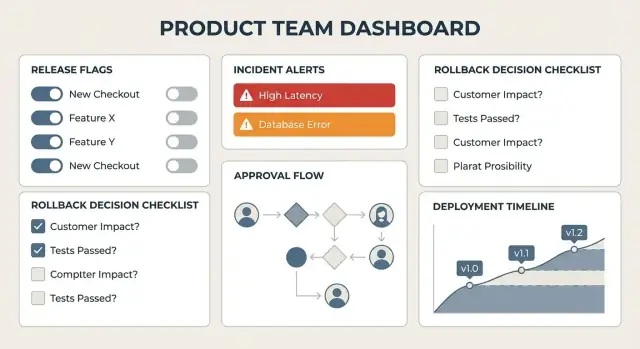
What the App Should Solve (and for Whom)
A “rollback decision” is the moment a team decides whether to undo a change that’s already in production—disabling a feature flag, reverting a deployment, rolling back a config, or pulling a release. It sounds simple until you’re in the middle of an incident: signals conflict, ownership is unclear, and every minute without a decision has a cost.
Teams struggle because the inputs are scattered. Monitoring graphs live in one tool, support tickets in another, deploy history in CI/CD, feature flags somewhere else, and the “decision” is often just a rushed chat thread. Later, when someone asks “why did we roll back?” the evidence is gone—or painful to reconstruct.
The app’s goal
The goal of this web app is to create one place where:
- Signals are gathered (metrics, error rates, customer impact, experiment results).
- Decisions are recorded (what you chose, who approved, what alternatives were considered).
- Actions are coordinated (what rollback step was executed, when, and by whom).
That doesn’t mean it should be a big red button that automatically rolls things back. By default, it’s decision support: it helps people move from “we’re worried” to “we’re confident” with shared context and a clear workflow. You can add automation later, but the first win is reducing confusion and speeding up alignment.
Who it’s for
A rollback decision touches multiple roles, so the app should serve different needs without forcing everyone into the same view:
- Engineering: verify what changed, compare current vs previous behavior, execute safe rollback steps.
- Product: weigh user impact, revenue risk, and whether a partial rollback (or flag-off) meets goals.
- Support/Success: contribute real customer reports, severity, and affected segments.
- Ops/SRE: focus on stability, incident response, and blast-radius reduction.
When this works well, you don’t just “roll back faster.” You make fewer panic moves, keep a cleaner audit trail, and turn each production scare into a repeatable, calmer decision process.
Roles, Responsibilities, and User Journeys
A rollback decision app works best when it mirrors how people actually respond to risk: someone spots a signal, someone coordinates, someone decides, and someone executes. Start by defining the core roles, then design journeys around what each person needs in the moment.
Primary roles (and what they need)
On-call engineer needs speed and clarity: “What changed, what’s breaking, and what’s the safest action right now?” They should be able to propose a rollback, attach evidence, and see whether approvals are required.
Product owner needs customer impact and trade-offs: “Who is affected, how severe is it, and what do we lose if we roll back?” They often contribute context (feature intent, rollout plan, comms) and may be an approver.
Incident commander needs coordination: “Are we aligned on the current hypothesis, decision status, and next steps?” They should be able to assign owners, set a decision deadline, and keep stakeholders synchronized.
Approver (engineering manager, release captain, compliance) needs confidence: “Is this decision justified and reversible, and does it follow policy?” They require a concise decision summary plus supporting signals.
Key jobs to be done (the user journeys)
- Detect issues: monitoring alerts, support tickets, and deployment notes land in a single incident view.
- Assess impact: quickly compare error rates, affected cohorts, and recent changes.
- Decide: propose options (rollback, disable via flag, wait for more data) with explicit reasoning.
- Execute: trigger the rollback or flag change (or hand off to a tool) and confirm completion.
- Document: record who decided what, when, and why—without extra busywork.
Permissions that prevent chaos
Define four clear capabilities: propose, approve, execute, and view. Many teams allow anyone on-call to propose, a small group to approve, and only a limited set to execute in production.
Common failure points to design against
Most rollback decisions go sideways due to scattered context, unclear ownership, and missing logs/evidence. Your app should make ownership explicit, keep all inputs in one place, and capture a durable record of what was known at decision time.
Data Model: Features, Releases, Incidents, and Decisions
A rollback app succeeds or fails on whether its data model matches how your team actually ships software and handles risk. Start with a small set of clear entities, then add structure (taxonomy and snapshots) that makes decisions explainable later.
Core entities (the “nouns”)
At minimum, model these:
- Feature: the thing being changed (often tied to a flag, config, or code path).
- Release: a deployable package/version that may include many features.
- Environment: where the release runs (prod, staging, region, tenant, etc.).
- Incident: a customer-impacting event or internal alert cluster.
- Decision: the recorded choice (rollback, mitigate, monitor, etc.).
- Action: what was executed (disable flag, revert commit, redeploy, hotfix).
- Metric Snapshot: captured evidence at decision time (error rate, latency, churn signals).
Relationships you’ll rely on
Keep relationships explicit so dashboards can answer “what’s affected?” quickly:
- Feature ↔ Release: many-to-many (a feature can ship in multiple releases; a release includes many features).
- Release ↔ Environment: one release can be deployed to multiple environments, with different timestamps and health.
- Incident ↔ Decision: usually one-to-many (an incident may trigger multiple decisions over time).
- Decision ↔ Action: one-to-many (a decision can require several actions and verifications).
Immutable vs editable data
Decide early what must never change:
- Immutable: audit events (who approved, when executed, before/after values, links to evidence), metric snapshots.
- Editable: notes, tags, incident summaries, and optional “reason” commentary—edited with version history.
Taxonomy that keeps reporting sane
Add lightweight enums that make filtering consistent:
- Severity (S0–S4), Impact (users affected, revenue risk), Status (open/monitoring/resolved)
- Decision outcome (rollback/disable flag/partial rollout/monitor)
- Reason codes (performance regression, elevated errors, billing mismatch, UX break, security concern)
This structure supports fast incident triage dashboards and creates an audit trail that holds up during post-incident reviews.
Rollback Types and What “Rollback” Means in Your Team
Before you build workflows and dashboards, define what your team means by “rollback.” Different teams use the same word to describe very different actions—with very different risk profiles. Your app should make the type of rollback explicit, not implied.
Choose your rollback mechanisms
Most teams need three core mechanisms:
- Re-deploy a previous version: roll back the entire service or frontend bundle to the last known-good artifact. This is broad, slower, and can undo unrelated changes.
- Disable a feature flag: turn off a specific capability while keeping the deployment intact. This is usually the fastest and safest path when flags are available.
- Config toggle / kill switch: change runtime configuration (rate limits, routing rules, recommendation weights, etc.). Useful when flags aren’t present, but it can be harder to reason about and verify.
In the UI, treat these as distinct “action types” with their own prerequisites, expected impact, and verification steps.
Environments and regions aren’t an afterthought
A rollback decision often depends on where the issue is happening. Model scope explicitly:
- Environment: dev/staging/prod (and any shared test envs).
- Region or shard:
us-east,eu-west, a specific cluster, or a percentage rollout.
Your app should let a reviewer see “disable flag in prod, EU only” vs “global prod rollback,” because those are not equivalent decisions.
Safe actions vs tracked-only actions
Decide what the app is allowed to trigger:
- Safe, automatable actions (e.g., disable a flag, pause a rollout) can be executed directly with guardrails.
- High-risk or multi-step actions (e.g., database rollback, emergency redeploy) might be tracked: the app records who approved, what was done, and evidence—while execution happens in CI/CD or by SRE.
Idempotency: prevent double rollbacks
Make actions idempotent to avoid conflicting clicks during an incident:
- Use a unique action key (feature + environment + region + mechanism + target state).
- Detect “already applied” states and turn “Execute” into “Verify.”
- Lock or serialize conflicting actions (e.g., don’t allow “redeploy previous version” while a “flag off” action is pending).
Clear definitions here keep your approval workflow calm and your incident timeline clean.
Decision Inputs: Signals, Thresholds, and Context
Rollback decisions get easier when the team agrees on what “good evidence” looks like. Your app should turn scattered telemetry into a consistent decision packet: signals, thresholds, and the context that explains why those numbers changed.
A signal checklist (standard, not optional)
Build a checklist that always appears for a release or feature under review. Keep it short, but complete:
- Error rate (overall and by endpoint)
- Latency (p95/p99) and timeouts
- Conversion or funnel drop at key steps
- Crash reports (app version, device/OS, top stacks)
- Support tickets (volume and top categories)
The goal isn’t to show every chart—it’s to confirm the same core signals were checked every time.
Thresholds that respect trends (not single spikes)
Single spikes happen. Decisions should be driven by sustained deviation and rate of change.
Support both:
- Static thresholds (e.g., “error rate > 2% for 10 minutes”)
- Baseline-aware thresholds (e.g., “conversion down > 5% vs same day last week”)
In the UI, show a small “trend strip” next to each metric (last 60–120 minutes) so reviewers can tell whether the problem is growing, stable, or recovering.
Context: a “Known changes” panel
Numbers without context waste time. Add a “Known changes” panel that answers:
- What shipped in the last 24 hours?
- Where did it ship (regions, platforms, cohorts)?
- What changed outside the product (campaigns, outages, third-party status)?
This panel should pull from release notes, feature flags, and deployments, and it should make “nothing changed” an explicit statement—not an assumption.
Fast paths to deeper evidence
When someone needs details, provide quick links that open the right place immediately (dashboards, traces, tickets) via /integrations, without turning your app into yet another monitoring tool.
Workflow: Propose, Review, Approve, Execute
A rollback decision app earns its keep when it turns “everyone in a chat thread” into a clear, time-boxed workflow. The goal is simple: one accountable proposer, a defined set of reviewers, and a single final approver—without slowing down urgent action.
1) Propose: create a decision record
The proposer starts a Rollback Proposal tied to a specific release/feature. Keep the form quick, but structured:
- What’s affected: feature, environment, rollout percentage
- Recommended action: rollback / pause rollout / keep shipping
- Impact snapshot: key metrics and customer symptoms
- “Why” (required): structured reasons (e.g., error spike, revenue drop, security concern) plus free-text notes
The proposal should immediately generate a shareable link and notify the assigned reviewers.
2) Review: gather signal, not opinions
Reviewers should be prompted to add evidence and a stance:
- Approve, Request changes, or Block (with a reason)
To keep discussions productive, store notes next to the proposal (not scattered across tools), and encourage linking to tickets or monitors using relative links like /incidents/123 or /releases/45.
3) Approve: one person makes the call
Define a final approver (often the on-call lead or product owner). Their approval should:
- Lock in the chosen action
- Record the approver’s rationale
- Stamp time, identity, and any conditions (e.g., “rollback now, reassess in 30 minutes”)
SLAs and reminders
Rollbacks are time-sensitive, so bake in deadlines:
- Reviewer response SLA (e.g., 10 minutes)
- Final approval SLA (e.g., 5 minutes after reviews complete)
If the SLA is missed, the app should escalate—first to a backup reviewer, then to an on-call manager—while keeping the decision record unchanged and auditable.
Emergency mode (break-glass)
Sometimes you can’t wait. Add a Break-glass Execute path that allows immediate action while requiring:
- A mandatory “why” note
- Extra logging (who executed, from where, what exactly changed)
- Auto-created follow-up tasks: post-incident review, customer comms draft, and a verification checklist
4) Execute: confirm, verify, close
Execution shouldn’t end at “button clicked.” Capture confirmation steps (rollback completed, flags updated, monitoring checked) and close the record only when verification is signed off.
UI/UX: Dashboards That Support Fast, Calm Decisions
When a release is misbehaving, people don’t have time to “figure out the tool.” Your UI should reduce cognitive load: show what’s happening, what’s been decided, and what the safe next actions are—without burying anyone in charts.
Key screens to plan
Overview (home dashboard). This is the triage entry point. It should answer three questions in seconds: What’s currently at risk? What decisions are pending? What changed recently? A good layout is a left-to-right scan: active incidents, pending approvals, and a short “latest releases / flag changes” stream.
Incident/Decision page. This is where the team converges. Pair a narrative summary (“What we’re seeing”) with live signals and a clear decision panel. Keep the decision controls in a consistent location (right rail or sticky footer) so people don’t hunt for “Propose rollback.”
Feature page. Treat this as the “owner view”: current rollout state, recent incidents linked to the feature, associated flags, known risky segments, and a history of decisions.
Release timeline. A chronological view of deployments, flag ramps, config changes, and incidents. This helps teams connect cause and effect without jumping between tools.
Make status obvious (and hard to misread)
Use prominent, consistent status badges:
- Current risk level: e.g., Normal / Elevated / Critical
- Decision state: Draft → In Review → Approved → Executing → Completed (or Rejected)
- Last action: who did what, and when (with one-click details)
Avoid subtle color-only cues. Pair color with labels and icons, and keep wording consistent across every screen.
The “decision pack” view
A decision pack is a single, shareable snapshot that answers: Why are we considering a rollback, and what are the options?
Include:
- Signals: key metrics, error trends, user impact, and alerts (with thresholds highlighted)
- Change summary: what shipped, which flags changed, and affected services
- Recommended options: rollback types available to your team (e.g., disable flag, revert deploy), with estimated blast radius and time-to-execute
This view should be easy to paste into chat and easy to export later for reporting.
Accessibility basics that matter under pressure
Design for speed and clarity:
- Clear labels (avoid jargon-only buttons like “Execute” without context)
- Strong contrast and readable font sizes
- Full keyboard navigation for critical actions (review, approve, execute)
- Focus states and confirmation dialogs that prevent accidental high-stakes clicks
The goal isn’t flashy dashboards—it’s a calm interface that makes the right action feel obvious.
Integrations: Deployments, Flags, Monitoring, and Ticketing
Integrations are what turn a rollback app from “a form with opinions” into a decision cockpit. The goal isn’t to ingest everything—it’s to reliably pull in the few signals and controls that let a team decide and act quickly.
Key integration points
Start with five sources most teams already use:
- Deployment system (CI/CD): what shipped, when, by whom, and the rollout scope (region, cluster, % rollout).
- Feature flag service: current flag state, targeting rules, and change history.
- Monitoring & analytics: error rate, latency, crash-free users, conversion drops, key business KPIs.
- Ticketing / incident tools: incident status, severity, affected services, assigned responders.
- Chat (Slack/Teams): lightweight updates, approvals, and links back to the decision record.
Choosing an integration style (with a safe fallback)
Use the least fragile method that still meets your speed requirements:
- Webhooks for events that matter immediately (deployment finished, flag toggled, incident created).
- Polling for tools without reliable webhooks (some analytics APIs), with clear intervals and backoff.
- API clients for on-demand lookups (“show me the last 5 deploys to service X”).
- Manual entry fallback when systems are down or access isn’t available. Make it explicit: label entries as “manual” and require a short reason.
Normalize events into one consistent format
Different systems describe the same thing differently. Normalize incoming data into a small, stable schema such as:
source(deploy/flags/monitoring/ticketing/chat)entity(release, feature, service, incident)timestamp(UTC)environment(prod/staging)severityandmetric_valueslinks(relative links to internal pages like /incidents/123)
This lets the UI show a single timeline and compare signals without bespoke logic per tool.
Handling failures without losing trust
Integrations fail; the app shouldn’t become silent or misleading.
- Retries with backoff for transient errors.
- A dead-letter queue for bad payloads, with a way to replay after fixing mapping.
- An integration health page (/integrations/health) showing last success time, error counts, and degraded-mode behavior.
When the system can’t verify a signal, say so plainly—uncertainty is still useful information.
Audit Trail, Evidence Snapshots, and Reporting
When a rollback is on the table, the decision itself is only half the story. The other half is making sure you can later answer: why did we do this, and what did we know at the time? A clear audit trail reduces second-guessing, speeds up reviews, and makes handoffs between teams calmer.
Define the audit events (the “who/what/when/where”)
Treat your audit trail as an append-only record of notable actions. For each event, capture:
- Who: user ID, display name, role, and team
- What: the action (e.g., “Proposed rollback,” “Approved,” “Executed,” “Cancelled”), plus the object affected (feature/release/incident)
- When: timestamp in UTC (and optionally local time for display)
- From where: IP address, user agent, and workspace/environment (prod/staging)
- What changed: before/after values for key fields (thresholds, rollout percentage, chosen rollback type, linked tickets)
This makes the audit log useful without forcing you into a complex “compliance” narrative.
Evidence snapshots: freeze the facts at decision time
Metrics and dashboards change minute by minute. To avoid “moving target” confusion, store evidence snapshots whenever a proposal is created, updated, approved, or executed.
A snapshot can include: the query used (e.g., error rate for feature cohort), the values returned, charts/percentiles, and links to the original source. The goal is not to mirror your monitoring tool—it’s to preserve the specific signals the team relied on.
Retention, exports, and reporting
Decide retention by practicality: how long you want incident/decision history to stay searchable, and what gets archived. Offer exports that teams actually use:
- CSV for analysis
- PDF for sharing decision summaries
Add fast search and filters across incidents and decisions (service, feature, date range, approver, outcome, severity). Basic reporting can summarize counts of rollbacks, median time to approval, and recurring triggers—useful for product operations and post-incident reviews.
Security and Access Control for High-Stakes Actions
A rollback decision app is only useful if people trust it—especially when it can change production behavior. Security here isn’t just “who can log in”; it’s how you prevent rushed, accidental, or unauthorized actions while still moving quickly during an incident.
Authentication: prove identity (humans and systems)
Offer a small set of clear sign-in paths and make the safest one the default.
- SSO/OAuth for employees (Google Workspace, Okta, Azure AD). This reduces password risk and centralizes offboarding.
- Email login as a fallback for contractors or small teams, ideally with magic links or MFA.
- Service accounts for integrations (CI/CD, monitoring, ticketing). These should be non-human identities with tightly scoped permissions and short-lived tokens when possible.
Authorization: decide what each identity can do
Use role-based access control (RBAC) with environment scoping so permissions are different for dev/staging/production.
A practical model:
- Viewer: read dashboards, audit trail, evidence snapshots.
- Operator: propose rollback, attach evidence, run dry-run checks.
- Approver: approve/deny production rollbacks.
- Admin: manage roles, integrations, retention.
Environment scoping matters: someone might be an Operator in staging but only a Viewer in production.
Protect the most dangerous actions
Rollbacks can be high-impact, so add friction where it prevents mistakes:
- Confirmations with explicit details (“Rollback feature X in production to version Y”).
- A two-person rule for high-risk steps (e.g., production rollback execution requires one proposer and a separate approver).
- Optional time-bound approvals (approval expires after 15 minutes) to reduce “stale green lights.”
Secure tokens and create an audit you can defend
Log sensitive access (who viewed incident evidence, who changed thresholds, who executed rollback) with timestamps and request metadata. Make logs append-only and easy to export for reviews.
Store secrets—API tokens, webhook signing keys—in a vault (not in code, not in plain database fields). Rotate them, and revoke immediately when an integration is removed.
Architecture and Build Plan (MVP to Production)
A rollback decision app should feel lightweight to use, but it’s still coordinating high-stakes actions. A clean build plan helps you ship an MVP quickly without creating a “mystery box” no one trusts later.
Start simple: UI + API + database + jobs
For an MVP, keep the core architecture boring:
- Web UI: dashboards, decision forms, approvals, and history views.
- API: a single service that owns the business rules (what can be approved, by whom, with what evidence).
- Database: store releases, features/flags, incidents, decisions, and evidence snapshots.
- Background jobs: ingest webhook events, poll metrics, generate reports, and send notifications.
This shape supports the most important goal: a single source of truth for what was decided and why, while letting integrations happen asynchronously (so a slow third-party API doesn’t block the UI).
Pick a stack that fits your team
Choose what your team can operate confidently. Typical combinations include:
- Backend: Node.js (Express/Nest), Python (Django/FastAPI), Ruby on Rails, or Go.
- Frontend: React, Vue, or server-rendered templates if you want maximum simplicity.
- Database: Postgres is a common fit (relational data + audit history).
- Jobs/queue: Sidekiq, Celery, BullMQ, or a managed queue.
If you’re a small team, favor fewer moving parts. One repo and one deployable service is often enough until usage proves otherwise.
If you want to accelerate the first working version without sacrificing maintainability, a vibe-coding platform like Koder.ai can be a practical starting point: you can describe the roles, entities, and workflow in chat, generate a React web UI with a Go + PostgreSQL backend, and iterate quickly on forms, timelines, and RBAC. It’s especially useful for this kind of internal tool because you can build an MVP, export the source code, and then harden integrations, audit logging, and deployment over time.
Testing strategy: confidence where it matters
Focus tests on the parts that prevent mistakes:
- Unit tests for decision rules: thresholds, required approvers, time windows, and “cannot execute twice” protections.
- Integration tests for webhooks: verify you correctly validate signatures, handle retries, and remain idempotent.
- UI smoke tests: ensure the critical journey (open release → review signals → approve → execute) doesn’t break.
Operational basics you’ll be glad you added early
Treat the app like production software from day one:
- Monitoring: API latency, job queue depth, webhook failures, and execution success rate.
- Backups: automated DB backups with periodic restore tests.
- Runbooks: create a simple page like /docs/runbooks covering “webhooks failing,” “queue stuck,” “can’t execute rollback,” and “how to revoke access.”
Plan the MVP around decision capture + auditability, then expand into richer integrations and reporting once teams rely on it daily.
FAQ
What is a “rollback decision,” and why is it hard in practice?
A rollback decision is the point where the team chooses whether to undo a production change—by reverting a deploy, disabling a feature flag, rolling back a config, or pulling a release. The hard part isn’t the mechanism; it’s aligning quickly on evidence, ownership, and next steps while the incident is unfolding.
Is this app supposed to automatically roll things back?
It’s primarily for decision support first: consolidate signals, structure the proposal/review/approval flow, and preserve an audit trail. Automation can come later, but the initial value is reducing confusion and speeding up alignment with shared context.
Who should use a rollback decision app?
It should serve multiple roles with tailored views:
- On-call engineering: what changed, what’s breaking, safest next action
- Incident commander: coordination, assignments, deadlines, decision status
- Product owner: user/revenue impact, trade-offs, comms context
- Approvers (EM/release captain/compliance): justification, reversibility, policy adherence
- Support/Success: real customer reports, affected segments, severity
The same decision record should be understandable to all of them, without forcing identical workflows.
What’s the minimum data model needed for this kind of app?
Start with a small set of core entities:
- Feature, Release, Environment
- Incident, Decision, Action
- Metric Snapshot (frozen evidence at decision time)
Then make relationships explicit (e.g., Feature ↔ Release as many-to-many, Decision ↔ Action as one-to-many) so you can answer “what’s affected?” fast during an incident.
What rollback types should the app support?
Treat “rollback” as distinct action types with different risk profiles:
- Redeploy previous version (broad, can undo unrelated changes)
- Disable a feature flag (often fastest/safest when available)
- Config toggle / kill switch (powerful but harder to reason about)
The UI should force the team to pick the mechanism explicitly and capture scope (env/region/% rollout).
What signals should be included in a “decision pack”?
A practical checklist includes:
- Error rate (overall and by endpoint)
- Latency p95/p99 and timeouts
- Conversion/funnel drops
- Crash reports (top stacks, affected versions/devices)
- Support ticket volume and categories
Support both static thresholds (e.g., “>2% for 10 minutes”) and baseline-aware comparisons (e.g., “down 5% vs same day last week”), and show small trend strips so reviewers can see direction, not just a point value.
How should the propose-review-approve-execute workflow work?
Use a simple, time-boxed flow:
- Propose: create a structured proposal tied to a release/feature with a required “why”
- Review: reviewers add evidence and a stance (Approve / Request changes / Block)
- Approve: a designated final approver records rationale and conditions
- Execute: track completion and require verification before closing
Add SLAs (review/approval deadlines) and escalation to backups so the record stays clear even under time pressure.
What is “break-glass” mode and what safeguards should it require?
Break-glass should allow immediate execution but increase accountability:
- Mandatory why note
- Extra logging (who executed, what changed, from where)
- Auto-created follow-ups (post-incident review task, comms draft, verification checklist)
This keeps the team fast in true emergencies while still producing a defensible record afterward.
How do you prevent double rollbacks or conflicting actions during an incident?
Make actions idempotent so repeated clicks don’t create conflicting changes:
- Generate a unique key (feature + env + region + mechanism + target state)
- Detect “already applied” and turn Execute into Verify
- Lock or serialize conflicting actions (e.g., don’t redeploy while a flag-off is pending)
This prevents double rollbacks and reduces chaos when multiple responders are active.
Which integrations matter most, and how should you implement them safely?
Prioritize five integration points:
- CI/CD deployments (what shipped, when, scope)
- Feature flag service (state, targeting, history)
- Monitoring/analytics (errors, latency, KPIs)
- Ticketing/incident tools (severity, ownership, status)
- Chat (updates and links back to the decision record)
Use webhooks where immediacy matters, polling where necessary, and keep a manual fallback that’s clearly labeled and requires a reason so degraded operation remains trustworthy.