

Build a Web App to Manage Marketplace Disputes End-to-End
Learn how to plan, design, and build a web app to handle marketplace disputes: case intake, evidence, workflows, roles, audit trails, integrations, and reporting.
What a Marketplace Dispute App Needs to Solve
A dispute app isn’t just a “support form with a status.” It’s the system that decides how money, items, and trust move through your marketplace when something goes wrong. Before you draw screens or tables, define the problem space clearly—otherwise you’ll build a tool that’s easy to use but hard to enforce.
Define what “dispute” means for your marketplace
Start by listing the dispute types you actually need to handle and how they differ. Common categories include:
- Item not received (shipping delays, wrong address, lost parcel)
- Not as described / damaged (quality issues, missing parts)
- Fraud / unauthorized purchase (account takeover, stolen payment method)
- Chargebacks (bank-driven disputes with strict evidence and deadlines)
Each type tends to require different evidence, time windows, and outcomes (refund, replacement, partial refund, seller payout reversal). Treat the dispute type as a workflow driver—not just a label.
Clarify goals (so you can make tradeoffs)
Dispute handling usually competes on speed, consistency, and loss prevention. Write down what success looks like in your context:
- Faster resolution: fewer back-and-forth messages and clearer deadlines
- Fewer errors: standardized decisions and fewer “special case” exceptions
- Better buyer/seller experience: transparency, status clarity, predictable next steps
- Lower losses: reduce unnecessary refunds, prevent repeat abuse, win more chargebacks
These goals influence everything from what data you collect to which actions you automate.
Identify who uses the system (and what they need)
Most marketplaces have more than “customer support.” Typical users include buyers, sellers, support agents, admins, and finance/risk. Each group needs a different view:
- Buyers and sellers: simple steps, clear evidence requests, deadline reminders
- Support agents: queues, templates, internal notes, decision guidance
- Admin/finance: audit trail, payout controls, chargeback exports, reporting
Decide what’s in v1 vs later
A strong v1 usually focuses on: creating a case, collecting evidence, messaging, tracking deadlines, and recording a decision with an audit trail.
Later releases can add: automated refund rules, fraud signals, advanced analytics, and deeper integrations. Keeping scope tight early prevents a “do everything” system that no one trusts.
If you’re moving fast, it can help to prototype the workflow end-to-end before committing to a full build. For example, teams sometimes use Koder.ai (a vibe-coding platform) to spin up an internal React admin dashboard + Go/PostgreSQL backend from a chat-driven spec, then export the source code once the core case states and permissions feel right.
Model the Dispute Workflow and States
A dispute app succeeds or fails based on whether it mirrors how disputes actually move through your marketplace. Start by mapping the current journey end-to-end, then turn that map into a small set of states and rules the system can enforce.
Map the dispute journey (step-by-step)
Write the “happy path” as a timeline: intake → evidence collection → review → decision → payout/refund. For each step, note:
- Who acts next (buyer, seller, agent, automated check)
- What information is required (photos, tracking, messages)
- What changes in the order/payment status (hold funds, refund initiated)
This becomes the backbone for automation, reminders, and reporting.
Define clear states (and what they mean)
Keep states mutually exclusive and easy to understand. A practical baseline:
- Opened: dispute created, waiting for initial info
- Waiting on buyer / Waiting on seller: action required by a party
- Under review: agent or automated rules evaluating evidence
- Resolved: decision executed (refund/release/replacement)
- Appealed: decision challenged, second-level review
For every state, define entry criteria, allowed transitions, and required fields before moving forward. This prevents stuck cases and inconsistent outcomes.
Time limits, SLAs, and escalation rules
Attach deadlines to states (e.g., seller has 72 hours to provide tracking). Add automatic reminders, and decide what happens when time runs out: auto-close, default decision, or escalation to manual review.
Outcomes and actions
Model outcomes separately from states so you can track what happened: refund, partial refund, replacement, release funds, account restriction/ban, or goodwill credit.
Capture exceptions early
Disputes get messy. Include paths for missing tracking, split shipments, digital goods delivery proofs, and orders with multiple items (item-level decisions vs full-order decisions). Designing these branches early avoids one-off handling that breaks consistency later.
Design the Data Model (Cases, Evidence, Decisions)
A dispute app succeeds or fails on whether the data model matches real-world questions: “What happened?”, “What’s the proof?”, “What did we decide?”, and “Can we show an audit trail later?” Start by naming a small set of core entities and being strict about what can change.
Core entities (and why they exist)
At minimum, model:
- Order (what was purchased, when, by whom)
- Payment (amounts, currency, authorization/capture/refund references)
- User (buyer, seller, agent/admin)
- Dispute / Case (the container that tracks the workflow)
- Claim reason (standardized reason codes and descriptions)
- Evidence (files, links, structured facts like tracking IDs)
- Message (conversation history and system notices)
- Decision (outcome, rationale, amounts, effective dates)
Keep “Dispute” focused: it should reference the order/payment, store status, deadlines, and pointers to evidence and decisions.
Immutable vs. editable data
Treat anything that must be defensible later as append-only:
- Status changes (who/when/why)
- Decisions and reversals
- Evidence uploads and deletions (record tombstones, not hard deletes)
- Amount changes tied to refunds/chargebacks
Allow edits only for operational convenience:
- Internal notes, tags, queue assignment
- Display-only metadata (e.g., “seller tier”) that can be re-synced
This split is easiest with an audit trail table (event log) plus current “snapshot” fields on the case.
Required fields and validation
Define strict validation early:
- Reason codes from a controlled list (map to payment processor codes if needed)
- Amounts with currency, precision rules, and non-negative constraints
- Dates for opened/received, response deadlines, resolution time
- Attachments required for certain reasons (e.g., tracking for “item not received”)
Attachments, security, and retention
Plan for evidence storage: allowed file types, size limits, virus scanning, and retention rules (e.g., auto-delete after X months if policy allows). Store file metadata (hash, uploader, timestamp) and keep the blob in object storage.
Case IDs and searchable metadata
Use a consistent, human-readable case ID scheme (e.g., DSP-2025-000123). Index searchable fields like order ID, buyer/seller IDs, status, reason, amount range, and key dates so agents can find cases fast from the queue.
Roles, Permissions, and Sensitive Data Controls
Disputes involve multiple parties and high-risk data. A clear role model reduces mistakes, speeds decisions, and helps you meet compliance expectations.
Define roles and what each can do
Start with a small, explicit set of roles and map them to actions—not just screens:
- Buyer / Seller: create a dispute, upload evidence, view only the information they’re allowed to see, respond to messages, accept or reject proposed resolutions
- Agent: triage cases, request more info, set deadlines, draft decisions, and apply standard outcomes (refund, replacement, deny)
- Supervisor: override decisions, reopen cases, approve escalations, and manage templates/policies
- Finance: execute or approve money movement (refunds, payout holds/releases), and view only the payment fields needed
- Admin: configure roles, integrations, and retention rules—ideally without reading case content by default
Use least-privilege defaults and add “break glass” access only for audited emergencies.
Authentication and privileged access
For staff, support SSO (SAML/OIDC) when available so access follows HR lifecycle. Require MFA for privileged roles (supervisor, finance, admin) and for any action that changes money or a final decision.
Session controls matter: short-lived tokens for staff tools, device-bound refresh where possible, and automatic logout for shared workstations.
PII, payment data, and field-level visibility
Separate “case facts” from sensitive fields. Apply field-level permissions for:
- Personally identifiable information (address, phone, email)
- Payment details (never store full PAN; tokenize and mask)
- Internal notes and risk flags
Redact by default in the UI and logs. If someone needs access, record why.
Audit trail and evidence visibility rules
Maintain an immutable audit log for sensitive actions: decision changes, refunds, payout holds, evidence deletion, permission changes. Include timestamp, actor, old/new values, and source (API/UI).
For evidence, define consent and sharing rules: what the other party can see, what remains internal (e.g., fraud signals), and what must be partially redacted before sharing.
User Experience: Case Queue and Case Detail Screens
A dispute tool lives or dies on speed: how quickly an agent can triage a case, understand what happened, and take a safe action. The UI should make “what needs attention now” obvious, while keeping sensitive data and irreversible decisions hard to click by accident.
Case queue: fast triage with meaningful filters
Your case list should behave like an operations console, not a generic table. Include filters that mirror how teams actually work: status, reason, amount, age/SLA, seller, and risk score. Add saved views (e.g., “New high-value”, “Overdue”, “Awaiting buyer response”) so agents don’t rebuild filters every day.
Make the rows scannable: case ID, status chip, days open, amount, party (buyer/seller), risk indicator, and the next deadline. Keep sorting predictable (default by urgency/SLA). Bulk actions are useful, but limit them to safe operations like assign/unassign or add internal tags.
Case detail: everything needed, nothing distracting
The case detail page should answer three questions within seconds:
- What happened?
- What evidence do we have?
- What’s the next action and deadline?
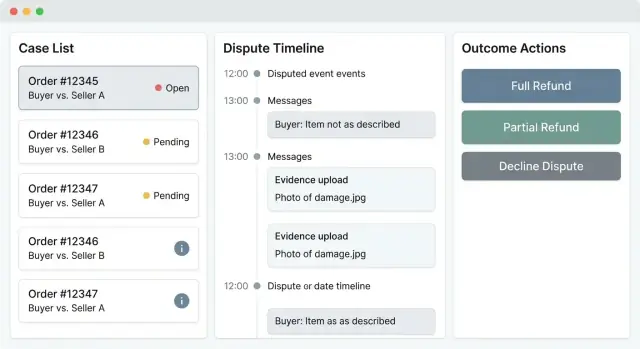
A practical layout is a timeline down the center (events, status changes, payments/shipping signals), with a right-side snapshot panel for order/payment context (order total, payment method, shipment status, refunds/chargebacks, key IDs). Keep deep links to related objects (order, payment, shipment) as relative routes like /orders/123 and /payments/abc.
Add a messages area and an evidence gallery that supports quick preview (images, PDFs) plus metadata (who submitted, when, type, verification state). Agents should never have to hunt through attachments to understand the latest update.
Clear, safe actions (with guardrails)
Decisioning actions (refund, deny, request more info, escalate) must be unambiguous. Use confirmations for irreversible steps and require structured inputs: a required note, reason code, and optional decision templates for consistent wording.
Separate collaboration channels: internal notes (agent-only, for handoffs) versus external messages (buyer/seller visible). Include assignment controls and a visible “current owner” to prevent duplicate work.
Accessibility and mobile-friendly reviews
Design for keyboard navigation, readable status contrast, and screen reader labels—especially on action buttons and form fields. Mobile views should prioritize the snapshot, last message, next deadline, and a one-tap route to the evidence gallery for quick reviews during on-call shifts.
Messaging, Notifications, and Deadlines
Disputes are mostly communication problems with a timer attached. Your app should make it obvious who needs to do what next, by when, and through which channel—without forcing people to dig through email threads.
Channels: in-app first, email always, SMS optional
Use in-app messaging as the source of truth: every request, reply, and attachment should live on the case timeline. Then mirror key updates via email notifications (new message, evidence requested, deadline approaching, decision issued). If you add SMS, keep it for time-sensitive nudges (e.g., “Deadline in 24 hours”) and avoid putting sensitive details in the text.
Templates that reduce back-and-forth
Create message templates for common requests so agents stay consistent and users know what “good evidence” looks like:
- Proof of delivery request (carrier, tracking link, delivery scan)
- Photo request (item condition, packaging, serial number)
- Return instructions (address, RMA, deadline, allowed carriers)
Allow placeholders like order ID, dates, and amounts, plus a short “human edit” area so replies don’t feel robotic.
Deadlines, reminders, and what happens if time runs out
Every request should generate a deadline (e.g., seller has 3 business days to respond). Show it prominently on the case, send automated reminders (48h and 24h), and define clear outcomes for non-response (e.g., auto-close, auto-refund, or escalate).
Multilingual and safe by default
If you serve multiple regions, store message content with a language tag and provide localized templates. To prevent abuse, add rate limits per case/user, attachment size/type limits, virus scanning, and safe rendering (no inline HTML, sanitize filenames). Keep an audit trail of who sent what and when.
Evidence Collection and Verification
Evidence is where most disputes are won or lost, so your app should treat it like a first-class workflow—not a pile of attachments.
Plan the evidence you’ll accept
Start by defining evidence types you expect to see across common marketplace disputes: tracking links and delivery scans, photos of packaging or damage, invoices/receipts, chat logs, return labels, and internal notes. Making these types explicit helps you validate inputs, standardize review, and improve reporting later.
Request evidence based on the dispute reason
Avoid generic “upload anything” prompts. Instead, generate structured evidence requests from the dispute reason (e.g., “Item not received” → carrier tracking + proof of delivery; “Not as described” → product listing snapshot + buyer photos). Each request should include:
- What to upload
- A short example (what “good” looks like)
- A due date aligned to your SLA
This reduces back-and-forth and makes cases comparable across reviewers.
Add integrity and chain-of-custody controls
Treat evidence like sensitive records. For each upload, store:
- A cryptographic hash (e.g., SHA-256) of the file
- Server-side timestamp(s)
- Uploader identity (user/service), role, and IP (if appropriate)
- Immutable audit events for uploads, downloads, and deletions
These controls won’t “prove” the content is truthful, but they do prove whether the file was altered after submission and who handled it.
Make an “evidence packet” export
Disputes often end up in external review (payment processor, carrier, arbitration). Provide a one-click export that bundles key files plus a summary: case facts, timeline, order metadata, and evidence index. Keep it consistent so teams can trust it under time pressure.
Retention and deletion workflows
Evidence can contain personal data. Implement retention rules by dispute type and region, plus a tracked deletion process (with approvals and audit logs) when legally required.
Decisioning, Outcomes, and Appeals
Decisioning is where a dispute app either builds trust or creates more work. The goal is consistency: similar cases should get similar outcomes, and both parties should understand why.
Write decision policies in plain language
Start by defining policies as readable rules, not legal prose. For each dispute reason (item not received, damaged, not as described, unauthorized payment, etc.), document:
- What qualifies for approve, decline, or partial relief
- What evidence is required (and what is “nice to have”)
- What timelines apply (shipping windows, response deadlines, delivery scans)
Keep these policies versioned so you can explain decisions made under older rules and reduce “policy drift” over time.
Build decision helpers, not just buttons
A good decision screen nudges reviewers toward complete, defensible outcomes.
Use checklists per reason that automatically appear in the case view (for example: “carrier scan present,” “photo shows damage,” “listing promised X”). Each checklist item can:
- Link to the relevant evidence already in the case
- Flag missing required evidence before the reviewer can finalize
- Add templated rationale text (“Delivery confirmed by carrier on…”) that the reviewer can edit
This creates a consistent audit trail without forcing everyone to write from scratch.
Outcomes that reflect real money
Decisioning should compute financial impact, not leave it to spreadsheets. Store and display:
- Refund amount (full/partial), currency, and rounding rules
- Fees (processor, marketplace, dispute fees), shipping costs, restocking amounts
- Expected chargeback risk or exposure (even if it’s a simple score)
Make it clear whether the system will auto-issue the refund or generate a task for finance/support (especially when payments are split or partially captured).
Appeals: allow them, but control them
Appeals reduce frustration when new information appears—but they can also become infinite loops.
Define: when appeals are allowed, what “new” evidence means, who reviews (different queue/reviewer if possible), and how many attempts are permitted. On appeal, freeze the original decision and create a linked appeal record so reporting can distinguish initial vs. final outcomes.
Explain decisions to both parties
Every decision should generate two messages: one for the buyer and one for the seller. Use clear language, list the key evidence considered, and state next steps (including appeal eligibility and deadlines). Avoid jargon and avoid blaming either party—focus on facts and policy.
Integrations: Orders, Payments, Shipping, and Support Tools
Integrations turn a dispute tool from a “notes app” into a system that can verify facts and safely execute outcomes. Start by listing the external systems that must agree on reality: order management (what was purchased), payments (what was captured/refunded), shipping carriers (what was delivered), and your email/SMS provider (what was communicated, and when).
Choose the right sync strategy (webhooks vs scheduled)
For time-sensitive changes—like chargeback alerts, refund status, or ticket updates—prefer webhooks. They reduce delay and keep case timelines accurate.
Use scheduled sync when webhooks are unavailable or unreliable (common with carriers). A practical hybrid is:
- Webhooks for payments and internal order events
- Polling for shipment scans and delivery confirmation
Whichever you choose, store the “last known external status” on the case and keep the raw payload for audit and debugging.
Idempotency: the safety rail for money moves
Financial actions must be repeat-safe. Network retries, double-clicks, and webhook re-deliveries can otherwise trigger duplicate refunds.
Make every money-affecting call idempotent by:
- Generating a unique action key per case outcome (e.g.,
case_id + decision_id + action_type) - Persisting an “integration action” record before calling the payment API
- Treating repeated requests with the same key as a no-op (return the original result)
This same pattern applies to partial refunds, voids, and fee reversals.
Integration event logs for support and troubleshooting
When something doesn’t match (a refund says “pending” or a delivery scan is missing), your team needs visibility. Log every integration event with:
- Timestamp, provider, endpoint/event type
- Request/response payloads (redacting sensitive fields)
- Correlation IDs that link events to a case and to each other
Expose a lightweight “Integration” tab in the case detail screen so support can self-serve.
Sandbox and test modes
Plan safe environments from day one: payment processor sandbox, carrier test tracking numbers (or mocked responses), and email/SMS “test recipients.” Add a visible “test mode” banner in non-production so QA never accidentally triggers real refunds.
If you’re building admin tooling, document required credentials and scopes on an internal page like /docs/integrations so setup is repeatable.
Architecture Choices That Keep the App Maintainable
A dispute management system quickly grows beyond “just a few screens.” You’ll add evidence uploads, payment lookups, deadline reminders, and reporting—so the architecture should stay boring and modular.
Pick a stack your team can ship
For v1, prioritize what your team already knows. A conventional setup (React/Vue + a REST/GraphQL API + Postgres) is usually faster to deliver than experimenting with new frameworks. The goal is predictable delivery, not novelty.
If you want to accelerate the first iteration without locking yourself into a black box, a platform like Koder.ai can be useful for generating a working React + Go + PostgreSQL foundation from a written workflow spec, while still keeping the option to export the source code and take full ownership.
Separate concerns from day one
Keep clear boundaries between:
- Frontend app: the admin dashboard and any buyer/seller views
- API service: business logic, permissions, validation, audit trail
- Background jobs: notifications, exports, evidence processing, integrations
- File storage: evidence files should live outside your database (object storage), with metadata stored in your tables
This separation makes it easier to scale specific parts (like background processing) without rewriting the whole case management web app.
Use a queue for long-running work
Evidence collection and verification often involves virus scanning, OCR, file conversions, and calling external services. Exports and scheduled reminders can also be heavy. Put these tasks behind a queue so your UI stays fast and users don’t re-submit actions. Track job status on the case so operators understand what’s pending.
Plan for search and filtering performance
Case queues live and die by search. Design for filtering by status, SLA/deadlines, payment method, risk flags, and assigned agent. Add indexes early, and consider full-text search only if basic indexing can’t meet your needs. Also design pagination and “saved views” for common workflows.
Environments, deployments, and rollbacks
Define staging and production from the start, with seed data that mirrors real dispute scenarios (chargeback workflow, refund automation, appeals). Use versioned migrations, feature flags for risky changes, and a rollback plan so you can deploy often without breaking active cases.
If your team values fast iteration, features like snapshots and rollback (available in platforms like Koder.ai) can be a practical complement to traditional release controls—especially while your workflows and permissions are still evolving.
Reporting, Analytics, and Continuous Improvement
A dispute management system gets better when you can see what’s happening across cases—fast. Reporting isn’t just for executives; it helps agents prioritize work, helps managers spot operational risk, and helps the business adjust policies before costs creep up.
Start with the metrics that change decisions
Track a small set of actionable KPIs and make them visible everywhere:
- Resolution time (average and p90), split by reason code and seller segment
- Backlog size and aging buckets (e.g., 0–2 days, 3–7, 8+)
- Win rates for chargebacks and appeals, by payment method and evidence type
- Refund totals and refund rate, plus preventable refunds (policy gaps)
- Repeat offenders (buyers and sellers), with thresholds and trendlines
Dashboards for agents vs. managers
Agents need an operational view: “What should I work next?” Build a queue-style dashboard that highlights SLA breaches, impending deadlines, and “missing evidence” cases.
Managers need pattern detection: spikes in specific reason codes, high-risk sellers, unusual refund totals, and win-rate drops after policy changes. A simple week-over-week view often beats an overbuilt chart page.
Exports without leaking sensitive data
Support CSV exports and scheduled reports, but put guardrails around them:
- Role-based export permissions
- Column-level redaction (PII, payment identifiers)
- Audit logs for who exported what and when
Improve data quality with tags and reason codes
Analytics only works if cases are labeled consistently. Use controlled reason codes, optional tags (free-form but normalized), and validation prompts when agents try to close a case with “Other.”
Turn insights into better policy and automation
Treat reporting as a feedback loop: review top loss reasons monthly, adjust evidence checklists, refine auto-refund thresholds, and document changes so improvements show up in future cohorts.
Testing, Launch Checklist, and Operational Readiness
Shipping a dispute management system is less about perfect UI polish and more about knowing it behaves correctly under stress: missing evidence, late responses, payment edge cases, and strict access control.
Test the full case lifecycle (and the ugly paths)
Write test cases that follow real flows end-to-end: open → evidence requested/received → decision → payout/refund/hold. Include negative paths and time-based transitions:
- Seller never responds; deadline expires and the case auto-advances.
- Evidence arrives after the deadline; verify how it’s flagged and whether it’s admissible.
- Partial refunds, split shipments, multiple items in one order.
- Retries for idempotent operations (e.g., “refund already issued”).
Automate these with integration tests around your APIs and background jobs; keep a small set of manual exploratory scripts for UI regression.
Permissions and sensitive data: test like an attacker
Role-based access control failures are high-impact. Build a permission test matrix for each role (buyer, seller, agent, supervisor, finance, admin) and verify:
- Who can view/edit evidence, PII, and internal notes.
- Field-level rules (masking, download restrictions, redaction).
- Audit trail completeness: every decision change, every refund, every sensitive export.
Monitoring, alerts, and “what if it breaks?”
Dispute apps depend on jobs and integrations (orders, payments, shipping). Add monitoring for:
- Failed background jobs, stuck cases, missed deadline triggers
- Integration errors and webhook failures, with alert thresholds
- Unusual spikes (e.g., refund failures, upload errors, queue backlog)
Runbook + phased rollout
Prepare an internal runbook covering common issues, escalation paths, and manual overrides (re-open case, extend deadline, reverse/refund correction, evidence re-request). Then roll out in phases:
- Pilot with a small team and limited dispute types.
- Expand volume, then enable automation rules gradually.
- Collect feedback from agents weekly and update workflows before scaling further.
When you’re iterating quickly, a structured “planning mode” (for example, the kind offered in Koder.ai) can help you align stakeholders on states, roles, and integrations before you ship changes into production.
FAQ
What should a marketplace dispute app actually solve (beyond a support form)?
Start by defining dispute types (item not received, not as described/damaged, fraud/unauthorized, chargebacks) and mapping each to different evidence requirements, time windows, and outcomes. Treat the dispute type as a workflow driver so the system can enforce consistent steps and deadlines.
What features belong in v1 versus later releases?
A practical v1 usually includes: case creation, structured evidence collection, in-app messaging mirrored to email, SLA deadlines with reminders, a basic agent queue, and recording decisions with an immutable audit trail. Defer advanced automation (fraud scoring, auto-refund rules, complex analytics) until the core workflow is trusted.
How do I model dispute states without creating a confusing workflow?
Use a small, mutually exclusive set such as:
- Opened
- Waiting on buyer / Waiting on seller
- Under review
- Resolved
- Appealed
For each state, define entry criteria, allowed transitions, and required fields before moving forward (e.g., you can’t enter “Under review” without required evidence for that reason code).
How should SLAs, deadlines, and escalations work in a dispute system?
Set deadlines per state/action (e.g., “seller has 72 hours to provide tracking”), then automate reminders (48h/24h) and define default outcomes when time expires (auto-close, auto-refund, or escalate). Make deadlines visible in both the queue (for prioritization) and the case detail (for clarity).
Why should outcomes be modeled separately from case states?
Separate state (where the case is in the workflow) from outcome (what happened). Outcomes often include refund, partial refund, replacement, release funds, payout reversal, account restriction, or goodwill credit. This lets you report accurately even when the same state (“Resolved”) can mean very different financial actions.
What’s the minimum data model for disputes, evidence, and decisions?
At minimum model: Order, Payment, User, Case/Dispute, Claim reason (controlled codes), Evidence, Messages, and Decision. Keep defensible information append-only via an event log (status changes, evidence uploads, decisions, money moves), while allowing limited edits for operational fields like internal notes, tags, and assignment.
Which records should be immutable, and how do I implement an audit trail?
Treat sensitive and defensible artifacts as append-only:
- Status changes with actor/time/reason
- Evidence uploads and deletion tombstones (no hard deletes)
- Decisions and reversals
- Refund/chargeback amount changes
Pair that with a “current snapshot” on the case for fast UI queries. This makes investigations, appeals, and chargeback packets much easier to defend later.
How do I design roles and permissions for sensitive dispute data?
Define explicit roles (buyer, seller, agent, supervisor, finance, admin) and grant permissions by action, not just by screen. Add least-privilege defaults, SSO + MFA for privileged staff, and field-level masking for PII/payment details. Keep internal notes and risk signals hidden from external parties, with audited “break glass” access for exceptions.
What should the agent case queue include to support fast triage?
Build an operations-style queue with filters that match real triage: status, reason, amount, age/SLA, seller, and risk score. Make rows scannable (case ID, status, days open, amount, party, risk, next deadline) and add saved views like “Overdue” or “New high-value.” Limit bulk actions to safe operations such as assignment or tagging.
How should messaging and evidence requests be structured to reduce back-and-forth?
Use in-app messaging as the source of truth, mirror key events to email, and use SMS only for time-sensitive nudges without sensitive content. Drive evidence requests from the reason code with templates (proof of delivery, photos, return instructions) and always attach a due date so users know exactly what to do next.