

How to Build a Web App to Manage Product Sunset Timelines
Plan and build a web app to manage product sunset timelines: milestones, approvals, customer notifications, dashboards, permissions, and audit history.
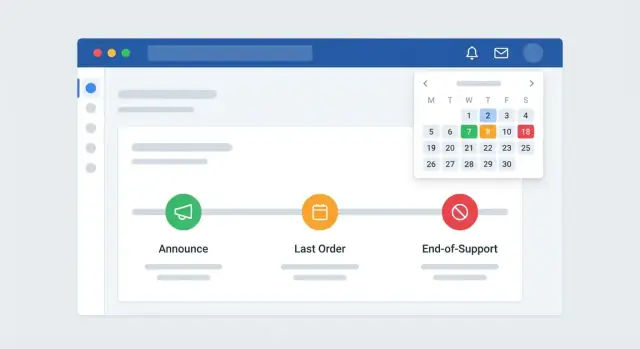
Goals, Users, and Scope
Before you design screens or pick a stack, get specific about what “sunset” means in your company. A product sunset timeline can refer to several different endpoints, and your app should support them explicitly so teams don’t argue later about what a date represents.
Define the sunset outcome (and the dates that matter)
Most organizations need at least three milestones:
- End-of-sale (EOS): no new purchases, but existing customers may continue.
- End-of-support (support EOL): support and fixes stop, often tied to contractual commitments.
- Full shutdown: the service is turned off; data retention/export rules apply.
Treat these as first-class concepts in your end-of-life (EOL) management tool. This avoids a vague “deprecation date” and enables clear release and support timelines.
Identify primary users and their needs
Sunsetting isn’t owned by one team. List your primary users and what they need to decide or approve:
- Product: define the product deprecation process, replacements, and exceptions.
- Support / Customer Success: customer notification planning, escalation paths, and account-specific constraints.
- Sales: renewal implications, upsell paths, and deal desk questions.
- Engineering: sunset milestone tracking, dependencies, and shutdown readiness.
- Legal / Compliance: contractual commitments, regional rules, and auditability.
This list will drive workflow and permissions later; for now, it clarifies whose work the app must unblock.
Clarify the decisions the tool must support
Write down the decisions that should be easy inside the app:
- Which dates are approved (and by whom), and what changes require re-approval.
- What messaging goes to which customers, when, and through what channels.
- Whether an account receives an exception (and when that exception expires).
- What migration path and replacement recommendation applies.
If the tool can’t answer these quickly, teams will revert to spreadsheets.
Set success criteria and constraints
Define measurable outcomes such as fewer missed milestones, fewer surprise customer escalations, and clear ownership for each step.
Capture scope constraints early (multiple products, regions, customer tiers, and contracts). These constraints should shape your data model and your audit trail for product changes from day one.
Key Terms and Lifecycle Stages
A sunset-timeline app works only if everyone uses the same words the same way. Product, Support, Sales, and Customer Success often mean different things when they say “deprecated” or “EOL.” Start by building a shared glossary inside the app (or linked from it) and make those definitions visible wherever milestones are created.
Standard lifecycle states (your “source of truth”)
Keep lifecycle states few, explicit, and mutually understood. A practical default set is:
- Active: fully supported and marketed; new sales allowed.
- Deprecated: still supported, but no longer recommended for new use; a replacement path is defined.
- EOL Planned: end-of-life dates are set and approved; customers are being guided to migrate.
- EOL: end-of-life reached (be specific about what stops here: sales, renewals, support SLAs, security patches).
- Retired: product is shut down and removed from catalogs; access may be disabled.
Tip: define what changes at each state (sales allowed, renewals allowed, support SLA, security patches) so the state isn’t just a label.
Milestone types (the dates that actually matter)
Treat milestones as typed events, not free-form dates. Common milestone types include announcement, last new purchase, last renewal, and end-of-support. Each milestone type should have clear rules (for example, “last renewal” only applies to subscription plans).
Who is impacted (so communications aren’t generic)
Impact should be structured, not a paragraph. Capture affected accounts, segments, plans, integrations, and regions. This lets teams filter “who needs to know” and prevents missing edge cases like a specific integration partner.
Required artifacts per milestone (so work is measurable)
For each milestone type, require a small checklist of artifacts such as an FAQ, migration guide, and release notes. When these are attached to the milestone, your timeline becomes actionable—not just informative.
The shared glossary (reducing misunderstandings)
Add a glossary entry for each state and milestone type, including examples and what it means for customers. Link to it from creation forms so definitions are one click away.
Data Model and Timeline Rules
A sunset app succeeds or fails on its data model. If the model is too thin, timelines become spreadsheets again. If it’s too complex, nobody maintains it. Aim for a small set of entities that can still express real-world exceptions.
Core entities (keep them explicit)
Start with these building blocks:
- Product: the thing being deprecated.
- Version/Plan: optional layer for SKUs, tiers, or major versions (for example, “v1” or “Enterprise plan”).
- Sunset Plan: a specific timeline for a product or version.
- Milestone: dated events within a plan (announce, sales stop, support end, shutdown).
- Audience: who this plan applies to (region, segment, customer cohort).
- Owner: accountable person or team for the plan and/or each milestone.
A key design choice: allow multiple Sunset Plans per Product. This handles “EU retires later than US,” “Free plan shuts down first,” or “Strategic accounts get extended support” without hacks.
Dependencies and migration reality
Sunsets are rarely isolated. Add structured fields so teams can reason about impact:
- Replacement product (link to another Product record)
- Migration requirement (boolean + notes)
- Blockers/risks (status + description)
- Dependencies (links to other milestones or external systems)
For supporting material, store source doc links as relative paths (for example, /blog/migration-checklist, /docs/support-policy) so they remain stable across environments.
Timeline rules you should enforce
Use validation rules to prevent “impossible” plans:
- Milestone ordering: enforce logical sequences (for example, “Customer notice” must be before “Shutdown”).
- Required milestones: for certain plan types, mandate a minimum set (announce → EOL → shutdown).
- Lead times: enforce buffers (for example, at least 60 days between first notice and EOL).
- Calendar vs. business days: store the raw date, but compute lead-time checks using either business-day calendars (region-aware) or calendar days—make the choice explicit per plan.
When rules fail, show clear, non-technical messages (“Shutdown must be after End of Support”) and point to the milestone that needs fixing.
Workflow and Ownership
A sunset plan fails most often when it’s unclear who decides what, and how changes move from idea to customer-facing commitments. Your app should make the process explicit, lightweight, and auditable.
A simple end-to-end workflow
Start with a default workflow that fits most teams and is easy to understand:
Draft → Review → Approve → Publish → Update → Retire
- Draft: product proposes milestones and messaging.
- Review: cross-functional input (Support, Sales, Legal, Security).
- Approve: a single decision gate—someone must be empowered to say yes or no.
- Publish: pushes the timeline and customer messaging to the surfaces that matter (portal, emails, docs).
- Update: handles inevitable changes without rewriting history.
- Retire: closes the plan once the product is fully end-of-life.
Ownership per milestone (one accountable person)
For each milestone (announce, last order date, end of sale, end of support, shutdown), assign:
- Accountable owner (required): exactly one person responsible for on-time delivery and updates
- Collaborators (optional): people who can add notes, attach evidence, and help execute
This keeps accountability crisp while still supporting teamwork.
Change requests that explain “what” and “why”
Treat changes as first-class objects. Each change request should include:
- What changed (dates, scope, affected SKUs, regions)
- Why it changed (supplier issue, security concern, dependency delay)
- Comments and attachments (internal memo, customer escalation, contract clause)
When approved, the app should automatically update the timeline while preserving previous values in history.
Risk flags with clear definitions
Add simple, consistent status flags for milestones:
- On track: no known issues
- At risk: credible risk without a confirmed slip
- Blocked: cannot proceed until a dependency is resolved
- Delayed: date or scope has already moved
Exception handling for real-world complexity
Build an “Exceptions” layer for cases like VIP customers, contract overrides, and region-specific delays. Exceptions should be time-bounded, linked to a reason, and require explicit approval—so special treatment doesn’t silently become the new default.
Core Screens and Navigation
Your app should feel like a single, calm workspace: find a plan, understand what’s happening next, and act—without hunting through tabs.
1) Sunset Plans List (the “home base”)
Start with a list view of every product sunset plan. This is where most people will land after login.
Include a few high-signal filters that match how teams actually work:
- Status (Draft, Active, At Risk, Completed)
- Owner (or team)
- Date range (for example, “next 90 days”)
Keep rows readable: product name, current stage, next milestone date, owner, and an “at risk” indicator. Make the entire row clickable to open the plan.
2) Timeline View (Gantt-style, but friendly)
Add a timeline view that visualizes milestones and dependencies (for example, “Customer notice must be sent before ‘Stop new sales’”). Avoid project-management jargon.
Use clear labels and a small legend. Let users switch between month/quarter zoom levels, and allow quick navigation back to the plan details.
3) Product Detail Page (one page, not ten)
The detail page should answer three questions fast:
- Current state (where the product is in the deprecation process)
- Upcoming dates (next 3–5 milestones, with owners)
- Key links (docs, replacement product, comms templates, Jira/Asana item)
Consider a sticky summary header so key dates stay visible while scrolling.
4) “Next Actions” panel by role
On the list page and inside each plan, show a “Next actions” panel tailored by role: what needs review, approvals waiting, and what’s overdue.
5) Copy and navigation guidelines
Use consistent verbs: Plan, Review, Approve, Notify, Complete. Keep labels short, avoid acronyms in headings, and provide plain tooltips for terms like “EOL.” Add a persistent breadcrumb (for example, Plans → Product X) and a predictable place for help, such as /help.
Customer Communications and Notifications
A sunset plan succeeds or fails on communication. Your app should make it easy to send clear, consistent messages across channels, tied to the same milestones your internal team is tracking.
Reusable templates (with versioning)
Start with a small library of notification templates that people can reuse and adapt:
- Announcement: first notice with rationale, key dates, and the recommended replacement.
- Reminder: shorter message that reiterates dates and next steps.
- Final notice: urgent and direct, with “what happens if you do nothing.”
Each template should support placeholders like {product_name}, {end_of_support_date}, {migration_guide_link}, and {support_contact}. When someone edits a template for a specific sunset, save it as a new content version so you can later answer: “What exactly did we tell customers on March 12?”
Channel support without duplicating work
Design one message draft that can be rendered into multiple outputs:
- In-app message/banner
- Help center post
- Status page entry
Keep channel-specific fields minimal (subject line for email, CTA button for in-app) while sharing the same core copy.
Targeting rules + recipient previews
Sunsets rarely apply to everyone. Let teams target by segment, plan, and region, and show a preview of estimated recipient counts before scheduling. This reduces accidental over-notifying (or missing a critical cohort) and helps support teams staff appropriately.
Milestone-based scheduling
Make scheduling relative to timeline milestones, not calendar guesswork. For example: automatically queue reminders 90/60/30 days before end-of-support, plus a final notice 7 days before end-of-life. If the milestone date changes, prompt owners to update dependent schedules.
Sent history and audit-ready records
Store a searchable history of what was sent, when, through which channel, and to which audience. Include approvals, content versions, and delivery status so communications are defensible during internal reviews and customer escalations.
Roles, Permissions, and Security Basics
A sunset timeline app quickly becomes the source of truth, which means permission mistakes turn into customer confusion. Keep your model small, predictable, and easy to explain—then enforce it consistently across screens, exports, and notifications.
Start with four roles
Define roles by what people can change, not by job title:
- Viewer: can read all published timelines and see read-only views.
- Editor: can draft updates (dates, milestones, migration notes), but cannot publish.
- Approver: can review drafts and publish changes for their area.
- Admin: manages users, permission rules, and system settings.
This keeps your product deprecation process moving without turning every update into an admin ticket.
Product-level and plan-level permissions
Most teams need two scopes:
- Product-level: who can edit/publish a specific product’s end-of-life (EOL) management timeline.
- Plan-level: who can change customer-facing impact per plan (for example, “Enterprise gets 12 extra months of support”).
Make “publish” a distinct capability: Editors prepare; Approvers finalize.
Read-only views reduce interruptions
Provide a default read-only view of the current published sunset milestone tracking. When the page answers “what’s the date, who’s affected, what’s the replacement,” you get fewer ad-hoc Slack questions. Consider a shareable internal link like /sunsets.
Audit logs for sensitive actions
Log and display an audit trail for product changes, especially:
- publish/unpublish
- date changes
- audience/plan changes
- deletes
Capture who did it, when, and what changed (before/after). This is crucial for accountability and customer notification planning.
Authentication: secure now, SSO later
If you can’t start with SSO, use strong password auth (hashed passwords, MFA if possible, rate limiting, lockouts). Design your user model to add SSO later without reworking permissions (for example, map SSO groups to roles).
Integrations with Existing Tools
A sunset plan touches customer data, support signals, and outbound messaging—so integrations are where your web app becomes the source of truth instead of yet another spreadsheet.
CRM: link impacted accounts without creating duplicates
Start with your CRM (Salesforce, HubSpot, etc.) to attach impacted accounts, opportunities, and account owners to each sunset plan.
The key design choice: sync IDs, not records. Store the CRM object IDs (Account ID, Owner ID) and fetch display fields (name, segment, owner email) on demand or via a scheduled sync. This avoids messy duplicate “account” tables and prevents drift when a customer gets renamed or reassigned.
Practical tip: allow manual overrides (for example, “also impacted: subsidiary account”) while keeping the canonical reference as the CRM ID.
Support tools: flag tickets related to a sunset plan
Connect Zendesk, Intercom, Jira Service Management, etc. so you can:
- tag or label tickets with a sunset plan ID
- surface open escalations on the plan page
- alert owners when ticket volume spikes near key milestones
You don’t need every field—usually ticket ID, status, priority, and a link back to the ticket is enough.
Email provider: send + track delivery without exposing secrets
If your app sends customer notices, integrate with your email provider (SendGrid, SES, Mailgun). Keep secrets out of the frontend:
- store API keys in server-side secrets
- use short-lived tokens or backend-to-provider calls
- log message IDs to track delivery, bounces, and unsubscribes
This gives you proof of outreach without storing message content everywhere.
Optional: Slack/Teams reminders for milestone owners
Internal reminders work best when they’re simple: “Milestone due in 7 days” with a link to the plan. Let teams opt into channels and frequency.
Keep integrations modular and document setup
Treat each integration as a plug-in with clear enable/disable toggles. Provide step-by-step setup docs (permissions required, webhook URLs, test checklist) in a short admin guide like /docs/integrations.
Reporting, Audit History, and Accountability
Sunset work gets messy when updates live in email threads or spreadsheets. A good reporting layer makes status visible, while audit history makes changes defensible and easy to reconstruct later.
Dashboards that answer “What’s at risk?”
Start with a dashboard focused on action, not vanity metrics. Useful panels include upcoming milestones (next 30/60/90 days), overdue items, and a breakdown of plans by lifecycle stage (for example, Announced, Deprecated, EOL, Archived). Add quick filters for product, customer segment, region, and owner so teams can self-serve without requesting custom reports.
A small “exceptions” view is often the most valuable: items missing a required milestone date, products with no replacement mapped, or timelines that conflict with a support policy.
Exports for stakeholders (without extra work)
Not everyone will log into the app. Provide exports in CSV (for analysis) and PDF (for sharing) with saved filters and date ranges. Typical needs: a quarterly EOL calendar, a list of customers impacted by a specific product, or a view limited to a business unit.
If you generate PDFs, label them clearly (for example, “Generated on…”) and treat them as snapshots—helpful for coordination, not contractual commitments.
Audit log: who changed what, when
Every key field should be auditable: milestone dates, lifecycle stage, replacement product, customer notification status, and ownership. Store:
- actor (user/service), timestamp, and source (UI/API)
- field name, previous value, new value
- optional change reason (free text + structured category)
This enables an “explain what happened” trail during escalations and reduces back-and-forth.
Approvals and internal accountability
For high-impact steps—like moving to “EOL Announced” or sending customer notices—record approvals with approver name, timestamp, and notes. Keep it simple: approvals should support your process, not turn the tool into legal language. The app tracks decisions and progress; your policies define the commitments.
Technical Architecture and Stack Choices
A sunset-timeline app doesn’t need exotic tech. It needs clarity: predictable data, secure access, and an easy way to ship changes.
A simple, maintainable stack
Pick one web framework, one database, and one authentication approach your team already understands.
A common, low-friction combo is:
- Web framework: Rails, Django, Laravel, or Node.js (Express/NestJS)
- Database: PostgreSQL (great for timeline queries and audit history)
- Auth: managed auth (Auth0/Clerk) or framework-native auth with SSO later
Choose boring defaults. Server-rendered pages are often enough for internal tools, with a small amount of JavaScript where it improves usability.
If you want to accelerate prototyping, a vibe-coding platform like Koder.ai can be a practical option for this exact category of internal web app: you describe the workflow (plans, milestones, approvals, notifications), and it helps generate a working React UI plus a Go + PostgreSQL backend. Features like source code export, deployment/hosting, and snapshots with rollback map well to the “ship changes safely” requirements of an EOL management tool.
Hosting and deployment flow
Decide early whether you want a managed platform or self-hosted infrastructure.
- Managed (Heroku, Render, Fly.io, AWS Amplify): faster setup, simpler ops
- Self-hosted (Kubernetes/VMs): more control, more maintenance
Regardless, keep a clean deployment flow: main branch → staging → production, with automated migrations and a one-click rollback plan.
API-first thinking (without overbuilding)
Even if you only ship a web UI now, define a small internal API boundary:
- versioned endpoints (for example,
/api/v1/sunsets) - clear resource names: products, milestones, notifications, approvals
- token-based access for scripts (separate from human login)
This makes it easier to add a mobile client, integrate with other systems, or run internal automation later.
Reliability basics: backups, monitoring, error tracking
Treat timeline data as business-critical:
- automated daily backups (and test restores quarterly)
- basic uptime and performance monitoring
- centralized error tracking (Sentry or equivalent) with alerts
Environments and access rules
Document what’s allowed in dev, staging, and production: who can deploy, who can view production data, and how secrets are stored and rotated. A short /runbook page can prevent a lot of accidental downtime.
Testing, Pilot Rollout, and Adoption
Shipping a sunset-timeline app without realistic testing is risky: missed dates can trigger support escalations, and premature emails can confuse customers. Treat testing and rollout as part of the product deprecation process—not an afterthought.
Validate timelines before you validate people
Build guardrails that prevent impossible plans from being saved:
- Date order checks: for example, “Announcement date must be before Last Order Date,” and “End of Support must be after End of Sale.”
- Required milestones: enforce a minimum set (Announcement, EOL, End of Support), with flexibility for optional milestones.
- Clear error messages: say exactly what’s wrong and how to fix it (“End of Support can’t be earlier than EOL. Choose a later date.”).
These validations reduce rework and make the app trustworthy for release and support timelines.
Seed data that matches real life
Create seed data and sample sunset milestone tracking templates that reflect your current product lifecycle management habits:
- one simple timeline (single region, single SKU)
- one complex timeline (multiple regions, staggered milestones, migration and replacement planning)
- one “messy” timeline (missing milestone, conflicting dates) to confirm validations
If your organization needs background context, link to internal guidance like /blog/product-lifecycle-basics.
Test notifications safely
Customer notification planning needs a “do no harm” mode:
- Sandbox mode: render emails/messages without sending.
- Test recipients: allow a controlled list (for example,
sunset-testing@company). - Approval gates: require sign-off before external sends, especially for high-impact milestones.
Pilot, then scale adoption
Run a pilot with one product line first. Track how long it takes to create a timeline, get approvals, and publish notifications. Use that feedback to refine labels, defaults, and milestone rules.
For adoption, make it easy to start: provide a template library, short training, and a clear “where to go next” link (for example, migration offers on /pricing if relevant).
Metrics and Continuous Improvement
A product sunset timeline app only stays useful if you can prove it’s working and keep it easy to use. Treat measurement as part of your end-of-life (EOL) management—not an afterthought—so the product deprecation process gets more predictable over time.
What to measure (and why)
Start with a small set of metrics that reflect real pain: missed dates, last-minute changes, and inconsistent customer notification planning.
- On-time milestones: percent of sunset milestone tracking items completed by their due dates (announce, last ship, last support, shutdown).
- Late changes: count of date edits after a freeze point (for example, after public announcement). Track how often it happens and which stage it happens in.
- Comms sent on schedule: announcements, reminders, and targeted notices delivered by planned dates, including segmentation (region, plan tier, customer type).
If possible, connect these to outcomes: support ticket volume near shutdown, migration completion rate, and replacement adoption—key signals for migration and replacement planning.
Close the loop with role-based feedback
Collect quick feedback from each role (PM, Support, Sales/CS, Legal, Engineering): what’s missing, what’s confusing, and what caused manual work. Keep the survey inside the app after major milestones, and review the results alongside your audit trail for product changes to see whether confusion correlates with late edits.
Reduce work with better defaults
Look for repetitive actions and turn them into templates: standard release and support timelines, reusable email copy, default milestone sets by product type, and pre-filled tasks for approvals. Improving templates often reduces errors more than adding new features.
Add advanced features later
Only after the basics are steady, consider dependencies between products, multi-region rules, and APIs to integrate with product lifecycle management tools. This sequencing prevents complexity from slowing adoption.
Make it routine
Set a quarterly review for active and planned sunsets: confirm dates, validate communications, and audit ownership. Publish a short internal summary (for example, on /blog/sunsets-playbook) to keep teams aligned.
FAQ
Which dates should a product sunset plan include?
Use separate dates for end of sale, end of support, and full shutdown. Give each date a clear meaning so Sales, Support, Engineering, and customers know what changes at each point.
What lifecycle stages should the app track?
Start with a small shared set: Active, Deprecated, EOL Planned, EOL, and Retired. Define what sales, renewals, support, and access look like in every state.
Why should milestones use fixed types instead of free-form dates?
Store milestones as typed events such as announcement, last new purchase, end of support, and shutdown. The app can then check date order and require the right steps for each plan.
Who should own a sunset milestone?
Give every milestone one accountable owner. Other people can collaborate, but one named person should keep the date, evidence, and status current.
Can one product have different sunset dates for different customers?
Allow more than one plan for a product. You may need different timelines for regions, plans, versions, or customers with contract exceptions.
How should the approval workflow work?
Use a Draft, Review, Approve, Publish, Update, Retire flow. Record who approved each customer-facing change and keep earlier values in the history.
How can the app prevent missed customer notifications?
Schedule notices from the milestone date, such as 90, 60, and 30 days before end of support. If the date moves, prompt the owner to review every affected message.
Which permissions does a sunset timeline app need?
Use four simple roles: Viewer, Editor, Approver, and Admin. Keep publishing separate from editing so a draft cannot accidentally become a customer commitment.
How should the app connect to a CRM?
Link CRM account IDs rather than copying account records into the app. Pull display details when needed, and let teams add controlled manual overrides for special cases.
What should the audit log record?
Log the actor, time, source, field changed, old value, new value, and reason. Include dates, audiences, owners, approvals, and notification status.