

How to Build a Web App to Manage Refunds & Chargebacks End-to-End
Learn how to design and build a web app to track refunds and chargebacks: data model, workflows, integrations, security, reporting, and testing.
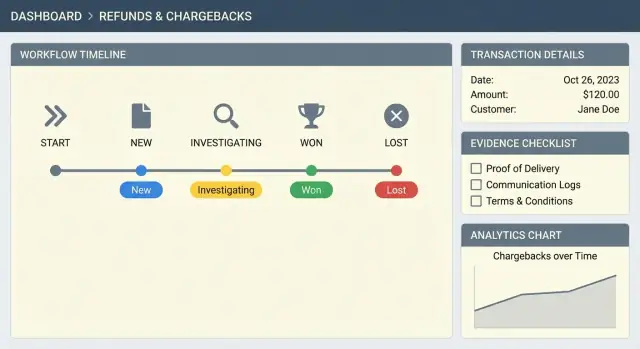
Clarify Goals, Users, and Scope
Before you design screens or pick tools, get precise about what you’re building. “Refunds” and “chargebacks” sound similar, but they behave differently across payment providers—and confusion here creates messy queues, wrong deadlines, and unreliable reporting.
Define key terms (for your business)
Write down what counts as a refund (a merchant-initiated reversal) versus a chargeback (a bank/card-network dispute initiated by the cardholder). Capture provider-specific nuances that affect workflow and reporting: partial refunds, multiple captures, subscription disputes, “inquiry” vs. “chargeback” phases, representment steps, and time limits.
List your main users
Identify who will use the system and what “done” means for them:
- Support agents: triage, customer context, issuing refunds, templated replies.
- Dispute specialists: deadlines, evidence requirements, submission tracking, win/loss reasons.
- Finance: reconciliation, payout impact, fee tracking, accounting exports.
- Admins: configuration, roles, provider connections, policy rules.
Pinpoint the pain points
Talk to the people doing the work. Common issues include missing evidence, slow triage, unclear statuses (“is this submitted or not?”), duplicated work across tools, and back-and-forth between support and finance.
Set measurable success metrics
Choose a small set you’ll track from day one:
- Average resolution time (refunds and disputes separately)
- Chargeback win rate and win rate by reason code
- Cost per dispute (fees + labor estimate)
- Refund cycle time and refund error rate
Clarify scope: MVP vs. later phases
A practical MVP usually includes a unified case list, clear statuses, deadlines, evidence checklists, and audit trails. Save advanced capabilities—automation rules, suggested evidence, multi-PSP normalization, and deeper risk/fraud signals—for later phases once the workflow is stable.
Model Refund and Chargeback Workflows
Your app will live or die by whether the workflow feels predictable to support and finance teams. Map two separate but related journeys (refunds and chargebacks), then standardize states so people don’t have to “think in provider terms.”
Refund workflow (end-to-end)
A practical refund flow is:
request → review → approve/deny → execute → notify → reconcile
“Request” may originate from a customer email, a helpdesk ticket, or an internal agent. “Review” checks eligibility (policy, delivery status, fraud signals). “Execute” is the provider API call. “Reconcile” confirms settlement/payout entries match what finance expects.
Chargeback workflow (end-to-end)
Chargebacks are deadline-driven and often multi-step:
alert → gather evidence → submit → representment → outcome
The key difference is that the issuer/card network drives the timeline. Your workflow should make it obvious what’s due next and by when.
Shared status taxonomy (provider-neutral)
Avoid surfacing raw provider statuses like “needs_response” or “won” as your primary UX. Create a small, consistent set across both flows—e.g., New, In Review, Waiting on Info, Submitted, Resolved, Closed—and store provider-specific statuses separately for debugging and reconciliation.
SLAs, timers, and exception paths
Define timers: evidence due dates, internal reminders, and escalation rules (e.g., escalate to a fraud lead 48 hours before a dispute due date).
Document edge cases upfront: partial refunds, multiple refunds on one order, duplicate disputes, and “friendly fraud” where a customer disputes a legitimate purchase. Treat these as first-class paths, not footnotes.
Design the Data Model
A refunds and chargebacks app lives or dies on its data model. Get this right early and you’ll avoid painful migrations when you add providers, automate rules, or scale support operations.
Start with core entities
At minimum, model these objects explicitly:
- Customer: identity, contact methods, and any risk flags.
- Order: what was sold, when, and fulfillment status.
- Payment: authorization/capture details and the processor used.
- Refund: each refund attempt, partial or full.
- Dispute / Chargeback: the dispute case, its stage, and deadlines.
- Evidence: files and structured data submitted to the provider.
- Message: internal notes and customer/provider communications.
Key fields that prevent headaches
Include fields that support reconciliation and provider integrations:
- Amounts and currencies (store as integers in minor units, e.g., cents)
- Reason codes (both your internal taxonomy and provider reason codes)
- Provider IDs (payment_intent/charge IDs, dispute IDs, refund IDs)
- Deadlines (evidence due date, response windows, SLA targets)
- Outcomes (won/lost, reversed, refunded) and fees (chargeback fee, refund fee)
Relationships and history
Common relationships are:
- One Order → many Payments (split tenders, retries)
- One Payment → many Refunds (partial refunds)
- One Payment → many Disputes (rare, but possible across networks/providers)
For change tracking, separate immutable events from editable content. Keep provider webhooks, status changes, and audit entries append-only, while allowing notes and internal tags to be edited.
Multi-currency and rounding rules
Handle multi-currency from day one: store currency per transaction, record FX rates only if you truly convert, and define rounding rules per currency (JPY has no minor unit). This avoids mismatches between your totals and provider settlement reports.
Plan the UI: Queues, Case Pages, and Actions
Your UI determines whether disputes get resolved calmly or spiral into missed deadlines and duplicated work. Aim for a small set of screens that make the “next best action” obvious.
Roles and permissions (least privilege)
Map roles to what they can see and do:
- Support: view cases, add notes, request customer info, assign/triage.
- Finance: approve/issue refunds, view reconciliation fields, export reports.
- Admin: manage settings, integrations, templates, and permission policies.
Keep permissions granular (e.g., “issue refund” separate from “edit amounts”), and hide actions users can’t perform to reduce mistakes.
Key screens you’ll actually use daily
Design around a small set of core views:
- Queue/Inbox: the operational hub for “what needs attention now.”
- Case detail: timeline, amounts, deadlines, evidence, and actions.
- Customer view: previous orders, refund history, messages, risk signals.
- Evidence builder: checklist + attachments + provider-ready templates.
- Reporting: volumes, win/loss, refund reasons, SLA adherence, reconciliation.
Quick actions that remove friction
Add one-click actions where users work:
- Issue refund / partial refund
- Request info (pre-filled email templates)
- Add note (internal vs. customer-visible)
- Assign owner, set priority, set due date
Place these actions consistently (e.g., top-right on case pages; inline on queue rows).
Filters and accessibility basics
Standardize filters across the app: status, provider, reason, deadline, amount, risk flags. Add saved views (e.g., “Due in 48h,” “High amount + risk”).
For accessibility: ensure clear contrast, full keyboard navigation (especially in tables), readable row density, and explicit focus states.
Choose a Practical Tech Stack and Architecture
Your refund management web app will touch money movement, deadlines, and sensitive customer data. The best stack is the one your team can build and operate confidently—especially in the first 90 days.
Monolith first (usually), services later (with clear reasons)
For an MVP, a modular monolith is often the fastest path: one deployable app, one database, clear internal modules. You can still design boundaries (Refunds, Chargebacks, Notifications, Reporting) so you can split into services later if you truly need independent scaling, strict isolation, or multiple teams releasing daily.
Move to services only when you can name the pain you’re solving (e.g., webhook spikes causing outages, separate ownership boundaries, or compliance-driven isolation).
A pragmatic stack that fits most teams
A common, practical combination:
- Frontend: React with Next.js for fast UI delivery and predictable routing
- Backend: Node.js (NestJS/Express) or Python (Django/FastAPI)—pick what your team already ships well
- Database: Postgres for cases, transactions, and audit data
- Cache/queue: Redis for rate limiting, idempotency keys, and job queues
If you want to accelerate the first iteration, consider starting with a build-and-export workflow using Koder.ai. It’s a vibe-coding platform that lets you create web apps via chat (React on the frontend, Go + PostgreSQL on the backend under the hood), then export the source code when you’re ready to take full ownership. Teams often use it to validate queues, case pages, role-based actions, and “happy path” integrations quickly, then harden security, monitoring, and provider adapters as requirements mature.
Define modules early (even inside one app)
Keep code and tables organized around:
- Cases: dispute/refund lifecycle, statuses, assignments, comments
- Payments integration: provider adapters, event normalization, idempotent updates
- Notifications: email/SMS/in-app, templates, throttling
- Reporting: exports, reconciliation views, KPI snapshots
- Admin settings: reason codes, rules, provider credentials
Background jobs and file storage decisions
Plan background jobs for deadline reminders, provider sync, and webhook retries (with dead-letter handling).
For evidence files, use object storage (S3-compatible) with encryption, virus scanning, and short-lived signed URLs. Keep the database storing metadata and permissions—not file blobs.
Integrate Payment Providers and Webhooks
A refunds and disputes app is only as accurate as the data it receives from payment providers. Decide which providers you’ll support and define a clean integration boundary so adding the next provider doesn’t require rewriting core logic.
Pick providers and map required endpoints
Common providers to plan for: Stripe, Adyen, PayPal, Braintree, Checkout.com, Worldpay, and relevant local PSPs.
At minimum, most integrations need:
- Refund operations: create refund, retrieve refund status, cancel (if supported)
- Disputes/chargebacks: list disputes, fetch dispute details, upload/attach evidence, submit evidence, accept liability (if supported)
- Transactions: fetch payment/charge details and metadata needed to justify a decision
Document these as provider “capabilities” so your app can gracefully hide unsupported actions.
Webhooks: your source of truth for state changes
Use webhooks to keep cases current: dispute opened, dispute won/lost, evidence due date changed, refund succeeded/failed, and reversal events.
Treat webhook verification as non-negotiable:
- Verify signatures using the provider’s signing secret/certificate
- Check timestamp tolerance where applicable
- Log the raw payload for troubleshooting (with sensitive fields redacted)
Retries, idempotency, and safe reprocessing
Providers will retry webhooks. Your system must safely process the same event multiple times without double-refunding or double-submitting evidence.
- Store an event id (or derived hash) and mark it processed
- Use idempotency keys for refund creation and evidence submission
- Implement retry with backoff for temporary provider/API failures
Normalize provider fields into your internal model
Provider terms differ (“charge” vs. “payment”, “dispute” vs. “chargeback”). Define an internal canonical model (case status, reason code, amounts, deadlines) and map provider-specific fields into it. Keep the original provider payload for auditing and support.
Manual override for edge cases
Build a manual path for:
- Provider outages or delayed webhooks
- Exceptions like partial refunds, multiple captures, or split shipments
- Corrections when a provider misclassifies a reason code
A simple “sync now” action plus an admin-only “force status / attach note” option keeps operations moving without corrupting your data.
Build Case Management and Automation Features
Case management is where your refund management web app stops being a spreadsheet and becomes a reliable payment disputes system. The goal is simple: keep every case moving forward, with clear ownership, predictable next steps, and zero missed deadlines.
Smart queues that match how teams work
Start with a dispute tracking dashboard that supports multiple prioritization modes. Deadline-first is the safest default for chargebacks, but high-amount-first can reduce exposure quickly. A risk-based view is useful when fraud signals should influence ordering (repeat customers, mismatched shipping, suspicious patterns).
Assignment rules and escalations
Automate assignment as soon as cases arrive. Common strategies include round-robin, skill-based routing (billing vs. shipping vs. fraud specialists), and escalation rules when a case nears its due date. Make “overdue” visible in the queue, on the case page, and in notifications.
Repeatable actions: templates and checklists
Automation isn’t only about APIs—it’s also about consistent human work. Add:
- Pre-approved outreach templates (refund status, missing info, denial explanation)
- Internal checklists per reason code (item not received, unauthorized, duplicate, subscription cancellation)
This reduces variance and speeds up training.
Evidence packs and deadline tracking
For chargebacks, build a one-click evidence pack generator that assembles receipts, shipping proof, order details, and communication logs into a single bundle. Pair it with clear deadline tracking and auto-reminders so agents know exactly what to do next and when.
Implement Evidence Collection and Submission
Evidence is what turns a “he said / she said” dispute into a winnable case. Your app should make it easy to gather the right artifacts, organize them by dispute reason, and produce a submission package that matches each provider’s rules.
Collect the right signals automatically
Start by pulling together evidence you already have so agents don’t waste time hunting. Typical items include order and refund history, fulfillment and delivery confirmation, customer communications, and risk signals such as IP address, device fingerprint, login history, and velocity flags.
Where possible, make evidence attachable with one click from the case page (e.g., “Add tracking proof” or “Add customer chat transcript”) rather than requiring manual downloads.
Use evidence checklists by dispute reason
Different chargeback reasons require different proof. Create a checklist template per reason code (fraud, not received, not as described, duplicate, canceled recurring, etc.) with:
- Required vs. optional items
- Suggested wording for cover notes
- Internal guidance (what usually wins)
File uploads with guardrails
Support uploads for PDFs, screenshots, and common document types. Enforce size/type limits, virus scanning, and clear error messages (“PDF only, max 10MB”). Store originals immutably, and generate previews for quick review.
Generate provider-ready submission packages
Payment providers often have strict requirements for naming, formats, and required fields. Your system should:
- Normalize filenames and label evidence clearly
- Merge multiple PDFs into a single packet when needed
- Include a structured summary (transaction, dates, customer contact attempts)
If you later add a self-serve dispute submission flow, keep it behind the same packaging logic so behavior stays consistent.
Track what was submitted (and prove it)
Record every submitted artifact: what was sent, to which provider, when, and by whom. Store final “submitted” packages separately from drafts, and surface a timeline on the case page for audits and appeals.
Security, Permissions, and Audit Logging
A refunds and disputes tool touches money movement, customer data, and often sensitive documents. Treat security as a product feature: it should be easy to do the right thing and hard to do the risky thing.
Authentication: keep access simple, add step-up where it matters
Most teams do best with SSO (Google Workspace/Okta) or email/password.
For high-impact roles (admins, finance approvers), add MFA and require it for actions like issuing refunds, exporting data, or changing webhook endpoints. If you support SSO, still consider MFA for “break glass” local accounts.
Authorization: role-based + object-level checks
Role-based access control (RBAC) defines what a user can do (e.g., Support can draft responses; Finance can approve/issue refunds; Admin can manage integrations).
But RBAC alone isn’t enough—cases are often scoped by merchant, brand, region, or team. Add object-level checks so users can only view and act on cases assigned to them or their business unit.
A practical approach is:
- Roles: Admin, Finance, Support, Analyst (read-only)
- Scopes: merchant_id, team_id, region
- Policies: “Support can update cases where case.team_id is in user.team_ids”
Audit trails: make every sensitive action explainable
Chargebacks require clear accountability. Record an immutable audit log entry for actions such as:
- Refund issued/voided/reversed
- Evidence uploaded/submitted
- Case status changed (including previous → next)
- Payout or reconciliation adjustments
- Permission or integration settings changes
Each entry should include: actor (user/service), timestamp, action type, case/refund ID, before/after values (diff), and request metadata (IP, user agent, correlation ID). Store logs append-only and protect them from deletion in the UI.
PII handling: reduce exposure by default
Design screens so users see only what they need:
- Masking: show partial card data, email, phone (e.g., last 4 digits)
- Retention rules: auto-expire PII and evidence files after a defined period
- Secure file storage: private buckets, per-file access controls, signed URLs, malware scanning, and encryption at rest
If you offer exports, consider field-level controls so analysts can export dispute metrics without customer identifiers.
Rate limiting and abuse prevention
If any endpoints are public-facing (customer portals, evidence uploads, inbound webhook receivers), add:
- Rate limits per IP and per account
- Request size limits (especially for file uploads)
- Idempotency keys for sensitive operations (refund creation, evidence submission)
- Bot protection for customer-facing forms
Notifications and Communication
A refunds/chargebacks app lives or dies on timing. Chargeback response windows are strict, and refunds involve handoffs. Good notifications reduce missed dates, keep ownership clear, and cut down on “what’s the status?” messages.
What to notify (and when)
Use both email and in-app notifications for events that require action—not every status change. Prioritize:
- Upcoming or breached deadlines (e.g., “evidence due in 48 hours”)
- New assignments and reassignments
- Provider updates (chargeback opened, reversed, won/lost)
- Missing inputs (receipt requested, tracking info required)
- Final outcomes and reconciliation-ready states
Keep in-app notifications actionable: link to the case page and pre-fill the next step (e.g., “Upload evidence”).
Case-centric collaboration
Each case should have an activity timeline that combines system events (webhook updates, status changes) with human notes (comments, file uploads). Add internal comments with @mentions so specialists can loop in finance, shipping, or fraud without leaving the case.
If you support external stakeholders, keep them separate: internal notes should never be visible to customers.
Optional customer-facing updates
A lightweight customer status page can reduce support tickets (“Refund initiated”, “Processing”, “Completed”). Keep it factual and timestamped, and avoid promising outcomes—especially for chargebacks where the decision sits with the card network and issuer.
Integrations and message discipline
If your support team uses a helpdesk, link or sync the case rather than duplicating conversations. Start with simple deep links (e.g., /integrations) and expand to bi-directional syncing once your workflow is stable.
Use consistent templates and neutral language. Say what happened, what’s next, and when you’ll update again—without guarantees.
Reporting, Analytics, and Reconciliation
Good reporting turns refunds and disputes from “support noise” into something finance, ops, and product can act on. Build analytics that answer three questions: what is happening, why it’s happening, and whether the numbers match payment providers.
Dashboards that match real decisions
Start with a disputes and refunds overview dashboard that can be understood quickly:
- Refund volume (count and amount) over time
- Dispute rate (disputes / successful payments)
- Win/loss rate and outcomes by stage
- Average handling time (open → resolved) and SLA breaches
Make every chart clickable so teams can jump to a filtered queue (e.g., “open chargebacks older than 7 days”).
Cost tracking that’s more than “refunded amount”
Refunds and chargebacks have different cost profiles. Track:
- Refunded amounts (gross and net, if you track fees)
- Chargeback fees and representment fees per provider
- Estimated operational time (simple time buckets like 5/15/30 minutes per case) to approximate labor cost
This helps quantify the impact of prevention work and workflow automation.
Drill-down reports for root causes
Provide drill-down reports by reason code, product/SKU, payment method, country/region, and provider. The goal is to spot patterns quickly (e.g., one product driving “item not received,” or one country driving friendly fraud).
Exports, scheduled delivery, and reconciliation
Finance teams often need CSV exports and scheduled reports (daily/weekly) for close and reconciliation. Include:
- Provider payout vs. your internal ledger totals
- Case-level exports with IDs that match provider event IDs
- Filters for settlement date vs. event date (they differ)
Data quality checks (quietly essential)
Add a “data health” view that flags missing fields, unmatched provider events, duplicate cases, and currency mismatches. Treat data quality as a first-class KPI—bad inputs create bad decisions and painful month-end closes.
Testing, Monitoring, and Launch Plan
A refunds and disputes app touches money movement, customer communication, and strict provider deadlines—so treat “it works on my machine” as a risk. Combine repeatable tests, realistic environments, and clear signals when something breaks.
Test strategy that matches real disputes
Start with unit tests for decision rules and state transitions (e.g., “refund allowed?”, “chargeback status can move from X to Y”). These should be fast and run on every commit.
Then add integration tests focused on the edges:
- Provider webhooks (signature validation, idempotency, retries)
- Provider APIs (refund creation, dispute details, evidence upload)
- Background jobs (timeouts, rate limits, partial failures)
Use sandbox environments for each provider, but don’t rely on them alone. Build a library of recorded webhook fixtures (realistic payloads, including out-of-order events and missing fields) and replay them in CI to catch regressions.
Observability: detect issues before support does
Instrument three things from day one:
- Logs: include provider event IDs, case IDs, and job IDs.
- Metrics: webhook success rate, processing latency, queue depth, evidence submission failures.
- Alerts: webhook verification failures, job backlog growth, spikes in “manual review” cases.
A simple dashboard for “webhooks failing” + “jobs behind” prevents silent SLA misses.
Launch plan: minimize blast radius
Deploy with feature flags (e.g., enable chargeback ingestion first, then refunds automation). Roll out in phases: internal users → a small support team → all users.
If you’re using a platform that supports snapshots and rollback (for example, Koder.ai includes snapshot/rollback workflows for shipped iterations), align that with your feature-flag strategy so you can revert safely without losing audit integrity.
If you’re migrating existing data, ship migration scripts with dry-run mode and reconciliation checks (counts, totals, and spot-audited cases).
MVP checklist
- Rules engine has unit test coverage for key transitions
- Webhook replay fixtures run in CI
- Alerts for webhook failures and job backlog
- Feature-flagged rollout and rollback plan
- Migration scripts + post-migration reconciliation
If you’re drafting the full guide, a readable target length is ~3,000 words—enough to cover the end-to-end workflow without turning into a textbook.
FAQ
What’s the practical difference between a refund and a chargeback in an internal tool?
Start by writing down your business definitions:
- Refund: merchant-initiated reversal (often optional, sometimes partial).
- Chargeback/Dispute: bank/card-network process initiated by the cardholder (deadline-driven).
Then list provider-specific variants you’ll support (inquiry vs. chargeback stages, representment steps, subscription disputes, partial captures) so your workflow and reporting don’t collapse into ambiguous “reversal” states.
What should a refunds and chargebacks MVP include (and what should wait)?
A typical MVP includes:
- Unified case list/queue with priorities and filters
- Provider-neutral statuses and clear owners
- Deadlines with reminders/escalations (especially for chargebacks)
- Evidence checklist + file uploads
- Audit trail for every sensitive action
Defer advanced automation (auto-routing, suggested evidence, multi-PSP normalization, fraud signals) until the base workflow is stable.
How do you standardize statuses across different payment providers?
Use a small provider-neutral set that works for both flows (and store raw provider states separately). A practical taxonomy is:
- New
- In Review
- Waiting on Info
- Submitted
- Resolved
- Closed
This prevents teams from having to “think in Stripe/Adyen terms” while still letting you debug with provider payloads when needed.
How should I design the refund and chargeback workflows end-to-end?
Model both journeys explicitly:
- Refund: request → review → approve/deny → execute → notify → reconcile
- Chargeback: alert → gather evidence → submit → representment → outcome
Then add timers (SLA targets, evidence due dates) and exception paths (partial refunds, duplicate disputes, friendly fraud) as first-class states—not ad hoc notes.
What are the essential entities and fields in the data model?
At minimum, treat these as first-class objects:
- Customer, Order, Payment
- Refund (each attempt, partial/full)
- Dispute/Chargeback (case + stage + deadlines)
- Evidence (files + structured fields)
- Message/Note (internal vs external)
Key fields that save you later: amounts in minor units, currency per transaction, provider IDs, reason codes (internal + provider), deadlines, outcomes, and fees.
How do I handle webhooks safely (retries, idempotency, and reprocessing)?
Assume events arrive late, duplicated, or out of order.
- Store a provider event ID/hash and mark processed
- Use idempotency keys for refund creation and evidence submission
- Implement retries with backoff and dead-letter handling for jobs
- Keep an append-only record of webhook payloads (with sensitive fields redacted)
This prevents double-refunds and makes “safe reprocessing” possible during incidents.
Which screens and UI patterns matter most for day-to-day operations?
Design around the daily operational views:
- Queue/Inbox (what needs action now)
- Case detail (timeline, amounts, deadlines, evidence, actions)
- Customer view (history, risk flags)
- Evidence builder (checklist + attachments)
- Reporting
Add consistent one-click actions (issue refund, request info, assign owner) and standard filters (status, provider, reason, deadline, amount, risk flags).
How can I build evidence collection that actually improves chargeback outcomes?
Evidence should be easy to assemble and hard to mess up:
- Auto-attach what you already have (order details, shipping proof, comms)
- Use checklists per reason code with required vs optional items
- Enforce file type/size limits, virus scanning, immutable originals
- Generate provider-ready packages (normalized names, merged PDFs if needed)
- Record exactly what was submitted, when, to which provider, and by whom
This improves win rates and reduces last-minute scramble before deadlines.
What security and audit logging do I need for a refunds/disputes app?
Treat security as a product feature:
- SSO or email/password, plus MFA for high-impact roles/actions
- RBAC plus object-level scoping (merchant/team/region)
- Append-only audit logs for refunds, evidence submission, status changes, exports, and settings changes
- PII minimization (masking, retention rules, controlled file access via signed URLs)
This reduces risk and makes compliance reviews easier.
What should I measure and report on to prove the system is working?
Pick metrics tied to operations and money:
- Resolution time (refunds vs disputes separately)
- Chargeback win rate (overall + by reason code)
- Cost per dispute (fees + labor estimate)
- Refund cycle time and refund error rate
For reconciliation, support exports with provider-matching IDs and views that compare provider payout totals vs your internal ledger, with filters for event date vs settlement date.