

Build a Web App to Manage Supplier Price Lists & Contracts
Step-by-step plan to build a web app for supplier price lists and contracts: imports, approvals, renewals, audit trails, and secure user access.
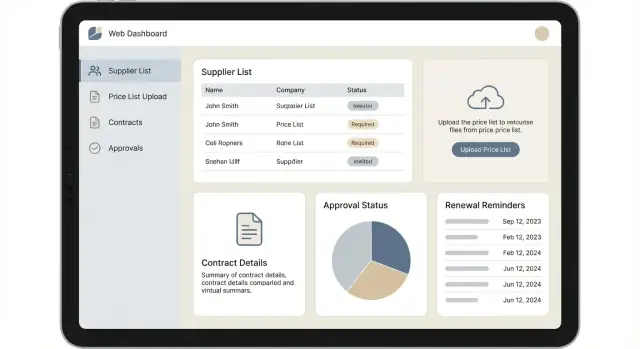
What the App Should Solve (and for Whom)
Most supplier pricing and contract chaos looks the same: price lists live in emailed spreadsheets, “final_FINAL” PDFs sit in shared drives, and nobody is quite sure which terms are current. The results are predictable—stale prices used in orders, avoidable disputes with suppliers, and renewals that slip past unnoticed.
The business problems to fix
A good web app should centralize the source of truth for supplier price lists and contracts, and make changes traceable end-to-end. It should reduce:
- Manual copying between spreadsheets, ERPs, and inboxes
- Pricing errors caused by outdated versions
- Missed renewals and notice periods
- Time spent hunting for the latest signed document or amendment
Who the app is for
Design the system around the people who touch pricing and terms every week:
- Procurement: imports price lists, negotiates updates, tracks effective dates
- Finance/AP: validates invoiced prices, checks currencies, units, taxes/fees
- Legal/Compliance: stores signed agreements, amendments, required clauses
- Approvers (management): reviews and approves price/term changes
- Admins: manages users, roles, supplier master data, templates
Success metrics that show it’s working
Pick a few measurable targets early:
- Time to publish a price update (e.g., from 2 days to 2 hours)
- Import error rate and number of manual corrections per upload
- Renewal reminder hit rate (e.g., % contracts with alerts sent before notice deadline)
- Price discrepancy rate (invoice/PO mismatches tied to price validity)
What “done” means: first release vs. later
For a first release, aim for centralized supplier records, price list import with validation, contract storage with key dates, basic approval, search, and an audit trail.
Later iterations can add deeper ERP integrations, clause libraries, automated invoice matching, multi-entity organizations, and advanced reporting dashboards.
Requirements and Workflow Mapping
Before you sketch screens or tables, map what actually happens from the moment a supplier sends a price list to the moment someone places an order against it. This prevents building a generic “document repository” when you really need a controlled pricing system.
Map the current workflow (as-is)
Start by walking through a real example with procurement, finance, and legal. Capture handoffs and artifacts at each step:
- Receive price list (email, portal, spreadsheet, EDI) → log receipt date and source
- Review and negotiate → record questions, counter-offers, and agreed changes
- Approve pricing and terms → identify decision points and required sign-offs
- Sign and store contract documents → link terms to the effective price list
- Operate and renew → monitor expirations, price changes, and exceptions
A simple swimlane diagram (Supplier → Buyer/Procurement → Legal → Finance → Operations) is often enough.
Identify key decisions and roles (who can do what)
List the decisions that change business outcomes and assign clear owners:
- Who can approve a new price list vs. a contract amendment?
- Who can edit pricing fields (currency, units, MOQ, lead time), and who can only request changes?
- Who can view sensitive contract terms (payment terms, liability clauses), and who should be restricted?
Also note where approvals differ by thresholds (e.g., >5% increase needs finance approval) so you can encode those rules later.
Define required outputs (what people need to get done)
Write down the exact questions the app must answer on day one:
- “What is the current price for item X from supplier Y, effective today?”
- “Which contracts expire in the next 60/90 days, and who owns renewal?”
- “Where do we have exceptions: expired prices still being used, missing MOQs, currency mismatches?”
These outputs should drive data fields, search, and reports—not the other way around.
Capture pain points and edge cases early
Procurement data is messy. Explicitly document common exceptions:
- Partial updates (supplier updates 20 SKUs, not the full catalog)
- Multiple currencies and FX assumptions
- MOQs, pack sizes, units (each vs. case), and rounding
- Overlapping effective dates or backdated corrections
Treat this list as acceptance criteria for import and approval, so the system supports reality instead of forcing workarounds.
High-Level Architecture and Module Breakdown
A good architecture for supplier price lists and contracts is less about trendy patterns and more about reducing coordination overhead while keeping the door open for growth.
Build approach: start simple, evolve intentionally
For most teams (1–6 engineers) the best starting point is a modular monolith: one deployable app with clearly separated modules and boundaries. You get faster development, simpler debugging, and fewer operational moving parts.
Move toward services later only if you have a clear reason—e.g., heavy import workloads that need independent scaling, multiple teams working in parallel, or strict isolation requirements. A common path is: modular monolith → extract import/processing and document workloads into background workers → optionally split high-traffic domains into services.
If you want to accelerate the first working prototype (screens, workflows, and role-based access) without committing to a long build cycle, a vibe-coding platform like Koder.ai can help you generate a React + Go + PostgreSQL baseline from a structured chat spec, then iterate quickly on imports, approvals, and audit trails. For procurement teams, that often means validating workflows with real users earlier—before you overbuild.
Core modules (the minimum set that stays understandable)
Design the app around a few stable domains:
- Suppliers: supplier profile, contacts, identifiers, status
- Catalog (Items/Materials): your internal item master and mapping to supplier item codes
- Price Lists: headers (supplier, validity period) and line items (prices, units, currencies), plus import history
- Contracts: contract records, linked suppliers, covered items/categories, key dates, and related documents
- Approvals & Governance: review steps, sign-off, comments, and decision history
- Reporting: search, exports, spend/pricing views, and operational snapshots
Keep each module responsible for its own rules and data access. Even in a monolith, enforce boundaries in code (packages, naming, and clear APIs between modules).
Plan integrations early (even if you don’t build them on day one)
Integrations change data flow, so reserve explicit extension points:
- SSO (SAML/OIDC) for authentication and user provisioning
- ERP/finance systems for vendor IDs, item masters, and pushing approved prices
- Email/calendar for renewal reminders and approval notifications
- Document signing (optional) to finalize amendments and new agreements
Non-functional needs (set targets before you ship)
Define measurable expectations upfront:
- Performance: common searches in <2 seconds; imports processed asynchronously with progress visibility
- Availability: clear uptime target and planned maintenance windows
- Backups & recovery: automated backups, restore drills, and retention aligned to policy
- Auditability: immutable event history for imports, approvals, and contract changes, with traceability to user and timestamp
Data Model: Entities, Relationships, and Versioning
A clean data model is what keeps a procurement app trustworthy. When users ask, “What price was valid on March 3?” or “Which contract governed that purchase?”, the database should answer without guesswork.
Core entities (the minimum you’ll rely on)
Start with a small set of well-defined records:
- Supplier: the vendor account (name, supplier code, status, default currency, payment terms)
- Contact: people at the supplier (many per supplier)
- Item/SKU: what you buy (item code, description, category, unit of measure)
- PriceList: a supplier-provided list or negotiated schedule (name, effective dates, currency, file source, status)
- PriceLine: prices inside a list (item, unit price, breaks/MOQ if applicable, tax flags)
- Contract: the commercial agreement (contract number, supplier, start/end dates, renewal settings, status)
- Term: structured clauses (lead time, warranty, delivery, service levels) you want to search/report on
Relationships that keep everything connected
Model relationships to reflect how buyers work:
- Supplier → Contracts: one supplier can have many contracts
- Supplier → PriceLists: one supplier can provide many price lists over time
- Contract → PriceLists (optional but useful): link a contract to the price list(s) it governs
- Item/SKU → PriceLines: one item can appear in many price lines (across suppliers, currencies, and effective dates)
If you support multiple ship-to locations or business units, consider adding a Scope concept (e.g., company, site, region) that can be attached to contracts and price lists.
Versioning: don’t overwrite history
Avoid editing “live” records in place. Instead:
- Price list versioning: each import creates a new PriceList version (or a new PriceList record with a shared “family” identifier). Keep prior versions read-only.
- Contract amendments: store each amendment as a new version with its own effective date and linked documents. The “current” contract view is simply the latest approved version.
This makes audit questions easy: you can reconstruct what was approved when, and what changed.
Reference data and uniqueness rules
Keep reference data in dedicated tables to avoid messy free text:
- Currency, Unit of Measure, Tax Code, and (if you ship internationally) Incoterms
Enforce identifiers to prevent silent duplicates:
- Supplier code unique across the system
- Item code unique (or unique per catalog/source)
- Contract number unique per supplier (or globally—choose and enforce it consistently)
Price List Import: Templates, Validation, and Error Handling
Price lists usually arrive in spreadsheets that were never designed for machines. A smooth import flow is the difference between “we’ll use the app” and “we’ll keep emailing Excel files.” The goal: make uploads forgiving, but the saved data strict.
Supported formats and a downloadable template
Support CSV and XLSX from day one. CSV is great for exports from ERPs and BI tools; XLSX is what suppliers actually send.
Provide a downloadable template that reflects your data model (and reduces guesswork). Include:
- A first row with exact column names
- An example row showing valid values (currency, unit, date)
- An optional “notes” sheet (for XLSX) explaining each column
Keep the template versioned (e.g., Template v1, v2) so you can evolve it without breaking existing processes.
Mapping rules: required vs optional columns
Define mapping rules explicitly and show them in the UI during upload.
Common approach:
- Required columns: supplier identifier, item/SKU, price, currency, unit of measure, effective start date
- Optional columns: effective end date, minimum order quantity, lead time, packaging, incoterms, comments
- Default values (per supplier or per upload): currency, unit, start date “today,” end date blank
If you allow custom columns, treat them as metadata and store them separately so they don’t pollute the core price schema.
Validation rules that prevent bad data
Run validations before anything is committed:
- Numeric formats: reject non-numeric price cells; normalize thousand separators; enforce non-negative prices
- Currency codes: validate against ISO 4217 (e.g., USD, EUR)
- Date ranges: start date required; end date must be after start date; prevent overlapping effective ranges for the same item if your rules require exclusivity
- Duplicate rows: detect identical keys (e.g., supplier + SKU + start date + currency + unit). Decide whether duplicates are errors or “last one wins” (error is safer)
Do both row-level validation (this row is wrong) and file-level validation (this upload conflicts with existing records).
Error handling: preview, row-level feedback, and reupload
A good import experience looks like: Upload → Preview → Fix → Confirm.
In the preview screen:
- Show a table with highlighted cells and clear messages (e.g., “Invalid currency code: US$”)
- Allow users to download an error report (CSV) with an extra “error” column
- Provide a fix-and-reupload flow that preserves mapping choices from the last attempt
Avoid “fail the whole file for one bad row.” Instead, let users choose: import valid rows only or block until all errors are fixed, depending on governance.
Store raw uploads for traceability
For auditability and easy reprocessing, store:
- The original raw file (exact bytes), with checksum and uploader identity
- Parsed rows and validation results (including errors)
- Import configuration (template version, column mapping, defaults)
This creates a defensible trail for disputes (“what did we import and when?”) and enables reprocessing when validation rules change.
Contract Records: Terms, Documents, and Amendments
A contract record should be more than a file cabinet. It needs enough structured data to drive renewals, approvals, and reporting—while still keeping signed documents easy to find.
Core contract terms (structured fields)
Start with fields that answer the questions procurement gets every week:
- Contract start date and end date
- Renewal type (auto-renew, fixed term, evergreen) and renewal length
- Notice period (e.g., “60 days before end date”) and who must be notified
- Payment terms (Net 30/45/60, early payment discount) and invoicing rules
- Contract owner, supplier contact, and internal stakeholders
Keep free-text notes for edge cases, but normalize anything you’ll filter, group, or alert on.
Documents, attachments, and retention
Treat documents as first-class items linked to the contract:
- Signed agreement (PDF)
- Amendments/addenda
- Statements of work, rate cards, insurance certificates, compliance docs
Store metadata with each file: document type, effective date, version, uploader, and confidentiality level. If your organization has retention requirements, add fields like “retention until” and “legal hold” so the app can prevent deletion and support audits.
Amendments and clause tracking
Amendments shouldn’t overwrite history. Model them as dated changes that either extend terms (new end date), adjust commercial terms, or add/remove scope.
Where possible, capture key clauses as structured data for alerts and reporting—examples: termination for convenience allowed (Y/N), indexation formula, service credits, liability cap, and exclusivity.
One contract, many suppliers or sites
If you buy centrally but operate across locations, support linking a single contract to multiple sites/business units, with optional site-level overrides (e.g., billing address, delivery terms). Similarly, allow one contract to cover a parent supplier plus subsidiaries, while preserving a clear “contracted party” for compliance.
Approval Workflow and Governance
Approvals are where price lists and contracts become defensible. A clear workflow reduces “who signed off on this?” debates and creates a repeatable path from supplier submission to usable, compliant data.
Status flow (keep it explicit)
Use a simple, visible lifecycle for both price lists and contract records:
Draft → Review → Approved → Active → Expired/Terminated
- Draft: editable by the submitter; not used in purchasing.
- Review: locked for editing except via requested changes; reviewers validate completeness and policy fit.
- Approved: decision recorded; ready to be activated by date rules.
- Active: effective for ordering; changes require a new revision and approval.
- Expired/Terminated: read-only; kept for reporting and audit.
Roles and responsibilities
Define responsibilities in the app (not in tribal knowledge):
- Submitter (Procurement/Supplier manager): uploads price lists, drafts contract terms, responds to review comments
- Reviewer (Category/Finance): checks pricing, units, currencies, and commercial alignment
- Approver (Budget owner): final decision for commercial impact
- Legal: required reviewer/approver for contract language, documents, and amendments
- Admin: configures thresholds, routing rules, and manages permissions—should not approve business content by default
Rules for price changes (prevent silent cost creep)
Add policy-driven checks that automatically trigger extra approval steps:
- Threshold approvals: e.g., if any line item increases >5% or total category spend impact exceeds $10,000, route to a higher approver
- Category-based routing: strategic categories (IT, logistics) may always require legal + budget owner
- Exception handling: allow overrides only with a mandatory reason and attachment
Audit-ready decisions: comments, reasons, and evidence
Every approval or rejection should capture:
- decision (approve/reject/request changes)
- reason code + free-text explanation
- timestamp, actor, and affected revision
- linked evidence (email PDF, supplier letter, meeting notes)
Escalation, timeouts, and accountability
Set service-level expectations to avoid approvals stalling:
- automatic reminders at 24/48 hours
- escalation to a backup approver after a set timeout
- visibility via a “My pending approvals” queue and an overdue report
Governance works best when it’s built into the workflow—not enforced after the fact.
User Experience: Screens, Search, and Reporting
A procurement app succeeds or fails on how quickly people can answer simple questions: “What’s the current price?”, “Which contract governs this item?”, and “What changed since last quarter?” Design the UI around those workflows, not around database tables.
Find information fast: search and filters
Provide two primary entry points in the top navigation:
- Supplier search (name, tax ID/vendor code, status, category)
- Item search (SKU/part number, description, manufacturer, unit)
On result pages, use contract filters that match real work: effective date, contract status (draft/active/expired), business unit, currency, and “has pending approval”. Keep filters visible and removable as chips so non-technical users don’t feel stuck.
Key screens to design first
Supplier profile should be a hub: active contracts, latest price list, open disputes/notes, and a “recent activity” panel.
Contract view should answer “What are we allowed to buy, at what terms, until when?” Include key terms (incoterms, payment terms), attached documents, and a timeline of amendments.
Price list comparison is where users spend time. Show current vs previous side-by-side with:
- Effective dates (and “future” pricing)
- Deltas by item (absolute and % change)
- Highlights for new/removed items
Reporting and exports
Reports should be actionable, not decorative: “expiring in 60 days”, “largest price increases”, “items with multiple active prices”. Offer one-click exports to CSV for finance and PDF for sharing/approvals, with the same filters applied so the exported data matches what users see.
Keep it simple and self-explanatory
Use clear labels (“Effective date”, not “Validity start”), inline help on tricky fields (units, currency), and empty states that explain next steps (“Import a price list to start tracking changes”). A short onboarding checklist on /help can reduce training time.
Security, Permissions, and Audit Trail
Security is easiest when it’s designed into the workflow, not bolted on later. For procurement apps, the goal is simple: people see and change only what they’re responsible for, and every important change is traceable.
Roles and permissions (least privilege)
Start with a small, clear role model and map it to actions, not just screens:
- Viewer: read-only access to approved price lists and active contracts
- Editor: create drafts, upload documents, prepare imports, fix validation errors
- Approver: approve/reject drafts, lock pricing effective dates, sign off amendments
- Admin: manage users, roles, reference data, and system settings
Permissions should be enforced server-side for every endpoint (UI permissions alone aren’t enough). If your organization is complex, add scope rules (e.g., by supplier, business unit, or region).
Sensitive data handling
Decide early what needs extra protection:
- Contract files (PDFs, scans): encrypt at rest, restrict download, and optionally watermark
- Bank details: store in a separate, more restricted area; limit visibility to a narrow finance role
- Pricing visibility: consider hiding margins or special prices from broad audiences; support “internal vs vendor-facing” views if needed
Audit trail: who changed what, and how
Capture an immutable audit log for key entities (contracts, terms, price items, approvals): who did it, what changed (before/after), when, and source (UI/import/API). Record import file name and row number so issues can be traced and corrected.
Authentication and session basics
Pick one primary login method:
- SSO (SAML/OIDC) for enterprise users, or password + MFA for smaller teams
Add sensible session controls: short-lived access tokens, secure cookies, inactivity timeouts, and forced re-auth for sensitive actions (e.g., exporting pricing).
Compliance basics (without overpromising)
Aim for practical controls: least privilege, centralized logging, regular backups, and tested restore procedures. Treat audit logs as business records—restrict deletion and define retention policies.
Pricing Rules: Effective Dates, Currencies, and Units
Pricing is rarely “one number.” The app needs clear rules so buyers, AP, and suppliers all get the same answer to: what is the price today for this item?
Effective dating (start/end, future prices, overlaps)
Store prices as time-bounded records with a start date and an optional end date. Allow future-dated rows (e.g., next quarter increases), and decide what “open-ended” means (typically: valid until replaced).
Overlaps should be handled deliberately:
- Reject overlaps by default during import (best for governance)
- Allow with precedence when needed (e.g., promotional pricing), but require a reason and approval
A practical rule is: one active base price per supplier-item-currency-unit at any point in time; anything else must be explicitly marked as an override.
Defining the “current price”
When multiple candidates exist, define an ordered selection, for example:
- Contract-covered price (if the contract is active and the item is in scope)
- Approved override (promo / exception) within date range
- Standard supplier price list within date range
- Fallback or “no price” state (forced user action)
If your process has preferred suppliers, add supplier priority as an explicit field used only when multiple valid suppliers exist for the same item.
Multi-currency strategy
Choose whether to store:
- Stored FX rate per price record (best for auditability; reproduces historical decisions)
- Live FX conversion (useful for dashboards; still store the original currency)
Many teams do both: keep the supplier price in original currency, plus an “as-of” converted value for reporting.
Rounding and unit conversions
Define unit normalization (e.g., each vs case vs kg) and keep conversion factors versioned. Apply rounding rules consistently (currency decimals, minimum price increments), and be explicit about when rounding happens: after unit conversion, after FX conversion, and/or at the final extended line total.
Renewals, Alerts, and Operational Dashboards
Renewals are where contract value is won or lost: missed notice periods, silent auto-renewals, and last-minute negotiations often lead to unfavorable terms. Your app should treat renewals as a managed process with clear dates, accountable owners, and visible operational queues.
Renewal timeline and reminders
Model renewal as a set of milestones tied to each contract (and optionally to specific amendments):
- End date (expiration)
- Notice period deadline (latest date to cancel/renegotiate)
- Renewal window start (when sourcing should begin)
Build reminders around these milestones. A practical default is a 90/60/30-day cadence before the key deadline (notice period is usually the most critical), plus a “day-of” alert.
Notification channels and delivery
Start with two channels:
- In-app notifications for day-to-day work queues
- Email for time-sensitive reminders
Optionally support an ICS calendar file export (per contract or per user) so owners can subscribe in Outlook/Google Calendar.
Make notifications actionable: include contract name, supplier, the exact deadline, and a deep link to the record.
Ownership and escalation
Alerts should go to:
- Contract owner (primary)
- Category owner (secondary, if different)
- Backup owner (for coverage)
Add escalation rules: if the primary hasn’t acknowledged within X days, notify backup or a manager. Track “acknowledged” timestamps so alerts don’t become background noise.
Operational dashboards that drive work
Dashboards should be simple, filterable, and role-aware:
- Contracts expiring soon (by 30/60/90 days, including notice-period deadlines)
- Contracts with overdue renewal tasks (unacknowledged or past milestone)
- Price lists pending approval (age, owner, supplier)
Each widget should link to a focused list view with search and export, so the dashboard is a starting point for action—not just reporting.
MVP Plan, Testing, and Rollout Checklist
An MVP for supplier price lists and contracts should prove one thing: teams can load pricing safely, find the right contract fast, and trust approvals and audit history.
MVP scope (must-haves)
Start with a thin, end-to-end workflow rather than many features in isolation:
- Supplier + item master basics: suppliers, products/services, units, currencies
- Price list import: one or two templates (CSV/XLSX), preview, field mapping (if needed), validation, and a clear error report
- Contract record: key terms (dates, renewal type, owner), attachments, and linking to supplier and relevant price list versions
- Approvals: one simple workflow (Draft → Review → Approved/Rejected) with role-based permissions and an audit log
- Search + reporting: global search (supplier, SKU, contract ID), and one “current approved prices” report export
If you’re trying to move fast with a small team, consider using Koder.ai to spin up the initial product skeleton (React frontend, Go backend, PostgreSQL) and iterate in “planning mode” with procurement/legal stakeholders. You can validate the workflow (imports → approvals → audit trail → renewal alerts), then export the source code when you’re ready to harden and extend it.
Testing plan (what breaks in real life)
Focus tests on where mistakes are costly:
- Import validation tests: missing required columns, invalid currencies/units, duplicate rows, date overlaps, negative prices, mixed decimals
- Permission tests: who can import, approve, edit after approval, and view sensitive attachments
- Workflow tests: re-approval on edits, rejection comments required, audit entries created for every state change
Rollout and deployment
Use staging with a copy of production-like data (sanitized). Require a checklist: backups enabled, migration scripts rehearsed, and a rollback plan (versioned DB migrations + deploy revert).
Add monitoring for import failures, slow queries on search, and approval bottlenecks.
Iterate after launch
Run a 2–4 week feedback loop with procurement and finance: top errors in imports, missing fields in contracts, and slow screens. Next candidates: ERP integrations, supplier portal uploads, analytics on savings and compliance.
Suggested internal reads: /pricing and /blog. "}
FAQ
What are the core problems this app should solve first?
Start by centralizing two things: price list versions and contract versions.
- Store every import/amendment as a new, read-only version.
- Add an approval step before anything becomes Active.
- Provide fast search for “current price by date” and “contracts expiring soon.”
What should be in the MVP vs later releases?
In an MVP, include:
- Supplier records + basic item/SKU catalog
- CSV/XLSX import with preview, validation, and error report
- Contract records with key dates (start/end, notice period, renewal type) + attachments
- A simple workflow: Draft → Review → Approved
- Audit trail (who/what/when/source)
- Search + one export for “current approved prices”
Should this be a modular monolith or microservices?
Use a modular monolith for most teams (1–6 engineers): one deployable app with clearly separated modules (Suppliers, Price Lists, Contracts, Approvals, Reporting).
Extract background workers for heavy tasks (imports, document processing, notifications) before jumping to microservices.
What entities and relationships matter most in the data model?
Model the minimum set:
- Supplier, Contact
- Item/SKU
- PriceList (header/version) and PriceLine (rows)
- Contract and (optional) structured Terms
- Approval events and audit log
Key links to include:
- Supplier → Contracts, Supplier → PriceLists
- Item → PriceLines
- Optional: Contract → PriceLists to trace “this price was governed by that agreement.”
How do you handle versioning without losing history?
Don’t overwrite. Use versioning:
- Each upload creates a new PriceList version (or a new PriceList record with a shared family ID).
- Each amendment creates a new Contract version with its effective date.
Then “current” becomes a query: latest approved version effective on the date the user selects.
What makes a good price list import experience?
Aim for “forgiving upload, strict saved data”:
- Support CSV and XLSX and provide a downloadable template.
- Validate row-level (bad cell/row) and file-level (conflicts with existing prices).
- Use an Upload → Preview → Fix → Confirm flow.
- Let governance decide: import only valid rows vs block until all errors fixed.
Store the raw file + mapping + validation results for auditability and reprocessing.
Which validation rules prevent the most bad pricing data?
Common rules:
- Required: supplier ID, SKU, price, currency, unit, effective start date
- Currency: validate ISO codes (e.g., USD, EUR)
- Dates: end date after start; define whether overlaps are allowed
- Duplicates: define the key (e.g., supplier + SKU + start date + currency + unit) and reject duplicates by default
If overlaps are allowed (promo/override), require a reason and an approval.
What approval workflow and statuses work best for prices and contracts?
Keep it explicit and consistent:
- Draft: editable; not used for purchasing
- Review: locked except via change requests/comments
- Approved: decision recorded; ready to activate
- Active: effective for ordering; changes require a new revision
- Expired/Terminated: read-only; retained for audit/reporting
Apply the same concept to both price lists and contract versions so users learn one pattern.
How should roles, permissions, and sensitive data be handled?
Start with a simple role model and enforce it server-side:
- Viewer: read-only approved/active
- Editor: create drafts, upload, fix import errors
- Approver: approve/reject, lock effective dates
- Admin: manage users/roles/reference data
Add scope-based permissions (by business unit/region/supplier) when needed, and treat contract PDFs/bank details as higher-sensitivity data with tighter access.
How do you manage renewals, reminders, and operational dashboards effectively?
Model key milestones and make alerts actionable:
- End date, notice deadline, renewal window start
- Default reminders (e.g., 90/60/30 days + day-of) targeted to the contract owner with backup/escalation
Dashboards that drive work:
- Contracts expiring soon (including notice deadlines)
- Overdue renewal tasks/acknowledgements
- Price lists pending approval (age, owner)
Each widget should link to a filtered list view with export.