

How to Build a Multi-Brand Franchise Operations Web App
Learn how to design and build a web app that runs franchise operations across multiple brands: data model, roles, workflows, integrations, and reporting.
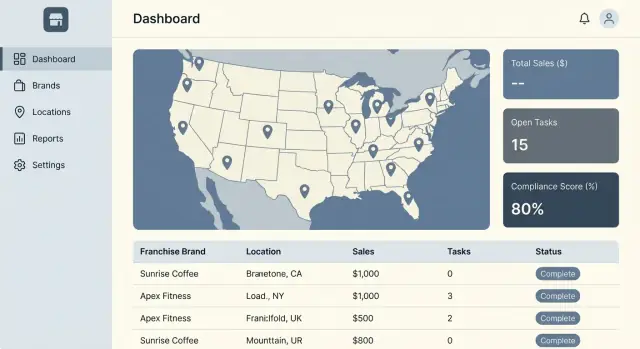
What a Multi-Brand Franchise Ops App Must Support
A multi-brand franchise ops app isn’t just “one franchise tool, scaled up.” The hard part is supporting many brands and many locations at the same time, where some standards are shared (food safety, cash handling, incident reporting) while others vary by brand, region, or even store format.
You’re building a system that can enforce consistency without pretending every location runs identically.
The problem you’re solving
Multi-brand operators need a single place to run daily work, prove compliance, and spot issues early—without forcing teams to jump between separate portals for each brand. The app has to handle:
- Shared corporate policies alongside brand-specific standards
- Local variation (regional regulations, franchisee preferences, limited staffing)
- Visibility boundaries (a franchisee shouldn’t see another franchisee’s performance)
Who uses the system (and why)
Different roles log in with different goals:
- Franchisor HQ sets standards and templates, and wants aggregated reporting across brands and regions.
- Franchisee owners/operators track performance and compliance across their portfolio of locations.
- Store managers need fast daily execution: checklists, tasks, handoffs, and issue resolution.
- Field auditors / ops consultants run inspections, capture evidence, and follow up on corrective actions.
These users often overlap—one person may manage multiple locations and multiple brands—so switching context must be effortless.
Common modules you’ll almost always need
Most franchise management software converges on a core set of modules:
- Locations & profiles: addresses, hours, store attributes, assigned brand(s)
- Users & permissions: role-based access, location/brand scoping
- Tasks & checklists: recurring and ad-hoc work with due dates and owners
- Audits & compliance: inspections, scoring, evidence (photos/notes), corrective actions
- Issues & maintenance: incident reporting, vendor handoff, status tracking
- Comms & knowledge: announcements, brand playbooks, updated standards
- Reporting: trends, exception views, and drill-down by brand/location
The goal
The goal is consistent operations with brand-specific rules and the right visibility: each team sees what they need to act, while leadership sees what they need to improve standards and performance across the network.
Start With Requirements and Success Metrics
Before you sketch screens or choose a tech stack, decide what “better operations” means across brands and locations. Multi-brand programs fail when the app tries to solve everything at once, or when success can’t be measured.
Your goal in this phase is clarity: what you’ll optimize first, what must work on day one, and what data proves it’s working.
Pick 2–3 outcomes to optimize first
Choose a small set of outcomes that matter to both headquarters and franchisees. Examples:
- Faster, more consistent audits (e.g., reduce time to complete an inspection)
- Fewer stockouts (e.g., reduce out-of-stock incidents per location per week)
- Quicker issue resolution (e.g., reduce average days to close a maintenance ticket)
When you pick too many outcomes, you end up building features that don’t move the needle.
Separate “day-one” workflows from later enhancements
List the workflows people already do today and mark which ones must be supported at launch. Day one is usually about repeatable work: checklists, tasks, simple issue reporting, and basic approvals. Later enhancements might include advanced analytics, automated recommendations, or deeper integrations.
A helpful test: if a location can’t operate or stay compliant without it, it’s day one.
Document brand-level differences explicitly
Multi-brand operations aren’t just different logos. Capture what varies by brand so you don’t force a one-size-fits-all setup:
- Menus and item availability
- SOPs and required checklists
- Pricing rules and promotions
- Compliance standards (health, safety, brand standards)
Define success metrics and the data needed
For each chosen outcome, write the metric, the baseline, the target, and the data required (who submits it, how often, and how you validate it). If you can’t reliably capture the data, the metric won’t be trusted—and the app won’t be adopted.
Choose a Tenant Model for Brands and Franchisees
Your tenant model determines how you separate data, how you bill, and how easily you can report across brands. Decide this early—changing it later is possible, but expensive.
Option A: Single tenant per brand
Each brand is its own tenant (database or schema boundary). Franchisees that operate multiple brands effectively have multiple “accounts.”
This is the simplest mental model and gives strong isolation: fewer chances of accidental cross-brand access, and brand-specific customizations are straightforward. The tradeoff is friction for multi-brand operators (multiple logins, duplicated user profiles) and harder cross-brand analytics unless you build a separate reporting layer.
Option B: Shared tenant with brand partitioning
All brands live in one tenant, with a brand_id (and usually location_id) partition on every record.
This reduces infrastructure cost and makes cross-brand reporting easier. It also supports multi-brand franchisees more naturally—one user can switch brands and locations in the same session.
The tradeoff is operational discipline: you must enforce partitioning everywhere (queries, background jobs, exports) and invest in guardrails (tests, row-level security, audit logs).
Can a franchisee own locations across multiple brands?
Decide explicitly. If “yes,” model franchisees as an organization that can be linked to many brands and many locations. If “no,” keep franchisee ownership nested under brand to simplify permissions and reporting.
A common compromise: allow multi-brand ownership, but require each location to belong to exactly one brand.
Define what “global” means
Clarify which things are shared vs. brand-specific:
- User accounts: one login across brands, or separate per brand
- Identity provider (SSO): global (preferred) or brand-specific
- Integrations: global connectors (e.g., one POS integration framework) with per-brand/per-location configuration
- Settings and templates: global defaults with brand overrides
Choosing based on tradeoffs
- Choose single-tenant per brand for maximum isolation and simpler compliance boundaries.
- Choose a shared tenant for lower cost and better multi-brand analytics.
If you’re unsure, write down the must-have. A “multi-brand franchisee experience” and “cross-brand reporting” usually push you toward shared tenancy with strict partitioning.
Design the Data Model: Brands, Locations, Standards, and Work
A clean data model is the difference between an ops app that feels “obvious” and one that constantly needs exceptions. For multi-brand franchise operations, you’re modeling two things at once: organizational structure (who owns what) and operational work (what gets done, where, and under which standard).
Start with core entities
Most systems can be built from a small set of well-defined objects:
- Brand: the rules, templates, and identity for a concept (menus, SOPs, audit checklists).
- Franchisee: a business entity that may own one or many locations, possibly across brands.
- Location: the unit where work happens (store/restaurant/site).
- User and Role: people and their permissions (brand admin, franchisee operator, location manager, auditor).
- Task: assigned work with due dates and completion evidence.
- Audit: a structured inspection against a checklist or standard.
- Ticket (issue): a problem found via audits or day-to-day ops, tracked to resolution.
Model ownership and scope explicitly
Decide which objects belong to which level:
- Brand-scoped: SOP templates, audit checklist templates, score rules, allowed categories, branding.
- Location-scoped: tasks, audits performed, tickets, attachments, daily logs.
- Franchisee-scoped: ownership, contacts, billing, multi-location reporting groups.
A practical pattern is: Brand → (BrandLocationMembership) → Location, so a location can belong to one brand now, but you have room for future brand changes without rewriting history.
Version standards so history stays truthful
Standards change. Your model should store SOP/checklist versions by brand with an effective date (and optionally an “expires” date). Audits and tasks should reference the specific version used at the time, so reports don’t shift when templates are updated.
Plan the data lifecycle upfront
Include states and timestamps to support:
- Onboarding (new location, initial setup tasks, default roles)
- Deactivation (closed locations/users retained for reporting)
- Ownership changes (franchisee transfers without losing past audits)
- Historical reporting (filter by “as-of” owner/brand and effective standards)
If you get these foundations right, later features—permissions, workflows, and analytics—become configuration, not custom code.
Access Control, Roles, and Auditability
Access control is where multi-brand operations either stay safe and orderly—or turn into a permission mess. The goal is simple: every user should see and change only what they’re responsible for, across brands and locations, with every important action traceable later.
Define clear roles and scopes
Start with a small, understandable set of roles, then constrain each role by scope (which brand(s) and location(s) they can act on):
- Brand admin: manages brand-level settings, standards, templates, and high-level reporting.
- Ops manager: oversees multiple locations, assigns work, reviews audits/issues.
- Franchisee owner: manages their own franchise locations, users, and performance.
- Store manager: runs day-to-day tasks, closes issues, responds to audits.
- Auditor: performs audits and submits findings, usually read-only elsewhere.
In a multi-brand setup, “role” alone is never enough. A store manager for Brand A should not automatically access Brand B.
Permission pattern: RBAC + attribute rules
Use role-based access control (RBAC) for broad permissions (e.g., “can_create_audit”, “can_manage_users”), then add attribute-based rules (ABAC) to decide where those permissions apply:
- Brand membership:
user.brand_idscontainsresource.brand_id - Location access:
user.location_idscontainsresource.location_id - Ownership boundaries: franchisee users restricted to their franchise entity
This lets you answer “can they do it?” and “can they do it here?” with the same policy engine.
Edge cases you should plan for early
Cross-brand staff and exceptions will happen:
- Cross-brand employees: allow multiple brand memberships with explicit location lists.
- Temporary access: time-box permissions (start/end), with automatic expiration.
- Vendor accounts: least-privilege roles (e.g., “maintenance”), restricted to assigned locations and specific modules.
Auditability: who changed what, when, and from where
Treat audit logs as a product feature, not just a compliance checkbox. For key events (approvals, score changes, standard updates, user/role changes), capture:
- Actor (user id, role at time), action, resource, before/after values
- Timestamp, location/brand context, and source (IP, device/session id)
Make logs searchable by brand and location, and expose a read-only view for admins and auditors. This pays off the first time someone asks, “Who changed this checklist last week?”
Model the Core Workflows (Tasks, Audits, Issues, Approvals)
Your data model can be perfect, but the product lives or dies by the day-to-day workflows. In franchise ops, most work fits into four buckets: tasks, audits, issues, and approvals. If you model them consistently, you can support very different brands without building four separate apps.
Key flows to support from day one
Onboarding a new location should feel like a guided plan, not a spreadsheet. Create a template with milestones (training, signage, equipment, first inventory order), assign owners, and track evidence (e.g., photos, documents). The output should be a “ready to open” checklist that leadership can trust.
Daily checklists are task workflows optimized for speed. Keep them mobile-first, with clear due times, optional recurrence, and a simple “blocked” state so staff can explain why something couldn’t be completed.
Issue escalation and corrective actions are where accountability is proven. An issue should capture what happened, severity, location, assignee, and evidence (photos). A corrective action is the tracked response: steps, due date, verification, and closure notes. Link them so reports can show “issues found vs. issues resolved.”
Make workflows configurable per brand
Different brands require different steps and standards. Build a workflow engine that lets each brand configure:
- Steps and required fields (including required photos)
- Due dates and SLAs (e.g., “fix within 48 hours”)
- Scoring for audits (pass/fail, weighted categories, auto-fail questions)
Keep the engine opinionated: limit what’s configurable so it stays understandable and reportable.
Approvals and notifications without noise
Add approvals where risk is real—marketing assets, vendor changes, major repairs, exceptions to standards. Model approvals as a small state machine (Draft → Submitted → Approved/Rejected) with comments and version history.
For notifications, support email and in-app by default, with optional SMS for urgent items. Prevent overload with digests, quiet hours, and “notify on assignment/escalation only” settings, so important signals don’t get buried.
Integrations: POS, Inventory, Accounting, and Identity
Integrations are where a franchise ops app becomes “real” for operators: sales data should flow in automatically, user access should follow corporate policy, and back-office teams shouldn’t be stuck re-entering numbers.
Integrations to plan for early
At minimum, map out these categories:
- POS (daily sales, refunds, item-level sales, payment tenders)
- Inventory (counts, receipts, transfers, waste, vendor catalogs)
- Accounting (invoices, payouts, chart of accounts, franchise fees/royalties)
- HR/timekeeping (employee roster, roles, schedule data where relevant)
- Messaging (email/SMS/Slack or Teams notifications)
- Identity (SSO via SAML/OIDC, SCIM provisioning)
Even if you don’t build them all in the MVP, designing around them prevents painful rework.
Choose an integration strategy
Most teams use a mix:
- Direct APIs for a few “must-have” systems with good documentation.
- Middleware/iPaaS (Workato/MuleSoft-style) when you expect many vendors or frequent changes.
- CSV import/export for long-tail vendors and “good enough” early rollouts.
- Webhooks for event-driven updates (e.g., “close-of-day posted,” “inventory count approved”).
Treat each as a product decision: speed to launch vs. ongoing maintenance.
Define data contracts and mapping
Be explicit about identifiers and ownership:
- A stable external ID per vendor object (store, terminal, item, employee).
- Mapping rules by brand and location (stores can share names; IDs cannot).
- Clear validation and error handling (partial failures, duplicates, missing fields).
Document this as a contract your admins can understand—not just developers.
Retries, reconciliation, and admin tooling
Assume integrations will fail. Build:
- Retry policies with backoff and idempotency keys.
- Reconciliation reports (e.g., “POS sales vs. recorded sales by location/day”).
- An admin page to re-run jobs, view payloads safely, and resolve mapping issues.
A simple “Integration Health” area (see /settings/integrations) reduces support load and speeds up rollouts.
Pick an Architecture That Scales Without Overbuilding
A multi-brand franchise ops app needs to scale in complexity as much as in traffic. The goal is to avoid a maze of services early, while still leaving clean seams for later expansion.
Start with a “modular monolith”
For most teams, a single deployable app (one codebase, one database) is the fastest path to a stable MVP. The key is to structure it like you could split it later: clear modules for Brands, Locations, Standards, Audits, Tasks, and Reporting.
When growth forces separation (independent scaling, different release cadences, strict isolation), extract the hottest parts first—typically background processing, search, and analytics—not the core transactional API.
Separate concerns from day one
Even in a monolith, keep boundaries explicit:
- API: versioned endpoints, consistent error formats, and pagination.
- UI: a shared shell with brand-aware navigation and theming.
- Background jobs: audits scheduled by time zone, notifications, exports, and imports.
- File storage: evidence photos, attachments, and generated PDFs stored outside the app server.
- Analytics pipeline: event tracking + a reporting store so dashboards don’t compete with operational queries.
Plan for multi-region reality
Franchises don’t run on one clock. Store all timestamps in UTC, but render using each location’s time zone. Support locales (date formats, number formats) and holiday calendars for task scheduling and SLA calculations.
Environments, flags, and per-brand configuration
Use dev/staging/prod with automated migrations and seeded test tenants. Add feature flags for incremental rollouts (by brand, region, or pilot group) and keep configuration per brand (checklist templates, scoring rules, required photos) out of code where possible.
Where Koder.ai can accelerate the first version
If you want to validate workflows quickly (tasks, audits, issues, and permissions) without committing to a long build cycle, a vibe-coding platform like Koder.ai can help you prototype the app end-to-end from a structured spec and iteration in chat. Teams often use this approach to stand up a React web app with a Go + PostgreSQL backend, test tenant partitioning and RBAC/ABAC rules with pilot brands, then export the source code when they’re ready to harden it for production rollout.
UX Patterns for Multi-Brand and Multi-Location Users
Multi-brand franchise users rarely “live” in a single store view. They jump between brands, regions, and time windows all day—often on a phone, sometimes with poor connectivity. Good UX reduces switching cost and makes the next action obvious.
Make scope visible: brand → franchisee → location
Use a persistent scope control (a multi-brand switcher) in the top bar. Show the active brand and location context everywhere—header, breadcrumbs, and in exported reports—so users don’t complete work in the wrong place.
A practical pattern is: Brand switcher + location picker + saved views (e.g., “My Region”, “Top 10 At-Risk Stores”). Keep the selection sticky across sessions.
Key screens that match real work
- Location overview: today’s status, overdue items, last audit score, open issues, recent photos.
- Task lists: “Assigned to me”, “Due this week”, “Overdue”, with quick actions (complete, reassign, comment).
- Audit forms: guided, step-by-step checklists with clear pass/fail, required evidence rules, and a progress indicator.
Mobile-first field workflows
Design for one-handed use: large tap targets, minimal typing, and fast camera capture.
For offline mode, prioritize read-only caching + queued submissions. Be explicit about sync state (“Saved on device”, “Syncing”, “Uploaded”) and conflict handling.
Photo uploads should support multiple images, annotations, and automatic attachment to the correct task/audit item.
Consistent navigation and filters
Standardize filters across screens: brand, franchisee, location, date range, status. Use the same terms and the same order. Provide “Clear all” and show active filters as chips.
Accessibility basics that pay off
Ensure readable contrast, keyboard navigation for primary flows, and clear status indicators (text + icon, not color alone). Use plain-language labels like “Overdue” vs. “Late,” and confirm irreversible actions with a short summary of scope (brand/location).
Reporting and Analytics That Drive Action
Analytics in franchise operations should answer one question: “What should we do next?” If reports don’t lead to a clear action (follow up, fix, approve, retrain), they’ll be ignored.
Operational dashboards that match how people work
Start with dashboards built around daily decisions:
- Compliance score trends by brand, franchisee group, and location
- Overdue tasks (today, this week) with clear owners
- Recurring issues (same finding in multiple audits, repeated equipment failures)
- Workload health (open items vs. capacity)
Keep the top level simple: a few headline metrics, plus an exceptions panel that flags the biggest risks.
Drill-down from summary to the exact item
Every chart should support a predictable path: brand → franchisee → location → item details.
For example, clicking a low compliance score should reveal which standard failed, which audit question triggered it, photos/notes, the remediation task, and whether it was verified. This drill-down flow reduces back-and-forth and builds trust in the numbers.
Exports and scheduled reports for stakeholders
Not everyone logs in daily. Plan:
- Scheduled email summaries (weekly ops, monthly exec)
- CSV exports for finance/BI teams
- Role-aware report templates so franchisees only see their locations
If you support recurring reports, include “what changed since last report” to prevent passive reading.
Data quality checks that prevent bad decisions
Dashboards are only as good as the underlying data. Add automated checks for:
- Missing POS mappings per location/SKU/category
- Incomplete audits (drafts, unanswered required questions)
- Duplicated locations or inconsistent naming/address data
Surface these as a “Data health” queue, not a hidden admin screen, so teams can fix issues quickly.
Security, Privacy, and Reliability Essentials
Multi-brand franchise ops apps concentrate sensitive operational data in one place: inspections, incident reports, employee details, vendor invoices, and sometimes customer-facing information. That makes security and reliability non-negotiable design requirements—especially when different brands and regions have contractual boundaries.
Security foundations
Start with least privilege by default. New users should see nothing until explicitly assigned a brand, location(s), and role. Treat “view” permissions as carefully as “edit” permissions, because audits and incident logs often contain sensitive notes.
Secure file uploads are another frequent weak spot (photos from audits, receipts, PDFs). Validate file type and size, store uploads outside your app server, scan for malware, and use time-limited URLs for access. Avoid public buckets.
Add rate limiting and abuse protection on login, password reset, invite flows, and any endpoint that can be enumerated (locations, users, standards). Manage secrets (API keys, database credentials) in a dedicated secrets manager, not environment files checked into repos.
Privacy and data boundaries
Be explicit about what personal data you store and why. Employee data (names, phone numbers, scheduling notes) should have clear retention rules; customer data should be minimized unless it’s essential.
Build retention and deletion workflows: automatic retention windows, legal holds, and auditable deletion requests.
For multi-region operations, plan for configurable access boundaries: some brands may require data to be visible only within a country, a corporate group, or a specific franchisee. Enforce these rules at the data layer (not just in the UI) and log access to sensitive records.
Reliability targets
Define availability goals early (for example, what happens if an audit must be completed during an outage). Implement automated backups with regular restore tests, and document disaster recovery procedures (who does what, and in what order).
Maintain an incident response playbook: alerting, on-call ownership, customer communication templates, and post-incident reviews. Reliability is as much process as it is infrastructure.
MVP to Rollout: Build, Migrate, and Expand
A multi-brand franchise ops app only succeeds if it ships, gets adopted, and keeps improving without breaking trust. Plan the first release around a narrow, high-value loop—then expand deliberately.
Define an MVP that’s small but real
Start with one brand and a handful of pilot locations. Keep roles limited (for example: Admin, Brand Ops, Franchisee/Manager) and focus on the core workflows that prove the product:
- Daily/weekly task completion
- A simple audit/checklist with scoring
- Issue capture (photos/notes) and basic assignment
- Approvals only where they unblock real work
Keep integrations minimal. A CSV import plus one identity option (email/password or SSO) is often enough for a pilot.
Migration: import, validate, then roll out in waves
Treat migration as a product feature, not a one-off script.
Import the essentials first: brands, locations, users, and role assignments.
Validate mappings with the business before anyone logs in: location codes, region names, ownership groups, and manager emails must match reality.
Roll out by region or ops team in phases. Each wave should include training, a clear “day-one” checklist, and a short feedback cycle (weekly is fine). Keep the legacy system read-only during overlap to avoid double entry.
Testing strategy that prevents rollout surprises
Prioritize tests that protect trust:
- Permission tests (who can see/edit which brand/location)
- Workflow tests (create → assign → complete → approve)
- Integration sandboxing (test POS/accounting data with non-production credentials)
Add a small set of end-to-end “golden paths” that run on every release.
Expand: what to add next
After adoption, invest in features that compound value:
- Automation rules (overdue reminders, escalation, auto-create tasks from audit results)
- Benchmarking across brands with fair, comparable metrics
- Deeper integrations (POS, inventory, accounting) to reduce manual work
If monetization is tied to locations, users, or modules, make the upgrade path obvious (e.g., transparent tiers on /pricing).
FAQ
What makes a multi-brand franchise ops app different from a single-brand tool?
Start by defining what must be shared (e.g., food safety, cash handling, incident reporting) and what must vary by brand, region, or location format.
Practically, that means:
- Brand-scoped templates (SOPs, audits, score rules)
- Location-scoped execution (tasks, completed audits, tickets)
- Clear visibility boundaries so franchisees only see their own locations
What success metrics should we choose before building anything?
Pick 2–3 measurable outcomes that matter to both HQ and operators, then build the smallest set of workflows that move them.
Examples:
- Reduce time to complete inspections
- Reduce out-of-stock incidents per week
- Reduce average days to close maintenance tickets
Write down the baseline, target, and the data you’ll need to trust the metric.
What belongs in the MVP versus later phases?
Use the “can a location operate or stay compliant without it?” test.
Typical day-one workflows:
- Daily/weekly checklists and task assignment
- A simple audit/checklist flow with scoring and evidence
- Issue reporting with photos/notes and basic assignment
- Minimal approvals only where they unblock real work
Save advanced analytics, automation, and deep integrations for later once adoption is proven.
Should we use a single tenant per brand or a shared tenant?
It depends on how important cross-brand reporting and one-login multi-brand users are.
- Single tenant per brand: strongest isolation, simpler brand-specific customization, but multi-brand operators may need multiple accounts and cross-brand analytics is harder.
- Shared tenant with brand partitioning: easier cross-brand analytics and smoother switching, but requires strict guardrails (row-level security, tests, audit logs) to prevent data leaks.
How should we model franchisees who own locations across multiple brands?
Model franchisees as an organization that can link to many locations (and optionally many brands), then enforce scope in permissions.
A common compromise:
- Allow multi-brand ownership
- Require each location to belong to exactly one brand at a time
This keeps reporting and standards clean while still supporting real operator portfolios.
How do we handle changing SOPs and checklist standards without breaking reporting?
Store standards as versioned templates with an effective date (and optionally an expiry).
Then:
- Each audit/task references the exact version used at the time
- Reports don’t “shift” when templates are updated later
This preserves historical truth and avoids disputes about what the standard was on a given day.
What’s the best permission model for multi-brand, multi-location access control?
Use RBAC for what a role can do and ABAC for where they can do it.
Examples of ABAC checks:
user.brand_idscontainsresource.brand_iduser.location_idscontainsresource.location_id- Franchisee users restricted to their franchisee organization
This prevents a store manager for Brand A from automatically seeing Brand B just because they share a role name.
How do we support cross-brand staff, temporary access, and vendors safely?
Build for common edge cases explicitly:
- Cross-brand staff: allow multiple brand memberships with explicit location lists
- Temporary access: time-box permissions with automatic expiration
- Vendor accounts: least-privilege roles restricted to assigned locations and specific modules
Also log sensitive actions so you can answer “who accessed or changed this?” later.
What integration strategy works best for POS, inventory, accounting, and identity?
Plan for failures and give admins visibility.
Minimum integration capabilities:
- Stable external IDs and mapping by brand/location
- Idempotent retries with backoff
- Reconciliation reports (e.g., POS sales vs recorded sales)
- Admin tools to view errors and re-run jobs
If you need a quick start, ship CSV import/export first, then add direct APIs or iPaaS once workflows stabilize.
What UX patterns help users who manage multiple brands and locations?
Make scope obvious and switching cheap.
Practical UX patterns:
- Persistent brand switcher + location picker with sticky selection
- Standard filters everywhere (brand, franchisee, location, date range, status)
- Mobile-first flows for checklists, audits, and photo evidence
- Offline-friendly behavior: read-only caching + queued submissions with clear sync state
Always show brand/location context in screens and exports to prevent work being done in the wrong place.