

How to Build a Web App to Manage Permissions Across Products
Learn how to design and build a web app that centralizes roles, groups, and permissions across multiple products, with audits, SSO, and safe rollout.
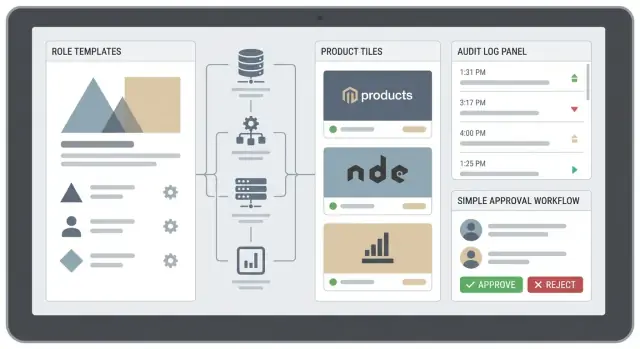
Problem to Solve and What Success Looks Like
When people say they need to manage permissions across “multiple products,” they usually mean one of three things:
- Separate applications (e.g., billing, analytics, support) that each evolved their own user and role system.
- Modules within one platform that behave like separate products (different data, actions, and teams).
- Tenants or workspaces where the same product is repeated for different customers, regions, or business units.
In all cases, the root issue is the same: access decisions are being made in too many places, with too many conflicting definitions of roles like “Admin,” “Manager,” or “Read-only.”
The most common pain points
Teams typically feel the breakage before they can clearly name it.
Inconsistent roles and policies. One product’s “Editor” can delete records; another’s can’t. Users over-request access because they don’t know what they’ll need.
Manual provisioning and deprovisioning. Access changes happen through ad-hoc Slack messages, spreadsheets, or ticket queues. Offboarding is especially risky: users lose access in one tool but keep it in another.
Unclear ownership. Nobody knows who can approve access, who should review it, or who is accountable when a permission mistake causes an incident.
What success should look like
A good permissions management web app isn’t just a control panel—it’s a system that creates clarity.
Central admin with consistent definitions. Roles are understandable, reusable, and map cleanly across products (or at least make differences explicit).
Self-service with guardrails. Users can request access without hunting down the right person, while sensitive permissions still require approvals.
Approval flows and accountability. Every change has an owner: who requested it, who approved it, and why.
Auditability by default. You can answer “who had access to what, when?” without stitching together logs from five systems.
Metrics that prove it’s working
Track outcomes that align with speed and safety:
- Time to grant access (median and 95th percentile)
- Fewer support tickets about access (“I can’t see X,” “Please add me to Y”)
- Fewer access-related incidents (over-permissioning, missed deprovisioning)
- Review completion rates for periodic access recertification (if/when you add it)
If you can make access changes faster and more predictable, you’re on the right path.
Requirements and Scope Checklist
Before you design roles or pick a tech stack, get clear on what your permissions app must cover on day one—and what it explicitly won’t. A tight scope prevents you from rebuilding everything halfway through.
1) Inventory the products you’ll integrate first
Start with a short list (often 1–3 products) and write down how each one currently expresses access:
- Does it use roles, groups, per-resource grants, or
is_adminflags? - Are permissions global (product-wide) or tied to entities (projects, workspaces, accounts)?
- Where are permissions enforced today (frontend, backend, both)?
If two products have fundamentally different models, note that early—you may need a translation layer rather than forcing them into a single shape immediately.
2) Identify user types and operational realities
Your permission system must handle more than “end users.” Define at least:
- Internal admins and support staff (often need broad, time-bound access)
- Customer admins and regular users
- Partners/resellers (may span multiple customer accounts)
- Service accounts and API clients (automation needs stable, least-privilege access)
Capture edge cases: contractors, shared inbox accounts, and users who belong to multiple organizations.
3) Decide which actions require permission checks
List actions that matter to the business and users. Common categories include:
- View vs. edit (read/write)
- Billing and subscription changes
- User management (invite, deactivate, reset MFA)
- High-risk admin actions (data export, key rotation, destructive deletes)
Write them as verbs tied to objects (e.g., “edit workspace settings”), not vague labels.
4) Document sources of truth and ownership
Clarify where identities and attributes originate:
- HRIS for employees, CRM for customers, existing directories for SSO groups
- Product databases for membership and resources
For each source, decide what your permissions app will own vs. mirror, and how conflicts are resolved.
Choose an Architecture: Centralize, Federate, or Hybrid
The first big decision is where authorization “lives.” This choice shapes your integration effort, your admin experience, and how safely you can evolve permissions over time.
Option 1: Centralize (one authorization service)
With a centralized model, a dedicated authorization service evaluates access for all products. Products call it (or validate centrally-issued decisions) before allowing actions.
This is attractive when you need consistent policy behavior, cross-product roles, and a single place to audit changes. The main cost is integration: every product must depend on the shared service’s availability, latency, and decision format.
Option 2: Federate (each product owns its own rules)
In a federated model, each product implements and evaluates its own permissions. Your “manager app” primarily handles assignment workflows and then syncs the result to each product.
This maximizes product autonomy and reduces shared runtime dependencies. The downside is drift: names, semantics, and edge cases can diverge, making cross-product administration harder and reporting less reliable.
Option 3: Hybrid (control plane + local enforcement)
A practical middle path is to treat the permission manager as a control plane (a single admin console), while products remain enforcement points.
You maintain a shared permission catalog for concepts that must match across products (e.g., “Billing Admin,” “Read Reports”), plus room for product-specific permissions where teams need flexibility. Products pull or receive updates (roles, grants, group mappings) and enforce locally.
Key trade-offs to decide upfront
- Speed of integration: centralized evaluation can be faster to standardize, but harder to roll into legacy systems; federated syncing can start small but takes longer to normalize.
- Autonomy: federated/hybrid lets product teams ship independently; centralized requires tighter coordination.
- Risk of breaking changes: a shared catalog and decision API need versioning and backward compatibility, or one change can impact multiple products.
If you expect frequent product growth, hybrid is often the best starting point: it delivers a single admin console experience without forcing every product onto the same runtime authorization engine on day one.
Design the Permission Model (RBAC First, Then ABAC)
A permissions system succeeds or fails on its data model. Start simple with RBAC (role-based access control) so it’s easy to explain, administer, and audit. Then add attributes (ABAC) only where RBAC becomes too blunt.
Core entities you’ll almost always need
At minimum, model these concepts explicitly:
- Users: the people (or service accounts) requesting access.
- Groups: collections of users (team, department, environment owners).
- Products: the apps/services you’re controlling access to.
- Resources: things inside a product (project, workspace, repo, customer account).
- Permissions: atomic actions (e.g.,
project.read,project.write,billing.manage). - Roles: named sets of permissions.
A practical pattern is: role assignments bind a principal (user or group) to a role within a scope (product-wide, resource-level, or both).
RBAC first: make roles your primary interface
Define roles per product so each product’s vocabulary stays clear (e.g., “Analyst” in Product A isn’t forced to match “Analyst” in Product B).
Then add role templates: standardized roles that can be reused across tenants, environments, or customer accounts. On top of that, create bundles for common job functions across multiple products (e.g., “Support Agent bundle” = roles in Product A + Product B + Product C). Bundles reduce admin effort without collapsing everything into one mega-role.
Least privilege: avoid “admin means everything”
Make the default experience safe:
- New users should start with no access (or a minimal “Viewer” role).
- Treat “Admin” as scoped (admin of a product, a workspace, or a tenant), not a global god mode.
- Prefer separate high-risk permissions like
billing.manage,user.invite, andaudit.exportinstead of hiding them under “admin.”
When to add ABAC (attributes)
Add ABAC when you need policy rules like “can view tickets only for their region” or “can deploy only to staging.” Use attributes for constraints (region, environment, data classification), while keeping RBAC as the main way humans reason about access.
If you want a deeper guide to role naming and scoping conventions, link your internal docs or a reference page like /docs/authorization-model.
Identity, Authentication, and Token Strategy
Your permissions app sits between people, products, and policies—so you need a clear plan for how every request identifies who is acting, what product is asking, and which permissions should be applied.
How products identify themselves
Treat each product (and environment) as a client with its own identity:
- Client IDs + secrets / API keys for server-side integrations. Rotate regularly and scope them to specific APIs.
- mTLS for high-trust internal traffic: the product presents a client certificate, and you validate it at the gateway.
Whichever you choose, log the product identity on every authorization/audit event so you can answer “which system requested this?” later.
How users sign in and sessions work
Support two entry points:
- Email/password (only if you must): protect with MFA, rate limiting, and breach checks.
- SSO (SAML/OIDC): preferred for businesses because user lifecycle and MFA live in the customer’s IdP.
For sessions, use short-lived access tokens plus a server-side session or refresh token with rotation. Keep logout and session revocation predictable (especially for admins).
Token strategy: JWT claims vs introspection
Two common patterns:
- JWT with permission claims: fast, offline validation, but permissions can go stale until token expiry.
- Token introspection / permission lookup: products call your auth service (or cache results briefly). More up to date and easier revocation, but adds latency and needs high availability.
A practical hybrid: JWT contains identity + tenant + roles, and products call an endpoint for fine-grained permissions when needed.
Service-to-service and non-human identities
Don’t reuse user tokens for background jobs. Create service accounts with explicit scopes (least privilege), issue client-credential tokens, and keep them separate in audit logs from human actions.
APIs and Integration Pattern for Multiple Products
A permissions app only works if every product can ask the same questions and get consistent answers. The goal is to define a small set of stable APIs that each product integrates once, then reuses as your portfolio grows.
Define the “stable core” APIs
Keep the core endpoints focused on the few operations every product needs:
- Check access: “Can user X do action Y on resource Z?” (the hot path)
- List entitlements: “What roles/permissions does user X have in product P?”
- Grant / revoke: admin actions and automated provisioning flows
- Audit export: “What changed, when, by whom, and why?”
Avoid product-specific logic in these endpoints. Instead, standardize on a shared vocabulary: subject (user/service), action, resource, scope (tenant/org/project), and context (attributes you may use later).
Choose an integration pattern per product
Most teams end up using a combination:
- Runtime authorization checks (sync): Product calls
POST /authz/check(or uses a local SDK) on each sensitive request. - Local enforcement (async replication): Product maintains a read model of entitlements for fast UI gating and offline decisions.
A practical rule: make the centralized check the source of truth for high-risk actions, and use replicated data for UX (menus, feature flags, “you have access” badges) where occasional staleness is acceptable.
Event-driven updates: keep products in sync
When permissions change, don’t rely on every product polling.
Publish events like role.granted, role.revoked, membership.changed, and policy.updated to a queue or webhook system. Products can subscribe and update their local caches/read models.
Design events so they’re:
- Idempotent (safe to process twice)
- Ordered per subject+tenant where possible
- Self-describing enough to rebuild state (or provide a follow-up “fetch current state” endpoint)
Caching and invalidation for fast checks
Access checks must be fast, but caching can create security bugs if invalidation is weak.
Common pattern:
- Cache allow/deny results briefly (seconds) keyed by subject/action/resource/scope.
- Cache entitlement snapshots (roles, group membership) longer, but invalidate aggressively on events.
If you use JWTs with embedded roles, keep token lifetimes short and pair them with server-side revocation strategies (or a “token version” claim) so revokes propagate quickly.
Versioning and backward compatibility
Permissions evolve as products add features. Plan for it:
- Version API contracts (
/v1/authz/check) and event schemas. - Treat permissions as additive when possible (introduce new actions rather than changing meaning).
- Deprecate with timelines and telemetry: measure which products still call old endpoints.
A small investment in compatibility prevents the permissions system from becoming the bottleneck for shipping new product capabilities.
Build the Admin and Self‑Service UX
A permissions system can be technically correct and still fail if admins can’t confidently answer: “Who has access to what, and why?” Your UX should reduce guesswork, prevent accidental over‑granting, and make common tasks fast.
Core admin console screens
Start with a small set of pages that cover 80% of daily operations:
- User lookup: search by name, email, employee ID, or external identity. Show a clear summary: products, roles, groups, and “last changed by.”
- Role assignment: a single, consistent flow to add/remove roles across products. Include effective dates if you support time‑boxed access.
- Group management: create groups (teams, departments, projects) and assign roles to groups so admins aren’t maintaining permissions user‑by‑user.
On every role, include a plain‑language explainer: “What this role allows” plus concrete examples (“Can approve invoices up to $10k” is better than “invoice:write”). Link to deeper docs when needed (e.g., /help/roles).
Bulk operations without bulk mistakes
Bulk tools save time but amplify errors, so make them safe by design:
- CSV import/export for onboarding or audits, with strict validation and a downloadable template.
- Mass role changes with a review step: show a diff (“+ Billing Admin, − Viewer”) before applying.
- Scheduled access reviews: let admins queue a review for a date, notify reviewers, and track completion.
Add guardrails like “dry run,” rate limits, and clear rollback instructions if an import goes wrong.
A simple approval workflow
Many organizations need a lightweight process:
Request → Approve → Provision → Notify
Requests should capture business context (“needed for Q4 close”) and duration. Approvals should be role‑ and product‑aware (the right approver for the right thing). Provisioning should generate an audit entry and notify both requester and approver.
Accessibility and clarity
Use consistent naming, avoid acronyms in the UI, and include inline warnings (“This grants access to customer PII”). Ensure keyboard navigation, readable contrast, and clear empty states (“No roles assigned yet—add one to enable access”).
Auditing, Reporting, and Compliance Basics
Auditing is the difference between “we think access is correct” and “we can prove it.” When your app manages permissions across products, every change must be traceable—especially role grants, policy edits, and admin actions.
What your audit log must capture
At minimum, log who changed what, when, from where, and why:
- Actor: user ID, admin ID, service account, or automation (include the impersonator if acting “on behalf of”).
- Action + object: e.g., “assigned role template X,” “revoked product Y access,” “edited policy Z,” including before/after values.
- Timestamp: in UTC with millisecond precision.
- Source: IP address, user agent, device/session ID, and the product/admin UI/API used.
- Reason: a required “change reason” field for sensitive actions (granting admin roles, editing role templates, disabling MFA, etc.).
Immutability, retention, and SIEM export
Treat audit events as append-only. Don’t allow updates or deletes through application code; if corrections are needed, write a compensating event.
Define retention by risk and regulation: many teams keep “hot” searchable logs for 30–90 days and archive for 1–7 years. Make export easy: provide scheduled delivery (e.g., daily) and streaming options to SIEM tools. At minimum, support export to newline-delimited JSON and include stable IDs so consumers can de-duplicate.
Detect risky behavior early
Build simple detectors that flag:
- Privilege escalation (sudden jump to high-privilege roles, new global admins, policy broadening).
- Unusual admin activity (out-of-hours spikes, many changes in a short window, changes across many tenants/products).
- Suspicious access patterns (new IP/geography, repeated failed admin actions).
Surface these in an “Admin activity” view and optionally send alerts.
Reports your stakeholders will ask for
Make reporting practical and exportable:
- Access by product (who has what, grouped by role template and tenant).
- Dormant accounts (no login or no product usage for N days, but still provisioned).
- High-privilege users (global admins, policy editors, break-glass accounts) with last-used timestamps.
If you later add approval workflows, link audit events to the request ID so compliance reviews are fast and defensible.
Security Controls and Common Failure Modes
A permissions management app is itself a high‑value target: one bad decision can grant broad access across every product. Treat the admin surface and authorization checks as “tier‑0” systems.
Prevent privilege escalation
Start with least privilege and make escalation intentionally hard:
- Separation of duties: split roles so no single person can both grant access and approve sensitive changes (e.g., “Role Editor” vs “Role Approver”).
- Protected roles: mark break‑glass/admin roles as immutable templates (cannot be edited, only assigned). Require stronger verification and extra approval to assign them.
- Two‑person rule for risky actions: assigning a protected role, expanding a role template, or changing policy evaluation rules should require secondary approval and be fully logged.
Common failure mode: a “role editor” can edit the admin role, then assign it to themselves.
Harden admin endpoints
Admin APIs should not be as reachable as end‑user APIs:
- Rate limiting on role/permission mutation endpoints to reduce brute force and abuse.
- IP allowlists (or private network access) for administrative actions when feasible.
- Secure defaults: deny by default, require explicit grants, and avoid “temporary” wildcard permissions that never get removed.
Common failure mode: a convenience endpoint (e.g., “grant all for support”) shipped to production without guardrails.
Protect secrets and sessions
- Use a real secrets manager (not environment variables in plain text across many systems).
- Encrypt in transit (TLS everywhere) and encrypt at rest for policy data, audit logs, and any PII.
- Lock down cookies:
HttpOnly,Secure,SameSite, short session lifetimes, and CSRF protection for browser flows.
Common failure mode: leaking service credentials that allow policy writes.
Test authorization like you mean it
Authorization bugs are usually “missing deny” scenarios:
- Write negative tests (“user must NOT access X”).
- Maintain a role matrix test suite (roles × actions × resources) to catch unintended access when templates change.
- Add regression tests for previously reported incidents and edge cases (deleted users, stale tokens, cross‑tenant access).
Rollout Plan: Pilot, Migrate, and Expand
A permissions system is never “done” at launch—you earn trust by rolling it out safely. The goal is to prove access decisions are correct, support can resolve issues quickly, and you can roll back changes without breaking teams.
1) Pilot with one product (end-to-end)
Start with a single product that has clear roles and active users. Map its current roles/groups into a small set of canonical roles in your new system, then build an adapter that translates “new permissions” into whatever the product enforces today (API scopes, feature toggles, database flags, etc.).
During the pilot, validate the full loop:
- Admin changes a role assignment
- The product receives the update (push or pull)
- Real users can sign in and perform expected actions
- Audit events capture who changed what and when
Define success metrics up front: reduced support tickets for access, no critical over-permission incidents, and time-to-revoke measured in minutes.
2) Migrate data carefully (and reversibly)
Legacy permissions are messy. Plan a translation step that converts existing groups, ad-hoc exceptions, and product-specific roles into the new model. Keep a mapping table so you can explain every migrated assignment.
Do a dry run in a staging environment, then migrate in waves (by organization, region, or customer tier). For tricky customers, migrate but keep “shadow mode” enabled so you can compare old vs. new decisions before enforcing.
3) Use feature flags and phased enforcement
Feature flags let you separate the “write path” from the “enforcement path.” Typical phases:
- Read-only UI (reporting only)
- Writes enabled, not enforced (sync only)
- Partial enforcement (specific actions)
- Full enforcement
If something goes wrong, you can disable enforcement while keeping audit visibility.
4) Runbooks for support and emergency revokes
Document runbooks for common incidents: user can’t access a product, user has too much access, admin made a mistake, and emergency revoke. Include who is on call, where to check logs, how to verify effective permissions, and how to perform a “break-glass” revoke that propagates quickly.
Once the pilot is stable, repeat the same playbook product-by-product. Each new product should feel like integration work—not a reinvention of your permission model.
Implementation Notes: Tech Stack and Operations
You don’t need exotic technology to ship a solid permissions management app. Prioritize correctness, predictability, and operability—then optimize.
A practical, boring stack
A common baseline:
- API service: Node.js (NestJS/Fastify) or Go (Gin/chi)
- Database: Postgres (strong consistency and great indexing for policy queries)
- Cache: Redis (cache role expansions, tenant configs, and “can user X do Y” decisions)
- Queue: Redis-backed queue (BullMQ) or a managed queue (SQS/Pub/Sub)
Keep the authorization decision logic in one service/library to avoid products drifting in behavior.
If you’re trying to get an internal admin console and APIs in place quickly (especially for a pilot), platforms like Koder.ai can help you prototype and ship the web app faster via a chat-driven workflow. In practice, that can be useful for generating a React-based admin UI, a Go + PostgreSQL backend, and the scaffolding for audit logs and approvals—then iterating as requirements become clearer. (You still need rigorous review for authorization logic, but it can shorten the time from spec to working pilot.)
Background jobs (provisioning and sync)
Permissions systems quickly accumulate work that shouldn’t block user requests:
- Import/sync users and groups from external IdPs
- Provision entitlements to downstream products
- Recompute derived grants after role template changes
- Periodic consistency checks (e.g., “orphaned” assignments)
Make jobs idempotent and retryable, and store job status per tenant for supportability.
Operations: observability that actually helps
At minimum, instrument:
- Logs: structured logs with request ID, tenant ID, actor ID, and decision outcome
- Metrics: authorization latency, error rate, cache hit rate, DB query time
- Traces: end-to-end paths for “permission check” and “admin change” flows
Alert on spikes in deny-by-error (e.g., DB timeouts) and on p95/p99 latency for permission checks.
Load testing and capacity checks
Before rollout, load test the permission-check endpoint with realistic patterns:
- Hot keys (same user/project checked repeatedly)
- Mixed reads/writes (admin updates during traffic)
- Varying tenant sizes
Track throughput, p95 latency, and Redis hit rate; verify performance degrades gracefully when the cache is cold.
Advanced Features: SSO, SCIM, and Multi‑Tenant Support
Once your core permission model works, a few “enterprise” features can make the system dramatically easier to operate at scale—without changing how your products enforce access.
SSO: SAML/OIDC, and mapping IdP groups to roles
Single Sign‑On usually means SAML 2.0 (common with older enterprise IdPs) or OpenID Connect (OIDC) (common with modern app stacks). Either way, the key design decision is: what do you trust from the Identity Provider (IdP)?
A practical pattern is to accept identity and high-level group membership from the IdP, then map those groups to your internal role templates per tenant. For example, an IdP group like Acme-App-Admins maps to your role Workspace Admin in tenant acme. Keep this mapping explicit and editable by tenant admins, not hard-coded.
Avoid using IdP groups as direct permissions. Groups change for organizational reasons; your app’s roles should remain stable. Treat the IdP as a source of “who the user is” and “which org group they’re in,” not “what they can do in every product.”
SCIM provisioning for automated user lifecycle
SCIM lets customers automate account lifecycle: create users, deactivate users, and sync group membership from the IdP. This reduces manual invites and closes security gaps when employees leave.
Implementation tips:
- Treat deactivation as a first-class event (immediately revoke sessions/tokens and remove product access).
- Make group sync idempotent and auditable: SCIM updates should translate into deterministic changes in your role assignments.
Multi-tenant support: isolation and admin boundaries
Multi-tenant access control must enforce tenant isolation everywhere: identifiers in tokens, database row-level filters, cache keys, and audit logs.
Define clear admin boundaries: tenant admins can manage users and roles only within their tenant; platform admins can troubleshoot without granting themselves product access by default.
For deeper implementation guides and packaging options, see /blog. If you’re deciding which features belong in which plan, align them with /pricing.
FAQ
What’s the best way to scope a permissions management app for day one?
Start by listing 1–3 products to integrate first and document, for each one:
- Current authorization shape (roles/groups/per-resource grants/flags)
- Scope (global vs workspace/project/account)
- Where checks happen today (frontend, backend, both)
If models differ a lot, plan for a translation layer rather than forcing a single model immediately.
Should authorization be centralized, federated, or hybrid across products?
Pick based on where you want policy decisions to be evaluated:
- Centralized: one authz service evaluates decisions for all products (best consistency; higher runtime dependency).
- Federated: each product evaluates locally; the manager app only assigns/syncs entitlements (best autonomy; more drift).
- Hybrid: a shared control plane (catalog + admin) with local enforcement in products (often the best starting point for legacy + growth).
If you expect multiple products and frequent change, hybrid is usually the safest default.
What data model should I start with for cross-product permissions?
A practical baseline is RBAC with explicit entities:
- Users (and service accounts)
- Groups
- Products
- Resources (workspace/project/account)
- Permissions (atomic actions like
billing.manage) - Roles (sets of permissions)
Then store role assignments as: (principal=user/group) + (role) + (scope=tenant/product/resource) so you can reason about “who has what, where.”
When should I add ABAC (attributes) instead of only RBAC?
Treat RBAC as the human interface and introduce ABAC only for constraints RBAC can’t express cleanly.
Use ABAC for rules like:
- “Can view tickets only in their region”
- “Can deploy only to staging”
Keep it maintainable by limiting attributes to a small set (region, environment, data classification) and documenting them, while roles remain the primary way admins assign access.
How do role templates and bundles help manage permissions across multiple products?
Avoid a single mega-role by layering:
- Product roles: clear, product-specific vocabulary.
- Role templates: reusable roles across tenants/environments.
- Bundles: job-function packages that assign multiple roles across products (e.g., Support bundle).
This reduces admin work without hiding important differences between products’ permission semantics.
What token strategy works best for permissions checks (JWT vs introspection)?
Design around two decision patterns:
- JWT with claims: fast and offline, but can be stale until expiry.
- Introspection/lookup: up-to-date and easier revocation, but adds latency and requires high availability.
A common hybrid: JWT carries identity + tenant + roles, and products call a check endpoint for high-risk or fine-grained actions. Keep token lifetimes short and have a revocation strategy for urgent removals.
What are the minimum APIs a multi-product permissions system should expose?
Keep a small “stable core” that every product can implement:
POST /authz/check(hot path)- Entitlements listing (roles/permissions per user per product)
- Grant/revoke (admin + automation)
- Audit export
Standardize the vocabulary: subject, action, resource, scope (tenant/org/workspace), and optional context (attributes). Avoid product-specific branching in the core APIs.
How should products stay in sync when roles or policies change?
Use events so products don’t need to poll for changes. Publish changes like:
role.granted/role.revokedmembership.changedpolicy.updated
Make events idempotent, ordered per subject+tenant when possible, and either (a) self-describing enough to update local state or (b) paired with a “fetch current state” endpoint for reconciliation.
What should the admin and self-service UX include to prevent over-permissioning?
Include the screens and guardrails that reduce mistakes:
- User lookup with a clear “effective access” summary and “last changed by”
- Consistent role assignment flow across products, with optional time-bound access
- Group management to avoid user-by-user assignments
- Bulk tools with a diff/review step, “dry run,” and strict CSV validation
Add plain-language role explainers and warnings for sensitive access (e.g., PII, billing).
What must an audit log include for a permissions management app?
Log every sensitive change as append-only events with enough context to answer “who had access to what, when, and why?”
At minimum capture:
- Actor (and impersonator if applicable)
- Action + object with before/after
- UTC timestamp (high precision)
- Source (IP, user agent, session/device, UI/API)
- Reason field for sensitive operations
Support export (e.g., newline-delimited JSON), long-term retention, and stable IDs for de-duplication in SIEM tools.