

How to Build a Web App to Track Cross‑Department Dependencies
A practical guide to designing a web app that captures, visualizes, and manages cross-department dependencies with clear workflows, roles, and reporting.
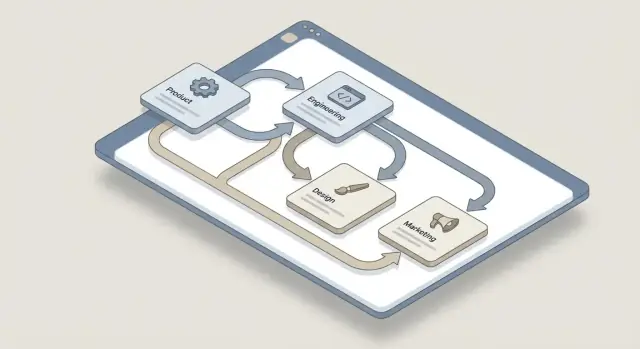
Clarify the Problem and Scope
Before you sketch screens or pick a tech stack, get specific about what you’re tracking and why. “Dependency” sounds universal, but most teams use it to mean different things—and that mismatch is exactly what causes missed handoffs and last‑minute blockers.
Define what a “dependency” means (for you)
Start by writing a plain‑English definition everyone can agree on. In most organizations, dependencies fall into a few practical buckets:
- Deliverable: Team A can’t start/finish until Team B ships a file, feature, or document.
- Approval: Legal, Finance, Security, or leadership sign‑off is required.
- Data: Another team must provide data access, a report, an export, or a schema change.
- Capacity / staffing: Another group needs to allocate time (design review, QA, ops support).
Be explicit about what is not a dependency. For example, “nice‑to‑have collaboration” or “FYI updates” might belong in a different tool.
Map the departments and common dependency types
List the departments that regularly block or unblock work (Product, Engineering, Design, Marketing, Sales, Support, Legal, Security, Finance, Data, IT). Then capture the recurring patterns between them. Examples: “Marketing needs launch dates from Product,” “Security needs a threat model before review,” “Data team needs two weeks for tracking changes.”
This step keeps the app focused on real cross‑team handoffs instead of becoming a generic task tracker.
Identify the pain points you want to remove
Write down the current failure modes:
- Handoffs are missed because the owner is unclear.
- A dependency is discovered too late (right before launch).
- Updates live in scattered places (email, chats, spreadsheets).
- Escalations happen because there’s no shared view of status and due dates.
Set success criteria (so “done” is measurable)
Define a few outcomes you can measure after rollout, such as:
- Fewer escalations related to cross‑team blockers.
- Faster approval turnaround time (median days from request to decision).
- Higher clarity of ownership (e.g., % of dependencies with an assigned owner).
- Fewer “surprise” blockers found in the final week before a milestone.
With scope and success metrics agreed, every feature decision becomes easier: if it doesn’t reduce confusion around ownership, timelines, or handoffs, it probably doesn’t belong in version one.
Map Users and Core Workflows
Before you design screens or tables, get clear on who will use the app and what they’re trying to accomplish. A dependency tracker fails when it’s built for “everyone,” so start with a small set of primary personas and optimize the experience for them.
Pick primary personas (and what each cares about)
Most cross‑department dependencies map cleanly to four roles:
- Requester: needs something from another team; cares about clarity, dates, and knowing “what happens next.”
- Owner: the team/person who must deliver; cares about scope, effort, and negotiating timelines.
- Approver: validates priority or resourcing; cares about risk, tradeoffs, and accountability.
- Program manager: needs overall visibility; cares about bottlenecks, aging items, and escalation paths.
Write a one‑paragraph job story for each persona (what triggers them to open the app, what decision they need to make, what success looks like).
Document the core workflows end‑to‑end
Capture the top workflows as simple sequences, including where handoffs happen:
- Create dependency (requester) → submit details, attach context, propose needed‑by date.
- Accept / decline / request changes (owner/approver) → confirm ownership and expectations.
- Complete dependency (owner) → mark done, add evidence/notes, notify requester.
- Escalate (program manager) → trigger review when blocked, overdue, or disputed.
Keep the workflow opinionated. If users can move a dependency to any status at any time, data quality degrades quickly.
Prevent form overload with required vs. optional fields
Define the minimum required to start: title, requester, providing team/person, needed‑by date, and a short description. Make everything else optional (impact, links, attachments, tags).
Decide what must be tracked over time
Dependencies are about change. Plan to record an audit trail for status changes, comments, due date edits, ownership reassignment, and acceptance/decline decisions. This history is essential for learning and fair escalation later.
Design the Dependency Record
The dependency record is the “unit of truth” your app manages. If it’s inconsistent or vague, teams will argue about what a dependency means instead of resolving it. Aim for a record that is easy to create in under a minute, but structured enough to sort, filter, and report on later.
Start with a consistent template
Use the same core fields everywhere so people don’t invent their own formats:
- Title: short, action‑oriented (“Security review for new billing flow”)
- Description: what’s needed, what “done” looks like, any constraints
- Requesting team (the team that needs something)
- Providing team (the team that will deliver)
- Owner (person accountable for the next step)
- Needed‑by date
- Status: keep it simple (e.g., Draft → Proposed → Accepted → In Progress → Blocked → Done)
Add a couple of optional fields that reduce ambiguity without turning your app into a scoring system:
- Impact: what gets delayed or what risk increases if this isn’t delivered (Low/Medium/High is enough)
- Urgency: how time‑sensitive it is (Normal/Soon/ASAP)
Link it to real work
Dependencies rarely live alone. Allow multiple links to related items—tickets, docs, meeting notes, PRDs—so people can verify context quickly. Store both a URL and a short label (e.g., “Jira: PAY‑1842”) to keep lists readable.
Design for partial information (because it’s normal)
Not every dependency starts with perfect ownership. Support an “Unknown owner” option and route it into a triage queue where a coordinator (or rotating duty) can assign the right team. This prevents dependencies from staying out of the system just because one field is missing.
A good dependency record makes accountability clear, prioritization possible, and follow‑up frictionless—without asking users to do extra work.
Plan the Data Model (Simple but Future‑Proof)
A dependency‑tracking app lives or dies by its data model. Aim for a structure that’s easy to query and explain, while leaving room for growth (more teams, more projects, more rules) without a redesign.
Start with a small set of core entities
Most orgs can cover 80% of needs with five tables (or collections):
- Department/Team: name, cost center (optional), parent team (optional)
- Person: name, email, team_id, role/title (optional)
- Project/Initiative: name, owner_team_id, start/end dates (optional)
- Milestone: project_id, due date, “definition of done” notes
- Dependency: the record everyone discusses—what is needed, by whom, and by when
Keep Dependency focused: title, description, requesting_team_id, providing_team_id, owner_person_id, needed_by_date, status, priority, and links to related work.
Model relationships explicitly
Two relationships matter most:
- Dependency → Project/Initiative: a dependency should attach to a project (and optionally a milestone). This enables project visibility and reporting.
- Dependency → Dependency (blocked by): sometimes a dependency can’t start until another dependency is done. Store this as a join table (e.g.,
dependency_edges) withblocking_dependency_idandblocked_dependency_idso you can build a dependency graph later.
Define status states and transitions
Use a simple, shared lifecycle such as:
Draft → Proposed → Accepted → In Progress → Blocked → Done
Define a small set of allowed transitions (for example, Done can’t go back without an admin action). This prevents “status roulette” and makes notifications predictable.
Store history without overengineering
You’ll want to answer: “Who changed what, and when?” Two common options:
- Audit log table: store
entity_type,entity_id,changed_by,changed_at, and a JSON diff. Easy to implement and query. - Event stream: store append‑only events (e.g.,
DependencyAccepted,DueDateChanged). Powerful, but more work.
For most teams, start with an audit log table; you can migrate to events later if you need advanced analytics or replaying state.
Choose the Right UI Patterns
A dependency tracker succeeds when people can answer two questions in seconds: what do I own and what am I waiting on. UI patterns should reduce cognitive load, make status obvious, and keep common actions one click away.
Start with a filterable list (the default)
Make the default view a simple table or card list with strong filters—this is where most users will live. Include two “starter” filters front and center:
- My team provides (dependencies your team must deliver)
- My team requests (dependencies blocking your team)
Keep the list scannable: title, requesting team, providing team, due date, status, and last updated. Avoid squeezing in every field; link to a detail view for the rest.
Use clear visual cues that match real decisions
People triage work visually. Use consistent cues (color + text label, not color alone) for:
- Overdue
- At risk (e.g., due soon with unanswered questions)
- Waiting for approval
- Blocked
Add small, readable indicators such as “3 days overdue” or “Needs owner response” so users know what to do next, not just that something is wrong.
Offer a dependency graph—but keep it optional
A dependency graph view is valuable for large programs, planning meetings, and spotting circular or hidden blockers. But graphs can overwhelm casual users, so treat it as a secondary view (“Switch to graph”) rather than the default. Let users zoom into a single initiative or team slice instead of forcing an org‑wide spiderweb.
Put quick actions everywhere they’re needed
Support fast coordination with inline actions in the list and on the detail page:
- Accept / acknowledge ownership
- Request info
- Change due date (with reason)
- Comment (with @mentions)
Design these actions to create a clear audit trail and trigger the right notifications, so updates don’t get lost in chat threads.
Set Permissions, Ownership, and Access
Permissions are where dependency tracking succeeds or fails. Too loose, and people stop trusting the data. Too strict, and updates stall.
Keep roles small (and memorable)
Start with four roles that map to everyday behavior:
- Viewer: can browse dependencies and subscribe to updates.
- Contributor: can add new dependencies and comment, but can’t change ownership.
- Owner: responsible for a dependency record; can update status, dates, and resolution notes.
- Admin: manages teams, role assignments, and global settings.
This keeps “who can do what” obvious without turning the app into a policy manual.
Define clear edit rules
Make the record itself the unit of responsibility:
- Owners update status, due dates, and delivery commitments.
- Contributors propose changes (suggested edits or comments) when they spot errors or new risks.
- Admins manage teams and can reassign ownership when people change roles or departments.
To prevent quiet data drift, log edits (who changed what, and when). A simple audit trail builds confidence and reduces disputes.
Handle sensitive dependencies
Some cross‑department dependencies touch hiring plans, security work, legal reviews, or customer escalations. Support restricted visibility per dependency (or per project):
- Private to a named set of teams
- Private to a project workspace
- Visible to all authenticated users
Ensure restricted items can still show up in aggregate reporting as counts (without details) if you need high‑level project visibility.
Authentication: choose the lowest‑friction option
If your company has it, use SSO so people don’t create new passwords and admins don’t manage accounts. If not, support email/password with basic protections (verified email, reset flow, optional MFA later). Keep sign‑in simple so updates happen when they’re needed.
Build Notifications and Escalations
Notifications turn dependency tracking from a static spreadsheet into an active coordination tool. The goal is simple: the right people get the right nudge at the right time—without training everyone to refresh a dashboard.
Pick channels that match how people actually work
Start with two defaults:
- In‑app notifications for lightweight updates and a visible activity trail.
- Email for anything time‑sensitive or requiring action.
Then make chat integrations optional (Slack/Microsoft Teams) for teams that live in channels. Treat chat as a convenience layer, not the only delivery method—otherwise you’ll miss stakeholders who don’t use that tool.
Trigger alerts on meaningful events
Design your event list around decisions and risk:
- Assignment (a new dependency is assigned to an owner)
- Acceptance/acknowledgement (owner confirms they will deliver)
- Due date changes (especially when moved earlier)
- Overdue (due date passes without completion)
Each alert should include what changed, who owns the next step, the due date, and a direct link to the record.
Prevent spam with controls people can trust
If the app is noisy, users will mute it. Add:
- Daily/weekly digests for non‑urgent updates
- Quiet hours (per user, aligned to time zone)
- Per‑user preferences by event type and channel
Also avoid notifying someone about actions they performed themselves.
Add escalation rules for stalled work
Escalations are a safety net, not punishment. A common rule: “Overdue by 7 days notifies the manager group” (or the dependency’s sponsor). Keep escalation steps visible in the record so expectations are clear, and allow admins to tune thresholds as teams learn what’s realistic.
Add Search, Filters, and Reporting
Once dependencies start piling up, the app succeeds or fails on how quickly people can find “the one thing blocking us.” Good search and reporting turn dependency tracking into a weekly working tool.
Make search feel immediate
Design search around the way people ask questions:
- Keyword search across title, description, linked projects, and comments (including common acronyms).
- Filters by team/owner, project, status, and date range (created, updated, due).
Keep results readable: show the dependency title, current status, due date, providing team, and the most relevant link (for example, “Blocked by Security review”).
Saved filters for repeatable routines
Most stakeholders revisit the same views every week. Add saved filters (personal and shared) for common patterns:
- Weekly dependency review (only “Blocked” + “Due in 14 days”)
- Upcoming due dates by team
- “Waiting on us” vs. “We’re waiting on them”
Make saved views linkable (a stable URL) so people can drop them into meeting notes or a wiki page like /operations/dependency-review.
Tags and lightweight reporting
Use tags or categories for quick grouping (e.g., Legal, Security, Finance). Tags should supplement—not replace—structured fields like status and owner.
For reporting, start with simple charts and tables: counts by status, aging dependencies, and upcoming deadlines by team. Keep it focused on action, not vanity metrics.
Exports that respect access rules
Exports are meeting fuel, but they can leak data. Support CSV/PDF exports that:
- Only include rows and fields the user can view
- Clearly mark “restricted” items (or omit them entirely)
- Include the filter criteria and timestamp so reports don’t get misinterpreted later
Select a Maintainable Tech Stack
A dependency‑tracking app succeeds when it stays easy to change. Pick tools your team already knows (or can support long‑term), and optimize for clear data relationships, reliable notifications, and straightforward reporting.
Start with a standard web stack
You don’t need novelty. A conventional setup keeps hiring, onboarding, and incident response simple.
- Frontend: Any mainstream framework (React, Vue, or similar) is fine—prioritize consistent component patterns for forms, tables, and detail pages.
- Backend: A widely used server framework (Node, Python, Ruby, Java, .NET) that matches your team’s strengths.
If you want to validate the UX and workflows before committing engineering time, a vibe‑coding platform like Koder.ai can help you prototype and iterate quickly via chat—then export the source code when you’re ready to take it in‑house. (Koder.ai commonly targets React on the frontend and Go + PostgreSQL on the backend, which maps well to relational dependency data.)
Use a relational database for dependency data
Cross‑department dependencies are inherently relational: teams, owners, projects, due dates, statuses, and “depends on” links. A relational database (e.g., Postgres/MySQL) makes it easier to:
- enforce data integrity (required fields, valid statuses)
- query “what’s blocked, by whom, and since when?”
- generate reports without complex workarounds
If you later need graph‑style views, you can still model edges in relational tables and render them in the UI.
Plan an API layer for future integrations
Even if you start with a single web UI, design the backend as an API so other tools can integrate later.
- REST works well for CRUD + reporting endpoints.
- GraphQL can be useful if many screens need flexible, nested data.
Either way, version your API and standardize identifiers so integrations don’t break.
Add background jobs for alerts and digests
Notifications shouldn’t depend on someone refreshing a page. Use background jobs for:
- scheduled digests (daily/weekly summaries)
- escalation rules (overdue dependencies)
- webhook delivery retries and email batching
This separation keeps the app responsive and makes notifications more reliable as usage grows.
Plan Integrations with Existing Tools
Integrations are what make dependency tracking stick. If people have to leave their ticketing system, docs, or calendar just to update a dependency, updates will lag and your app becomes “yet another place to check.” Aim to meet teams where they already work, while keeping your app as the source of truth for the dependency record.
Start with the systems people touch daily
Prioritize a small set of high‑usage tools—typically ticketing (Jira/ServiceNow), docs (Confluence/Google Docs), and calendars (Google/Microsoft). The goal isn’t to mirror every field. It’s to make it effortless to:
- link a dependency to the work item that will deliver it
- jump from your app to the canonical artifact
- pull minimal status signals (e.g., “Done,” due date, owner)
Prefer bi‑directional links over full sync
Full synchronization sounds appealing, but it creates conflict‑resolution problems and brittle edge cases. A better pattern is bi‑directional linking:
- Your app stores an external reference (tool, item ID, URL).
- The external tool stores a backlink to the dependency (often as a comment, custom field, or pasted URL).
This keeps context connected without forcing identical data models.
Plan imports for the initial rollout
Most orgs already have a spreadsheet or backlog of dependencies. Support a “get started fast” path:
- CSV upload with clear templates
- API import for power users or admins
Pair this with a lightweight validation report so teams can fix missing owners or dates before publishing.
Document limitations and error handling
Write down what happens when things go wrong: missing permissions, deleted/archived items, renamed projects, or rate limits. Show actionable errors (“We can’t access this Jira issue—ask for permission or relink”) and keep an integration health page (e.g., /settings/integrations) so admins can diagnose problems quickly.
Roll Out Gradually with Governance
A dependency tracker only works if people trust it and keep it current. The safest way to get there is to ship a minimum viable version, test it with a small group, then add lightweight governance so the app doesn’t become a graveyard of old items.
Start with a Minimum Viable Version (MVP)
For the first release, keep the scope tight and obvious:
- Dependency records with a clear title and short description
- Owner (a person) and requesting/providing teams
- Status (Draft → Proposed → Accepted → In Progress → Blocked → Done)
- Needed‑by date (optional, but strongly encouraged)
- Simple risk/impact flag
- Notifications for assignment, status changes, and approaching due dates
If you can’t answer “who owns this?” and “what’s next?” from the list view, the model is too complicated.
Run a pilot before company‑wide launch
Pick 1–2 cross‑functional programs where dependencies are already painful (product launch, compliance project, a big integration). Run a short pilot for 2–4 weeks.
Hold a weekly 30‑minute feedback session with a few representatives from each department. Ask:
- Which fields do you ignore?
- What updates feel repetitive?
- Which notifications are helpful vs. noisy?
Use pilot feedback to refine the form, statuses, and default views before scaling.
Add lightweight governance (so work stays fresh)
Governance doesn’t mean a committee. It means a few clear rules:
- Triage owner: a rotating role (or a small ops team) that assigns unassigned dependencies within 24–48 hours.
- Stale‑item policy: after X days with no activity, the app pings the owner; after Y days, it escalates to the program lead.
- Close criteria: define when a dependency can be marked Done and who can close or reopen it.
Publish a short usage guide
Ship a one‑page guide that explains statuses, ownership expectations, and notification rules. Link it from inside the app so it’s always handy (for example: /help/dependencies).
Measure Success and Iterate
Shipping the app is only the midpoint. A dependency tracker succeeds when teams actually use it to make handoffs clearer and faster—and when leaders trust it as a source of truth.
Track adoption (is it being used?)
Start with a small, stable set of usage metrics you can review weekly:
- Active users by department (and how many are returning)
- Dependencies created per week/month
- Data completeness, especially the % with an owner and a needed‑by date
Adoption problems usually look like one of these: people create items but don’t update them, only one team logs dependencies, or records are missing owners/dates so nothing moves forward.
Track outcomes (is it improving delivery?)
Measure whether dependency tracking is reducing friction, not just generating activity:
- Average time to acceptance (from created to accepted/confirmed)
- Overdue rate (dependencies past due)
- Reopened items (closed but later reactivated)
If time to acceptance is high, the request may be unclear or the workflow may require too many steps. If reopened items are frequent, the definition of “done” is probably ambiguous.
Collect qualitative feedback where work happens
Use the recurring cross‑team meetings you already have (weekly planning, release syncs) to gather fast feedback.
Ask what information is missing when someone receives a dependency, which statuses feel confusing, and what updates people forget to make. Keep a shared note of recurring complaints—those are your best iteration candidates.
Plan small iteration cycles
Commit to a predictable cadence (for example, every 2–4 weeks) to refine:
- Fields (remove rarely used ones; clarify names; add only when requested repeatedly)
- Views (a “My Dependencies” page, an “Overdue” view, a simple department dashboard)
- Notifications (reduce noise; focus on owner changes, due‑date risk, and overdue)
Treat each change like product work: define the expected improvement, ship, then re‑check the same metrics to confirm it helped.
FAQ
What counts as a cross-department dependency?
Start with a simple definition that everyone shares. A dependency is work, approval, data, or capacity one team needs from another before it can move forward. Keep FYI updates and casual collaboration outside this system.
What information should each dependency include?
Require a title, requester, providing team or person, owner, needed-by date, and short description. Let users add impact, tags, links, and attachments only when they help explain the request.
Which statuses work best for a dependency tracker?
Use a short lifecycle such as Draft, Proposed, Accepted, In Progress, Blocked, and Done. Limit who can change each state so people cannot move items around without confirming responsibility.
How should we handle a dependency with no clear owner?
Allow an Unknown owner choice and send those records to a triage queue. A coordinator or rotating duty person can assign the right team, so useful requests do not stay in email while someone searches for an owner.
What should the default dashboard show?
Make the main screen a filterable list. Show the title, requesting and providing teams, owner, due date, status, and last update, then offer filters for work my team provides and work my team requests.
Why does the app need an audit trail?
Record status changes, comments, due-date edits, reassignments, and accept or decline decisions. This gives teams a shared history when a deadline slips or someone needs to escalate an item.
When should the app send notifications?
Notify people when an item gets assigned, accepted, moved, or becomes overdue. Use email for urgent actions and in-app alerts for routine updates, with digests and quiet hours to keep messages manageable.
How should overdue dependencies be escalated?
Start with an escalation after a dependency stays overdue for a defined period, such as seven days. Tell the owner and manager group what is blocked, who owns the next action, and when the item was due.
What tech stack suits a dependency-tracking app?
A relational database such as PostgreSQL fits this work well because dependencies connect teams, people, projects, milestones, dates, and other dependencies. Model blocking relationships in a separate table so you can add graph views later.
How do we roll out the app without overwhelming teams?
Launch with a small pilot involving one or two programs that already struggle with handoffs. Run it for a few weeks, review which fields and alerts people use, then refine the workflow before expanding to more departments.