

How to Build a Web App for Affiliate Programs and Payouts
A step-by-step plan to build a web app that tracks affiliates, calculates commissions, approves payouts, and prevents fraud—plus MVP scope and launch tips.
Define Goals, Users, and MVP Scope
Before you choose a tech stack or design screens, get precise about who the product serves and what “done” means. Most affiliate program software fails not because of missing features, but because the team builds for an imaginary user and a vague outcome.
Identify your real users
Start with a short list of roles and what they need to accomplish:
- Admins / partner managers: create offers, approve affiliates, handle questions, and resolve disputes.
- Finance / Ops: review balances, export reports, schedule affiliate payouts, and maintain an audit trail.
- Affiliates (partners): get a tracking link, see conversion tracking results, understand commission rules, and know when they’ll be paid.
Write 3–5 “day in the life” scenarios per role (even as bullet points). These scenarios will shape both your partner portal and your internal tools.
List the core jobs your app must do
For v1, focus on the essential loop:
- Recruit/approve partners
- Provide affiliate tracking (links and basic attribution)
- Record conversions
- Calculate commissions
- Automate payouts (at least a simple workflow)
Anything that doesn’t support that loop is a “later” feature.
Define measurable success
Pick a few metrics that reflect business value, such as:
- Fewer support tickets about missing conversions or unclear statuses
- Faster payout cycle time (e.g., weekly instead of monthly)
- Fewer commission disputes due to clearer attribution and reporting
Write a one-page MVP scope
Create a single page that lists:
- Must-have: minimum conversion tracking, basic affiliate analytics, one payout method, manual approvals.
- Nice-to-have (later): multi-touch attribution, coupon tracking, complex tiering, multiple currencies.
This MVP scope becomes your decision filter when feature requests show up mid-build.
Design the Program Rules (Commissions and Attribution)
Before you build screens or write tracking code, define the rules that determine who gets paid, how much, and when. Clear rules reduce disputes, simplify reporting, and keep your first release manageable.
Choose a payout model (start simple)
Pick one primary commission model for v1 and make it easy to explain:
- Revenue share: a percentage of net revenue from an order (common for subscriptions and e‑commerce).
- Fixed bounty: a flat amount per approved conversion (common for lead-gen or trials).
- Tiered rates: higher rates after hitting thresholds (e.g., after 20 sales/month). Motivating, but adds complexity—consider supporting tiers only after your base flow is stable.
Decide what the commission is based on (gross vs. net, tax/shipping included or excluded, refunds/chargebacks handling). If you’re unsure, base it on net paid amount and subtract refunds later.
Decide attribution rules
Attribution defines which affiliate gets credit when multiple touchpoints exist.
For v1, choose one:
- Last click: simplest and most common.
- First click: rewards discovery.
- Multi-touch: fairer in theory, but significantly harder to implement and explain.
Document edge cases early: what happens if a customer uses a coupon, or arrives via paid ads after an affiliate click?
Set the referral window and repeats
Define your cookie/referral window (e.g., 7/30/90 days) and whether repeat purchases count:
- New customer only vs. all purchases within window
- Whether the window resets on every new affiliate click
- How you handle “self-referrals” (often blocked)
Define approval and hold periods
Approval rules affect cash flow and fraud risk:
- Auto-approve: faster, better affiliate experience.
- Manual review: safer, but needs ops time.
Many programs use a hold period (e.g., 14–30 days) before a conversion becomes payable to cover refunds and chargebacks. Keep statuses explicit: pending → approved → payable → paid.
Map the Data Model and Key Statuses
A clean data model keeps affiliate tracking and affiliate payouts from turning into a pile of edge cases. Before you build screens, define the “things” you track and the states they can be in so reporting and commission management stay consistent.
Core entities to model
At minimum, most affiliate program software needs these entities:
- Affiliates (partners): profile, payout preferences, tax info flags, status
- Campaigns/Offers: commission rules, active dates, allowed traffic sources
- Tracking links: unique IDs, destination URL, optional UTM defaults
- Clicks: timestamp, link ID, affiliate ID, IP/device fields (minimize PII)
- Conversions: order/event ID, revenue, currency, attribution data
- Invoices (optional but useful): what an affiliate is requesting to be paid
- Payouts: what you actually pay, grouped by period/method
Keep IDs stable and immutable, especially for clicks and conversions, so recalculations don’t break analytics.
Statuses you’ll rely on
Define shared statuses early so your UI, automation, and support team speak the same language:
- Pending: recorded but not yet eligible (e.g., within refund window)
- Approved: eligible for payout
- Rejected: invalid (policy violation, duplicate, etc.)
- Paid: included in a completed payout
- Reversed: previously approved/paid, later clawed back (refund/chargeback)
Apply statuses consistently to conversions and commission line items. Payouts themselves also need states like scheduled, processing, completed, failed.
Future-safe fields: currency, tax, and auditability
Even if v1 is single-currency, store currency on conversions and payouts, and consider fields like fx_rate, tax_withheld_amount, and tax_region. This keeps payout automation and reporting extensible.
Finally, add an audit log table: actor_type (admin/affiliate/system), actor_id, entity_type, entity_id, action, before, after, created_at. When a commission flips from approved to reversed, you’ll want to know who changed what and when.
Plan the Main Screens and Workflows
Before you write code, sketch the screens and “happy paths” for each role. Affiliate programs fail more often from confusing workflows than from missing features. Aim for a small set of pages that answer one question each: What can I do next, and what’s the status?
Affiliate portal (partner experience)
Your partner portal should make it easy to start promoting in minutes.
Key screens:
- Signup / login with email verification and basic profile (tax/payout details can be added later).
- Get tracking links: pick an offer, generate a link, copy it, and optionally download creatives.
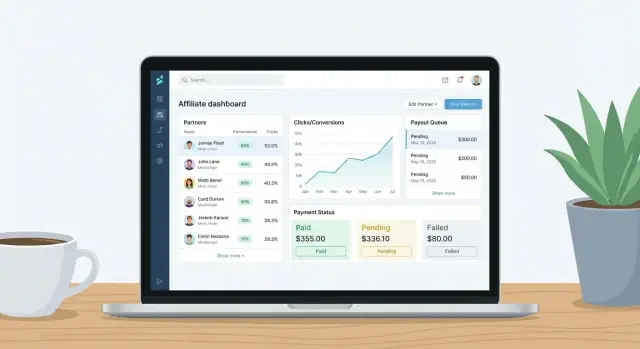
- Performance dashboard: clicks, conversions, pending vs. approved commissions, and recent activity.
- Payout history: payout batches, amounts, payment method, and payout status (scheduled/paid/failed).
Design tip: always show why a commission is “pending” (e.g., “awaiting refund window”) and the expected approval date.
Admin console (program operations)
Admins need speed and control.
Core workflows:
- Manage affiliates: approve/deny, set status, adjust terms, and leave internal notes.
- Define offers: payout rules, allowed traffic sources, caps, and creatives.
- Review conversions: a queue where conversions can be approved, rejected, or flagged for investigation.
Include bulk actions (approve 50 conversions, pause multiple affiliates) to keep operations manageable.
Finance workflow (getting money out safely)
Finance screens should support repeatable payout cycles:
- Create payout batches filtered by date range and “approved, unpaid” commissions.
- Export payouts (CSV) or send to your payment provider.
- Mark as paid with reference IDs, handle partial payouts, and re-try failures.
- Refunds/chargebacks: reverse commissions and, if already paid, create a negative adjustment for the next cycle.
Support workflow (trust and dispute handling)
Build a lightweight case view: affiliate + conversion + click trail (where available), with notes, attachments, and a dispute status. The goal is fast resolution without hunting across tools.
Implement Tracking: Links, Pixels, and Server Events
Tracking is the foundation of any affiliate program: if you can’t reliably connect a click to a purchase, everything downstream (commissions, payouts, reporting) becomes noisy and dispute-prone.
Choose your tracking methods
Most programs support a mix of these approaches:
- Referral links with parameters (e.g.,
?aff_id=123&campaign=spring). Easy to roll out and works well for content affiliates. - Promo codes (e.g.,
ALICE10). Useful for influencers and offline sharing, and a good backup when link parameters are lost. - Postback/webhooks (server-to-server callbacks). Best for accuracy, especially when affiliates run paid traffic or need their own reporting.
Decide where tracking runs
You typically choose between:
- Client-side pixel: a script on your “thank you” page reports the conversion. Quick to implement, but can be blocked.
- Server-to-server events: your backend records conversions directly (from checkout/order system) and can notify affiliates via webhook. More reliable.
- Both: pixel for marketing tools and redundancy, server events as the source of truth.
Handle real-world edge cases
Plan for situations that otherwise create “missing conversion” tickets:
- Ad blockers / browser privacy: prefer first-party cookies and server events.
- Multiple devices: use account-based attribution when a user logs in (store the referral in the user profile), not only in cookies.
- Missing parameters: fall back to promo code attribution, or last known referrer stored server-side.
- Double counting: deduplicate by
order_id(and optionallyevent_id) before you create commissions.
Document the end-to-end event flow
Write down a simple, shared contract between product, engineering, and partners:
Click (affiliate link) -> Store attribution (cookie + user/profile) ->
Conversion (order created) -> Validate/dedupe -> Create commission ->
Notify partner (optional webhook) -> Appear in partner portal
This documentation becomes your reference for debugging, partner support, and future integrations.
Build the Commission Calculation Engine
Your commission engine is the “source of truth” that turns tracking data into money. Treat it like accounting: deterministic rules, clear statuses, and a full audit trail.
Use a clear calculation pipeline
Start by separating what happened from what you pay for. A practical pipeline looks like:
- Raw events: clicks, leads, purchases, refunds arriving from links, pixels, or server events.
- Eligible: events that match your rules (correct program, within cookie window, not excluded products, etc.).
- Approved: events that passed review/hold period (e.g., after shipping, after a 14‑day refund window).
- Payable: approved items that are not yet paid and belong to an affiliate who can be paid.
Store each step explicitly so support teams can answer “why wasn’t this paid?” without guessing.
Make adjustments first-class
Real programs need corrections. Support:
- Manual bonuses (e.g., “+ $50 for a quarterly promo”)
- Penalties (policy violations, returned chargebacks)
- Reversals (undo a previously approved commission)
Model these as separate ledger entries linked to the original conversion when possible, rather than editing history. That keeps reports consistent and auditable.
Prevent double counting with idempotency
Affiliate tracking often retries the same conversion. Require:
- A unique conversion ID (merchant order ID + line item ID is common)
- An idempotency key per incoming event, so re-sent events don’t create duplicates
Enforce uniqueness at the database level and log rejected duplicates for troubleshooting.
Define rounding and refund behavior
Decide and document:
- Rounding rule: per line item vs. per order vs. per payout batch (and whether you round half up, banker’s rounding, etc.).
- Partial refunds: if an order is 30% refunded, do you reverse 30% of the commission (recommended), and does that create a negative adjustment in the next payout?
Write these rules into code and your partner portal UI so affiliates see consistent math across exports, invoices, and payouts.
Payouts: Scheduling, Batching, and Payment Methods
Payouts are where your affiliate program becomes “real” for partners—so the experience should be predictable, auditable, and easy to support. Start simple in v1, but design the workflow so you can add more payment methods and controls later without rewriting everything.
Define payout cycles and release rules
Decide how often you pay (weekly or monthly), then add two key guardrails:
- Minimum threshold (e.g., don’t pay out until an affiliate has $50 approved).
- Hold period (e.g., 14–30 days) to cover refunds, chargebacks, and late attribution adjustments.
Make these rules visible in the partner portal so affiliates understand why a conversion is “approved but not payable yet.”
Choose payment rails for v1
For an initial release, pick rails that are operationally simple:
- Manual bank transfer: you generate amounts and a payout list; finance pays separately.
- PayPal: common for smaller affiliates; still needs identity checks and fee handling.
Whichever you choose, model fees and currency constraints explicitly. Even if you only support one currency at launch, storing currency at the payout level prevents painful migrations.
Model payout batches as a workflow
Treat payouts as batches that move through clear statuses:
draft → approved → processing → completed
“Draft” is where the system aggregates eligible commissions. “Approved” is a human checkpoint. “Processing” is when you’ve initiated payments (or sent instructions to finance). “Completed” is locked, with immutable totals and timestamps.
Exports and receipts affiliates can trust
Provide:
- CSV exports for internal accounting and reconciliation.
- Payout receipts in the affiliate portal showing batch ID, covered date range, line items, adjustments, and payment reference.
This reduces support tickets and gives affiliates confidence that your commission management is consistent.
Security, Permissions, and Sensitive Data Handling
Affiliate platforms handle money, identity, and performance data—so security isn’t an add-on. Treat it like a product feature with clear rules, sensible defaults, and strict access.
Collect only what you need
Start with the minimum data required to run the program:
- Business details (legal name, tax status if applicable)
- Payout information (bank/PayPal details)
- A contact email for account recovery and payout notifications
Avoid collecting documents, personal addresses, or phone numbers unless you truly need them for compliance. Less data means less risk and fewer support issues.
Store sensitive data safely
Anything tied to payouts should be treated as high sensitivity:
- Encrypt sensitive fields at rest (not just the database disk).
- Use a dedicated secrets manager for API keys and webhook secrets.
- Prefer tokenization where possible (e.g., store a payment provider token instead of raw bank details).
- Log access to sensitive records, and keep an audit trail of changes (who changed what, when).
Also, make sure analytics exports don’t accidentally include payout details—separate “performance reporting” from “finance operations.”
Permissions: who can see and do what
Role-based access control keeps teams productive without oversharing.
A practical split:
- Admin: program settings, user management, integrations
- Finance: payout methods, payout approvals, exports, payment runs
- Support: affiliate profiles and statuses, but no payout details
Enforce least privilege by default, and add permission checks on every sensitive action (not only in the UI).
Optional upgrades for later
Once the core is stable, add stronger controls:
- 2FA for admins and finance roles
- SSO for internal staff
- IP allowlists for finance tools and payout approval screens
These steps reduce account takeover risk and make audits much easier.
Fraud Prevention and Quality Controls
Fraud controls should be part of your affiliate program from day one, not a later add-on. The goal isn’t to accuse partners—it’s to protect payouts, keep performance data trustworthy, and make approvals predictable.
Start with simple, high-signal checks
You can catch a surprising amount of abuse with a few basic signals:
- Duplicate accounts: shared bank details, tax IDs, payout emails, device fingerprints, or repeated IP ranges during signup.
- Suspicious conversion spikes: sudden bursts from one partner, especially with abnormal conversion rates or identical timestamps.
- Self-referrals: affiliate clicks that later convert using the same email/domain, IP, device, or payment instrument as the affiliate.
Keep thresholds configurable per program (new partners often deserve tighter limits until they build history).
Use “flag, then review” instead of auto-reject
Rather than instantly denying conversions, create a review queue. Flag events when rules fire (e.g., “3+ conversions within 2 minutes from same IP,” “order value far above typical,” “new account + high volume”). Reviewers should see:
- what was flagged
- the supporting evidence (timestamps, IPs, order IDs)
- the current status (Pending, Approved, Rejected)
This reduces false negatives and gives you defensible decisions.
Rate-limit and harden tracking endpoints
Tracking is a magnet for fake traffic. Add:
- Rate limits per IP / partner / user agent
- Bot filtering (basic heuristics plus allow/deny lists)
- Signed tracking links or short-lived tokens for sensitive campaigns
- Server-side validation: only accept conversions that match a prior click (when your attribution model requires it)
Keep decisions explainable
Disputes happen. Store a clear “why” for every hold or rejection (rule name, threshold, data points). A short reason visible in the partner portal prevents support tickets from turning into arguments and helps honest affiliates correct issues quickly.
Reporting and Analytics That Matter
Reporting is where affiliate program software earns trust. Affiliates want to know “what happened,” and admins need to know “what to do next.” Start with a small set of metrics that answer both.
The must-have metrics
At minimum, track and display:
- Clicks and unique clicks (basic demand generation)
- Conversions split by status (pending/approved/rejected)
- EPC (Earnings Per Click) so affiliates can compare campaigns fairly
- Approval rate (approved ÷ total conversions) to spot quality issues
- Payout liability (approved-but-unpaid commissions) to manage cash flow
Keep the definitions visible in tooltips so everyone interprets numbers the same way.
Two dashboards: admin vs. affiliate
Admins need a control panel view: trends over time, top partners, top campaigns, and alerts for spikes in clicks, sudden drops in approval rate, or unusual EPC swings.
Affiliates need simpler summaries: their clicks, conversions, earnings, and what’s pending vs. approved. Make status meaning explicit (e.g., pending amounts aren’t payable yet) to reduce support tickets.
Filters that prevent “report chaos”
Make every report filterable by:
- Date range (with presets like last 7/30 days)
- Campaign (or offer)
- Affiliate (for admins)
- Status (pending/approved/rejected/paid)
When filters change, totals and charts should update together—nothing undermines confidence faster than mismatched numbers.
Exports and scheduled reports (later)
CSV exports are useful, but don’t let them slow your MVP. Add exports and scheduled email reports as a phase-two enhancement once core tracking and commission management are stable.
Architecture and Tech Stack Choices
Your architecture determines whether affiliate tracking and affiliate payouts stay reliable as volume grows. The goal isn’t the “perfect” stack—it’s a stack your team can operate, debug, and extend without fear.
Choose boring, maintainable building blocks
Pick a mainstream web framework your team already ships with (Rails, Django, Laravel, Express/Nest, ASP.NET). For most affiliate program software, a relational database (PostgreSQL/MySQL) is the safest default because commission management depends on consistent transactions and auditable histories.
Hosting can be any major cloud (AWS/GCP/Azure) or a managed platform (Render/Fly/Heroku-style). Prioritize observability (logs, metrics, tracing) over novelty—you’ll need it when partners ask, “Why wasn’t this conversion counted?”
If you want to validate the product shape quickly (partner portal + admin console + basic workflows) before committing to a full engineering sprint, a vibe-coding platform like Koder.ai can help you prototype the core flows via chat, iterate in planning mode, and export source code when you’re ready to harden the system. That’s especially useful early on when requirements change weekly and you need fast feedback from ops and finance.
Split responsibilities into clear components
At minimum, separate:
- Web app: the partner portal, admin UI, program rules, and reporting.
- Tracking endpoints: lightweight services that accept clicks/pixels/server events quickly.
- Background workers: async jobs for attribution, commission calculation, payout automation, and notifications.
- Database: source of truth for attribution decisions, statuses, and payouts.
Keeping tracking endpoints lean prevents spikes (promotions, email blasts) from taking down the entire partner portal.
Use queues for heavy work
Affiliate tracking often needs enrichment and deduping. Put expensive tasks behind a queue (SQS/RabbitMQ/Redis queues):
- Commission calculation engine runs
- Payout batch creation and reconciliation
- Email notifications (approvals, reversals, payout confirmations)
- Backfills and re-attribution after rule changes
Plan integrations early
Most teams need at least:
- E-commerce (Shopify/Woo/WHS) for conversion tracking and order status updates
- Payment provider (Stripe/PayPal/Wise) for affiliate payouts
- Email service for onboarding and payout messages
Document each integration’s failure modes (rate limits, retries, idempotency). That’s what keeps affiliate analytics trustworthy when systems misbehave.
Testing, Launch, and Ongoing Operations
Testing and operations are where affiliate platforms either earn trust—or quietly create support tickets. Because money is involved, you want confidence not only that things work, but that they keep working when real partners, real traffic, and real edge cases arrive.
Test the money paths first
Prioritize tests around the logic that can change balances. A good baseline is:
- Attribution rules (first/last click, lookback windows, coupon overrides, self-referrals)
- Commission calculations (tiers, caps, minimum order value, currency rounding)
- Reversals and adjustments (refunds, chargebacks, partial returns)
Keep these tests deterministic by fixing timestamps and using known exchange rates (or stubbing FX) so results don’t drift.
Build staging data that resembles real disputes
A staging environment with only “happy path” data isn’t enough. Seed scenarios you expect from real programs:
- Multiple clicks from different affiliates before one conversion
- Conversions that arrive late via webhook retries
- Refunds after a payout is already queued
- Manual overrides (support-approved exceptions)
Use this dataset to rehearse support workflows: can you explain why a commission happened, and can you correct it with an auditable trail?
Monitor the system like a payments product
Add monitoring before launch, not after. At minimum:
- Error tracking for backend and frontend (with release tags)
- Webhook health: failures, retries, provider response times
- Delayed jobs/queues: lag, dead-letter counts, retry storms
- Payout batch health: number of pending payouts, stuck batches, unusually high totals
Also log key events (conversion created, commission approved, payout sent) with IDs support can search.
Launch checklist + v2 roadmap
A practical launch checklist should cover: program rules finalized, test payouts executed end-to-end, email templates reviewed, partner onboarding copy written, and a rollback plan.
For v2, keep a simple roadmap based on what you learn: better fraud signals, richer reporting, and admin tools that reduce manual intervention. If you have documentation, link it from your partner portal and keep it versioned (e.g., /docs/affiliate-guidelines).
FAQ
What should I define before picking a tech stack for an affiliate web app?
Start by writing 3–5 “day in the life” scenarios for each role (admin/partner manager, finance/ops, affiliate). Then turn those into your v1 loop:
- Approve affiliates
- Generate tracking links
- Record conversions
- Calculate commissions
- Run a basic payout workflow
Anything not supporting that loop goes to “later,” even if it’s popular.
What belongs in an MVP for affiliate program software?
Write a one-page scope with:
- Must-have: link tracking + basic attribution, conversions with statuses, commission calculation, one payout method, manual approvals.
- Nice-to-have: multi-touch attribution, coupon stacking rules, complex tiers, multiple currencies.
Use it as a decision filter when stakeholders request features mid-build.
How do I choose a commission model that won’t create disputes?
Pick one model for v1:
- Revenue share (percent of net paid amount)
- Fixed bounty (flat amount per approved conversion)
Document the base amount clearly (gross vs net, tax/shipping included or excluded) and how refunds/chargebacks affect commissions. If unsure, anchor on net paid amount and adjust on refunds.
Which attribution model should I implement first?
Choose one attribution rule and make it explicit:
- Last click is simplest and common.
- First click rewards discovery.
Then document edge cases (coupon usage, paid ads after an affiliate click, missing parameters). Clear “rules of credit” reduce support load more than extra features.
What core tables and statuses should my data model include?
Model the minimum set:
- Affiliates, Offers/Campaigns, Tracking links, Clicks, Conversions, Commission line items/adjustments, Payout batches
Define shared statuses early (e.g., pending → approved → payable → paid, plus rejected and reversed). Store stable immutable IDs (especially for clicks/conversions) so reporting doesn’t break when you recalculate.
What’s the best way to implement affiliate tracking reliably?
Use a mix, but pick a source of truth:
- Links with parameters for easy rollout
- Server-to-server events as the most reliable conversion source
- Pixel only as a helpful backup/marketing integration
Plan for dedupe (order_id/event_id), missing parameters (fallback to promo codes or stored referrer), and privacy constraints (minimize PII).
How should I design the commission calculation engine?
Treat commissions like a ledger with an explicit pipeline:
- Raw events → Eligible → Approved → Payable
Make adjustments first-class (bonuses, penalties, reversals) instead of editing history. Enforce idempotency at the database level so webhook retries don’t create duplicate commissions.
How do I structure payouts so finance and affiliates trust them?
Start simple and auditable:
- Define a payout cycle (weekly/monthly)
- Add a hold period (e.g., 14–30 days)
- Add a minimum threshold (e.g., $50)
Model payouts as batches with statuses: draft → approved → processing → completed. Provide affiliate-facing receipts showing date range, line items, adjustments, and a payout reference ID.
What security and permissions should an affiliate platform have on day one?
Apply least privilege and reduce sensitive data:
- Collect only what you need for payouts and compliance
- Encrypt sensitive fields (not just disk)
- Prefer tokenization (store provider tokens vs raw bank details)
- Separate roles: Admin, Finance, Support
Also log changes (who/what/when) so payout and status changes are auditable.
How can I prevent affiliate fraud without harming good partners?
Focus on high-signal, explainable controls:
- Flag duplicates (shared payout details, tax IDs, signup IP/device patterns)
- Detect spikes and abnormal conversion rates
- Block or flag self-referrals
Use flag-then-review rather than auto-reject, and store a clear reason code for every hold/rejection. Rate-limit tracking endpoints and validate conversions against prior clicks when your rules require it.