

Build a Booking Web App to Manage Service Providers End‑to‑End
Step-by-step plan to build a web app for booking and managing service providers: requirements, data model, scheduling, payments, notifications, and launch.
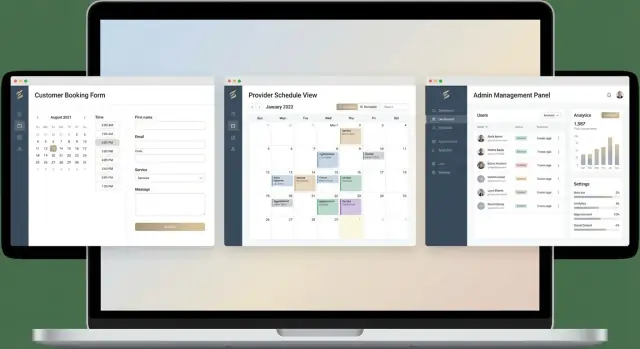
Clarify the Product: Booking Tool vs. Marketplace
Before you draw screens or pick a tech stack, get precise about the business goal. A service provider booking app can mean two very different products.
The core business goal
At minimum, you’re trying to run bookings, scheduling, and provider operations in one place: customers request or reserve time, providers deliver the service, and your team manages changes (reschedules, cancellations, payouts, support).
If your product doesn’t reduce manual coordination—texts, spreadsheets, and back-and-forth calls—it won’t feel meaningfully better than what teams already do.
Common verticals (and what changes per niche)
The same appointment booking system patterns show up across verticals like cleaning, beauty salons, tutors, and home repairs. What changes by niche is usually:
- Duration & buffers: haircuts vs. deep cleaning vs. repair windows
- Resources: rooms, chairs, equipment, or vehicles alongside people
- Pricing logic: fixed price, hourly, packages, add-ons, surge/peak pricing
- Service location: on-site vs. in-store vs. remote
- Trust & compliance: background checks, certifications, waivers
Knowing these differences early prevents you from building a rigid workflow that only fits one use case.
Booking tool vs. multi-provider marketplace
A booking tool is for a single business (or a controlled set of providers) to manage their schedule—think provider management software for one brand. Customers don’t “shop the market”; they book within your operation.
A multi-provider marketplace is a two-sided product: customers discover providers, compare options, and book; providers join, manage availability, and compete (sometimes on price, ratings, or response time). Marketplaces require extra layers: onboarding, profiles, reviews, dispute handling, and often payments/payouts.
Define success metrics early
Pick a few measurable outcomes to guide scope decisions:
- Completed bookings (not just created bookings)
- Provider utilization (booked hours ÷ available hours)
- Repeat customers (repeat rate and time-to-second-booking)
- Optional but useful: cancellation rate, time-to-confirmation, support tickets per 100 bookings
These metrics tell you whether your booking workflow design is working—and whether you’re building a tool or a marketplace (or accidentally drifting into both).
Users, Roles, and Core Jobs-to-Be-Done
Before you design screens or pick a database, decide who the app is for and what each person is trying to accomplish in one sitting. Booking products fail most often when they treat “users” as a single blob and ignore role-specific needs.
The core roles (and why they matter)
Customer: the person requesting a service. Their patience is short, and their trust is fragile.
Provider: an individual or team delivering the service. They care about a predictable schedule, clear job details, and getting paid.
Dispatcher/Admin: the operator who keeps everything moving—assigning work, resolving conflicts, and handling exceptions.
Support: the “fix it” role. They need visibility and safe tools to correct mistakes without breaking auditability.
Top jobs-to-be-done by role
For each role, map the few highest-value tasks:
- Customer: find a service, pick a time, provide details/location, pay (if required), reschedule/cancel, get confirmations.
- Provider: set availability, accept/decline (if your model allows it), view upcoming bookings, update status (on the way/complete), message the customer/admin.
- Dispatcher/Admin: create/edit bookings, assign staff, override availability, handle no-shows, issue refunds/credits, monitor capacity.
- Support: locate a booking fast, verify identity, adjust times, resend notifications, document actions.
Must-have pages (MVP-ready)
Keep the first version tight:
- Public: service list/details, provider/profile (optional), booking form, confirmation page.
- Customer portal: “My bookings” list + detail page with reschedule/cancel.
- Provider portal: calendar/agenda view, availability editor, booking detail page.
- Admin console: booking dashboard, provider management, manual booking creation, basic reporting.
Provider onboarding: self-serve vs. approval
Decide early whether providers can self-onboard instantly or require review.
If quality, licensing, or safety matter, add admin approval with statuses like pending → approved → suspended. If speed matters, allow self-serve onboarding but gate visibility (e.g., draft listings) until required fields are complete.
Key User Flows and MVP Scope
A booking platform succeeds or fails on its core flows. Before you design screens or databases, write down the “happy path” plus the few edge cases that will happen every week.
The core booking flow (happy path)
Most service provider booking apps share the same backbone:
- Search / browse: customer finds a provider or service (category, location, rating, price).
- Select service: pick a specific offering (duration, price, add‑ons).
- Choose time: calendar shows real availability; customer selects a slot.
- Pay (or hold): take full payment, a deposit, or store a card for no‑show protection.
- Confirmation: show booking details and send notifications (email/SMS) with an add‑to‑calendar link.
Make this flow fast: minimize steps, avoid forcing account creation until necessary, and keep a “next available” option visible.
Rescheduling: customer vs. provider
Rescheduling is where booking workflow design often breaks.
- Customer reschedule: the customer picks a new time from the same availability view. The system should release the old slot only after the new slot is successfully reserved.
- Provider reschedule: the provider proposes new times (or blocks out availability), and the customer confirms. Track who initiated the change, and keep an audit trail.
Edge cases you must support in MVP
Handle these from day one:
- Cancellations (within policy windows)
- No‑shows (fees, partial charge, or deposit retention)
- Refunds (full/partial, and what happens to platform fees)
- Double‑booking prevention (two customers click the same slot)
MVP scope vs. nice-to-haves
MVP: service catalog, provider profiles, availability, booking creation, basic payments, cancellation/reschedule rules, confirmations, and a simple admin view.
Later: memberships, promo codes, waitlists, packages, multi-location, advanced analytics, reviews, and chat.
If you’re unsure what to cut, validate the smallest version first: /blog/how-to-validate-an-mvp.
Data Model: Services, Providers, Availability, and Bookings
A booking app feels simple on the surface, but the data model is what keeps it consistent when you add multiple providers, different service lengths, and real-world constraints. Start with a small set of core entities and make them explicit.
Services
A Service defines what can be booked. Keep it provider-agnostic where possible.
Include:
- name, description, category
- duration (minutes) and optional buffers (e.g., 10 minutes setup/cleanup)
- price (fixed) or pricing rules (e.g., “from” price, tiers)
- add-ons (extra time + extra cost)
- location / travel rules: in-store vs at-customer, travel radius, travel fee, minimum booking notice
If services vary by provider (different prices or durations), model a join table like provider_services to override defaults.
Providers and availability
A Provider represents the person or team delivering the service.
Store:
- skills / offered services (link to Service)
- working hours (weekly schedule) and time zone
- time-off (vacation, sick days) and special hours
- service area (zip codes, radius, regions) if travel matters
Availability should be derived from: working hours minus time-off minus existing bookings. Persisting “slots” can be helpful later, but start by storing rules and computing availability.
Bookings
A Booking ties a customer, service, time, and provider together.
Key fields:
- status (requested, confirmed, rescheduled, completed, canceled, no-show)
- start_at, end_at, created_at, updated_at
- assigned_provider_id (nullable if you support “auto-assign”)
- customer notes, internal notes, and optional attachments (reference IDs)
Keep an audit trail for changes (especially reschedules and cancellations) to support disputes and support tickets.
Supporting entities (add as needed)
- Customers (contact details, preferences)
- Payments (amount, method, deposit, refund records)
- Coupons / promotions (rules, limits)
- Reviews (optional; tie to completed bookings)
Designing these entities early makes the rest of the system—availability checks, provider dashboards, and payments—much easier to build reliably.
Choose the Right Tech Stack and Architecture
Your tech stack should make the appointment booking system easy to ship, easy to change, and reliable under real-world usage (cancellations, reschedules, peak hours). Start by picking an approach that fits your team and MVP scope.
Architecture options: what you gain and what you trade
A monolith (one backend app + one database) is usually the fastest path for an MVP booking platform. It keeps your data model, permissions, and booking workflow design in one place—useful when you’re still learning what users need.
A modular backend (well-separated modules, or later microservices) makes sense once you have clear boundaries like payments, notifications, and provider management software. Modular doesn’t have to mean microservices on day one: you can keep a monolith but design clean modules and APIs.
For the frontend, server-rendered pages (Rails/Django/Laravel) often deliver faster development and fewer moving parts. A SPA (React/Vue) can shine when scheduling UI gets complex (drag-and-drop, live availability), but it adds build tooling and more API surface area to secure.
If you want to move fast without committing to a long build-out upfront, a vibe-coding platform like Koder.ai can help you prototype and ship a booking MVP via chat—typically with a React frontend and a Go + PostgreSQL backend—while still keeping the option to export source code later as requirements solidify.
Pick a stack your team can maintain
Choose what your team already ships confidently:
- Node.js (Express/Nest) for JavaScript teams
- Django for Python teams
- Rails for Ruby teams
- Laravel for PHP teams
All can support a multi-provider marketplace and web app scheduling if the data model and constraints are solid.
Hosting basics (keep it boring)
Plan for:
- A managed database (Postgres is a common default)
- Object storage for files (provider documents, receipts)
- An email/SMS provider for reminders and verification
Non-functional requirements that matter early
Define targets for performance and uptime (even simple ones), and add audit logs for key events: booking created/changed, payment actions, provider availability edits, and admin overrides.
These logs save time when disputes and support tickets start coming in.
UX/UI Patterns for Booking and Scheduling
A booking app succeeds when the interface removes guesswork: people instantly understand what to do, what it costs, and when the provider will show up. These patterns help you keep the experience fast for customers and practical for providers.
An onboarding-first booking form (minimal steps)
Treat the first booking like onboarding. Ask only what you need to confirm the appointment, then collect “nice to have” details after the time is reserved.
A simple flow:
- Pick service (and optional add‑ons)
- Choose location (on‑site vs in‑store) and enter address only if needed
- Select date & time
- Enter contact details and confirm
Show key reassurance inline: duration, price range, cancellation policy, and what happens next (“You’ll get a confirmation email”). Use progressive disclosure for extra fields (notes, photos, gate codes) so the form never feels long.
Scheduling UI patterns customers understand
Use a calendar + time slots pattern rather than free‑text.
- Calendar picker: disable unavailable days; highlight “soonest available.”
- Time slots: present in a clean list, grouped by morning/afternoon; include duration.
- Timezone hints: display “Times shown in {User Timezone}” and allow switching when the booking location differs.
If availability is limited, offer “Next available” and “Notify me” instead of a dead end.
Provider portal essentials
Providers need a “start my day” screen:
- Today’s jobs with addresses, contact buttons, and status updates (arrived/complete)
- Upcoming calendar with filters by service/location
- Availability editor that supports working hours, breaks, buffer time, and time off
Keep the availability editor visual and forgiving (undo, clear labels, and previews).
Accessibility and mobile usability checks
Ensure forms work one‑handed on mobile: large tap targets, readable contrast, clear error messages, and labels that don’t disappear.
Support keyboard navigation, visible focus states, and screen‑reader friendly date/time controls (or accessible custom components).
Build the Scheduling Engine (Without Double-Bookings)
A scheduling engine is the part of your booking app that decides what times are actually bookable—and guarantees two customers can’t grab the same spot.
Model availability: fixed slots vs. open intervals
There are two common strategies:
- Fixed slots: providers publish discrete start times (e.g., 9:00, 9:30, 10:00). This is simple, fast to display, and great for standardized services.
- Open intervals + duration rules: providers declare working windows (e.g., 9:00–17:00), and the system generates valid start times based on the service duration (and increments like 5/15 minutes). This is flexible and handles varied service lengths better.
Whichever you choose, treat “availability” as rules, and “bookings” as exceptions that remove time.
Prevent double-bookings
Double-bookings usually happen when two users book the same time within milliseconds. Fix it at the database level:
- Use a transactional check: “is this time still free?” and “create booking” must succeed together.
- Add locking around the provider’s schedule row/time range, or enforce a constraint that rejects overlapping bookings.
If the booking fails, show a friendly “That time was just taken—please pick another slot.”
Real-world rules: buffers, travel, notice, and horizon
Add constraints that reflect operations:
- Buffers before/after appointments (cleanup, prep)
- Travel time between locations (especially for mobile providers)
- Minimum notice (e.g., no same-day bookings after 6pm)
- Maximum advance (e.g., book up to 60 days out)
Recurring and multi-service appointments
For recurring bookings (weekly/biweekly), store the series rule and generate occurrences, but also allow exceptions (skips/reschedules).
For multi-service appointments, calculate total time (plus buffers), and verify all required resources (provider(s), room, equipment) are free for the entire combined window.
Provider Management and Operations
A booking app succeeds or fails on day‑to‑day operations: getting providers live quickly, keeping their calendars accurate, and giving admins the tools to resolve issues without engineering help.
Provider onboarding (profile → verified → bookable)
Treat onboarding as a checklist with clear statuses.
Start with a provider profile (name, bio, location/service area, photos), then collect verification fields that match your risk level: email/phone confirmation, identity document, business registration, insurance, or certifications.
Next, require service selection and pricing. Keep it structured: each provider chooses one or more services from your catalog (or proposes a new one for admin approval), sets duration, price, and optional add‑ons.
Enforce constraints early (minimum lead time, max daily hours, cancellation policy) so you don’t create “unbookable” providers.
Availability management (templates + exceptions)
Most providers don’t want to edit a calendar day by day. Offer a weekly template (e.g., Mon 9–17, Tue off) and layer exceptions on top:
- Holidays (single-day or multi-day)
- Time-off (vacations, sick days)
- One-off extended hours
Make exceptions easy to add from the provider dashboard, but also allow admins to apply them when needed (e.g., a verified emergency).
A simple “effective schedule” preview helps providers trust what customers will see.
Capacity rules (solo providers, teams, and parallel bookings)
Define capacity per provider and per service. A solo provider typically has capacity = 1 (no simultaneous bookings). Teams may allow multiple bookings in the same time slot, either because different staff members fulfill them or because the service scales.
Operationally, support three common setups:
- Single provider: one calendar, one capacity.
- Provider + resources: the booking also requires a room/vehicle.
- Teams: a pool of staff where bookings consume one unit of capacity.
Admin tools (keep the business running)
Admins need a control panel to:
- Assign/reassign a booking to a different provider (with audit trail)
- Block time on behalf of a provider (maintenance, emergencies)
- Manage disputes (no-shows, quality issues) with notes and attachments
Add internal-only tags and status reasons (“reassigned: overbook risk”, “blocked: provider request”) so your team can operate consistently as volume grows.
Payments, Deposits, Refunds, and Invoicing
Payments are where booking apps either build trust—or create support tickets. Before writing code, decide what “paid” means in your product and when money changes hands.
Choose when customers pay
Most service businesses fit one of these models:
- Pay now (full amount): best for classes, fixed-price services, no‑show risk.
- Deposit: reduces no‑shows while keeping a lower barrier to booking.
- Pay after service: common for in‑person work where the final price can change.
- Split payments: deposit at booking, remainder after completion.
Whatever you choose, make it explicit in the booking UI (“Pay $20 deposit today, $80 after your appointment”). Also define your cancellation policy in plain language.
Map the payment flow (authorize → capture → refund)
Treat payment as a state machine tied to the booking:
- Authorization: place a hold (useful when the final amount may change).
- Capture: actually charge (immediately, at confirmation, or after completion).
- Refunds: support full and partial refunds (e.g., refund deposit minus a cancellation fee).
Operationally, you’ll want a clear admin view: payment status, amounts (gross, fees, net), timestamps, and a reason code for refunds.
Receipts, invoices, and safe storage
At minimum, generate:
- Receipt: proof of payment (amount, date, provider, booking reference).
- Basic invoice: line items, taxes (if used), and business details.
Don’t store card numbers. Store only safe references returned by your payment provider (e.g., customer ID, payment intent/charge ID), plus the last 4 digits and card brand if provided.
What to show on pricing pages
If you have plans or transaction fees, be transparent:
- What’s included per plan (providers, locations, staff accounts)
- Whether you charge per booking, per provider, or a monthly subscription
- Payout timing and refund handling
Link to /pricing for full plan details and keep the booking checkout free of surprises.
Notifications and Calendar Integrations
Notifications are where your booking app feels “alive.” They reduce no-shows, prevent misunderstandings, and give providers confidence that changes won’t be missed. The key is to be consistent, timely, and respectful of user preferences.
Pick channels that match your audience
Most platforms start with email (cheap, universal) and add SMS for time-sensitive reminders. Push notifications work best when you already have a mobile app or a strong PWA install base.
A practical approach is to let each role choose channels:
- Customers: email by default, optional SMS for reminders
- Providers: email + optional SMS for schedule changes
- Admins/ops: email for exceptions (failed payments, disputes)
Templates: keep them event-driven and predictable
Define message templates for the events users actually care about:
- Booking created (include time, location/video link, cancellation policy)
- Booking changed (highlight what changed)
- Booking canceled (who canceled, refund/deposit status)
- Provider running late (simple “delay” message + updated ETA)
Use the same variables across channels (customer name, service, provider, start/end time, timezone) so content stays consistent.
Calendar invites and sync
Always include an ICS invite in email confirmations so customers and providers can add the appointment to any calendar app.
If you offer Google/Outlook sync, treat it as “nice to have” and be clear about behavior: which calendar gets written to, how updates propagate, and what happens if the user edits the event in their calendar. Sync is less about APIs and more about avoiding conflicting sources of truth.
Preferences, opt-ins, and quiet hours
To reduce spam complaints, implement:
- Explicit SMS opt-in and easy opt-out
- Notification preferences per event type (e.g., reminders on, marketing off)
- Quiet hours (delay non-urgent messages overnight)
Finally, log delivery results (sent, bounced, failed) so support can answer “Did it go out?” without guessing.
Security, Privacy, and Admin Controls
Security and privacy aren’t “extra features” in a booking app—they directly affect trust, chargebacks, and support load. A few practical choices early will prevent the most common issues: account takeovers, accidental data leaks, and untraceable changes.
Authentication and role-based access
Start by defining clear roles and permissions: customer, provider, and admin. Then enforce them everywhere—UI and server-side.
- Customers: manage their profile, view/modify their own bookings, handle payments for their bookings.
- Providers: manage their own availability, services, and view only bookings assigned to them.
- Admins: resolve disputes, refund/cancel, manage providers, and view operational dashboards.
Use standard, well-tested login flows (email + password, magic link, or OAuth). Add session timeouts and rate-limiting to reduce brute-force attempts.
Protect sensitive data by default
Focus on a few strong defaults:
- Encryption in transit: force HTTPS everywhere (including internal APIs).
- Password hashing: store passwords only as salted hashes (e.g., bcrypt/Argon2). Never log them.
- Least privilege: restrict database access so each service can only read what it needs; avoid “admin” database users in production.
Also treat booking notes and customer contact details as sensitive—limit who can see them and when.
Basic privacy and compliance checklist
Keep your policies simple and actionable:
- Consent for marketing emails (separate from booking confirmations).
- Data retention rules (e.g., keep invoices for X years, purge abandoned accounts after Y months).
- Export/delete requests: support “download my data” and “delete my account,” with sensible exceptions for legal records.
Link these from settings and the checkout flow (e.g., /privacy, /terms).
Admin controls and audit trails
Give admins safe tools with guardrails: permissioned actions, confirmation steps for refunds/cancellations, and scoped access to provider data.
Add audit trails for booking changes and admin actions (who changed what, when, and why). This is invaluable for resolving disputes like “my appointment disappeared” or “I didn’t approve that refund.”
Testing, Launch, and Scaling the Platform
Shipping a booking platform isn’t just “deploy and hope.” Treat launch like a controlled experiment: validate the booking experience end-to-end, measure what matters, and plan upgrades before you feel the pain.
Testing plan (what to prove before launch)
Start with a small set of “golden paths” and test them repeatedly:
- Booking flow: search/select service → pick time → confirm details → pay (if required) → receive confirmation → provider sees it on their schedule.
- Timezones: create bookings across different user/provider timezones, including daylight saving changes. Confirm displayed times, email/SMS content, and calendar exports are consistent.
- Concurrency: simulate two people booking the same slot at nearly the same time. Your system should allow only one booking and gracefully reject the other.
- Payment webhooks: test success, failure, retries, and delayed events (e.g., payment captured after authorization). Confirm you never mark a booking “paid” without a verified webhook.
Where possible, automate these checks so every release runs them.
Analytics to track (so you can improve)
Set up analytics from day one so you’re not guessing:
- Conversion rate: visits → service view → time selected → booking completed.
- Cancellation rate: by provider, service, and lead time (how far in advance people cancel).
- Provider fill rate: booked hours vs available hours; watch for empty days and overbooked peaks.
Tie metrics to actions: improve copy, adjust availability rules, or tweak deposit policies.
Launch checklist (reduce day-one chaos)
Before inviting real users:
- Seed data: real services, durations, buffers, provider profiles, and test availability.
- Monitoring: uptime checks, error alerts, and basic performance monitoring.
- Backups: automated database backups and a simple restore drill.
- Support playbook: FAQs, refund/cancellation steps, and templates for common issues.
Scaling roadmap (when usage grows)
Plan upgrades in stages:
- Caching for popular provider/service pages and availability lookups.
- Queueing for emails/SMS, calendar sync, and webhook processing.
- Search for providers/services as your catalog grows.
- Multi-location support (location-specific hours, travel time, room resources).
- Multi-currency and localized taxes/receipts if you expand internationally.
Scaling is easier when your release process and metrics are already in place.
FAQ
What’s the difference between a booking tool and a multi-provider marketplace?
Start by deciding whether you’re building a booking tool (one business or controlled providers) or a multi-provider marketplace (two-sided: discovery, onboarding, reviews, disputes, payouts). That choice changes your MVP scope, data model, and operations.
A quick test: if customers “shop and compare” providers inside your product, you’re building a marketplace.
Which success metrics should I define before building the app?
Pick a few that match your business goal and can be tracked weekly:
- Completed bookings (not just created)
- Provider utilization (booked hours ÷ available hours)
- Repeat customer rate and time-to-second-booking
- Add operational signals: cancellation rate, time-to-confirmation, support tickets per 100 bookings
What user roles should a service provider booking app support?
Most platforms need at least these roles:
- Customer: find a service, choose time, confirm details, pay/reschedule/cancel
- Provider: set availability, view schedule, update job status, communicate
- Admin/Dispatcher: create/edit bookings, assign providers, override availability, handle exceptions
- Support: find bookings fast, verify identity, resend notifications, document changes
Designing per-role prevents “one-size-fits-none” screens.
What pages and features should be in the MVP?
A practical MVP usually includes:
- Public: service list/details, booking form, confirmation page
- Customer portal: “My bookings” + reschedule/cancel
- Provider portal: calendar/agenda, availability editor, booking details
- Admin console: booking dashboard, provider management, manual booking creation, basic reporting
Add features like chat, reviews, or memberships later unless they’re core to your model.
What does a “good” core booking flow look like?
Make it a short, predictable path:
- Browse/search
- Select service (duration, add-ons)
- Choose time from real availability
- Pay now/deposit/hold card (depending on policy)
- Confirm + send email/SMS and an add-to-calendar link
Keep steps minimal and avoid forced account creation until it’s needed.
How should rescheduling work to avoid conflicts and confusion?
Implement rescheduling as a safe two-step:
- Let the user pick a new time from the same availability view.
- Only release the old slot after the new slot is successfully reserved.
Also record who initiated the change and keep an audit trail so support can resolve disputes quickly.
How do I prevent double-bookings in the scheduling engine?
Double-bookings are a concurrency problem—fix them at the database level:
- Wrap “check availability + create booking” in a transaction.
- Use locking or enforce a constraint that rejects overlapping bookings.
If a conflict occurs, fail gracefully with a message like “That time was just taken—please choose another slot.”
What’s the recommended data model for services, providers, and bookings?
Start with a small set of core entities:
- Service: duration, buffers, pricing rules, add-ons, location/travel rules
- Provider: skills/offered services, working hours, timezone, time-off, service area
- Booking: customer, provider, service, start/end, status, notes
Compute availability from rules (hours minus time-off minus bookings). Add a provider_services join table if providers override price/duration.
How should I handle payments, deposits, and refunds?
Pick based on no-show risk and how final pricing works:
- Pay now: simplest, best for fixed-price services
- Deposit: reduces no-shows without full upfront cost
- Pay after service: common when price can change
- Split payments: deposit now, remainder after completion
Treat payments as a state machine (authorize → capture → refund) and support partial refunds with reason codes.
What notification and calendar integration features matter most early?
Start with email and add SMS for time-sensitive reminders. Keep messages event-driven:
- created, changed, canceled (with what changed and refund status)
- reminders and “running late” updates
Always include an ICS invite in confirmations, and log delivery results (sent/bounced/failed) so support can answer “Did it go out?” reliably.