

How to Build a Budget Planning & Department Forecasting Web App
Learn how to plan, design, and ship a budget planning web app with department forecasting, approvals, dashboards, and secure data handling.
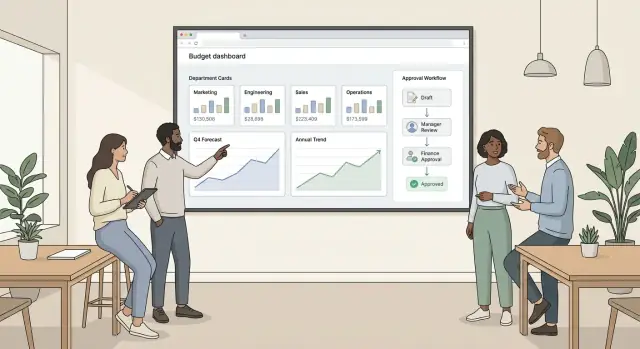
Clarify the Problem and Success Metrics
Before you design screens or tables, get specific about the decisions your app must support. Budget planning tools fail when they try to be everything at once—budget, forecast, accounting system, and reporting suite. Your first job is to define what “planning” means for your organization.
What decisions will the app support?
Start by separating three concepts and deciding how they interact:
- Plan (Budget): the approved target for the period.
- Forecast: the latest expectation based on current information.
- Actuals: what already happened (often imported from your accounting/ERP).
Write down the core questions leaders need answered, such as: “Can we afford 2 new hires in Q2?” or “Which departments are projected to overspend by quarter-end?” This drives everything from your data model to your reports.
Choose a planning cadence that matches reality
Pick the cadence your organization will actually follow:
- Annual budget for the next fiscal year
- Quarterly reforecast to adjust targets and timing
- Rolling forecast (e.g., always projecting 12 months ahead)
Be explicit about cutoff rules: when a forecast changes, do you keep history (forecast versions) or overwrite?
Define outputs people will use
List the outputs the app must produce on day one:
- Department budgets by expense categories
- Variance reports (Budget vs. Actuals, Forecast vs. Budget)
- Headcount plan (approved roles, start dates, fully loaded cost)
Set success metrics (and baseline them)
Tie success to measurable outcomes:
- Cycle time: days from “kickoff” to final approval
- Accuracy: forecast error vs. actuals (by department/category)
- Adoption: % of departments submitting in-app vs. spreadsheets
- Version control: fewer parallel spreadsheet copies and “latest_final_v7.xlsx”
Capture today’s baseline so you can prove improvement after launch.
Users, Roles, and Workflow Requirements
Before you draw screens or pick a database, get specific about who will use the app and what “done” looks like for each of them. Budgeting fails less from math errors and more from unclear ownership: who inputs what, who signs off, and what happens when numbers change.
Core user groups (and what they care about)
Finance team needs consistency and control: standardized expense categories, validation rules, and a clear view of what’s submitted vs. pending. They’ll also want commentary fields to explain changes, plus an audit trail for revisions.
Department managers want speed and flexibility: pre-filled baseline numbers, obvious deadlines, and the ability to delegate line-item input to team members without losing accountability.
Executives want decision-ready outputs: high-level summaries, variance highlights, and the ability to drill down when something looks off—without editing data.
Admins (often finance ops or IT) manage users, role-based access control, mappings (departments, cost centers), and integrations.
Primary tasks per role
- Finance: create cycles, lock/unlock periods, run validations, request changes, consolidate, and publish approved scenarios.
- Managers: enter and justify budget/forecast, attach supporting notes, submit, respond to review feedback, and re-submit.
- Executives: review dashboards, compare scenarios, approve/reject with comments.
- Admins: configure workflows, permissions, and import/export routines.
Workflow constraints to capture early
Define due dates (and reminders), required fields (e.g., owner, expense category, justification threshold), versioning rules (what changes after submission), and audit needs (who changed what, when, and why). Also document must-keep steps from the current process—even if they seem inefficient—so you can replace them intentionally, not accidentally.
Current-process pain points to ask about
Look for spreadsheet issues: broken formulas, inconsistent expense categories, unclear latest version, email-based approvals, and late submissions. Each pain point should map to a product requirement (validation, locking, comments, workflow status, or permissions) that reduces rework and review cycles.
Data Model: Departments, Accounts, Periods, Scenarios
A budgeting app succeeds or fails on its data model. If departments, accounts, time periods, and scenarios aren’t modeled cleanly, every report, approval step, and integration becomes harder than it needs to be.
Budget structure: departments, cost centers, projects, locations
Start by deciding what “unit” people budget for. Many companies use Departments (e.g., Marketing, Engineering), but you often need extra dimensions:
- Cost centers for internal tracking (shared services, regional teams)
- Projects for temporary initiatives (Product Launch Q2)
- Locations for geography-driven costs (NYC vs. Remote)
In the database, treat these as separate entities (or dimensions) rather than cramming everything into “department.” This keeps reporting flexible: you can slice spend by department and location without duplicating data.
Chart of accounts and categories
Define a Chart of Accounts (CoA) that matches how Finance reports actuals: revenue accounts, expense accounts, payroll accounts, etc. Each line item in a budget should reference an Account (and optionally an “Expense Category” label for UX). Keep accounts stable over time; deprecate rather than delete to preserve history.
A practical pattern is:
- Account (official code/name, type, active flag)
- Budget line item (account + dimensions + amount)
Time model: months/quarters and fiscal calendars
Model time explicitly with a Period table (monthly is the usual base). Support:
- Fiscal year start month (e.g., April)
- Quarter mappings (Q1–Q4)
- Locked/closed periods (to prevent edits)
Scenarios: baseline, best/worst, what-if
Scenarios are versions of the plan. Treat each scenario as its own container that points to a set of period-by-period line items. Common types include:
- Baseline (approved plan)
- Best/Worst case (assumption variants)
- What-if (sandbox copies)
Store scenario metadata (owner, status, created from scenario, notes) so you can trace why numbers changed without mixing it into the amounts themselves.
Budgeting and Approval Workflow
A clear approval flow keeps budgets moving while preventing “final” numbers from being overwritten. Start by defining a small set of workflow states that everyone understands and that the system can enforce.
Core states (and what they allow)
Use a simple state machine: Draft → Submitted → Returned → Approved → Locked.
In Draft, department owners can edit line items, assumptions, and notes freely. Submitted freezes editing for the requester and routes the budget to the right approver(s). If something needs fixing, Returned re-opens editing but preserves a clear reason and requested changes. Approved marks the budget as accepted for the period/scenario. Locked is for finance close: it blocks edits entirely and forces changes to happen through a controlled adjustment process.
Approval routing that matches your org
Avoid a single “manager approves everything” rule. Support approvals by:
- Threshold (e.g., any department budget increase > 5% requires Finance)
- Department (different approvers for Sales vs. R&D)
- Hierarchy (manager → director → finance controller)
This routing should be data-driven (config tables), not hard-coded, so finance can adjust rules without a release.
Comments, change requests, and attachments
Every submission should carry context: threaded comments, structured change requests (what to change, by how much, due date), and optional attachments (quotes, hiring plans). Keep attachments scoped to the budget item or department, and ensure they inherit permissions.
Audit trail: who changed what, when, and why
Treat auditability as a feature, not a log file. Record events like “Line item updated,” “Submitted,” “Returned,” “Approved,” and “Rule override,” including user, timestamp, old/new values, and reason. This makes reviews faster, reduces disputes, and supports internal controls. For more on permissions that protect this workflow, see /blog/security-permissions-auditability.
Budget Input UX That Reduces Errors
A budgeting app succeeds or fails at the point of data entry. The goal isn’t just speed—it’s helping people enter the right numbers the first time, with enough context to avoid accidental mismatches.
Pick entry modes that match how people work
Most teams need more than one input method:
- Line-item grid for finance-style users who want Excel-like entry, copy/paste, and fast keyboard navigation.
- Form-based entry for occasional contributors (fewer fields at once, clearer labels, guided steps).
- Bulk import (CSV/XLSX) for departments that maintain their own sheets—pair this with a preview and mapping step.
- Templates for recurring budgets (same expense categories every year), so users start from a familiar structure instead of a blank page.
Make assumptions explicit (and reusable)
Errors often come from hidden logic. Let users attach:
- Drivers like headcount, price, volume, and utilization, with clear units (e.g., “$ per seat per month”).
- Notes and attachments to explain one-off changes (“new vendor contract starting May”).
Where possible, show the calculated amount next to the driver inputs, and allow a controlled override with a required reason.
Build comparison views directly into the editor
While editing, users should be able to toggle reference columns: prior year, last forecast, and actuals to date. This catches typos instantly (e.g., an extra zero) and reduces back-and-forth with finance.
Prevent the common mistakes automatically
Add validation that feels helpful, not punitive:
- Required fields and clear inline error messages
- Totals checks (row/column totals, department totals vs. caps)
- Warnings for unusual deltas (e.g., “+80% vs last forecast”)
- Locked periods and read-only calculated cells to prevent accidental edits
Forecasting Logic: Methods, Assumptions, and Overrides
Your forecasting engine should feel predictable: users need to understand why a number changed, and what happens when they edit it. Start by choosing a small set of supported forecasting methods and applying them consistently across accounts and departments.
Choose a Forecasting Approach (and Allow Mix-and-Match)
Most teams need three approaches:
- Driver-based: values are calculated from inputs like headcount, hours, units sold, or square footage. Best for payroll, contractor spend, and operational costs.
- Trend-based: projects future values using history (e.g., average of last 3 months, linear trend, rolling rate). Good for utilities or recurring SaaS where patterns are stable.
- Rule-based: explicit business rules (e.g., “increase every January,” “cap at $X,” “apply FX rate,” “allocate corporate costs by % of revenue”). Useful for governance and repeatability.
A practical design: store the method per account + department (and often per scenario), so payroll can be driver-based while travel is trend-based.
Formulas and Assumptions per Account
Define a small, readable library of formulas:
- Fixed: same value each month (with optional annual escalation).
- % growth: month-over-month or year-over-year growth applied to a baseline.
- Seasonal patterns: monthly weights (e.g., 5%, 7%, 12%…) applied to an annual target or last year’s total.
Always keep the assumptions visible near the numbers: baseline period, growth rate, seasonality set, and any caps/floors. This reduces “mystery math” and shortens review cycles.
Headcount Forecasting (The Payroll Reality)
Model headcount as dated “position lines” rather than a single monthly number. Each line should capture role, start date (and optional end date), FTE, and compensation components:
- base salary or hourly rate
- bonus/commission % (or fixed)
- taxes/benefits burden %
- one-time costs (equipment, recruiting)
Then compute monthly payroll by prorating partial months and applying employer burden rules.
Overrides: Clear Rules for Manual Edits
Manual edits are inevitable. Make override behavior explicit:
- If a user edits a calculated cell, mark it as an override and store the entered value.
- Decide scope: override only that month, or “fill forward” until the next non-overridden month.
- Keep the calculation intact in the background so users can reset to calculated at any time.
Finally, show “Calculated vs. Overridden” in drill-down so approvals focus on what actually changed.
Integrations and Data Import/Export
A budget planning app is only as good as the data it starts with. Most teams already have key numbers spread across accounting, payroll, CRM, and sometimes a data warehouse. Integrations shouldn’t be an afterthought—they determine whether budgeting feels “alive” or like a monthly spreadsheet ritual.
Choose your data sources (and what you’ll pull)
Start by listing systems that own critical inputs:
- Accounting/ERP: actuals by account, department, cost center, vendor
- Payroll/HRIS: employees, salaries, benefits, headcount changes
- CRM: pipeline, bookings, renewals (for revenue-driven forecasts)
- Data warehouse: curated metrics if finance already centralizes reporting
Be explicit about which fields you’ll need (e.g., GL account codes, department IDs, employee IDs). Missing identifiers are the #1 cause of “why don’t these totals match?” later.
Sync frequency and source-of-truth rules
Decide how often each source should sync: nightly for accounting actuals, more frequent for CRM, and possibly on-demand for payroll. Then define conflict handling:
- If a department name changes in HR, should your app update historical periods?
- If a user edits a forecast line that was initially imported, do you keep the override, or reapply imports?
A practical approach is immutable imported actuals and editable forecast/budget values, with clear audit notes when something is overwritten.
Normalize and map fields
Expect mismatches: “Sales Ops” in payroll vs “Sales Operations” in accounting. Build mapping tables for accounts, departments, and employees so imports land consistently. Keep a UI for finance admins to manage mappings without engineering.
Transitional import/export (CSV/XLSX)
Even with integrations, teams often need manual paths during rollout or quarter-end.
Provide:
- CSV/XLSX import with validation (required columns, data types, period format)
- Export of budgets/forecasts and mapping tables for review and backup
Include error files that explain exactly which rows failed and why, so users can fix issues quickly instead of guessing.
Dashboards, Reporting, and Drill-Down
A budgeting app lives or dies by how quickly people can answer two questions: “Where are we now?” and “What changed?” Your reporting layer should make the company roll-up obvious, while keeping a clean path to the exact line item (and even the underlying transactions) that caused a variance.
Core views that match how teams talk
Start with three default views that work for most organizations:
- Department summary: budget, forecast, actuals, and variance for a single department, plus the key drivers (top expense categories and headcount-sensitive lines).
- Company roll-up: totals across all departments with the same structure, so leadership sees one coherent picture.
- Variance to plan: a ranked list of the biggest over/under drivers, with quick filters by period, scenario, and department.
Keep the layout consistent across views (same columns, same definitions). Consistency reduces “report debates” and speeds up adoption.
Drill-down: totals → lines → transactions
Design drill-down like a funnel:
- Totals: e.g., “Marketing spend is $120k over plan.”
- Account lines: click into “Paid Media” to see planned vs actual by month and by subcategory.
- Transactions (optional but powerful): click again to view the source entries (invoice, vendor, payroll allocation). This is where trust is built—users can verify, not just speculate.
Make drill-down stateful: if someone filters to Q3, Scenario = “Rolling Forecast,” and Department = Sales, those filters should persist as they navigate deeper and back up.
Charts that explain the story
Use charts for patterns, tables for precision. A small set of high-signal visuals usually beats a dozen widgets:
- Burn rate: actual spend per month, with a marker for budget/forecast.
- Runway: “months until budget exhausted” for departments with capped spend (or cash runway at the company level).
- Forecast vs actual: lines or columns showing divergence over time.
- Trend lines: rolling averages to smooth noisy transaction timing.
Every chart should support “click to filter” so the visuals aren’t decorative—they’re navigational.
Export, sharing, and scheduled delivery
Reporting has to leave the app, especially for board packs and department reviews. Support:
- PDF export for polished, consistent snapshots.
- Spreadsheet export for offline analysis (with clear column definitions and scenario labels).
- Scheduled email reports (e.g., monthly close, weekly forecast update), ideally with links back to the exact filtered view (like
/reports/variance?scenario=rf&period=2025-10).
Add an “as of” timestamp and scenario name on every export to prevent confusion when numbers change.
Security, Permissions, and Auditability
Security in a budgeting app isn’t just “login and lock it down.” People need to collaborate across departments, while finance needs control, traceability, and protection for sensitive lines like payroll.
Role-based access (who can do what)
Start with clear roles and make permissions predictable:
- Department Owners/Managers: edit only their department(s) for allowed scenarios (e.g., next-year budget, Q2 reforecast).
- Finance: edit across departments, manage templates, lock periods, and override assumptions.
- Executives: view consolidated results and high-level details; limited edit privileges.
- Auditors/Read-only: view and export, with no edits.
Implement role-based access control (RBAC) with scoped permissions: access is evaluated by department and scenario (and often time period). This prevents accidental edits in the wrong version of the plan.
Field-level protection for sensitive data
Some rows should be hidden or masked even from people who can edit a department. Common examples:
- Payroll, bonuses, headcount planning
- Executive forecast scenarios
- Vendor contract rates
Use field-level rules such as: “Managers can edit totals but cannot view employee-level payroll detail,” or “Only Finance can see salary lines.” This keeps the UI consistent while protecting confidential fields.
Authentication and SSO
Enforce strong authentication (MFA where possible) and support SSO (SAML/OIDC) if the company uses an identity provider. Centralized identity simplifies offboarding—critical for financial tools.
Audit trail, retention, and backups
Treat every edit as an accounting event. Log who changed what, when, from which value to which value, and include context (department, scenario, period). Also log access to restricted reports.
Define retention (e.g., keep audit logs for 7 years), encrypted backups, and restore testing so you can prove numbers weren’t altered without review.
Architecture and Tech Stack Choices
Architecture decisions determine whether your budget planning web app stays pleasant to evolve after the first budgeting cycle—or becomes fragile when finance asks for “one more scenario” or “just a few more departments.” Aim for a simple, boring foundation that fits your team.
Pick a stack your team can ship and support
Start with what your developers already know, then validate it against your constraints: security requirements, reporting needs, and integration complexity.
A common, dependable setup is a modern web framework (e.g., Rails/Django/Laravel/Node), a relational database (PostgreSQL), and a background job system for long-running imports and recalculations. Budgeting data is highly relational (departments, accounts, periods, scenarios), so a SQL database usually reduces complexity compared to stitching documents together.
If you want to prototype quickly before committing to a full build, platforms like Koder.ai can help you generate a working React web app with a Go + PostgreSQL backend from a guided chat—useful for validating workflows (draft/submit/return/approve/lock), permissions, and core reporting with real stakeholders. Features like planning mode (to think through requirements first) plus snapshots and rollback can reduce the risk of “big refactors” once finance starts testing.
Single-tenant vs multi-tenant: decide early
If you’re building for one organization, single-tenant keeps everything straightforward.
If you’re serving multiple organizations, you’ll need a multi-tenant approach: either separate databases per tenant (strong isolation, more operational overhead) or shared database with tenant IDs (simpler operations, stricter access controls and indexing discipline). This choice affects migrations, backup/restore, and how you debug customer-specific issues.
Performance: treat aggregation as a first-class feature
Budgeting screens and dashboards often require sums across months, departments, and expense categories. Plan for:
- Pre-aggregated tables/materialized views for common rollups
- Caching for “same query, many users” dashboards
- Async jobs for imports, scenario copies, and large recalculations
Keep “write path” (user edits) fast, then update aggregates asynchronously with clear “last updated” timestamps.
Clean API boundaries and a domain layer
Define API boundaries early: what is internal UI-to-server traffic vs. what is public for integrations (ERP/payroll/HRIS). Even if you start with a monolith, isolate the domain logic (forecast methods, validation rules, approval transitions) from controllers and UI.
This keeps financial modeling rules testable, makes integrations safer, and prevents the UI from becoming the only place where business rules live.
Testing Strategy for Numbers You Can Trust
A budgeting app fails the moment people stop believing the numbers. Your testing plan should focus on calculation correctness, workflow correctness, and data integrity—and make regressions obvious whenever assumptions or logic change.
1) Unit tests for critical calculations
Start by identifying the “money paths”: totals, allocations, proration, headcount × rate, FX conversion, and rounding rules. Write unit tests around each formula with small, readable fixtures.
Include at least one golden dataset (a compact spreadsheet you can explain) and assert outputs for:
- Totals by month/quarter/year
- Scenario comparisons (Budget vs Forecast)
- Edge cases: zero months, partial periods, negative adjustments, rounding to cents
2) End-to-end workflow tests
Numbers are only half the story; approvals and locking must behave predictably.
Validate workflows with end-to-end tests covering key paths:
- Submit → approve → lock (and that locked items cannot be edited)
- Reject/return → revise → resubmit (with comments preserved)
- Role boundaries (e.g., department owner can edit, approver can’t change amounts)
3) Data quality checks before it hits reports
Integrations and imports are frequent sources of silent errors. Add automated checks that run on import and nightly:
- Missing mappings (department, account, expense category)
- Outliers vs prior period (spikes/drops beyond a threshold)
- Invalid values (unexpected negatives, impossible dates, duplicate rows)
Surface failures as actionable messages (“5 rows missing Account mapping”) rather than generic errors.
4) User acceptance testing with finance
Run user acceptance testing with finance and 1–2 pilot departments. Ask them to recreate a recent cycle end-to-end and compare results to a known baseline. Capture feedback on “trust signals” such as audit trail entries, variance explanations, and the ability to trace any number back to its source.
Deployment, Migration, and Ongoing Operations
A budgeting app isn’t “done” when features ship. Teams will rely on it every month, so you need a deployment and operations plan that keeps numbers available, consistent, and easy to trust.
Environments: dev, staging, production
Use three separate environments with isolated databases and credentials. Keep staging as a production-like rehearsal space: same configuration patterns, smaller but realistic data volumes, and the same integrations (pointed to vendor sandboxes where possible).
Seed demo data safely so anyone can test workflows without touching real payroll or vendor spend:
- Store seed scripts in version control and make them idempotent (safe to run multiple times)
- Generate synthetic users, departments, and transactions; never copy raw production exports
- Add a “demo tenant” flag so demo data can’t be emailed/exported by accident
Migration: historical budgets and actuals
Plan migrations as a product project, not a one-time import. Start by defining which history is actually needed (e.g., last 2–3 fiscal years plus current year) and reconcile to a source of truth.
A practical approach:
- Import a small subset first (one department, one year) and validate totals with Finance
- Preserve source identifiers (GL account codes, cost center IDs) for traceability
- Capture mapping rules (old categories → new expense categories) in a repeatable transformation step
Monitoring what matters
Operations should focus on signals that affect trust and timeliness:
- Scheduled job failures (rollups, approvals, forecast recalculations)
- Sync delays for integrations and missing data windows
- Slow queries on key screens (budget entry, dashboards)
- Error rates by endpoint and “top failing” user actions
Pair alerts with runbooks so the on-call person knows what to check first.
Adoption: onboarding and support
Even a great workflow needs enablement. Provide lightweight onboarding, in-app tooltips, and a short training path for each role (submitter, approver, finance admin). Maintain a living help center (e.g., /help/budgeting-basics) and a checklist for month-end forecasting so teams follow the same steps every cycle.
FAQ
What should I define before designing screens for a budget planning app?
Start by defining the decisions it must support (e.g., hiring, spend caps, overspend detection) and the outputs required on day one (department budgets, variance reports, headcount plan). Then baseline measurable success metrics:
- Cycle time (kickoff → approval)
- Forecast accuracy (error vs actuals)
- Adoption (% in-app vs spreadsheets)
- Version control reduction (fewer parallel files)
Those choices drive the data model, workflow, and reporting needs.
How do I distinguish budget, forecast, and actuals in the product?
Treat them as distinct but related concepts:
- Budget (Plan): the approved target
- Forecast: the latest expected outcome
- Actuals: imported historical/realized results (often from ERP/accounting)
Keep definitions consistent across the product and reports (especially variance calculations), and decide whether forecasts are versioned (history kept) or overwritten.
What planning cadence should the app support (annual, quarterly, rolling)?
Pick what your organization will actually follow:
- Annual budget for the next fiscal year
- Quarterly reforecast to adjust targets
- Rolling forecast (e.g., always 12 months ahead)
Also define cutoff rules: when a forecast changes, do you create a new forecast version, or overwrite the existing one? That affects auditability, approvals, and reporting comparisons.
What are the essential workflow states for budgeting and approvals?
A common, practical set is:
- Draft → Submitted → Returned → Approved → Locked
Each state should strictly control what’s editable and who can act. For example, Submitted freezes editing for the submitter, Returned reopens with required change notes, and Locked prevents edits entirely except via controlled adjustment processes.
How should approval routing be designed so it matches real org structure?
Make routing configurable (data-driven), not hard-coded. Common routing rules include:
- By department (different approvers for Sales vs R&D)
- By hierarchy (manager → director → finance)
- By threshold (e.g., increases > 5% require Finance)
This lets Finance adjust approval logic without engineering releases when org structure or policies change.
What’s the minimum viable data model for a budgeting and forecasting app?
Model core entities and keep dimensions separate:
- Departments plus optional dimensions like cost centers, projects, and locations
- Accounts (CoA) that match accounting actuals (stable, deprecate instead of delete)
- Periods (usually monthly) with fiscal-year and quarter mapping, plus lock flags
- Scenarios (baseline, what-if, best/worst) as containers for line items
This avoids duplicating data and keeps reporting slices flexible.
How do I design budget input UX that reduces errors and rework?
Offer multiple entry modes to match user types:
- Grid for finance-style users (fast keyboard entry, copy/paste)
- Forms for occasional contributors (guided, fewer fields)
- Bulk import (CSV/XLSX) with preview + mapping + validation
- Templates for recurring structures
Reduce errors with inline validation, locked periods, anomaly warnings (e.g., +80% vs last forecast), and comparison columns (prior year, last forecast, actuals-to-date) directly in the editor.
What forecasting methods should the app support, and where do I store them?
Support a small set of predictable methods and apply them consistently:
- Driver-based (headcount × rate, units × price)
- Trend-based (moving average, linear trend)
- Rule-based (caps, step changes, FX, allocations)
Store method selection at a granular level (often account + department + scenario). Make assumptions visible (baseline period, growth rate, seasonality) and implement explicit override rules (single month vs fill-forward, plus “reset to calculated”).
How should integrations and import/export be handled to avoid mismatched totals?
Treat integrations as a first-class design problem:
- Identify systems: ERP/accounting (actuals), HRIS/payroll (headcount), CRM (revenue drivers), warehouse (curated metrics)
- Define required identifiers up front (GL codes, department IDs, employee IDs)
- Establish source-of-truth rules (typically immutable actuals; editable budget/forecast)
- Build mapping tables for mismatched names/codes and a UI for finance admins to manage them
For rollout, keep CSV/XLSX import/export with clear error files so teams can transition off spreadsheets safely.
What security and audit features are essential for a budgeting app?
Use scoped role-based access control (RBAC) and auditability as product features:
- Evaluate permissions by department, scenario, and often period
- Add field-level protection for sensitive lines (payroll, bonuses, vendor rates)
- Support SSO (SAML/OIDC) and strong authentication (MFA where possible)
- Log every change with user, timestamp, old/new values, reason, and context
Define retention and backup/restore testing so you can prove data integrity over time.