

Build a Web App for Centralized Reporting Across Tools
Learn how to design, build, and launch a web app that pulls data from multiple tools into one reporting hub—secure, reliable, and easy to use.
What Centralized Reporting Solves (and What It Doesn’t)
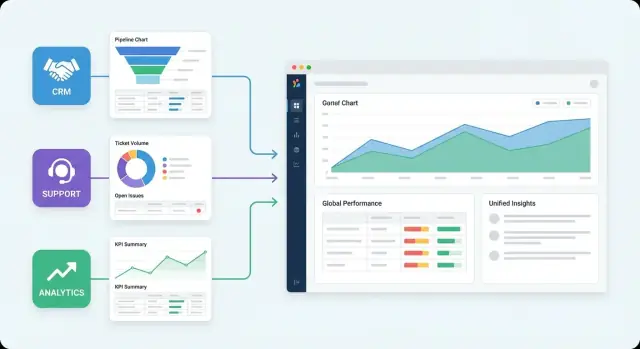
Centralized reporting means pulling data from the tools you already use (CRM, billing, marketing, support, product analytics) into a single place where everyone can view the same numbers—defined the same way—on dashboards that update on a schedule.
In practice, it replaces the “spreadsheet relay race” with a shared system: connectors ingest data, a model standardizes it, and dashboards answer recurring questions without someone rebuilding the report every week.
Problems it solves
Most teams build a reporting app for the same reasons:
- Manual exports and copy/paste workflows. CSV downloads, VLOOKUPs, and “can you re-send that report?” become a time sink.
- Inconsistent metrics. Two dashboards show different “MRR” because each person calculated it differently (or filtered time ranges differently).
- Siloed access. Marketing can’t see revenue outcomes, Sales can’t see support trends, and leaders can’t get an end-to-end view without asking multiple teams.
- Slow answers. Simple questions take days because the data is spread across systems, owned by different people, and not joined anywhere.
Centralization also improves accountability: when metric definitions live in one place, it’s easier to spot when a number changes—and why.
Cross-tool questions leaders actually ask
Once you can combine sources, you can answer questions that single-tool dashboards can’t, such as:
- “Is pipeline growth keeping up with ad spend, and which campaigns are producing deals that actually close?”
- “Do support tickets and time-to-first-response correlate with churn or downgrades the following month?”
- “Which customer segments have the highest product usage but lowest renewal rate, and what does Sales see in the CRM?”
- “Are we hitting our SLA when usage spikes, and does that impact NPS or refunds?”
What it doesn’t solve
A centralized reporting app can’t fix problems that originate upstream:
- Bad source data. If the CRM has duplicate accounts or missing close dates, your app will reflect that until you clean it.
- Missing instrumentation. If you don’t track key product events, no dashboard can infer them later.
- Unclear ownership. If nobody owns definitions like “active user” or “qualified lead,” centralization will surface disagreement rather than remove it.
The goal isn’t perfect data on day one. It’s a consistent, repeatable way to improve reporting over time while reducing the daily friction of getting answers.
Define Users, Questions, and Success Metrics
Centralized reporting only works when it’s built around real decisions. Before you pick tools or write a connector, get clear on who the app is for, what they’re trying to learn, and how you’ll know the project is succeeding.
Identify your primary users
Most reporting apps serve multiple audiences. Name them explicitly and write down what each group needs to do with the data:
- Leadership: track company health, spot risks, review performance trends.
- Ops: monitor throughput, SLA adherence, process bottlenecks.
- Finance: reconcile revenue/costs, forecast, validate numbers.
- Sales: pipeline visibility, conversion rates, rep performance.
- Support: ticket volume, resolution time, customer sentiment.
- Analysts: flexible exploration, exports, consistent metric logic.
If you can’t explain a dashboard in one sentence to each group, you’re not ready to build it.
Capture the top reporting questions
Collect the “top 10” questions people ask repeatedly and tie each to a decision. Examples:
- “Why did revenue dip last week?” → decide whether to adjust pricing, spend, or outreach.
- “Which channels bring the highest-quality leads?” → reallocate budget.
- “Are we meeting our support SLA?” → staffing and escalation changes.
This list becomes your backlog. Anything not linked to a decision is a candidate to defer.
Define success metrics (for the reporting app)
Pick measurable outcomes:
- Time-to-insight: minutes from question to answer.
- Adoption: weekly active users by role.
- Data freshness: how current dashboards are (e.g., hourly, daily).
- Accuracy: agreement with a defined source of truth (and fewer “number debates”).
Set scope boundaries
Write down what’s in and out: which tools, which teams, and what time range you’ll support (e.g., last 24 months). This prevents a “reporting app” from turning into an endless integration project.
Planning note: aim for a final build plan that supports an article-length implementation guide of roughly 3,000 words—detailed enough to execute, short enough to stay focused.
Inventory Data Sources and Access Methods
Before you design pipelines or dashboards, get clear on what data you actually have—and how reliably you can pull it. This prevents two common failures: building reports on the wrong “source of truth,” and discovering late that a key system can only export monthly CSVs.
Identify the source of truth by domain
Start by mapping each business domain to the tool that should “win” when numbers disagree.
- Revenue: billing system (e.g., Stripe), invoicing tool, or ERP—pick one as primary.
- Marketing: ad platforms vs. your attribution tool vs. analytics—define what counts as a conversion.
- Support: helpdesk (tickets) vs. CRM (accounts)—decide where status and ownership live.
Write this down explicitly. It will save hours of debate once stakeholders see metrics side-by-side.
Document export and ingestion methods
For every tool, record realistic ways to extract data:
- REST APIs (endpoints, auth type)
- Webhooks (event types, retries, signature verification)
- Scheduled CSV exports (delivery location, file naming, schema drift)
- Direct database access (read replicas, views, network/VPN requirements)
Capture constraints that impact reporting
Constraints determine refresh cadence, backfill strategy, and even which metrics are feasible.
- Rate limits (per minute/day), plus burst behavior
- Pagination style and maximum page sizes
- Historical backfills: how far back can you pull, and how long will it take?
- Data retention: are old records deleted or anonymized?
Plan access and secret handling
List what’s required to connect safely:
- Service accounts vs. user-based OAuth apps
- Token lifetimes and refresh tokens
- Required scopes/permissions
Store credentials in a secrets manager (not in code or dashboard settings).
Create a practical source matrix
Make a simple table: source → entities → fields needed → refresh cadence. For example: “Zendesk → tickets → created_at, status, assignee_id → every 15 minutes.” This matrix becomes your build checklist and your scope control when requests expand.
Pick an Architecture: ETL, ELT, or Live Queries
This choice determines how “real” your numbers feel, how often reports break, and how much you’ll spend on infrastructure and API usage. Most reporting apps end up using a mix, but you still need a clear default.
Three approaches you can use
1) Live queries (pull on demand)
Your app queries each tool’s API when a user loads a dashboard.
- Freshness: Best (seconds/minutes)
- Cost: Can be high if you re-fetch the same data repeatedly
- Reliability: Lowest—every dashboard depends on multiple external systems being up
- Complexity: Moderate (no pipelines), but caching and retries get tricky
- API limits: Risky—dashboards can trigger bursts that hit rate limits
2) Scheduled pipelines (ETL/ELT into your storage)
You copy data on a schedule (e.g., hourly/nightly), then dashboards query your own database/warehouse.
- Freshness: Good enough for most teams (15 min–24 hours)
- Cost: Predictable; compute happens on your schedule
- Reliability: High—dashboards don’t fail because an external API is slow
- Complexity: Higher upfront (connectors, backfills, schema changes)
- API limits: Easier to manage with incremental sync and quotas
Where ETL vs. ELT fits:
- ETL (Transform before load): Clean/aggregate before writing to storage. Useful when you want a tight, curated dataset and smaller storage bills.
- ELT (Load then transform): Land raw data first, transform inside the warehouse. Often faster to iterate, better for auditing and reprocessing.
3) Hybrid (scheduled + selective live/near-real-time)
Core datasets are scheduled, but a few “hot” widgets (e.g., today’s spend, active incidents) use live queries or more frequent syncs.
- Freshness: Great where it matters
- Cost: Balanced—opt-in real-time
- Reliability: High if you degrade gracefully (show last-synced value when live fails)
- Complexity: Highest—two paths to maintain
- API limits: Manageable if limited to a small surface area
Tradeoffs that matter in practice
Freshness is not free: the closer you get to real time, the more you pay in API calls, caching, and failure handling. Scheduled ingestion is usually the most stable foundation for a reporting product, especially when users expect dashboards to load fast every time.
Recommended default
For most teams: start with scheduled ELT (load raw + lightly normalized data, then transform for metrics), and add near-real time only for a few high-value metrics.
Decision checklist
Choose Live Queries if:
- The data changes minute-to-minute and users act on it immediately
- API rate limits are generous or you can cache heavily
- You can tolerate occasional “partial dashboard” states
Choose Scheduled ETL/ELT if:
- Accuracy, consistency, and fast dashboards matter more than minute-level freshness
- You need historical analysis, backfills, and reproducible numbers
- You’re integrating many tools with inconsistent APIs
Choose Hybrid if:
- Most reporting can be delayed, but a few metrics must be fresh
- You can implement fallbacks (last sync + timestamp) for live components
- You have the capacity to operate two data paths without confusing users
Design the Data Model and Metric Definitions
A centralized reporting app succeeds or fails on two things: a data model people can understand, and metrics that mean the same thing everywhere. Before building dashboards, define the “business nouns” and the exact math behind your KPIs.
Define your core entities
Start with a simple, shared vocabulary. Common entities include:
- Accounts/Companies (the customer organization)
- Users/Contacts (people at the account)
- Deals/Opportunities (sales pipeline)
- Invoices/Subscriptions/Payments (billing truth)
- Tickets/Conversations (support workload and outcomes)
- Campaigns/Ads (marketing spend and attribution inputs)
Decide which system is the source of truth for each entity (e.g., billing for invoices, CRM for deals). Your model should reflect that ownership.
Plan how data joins across systems
Cross-tool reporting requires reliable keys. Prefer joins in this order:
- Native stable IDs via explicit cross-system fields (external_id)
- Mapping tables you control (e.g., crm_account_id ↔ billing_customer_id)
- Emails/domains (useful, but riskier due to duplicates and changes)
Invest early in mapping tables—they turn “messy but workable” into “repeatable and auditable.”
Define metrics once (and assign an owner)
Write metric definitions like product requirements: name, formula, filters, grain, and edge cases. Examples:
- MRR: include/exclude taxes? discounts? paused subscriptions?
- CAC: which spend sources count, and over what time window?
- Churn: logo vs. revenue churn, and how to treat downgrades?
Assign a single owner (finance, revops, analytics) who approves changes.
Standardize time, currency, and calendars
Pick defaults and enforce them in the query layer:
- Time zone: store timestamps in UTC; report in a chosen business time zone
- Currency: choose a base currency and exchange-rate rules (daily/monthly)
- Fiscal calendar: define fiscal months/quarters and keep them consistent
Version metric logic and document changes
Treat metric logic as code: version it, include effective dates, and keep a short changelog (“MRR v2 excludes one-time fees from 2025-01-01”). This prevents “the dashboard changed” confusion and makes audits much easier.
Build Data Pipelines: Extraction, Normalization, Scheduling
A centralized reporting app is only as trustworthy as its pipelines. Think of each connector as a small product: it must pull data consistently, shape it into a predictable format, and load it safely—every time.
Connector responsibilities (extract → validate → normalize → load)
Extraction should be explicit about what it requests (endpoints, fields, time ranges) and how it authenticates. Immediately after pulling data, validate basic assumptions (required IDs present, timestamps parse, arrays aren’t unexpectedly empty).
Normalization is where you make the data usable across tools. Standardize:
- Dates and time zones (store UTC; keep original timestamp fields when helpful)
- Statuses/enums (map “won/closed/success” to a shared set)
- Naming conventions (snake_case vs. camelCase; consistent field names like
account_id)
Finally, load into your storage in a way that supports fast reporting and safe re-runs.
Scheduling: hourly/daily jobs, incremental syncs, and backfills
Most teams run critical connectors hourly and long-tail sources daily. Prefer incremental syncs (e.g., updated_since or a cursor) to keep jobs fast, but design for backfills when mapping rules change or a vendor API was down.
A practical pattern is:
- Incremental: fetch by updated timestamp or change token
- Backfill: bounded ranges (by date or ID) with throttling
Handling real API issues
Expect pagination, rate limits, and occasional partial failures. Use retries with exponential backoff, but also make runs idempotent: the same payload processed twice should not create duplicates. Upserts keyed by a stable external ID usually work well.
Keep raw alongside cleaned
Store raw responses (or raw tables) next to your cleaned/normalized tables. When a dashboard number looks off, raw data lets you trace what the API returned and which transformation changed it.
Choose Storage: Database vs Warehouse vs Lake
Storage is where centralized reporting succeeds or fails. The “right” choice depends less on your tools and more on how people will query: frequent dashboard reads, heavy aggregations, long history, and how many users hit the system at once.
Option 1: Relational database (Postgres/MySQL)
A relational database is a good default when your reporting app is young and your dataset is moderate. You get strong consistency, straightforward modeling, and predictable performance for filtered queries.
Use it when you expect:
- Many small queries (per team/org)
- Moderate aggregation needs
- Lower concurrency (tens of users, not hundreds)
Plan for typical reporting patterns: index by (org_id, date) and any high-selectivity filters like team_id or source_system. If you store event-like facts, consider monthly partitions by date to keep indexes small and vacuum/maintenance manageable.
Option 2: Data warehouse (BigQuery/Snowflake/Redshift)
Warehouses are built for analytics workloads: large scans, big joins, and many users refreshing dashboards at once. If your app needs multi-year history, complex metrics, or “slice-and-dice” exploration, a warehouse usually pays off.
Modeling tip: keep an append-only fact table (e.g., usage_events) and dimension tables (orgs, teams, tools) and standardize metric definitions so dashboards don’t re-implement logic.
Partition by date and cluster/sort by fields you filter often (org/team). This reduces scan costs and speeds up common queries.
Option 3: Object storage / data lake (S3/GCS/Azure Blob)
A lake is great for cheap, durable storage of raw and historical data, especially when you ingest many sources or need to replay transformations.
On its own, a lake isn’t reporting-ready. You’ll typically pair it with a query engine or warehouse layer for dashboards.
Costs and retention: what drives the bill
Cost is usually driven by compute (how often dashboards refresh, how much data each query scans) more than storage. Frequent “full-history” queries are expensive; design summaries (daily/weekly rollups) to keep dashboards fast.
Define retention rules early: keep curated metric tables hot (e.g., 12–24 months), and archive older raw extracts to the lake for compliance and backfills. For deeper planning, see /blog/data-retention-strategies.
Implement the Backend: Auth, Query Layer, and Metrics Logic
Your backend is the contract between messy, changing data sources and the reports people rely on. If it’s consistent and predictable, the UI can stay simple.
Core services to include
Start with a small set of “always needed” services:
- Authentication & sessions: SSO (Google/Microsoft), password login if required, and service tokens for API access.
- Organization/workspace management: orgs, workspaces/projects, membership, invitations, and roles.
- A query API: one endpoint style that dashboards, exports, and automations can all use (e.g.,
/api/query,/api/metrics).
Keep the query layer opinionated: accept a limited set of filters (date range, dimensions, segments) and reject anything that could turn into arbitrary SQL execution.
Add a semantic (metrics) layer
Centralized reporting fails when “Revenue” or “Active Users” means something different in every dashboard.
Implement a semantic/metrics layer that defines:
- metric formulas (e.g., net revenue = gross − refunds)
- allowed dimensions (channel, campaign, region)
- time logic (time zone, week starts Monday vs. Sunday)
Store these definitions in versioned config (database table or files in git) so changes are auditable and rollbacks are possible.
Caching that matches real dashboard behavior
Dashboards repeat the same queries. Plan caching early:
- cache common aggregates by workspace + date range + filter hash
- use shorter TTLs for “today” and longer TTLs for historical ranges
- precompute expensive rollups on a schedule when possible
This keeps the UI fast without hiding data freshness.
Multi-tenancy: isolate data safely
Choose between:
- Separate schemas/databases per tenant (strong isolation, more ops work), or
- Row-level separation with tenant IDs (simpler to run, requires strict access checks).
Whichever you pick, enforce tenant scoping in the query layer—not in the frontend.
Exporting and sharing
Backend support makes reporting actionable:
- CSV export for any saved report
- scheduled emails (daily/weekly snapshots)
- API access for downstream tools, using scoped tokens and rate limits
Design these features as first-class API capabilities so they work everywhere your reports appear.
A practical build shortcut (when you need a working app fast)
If you want to ship a working internal reporting app quickly, consider prototyping the UI and API shape in Koder.ai first. It’s a vibe-coding platform that can generate a React frontend plus a Go backend with PostgreSQL from a simple chat-driven spec, and it supports planning mode, snapshots, and rollback—useful when you’re iterating on schemas and metric logic. If you later outgrow the prototype, you can export the source code and continue development in your own pipeline.
Design the Frontend Dashboards for Real Reporting Work
A centralized reporting app succeeds or fails in the UI. If the dashboards feel like “a database with charts,” people will keep exporting to spreadsheets. Design the frontend around the way teams ask questions, compare periods, and follow up on anomalies.
Organize navigation by questions (not tables)
Start with the decisions people make. A good top-level navigation often maps to familiar questions: revenue, growth, retention, and support health. Each area can contain a small set of dashboards that answer a specific “so what?” rather than dumping every metric you can compute.
For example, a Revenue section can focus on “How are we doing vs. last month?” and “What’s driving the change?” instead of exposing raw invoice, customer, and product tables.
Filters that match real workflows
Most reporting sessions begin with narrowing scope. Put core filters in a consistent, always-visible place and use the same names across dashboards:
- Date range (with common presets like last 7/30/90 days)
- Team or owner
- Region
- Product
- Segment
Make filters sticky as users move between pages so they don’t have to rebuild context. Also be explicit about time zones and whether dates represent event time or processed time.
Drill-downs that lead to action
Dashboards are for noticing; drill-downs are for understanding. A practical pattern is:
Summary chart → detail table → source record link (when available).
When a KPI spikes, users should be able to click the point, see the underlying rows (orders, tickets, accounts), and jump to the originating tool via a relative link like /records/123 (or a “view in source system” link if you maintain one). The goal is to reduce the “now I need to ask the data team” moment.
Make data freshness obvious
Centralized reporting often has known delays—API limits, batch schedules, upstream outages. Surface that reality directly in the UI:
- “Last updated” timestamp per dashboard (and ideally per widget)
- Expected refresh cadence (hourly, daily)
- Notes on known delays or partial backfills
This small element prevents mistrust and endless Slack threads about whether numbers are “wrong.”
Plan for self-serve from day one
To support a dashboard app beyond a small pilot, add lightweight self-serve features:
- Saved views (a filter state + layout users can return to)
- Annotations (e.g., campaign launch, pricing change) attached to dates/metrics
- Role-appropriate defaults (finance lands on revenue; support lands on ticket trends)
Self-serve doesn’t mean “anything goes.” It means common questions are easy to answer without rewriting reports or building one-off dashboards for every team.
Data Quality, Auditing, and Observability
A centralized reporting app earns trust the same way it loses it: one confusing number at a time. Data quality isn’t a “nice to have” after dashboards ship—it’s part of the product.
Validations that catch issues early
Add checks at the edges of your pipelines, before data reaches dashboards. Start simple and expand as you learn failure patterns.
- Missing values: required fields (dates, IDs, currency) shouldn’t arrive blank.
- Unexpected spikes/drops: compare today vs. the last N days; flag changes beyond a threshold.
- Schema changes: detect added/removed columns and type changes so a vendor API update doesn’t silently break metrics.
When a validation fails, decide whether to block the load (for critical tables) or quarantine the batch and mark the data as partial in the UI.
Lineage: from metric back to the source field
People will ask, “Where does this number come from?” Make the answer one click away by storing lineage metadata:
metric → model/table → transformation → source connector → source field
This is invaluable for debugging and for onboarding new teammates. It also prevents metric drift when someone edits a calculation without understanding downstream impact.
Observability: logs, alerts, and freshness
Treat pipelines like production services. Log every run with row counts, durations, validation results, and the max timestamp loaded. Alert on:
- Failures (auth errors, rate limits, parsing issues)
- Late data (a job ran, but the newest data is older than your SLA)
In the dashboard UI, surface a clear “Data last updated” indicator and a link to a status page like /status.
Auditing: what changed, when, and why
Provide an audit view for admins that tracks changes to metric definitions, filters, permissions, and connector settings. Include diffs and the actor (user/service), plus a short “reason” field for intentional edits.
A lightweight runbook
Write a short runbook for the most common incidents: expired tokens, API quota exceeded, schema change, and delayed upstream data. Include the fastest checks, an escalation path, and how to communicate impact to users.
Security and Access Control Basics
Centralized reporting apps often read from multiple tools (CRM, ads, support, finance). That makes security less about a single database and more about controlling every hop: source access, data movement, storage, and what each user can see in the UI.
Least-privilege for source systems
Create dedicated “reporting” identities in each source tool. Grant the smallest scope required (read-only, specific objects, specific accounts) and avoid using personal admin tokens. If a connector supports granular scopes, prefer them—even if it takes longer to set up.
RBAC (and when to add row-level rules)
Implement role-based access control in your app so permissions are explicit and auditable. Common roles include Admin, Analyst, and Viewer, plus “Business Unit” variants.
If different teams should only see their own customers, regions, or brands, add optional row-level rules (e.g., region_id IN user.allowed_regions). Keep these rules server-side, enforced in the query layer—not just hidden in the dashboard.
Secrets, tokens, and rotation
Store API keys and OAuth refresh tokens in a secrets manager (or encrypted at rest if that’s your only option). Never ship secrets to the browser. Build rotation into operations: expiring credentials should fail gracefully with clear alerts, not silent data gaps.
Encryption in transit and at rest
Use TLS everywhere: browser to backend, backend to sources, and backend to storage. Enable encryption at rest for your database/warehouse and backups where your stack supports it.
Privacy basics to document early
Write down how you handle PII: what fields you ingest, how you mask or minimize them, and who can access raw vs. aggregated views. Support deletion requests (user/customer) with a repeatable process. Keep access logs for authentication events and sensitive report exports so audits are possible.
Deployment, Scaling, and Ongoing Maintenance
Shipping a reporting app isn’t a one-time “go live.” The fastest way to keep trust is to treat deployment and operations as part of the product: predictable releases, clear expectations for data freshness, and a maintenance rhythm that prevents silent breakage.
Environments: dev, staging, production
Set up at least three environments:
- Dev for rapid iteration with safe credentials and sample data.
- Staging that mirrors production config (same database/warehouse engine, same job schedule), but uses test workspaces and redacted data where possible.
- Production with locked-down credentials and change control.
For test data, prefer a mix: a small, versioned dataset for deterministic tests, plus a “synthetic but realistic” dataset that exercises edge cases (missing values, refunds, timezone boundaries).
CI checks that protect you from regressions
Add automated checks before every deploy:
- Schema/migration checks: run migrations on an empty database and on a copy of the last-release schema.
- Connector smoke tests: validate auth and a single lightweight API call per connector (rate-limit friendly).
- Dashboard snapshot tests: render key dashboards or queries and compare results to expected ranges, not exact numbers (to avoid false failures when data naturally shifts).
If you publish metric definitions, treat them like code: review, version, and release notes.
Scaling points you’ll hit sooner than you think
Centralized reporting systems usually bottleneck in three places:
- Data refresh jobs: move heavy extraction/transform work to a job queue so UI traffic doesn’t slow ingestion.
- Query concurrency: use read replicas or warehouse concurrency controls, and prioritize interactive queries over batch backfills.
- Repeated queries: introduce caching for common dashboard views and pre-aggregations for expensive metrics.
Also track API limits per source. A single new dashboard can multiply calls; protect sources with request throttling and incremental syncs.
Internal SLAs and incident response
Define expectations in writing:
- Refresh times (e.g., “Sales metrics updated every 2 hours; finance daily at 6am”).
- Uptime targets for the app and the pipeline separately.
- Incident response: who is on call, what constitutes a data incident, and how you communicate status.
A simple /status page (internal is fine) reduces repeated questions during outages.
Ongoing maintenance and governance
Plan recurring work:
- Connector updates (API version changes, OAuth scopes, new fields).
- New sources onboarding checklist (access, data mapping, validation rules).
- Metric governance: ownership per metric, change approval, and deprecation policy.
If you want a smooth cadence, schedule “data reliability” sprints every quarter—small investments that prevent big firefights later.
FAQ
What is centralized reporting in a web app context?
Centralized reporting pulls data from multiple systems (CRM, billing, marketing, support, product analytics) into one place, standardizes definitions, and serves dashboards on a schedule.
It’s meant to replace ad-hoc exports and one-off spreadsheets with a repeatable pipeline + shared metric logic.
How do I decide who the reporting app is for and what to build first?
Start by identifying primary user groups (leadership, ops, finance, sales, support, analysts) and collecting the top recurring questions tied to decisions.
If you can’t describe a dashboard’s purpose in one sentence for each audience, narrow scope before building anything.
What success metrics should I use for a centralized reporting app?
Define measurable outcomes like:
- Time-to-insight (minutes from question to answer)
- Adoption (weekly active users by role)
- Data freshness (hourly/daily)
- Accuracy (agreement with a defined source of truth)
Pick a few and track them from the first pilot to avoid “we shipped dashboards, but nobody uses them.”
How do I choose the source of truth when multiple tools contain the same data?
Use a “source of truth by domain” map: billing/ERP for revenue, helpdesk for tickets, CRM for pipeline, etc.
When numbers disagree, you’ll have a pre-agreed winner—reducing debates and preventing teams from cherry-picking the dashboard they like best.
Should I use live queries or scheduled ETL/ELT for dashboards?
Live queries hit external APIs when a dashboard loads; scheduled ETL/ELT copies data into your own storage on a cadence; hybrid mixes both.
Most teams should start with scheduled ELT (load raw, transform for metrics) and add near-real-time only for a small set of high-value widgets.
What is a semantic layer, and why does a reporting app need one?
A semantic (metrics) layer defines KPI formulas, allowed dimensions, filters, time logic, and versions the definitions.
It prevents “Revenue” or “Active Users” from being calculated differently across dashboards and makes changes auditable and reversible.
How do I reliably join data across tools (CRM, billing, support, analytics)?
Prefer joins in this order:
- Stable native IDs with explicit cross-system fields (e.g.,
external_id) - Mapping tables you control (e.g.,
crm_account_id ↔ billing_customer_id) - Emails/domains (useful but risky)
Investing in mapping tables early makes cross-tool reporting repeatable and debuggable.
What are the key pipeline practices for reliable centralized reporting?
Build connectors to be idempotent and resilient:
- Incremental syncs (
updated_since/cursor) + bounded backfills - Retries with exponential backoff for rate limits/timeouts
- Upserts keyed by stable external IDs to avoid duplicates
- Store raw alongside normalized data for debugging
Expect schema drift and partial failures; design for them upfront.
Should I store reporting data in a database, warehouse, or data lake?
Choose based on query patterns and scale:
- Postgres/MySQL: great for early-stage apps, moderate data, many small filtered queries
- Warehouse (BigQuery/Snowflake/Redshift): best for large joins, long history, high concurrency
- Lake (S3/GCS/Azure Blob): cheap raw storage and replay, usually paired with a warehouse/query engine
Cost is often driven by compute scans; add rollups/summaries to keep dashboards fast.
What problems won’t centralized reporting solve by itself?
Centralization doesn’t fix upstream issues:
- Bad source data (duplicates, missing fields)
- Missing instrumentation (events you never tracked)
- Unclear ownership of definitions (e.g., “qualified lead”)
A reporting app makes problems visible; you still need data governance, instrumentation, and cleanup to improve accuracy over time.