

How to Build a Web App for Feedback Collection and Surveys
Learn how to plan, build, and launch a web app for collecting feedback and running user surveys, from UX and data models to analytics and privacy.
Define the Problem and the MVP
Before you write code, decide what you’re actually building. “Feedback” can mean a lightweight inbox for comments, a structured survey tool, or a mix of both. If you try to cover every use case on day one, you’ll end up with a complicated product that’s hard to ship—and even harder for people to adopt.
Clarify the primary goal
Pick the core job your app should do in its first version:
- Feedback inbox first: capture open-ended comments, categorize them, and route them to the right team.
- Surveys first: create questionnaires, collect responses, and summarize results.
- Both (carefully): only if you can keep the first release small—e.g., one survey type plus a simple feedback form.
A practical MVP for “both” is: one always-available feedback form + one basic survey template (NPS or CSAT), feeding into the same response list.
Define success metrics you can measure
Success should be observable within weeks, not quarters. Choose a small set of metrics and set baseline targets:
- Response rate: invited users who submit anything
- Completion rate: started surveys that finish
- Insights created: number of tagged themes, issues opened, or decisions logged based on feedback
If you can’t explain how you’ll calculate each metric, it’s not a useful metric yet.
Pick your first target users
Be specific about who uses the app and why:
- Customers: product feedback, churn reasons, satisfaction tracking
- Internal teams: employee pulse surveys, support triage, feature requests
- Beta testers: structured bug/UX feedback during releases
Different audiences require different tone, anonymity expectations, and follow-up workflows.
List key constraints upfront
Write down what can’t change:
- Budget and timeline: what you can ship in 2–6 weeks
- Compliance needs: e.g., GDPR-friendly surveys, data retention rules
- Operational limits: who will manage templates, tags, and follow-ups
This problem/MVP definition becomes your “scope contract” for the first build—and it will save you from rebuilding later.
Map User Journeys and Roles
Before you design screens or pick features, decide who the app is for and what “success” looks like for each person. Feedback products fail less from missing tech and more from unclear ownership: everyone can create surveys, nobody maintains them, and results never turn into action.
Core personas (keep it simple)
Admin owns the workspace: billing, security, branding, user access, and default settings (data retention, domains allowed, consent text). They care about control and consistency.
Analyst (or Product Manager) runs the feedback program: creates surveys, targets audiences, watches response rates, and turns results into decisions. They care about speed and clarity.
End user / respondent answers questions. They care about trust (why am I being asked?), effort (how long is this?), and privacy.
The main journey: create → distribute → collect → analyze → act
Map the “happy path” end-to-end:
- Create survey: pick a template, write questions, set logic (if any), preview.
- Distribute: choose channel (in-app widget, email invite, shareable link), define audience, schedule.
- Collect: responses arrive, duplicates and spam handled, partial completions tracked.
- Analyze: filters, segments, trends over time, exports.
- Act: assign owners, add notes/tags, track status (new → reviewing → resolved), close the loop.
Even if you postpone “act” features, document how teams will do it (e.g., export to CSV or push to another tool later). The key is to avoid shipping a system that collects data but can’t drive follow-through.
Must-have screens (minimum set)
You don’t need many pages, but each must answer a clear question:
- Survey builder: create/edit, preview, basic logic, version history.
- Distribution: channel setup, targeting, scheduling, invite status.
- Results: overview metrics, response list, filters/segments, export.
- Settings: workspace, roles/permissions, branding, privacy text.
Common pitfalls to avoid early
- Too many question types: start with a handful (rating, single choice, multi-choice, short text). Add more only when users ask repeatedly.
- Unclear ownership: define who can publish, who can edit live surveys, and who can see raw responses.
- No workflow: results without a next step become a “reporting app.” Add lightweight tagging/notes or at least a consistent export process.
Once these journeys are clear, feature decisions get easier—and you can keep the product focused.
Pick a Simple Tech Stack and Architecture
A feedback collection web app and user survey application doesn’t need an elaborate architecture to be successful. Your first goal is to ship a reliable survey builder, capture responses, and make it easy to review results—without creating a maintenance burden.
Monolith vs. simple services
For most teams, a modular monolith is the simplest place to start: one backend app, one database, and clear internal modules (auth, surveys, responses, reporting). You can still keep boundaries clean so parts can be extracted later.
Choose simple services only if you have a strong reason—like sending high-volume email survey invites, heavy analytics workloads, or strict isolation requirements. Otherwise, microservices can slow you down with duplicated code, complex deployments, and harder debugging.
A practical compromise is: monolith + a couple of managed add-ons, such as a queue for background jobs and an object store for exports.
Frontend and backend options
On the frontend, React and Vue are both great fits for a survey builder because they handle dynamic forms well.
- React: huge ecosystem, many UI libraries, lots of examples for drag-and-drop builders.
- Vue: simpler learning curve, excellent developer experience, great for smaller teams.
On the backend, pick something your team can move quickly in:
- Node.js (Express/NestJS): strong match if your team is already JavaScript/TypeScript-heavy.
- Python (Django/FastAPI): Django speeds up admin-style workflows; FastAPI is clean for APIs.
- Ruby (Rails): excellent for CRUD-heavy products and fast iteration.
Whatever you choose, keep APIs predictable. Your survey builder and response UI will evolve faster if your endpoints are consistent and well-versioned.
If you want to accelerate the “first working version” without committing to months of scaffolding, a vibe-coding platform like Koder.ai can be a practical starting point: you can chat your way to a React frontend plus a Go backend with PostgreSQL, then export the source code when you’re ready to take full control.
Database: why relational is usually simplest
Surveys look “document-like,” but most product feedback workflow needs are relational:
- Workspaces and users
- Surveys, questions, and versions
- Responses linked to respondents (or anonymous sessions)
- Permissions and auditability
A relational database like PostgreSQL is usually the easiest choice for a feedback database because it supports constraints, joins, reporting queries, and future analytics without workarounds.
Hosting and basic cost drivers
Start with a managed platform when possible (e.g., a PaaS for the app and managed Postgres). It reduces ops overhead and keeps your team focused on features.
Typical cost drivers for a survey analytics product:
- Email volume (transactional provider pricing)
- Background jobs (sending invites, exporting reports)
- Database size (responses grow quickly)
- Traffic spikes (campaign links and in-app widget rollouts)
As you grow, you can move pieces to a cloud provider without rewriting everything—if you’ve kept the architecture simple and modular from the start.
Design the Data Model for Surveys and Feedback
A good data model makes everything else easier: building the survey builder, keeping results consistent over time, and producing trustworthy analytics. Aim for a structure that’s simple to query and hard to “accidentally” corrupt.
Core entities (and why they exist)
Most feedback collection web apps can start with six key entities:
- Workspace: the account/container for a company or team. Every record should belong to a workspace to keep data separated.
- User: the people who create surveys, invite respondents, and view results.
- Survey: a named container with status (draft/published/archived) and settings (thank-you page, anonymity, etc.).
- Question: the building blocks of a survey. Store order/position and configuration.
- Response: one submission event (who/when/where it was submitted).
- Answer: the actual values per question inside a response.
This structure maps cleanly to a product feedback workflow: teams create surveys, collect responses, then analyze answers.
Survey versions without breaking historical results
Surveys evolve. Someone will fix wording, add a question, or change options. If you overwrite questions in place, older responses become confusing or impossible to interpret.
Use versioning:
- Keep a Survey record as the stable identity (e.g., “Q4 NPS”).
- Create SurveyVersion records (v1, v2, v3…), each with its own set of questions.
- Point each Response to the exact SurveyVersion it was filled out against.
That way, editing a survey creates a new version while past results remain intact.
Designing for multiple question types
Question types usually include text, scale/rating, and multiple choice.
A practical approach is:
- Question: stores
type,title,required,position - QuestionOption (for multiple choice): option labels/values and ordering
- Answer: stores
question_idand a flexible value (e.g.,text_value,number_value, plus anoption_idfor choices)
This keeps reporting straightforward (e.g., averages for scales, counts per option).
Identifiers and timestamps for reporting and audits
Plan identifiers early:
- Use stable IDs (UUIDs) for workspaces, surveys, and responses.
- Add timestamps like
created_at,published_at,submitted_at, andarchived_at. - Store response metadata useful for analytics and compliance:
channel(in-app/email/link),locale, and optionalexternal_user_id(if you need to tie responses to your product users).
These basics make your survey analytics more reliable and your audits less painful later.
Build the Survey Builder and Response UI
A feedback collection web app lives or dies by its UI: admins need to build surveys quickly, and respondents need a smooth, distraction-free flow. This is where your user survey application starts to feel “real.”
Survey builder essentials
Start with a simple survey builder that supports a question list with:
- Question type (short text, long text, single choice, multiple choice, rating)
- Required flag
- Help text / placeholder
- Ordering (drag-and-drop is nice, but “Move up/down” works fine for v1)
If you add branching, keep it optional and minimal: allow “If answer is X → go to question Y.” Store this in your feedback database as a rule attached to a question option. If branching feels risky for v1, ship without it and keep the data model ready.
Respondent experience (fast, mobile-friendly)
The response UI should load quickly and feel good on a phone:
- One question per screen (or short pages) to reduce scroll fatigue
- A clear progress indicator (e.g., “3 of 8”)—even for anonymous links
- Autosave for longer responses when possible (especially multi-step)
Avoid heavy client-side logic. Render simple forms, validate required answers, and submit responses in small payloads.
Accessibility basics you should not skip
Make your in-app feedback widget and survey pages usable for everyone:
- Proper labels linked to inputs
- Keyboard navigation (tab order, visible focus state)
- Sufficient contrast for text and buttons
- Error messages that are specific and announced (ARIA live region if needed)
Anti-abuse measures
Public links and email survey invites attract spam. Add lightweight protections:
- Rate limits per IP and per survey
- Bot detection (hidden honeypot field)
- CAPTCHA only when abuse is detected (or on high-risk public surveys)
This combination keeps the survey analytics clean without harming legitimate respondents.
Add Collection Channels: In-App, Email, and Links
Collection channels are how your survey reaches people. The best apps support at least three: an in-app widget for active users, email invitations for targeted outreach, and shareable links for broad distribution. Each channel has different tradeoffs in response rate, data quality, and risk of misuse.
In-app widget: placement and trigger rules
Keep the widget easy to find but not annoying. Common placements are a small button in the bottom corner, a tab on the side, or a modal that appears after specific actions.
Triggers should be rule-based so you only interrupt when it makes sense:
- Time-based: show after 30–60 seconds on a key page.
- Page-based: show only on onboarding, pricing, or post-purchase screens.
- Event-based: show after completing a workflow (e.g., “export completed”, “ticket resolved”).
Add frequency limits (e.g., “no more than once per week per user”) and a clear “don’t show again” option.
Email invitations: tokens, expiry, and safety
Email works best for transactional moments (after a trial ends) or for sampling (N users per week). Avoid shared links by generating single-use tokens tied to a recipient and survey.
Recommended token rules:
- Store a hashed token and mark it used on submission.
- Set an expiry (7–30 days) and allow regenerating a fresh link.
- Keep tokens scoped (survey_id, recipient_id, workspace_id) so they can’t be replayed elsewhere.
Public links vs authenticated surveys
Use public links when you want reach: marketing NPS, event feedback, or community surveys. Plan for spam controls (rate limiting, CAPTCHA, optional email verification).
Use authenticated surveys when answers must map to an account or role: customer support CSAT, internal employee feedback, or workspace-level product feedback workflow.
Reminders and throttling
Reminders can lift responses, but only with guardrails:
- Send 1–2 reminders max, spaced 3–7 days apart.
- Stop immediately after a response.
- Throttle by user and workspace to prevent “survey fatigue” across multiple campaigns.
These basics make your feedback collection web app feel considerate while keeping your data trustworthy.
Handle Authentication, Permissions, and Workspaces
Authentication and authorization are where a feedback collection web app can quietly go wrong: the product works, but the wrong person can see the wrong survey results. Treat identity and tenant boundaries as core features, not add-ons.
Authentication: start simple, leave room to grow
For an MVP user survey application, email/password is usually enough—fast to implement and easy to support.
If you want a smoother sign-in without committing to enterprise complexity, consider magic links (passwordless). They reduce forgotten-password tickets, but require good email deliverability and link-expiry handling.
Plan SSO (SAML/OIDC) as a later upgrade. The key is designing your user model so adding SSO doesn’t force a rewrite (e.g., support multiple “identities” per user).
Permissions: roles that match real work
A survey builder needs clear, predictable access:
- Owner: billing, workspace settings, member management
- Admin: manage surveys, responses, integrations
- Editor: create/edit surveys, view results (maybe limited exports)
- Viewer: read-only analytics and responses
Keep permissions explicit in code (policy checks around every read/write), not just in the UI.
Workspaces: multi-tenant separation and data isolation
Workspaces let agencies, teams, or products share the same platform while isolating data. Every survey, response, and integration record should carry a workspace_id, and every query should scope by it.
Decide early whether you’ll support users in multiple workspaces, and how switching works.
API keys and webhooks for integrations
If you expose API keys (for embedding an in-app feedback widget, syncing to a feedback database, etc.), define:
- Scope (read responses, create responses, manage surveys)
- Rotation (create new key, revoke old without downtime)
- Auditability (who created/revoked, when)
For webhooks, sign requests, retry safely, and let users disable or regenerate secrets from a simple settings screen.
Implement Analytics and Reporting
Analytics is where a feedback app becomes useful for decision-making, not just data storage. Start by defining a small set of metrics you can trust, then build views that answer everyday questions quickly.
Track the survey funnel (not just responses)
Instrument key events for each survey:
- View (survey displayed)
- Start (first interaction)
- Complete (submitted)
From these, you can calculate start rate (starts/views) and completion rate (completions/starts). Also log drop-off points—for example, the last question seen or the step where users abandoned the flow. This helps you spot surveys that are too long, confusing, or poorly targeted.
Build basic dashboards that teams will actually use
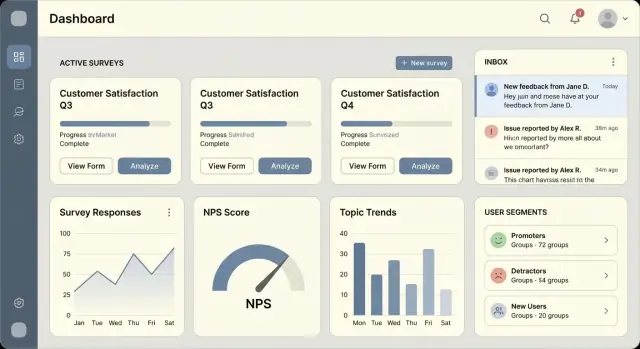
Before advanced BI integrations, ship a simple reporting area with a few high-signal widgets:
- Response volume over time (daily/weekly)
- Completion rate trend per survey
- Top distribution charts for multiple-choice questions
- Latest responses feed for qualitative review
Keep charts simple and fast. Most users want to confirm, “Did this change improve sentiment?” or “Is this survey getting traction?”
Filtering and segmentation
Add filters early so results are credible and actionable:
- Date range (last 7/30/90 days, custom)
- Channel (in-app, email, link)
- User attributes (plan, region, language, role) and anonymous vs logged-in
Segmenting by channel is especially important: email invites often complete differently than in-product prompts.
Export and portability
Offer CSV export for survey summaries and raw responses. Include columns for timestamps, channel, user attributes (where permitted), and question IDs/text. This gives teams immediate flexibility in spreadsheets while you iterate toward richer reports.
Privacy, Security, and Compliance Basics
Feedback and survey apps often collect personal data without meaning to: emails in invites, free-text answers that mention names, IP addresses in logs, or device IDs in an in-app widget. The safest approach is to design for “minimum necessary data” from day one.
Collect only what you need (and write it down)
Create a simple data dictionary for your feedback collection web app that lists every field you store, why you store it, where it appears in the UI, and who can access it. This keeps the survey builder honest and helps you avoid “just in case” fields.
Examples of fields to question:
- Full name vs. first name vs. anonymous
- IP address (often not required for survey analytics)
- Open-ended responses (high risk for accidental personal data)
If you offer anonymous surveys, treat “anonymous” as a product promise: don’t store identifiers in hidden fields, and avoid mixing response data with authentication data.
Consent, retention, and deletion flows
Make consent explicit when you need it (e.g., marketing follow-ups). Add clear wording at the point of collection, not buried in settings. For GDPR-friendly surveys, also plan operational flows:
- Retention: define how long responses and invite logs are kept (e.g., 12 months), then enforce it with scheduled deletion.
- User requests: let a respondent request deletion or export when you can identify them (common for email survey invites).
- Admin tools: add workspace-level controls to delete a survey, purge responses, or anonymize data.
Secure storage and transport
Use HTTPS everywhere (encryption in transit). Protect secrets with a managed secrets store (not environment variables copied into docs or tickets). Encrypt sensitive columns at rest when appropriate, and ensure backups are encrypted and tested with restore drills.
Practical GDPR/CCPA notes
Use plain language: who is collecting the data, why, how long you keep it, and how to contact you. If you use subprocessors (email delivery, analytics), list them and provide a way to sign a data processing agreement. Keep your privacy page easy to find from the survey response UI and in-app feedback widget.
Reliability and Performance for Real Traffic
Traffic patterns for surveys are spiky: a new email campaign can turn “quiet” into thousands of submissions in minutes. Designing for reliability early prevents bad data, duplicate responses, and slow dashboards.
Accept imperfect submissions (without corrupting data)
People abandon forms, lose connectivity, or switch devices mid-survey. Validate inputs server-side, but be deliberate about what must be required.
For long surveys, consider saving progress as a draft: store partial answers with a status like in_progress, and only mark a response submitted once all required questions pass validation. Return clear field-level errors so the UI can highlight exactly what to fix.
Prevent duplicates with idempotent submissions
Double-clicks, back-button resubmits, and flaky mobile networks can easily create duplicate records.
Make your submission endpoint idempotent by accepting an idempotency key (a unique token generated by the client for that response). On the server, store the key with the response and enforce a uniqueness constraint. If the same key is sent again, return the original result instead of inserting a new row.
This is especially important for:
- “Submit” actions after a timeout
- Webhook retries
- Bulk imports or kiosk-style devices
Move slow work to background jobs
Keep the “submit response” request fast. Use a queue/worker for anything that doesn’t need to block the user:
- sending email survey invites and reminders
- generating exports (CSV/PDF)
- delivering webhooks to integrations
Implement retries with backoff, dead-letter queues for repeated failures, and job deduplication where applicable.
Keep dashboards snappy
Analytics pages can become your slowest part as responses grow.
- Use pagination (or infinite scroll) for response lists; avoid loading everything.
- Add indexes on common filters:
survey_id,created_at,workspace_id, and any “status” field. - Cache expensive aggregates (daily counts, NPS averages) and refresh on a schedule or when new responses arrive.
A practical rule: store raw events, but serve dashboards from pre-aggregated tables when queries start to hurt.
Testing, QA, and Monitoring
Shipping a survey app is less about “finishing” and more about preventing regressions as you add question types, channels, and permissions. A small, consistent test suite plus a repeatable QA routine will save you from broken links, missing responses, and incorrect analytics.
Automated tests that catch the expensive bugs
Focus automated tests on logic and end-to-end flows that are hard to spot manually:
- Unit tests for scoring and validation: calculated scores, required questions, skip logic outcomes, and edge cases like empty answers or “Other” fields.
- Integration tests for core flows: create survey → publish → respondent submits → results appear in analytics → export works. Include one test per collection channel (in-app, email, public link).
Keep fixtures small and explicit. If you version survey schemas, add a test that loads “old” survey definitions to ensure you can still render and analyze historic responses.
Manual QA checklist (fast but thorough)
Before every release, run a short checklist that mirrors real usage:
- Mobile checks: layout, tap targets, keyboard behavior, and long text answers.
- Email link checks: links open on mobile/desktop, tracking parameters don’t break the survey URL, unsubscribe/opt-out behavior works.
- Permissions and workspaces: a user in Workspace A cannot view/edit Workspace B; role changes take effect immediately.
- Exports: CSV/XLSX export includes correct columns, time zone handling, and doesn’t leak hidden/internal fields.
Staging with seed data for demos and QA
Maintain a staging environment that mirrors production settings (auth, email provider, storage). Add seed data: a few example workspaces, surveys (NPS, CSAT, multi-step), and sample responses. This makes regression testing and demos repeatable and prevents “it works on my account” surprises.
Observability: know when collection breaks
Surveys fail quietly unless you watch the right signals:
- Structured logs for publish events, response submissions, email sends, and webhooks—include surveyId/workspaceId.
- Basic metrics: response submission rate, 4xx/5xx counts, email bounce rate, and queue/backlog depth if you process events asynchronously.
- Alerting on failure patterns: spike in submit errors, email provider failures, or sudden drop to zero responses for active surveys.
A simple rule: if a customer can’t collect responses for 15 minutes, you should know before they email you.
Launch, Onboard Users, and Iterate
Shipping a feedback collection web app isn’t a single “go-live” moment. Treat launch as a controlled learning cycle so you can validate your user survey application with real teams while keeping support manageable.
A phased launch plan
Start with a private beta (5–20 trusted customers) where you can watch how people actually build surveys, share links, and interpret results. Move to a limited rollout by opening access to a waitlist or a specific segment (e.g., startups only), then proceed to a full release once core flows are stable and your support load feels predictable.
Define success metrics for each phase: activation rate (created first survey), response rate, and time-to-first-insight (viewed analytics or exported results). These are more useful than raw signups.
Onboarding that gets users to “first value”
Make onboarding opinionated:
- Templates: NPS/CSAT, product feedback workflow, post-support survey, churn exit survey.
- Example surveys: pre-filled questions and logic users can duplicate.
- Guided setup: a short checklist—create a workspace, pick a template, add a collection channel (email/in-app/link), and send a test response.
Keep onboarding inside the product, not in docs alone.
Close the loop with a lightweight workflow
Feedback is only useful when it’s acted on. Add a simple workflow: assign owners, tag themes, set a status (new → in progress → resolved), and help teams close the loop by notifying respondents when an issue is addressed.
What to build next
Prioritize integrations (Slack, Jira, Zendesk, HubSpot), add more NPS/CSAT templates, and refine packaging. When you’re ready to monetize, point users to your plans at /pricing.
If you’re iterating quickly, consider how you’ll manage changes safely (rollbacks, staging, and quick redeploys). Platforms like Koder.ai lean into this with snapshots and rollback plus one-click hosting—useful when you’re experimenting with survey templates, workflows, and analytics without wanting to babysit infrastructure in the early phases.
FAQ
What’s a realistic MVP for a feedback and survey web app?
Start by choosing one primary goal:
- A feedback inbox (open-ended comments, tagging, routing)
- Surveys (questionnaires, response summaries)
- A small hybrid MVP: one always-on feedback form + one simple survey template (NPS or CSAT) feeding into the same response list
Keep the first release narrow enough to ship in 2–6 weeks and measure outcomes quickly.
Which success metrics should I track in the first version?
Pick metrics you can calculate within weeks and define them precisely. Common choices:
- Response rate = submissions / invites
- Completion rate = completed / started
- Insights created = number of tagged themes, issues opened, or decisions logged based on feedback
If you can’t explain where the numerator/denominator come from in your data model, the metric isn’t ready.
What user roles should I define for a survey product?
Keep roles simple and aligned with real ownership:
- Admin/Owner: workspace settings, billing, security, retention
- Analyst/PM: create/publish surveys, monitor response health, interpret results
- Respondent: answer quickly, understand why they’re asked, trust privacy claims
Most early product failures come from unclear permissions and “everyone can publish, nobody maintains.”
What are the must-have screens to ship first?
A minimal, high-leverage set is:
- Survey builder (create/edit, preview, basic logic, version history)
- Distribution (channel, audience, schedule, invite status)
- Results (overview metrics, response list, filters, export)
- Settings (workspace, roles, branding, privacy text)
If a screen doesn’t answer a clear question, cut it from v1.
Should I start with a monolith or microservices?
For most teams, start with a modular monolith: one backend app + one database + clear internal modules (auth, surveys, responses, reporting). Add managed components only where needed, like:
- A queue for background jobs (emails, exports, webhooks)
- Object storage for export files
Microservices usually slow early shipping due to deployment and debugging overhead.
How do I design a data model that won’t break analytics later?
Use a relational core (often PostgreSQL) with these entities:
- Workspace, User
- Survey, SurveyVersion, Question (and QuestionOption)
- Response (points to SurveyVersion), Answer
Versioning is key: editing a survey should create a new SurveyVersion so historical responses remain interpretable.
What question types and builder features are essential for v1?
Keep the builder small but flexible:
- Start with a handful of types: rating/scale, single choice, multi-choice, short/long text
- Support ordering (move up/down is fine for v1)
- Store “required” and help text
If you add branching, keep it minimal (e.g., “If option X → jump to question Y”) and model it as rules attached to options.
How should I implement in-app, email, and public link collection channels?
A practical minimum is three channels:
- In-app widget: rule-based triggers (time/page/event), frequency caps, “don’t show again”
- Email invites: single-use tokens, hashed storage, expiry (7–30 days), stop reminders after submit
- Shareable links: easy distribution, but add rate limiting and spam controls
Design each channel to record channel metadata so you can segment results later.
What privacy and compliance basics should I handle from day one?
Treat it as a product promise and reflect it in your data collection:
- Collect minimum necessary data; avoid hidden identifiers in “anonymous” flows
- Provide clear consent text at collection time when required
- Implement retention and deletion (scheduled purges, workspace tools to purge/anonymize)
- Use HTTPS, protect secrets, and encrypt backups; consider encrypting sensitive columns
Also keep a simple data dictionary so you can justify every stored field.
How do I prevent duplicates and keep performance reliable under traffic spikes?
Focus on the failure modes that create bad data:
- Idempotent submissions: accept an idempotency key and enforce uniqueness to prevent duplicates
- Draft/in-progress responses for long surveys, validate server-side, and only mark
submittedwhen complete - Move slow work to background jobs (email, exports, webhooks) with retries and backoff
- Keep analytics fast with pagination, indexes (
workspace_id,survey_id,created_at), and cached aggregates
Add alerts for “responses dropped to zero” and spikes in submit errors so collection doesn’t fail silently.