

Build a Coaching Web App to Manage Sessions and Progress
Learn how to plan and build a web app for coaches: scheduling, session notes, progress tracking, messaging, payments, and a safe MVP-to-launch roadmap.
Define the Coaching Workflow and the Real Problem
Before you pick features, get clear on who the coaching web app is for and what “a normal week” looks like.
Most coaching businesses share the same rhythm (intake → sessions → follow-ups → progress checks), but the details vary by niche:
- Life / career coaches: goals, habits, reflections, accountability, session notes.
- Fitness coaches: workouts, measurements, adherence, weekly check-ins, PRs.
- Sports coaches: training plans, performance metrics, video feedback, drills.
- Tutors / academic coaches: lesson plans, assignments, grades, study goals.
The daily needs that actually matter
Coaches and clients don’t wake up thinking “I need a coach management system.” They need to get through the day without dropping the ball.
Common pain points you’ll be solving:
- Tracking sessions: dates, attendance, what was covered, what’s next.
- Remembering context: notes, commitments, personal details that build trust.
- Showing progress: something tangible a client can understand quickly.
- Staying consistent: reminders, follow-ups, and a simple routine that sticks.
Mapped to a simple workflow, it often looks like:
- A coach prepares for a session (review notes + last goals)
- They run the session (capture outcomes)
- They assign next actions (goals/homework)
- The client checks in during the week (progress + questions)
- The coach reviews progress before the next session
Define the “success moment”
A good online coaching tool produces an obvious “aha” moment.
For a coach, it might be: opening a client profile and instantly seeing what happened last time, what’s planned next, and whether progress is trending up or down.
For a client, it might be: a simple progress view that makes them feel momentum—and prompts the next step without confusion.
Scope of this guide
This guide focuses on a practical, step-by-step path to a web app MVP (not an enterprise system). You’ll focus on the minimum set of screens, data, and flows needed for session scheduling software and client progress tracking—written to be non-technical friendly so you can plan clearly before you build.
Scope the MVP: What to Build First
A coaching web app fails most often when it tries to be a full coaching CRM, a session scheduling software, a messaging tool, and a finance system on day one. Your v1 should prove one thing: coaches can run sessions and show client progress tracking without friction.
Start with 2–3 primary user stories
Pick a tiny set of “must work perfectly” flows:
- Create a client (name, contact info, goals)
- Book a session (date/time + location/video link)
- Record notes after the session (high-level summary + action items)
- Update progress (one or two metrics tied to the client’s goal)
If these stories feel smooth, you already have a usable online coaching tool.
If you want to speed up early validation without committing to a full engineering cycle, a vibe-coding platform like Koder.ai can help you prototype these exact flows quickly—then export the source code when you’re ready to take it further.
MVP vs. later: draw a hard line
For a web app MVP, treat “later” as a separate product.
MVP (must-have): client list, session calendar, session notes, simple goals/metrics, basic reminders.
Later (nice-to-have): templates, automations, advanced analytics, integrations, multi-coach teams, complex packages, public client portal.
Prioritize with impact vs. effort
Make a simple 2×2:
- High impact / low effort: build first (e.g., quick note-taking, rescheduling)
- High impact / high effort: plan next (e.g., full two-way calendar sync)
- Low impact / low effort: only if time allows (e.g., color themes)
- Low impact / high effort: skip
Decide what you will not build in v1
Write a “not now” list and stick to it: community features, habit streak gamification, complex automation, and deep reporting.
A focused coach management system earns trust faster—and gives you clearer feedback for iteration. If you need a checkpoint, add a simple “Request a feature” link to /feedback and let users vote with real usage.
Users, Roles, and Permissions
Before you design screens or databases, get clear on who uses the app and what they’re allowed to do. This prevents messy “who edited what?” situations and keeps client data safe.
The core roles
Coach is the primary operator. Coaches create sessions, write notes, assign goals, track metrics, and (if you include billing) manage packages and invoices.
Client should have a focused experience: view schedule, confirm sessions, review agreed goals, and understand progress without seeing internal coaching admin details.
Admin (optional) makes sense if you expect organizations or support staff. An admin can manage subscriptions, coach accounts, templates, and high-level reporting. If you’re building a solo-coach MVP, you can skip this role initially.
Permissions: decide what’s editable
A simple rule set works well for a web app MVP:
- Session notes: coach can create/edit; client can view a “client-facing summary” (optional) but not edit.
- Goals: coach creates; client can mark complete or add comments, depending on your coaching style.
- Progress metrics: client can submit measurements/check-ins; coach can edit/approve to keep data clean.
- Invoices/packages: coach (and admin) manage; client can view and pay.
Inviting clients (keep it low-friction)
Plan a clear onboarding flow: coach sends an email invite link that expires, or shares a short invite code.
If you allow self-signup, add coach approval before the client can access anything.
One coach vs. teams
If multi-coach teams are possible, model accounts as Organization → Coaches → Clients.
Clients can be assigned to one primary coach, with optional “shared access” for assistants—useful without overcomplicating early releases.
Core Screens and User Flows
A coaching web app succeeds or fails on how quickly a coach can get from “I need to book this” to “I captured what happened and what’s next.” Start by mapping a small set of repeatable screens, then design a few end-to-end flows that match real work.
The main screens to design first
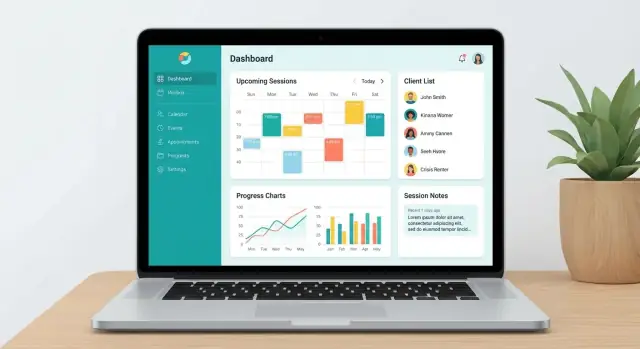
Dashboard: today’s sessions, overdue client check-ins, and quick actions (add note, reschedule, message).
Clients: searchable list with a simple client profile (goals, current plan/package, recent sessions, latest metrics).
Calendar: week view with fast scheduling, drag-to-move, and clear status (booked, completed, no-show).
Session details: a single page that works before, during, and after the call—agenda, notes, outcomes, and next steps.
Progress: charts and plain-language summaries clients can understand (“Workouts completed: 3/4 this week”).
Settings: templates, notification preferences, and basic business details.
Key flow: add client → schedule → run → log → next steps
Design this as the “happy path” and keep it fast:
-
Add client: name, email, timezone, and one primary goal.
-
Schedule session: pick a time, auto-apply default duration, send invite.
-
Run session: open the session page, follow a lightweight agenda, capture bullets.
-
Log outcomes: select outcomes from a short list (e.g., “new plan,” “adjusted goal”), add 1–2 notes.
-
Assign next steps: tasks and due dates (homework, check-in message, next session).
Keep forms short with templates
Use templates for session notes and goal updates (pre-filled prompts like “Wins,” “Challenges,” “Next focus”). Make every field optional except what’s needed to move forward.
Mobile-friendly and accessible by default
Coaches often work on phones between sessions. Ensure large tap targets, sticky “Save” buttons, and offline-tolerant drafts.
Use clear labels (not just placeholders), good contrast, keyboard navigation, and readable error messages.
Data Model: Sessions, Notes, Goals, and Metrics
A clean data model keeps your MVP simple while still supporting real coaching work: scheduling, documenting sessions, assigning next steps, and showing progress in a way clients trust.
Core objects (start small)
At minimum, define these entities:
- User (login account): id, email, role (coach/admin), createdAt
- ClientProfile: userId (or separate id), coachId, name, timezone, preferences
- Session: clientId, coachId, startAt/endAt, status (scheduled/completed/canceled/no-show), location/videoLink
- Note: sessionId, authorUserId, body, visibility (coach-only/shared)
- Goal: clientId, title, targetDate, status (active/paused/done), priority
- Metric: clientId, type (weight, steps, mood), value, unit, recordedAt, source (manual/device)
- Message: threadId, senderUserId, recipientId(s), body, sentAt, readAt
- Payment: clientId, amount, currency, status (pending/paid/failed/refunded), providerRef
Relationships that mirror coaching reality
One ClientProfile has many Sessions.
A Session can have many Notes and (optional) action items (store as Note sections or a small Task table).
Goals belong to a client and can be linked to sessions (e.g., “reviewed in session”).
Metrics belong to a client and are charted over time; you can optionally associate them with a goal.
Timestamps, statuses, and audit trails
Add createdAt, updatedAt, and deletedAt (soft delete) to most tables.
Track who changed what with fields like createdBy, updatedBy, and a lightweight AuditLog (entity, entityId, actorUserId, action, at).
Attachments and retention
Plan for file uploads on Notes and Messages (progress photos, PDFs). Store metadata in an Attachment table (ownerType/ownerId, filename, mimeType, size, storageKey).
Define retention rules early: how long to keep data after a client leaves, and how deletes work (immediate removal vs. scheduled purge).
Tech Stack and High-Level Architecture
Your MVP should prioritize speed, clarity, and easy maintenance over “perfect” engineering. A simple, well-supported stack will let you ship scheduling + progress tracking quickly and iterate with real coaches.
A simple, proven stack
Two common options:
- React/Next.js + Node.js (great for modern UI and fast product iteration)
- Django (Python) or Rails (Ruby) (excellent “batteries included” frameworks that move quickly with less glue code)
Any of these can power a solid coaching web app and a clean coach dashboard.
If you prefer an approach that starts from a chat-driven build workflow, Koder.ai is designed for rapid app creation (web, server, and mobile) and commonly uses a React front end with a Go + PostgreSQL backend—useful when you want to move from scope → prototype → deploy without stitching together a long toolchain.
Database + hosting
For a coaching CRM-style product, PostgreSQL is the default choice: reliable, relational (great for sessions, goals, metrics), and widely supported.
For hosting, prefer managed platforms early on (fewer ops tasks). Self-hosting can wait until you have steady revenue and clear performance needs.
Build vs. buy (save your time)
Don’t reinvent the parts users don’t pay you for:
- Auth: managed auth (or framework defaults) with password reset and email verification
- Email: transactional email provider for invites, reminders, receipts
- Payments: Stripe for packages and subscriptions
- Calendars: Google/Microsoft calendar integrations when scheduling friction shows up
Basic architecture (MVP)
Client (browser)
   ↓
Web App (Next.js / Django templates)
   ↓
API (REST/GraphQL)
   ↓
PostgreSQL (sessions, notes, goals, metrics)
   ↘
Integrations (Email, Stripe, Calendar)
If you want, define this upfront as a “one-page” technical plan alongside your feature scope (see /blog/scope-the-mvp).
Authentication, Privacy, and Security Basics
If your coaching web app stores private conversations, health details, or performance notes, security can’t be an afterthought. Start with a few reliable defaults that reduce risk without slowing down your MVP.
Sign-up and sign-in options (and when to use each)
Most coaching apps do well with two or three login methods:
- Email + password: familiar and works everywhere, but you must handle password resets, stronger password rules, and protection against brute-force attempts.
- Magic link (email login link): fewer passwords to leak and easier for clients, but it depends on email deliverability and can be annoying if links expire too fast.
- Google sign-in: very convenient and secure for many users, but some clients won’t want to connect personal accounts, and it adds some setup complexity.
For an MVP, a practical combo is magic link + Google, with optional password login later if users ask.
Protect sensitive coaching notes
Treat coaching notes like medical-adjacent data even if you’re not in a regulated environment:
- Encrypt in transit: use HTTPS everywhere (including your API) so notes aren’t readable on public Wi‑Fi.
- Access controls: every request must check “is this user allowed to see this client/session?” (not just “is the user logged in?”).
- Least access by default: clients see their own plan and progress; coaches see only assigned clients.
If you plan to add encryption at rest for certain fields (like private notes), design your data model so it’s easy to add later.
Data separation for teams
If you support multiple coaches or a coaching company, implement tenant separation early. Each record (client, session, message, invoice) should belong to an account/workspace, and queries should always filter by that workspace.
This prevents one coach from accidentally seeing another coach’s clients.
MVP-grade security hygiene
Add a few basics from day one: rate limiting on login endpoints, secure sessions (short-lived tokens, HTTP-only cookies where possible), regular backups with tested restores, and a privacy-friendly approach (collect only what you need, clear consent, and a simple data export/delete flow in /settings).
Scheduling and Session Management
Scheduling is where a coaching app either feels effortless or immediately frustrating. Your MVP should make it easy to see what’s next, avoid double-booking, and keep both coach and client aligned—without relying on external integrations on day one.
Calendar view (with time zones)
Start with an internal calendar that supports:
- Day/week views for coaches, plus a simple agenda list for clients
- Recurring sessions (e.g., every Tuesday at 7pm for 8 weeks)
- Clear time zone handling: store times in UTC, display in each user’s local time, and show the time zone label on invites
- Automated reminders (email first; push/SMS can come later)
A small but important detail: let coaches set “buffer time” (e.g., 10 minutes) to prevent back-to-back collisions.
Booking models: coach-driven vs. client self-booking
Support two modes from the start:
- Coach-driven scheduling: the coach proposes times or creates sessions directly (best for high-touch programs).
- Client self-booking: the coach defines availability windows and rules (notice period, maximum sessions per week), and the client books within those constraints.
If you’re unsure, launch with coach-driven scheduling and add self-booking as an upgrade.
Session templates
Templates reduce repetitive work and keep sessions consistent. Include defaults like duration, location or meeting link, and a short agenda (e.g., “Check-in → review goals → next steps”).
When a coach creates a new session, they can apply a template and tweak details.
Integrations later
Avoid Google Calendar complexity at MVP stage. Build the internal calendar first, then add one-way sync or invite links later once core flows are stable (see /blog/mvp-scope for prioritization).
Progress Tracking That Clients Actually Understand
Progress tracking fails when it’s just a spreadsheet of numbers. In a coaching web app, the goal is clarity: clients should know what’s improving, what’s stuck, and what to do next—without asking you to interpret it every week.
Define “progress” by coaching type
Start by deciding what counts as progress for each program. Fitness clients may care about weight, reps, and consistency. Executive coaching may focus on habit completion, milestone delivery, and self-ratings (confidence, stress). Nutrition coaching often mixes adherence and outcomes.
A practical approach is to support four progress categories:
- Habits: daily/weekly checkmarks (e.g., “walk 20 minutes”)
- Workouts / activities: sets, reps, time, RPE
- Milestones: “booked first sales call,” “ran 5K,” “completed week 4 plan”
- Ratings: mood, energy, pain, sleep quality (1–10)
Keep metrics simple, but flexible
Include a small set of built-in metrics (weight, reps, mood score, adherence %) and let coaches add custom fields per program (dropdown, number, yes/no, short text).
This avoids forcing every coach into a “fitness coaching platform” mold while keeping the UI consistent.
Make visuals do the explaining
Clients don’t want dashboards; they want answers. Use clear visuals:
- Trend lines for numbers (weight, reps)
- Streaks for habits (with “best streak” and “current streak”)
- Goal status badges (On track / At risk / Completed)
Add context: notes + check-ins
Numbers are incomplete without “why.” Pair each week with a lightweight check-in (“What went well?” “What was hard?”) and attach coach notes to the same timeline.
This turns client progress tracking into a story, not a report.
Messaging and Notifications
Messaging is where a coaching app starts to feel “alive.” Done well, it keeps clients on track between sessions without turning your product into a noisy chat app.
Pick the channels (start small)
You have three common options: in-app messages, email, and SMS. For an MVP, ship in-app + email first.
In-app messages give you a searchable history tied to the client, session, or goal. Email ensures people actually see important reminders even if they don’t open the app that week.
SMS can wait until you’ve validated that reminders improve adherence (and you’re ready for extra cost, consent, and deliverability work).
Notifications that matter
Focus on a few high-value triggers:
- Upcoming session reminder (e.g., 24 hours and/or 1 hour before)
- Missed check-in (when the client hasn’t updated progress by a chosen cadence)
- Goal due (a gentle nudge before a deadline)
Make each notification link to a clear next step (open session details, complete a check-in, review the goal).
Boundaries to prevent spam
Give coaches and clients control:
- Digest mode (daily/weekly summary instead of multiple pings)
- Quiet hours (no notifications overnight, local time)
- Per-client settings (some clients want more accountability than others)
Example copy (short and supportive)
- Session reminder: “Heads up—your session with Alex is tomorrow at 3:00 PM. Want to add an agenda item?”
- Missed check-in: “Quick check-in: can you log your week when you have 2 minutes? One update helps keep your plan accurate.”
- Goal due: “Your ‘3 workouts/week’ goal is due Friday. Need to adjust it or set a smaller target for this week?”
Payments, Packages, and Simple Billing
Billing is where many coaching apps get overcomplicated. For an MVP, you don’t need accounting features—you need a clear way to sell sessions, track what’s been paid, and avoid awkward “did you send that?” messages.
Choose a simple billing model
Most coaching businesses fit into one of these:
- Per session: clients pay for each session they book (or immediately after). Great for ad-hoc coaching.
- Packages: a bundle like “5 sessions” or “10 sessions” with an expiration date and a remaining balance. This is often the easiest “upgrade” from per-session without going full subscription.
- Monthly subscription: a fixed monthly fee (sometimes with limits like “2 sessions/month” or “unlimited messaging”). Works well for ongoing support.
In your data model, treat these as products/plans that generate purchases (package purchase or subscription) and optionally allocate credits (sessions included).
Invoice/receipt basics and payment status
Even if you don’t generate formal invoices at first, record:
- Amount, currency, what it covers (session, package, month)
- Payment status: unpaid / paid / refunded / failed
- Payment date and method
- A receipt reference (provider charge ID or manual receipt number)
This lets coaches see “who’s active and paid” inside the coach dashboard without digging through emails.
Provider integration vs. manual payments
For MVP speed, you can start with manual payments: coach marks a session/package as paid (cash, bank transfer, PayPal). It’s surprisingly common and avoids compliance complexity.
If you want automation, integrate a payment provider (e.g., Stripe) for:
- Card payments and hosted checkout
- Automatic receipts
- Subscription renewals and failed-payment handling
A practical approach is hybrid: support provider payments for self-serve checkout, but keep a manual override so coaches can record off-platform payments.
Your /pricing page: what to include
Link to /pricing from the app and marketing site. Keep it clear: plan names, monthly price, what’s included (sessions, clients, messaging), any limits, and a short FAQ (refunds, cancellations, trial, switching plans).
Pricing transparency reduces support load and improves conversion.
Coach Dashboard, Admin Tools, and Reporting
A good dashboard answers one question fast: “Who needs my attention today?” In v1, prioritize clarity over clever charts. Coaches should immediately see client activity, scheduling status, and a simple view of outcomes over time.
What the coach needs to see (v1)
Focus on a few panels that drive action:
- Today/This week: upcoming sessions, late cancellations, and clients without a next booking.
- Client activity: last check-in date, last message, completed tasks, and missed habits.
- Retention signals: expiring packages, unpaid invoices (if you bill), and clients inactive for X days.
- Outcomes over time: a small set of trends (e.g., weight, adherence %, subjective energy score) with clear time ranges.
Reporting that doesn’t mislead
Avoid metrics that look precise but aren’t. In v1, only report what you can measure reliably:
- If you track “adherence,” define it (e.g., “% of planned tasks marked complete”) and show the definition in the UI.
- Don’t imply causation (“sessions caused progress”)—stick to observed changes.
- If data is self-reported, label it as such.
Admin tools you’ll be glad you built
Even a small coaching CRM needs basic admin controls:
- Manage users and roles, reset access, deactivate accounts.
- Correct scheduling or session records when needed.
- Handle refunds/credits (or at least record them) if payments exist.
Export options (backup-friendly)
Give coaches simple exports for peace of mind: CSV for client lists, sessions, and metrics; PDF for session summaries or progress snapshots.
Keep exports filtered by date range and client to avoid dumping everything at once.
Testing, Beta Launch, and Continuous Improvement
Shipping a coaching web app MVP is less about “perfect code” and more about preventing trust-breaking moments: missed sessions, wrong time zones, and private notes shown to the wrong person.
A practical testing checklist
Before you invite real coaches, run through a repeatable checklist:
- Booking flow: create, reschedule, cancel, and no-show handling
- Time zones: coach in one zone, client in another; daylight saving changes
- Permissions: coach vs client visibility (notes, metrics, billing)
- Data edits: changing goals/metrics without losing history
- Reminders: email/push/SMS timing, duplicate reminders, opt-outs
Do at least one “messy week” simulation where you edit data after sessions and verify the app still tells a coherent story.
Plan a small, structured beta
Start with 5–20 coaches (ideally different niches). Give them a clear scope: use the app for scheduling + notes + progress for two weeks.
Create a tight feedback loop:
- Weekly 30-minute check-in call
- A short form after each session booked
- A shared list of top issues with status (“fixing”, “released”, “won’t do”) to build confidence
Measure usage and reliability
Set up analytics around the key actions: session booked, reminder sent, note saved, goal updated.
Pair that with error tracking so you catch crashes and slow pages quickly.
Launch with onboarding and content
Prepare onboarding emails (day 0, 2, 7), a simple help center, and a few focused posts under /blog (e.g., “How to schedule sessions across time zones”, “How clients read progress updates”).
Link those posts from inside the product where users get stuck.
FAQ
What problem should a coaching web app MVP solve first?
Start by writing down one “normal week” for the coach and the client (intake → sessions → follow-ups → progress checks). Then pick the smallest workflow that removes daily friction:
- schedule a session
- remember context (notes + next steps)
- show progress in a way the client understands
If your app makes those three things effortless, you have a viable MVP.
How do I define the “success moment” for coaches and clients?
Define a clear “success moment” for each side:
- Coach: open a client profile and instantly see last session, next steps, and whether progress is trending up/down.
- Client: see a simple progress view that creates momentum and tells them what to do next.
If you can’t describe those moments in one sentence, the scope is probably too broad.
What are the must-have features for a coaching web app MVP?
A practical v1 usually includes:
- Client list + client profile (goal + basics)
- Calendar (schedule/reschedule/cancel)
- Session details + notes (outcomes + action items)
- Simple goals + 1–2 metrics per client
- Basic reminders (email is enough)
Everything else (automation, deep analytics, teams, integrations) can be a “later” milestone.
How do I avoid building too much too soon?
Use 2–3 primary user stories and make them “must work perfectly,” such as:
- Create a client
- Book a session
- Record session notes + next actions
- Update progress
Then prioritize with an impact/effort 2×2. If a feature doesn’t directly improve scheduling, notes, or progress clarity, it’s probably not v1.
What roles and permissions should I set up in the first version?
Start with Coach and Client roles. Add Admin only if you expect organizations or support staff.
A simple permissions baseline:
- Notes: coach edits; client optionally sees a shared summary
- Goals: coach creates; client can mark complete or comment
- Metrics: client submits; coach can edit/approve
Keep every request scoped to “is this user allowed to access this client/session?” not just “is the user logged in?”
What’s the simplest way to invite and onboard clients?
Low-friction invites work best:
- Coach sends an email invite link that expires, or a short invite code.
- If you allow self-signup, require coach approval before any data is visible.
Also store the client’s timezone during onboarding so scheduling and reminders behave correctly from day one.
What data model should a coaching app MVP use?
Keep the core objects small and relational:
- User, ClientProfile
- Session (status, start/end, location/videoLink)
- Note (with visibility: coach-only/shared)
- Goal
- Metric (value, unit, recordedAt, source)
Add createdAt/updatedAt/deletedAt and lightweight audit fields (createdBy/updatedBy) so you can debug “who changed what?” later without rewriting your schema.
What should I include in scheduling and session management for v1?
Minimum viable scheduling should include:
- internal day/week calendar
- recurring sessions
- buffer time between sessions
- store times in UTC, display in local timezone, show the timezone label
- reminders (email first)
If you’re unsure, launch with coach-driven scheduling first and add client self-booking as an upgrade once the core flow is stable.
How can I design progress tracking clients actually understand?
Treat progress as “clarity + next step,” not a spreadsheet.
Use a small set of progress types:
- habits (checkmarks)
- activities/workouts
- milestones
- ratings (1–10 mood/energy/sleep)
Support a few built-in metrics plus custom fields per program, and pair numbers with a weekly check-in (“What went well?” / “What was hard?”) so the timeline has context.
What security and privacy basics should I implement from day one?
Start with MVP-grade security defaults:
- HTTPS everywhere
- strict per-record access control (coach only sees assigned clients)
- rate limiting on login endpoints
- secure sessions (HTTP-only cookies where possible)
- backups with tested restores
- simple export/delete flow in /settings
If you support teams, implement tenant/workspace separation early (every record belongs to an organization/workspace and queries always filter by it).