

How to Build a Web App for Freelance Projects, Invoices, Feedback
Step-by-step blueprint to build a web app that helps freelancers track projects, create invoices, and collect client feedback with a simple, scalable setup.
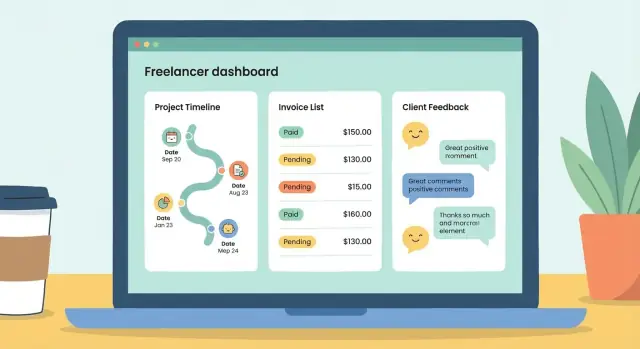
What You’re Building and Who It’s For
You’re building a single place where a freelancer can run a client project end-to-end: track work, send invoices, and collect feedback—without losing context across email threads, spreadsheets, and chat.
The core problem you’re solving
Freelance work breaks down when information is scattered. A project can be “done” but not billed, an invoice can be sent but never followed up, and feedback can be buried in a long email chain. The goal of this app is straightforward: keep project status, billing, and client approvals connected so nothing slips.
Primary users (and what they need)
Solo freelancers need speed and clarity: a lightweight dashboard, quick invoice creation, and a clean way to share updates and request approvals.
Small studios (2–10 people) need shared visibility: who owns the task, what’s blocked, and which invoices are overdue.
Recurring clients need confidence: a portal where they can view progress, review deliverables, and leave feedback in a structured way.
What success looks like (metrics you can measure)
Pick a few measurable outcomes and build toward them:
- Faster invoicing: time from “work completed” to “invoice sent”
- Fewer missed payments: reduction in overdue invoices after reminders
- Clearer feedback: fewer revision cycles per deliverable, faster approvals
- Less admin time: fewer manual status updates and follow-up emails
MVP vs. later (avoid scope creep)
For the MVP, focus on the workflow that creates value in one session:
Create a project → add a client → log a milestone/deliverable → request feedback → generate an invoice → track payment status.
Save “nice-to-haves” for later: time tracking, expense management, multi-currency taxes, deep analytics, integrations, and custom branding. The MVP should feel complete, not crowded.
Feature Checklist for a Freelancer Tracker MVP
An MVP for a freelancer web app should cover the core loop: track work → invoice → collect feedback → get paid. Keep the first release focused on what you’ll use weekly, not what sounds impressive in a pitch.
Projects (project tracking)
Your project view should answer three questions at a glance: what’s active, what’s next, and what’s at risk.
- Statuses: draft, active, blocked, delivered, completed (plus “archived”)
- Milestones: simple list with owner, due date, and completion checkbox
- Due dates: per project and per milestone, with an “overdue” highlight
- Deliverables: files/links per milestone (e.g., Figma URL, Google Drive link)
- Notes: lightweight running log (decision notes beat long descriptions)
Invoices (invoice management)
The invoicing system should support real-world billing without turning into accounting software.
- Line items: description, quantity, rate, subtotal
- Taxes and discounts: optional per invoice (percentage or fixed)
- Currency: set per client or per invoice
- Payment status: draft → sent → paid → overdue (and “void”)
- PDF + email send: generate a clean PDF and track when it was sent
Client feedback portal (comments and approvals)
Client feedback is where projects get stuck—make it structured.
- Comments: per deliverable with @mentions (optional)
- Approvals: “approved” vs “needs changes,” timestamped
- Attachments: upload or link references (screenshots, docs)
- Revision requests: short form: what to change, priority, due date
Nice-to-have (only if MVP is stable)
Time tracking, expenses, reusable templates (projects/invoices), and a branded client portal are great next steps—but only after the basics are fast, reliable, and easy to use.
User Journeys and Screen Map
A good freelancer tracker feels “obvious” because the main journeys are predictable. Before you design screens, map the few flows your app must support end-to-end—then build only what those flows require.
Core journeys (end-to-end)
Start with the happy path your product is promising:
- Create project → invite client → track work → invoice → collect feedback
Write this as a simple storyboard:
- Freelancer creates a project, sets scope, rate, and due dates.
- Freelancer invites the client by email.
- Client accepts the invite and can see only that project.
- Freelancer logs updates (milestones, files/links, notes).
- Freelancer creates an invoice from fixed price or milestone delivery.
- Client reviews the invoice, pays (or confirms an offline payment), then leaves feedback and approvals on delivered items.
Once you have this flow, you can spot the “supporting” moments you’ll need (resend invite, clarify a line item, request a revision) without building a dozen extra features.
Screen map (the minimum set)
For an MVP, keep screens focused and reusable:
- Dashboard: a list of active projects, unpaid invoices, and items awaiting feedback.
- Project detail: overview + sections for updates, files/links, invoices, and feedback.
- Invoice editor: create/edit invoice, line items, taxes/discounts, send to client.
- Invoice view: client-friendly view for review, payment status, and receipt.
- Feedback thread: comments, approvals, and revision requests tied to a deliverable.
Roles, permissions, and what each person sees
Define access rules early so you don’t redesign later:
- Freelancer: full access to their projects, invoices, and settings.
- Client: access only to invited projects, related invoices, and feedback threads.
If you add collaborators later, treat them as a distinct role rather than “client but more.”
Navigation that stays consistent
Use one primary navigation pattern across the app: Projects, Invoices, Feedback, Account. Inside a project, keep stable sub-navigation (e.g., Overview / Updates / Invoices / Feedback) so users always know where they are—and how to get back.
Data Model: Projects, Invoices, Clients, and Feedback
A clear data model keeps your app predictable: totals add up, statuses make sense, and you can answer common questions (“What’s overdue?”, “Which projects are waiting on approval?”) without complicated workarounds.
Core entities (the nouns)
Start with a small set of tables/collections and let everything else hang off them:
- User: the account that logs in (freelancer, teammate, client).
- Client: a company/person you work for (often linked to one or more client users).
- Project: the container for work, scope, timeline, and billing.
- Milestone: optional, but useful for staged delivery and partial invoicing.
- Invoice: what you bill.
- Payment: what you receive (or attempt to receive).
- Feedback: comments, approvals, and revision notes tied to a deliverable.
- File: uploaded assets (briefs, proofs, attachments).
Relationships (how they connect)
Keep relationships simple and consistent:
- Client has many Projects
- Project has many Milestones
- Project has many Invoices
- Invoice has many Payments (captures partial payments, retries, refunds)
- Project (or Milestone) has many Feedback items
- Feedback can reference a File (attachments)
Fields to plan upfront
Use explicit statuses so your UI can guide users:
- Dates:
start_date,due_date,issued_at,paid_at - Statuses:
project_status(active/on-hold/done),invoice_status(draft/sent/overdue/paid),feedback_status(open/needs-changes/approved) - Money: store
subtotal,tax_total,discount_total,total(avoid recalculating from text notes) - Audit fields everywhere:
created_at,updated_at, plus optionaldeleted_atfor soft-deletes
Files: store the blob elsewhere
Store file binaries in object storage (e.g., S3-compatible) and keep only references in your database:
file_id,owner_id,project_idstorage_key(path),original_name,mime_type,size- optional
checksumanduploaded_at
This keeps your database lean and makes downloads, previews, and permissions easier to control.
Architecture and Tech Stack (Simple but Scalable)
The goal for an MVP is speed and clarity: one codebase, one database, one deployment. You can still design it so it won’t paint you into a corner when you add more users, team members, and integrations.
Monolith first, services later
For a freelancer tracker MVP, a modular monolith is usually the best tradeoff. Keep everything in one backend (auth, projects, invoices, feedback, notifications), but separate concerns by modules or packages. That gives you:
- Faster development (fewer moving parts)
- Easier debugging (one place to trace a request)
- Cleaner future split (modules can become services if needed)
If you later need separate services (e.g., payments webhooks, email/queue processing, analytics), you can extract them once you have real usage data.
Common stack options
Pick a stack your team can ship confidently. Typical, proven combinations:
- Frontend: React or Vue (both work well for dashboard-style apps)
- Backend: Node.js (Express/Nest), Django, or Rails
- Database: PostgreSQL
React/Vue handle the client portal experience well (comments, file attachments, approval states), while Node/Django/Rails give you mature libraries for auth, background jobs, and admin workflows.
If you want to move even faster—especially for an MVP like this—platforms like Koder.ai can generate a working React frontend plus a Go + PostgreSQL backend from a structured chat brief. That’s useful when your goal is to validate workflows (project → invoice → approval) quickly, while still retaining the option to export and own the source code later.
Why PostgreSQL fits
Postgres is a great default for this product because your data is naturally relational:
- Clients have projects; projects have invoices; invoices have line items; feedback links to deliverables
- You’ll want reporting (revenue by month, outstanding invoices, client activity)
- You benefit from integrity (foreign keys, constraints) to prevent orphaned invoices or mismatched totals
You can still store flexible fields (like invoice metadata) using JSON columns when necessary.
Environments and a basic CI pipeline
Plan three environments from the start:
- Local: seeded sample data and a simple mail “sink”
- Staging: production-like setup for client previews
- Production: locked-down access, backups, monitoring
Add a basic CI pipeline that runs tests, linting, and migrations on deploy. Even minimal automation reduces breakages when you iterate quickly on invoicing and feedback flows.
Login, Accounts, and Permissions
A freelancer tracker doesn’t need complicated identity management, but it does need predictable boundaries: who can sign in, what they can see, and how you keep accounts safe.
Authentication options (pick one to start)
Most MVPs do well with email + password because it’s familiar and easy to support. Add a “forgot password” flow on day one.
If you want fewer password-related support requests, magic links (email-based sign-in links) are a strong alternative. They reduce friction for clients who only visit occasionally.
OAuth (Google/Microsoft) is great for reducing signup friction, but it adds setup complexity and edge cases. Many teams ship the MVP with email/password or magic links, then add OAuth later.
Roles and what they can do
Keep roles simple and explicit:
- Freelancer (owner): full access—creates projects, sends invoices, invites clients, manages settings.
- Team member (optional): can help manage projects/invoices but can’t change billing, delete the workspace, or view all financial settings unless you decide otherwise.
- Client (restricted): can only see their own projects, invoices, files, and feedback threads.
A practical pattern is “workspace → projects → permissions,” where each client account is attached to specific projects (or to a client record) and never has global access.
Security basics you shouldn’t skip
Keep security practical and consistent:
- Passwords hashed with a modern algorithm (e.g., bcrypt/argon2)
- Rate limiting on login, password reset, and invitation endpoints
- Secure sessions (secure cookies, CSRF protection if relevant, session revocation on password change)
Data privacy boundaries
Make “client isolation” non-negotiable: every query that fetches projects/invoices/feedback should be scoped by the authenticated user’s role and relationship to the data. Don’t rely on the UI alone—enforce it in your backend authorization layer.
UX Patterns That Work for Freelancers and Clients
Good UX for a freelancer tracker is mostly about reducing admin work and making the next action obvious. Freelancers want speed (capture info without context switching). Clients want clarity (what do you need from me, and what happens next?).
A dashboard that answers “what should I do today?”
Treat the dashboard as a decision screen, not a reporting screen. Show just a few cards:
- Upcoming deadlines (next 7–14 days), with one-click access to the project
- Unpaid invoices with status labels (“sent”, “viewed”, “overdue”) and a “nudge client” action
- Latest feedback so you can respond quickly while context is fresh
Keep it scannable: limit each card to 3–5 items and offer “View all” for the rest.
Project pages: timeline + activity, without heavy task management
Most freelancers don’t need a full task system. A project page works well with:
- Milestones as the primary structure (each with due date and status)
- Lightweight tasks only inside a milestone (optional, simple checkboxes)
- Files grouped by milestone, plus a clear “latest version” indicator
- Activity log (invoice sent, comment added, file uploaded) to avoid “did we already…?” confusion
A client portal with a single obvious path
Clients should land on a page that shows only what matters: current milestone, latest deliverable, and clear calls to action: Approve, Comment, Request changes, Pay. Avoid navigation overload—fewer tabs, fewer decisions.
Short forms: defaults, templates, and auto-fill
Every extra field slows you down. Use invoice templates, default payment terms, and auto-fill from the client/project. Prefer smart defaults (“Net 7”, last-used currency, saved billing address) with the option to edit.
Building the Invoicing System
An invoicing feature should feel like a simple form, but behave like a reliable record. Your goal is to help freelancers send accurate invoices quickly, and give clients a clear place to view what they owe.
The invoice editor (what to capture)
Start with an editor that supports the common real-world cases:
- Line items: description, quantity, rate, amount
- Taxes: per-invoice (e.g., VAT/GST) or per-line if you need flexibility
- Discounts: fixed amount or percentage
- Notes: friendly context (“Thanks for the quick feedback on the homepage copy.”)
- Payment terms: due date, “Net 7/14/30”, or “due on receipt”
Make calculations automatic and transparent: show subtotal, tax, discount, total. Round consistently (currency rules matter) and lock the currency per invoice to avoid surprises.
PDF generation and sending
Most clients still expect a PDF. Offer two delivery options:
- Generate a PDF that mirrors the invoice view (same totals, same wording).
- Send via email or provide a shareable invoice link that opens a read-only view.
Even if you send emails, keep the shareable link. It reduces “Can you resend?” requests and gives you a single source of truth.
Statuses and the lifecycle
Treat invoice status as a simple state machine:
- Draft: editable, not visible to clients
- Sent: delivered via email/link
- Viewed: client opened the invoice link
- Paid: marked after payment confirmation
- Overdue: past due date and not paid
- Void: canceled without deleting history
Avoid deleting invoices; voiding preserves auditability and prevents gaps in numbering.
Future enhancements (don’t build on day one)
Leave room for recurring invoices (monthly retainers) and configurable late-fee rules. Design your data so you can add these later without rewriting the core editor and status flow.
Payments and Getting Paid Reliably
Getting paid is the moment your app proves its value. Treat payments as a workflow (invoice → payment → receipt), not just a button, and design it so you can trust the numbers later.
Pick a provider and the methods you’ll support
Start with one mainstream provider that matches where your freelancers live and how their clients pay. For many MVPs, that means card payments plus bank transfer options.
Be explicit about what you support:
- Cards (fast, highest completion rate)
- Bank transfer (lower fees, slower, common for larger clients)
- Manual/offline (cash, check, “paid via transfer outside the system”)
If you plan to charge platform fees, confirm the provider supports your model (e.g., marketplace/connected accounts vs. a single business account).
Store payment state safely (and don’t rely on the front end)
When a payment is created, store the provider’s IDs on your side and treat provider webhooks as the source of truth for final status.
At minimum, record:
- Invoice ID → provider payment ID(s)
- Amount, currency, and timestamps
- Payment status (pending, succeeded, failed, refunded, partially_paid)
- A raw webhook event log for auditing and reconciliation
This allows you to match invoice totals to actual money movement, even if a user closes a tab mid-checkout.
Handle real-world edge cases
Payments rarely behave like a demo:
- Partial payments: track remaining balance and keep the invoice open until fully paid
- Failed payments: show a clear next step (retry card, use bank transfer, contact support)
- Refunds: record refunded amount and whether the invoice is reopened or marked refunded
Make offline payments easy (without breaking reporting)
Some clients will pay outside the app. Provide clear bank details/instructions on the invoice and allow a “Mark as paid” flow with safeguards:
- Require date, amount, method, reference note
- Optionally restrict this to the freelancer (or admin)
- Always keep an audit trail of who marked it paid and when
That combination keeps your app friendly for clients while staying reliable for reporting.
Client Feedback Workflow (Comments, Approvals, Revisions)
A good feedback workflow keeps projects moving without long email threads, “Which version is this?” confusion, or unclear approvals. Your goal is to make it easy for clients to comment, easy for freelancers to respond, and hard to lose the final decision.
Feedback formats (start simple)
Most MVPs should support two core formats:
- Threaded comments tied to a deliverable (e.g., “Homepage draft”) so conversations stay organized
- Checklist approvals for concrete sign-off items (e.g., “Copy approved”, “Pricing table correct”, “Mobile layout approved”)
If your audience needs it, add annotated files later (optional): upload a PDF/image and let users place pin comments. It’s powerful, but adds UI and storage complexity—better as a Phase 2 feature.
Approvals and revision requests
Treat feedback as actions, not just messages. In the UI, separate “comment” from:
- Request changes (creates a revision item and keeps the deliverable in review)
- Approve (locks the deliverable as approved and stops further edits unless reopened)
This prevents “Looks good!” from being ambiguous. The client should always have a clear button to approve, and freelancers should see exactly what’s blocking approval.
Versioning: know what changed
Each deliverable should have versions (v1, v2, v3…), even if you only store a file upload or a link. When a new version is submitted:
- Snapshot the current checklist state
- Carry forward unresolved comments (or require resolving them explicitly)
- Allow a short “What changed” note so clients can review faster
Notifications that help (not spam)
Send alerts for events that require action:
- Mentions (@client, @freelancer) → immediate notification
- Approval requests → email + in-app badge
- New comments → batched email (e.g., every 15 minutes) to avoid flooding
Keep a decision trail
For every approval or major change, log:
- Who approved/requested changes
- What they approved (deliverable + version)
- When it happened
This decision trail protects both sides when timelines shift or scope is questioned—and it makes handoffs painless.
Notifications, Reminders, and Scheduling
Notifications are where a freelancer tracker either feels helpful or feels like noise. The goal is simple: surface the next action at the right time for the right person—without turning your app into an email cannon.
The reminder types that matter
Start with three high-signal reminders:
- Upcoming due date: “Invoice #104 is due in 3 days” or “Milestone review scheduled tomorrow.”
- Overdue invoice: escalate gently after the due date passes, with clearer calls to action
- Pending approval: nudge clients when feedback or sign-off is blocking delivery
Keep the copy specific (client name, project, due date) so users don’t have to open the app to understand what’s happening.
Channels: email first, in-app second
For an MVP, prioritize email because it reaches people without requiring an open tab. Add in-app notifications as the second step: a small bell icon, an unread count, and a simple list view (“All” and “Unread”). In-app is great for status awareness; email is better for time-sensitive prompts.
Frequency controls and opt-outs
Give users control early:
- Per reminder type (due dates vs approvals)
- Frequency options (immediate, daily digest, weekly)
- A clear opt-out
Defaults should be conservative: one upcoming reminder (e.g., 3 days before) and one overdue follow-up (e.g., 3 days after) is often enough.
Avoid spam with batching and smart rules
Batch where possible: send a daily digest if multiple items trigger the same day. Add quiet hours and a “don’t remind again until X” rule per item. Scheduling should be event-driven (invoice due date, feedback requested timestamp), so reminders stay accurate when timelines change.
Security, Reliability, and Launch Checklist
A freelancer tracker app handles personal data, money, and client conversations—so a few practical safeguards go a long way. You don’t need enterprise complexity, but you do need consistent basics.
Security basics you should ship with
Start with input validation everywhere: forms, query params, file uploads, and webhook payloads. Validate type, length, and allowed values on the server, even if you already validate in the UI.
Protect against common web issues:
- CSRF protection for any state-changing requests (especially if you use cookie-based sessions)
- XSS protection by escaping user content and sanitizing rich text (comments/feedback) before display
- Secure headers such as Content Security Policy (CSP), HSTS, and
frame-ancestors(or equivalent) to reduce clickjacking risk
Also keep secrets (API keys, webhook signing secrets) out of your repo and rotate them when needed.
Backups and data export
Plan for two kinds of reliability: your own recovery and user portability.
- Automated database backups with a tested restore process
- Simple exports: CSV for project lists and invoice tables, plus PDF for invoices/receipts
Exports reduce support load and build trust.
Performance that stays smooth as you grow
Dashboards can get slow quickly. Use pagination for tables (projects, invoices, clients, feedback threads), indexes on common filters (client_id, project_id, status, created_at), and lightweight caching for summary widgets (e.g., “unpaid invoices”).
Launch checklist (the unglamorous essentials)
Before announcing, add monitoring (uptime checks), error tracking (backend + frontend), and a clear support path with a simple /help page.
If you’re building on a platform like Koder.ai, features like deployment/hosting, snapshots, and rollback can also reduce launch risk—especially when you’re iterating quickly on invoicing and client-portal flows. Finally, make it easy to understand the business side by linking to /pricing from your app and marketing pages.
FAQ
What should a freelancer tracker MVP include?
Start with the weekly workflow: create a project, add a client, track milestones, request feedback, send an invoice, and record payment. Leave time tracking, expenses, integrations, and detailed analytics for a later release.
How should I track project progress?
Use a small set of clear statuses: draft, active, blocked, delivered, completed, and archived. Add a due date and owner to each milestone so the project page shows what needs attention.
What fields does an invoice need?
Keep each invoice simple: line items, quantity, rate, taxes or discounts, currency, payment terms, and notes. Calculate subtotal, tax, discount, and total automatically, then keep the currency fixed for that invoice.
Which invoice statuses should the app use?
Use a clear lifecycle such as draft, sent, viewed, paid, overdue, and void. Void invoices instead of deleting them, so invoice numbering and billing history stay intact.
What should clients see in the portal?
Give each client access only to projects they were invited to, plus the related invoices, files, and feedback. Enforce that rule in backend queries, not only in the interface.
How can I keep client feedback organized?
Put comments and approvals on a specific deliverable or milestone. Let clients choose Approve or Request changes, record who acted and when, and keep unresolved comments visible on the next version.
What tech stack works well for this kind of app?
A modular monolith with one frontend, one backend, and PostgreSQL is a practical starting point. It keeps deployment and debugging simple while leaving room to split out payment or notification work later.
How should the app handle online payments?
Store payment provider IDs, amounts, currencies, timestamps, and status changes in your database. Use provider webhooks to confirm successful payments, because a browser redirect does not prove that money arrived.
What reminders are most useful for freelancers?
Send email reminders for upcoming due dates, overdue invoices, and approval requests. Start conservatively, such as one reminder before a due date and one after it, then let users adjust frequency or opt out.
What security basics should I build before launch?
Protect passwords with bcrypt or Argon2, rate-limit login and reset requests, validate all server input, and scope every project and invoice query to the signed-in user's permissions. Keep file data in object storage and store only references in the database.