

How to Build a Web App for Internal Developer Platforms (IDPs)
Step-by-step guide to plan, build, and ship a web app for an internal developer platform: catalog, templates, workflows, permissions, and auditability.
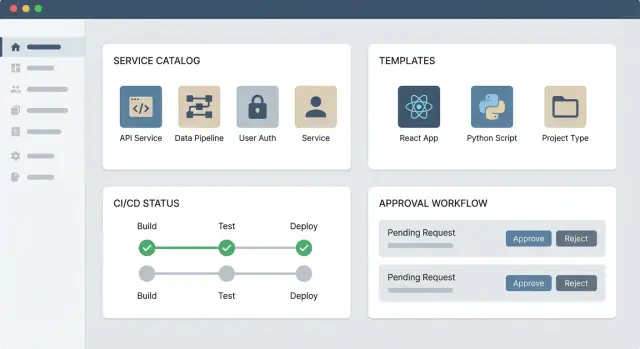
What You’re Building: The IDP Web App in Plain Terms
An IDP web app is an internal “front door” to your engineering system. It’s where developers go to discover what already exists (services, libraries, environments), follow the preferred way to build and run software, and request changes without hunting through a dozen tools.
Just as importantly, it’s not another all-in-one replacement for Git, CI, cloud consoles, or ticketing. The goal is to reduce friction by orchestrating what you already use—making the right path the easiest path.
The problems it should solve
Most teams build an IDP web app because day-to-day work is slowed down by:
- Tool sprawl: the knowledge of “where to click” lives in tribal memory.
- Slow onboarding: new engineers spend weeks learning process instead of shipping.
- Inconsistent standards: services are created and operated differently, making reliability and security harder.
The web app should turn these into repeatable workflows and clear, searchable information.
Core building blocks
A practical IDP web app usually has three parts:
- Portal UI: a service catalog, documentation entry points, and self-service forms (e.g., “create a service,” “request access,” “provision a database”).
- Backend APIs: the business logic that validates requests, applies policy, and records actions.
- Integrations: connectors to your toolchain (Git hosting, CI/CD, infrastructure tooling, secrets, incident management) so actions happen in the systems of record.
Who owns it (and who doesn’t)
The platform team typically owns the portal product: the experience, the APIs, the templates, and the guardrails.
Product teams own their services: keeping metadata accurate, maintaining docs/runbooks, and adopting the provided templates. A healthy model is shared responsibility: the platform team builds the paved road; product teams drive on it and help improve it.
Users, Use Cases, and Success Metrics
An IDP web app succeeds or fails based on whether it serves the right people with the right “happy paths.” Before you pick tooling or draw architecture diagrams, get clear on who will use the portal, what they’re trying to accomplish, and how you’ll measure progress.
Primary users (and what they care about)
Most IDP portals have four core audiences:
- Application developers: want fast, safe defaults to create and run services without waiting on tickets.
- SRE / ops: want standardization, fewer surprise changes, and clear ownership when incidents happen.
- Security / compliance: want consistent controls (access reviews, secrets handling, audit trails) without blocking delivery.
- Engineering managers / product leads: want visibility—what exists, who owns it, and whether teams are shipping reliably.
If you can’t describe how each group benefits in one sentence, you’re likely building a portal that feels optional.
Map 5–10 key journeys
Choose journeys that happen weekly (not yearly) and make them truly end-to-end:
- Create a new service from a template (repo + CI + ownership + tags).
- Request an environment (dev/stage) with guardrails.
- View service health (deploy status, alerts, dependencies).
- Rotate keys / secrets with an auditable workflow.
- Request access to a system or dataset with approvals.
Write each journey as: trigger → steps → systems touched → expected outcome → failure modes. This becomes your product backlog and your acceptance criteria.
Define success metrics you can actually track
Good metrics tie directly to time saved and friction removed:
- Time-to-first-deploy for a new service (median, p90).
- Manual ticket volume for common requests (and time-to-resolution).
- Adoption rate: % of services registered, % of teams using templates.
- Change failure rate and mean time to restore (if the portal standardizes delivery).
Write a “version 1” scope statement
Keep it short and visible:
V1 scope: “A portal that lets developers create a service from approved templates, registers it in the service catalog with an owner, and shows deploy + health status. Includes basic RBAC and audit logs. Excludes custom dashboards, full CMDB replacement, and bespoke workflows.”
That statement is your feature-creep filter—and your roadmap anchor for what comes next.
MVP Scope and Roadmap for an Internal Portal
An internal portal succeeds when it solves one painful problem end-to-end, then earns the right to expand. The fastest path is a narrow MVP shipped to a real team within weeks—not quarters.
A narrow MVP that still feels “complete”
Start with three building blocks:
- Service catalog: one place to discover what exists, who owns it, and where the operational links live.
- One self-service workflow: pick a high-frequency request (for example, “create a new service repo” or “provision a standard environment”) and automate it.
- Docs/links hub: don’t migrate everything—link out to existing sources of truth (CI/CD, incident tools, runbooks) while you learn what people actually use.
This MVP is small, but it delivers a clear outcome: “I can find my service and perform one important action without asking in Slack.”
If you want to validate the UX and workflow “happy path” quickly, a vibe-coding platform like Koder.ai can be useful for prototyping the portal UI and orchestration screens from a written workflow spec. Because Koder.ai can generate a React-based web app with a Go + PostgreSQL backend and supports source-code export, teams can iterate fast and still keep long-term ownership of the codebase.
Backlog structure: discover, create, operate, govern
To keep the roadmap organized, group work into four buckets:
- Discover: search, tags, ownership, team pages, dependency views.
- Create: templates, scaffolding, environment provisioning, standard configs.
- Operate: links to dashboards/runbooks, on-call info, SLO summaries, common actions.
- Govern: RBAC, approval steps, audit logs, policy checks.
This structure prevents a portal that’s “all catalog” or “all automation” with nothing tying it together.
Automate now vs. link out
Automate only what meets at least one of these criteria: (1) repeated weekly, (2) error-prone when done manually, (3) requires multi-team coordination. Everything else can be a well-curated link to the right tool, with clear instructions and ownership.
Progressive enhancement without redesign
Design the portal so new workflows plug in as additional “actions” on a service or environment page. If every new workflow requires a navigation rethink, adoption will stall. Treat workflows like modules: consistent inputs, consistent status, consistent history—so you can add more without changing the mental model.
Reference Architecture: UI, APIs, and Integrations
A practical IDP portal architecture keeps the user experience simple while handling “messy” integration work reliably behind the scenes. The goal is to give developers one web app, even though actions often span Git, CI/CD, cloud accounts, ticketing, and Kubernetes.
Pick a deployment model
There are three common patterns, and the right choice depends on how fast you need to ship and how many teams will extend the portal:
- Single app (monolith): fastest MVP. UI, API, and integration logic ship together. Good when the platform team owns most features.
- Modular services: separate UI, core API, and a few integration services. Easier scaling and clearer ownership as the portal grows.
- Plugin-based: a stable “core” plus plugins for catalog sources, scaffolding, docs, and workflows. Best when many teams contribute features.
Core components (what runs where)
At minimum, expect these building blocks:
- Web UI (developer portal): catalog browsing, golden paths, forms, status pages.
- Backend API (often behind an API gateway): auth, RBAC checks, validation, orchestration.
- Integration workers: long-running tasks (repo creation, environment provisioning, CI setup) executed asynchronously.
- Database: portal configuration, cached catalog views, workflow history, audit events.
Where state should live
Decide early what the portal “owns” versus what it merely displays:
- Keep source-of-truth in existing systems (Git, cloud IAM, CI/CD, Kubernetes, ticketing).
- Store in the portal DB: workflow requests, status, approvals, audit logs, and cached indexes that make the UI fast.
Reliability for integrations
Integrations fail for normal reasons (rate limits, transient outages, partial success). Design for:
- Retries with backoff and clear error messages
- Idempotency (re-running a request shouldn’t create duplicates)
- Timeouts and cancellation
- Durable workflow history so users can see what happened and recover safely
Data Model: Service Catalog and Ownership
Your service catalog is the source of truth for what exists, who owns it, and how it fits into the rest of the system. A clear data model prevents “mystery services,” duplicate entries, and broken automations.
Define the core “Service” entity
Start by agreeing what a “service” means in your org. For most teams, it’s a deployable unit (API, worker, website) with a lifecycle.
At minimum, model these fields:
- Name + description (human-readable)
- Owners: a primary team, plus optional secondary contacts (on-call group, tech lead)
- Source repositories: one or many repo links/IDs
- Runtime environments: dev/stage/prod, or region-specific variants
- Dependencies: upstream/downstream services and shared libraries
Add practical metadata that powers portals:
- Lifecycle (experimental, active, deprecated)
- Criticality/tier (for support expectations and governance)
- Links (runbooks, dashboards, SLOs, incident channel)
Model relationships explicitly
Treat relationships as first-class, not just text fields:
- Services ↔ teams: many services per team; sometimes shared ownership (use
primary_owner_team_idplusadditional_owner_team_ids). - Services ↔ resources: connect to cloud resources (Kubernetes namespaces, queues, databases) so people can answer “what does this service use?”
- Service tiers: store tier as a structured enum, and tie it to policy (e.g., tier-0 requires on-call and audit logs).
This relational structure enables pages like “everything owned by Team X” or “all services touching this database.”
Identifiers and naming rules
Decide early on the canonical ID so duplicates don’t appear after imports. Common patterns:
- A stable slug (e.g.,
payments-api) enforced as unique - An immutable UUID plus a human-friendly slug
- Optional: a repo-derived key (
github_org/repo) if repos are 1:1 with services
Document naming rules (allowed characters, uniqueness, rename policy) and validate them at creation time.
Plan how data stays fresh
A service catalog fails when it becomes stale. Pick one or combine:
- Scheduled imports (nightly sync from Git, CI/CD, cloud inventory)
- Webhooks (update on repo changes, deploys, ownership changes)
- Event streams (publish events like “service.created” or “dependency.updated”)
Keep a last_seen_at and data_source field per record so you can show freshness and debug conflicts.
Authentication, Authorization, and Auditability
If your internal developer platform (IDP) web app is going to be trusted, it needs three things that work together: authentication (who are you?), authorization (what can you do?), and auditability (what happened, and who did it?). Get these right early and you’ll avoid rework later—especially when the portal starts handling production changes.
Default to SSO with group mapping
Most companies already have identity infrastructure. Use it.
Make SSO via OIDC or SAML the default sign-in path, and pull group membership from your IdP (Okta, Azure AD, Google Workspace, etc.). Then map groups to your portal’s roles and team membership.
This keeps onboarding simple (“log in and you’re already in the right teams”), avoids password storage, and lets IT enforce global policies like MFA and session timeouts.
Define clear roles (and what they can do)
Avoid a vague “admin vs everyone” model. A practical set of roles for an internal developer platform is:
- Developer: browse the developer portal, use templates and self-service workflows within allowed scopes.
- Service Owner: manage a service catalog entry (metadata, on-call, links, lifecycle), see service-specific history.
- Approver: approve or reject sensitive requests (prod access, new environments, cost-impacting resources).
- Platform Admin: manage templates, integrations, global settings, and policy defaults.
- Auditor: read-only access to audit logs, approvals, and configuration history.
Keep roles small and understandable. You can always extend later, but a confusing model lowers adoption.
RBAC plus resource-level permissions
Role-based access control (RBAC) is necessary, but not sufficient. Your portal also needs resource-level permissions: access should be scoped to a team, a service, or an environment.
Examples:
- A developer can trigger a “create sandbox environment” workflow for their team’s services, but not others.
- A service owner can edit the service catalog entry for services they own.
- An approver can approve requests only for specific cost centers or production namespaces.
Implement this with a simple policy pattern: (principal) can (action) on (resource) if (condition). Start with team/service scoping and grow from there.
Audit trails for sensitive actions
Treat audit logs as a first-class feature, not a backend detail. Your portal should record:
- Who initiated a self-service workflow (and from where)
- Parameter values submitted (redact secrets)
- Who approved/denied and any comments
- Resulting changes (links to CI/CD runs, tickets, or infrastructure changes)
- Changes to templates, permissions, and integrations
Make audit trails easy to access from the places people work: a service page in the developer portal, a workflow “History” tab, and an admin view for compliance. This also speeds up incident reviews when something breaks.
UX Design for Developers: Make the Right Path Easy
A good IDP portal UX isn’t about looking fancy—it’s about reducing friction when someone is trying to ship. Developers should be able to answer three questions quickly: What exists? What can I create? What needs attention right now?
Design navigation around real tasks
Instead of organizing menus by backend systems (“Kubernetes,” “Jira,” “Terraform”), structure the portal around the work developers actually do:
- Discover: find services, APIs, docs, owners, runbooks
- Create: start a new service, add an endpoint, request a database
- Operate: view health, incidents, deploy status, recent changes
- Govern: permissions, compliance checks, policy exceptions
This task-based navigation also makes onboarding easier: new teammates don’t need to know your toolchain to get started.
Make ownership impossible to miss
Every service page should clearly show:
- Owning team and team channel
- On-call rotation and escalation path
- Primary repo(s) and deployment target
Place this “Who owns this?” panel near the top, not buried in a tab. When incidents happen, seconds matter.
Search, filters, and status that match how people think
Fast search is the portal’s power feature. Support filters developers naturally use: team, lifecycle (experimental/production), tier, language, platform, and “owned by me.” Add crisp status indicators (healthy/degraded, SLO at risk, blocked by approval) so users can scan a list and decide what to do.
Keep forms short with templates and sensible defaults
When creating resources, ask only for what’s truly needed now. Use templates (“golden paths”) and defaults to prevent avoidable errors—naming conventions, logging/metrics hooks, and standard CI settings should be pre-filled, not retyped. If a field is optional, hide it behind “Advanced options” so the happy path stays fast.
Self-Service Workflows: Templates, Approvals, and History
Self-service is where an internal developer platform earns trust: developers should be able to complete common tasks end-to-end without opening tickets, while platform teams still keep control over safety, compliance, and cost.
Pick the workflow types that matter first
Start with a small set of workflows that map to frequent, high-friction requests. Typical “first four”:
- Create service: scaffold a repo, register it in the service catalog, set ownership, and bootstrap CI/CD.
- Provision environment: spin up a dev/staging environment with standard networking, logging, and budgets.
- Request access: grant least-privilege access to a system (database, queue, third-party API) with an expiry option.
- Rotate secrets: trigger rotation, update downstream configs, and validate applications are healthy afterward.
These workflows should be opinionated and reflect your golden path, while still allowing controlled choices (language/runtime, region, tier, data classification).
Define a workflow contract (so templates stay predictable)
Treat every workflow like a product API. A clear contract makes workflows reusable, testable, and easier to integrate with your toolchain.
A practical contract includes:
- Inputs: typed fields with defaults (e.g., service name, owner team, environment, data sensitivity).
- Validation: naming rules, allowed regions, quota checks, and “does this already exist?” checks.
- Steps: a sequence of actions (run a template, call CI/CD, create cloud resources, update the service catalog).
- Outputs: artifacts and links developers need (repo URL, deployment URL, runbook link, created resources).
Keep the UX focused: surface only the inputs the developer can actually decide, and infer the rest from the service catalog and policy.
Approvals that are fast, clear, and enforceable
Approvals are unavoidable for certain actions (production access, sensitive data, cost increases). The portal should make approvals predictable:
- Who approves what: define rule-based approvers (team owner, system owner, security) rather than ad-hoc pings.
- Time limits: set an SLA for approval and auto-expire stale requests.
- Escalation: if the primary approver is unavailable, route to a backup group or on-call rotation.
Crucially, approvals should be part of the workflow engine, not a manual side channel. The developer should see status, next steps, and why an approval is required.
Store history and results so teams can self-debug
Every workflow run should produce a permanent record:
- Inputs used, validation results, and approver decisions
- Step-by-step logs (with secrets redacted)
- Final outputs, created resources, and any rollback actions
This history becomes your “paper trail” and your support system: when something fails, developers can see exactly where and why—often resolving issues without filing a ticket. It also gives platform teams the data to improve templates and spot recurring failures.
Integrations: Connecting the Portal to Your Toolchain
An IDP portal only feels “real” when it can read from and act on the systems developers already use. Integrations turn a catalog entry into something you can deploy, observe, and support.
Start with a clear integration checklist
Most portals need a baseline set of connections:
- Git (repos, default branches, CODEOWNERS, pull requests)
- CI/CD (pipelines, build status, artifacts, promotions)
- Kubernetes (clusters, namespaces, workloads, rollouts)
- Cloud (accounts/projects, networking, managed services)
- IAM (teams, groups, SSO, role mappings)
- Secrets (vaults, secret references, rotation status)
Be explicit about what data is read-only (e.g., pipeline status) vs write (e.g., trigger a deployment).
Prefer API-first; use webhooks or sync when you must
API-first integrations are easier to reason about and test: you can validate auth, schemas, and error handling.
Use webhooks for near-real-time events (PR merged, pipeline finished). Use scheduled sync for systems that can’t push events or where eventual consistency is acceptable (e.g., nightly import of cloud accounts).
Build a connector layer (don’t bake vendors into your core)
Create a thin “connector” or “integration service” that normalizes vendor-specific details into a stable internal contract (e.g., Repository, PipelineRun, Cluster). This isolates changes when you migrate tools and keeps your portal UI/API clean.
A practical pattern is:
- Portal calls your connector
- Connector handles auth, rate limits, retries, mapping
- Connector returns normalized data + actionable links (e.g.,
/deployments/123)
Document failure modes and what users should do
Every integration should have a small runbook: what “degraded” looks like, how it’s shown in the UI, and what to do.
Examples:
- Git API rate-limited: portal shows cached repo data; user can still browse catalog, but “Create from template” is disabled.
- CI/CD down: portal offers a manual fallback (link to pipeline UI) and explains retry timing.
- Secrets manager unavailable: block changes that require new secrets; allow read-only access to service metadata.
Keep these docs close to the product (e.g., /docs/integrations) so developers don’t have to guess.
Observability: Monitoring the Portal and Its Automations
Your IDP portal isn’t just a UI—it’s an orchestration layer that triggers CI/CD jobs, creates cloud resources, updates a service catalog, and enforces approvals. Observability lets you answer, quickly and confidently: “What happened?”, “Where did it fail?”, and “Who needs to act next?”
Trace every request across steps
Instrument each workflow run with a correlation ID that follows the request from the portal UI through backend APIs, approval checks, and external tools (Git, CI, cloud, ticketing). Add request tracing so a single view shows the full path and timing of each step.
Complement traces with structured logs (JSON) that include: workflow name, run ID, step name, target service, environment, actor, and outcome. This makes it easy to filter by “all failed deploy-template runs” or “everything affecting Service X.”
Metrics that reflect developer pain
Basic infra metrics aren’t enough. Add workflow metrics that map to real outcomes:
- Run counts, success rate, and duration per workflow and step
- Approval wait time vs. execution time (helps identify bottlenecks)
- Retries, timeouts, and rate limits from connectors
Operational views inside the portal
Give platform teams “at a glance” pages:
- Workflow queue: running, queued, failed, awaiting approval
- Connector health: token validity, last successful call, error rate
- Sync status: last catalog sync, drift detected, backlog size
Link every status to drill-down details and the exact logs/traces for that run.
Alerts, retention, and audit
Set alerts for broken integrations (e.g., repeated 401/403), stuck approvals (no action for N hours), and sync failures. Plan data retention: keep high-volume logs shorter, but retain audit events longer for compliance and investigations, with clear access controls and export options.
Security and Governance Without Slowing Teams Down
Security in an IDP portal works best when it feels like “guardrails,” not gates. The goal is to reduce risky choices by making the safe path the easiest path—while still giving teams autonomy to ship.
Validate inputs and enforce standards automatically
Most governance can happen at the moment a developer requests something (a new service, repository, environment, or cloud resource). Treat every form and API call as untrusted input.
Enforce standards in code, not in docs:
- Require ownership (team, on-call, and escalation contact) and block creation when it’s missing.
- Validate naming conventions (service names, repo names, environments) to avoid collisions and confusion.
- Require tags/metadata used for cost allocation, compliance, and discovery.
- Reject requests that don’t meet minimum policy (for example, “public exposure” needs extra review).
This keeps your service catalog clean and makes audits far easier later.
Protect secrets by design
A portal often touches credentials (CI tokens, cloud access, API keys). Treat secrets as radioactive:
- Never log secrets or include them in error messages.
- Prefer short-lived tokens (OIDC, federated access, time-bound credentials) over long-lived keys.
- Store secrets only in a dedicated secret manager; the portal should reference them, not copy them.
Also ensure your audit logs capture who did what and when—without capturing secret values.
Threat model the “normal” failures
Focus on realistic risks:
- Privilege escalation through misconfigured RBAC and overly broad permissions.
- Spoofed webhooks or callbacks that trigger actions without verification.
- Data leaks via debug endpoints, verbose logs, or overly permissive search.
Mitigate with signed webhook verification, least-privilege roles, and strict separation between “read” and “change” operations.
Shift checks left with CI and permission reviews
Run security checks in CI for your portal code and for generated templates (linting, policy checks, dependency scanning). Then schedule regular reviews of:
- RBAC roles and group mappings
- Template permissions (who can create what)
- “Break-glass” admin access and rotation procedures
Governance is sustainable when it’s routine, automated, and visible—not a one-time project.
Rollout, Adoption, and Long-Term Maintenance
A developer portal only delivers value if teams actually use it. Treat rollout as a product launch: start small, learn fast, then scale based on evidence.
Start with a focused pilot
Pilot with 1–3 teams who are motivated and representative (one “greenfield” team, one legacy-heavy team, one with stricter compliance needs). Watch how they complete real tasks—registering a service, requesting infrastructure, triggering a deploy—and fix friction immediately. The goal isn’t feature completeness; it’s proving the portal saves time and reduces mistakes.
Make migration boring and predictable
Provide migration steps that fit into a normal sprint. For example:
- register an existing service in the service catalog,
- attach ownership and on-call info,
- connect CI/CD,
- adopt one template (repo, pipeline, or infra) for the next new component.
Keep “day 2” upgrades simple: allow teams to gradually add metadata and replace bespoke scripts with portal workflows.
Docs and in-product help that people will read
Write concise docs for the workflows that matter: “Register a service,” “Request a database,” “Roll back a deploy.” Add in-product help next to form fields, and link out to /docs/portal and /support for deeper context. Treat docs like code: version them, review them, and prune them.
Ownership is a long-term commitment
Plan ongoing ownership from the beginning: someone must triage the backlog, maintain connectors to external tools, and support users when automations fail. Define SLAs for portal incidents, set a regular cadence for connector updates, and review audit logs to spot recurring pain points and policy gaps.
As your portal matures, you’ll likely want capabilities like snapshots/rollback for portal configuration, predictable deployments, and easy environment promotion across regions. If you’re building or experimenting quickly, Koder.ai can also help teams stand up internal apps with planning mode, deployment/hosting, and code export—useful for piloting portal features before you harden them into long-term platform components.
FAQ
What is an IDP web app, and what is it not?
An IDP web app is an internal developer portal that orchestrates your existing tools (Git, CI/CD, cloud consoles, ticketing, secrets) so developers can follow a consistent “golden path.” It’s not meant to replace those systems of record; it reduces friction by making common tasks discoverable, standardized, and self-service.
What problems should an internal developer portal solve first?
Start with problems that happen weekly:
- Tool sprawl and “tribal knowledge”
- Slow onboarding (time-to-first-deploy)
- Inconsistent standards that hurt reliability and security
If the portal doesn’t make a frequent workflow faster or safer end-to-end, it will feel optional and adoption will stall.
What should the MVP scope include for an IDP portal?
Keep V1 small but complete:
- A service catalog (what exists, who owns it, key links)
- One high-frequency self-service workflow (e.g., create service repo, provision a standard environment)
- A docs/links hub that points to existing sources of truth
Ship this to a real team in weeks, then expand based on usage and bottlenecks.
How do I choose the right user journeys to implement?
Treat journeys as acceptance criteria: trigger → steps → systems touched → expected outcome → failure modes. Good early journeys include:
- Create a new service from a template (repo + CI + ownership + tags)
- Request an environment (dev/stage) with guardrails
- Request access with approvals
- Rotate secrets with an auditable record
- View service health (deploy status, alerts, dependencies)
What success metrics actually work for an IDP web app?
Use metrics that reflect friction removed:
- Time-to-first-deploy (median and p90)
- Manual ticket volume for common requests and time-to-resolution
- Adoption: % services registered, % teams using templates
- Delivery outcomes influenced by standardization (e.g., change failure rate, MTTR)
Pick metrics you can instrument from workflow runs, approvals, and integrations—not surveys alone.
Who should own the portal, templates, and service metadata?
A common split is:
- Platform team owns the portal product: UX, APIs, templates, guardrails, integrations
- Product teams own their services: metadata accuracy, docs/runbooks, adopting templates
Make ownership explicit in the UI (team, on-call, escalation) and back it with permissions so service owners can maintain their entries without platform-team tickets.
What’s the recommended reference architecture for an IDP portal?
Start with a simple, extensible shape:
- Web UI for catalog, forms, and status
- Backend API for auth/RBAC, validation, orchestration
- Integration workers for long-running tasks (repo creation, provisioning) executed asynchronously
- Database for workflow history, approvals, audit events, and cached indexes
Keep the systems of record (Git/IAM/CI/cloud) as the source of truth; the portal stores requests and history.
How should I design the service catalog data model to avoid staleness and duplicates?
Model services as a first-class entity with:
- Name/description, owners, repos, environments
- Dependencies and links (runbooks, dashboards, SLOs)
- Lifecycle and tier/criticality
Use a canonical ID (slug + UUID is common) to prevent duplicates, store relationships (service↔team, service↔resource), and track freshness with fields like last_seen_at and data_source.
How do I implement SSO, RBAC, and audit logs in a practical way?
Default to enterprise identity:
- SSO via OIDC/SAML and group mapping from your IdP
- Clear roles (Developer, Service Owner, Approver, Platform Admin, Auditor)
- Resource-level permissions scoped to team/service/environment
Record audit events for workflow inputs (with secrets redacted), approvals, and resulting changes, and surface that history on service and workflow pages so teams can self-debug.
How do I handle integration reliability and failures without breaking the developer experience?
Make integrations resilient by design:
- Use a connector layer that normalizes vendor APIs
- Build for retries with backoff, timeouts, and idempotency
- Show clear degraded states (what’s read-only, what actions are disabled)
- Track workflow history so users can see failures and recover
Document failure modes in a short runbook under something like /docs/integrations so developers know what to do when an external system is down.