

How to Build a Web App for Managing Customer Feedback Loops
Learn how to design and build a web app that collects, routes, tracks, and closes customer feedback loops with clear workflows, roles, and metrics.
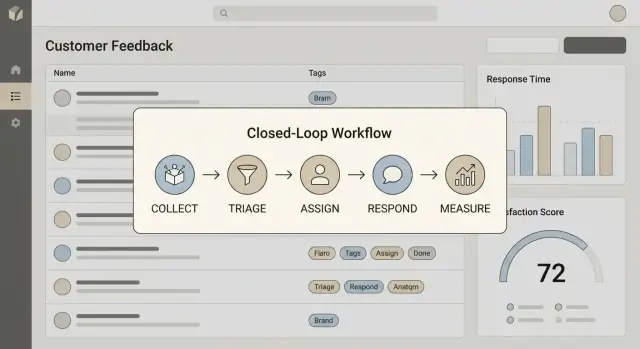
Clarify the Goal: What a Feedback Loop Should Deliver
A feedback management app isn’t “a place to store messages.” It’s a system that helps your team reliably move from input to action to customer-visible follow-up, and then learn from what happened.
Define what “closing the loop” means
Write a one‑sentence definition your team can repeat. For most teams, closing the loop includes four steps:
- Collect: capture feedback with enough context (who, what, where it came from)
- Act: turn it into work or a decision (fix, ship, explain, or decline)
- Reply: respond to the customer with a clear outcome and timeframe (even if it’s “not yet”)
- Learn: feed outcomes back into prioritization, product discovery, and support playbooks
If any of these steps is missing, your app will become a backlog graveyard.
Identify the key users and what they need
Your first version should serve real day‑to‑day roles:
- Support: fast triage, status clarity, templates for replies
- Product: trends, impact, links to roadmap work
- Customer success: visibility for accounts, proactive updates
- Admins: configuration, data hygiene, access control
- End customers (optional): acknowledgment, updates, self‑serve status
List the decisions your app must support
Be specific about the “decisions per click”:
- What is this feedback about (tag/category)?
- Who owns it and what’s the next step?
- What is the current status and what changed since last week?
- What response do we send, and when?
Set measurable outcomes (so you can tell if it’s working)
Pick a small set of metrics that reflect speed and quality, such as time to first response, resolution rate, and CSAT change after follow‑up. These become your north star for later design choices.
Map the Feedback Journey and Data Model
Before you design screens or pick a database, map what happens to feedback from the moment it’s created to the moment you respond. A simple journey map keeps teams aligned on what “done” means and prevents you from building features that don’t fit real work.
Start with sources, then normalize
List your feedback sources and note what data each one reliably provides:
- In‑app widget (often includes user/session context)
- Email (threaded messages, attachments)
- Chat (timestamps, agent info)
- Web form (structured fields)
- App store reviews (public text, rating)
- Surveys (scores plus free‑form comments)
Even if inputs differ, your app should normalize them into a consistent “feedback item” shape so teams can triage everything in one place.
Define core entities (and keep them boring)
A practical first model usually includes:
- Customer: the person giving feedback
- Account: the company or organization (optional for B2C)
- Feedback item: the main record (message, source, metadata)
- Tag: categorization (e.g., “Billing”, “Bug”, “Feature request”)
- Status: where it is in the workflow
- Assignment: who owns the next step (person/team)
- Reply: outbound messages tied to the feedback item (and optionally to a thread)
Statuses to start with: New → Triaged → Planned → In Progress → Shipped → Closed. Keep status meanings written down so “Planned” doesn’t mean “Maybe” for one team and “Committed” for another.
Decide what “duplicate” means
Duplicates are inevitable. Define rules early:
- When are two items duplicates: same root problem, same feature request, or same keywords?
- What does merging do: combine tags, keep both customers, move replies?
A common approach is to keep one canonical feedback item and link others as duplicates, preserving attribution (who asked) without fragmenting the work.
Design the Core User Flows (Inbox → Triage → Action → Reply)
A feedback loop app succeeds or fails on day one based on whether people can process feedback quickly. Aim for a flow that feels like: “scan → decide → move on,” while still preserving context for later decisions.
1) Inbox: fast scanning with the right filters
Your inbox is the team’s shared queue. It should support quick triage through a small set of powerful filters:
- Source (in‑app, email, chat, app store, sales notes)
- Tag (billing, bugs, feature request, onboarding)
- Status (new, triaged, in progress, shipped, replied)
- Priority (low → urgent)
- Customer tier (free, pro, enterprise)
Add “Saved views” early (even if basic), because different teams scan differently: Support wants “urgent + paying,” Product wants “feature requests + high ARR.”
2) Detail view: everything needed to make a decision
When a user opens an item, they should see:
- Full history of the feedback (original text plus edits, merges, and status changes)
- Customer context (plan, account value, company, last seen, NPS/CSAT if available)
- A conversation thread that keeps replies and internal notes separate
The goal is to avoid switching tabs just to answer: “Who is this, what did they mean, and have we already responded?”
3) Triage actions: keep it lightweight, but complete
From the detail view, triage should be one click per decision:
- Tag and set priority
- Assign an owner (or team queue)
- Merge duplicates (with one “canonical” item)
- Link to a feature/issue so work stays connected to customer reality
4) Reply: decide what’s external vs internal
You’ll likely need two modes:
- Internal-only tracking (most B2B teams): statuses and notes are private; customers get direct replies when there’s an update.
- Customer-facing status page: useful when you want transparency at scale (public changelog‑style updates). Keep it opt‑in and tightly curated.
Whichever you choose, make “reply with context” the final step—so closing the loop is part of the workflow, not an afterthought.
Plan Roles, Permissions, and Security Basics
A feedback app quickly becomes a shared system of record: product wants themes, support wants fast replies, and leadership wants exports. If you don’t define who can do what (and prove what happened), trust breaks down.
Start with multi-tenant boundaries
If you’ll serve multiple companies, treat each workspace/org as a hard boundary from day one. Every core record (feedback item, customer, conversation, tags, reports) should include a workspace_id, and every query should be scoped to it.
This isn’t just a database detail—it affects URLs, invitations, and analytics. One safe default: users belong to one or more workspaces, and their permissions are evaluated per workspace.
Define roles that match real work
Keep the first version simple:
- Admin: manage workspace settings, billing, integrations, and roles
- Manager: configure categories/routing, bulk actions, view reports, export
- Agent: triage items, assign, comment, and respond to customers
Then map permissions to actions, not screens: view vs. edit feedback, merge duplicates, change status, export data, and send replies. This makes it easier to add a “Read-only” role later without rewriting everything.
Add an audit log early
An audit log prevents “who changed this?” debates. Log key events with actor, timestamp, and before/after where helpful:
- assignment changes
- status updates and merges
- tag/category edits
- customer replies sent
Basic security that won’t slow you down
Enforce a reasonable password policy, protect endpoints with rate limiting (especially login and ingestion), and secure session handling.
Design with SSO in mind (SAML/OIDC) even if you ship it later: store an identity provider ID and plan for account linking. This keeps enterprise requests from forcing a painful refactor.
Choose an Architecture That Fits Your First Version
Early on, the biggest architecture risk isn’t “will it scale?”—it’s “will we be able to change it quickly without breaking things?” A feedback app evolves fast as you learn how teams actually triage, route, and respond.
Start simple: a monolith with clear boundaries
A modular monolith is often the best first choice. You get one deployable service, one set of logs, and simpler debugging—while still keeping the codebase organized.
A practical module split looks like:
- Auth & orgs: users, teams, SSO later
- Feedback: sources, submissions, attachments, tags
- Workflow: triage status, routing rules, assignments
- Messaging: outbound replies, templates, audit trail
- Analytics: reports, exports, dashboards
Think “separate folders and interfaces” before “separate services.” If a boundary becomes painful later (for example, ingestion volume), you can extract it with less drama.
Pick a stack your team can maintain
Choose frameworks and libraries your team can ship confidently. A boring, well‑known stack usually wins because:
- hiring and onboarding are easier
- upgrades are more predictable
- debugging production issues is faster
Novel tooling can wait until you have real constraints (high ingestion rate, strict latency needs, complex permissions). Until then, optimize for clarity and steady delivery.
Data storage: relational first, search later
Most core entities—feedback items, customers, accounts, tags, assignments—fit naturally in a relational database. You’ll want good querying, constraints, and transactions for workflow changes.
If full‑text search and filtering become important, you can add a dedicated search index later (or use built‑in capabilities first). Avoid building two sources of truth too early.
Use background jobs where users shouldn’t wait
A feedback system quickly accumulates “do this eventually” work: sending email replies, syncing integrations, processing attachments, generating digests, firing webhooks. Put these into a queue/background worker setup from the start.
This keeps the UI responsive, reduces timeouts, and makes failures retryable—without forcing you into microservices on day one.
Fast path to a working MVP (if you want to move quicker)
If your goal is to validate workflow and UI quickly (inbox → triage → replies), consider using a vibe‑coding platform like Koder.ai to generate the first version from a structured chat spec. It can help you stand up a React front end with a Go + PostgreSQL backend, iterate in “planning mode,” and still export the source code when you’re ready to take over a classic engineering workflow.
Implement Storage: Schema, Indexes, and Retention Rules
Your storage layer decides whether your feedback loop feels fast and trustworthy—or slow and confusing. Aim for a schema that’s easy to query for daily work (triage, assignment, status), while still preserving enough raw detail to audit what actually came in.
A practical starting data model
For an MVP, you can cover most needs with a small set of tables/collections:
- workspaces: account-level container (plan, settings, retention policy)
- users: teammates (role, workspace_id)
- customers: end users/organizations (email, external_id, workspace_id)
- feedback: the primary record (title, body/summary, status, priority, source, customer_id, assigned_to, created_at)
- tags: normalized tag definitions (name, color, workspace_id)
- feedback_tags (join): feedback_id ↔ tag_id
- events: append-only timeline (status changes, assignment changes, merges, notes)
- replies: outbound responses (channel, message, sent_at, feedback_id, customer_id)
A useful rule: keep feedback lean (what you query constantly) and push the “everything else” into events and channel-specific metadata.
Store raw payloads for traceability
When a ticket arrives via email, chat, or a webhook, store the raw incoming payload exactly as received (e.g., original email headers + body, or webhook JSON). This helps you:
- troubleshoot parsing issues (“why did the subject get truncated?”)
- prove what was received when there’s a dispute
- reprocess old data after improving your parser
Common pattern: an ingestions table with source, received_at, raw_payload (JSON/text/blob), and a link to the created/updated feedback_id.
Index for the queries people actually run
Most screens boil down to a few predictable filters. Add indexes early for:
(workspace_id, status)for inbox/kanban views(workspace_id, assigned_to)for “my items”(workspace_id, created_at)for sorting and date filters- tags: either
(tag_id, feedback_id)on the join table or a dedicated tag lookup index
If you support full‑text search, consider a separate search index (or your database’s built‑in text search) rather than piling complex LIKE queries onto production.
Retention, deletion, and “right to be forgotten”
Feedback often contains personal data. Decide up front:
- how long to keep raw payloads (shorter than normalized feedback is common)
- how to handle GDPR deletion requests (delete or anonymize customer identifiers and redact raw payloads)
- what happens when a customer offboards (export + timed deletion)
Implement retention as a policy per workspace (e.g., 90/180/365 days) and enforce it with a scheduled job that expires raw ingestions first, then older events/replies if required.
Build Ingestion: Capture Feedback From Multiple Channels
Ingestion is where your customer feedback loop either stays clean and useful—or turns into a messy pile. Aim for “easy to send, consistent to process.” Start with a few channels your customers already use, then expand.
Capture options to ship early
A practical first set usually includes:
- In-app widget: A small form for ideas and issues (optionally attach a screenshot). Keep it minimal: message, category, email.
- API endpoint: Let internal tools or partners send feedback programmatically. Prefer a simple JSON schema and an API key per workspace.
- Email ingestion: A unique address per workspace (e.g., feedback+acme@…). Parse subject/body, keep the raw email for audit.
- CSV import: Useful for migrations and research batches. Validate columns and provide a preview before importing.
Spam and quality controls
You don’t need heavyweight filtering on day one, but you do need basic protections:
- CAPTCHA for public widget submissions
- Text limits (e.g., 5–5,000 chars) and attachment size limits
- Duplicate detection hints: hash the normalized message + product area, or detect “near duplicates” by matching recent similar subjects. Don’t auto-delete; mark as “possible duplicate.”
Normalize inputs so downstream work is consistent
Normalize every event into one internal format with consistent fields:
- Source (widget, API, email, CSV)
- Customer identifiers (workspace, account ID, contact email, plan)
- Product area (billing, onboarding, mobile, etc.)
Keep both the raw payload and the normalized record so you can improve parsing later without losing data.
Auto-acknowledgement that sets expectations
Send an immediate confirmation (for email/API/widget when possible): thank them, share what happens next, and avoid promises. Example: “We review every message. If we need more details, we’ll reply. We can’t respond to every request individually, but your feedback is tracked.”
Create a Triage and Routing System That Scales
A feedback inbox only stays useful if teams can quickly answer three questions: What is this? Who owns it? How urgent is it? Triage is the part of your app that turns raw messages into organized work.
Start with a controlled tagging system
Freeform tags feel flexible, but they fragment fast (“login”, “log-in”, “signin”). Begin with a small controlled taxonomy that mirrors how your product teams already think:
- Product area (Billing, Mobile, Admin)
- Theme (Bug, Feature request, UX issue)
- Impact (Blocker, High, Normal)
Allow users to suggest new tags, but require an owner (e.g., PM/Support lead) to approve them. This keeps reporting meaningful later.
Use auto-triage rules to reduce manual sorting
Build a simple rules engine that can route feedback automatically based on predictable signals:
- Keyword/intent: “refund”, “cancel”, “invoice” → Billing queue
- Plan/account tier: Enterprise → Priority support queue
- Product area: derived from URL path, app module, or selected category
Keep rules transparent: show “Routed because: Enterprise plan + keyword ‘SSO’.” Teams trust automation when they can audit it.
Make SLAs visible, not hidden
Add SLA timers to every item and every queue:
- Time to first response (how quickly you acknowledge)
- Time to closure (how quickly you resolve or conclude)
Display SLA status in the list view (“2h left”) and on the detail page, so urgency is shared across the team—not trapped in someone’s head.
Build escalation and reminders into the workflow
Create a clear path when items stall: an overdue queue, daily digests to owners, and a lightweight escalation ladder (Support → Team lead → On-call/Manager). The goal isn’t pressure—it’s preventing important customer feedback from quietly expiring.
Close the Loop: Connect Work to Customer Replies
Closing the loop is where a feedback management system stops being a “collection box” and becomes a trust‑building tool. The goal is simple: every piece of feedback can be connected to real work, and customers who asked for something can be told what happened—without manual spreadsheets.
Link feedback to internal work
Start by letting a single feedback item point to one or more internal work objects (bug, task, feature request). Don’t try to mirror your whole issue tracker—store lightweight references:
work_type(e.g., issue/task/feature)external_system(e.g., jira, linear, github)external_idand optionallyexternal_url
This keeps your data model stable even if you change tools later. It also enables “show me all customer feedback tied to this release” views without scraping another system.
Define a “Shipped” workflow that notifies everyone
When linked work moves to Shipped (or Done/Released), your app should be able to notify all customers attached to related feedback items.
Use a templated message with safe placeholders (name, product area, summary, release notes link). Keep it editable at send time to avoid awkward wording. If you have public notes, link them using a relative path like /releases.
Reply channels and tracking
Support replies through whichever channel you can reliably send from:
- In‑app notification
- Webhook to your messaging system
Whatever you choose, track replies per feedback item with an audit‑friendly timeline: sent_at, channel, author, template_id, and delivery status. If a customer replies back, store inbound messages with timestamps too, so your team can prove the loop was actually closed—not just “marked shipped.”
Add Reporting That Helps Teams Make Decisions
Reporting is only useful if it changes what teams do next. Aim for a few views people can check daily, then expand when you’re confident the underlying workflow data (status, tags, owners, timestamps) is consistent.
Dashboards that answer “what needs attention?”
Start with operational dashboards that support routing and follow‑up:
- Volume by source (email, in‑app, social, calls): spot channel shifts and staffing needs
- Top tags / categories: what themes are rising this week
- Backlog by status (new, triaged, in progress, waiting on customer, closed): where work is stuck
- SLA compliance: first-response time and time‑to‑close against your targets
Keep the charts simple and clickable so a manager can drill into the exact items that make up a spike.
Customer-level view for better conversations
Add a “customer 360” page that helps support and success teams respond with context:
- All feedback from that customer across channels
- Last contact and who replied
- Open items and current status/owner
- A place for lightweight sentiment notes (e.g., “frustrated about billing; prefers email”)—not a black‑box score
This view reduces duplicate questions and makes follow‑ups feel intentional.
Export without breaking trust
Teams will ask for exports early. Provide:
- CSV export that respects the same filters as the UI
- Read-only API endpoints for reporting/BI
Make filtering consistent everywhere (same tag names, date ranges, status definitions). That consistency prevents “two versions of the truth.”
Avoid vanity metrics
Skip dashboards that only measure activity (tickets created, tags added). Favor outcome metrics tied to action and response: time to first reply, % of items that reached a decision, and recurring issues that were actually addressed.
Integrate With the Tools Your Team Already Uses
A feedback loop only works if it lives where people already spend time. Integrations reduce copy‑pasting, keep context close to the work, and make “closing the loop” a habit instead of a special project.
Start with the integrations that unblock daily work
Prioritize the systems your team uses to communicate, build, and track customers:
- Slack / Microsoft Teams: notify the right channel when high‑impact feedback arrives, when an owner is assigned, or when a customer is replied to
- Jira / Linear: link feedback to an issue (or create one) so engineering work stays traceable back to real customer input
- CRM sync (Salesforce/HubSpot): attach feedback to accounts/contacts so support and success teams have full context
Keep the first version simple: one‑way notifications + deep links back to your app, then add write‑back actions (e.g., “Assign owner” from Slack) later.
Add a webhook system for extensibility
Even if you ship only a few native integrations, webhooks let customers and internal teams connect anything else.
Offer a small, stable set of events:
feedback.createdfeedback.updatedfeedback.closed
Include an idempotency key, timestamps, tenant/workspace id, and a minimal payload plus a URL to fetch full details. This avoids breaking consumers when you evolve your data model.
Make failures visible and recoverable
Integrations fail for normal reasons: revoked tokens, rate limits, network issues, schema mismatches.
Design for this upfront:
- Retries with backoff for transient errors
- A dead-letter queue for repeated failures
- A simple integration health page (last success, last error, next retry)
- Actionable error states in the UI (e.g., “Reconnect Slack” or “Permission missing in Jira”)
If you’re packaging this as a product, integrations are also a buying trigger. Add clear next steps from your app (and marketing site) to /pricing and /contact for teams who want a demo or help connecting their stack.
Ship an MVP, Then Improve With Real Usage Data
An effective feedback app isn’t “done” after launch—it gets shaped by how teams actually triage, act, and respond. The goal of your first release is simple: prove the workflow, reduce manual effort, and capture clean data you can trust.
Define an MVP that’s small but complete
Keep scope tight so you can ship quickly and learn. A practical MVP usually includes:
- One workspace (no multi‑org complexity yet)
- A core inbox with search and basic filters
- Tagging/categorization and simple assignment
- A basic reply flow (even if it’s plain email templates at first)
If a feature doesn’t help a team process feedback end‑to‑end, it can wait.
Test what breaks trust
Early users will forgive missing features, but not lost feedback or incorrect routing. Focus tests where mistakes are expensive:
- Unit tests for routing rules, tagging logic, and permission checks
- Integration tests for ingestion sources and webhooks (including retries and duplicate events)
Aim for confidence in the workflow, not perfect coverage.
Plan for operational reality
Even an MVP needs a few “boring” essentials:
- Monitoring for ingestion failures and queue backlogs
- Backups and a restore process you’ve actually tried
- Error tracking with enough context to reproduce issues
- Lightweight admin tools (replay an event, reassign items, fix bad tags)
Roll out like a product experiment
Start with a pilot: one team, a limited set of channels, and a clear success metric (e.g., “respond to 90% of high‑priority feedback within 2 days”). Gather friction points weekly, then iterate the workflow before inviting more teams.
Treat usage data as your roadmap: where people click, where they abandon, which tags are unused, and what “workarounds” reveal the real requirements.
FAQ
What does “closing the loop” actually mean in a feedback management app?
“Closing the loop” means you can reliably move from Collect → Act → Reply → Learn. In practice, every feedback item should end in a visible outcome (shipped, declined, explained, or queued) and—when appropriate—a customer-facing response with a timeframe.
Which metrics best show whether our feedback loop is working?
Start with metrics that reflect speed and quality:
- Time to first response (acknowledgement speed)
- Time to closure (decision or resolution)
- Resolution/decision rate (how many items reach an outcome)
- CSAT/NPS change after follow-up (did closing the loop help?)
Pick a small set so teams don’t optimize for vanity activity.
How should we handle multiple feedback sources like email, chat, and in-app widgets?
Normalize everything into a single internal “feedback item” shape, while keeping the original data.
A practical approach:
- Store the raw payload (email headers, webhook JSON, chat transcript)
- Parse into a normalized record (source, customer identifiers, message, metadata)
This keeps triage consistent and lets you reprocess old messages when your parser improves.
What data model should an MVP feedback app use?
Keep the core model simple and query-friendly:
- Workspace/Org, Users
- Customer (and Account if B2B)
- Feedback item (lean fields you filter/sort on)
- Tags + join table
- Status, Assignment
- Replies (outbound)
- Events (append-only timeline)
Use the events timeline for auditability and to avoid overloading the main feedback record.
What workflow statuses should we start with, and how do we keep them consistent?
Write down a short, shared status definition and start with a linear set:
- New → Triaged → Planned → In Progress → Shipped → Closed
Make sure each status answers “what happens next?” and “who owns the next step?” If “Planned” sometimes means “maybe,” split it or rename it so reporting stays trustworthy.
How do we detect and manage duplicate feedback without losing context?
Define duplicates as “same underlying problem/request,” not just similar text.
A common workflow:
- Choose a canonical feedback item
- Link others as duplicates (don’t delete them)
- Preserve attribution (all customers who asked)
- Decide merge rules up front (tags, status, linked work, replies)
This prevents fragmented work while keeping a complete record of demand.
What’s the best way to implement triage and routing rules early on?
Keep automation simple and auditable:
- Route by keywords/intent (e.g., “refund” → Billing)
- Route by plan/tier (Enterprise → priority queue)
- Route by selected product area (from widget/form)
Always show “Routed because…” so humans can trust and correct it. Start with suggestions or defaults before enforcing hard auto-routing.
How should we approach multi-tenancy and permissions in a feedback loop product?
Treat each workspace as a hard boundary:
- Add
workspace_idto every core record - Scope every query to
workspace_id - Evaluate permissions per workspace
Then define roles by actions (view/edit/merge/export/send replies), not by screens. Add an audit log early for status changes, merges, assignments, and replies.
What architecture choices make sense for the first version (monolith vs microservices)?
Start with a modular monolith and clear boundaries (auth/orgs, feedback, workflow, messaging, analytics). Use a relational database for transactional workflow data.
Add background jobs early for:
- sending replies
- syncing integrations
- processing attachments
- webhook delivery and retries
This keeps the UI fast and failures retryable without committing to microservices too soon.
How do we connect feedback to Jira/Linear/GitHub and notify customers when something ships?
Store lightweight references rather than mirroring your whole issue tracker:
external_system(jira/linear/github)work_type(bug/task/feature)external_id(and optionalexternal_url)
Then, when linked work is Shipped, trigger a workflow to notify all attached customers using templates and tracked delivery status. If you have public notes, link them relatively (e.g., /releases).