

Building a Web App for Enterprise Multi-Step Approvals
Learn how to design, build, and roll out a web app for enterprise multi-step approvals with routing rules, roles, notifications, and audit trails.
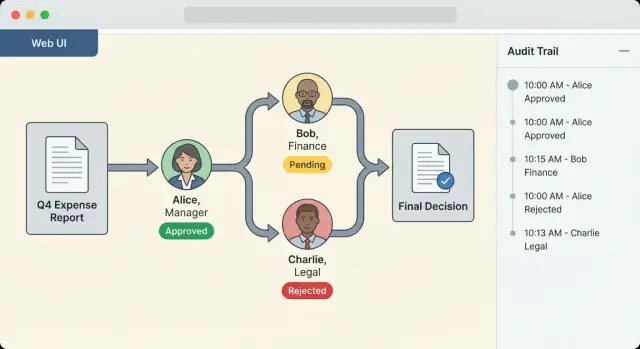
What Multi-Step Approval Chains Are (and Why They Matter)
A multi-step approval chain is a structured sequence of decisions that a request must pass through before it can move forward. Instead of relying on ad‑hoc emails and “looks good to me” messages, an approval chain turns decisions into a repeatable workflow with clear ownership, timestamps, and outcomes.
At a basic level, your app is answering three questions for every request:
- Who needs to approve?
- In what order (or at what stage)?
- What happens after each decision?
Sequential vs. parallel steps
Approval chains usually combine two patterns:
- Sequential approvals: Step B can’t start until Step A is approved. Example: a purchasing (закупки) request might need the team lead first, then Finance, then Procurement.
- Parallel approvals: Multiple approvers can review at the same time. Example: a policy change might require approvals from Legal and Security in parallel, and only then can it proceed.
Good systems support both, plus variations like “any one of these approvers can approve” vs. “all must approve.”
Typical enterprise use cases (generic examples)
Multi-step approvals show up anywhere a business wants controlled change with traceability:
- Purchasing (закупки): vendor selection, budget checks, procurement sign-off
- Expenses: manager approval, finance validation, exceptions for higher amounts
- Access requests: manager approval, system owner approval, security review
- Policy changes: drafting, stakeholder sign-off, compliance review, publishing
Even when the request type differs, the need is the same: consistent decision-making that doesn’t depend on who happens to be online.
What enterprises want from approval chains
A well-designed approval workflow isn’t just “more control.” It should balance four practical goals:
- Speed: reduce back-and-forth and remove avoidable waiting
- Control: ensure the right people approve the right things
- Visibility: everyone can see status, next step, and blockers
- Compliance-ready records: a complete audit trail (who, what, when, decision, and rationale)
Common pitfalls to avoid
Approval chains fail less from technology and more from unclear process. Watch for these recurring problems:
- Unclear ownership: requests stall because nobody knows who the approver is
- Missing audit history: decisions happen in chat or email and can’t be proven later
- Too many manual steps: “FYI” reviews become mandatory approvals, slowing everything down
The rest of this guide focuses on building the app so approvals stay flexible for the business, predictable for the system, and auditable when it matters.
Requirements Checklist for Enterprise Approvals
Before you design screens or pick a workflow engine, align on requirements in plain language. Enterprise approval chains touch many teams, and small gaps (like missing delegation) quickly turn into operational workarounds.
Stakeholders to involve early
Start by naming the people who will use—or inspect—the system:
- Requesters (employees, contractors, vendors)
- Approvers (managers, finance, legal, IT, security)
- Admins (ops/support who manage templates, routing rules, and access)
- Auditors/compliance (internal audit, external regulators)
A practical tip: run a 45‑minute walkthrough of a “typical request” and a “worst-case request” (escalation, reassignment, policy exception) with at least one person from each group.
Must-have workflow capabilities
Write these as testable statements (you should be able to prove each one works):
- Submit requests with attachments and structured fields
- Approve/reject, comment, and record decisions per step
- Delegate temporarily (vacation) and reassign permanently (org changes)
- Support parallel approvals (e.g., Finance and Legal) as well as sequential steps
- Enforce who can see what (requester visibility vs approver-only notes)
If you need inspiration for what “good” looks like, you can later map these to UX requirements in /blog/approver-inbox-patterns.
Non-functional requirements (what makes it enterprise-ready)
Define targets, not wishes:
- Uptime and RTO/RPO (how long can it be down, and how much data loss is acceptable)
- Performance (e.g., inbox loads under 2 seconds for 10k pending items)
- Data retention (how long to keep requests, comments, and attachments)
- Support model (who is on-call, office hours, SLAs for incidents)
Constraints and success metrics
Capture constraints up front: regulated data types, regional storage rules, and a remote workforce (mobile approvals, time zones).
Finally, agree on success metrics: time-to-approve, % overdue, and rework rate (how often requests bounce back due to missing info). These metrics guide prioritization and help justify the rollout.
Data Model: Requests, Steps, Decisions, and Templates
A clear data model prevents “mystery approvals” later—you can explain who approved what, when, and under which rules. Start by separating the business object being approved (the Request) from the process definition (the Template).
Core entities
Request is the record a requester creates. It includes requester identity, business fields (amount, department, vendor, dates), and links to supporting material.
Step represents one stage in the chain. Steps are typically generated from a Template at submission time so each Request has its own immutable sequence.
Approver is typically a user reference (or group reference) attached to a Step. If you support dynamic routing, store both the resolved approver(s) and the rule that produced them for traceability.
Decision is the event log: approve/reject/return, actor, timestamp, and optional metadata (e.g., delegated-by). Model it as append-only so you can audit changes.
Attachment stores files (in object storage) plus metadata: filename, size, content type, checksum, and uploader.
Statuses that make reporting easy
Use a small, consistent set of Request statuses:
- Draft: editable, not routed
- Submitted: locked to routing rules, steps generated
- In Review: at least one pending step
- Approved: all required steps satisfied
- Rejected: a rejection ended the request
- Canceled: requester/admin withdrew it
Step types you’ll need early
Support common step semantics:
- Single approver: one person must decide
- Group: any one member can decide
- Quorum: N-of-M approvals required
- Conditional: included only if a condition is true (e.g., amount > $10k)
Template versioning without surprises
Treat a Workflow Template as versioned. When a template changes, new Requests use the latest version, but in-flight Requests keep the version they were created with.
Store template_id and template_version on each Request, and snapshot critical routing inputs (like department or cost center) at submission time.
Comments and files
Model comments as a separate table tied to Request (and optionally Step/Decision) so you can control visibility (requester-only, approvers, admins).
For files: enforce size limits (e.g., 25–100 MB), scan uploads for malware (async quarantine + release), and store only references in your database. This keeps your core workflow data fast and your storage scalable.
Designing Flexible Approval Routing Rules
Approval routing rules decide who needs to approve what, and in what order. In an enterprise approval workflow, the trick is balancing strict policy with real-world exceptions—without turning every request into a custom workflow.
Start with clear “signals”
Most routing can be derived from a few fields on the request. Common examples:
- Amount thresholds (e.g., over $10k adds Finance)
- Department or cost center (routes to the cost center owner)
- Location (local legal entity or regional compliance)
- Risk level (adds InfoSec/Legal for high-risk vendors)
Treat these as configurable rules, not hard-coded logic, so admins can update policies without a deployment.
Support dynamic approvers
Static lists break quickly. Instead, resolve approvers at runtime using directory and org data:
- Manager chain (direct manager, then skip-level above a threshold)
- Cost center owner from Finance/ERP
- Project lead from a project system
Make the resolver explicit: store how the approver was chosen (e.g., “manager_of: user_123”), not just the final name.
Parallel steps and merge logic
Enterprises often need multiple approvals at once. Model parallel steps with clear merge behavior:
- All must approve (e.g., Finance and Legal)
- Any can approve (e.g., one of several budget holders)
Also decide what happens on a rejection: stop immediately, or allow “rework and resubmit.”
Escalations and exceptions
Define escalation rules as first-class policy:
- Reminders after X hours/days
- Overdue handling (escalate to manager, reassign queue)
- Auto-escalate on missed SLA
Plan exceptions up front: out-of-office, delegation, and substitute approvers, with an auditable reason recorded for every reroute.
Workflow Engine: Orchestrating Steps Reliably
A multi-step approval app succeeds or fails on one thing: whether the workflow engine can move requests forward predictably—even when users click twice, integrations lag, or an approver is out of office.
Build your own engine vs. adopt a library
If your approval chains are mostly linear (Step 1 → Step 2 → Step 3) with a few conditional branches, a simple in-house engine is often the fastest path. You control the data model, can tailor audit events, and avoid pulling in concepts you don’t need.
If you expect complex routing (parallel approvals, dynamic step insertion, compensation actions, long-running timers, versioned definitions), adopting a workflow library or service can reduce risk. The tradeoff is operational complexity and mapping your approval concepts to the library’s primitives.
If you’re in the “we need to ship a working internal tool quickly” phase, a vibe-coding platform like Koder.ai can be useful for prototyping the end-to-end flow (request form → approver inbox → audit timeline) and iterating on routing rules in planning mode, while still generating a real React + Go + PostgreSQL codebase you can export and own.
Define a clear state machine
Treat every request as a state machine with explicit, validated transitions. For example: DRAFT → SUBMITTED → IN_REVIEW → APPROVED/REJECTED/CANCELED.
Each transition should have rules: who can perform it, required fields, and what side effects are allowed. Keep transition validation server-side so the UI can’t accidentally bypass controls.
Idempotency: assume buttons get clicked twice
Approver actions must be idempotent. When an approver hits “Approve” twice (or refreshes during a slow response), your API should detect the duplicate and return the same outcome.
Common approaches include idempotency keys per action, or enforcing unique constraints like “one decision per step per actor.”
Background jobs for timers and escalations
Timers (SLA reminders, escalation after 48 hours, auto-cancel after expiration) should run in background jobs, not in request/response code. This keeps the UI responsive and ensures timers still fire during traffic spikes.
Separate workflow logic from UI and integrations
Put routing, transitions, and audit events in a dedicated workflow module/service. Your UI should call “submit” or “decide,” and integrations (SSO/HRIS/ERP) should provide inputs—not embed workflow rules. This separation makes change safer and testing simpler.
Security, Access Control, and Audit Readiness
Enterprise approvals often gate spend, access, or policy exceptions—so security can’t be an afterthought. A good rule: every decision must be attributable to a real person (or system identity), authorized for that specific request, and provably recorded.
Authentication: prove who the user is
Start with single sign-on so identities, deprovisioning, and password policies stay centralized. Most enterprises expect SAML or OIDC, often paired with MFA.
Add session policies that match corporate expectations: short-lived sessions for high-risk actions (like final approval), device-based “remember me” only where allowed, and re-authentication when roles change.
Authorization: prove they’re allowed to act
Use role-based access control (RBAC) for broad permissions (Requester, Approver, Admin, Auditor), then layer per-request permissions on top.
For example, an approver might only see requests for their cost center, region, or direct reports. Enforce permissions server-side on every read and write—especially for actions like “Approve,” “Delegate,” or “Edit routing.”
Data protection: protect content and secrets
Encrypt data in transit (TLS) and at rest (managed keys where possible). Store secrets (SSO certificates, API keys) in a secrets manager, not in environment variables scattered across servers.
Be deliberate about what you log; request details may include sensitive HR or financial data.
Audit readiness: make every decision explainable
Auditors look for an immutable trail: who did what, when, and from where.
Record each state change (submitted, viewed, approved/denied, delegated) with timestamp, actor identity, and request/step IDs. Where permitted, capture IP and device context. Ensure logs are append-only and tamper-evident.
Abuse prevention: block common attacks
Rate-limit approval actions, protect against CSRF, and require server-generated, single-use action tokens to prevent approval spoofing via forged links or replayed requests.
Add alerts for suspicious patterns (mass approvals, rapid-fire decisions, unusual geographies).
User Experience: Requester Flow and Approver Inbox
Enterprise approvals succeed or fail on clarity. If people can’t quickly understand what they’re approving (and why), they’ll delay, delegate, or reject by default.
Key screens to design
Request form should guide the requester to provide the right context the first time. Use smart defaults (department, cost center), inline validation, and a short “what happens next” hint so the requester knows the approval chain won’t be a mystery.
Approver inbox must answer two questions instantly: what needs my attention now and what’s the risk if I wait. Group items by priority/SLA, add fast filters (team, requester, amount, system), and make bulk actions possible only when safe (e.g., for low-risk requests).
Request detail is where decisions are made. Keep a clear summary at the top (who, what, cost/impact, effective date), then supporting details: attachments, linked records, and an activity timeline.
Admin builder (for templates and routing) should read like a policy, not a diagram. Use plain-language rules, previews (“this request would route to Finance → Legal”), and a change log.
Make decisions easy (and safe)
Highlight what changed since the last step: field-level diffs, updated attachments, and new comments. Provide one-click actions (Approve / Reject / Request changes) plus a required reason for rejections.
Transparency without overload
Show the current step, the next approver group (not necessarily the person), and SLA timers. A simple progress indicator reduces “where is my request?” messages.
Mobile-friendly and accessible
Support quick approvals on mobile while preserving context: collapsible sections, a sticky summary, and attachment previews.
Accessibility basics: full keyboard navigation, visible focus states, readable contrast, and screen-reader labels for statuses and buttons.
Notifications, Reminders, and Escalations
Approvals fail quietly when people don’t notice them. A good notification system keeps work moving without turning into noise, and it creates a clear record of who was prompted, when, and why.
Channels: meet users where they work
Most enterprises need at least email and in-app notifications. If your company uses chat tools (for example, Slack or Microsoft Teams), treat them as an optional channel that mirrors in-app alerts.
Keep channel behavior consistent: the same event should create the same “task” in your system, even if it’s delivered by email or chat.
Avoid spam with smart timing
Instead of sending a message for every tiny change, group activity:
- Batching: combine multiple updates to the same request within a short window (e.g., 5–10 minutes)
- Digests: daily/weekly summaries for watchers or FYI recipients
- Smart reminders: only remind if an item is still pending and the approver hasn’t acted
Also respect quiet hours, time zones, and user preferences. An approver who opts out of email should still see a clear in-app queue in /approvals.
Message content: be specific and actionable
Every notification should answer three questions:
- What changed? (Submitted, step advanced, rejected, comment added.)
- What action is needed? (Approve/Reject/Request changes; by when.)
- Where do I go? Include a deep link to the exact screen, like /requests/123?tab=decision.
Add key context inline (request title, requester, amount, policy tag) so approvers can triage quickly.
Reminder cadence and escalations
Define a default cadence (e.g., first reminder after 24 hours, then every 48 hours), but allow per-template overrides.
Escalations must have clear ownership: escalate to a manager role, a backup approver, or an ops queue—not “everyone.” When escalation happens, record the reason and timestamp in the audit trail.
Templates and localization
Manage notification templates centrally (subject/body per channel), version them, and allow variables. For localization, store translations alongside the template and fall back to a default language when missing.
This prevents “half translated” messages and keeps compliance wording consistent.
Integrations and APIs for Enterprise Systems
Enterprise approvals rarely live in one app. To reduce manual re-entry (and the “did you update the other system?” problem), design integrations as a first-class feature, not an afterthought.
Systems you’ll likely need to connect
Start with the sources of truth your organization already relies on:
- HR directory / identity provider (for manager relationships, departments, employment status)
- ERP / finance system (for cost centers, budgets, vendor records, purchase orders)
- Ticketing (to link approvals to incidents/changes and keep an operational paper trail)
- Document storage (contracts, quotes, policies, supporting files)
Even if you don’t integrate everything on day one, plan for it in your data model and permissions (see /security).
API and webhook design
Provide a stable REST API (or GraphQL) for core actions: create request, fetch status, list decisions, and retrieve the full audit trail.
For outbound automation, add webhooks so other systems can react in real time.
Recommended event types:
request.submittedrequest.step_approvedrequest.step_rejectedrequest.completed
Make webhooks reliable: include event IDs, timestamps, retries with backoff, and signature verification.
Inbound integrations: creating requests from other tools
Many teams want approvals to start from where they work—ERP screens, ticket forms, or an internal portal. Support service-to-service authentication and allow external systems to:
- create a request from a template
- attach metadata (amount, cost center, vendor)
- include links back to the originating record
Data mapping and identity matching
Identity is the common failure point. Decide your canonical identifier (often employee ID) and map emails as aliases.
Handle edge cases: name changes, contractors without IDs, and duplicate emails. Log mapping decisions so admins can resolve mismatches quickly, and expose status in your admin reporting (see /pricing for typical plan differences if you tier integrations).
Admin Console and Reporting for Operations
An enterprise approval app succeeds or fails on day‑2 operations: how quickly teams can adjust templates, keep queues moving, and prove what happened during an audit.
The admin console should feel like a control room—powerful, but safe.
Manage templates, groups, policies, and SLAs
Start with a clear information architecture:
- Workflow templates (e.g., “Spend Approval”, “Vendor Onboarding”) with owners and a description of when to use them
- Approver groups (Finance Ops, Legal Reviewers) that map to roles and locations, not individuals
- Policies and SLAs (e.g., “CFO step required above $50k”, “Step 2 due in 2 business days”)
Admins should be able to search and filter by business unit, region, and template version to avoid accidental edits.
Safe edits: draft/publish, versioning, rollbacks
Treat templates like configuration you can release:
- Draft vs. published states, with a preview showing impacted request types
- Version history and a one-click rollback if a routing rule causes delays
- A clear rule: in-flight requests keep their original version, while new requests use the latest published version
This reduces operational risk without slowing necessary policy updates.
Permissions: admins, super admins, auditors
Separate responsibilities:
- Admins manage templates and groups within assigned scopes
- Super admins change global policies, retention, and integrations
- Auditors get read-only access to logs, exports, and reports
Pair this with an immutable activity log: who changed what, when, and why.
Reporting, exports, and retention
A practical dashboard highlights:
- Bottlenecks (steps with the longest median time)
- Overdue queues (by team, template, region)
- Top request types and rejection reasons
Exports should include CSV for ops, plus an audit package (requests, decisions, timestamps, comments, attachment references) with configurable retention windows.
Link from reports to /admin/templates and /admin/audit-log for fast follow‑up.
Testing, Monitoring, and Failure Handling
Enterprise approvals fail in messy, real-world ways: people change roles, systems time out, and requests arrive in bursts. Treat reliability as a product feature, not an afterthought.
Testing strategy that matches the risks
Start with fast unit tests for approval routing rules: given a requester, amount, department, and policy, does the workflow pick the right chain every time? Keep these tests table-driven so business rules are easy to extend.
Then add integration tests that exercise the full workflow engine: create a request, progress step-by-step, record decisions, and verify the final state (approved/rejected/canceled) plus the audit trail.
Include permission checks (who can approve, delegate, or view) to prevent accidental data exposure.
Edge cases you should simulate
A few scenarios should be “must pass” tests:
- Approver leaves the company mid-request (step reassignment via role, manager, or admin override)
- Conflicting decisions (double-click approvals, parallel steps, or late responses after escalation)
- Template changes over time (ensure in-flight requests continue using their original
template_version)
Load testing and operational visibility
Load test the inbox view and notifications under burst submissions, especially if requests can include large attachments. Measure queue depth, processing time per step, and worst-case approval latency.
For observability, log every state transition with a correlation ID, emit metrics for “stuck” workflows (no progress beyond SLA), and add tracing across async workers.
Alert on: rising retries, dead-letter queue growth, and requests exceeding expected step duration.
Quality gates before release
Before shipping changes to production, require a security review, run a backup/restore drill, and validate that replaying events can rebuild the correct workflow state.
This is what keeps audits boring—in a good way.
Deployment, Rollout, and Change Management
A great approval app can still fail if it’s dropped on everyone overnight. Treat rollout as a product launch: staged, measured, and supported.
Roll out in phases (and keep scope tight)
Start with a pilot team that represents real-world complexity (a manager, finance, legal, and one executive approver). Limit the first release to a small set of templates and one or two routing rules.
Once the pilot is stable, expand to a few departments, then move to company-wide adoption.
During each phase, define success criteria: percentage of requests completed, median time-to-decision, number of escalations, and top rejection reasons.
Publish a simple “what’s changing” note and a single place for updates (for example, /blog/approvals-rollout).
Plan data migration (if you’re replacing an older process)
If approvals currently live in email threads or spreadsheets, migration is less about moving everything and more about avoiding confusion:
- Import active/in-flight requests where possible, or freeze old requests and restart them in the new system with clear labels
- Migrate templates, approver groups, and policies first—those are the parts that shape daily work
- Keep a read-only archive of the old system (or export) for audit and reference
Make change management a deliverable
Provide short training and quick guides tailored to roles: requester, approver, admin.
Include “approval etiquette” such as when to add context, how to use comments, and expected turnaround times.
Offer a lightweight support path for the first few weeks (office hours + a dedicated channel). If you have an admin console, include a “known issues and workarounds” panel.
Establish governance for templates and rule changes
Define ownership: who can create templates, who can modify routing rules, and who approves those changes.
Treat templates like policy documents—version them, require a reason for change, and schedule updates to avoid surprise mid-quarter behavior changes.
Build a continuous improvement loop
After each rollout phase, review metrics and feedback. Hold a quarterly review to tune templates, adjust reminders/escalations, and retire unused workflows.
Small, regular adjustments keep the system aligned with how teams actually work.
FAQ
What is a multi-step approval chain, and why do enterprises use it?
A multi-step approval chain is a defined workflow where a request must pass through one or more approval steps before it can complete.
It matters because it creates repeatability (same rules each time), clear ownership (who approves what), and audit-ready traceability (who decided, when, and why).
When should approvals be sequential vs. parallel?
Use sequential approvals when order matters (e.g., manager approval must happen before Finance can review).
Use parallel approvals when multiple teams can review at the same time (e.g., Legal and Security), and define merge rules such as:
- All must approve
- Any one can approve
- N-of-M (quorum)
What requirements should we gather before building an approval workflow?
At minimum, align on:
- Who the stakeholders are (requesters, approvers, admins, auditors)
- What actions exist per step (approve/reject/request changes, comments)
- Delegation and reassignment behavior
- Visibility rules (who can see what fields and notes)
- Non-functional targets (uptime, performance, retention)
A quick way to validate is to walk through a “typical” and a “worst-case” request with representatives from each group.
What are the key data model entities for enterprise approvals?
A practical core model includes:
- Request (the business object)
- Template (the versioned process definition)
- Step (a stage generated for the request)
- Approver (user/group + how it was resolved)
- Decision (append-only event log)
- Attachment and Comment (separate entities for control and performance)
Keeping decisions append-only is key for audits and debugging.
How should workflow template versioning work to avoid surprises?
Version templates so policy changes don’t rewrite history:
- Store
template_idandtemplate_versionon each request - Generate (and effectively freeze) the step list at submission time
- Apply template edits only to new requests
- Keep a version history and rollback path in the admin console
This prevents “mystery approvals” where in-flight requests suddenly route differently.
How do we design flexible approval routing rules without hard-coding approvers?
Make routing rule-driven and configurable, based on a small set of signals such as:
- Amount thresholds
- Department/cost center
- Location/legal entity
- Risk level
Resolve dynamic approvers from systems of record (directory, HRIS, ERP), and store both:
- the resolved approver(s)
- the rule that produced them (for traceability)
Avoid hard-coding approver lists; they go stale quickly.
What makes a workflow engine reliable for approvals?
Treat the request lifecycle as an explicit state machine (e.g., Draft → Submitted → In Review → Approved/Rejected/Canceled).
To make it reliable in real conditions:
- Enforce transitions server-side (permissions + validation)
- Make decision actions idempotent (double-click safe)
- Run reminders/escalations in background jobs (not in UI request/response)
- Separate workflow logic from UI and integrations for safer change
What security and audit features are essential for enterprise approvals?
Use layered controls:
- Authentication: enterprise SSO (SAML/OIDC), MFA as needed
- Authorization: RBAC plus per-request checks (scope by team/cost center/region)
- Data protection: TLS, encryption at rest, secrets manager
- Audit trail: append-only events for submitted/viewed/decided/delegated, with timestamps and actor identity
Also protect the action endpoints: rate limits, CSRF defenses, and single-use action tokens for emailed links.
How should the requester flow and approver inbox be designed?
Focus on reducing time-to-decision without losing context:
- Request form with smart defaults and inline validation
- Approver inbox that highlights priority/SLA and supports safe filtering (see /blog/approver-inbox-patterns)
- Request detail page with a clear summary, attachments, and an activity timeline
- Require a reason for rejections and show what changed since the last step
For mobile, keep context accessible (collapsible sections, sticky summary) and meet accessibility basics (keyboard, contrast, screen-reader labels).
How do we implement notifications, reminders, and escalations without spamming users?
Build notifications as a task delivery system, not just messages:
- Support email + in-app; optionally mirror to chat tools
- Use batching/digests to reduce noise
- Remind only when still pending; respect time zones and quiet hours
- Escalate to a clear owner (manager role, backup approver, or ops queue)
Make every notification actionable: what changed, what action is needed (and by when), and a deep link like /requests/123?tab=decision.