

How to Build a Web App for Operational Risk Tracking
Step-by-step plan to design, build, and launch an operational risk tracking web app: requirements, data model, workflows, controls, reporting, and security.
Clarify the Goal and Scope of the App
Before you design screens or pick a tech stack, get explicit about what “operational risk” means in your organization. Some teams use it to cover process failures and human error; others include IT outages, vendor issues, fraud, or external events. If the definition is fuzzy, your app will turn into a dumping ground—and reporting will become unreliable.
Define what you will track
Write a clear statement of what counts as an operational risk and what does not. You can frame it as four buckets (process, people, systems, external events) and add 3–5 examples for each. This step reduces debates later and keeps data consistent.
Agree on the outcomes
Be specific about what the app must achieve. Common outcomes include:
- Visibility: a single place to see risks, controls, incidents, and actions
- Ownership: every item has a named owner and a due date
- Remediation tracking: actions move from “open” to “verified” with evidence
- Reporting and audit readiness: you can explain what changed, when, and why
If you can’t describe the outcome, it’s probably a feature request—not a requirement.
Identify the primary users
List the roles who will use the app and what they need most:
- Risk owners (identify and update risks)
- Control owners (attest controls, attach evidence)
- Reviewers (approve changes, request updates)
- Auditors (read-only access, traceability)
- Admins (user access, configuration)
This prevents building for “everyone” and satisfying no one.
Set a realistic v1 scope
A practical v1 for operational risk tracking usually focuses on: a risk register, basic risk scoring, action tracking, and simple reporting. Save deeper capabilities (advanced integrations, complex taxonomy management, custom workflow builders) for later phases.
Define success metrics
Pick measurable signals such as: percentage of risks with owners, completeness of the risk register, time to close actions, overdue action rate, and on-time review completion. These metrics make it easier to judge whether the app is working—and what to improve next.
Gather Requirements From Stakeholders
A risk register web app only works if it matches how people actually identify, assess, and follow up on operational risk. Before talking features, talk to the people who will use (or be judged by) the outputs.
Who to involve (and why)
Start with a small, representative group:
- Business unit owners who raise and manage risks day to day
- Risk/Compliance who define terminology, scoring expectations, and reporting needs
- Internal audit who care about evidence, approvals, and audit trail completeness
- IT/Security who will review access control, data retention, and integrations
- Executives/board liaisons who consume summaries and trend reports
Map the current process end-to-end
In workshops, map the real workflow step by step: risk identification → assessment → treatment → monitoring → review. Capture where decisions happen (who approves what), what “done” looks like, and what triggers a review (time-based, incident-based, or threshold-based).
Capture pain points you must fix
Have stakeholders show the current spreadsheet or email trail. Document concrete issues such as:
- Missing ownership (unclear risk owner vs. control owner vs. action owner)
- Inconsistent scoring (teams interpret likelihood/impact differently)
- Weak audit trails (no record of who changed what and why)
- Version confusion (multiple copies of “the latest” register)
Document required workflows and events
Write down the minimum workflows your app must support:
- Create a new risk (with required fields and approval rules)
- Update a risk (re-score, change status, add notes)
- Log incidents and link them to risks/controls
- Record control testing results and evidence
- Create and track action plans (due dates, reminders, escalation)
Define the reports people depend on
Agree on outputs early to prevent rework. Common needs include board summaries, business-unit views, overdue actions, and top risks by score or trend.
Note compliance constraints (without promising certifications)
List any rules that shape requirements—e.g., data retention periods, privacy constraints for incident data, segregation of duties, approval evidence, and access restrictions by region or entity. Keep it factual: you’re gathering constraints, not claiming compliance by default.
Design Your Risk Framework and Terminology
Before you build screens or workflows, align on the vocabulary your operational risk tracking app will enforce. Clear terminology prevents “same risk, different words” problems and makes reporting trustworthy.
Start with a practical risk taxonomy
Define how risks will be grouped and filtered in the risk register web app. Keep it useful for day-to-day ownership as well as dashboards and reports.
Typical taxonomy levels include category → subcategory, mapped to business units and (where helpful) processes, products, or locations. Avoid a taxonomy so detailed that users can’t choose consistently; you can refine later as patterns emerge.
Standardize the risk statement and required fields
Agree on a consistent risk statement format (e.g., “Due to cause, event may occur, leading to impact”). Then decide what’s mandatory:
- Cause, event, impact (to support meaningful analysis)
- Risk owner and accountable team (to drive action)
- Status (draft, active, under review, retired)
- Dates (identified, last assessed, next review)
This structure ties controls and incidents to a single narrative instead of scattered notes.
Define assessment dimensions and scoring
Choose the assessment dimensions you’ll support in your risk scoring model. Likelihood and impact are the minimum; velocity and detectability can add value if people will actually rate them consistently.
Decide how you’ll handle inherent vs. residual risk. A common approach: inherent risk is scored before controls; residual risk is the post-control score, with controls linked explicitly so the logic remains explainable during reviews and audits.
Finally, agree on a simple rating scale (often 1–5) and write plain-language definitions for each level. If “3 = medium” means different things to different teams, your risk assessment workflow will generate noise instead of insight.
Create the Data Model (Risk Register, Controls, Actions)
A clear data model is what turns a spreadsheet-style register into a system you can trust. Aim for a small set of core records, clean relationships, and consistent reference lists so reporting stays reliable as usage grows.
Core entities (your minimum viable schema)
Start with a few tables that map directly to how people work:
- Users and Roles: who is in the system and what they can do
- Risks: the risk register entry (title, description, owner, business area, inherent/residual ratings, status)
- Assessments: point-in-time evaluations (date, assessor, scoring inputs, notes). Keeping assessments separate avoids overwriting the “current view.”
- Controls: safeguards tied to risks (design/operating effectiveness, testing cadence, control owner)
- Incidents/Events: what happened (date, impact, root cause, linked risk(s), linked control failures)
- Actions: remediation tasks linked to a risk, control, or incident
- Comments: discussion and decisions, ideally with @mentions and timestamps
Relationships that matter for traceability
Model key many-to-many links explicitly:
- Risk ↔ Controls (via a join table) to show which controls mitigate which risks
- Risk ↔ Incidents to connect real losses/near-misses back to the register
- Actions → Risk/Control/Incident (polymorphic link or three nullable foreign keys) so remediation is always anchored
This structure supports questions like “Which controls reduce our top risks?” and “Which incidents drove a risk rating change?”
History tables and “why did this change?”
Operational risk tracking often needs defensible change history. Add history/audit tables for Risks, Controls, Assessments, Incidents, and Actions with:
- who changed it, when, and what fields changed
- optional change reason (free text or selectable codes)
Avoid storing only “last updated” if approvals and audits are expected.
Reference tables for consistency
Use reference tables (not hard-coded strings) for taxonomy, statuses, severity/likelihood scales, control types, and action states. This prevents reporting from breaking due to typos (“High” vs. “HIGH”).
Attachments (evidence) with retention in mind
Treat evidence as first-class data: an Attachments table with file metadata (name, type, size, uploader, linked record, upload date), plus fields for retention/deletion date and access classification. Store files in object storage, but keep the governance rules in your database.
Plan Workflows, Approvals, and Ownership
A risk app fails quickly when “who does what” is unclear. Before building screens, define workflow states, who can move items between states, and what must be captured at each step.
Roles and permissions (keep them simple)
Start with a small set of roles and grow only when needed:
- Creator: can draft new risks, controls, incidents, and actions
- Risk owner: accountable for the item’s accuracy and ongoing review
- Approver: validates entries and can mark them as “official”
- Auditor / read-only: can view, export, and (optionally) comment, but can’t edit
- Admin: manages configuration, users, and permissions
Make permissions explicit per object type (risk, control, action) and per capability (create, edit, approve, close, reopen).
Approval flow: draft → review → approved → re-review
Use a clear lifecycle with predictable gates:
- Draft: editable; incomplete fields allowed
- In review: changes restricted; require reviewer comments
- Approved: lock core fields; changes require a formal update request
- Periodic re-review: scheduled checkpoints (e.g., quarterly) to confirm nothing has changed
SLAs, reminders, and overdue logic
Attach SLAs to review cycles, control testing, and action due dates. Send reminders before due dates, escalate after missed SLAs, and display overdue items prominently (for owners and their managers).
Delegation, reassignment, and accountability
Every item should have one accountable owner plus optional collaborators. Support delegation and reassignment, but require a reason (and optionally an effective date) so readers understand why ownership changed and when responsibility transferred.
Design the User Experience and Key Screens
A risk app succeeds when people actually use it. For non-technical users, the best UX is predictable, low-friction, and consistent: clear labels, minimal jargon, and enough guidance to prevent vague “miscellaneous” entries.
1) Risk intake: make good data the default
Your intake form should feel like a guided conversation. Add short helper text under fields (not long instructions) and mark truly required fields as required.
Include essentials such as: title, category, process/area, owner, current status, initial score, and “why this matters” (impact narrative). If you use scoring, embed tooltips next to each factor so users can understand definitions without leaving the page.
2) Risk list view: triage and follow-up in one place
Most users will live in the list view, so make it fast to answer: “What needs attention?”
Provide filters and sorting for status, owner, category, score, last reviewed date, and overdue actions. Highlight exceptions (overdue reviews, past-due actions) with subtle badges—not alarm colors everywhere—so attention goes to the right items.
3) Risk detail page: one story, connected records
The detail screen should read like a summary first, then supporting detail. Keep the top area focused: description, current score, last review, next review date, and owner.
Below that, show linked controls, incidents, and actions as separate sections. Add comments for context (“why we changed the score”) and attachments for evidence.
4) Action tracker: turn decisions into closure
Actions need assignment, due dates, progress, evidence uploads, and clear closure criteria. Make completion explicit: who approves closure and what proof is required.
If you need a reference layout, keep navigation simple and consistent across screens (e.g., /risks, /risks/new, /risks/{id}, /actions).
Implement Risk Scoring and Review Logic
Risk scoring is where your operational risk tracking app becomes actionable. The goal is not to “grade” teams, but to standardize how you compare risks, decide what needs attention first, and keep items from going stale.
Choose (and document) a scoring model
Start with a simple, explainable model that works across most teams. A common default is a 1–5 scale for Likelihood and Impact, with a calculated score:
- Score = Likelihood × Impact
Write clear definitions for each value (what “3” means, not just the number). Put this documentation next to the fields in the UI (tooltips or an “How scoring works” drawer) so users don’t have to hunt for it.
Make thresholds meaningful and tie them to actions
Numbers alone don’t drive behavior—thresholds do. Define boundaries for Low / Medium / High (and optionally Critical) and decide what each level triggers.
Examples:
- High: requires an owner, target date, and management approval before closing
- Medium: requires a mitigation plan but may not need approval
- Low: track and review; no immediate action required
Keep thresholds configurable, because what counts as “High” differs by business unit.
Track inherent vs. residual risk
Operational risk discussions often stall when people talk past each other. Solve that by separating:
- Inherent risk: the risk before controls
- Residual risk: the risk after considering existing controls
In the UI, show both scores side-by-side and show how controls affect residual risk (for example, a control can reduce Likelihood by 1 or Impact by 1). Avoid hiding logic behind automated adjustments users can’t explain.
Build configurable review rules
Add time-based review logic so risks don’t become outdated. A practical baseline is:
- High risks: review quarterly
- Medium risks: review semi-annually
- Low risks: review annually
Make review frequency configurable per business unit and allow overrides per risk. Then automate reminders and “review overdue” status based on the last review date.
Avoid black-box scoring
Make the calculation visible: show Likelihood, Impact, any control adjustments, and the final residual score. Users should be able to answer “Why is this High?” in one glance.
Build Audit Trail, Versioning, and Evidence Handling
An operational risk tool is only as credible as its history. If a score changes, a control is marked “tested,” or an incident is reclassified, you need a record that answers: who did what, when, and why.
Decide what to audit (and be explicit)
Start with a clear event list so you don’t miss important actions or flood the log with noise. Common audit events include:
- Create/update/delete on core objects (risks, controls, incidents, actions)
- Approval decisions (submitted, approved, rejected) and reassignment of ownership
- Exports (CSV/PDF), especially for regulated teams
- Authentication events (login attempts, password resets) and permission changes
Capture the “who/when/what” plus context
At minimum, store actor, timestamp, object type/ID, and the fields that changed (old value → new value). Add an optional “reason for change” note—it prevents confusing back-and-forth later (“changed residual score after quarterly review”).
Keep the audit log append-only. Avoid allowing edits, even by admins; if a correction is needed, create a new event that references the prior one.
Provide a read-only audit log view
Auditors and administrators typically need a dedicated, filterable view: by date range, object, user, and event type. Make it easy to export from this screen while still logging the export itself. If you have an admin area, link it from /admin/audit-log.
Version evidence and prevent silent overwrites
Evidence files (screenshots, test results, policies) should be versioned. Treat each upload as a new version with its own timestamp and uploader, and preserve prior files. If replacements are allowed, require a reason note and keep both versions.
Define retention and access for sensitive evidence
Set retention rules (e.g., keep audit events for X years; purge evidence after Y unless on legal hold). Lock down evidence with stricter permissions than the risk record itself when it contains personal data or security details.
Address Security, Privacy, and Access Control
Security and privacy are not “extras” for an operational risk tracking app—they shape how comfortable people feel logging incidents, attaching evidence, and assigning ownership. Start by mapping who needs access, what they should see, and what must be restricted.
Authentication: SSO vs. email/password
If your organization already uses an identity provider (Okta, Azure AD, Google Workspace), prioritize Single Sign-On via SAML or OIDC. It reduces password risk, simplifies onboarding/offboarding, and aligns with corporate policies.
If you’re building for smaller teams or external users, email/password can work—but pair it with strong password rules, secure account recovery, and (where supported) MFA.
Role-based access control (RBAC) that matches how work happens
Define roles that reflect real responsibilities: admin, risk owner, reviewer/approver, contributor, read-only, auditor.
Operational risk often requires tighter boundaries than a typical internal tool. Consider RBAC that can restrict access:
- By business unit/department (e.g., Finance can’t view HR incidents)
- By record level (e.g., only a specific investigation team can access a sensitive incident)
Keep permissions understandable—people should quickly know why they can or cannot see a record.
Data protection basics you should treat as non-negotiable
Use encryption in transit (HTTPS/TLS) everywhere and follow least privilege for app services and databases. Sessions should be protected with secure cookies, short idle timeouts, and server-side invalidation on logout.
Field-level sensitivity and redaction
Not every field has the same risk. Incident narratives, customer impact notes, or employee details may need tighter controls. Support field-level visibility (or at least redaction) so users can collaborate without exposing sensitive content broadly.
Administrative safeguards
Add a few practical guardrails:
- Admin activity logs (who changed permissions, exports, configurations)
- Optional IP allowlists for high-risk environments
- MFA for admins (even if others don’t use it)
Done well, these controls protect data while keeping reporting and remediation workflows smooth.
Deliver Dashboards, Reporting, and Exports
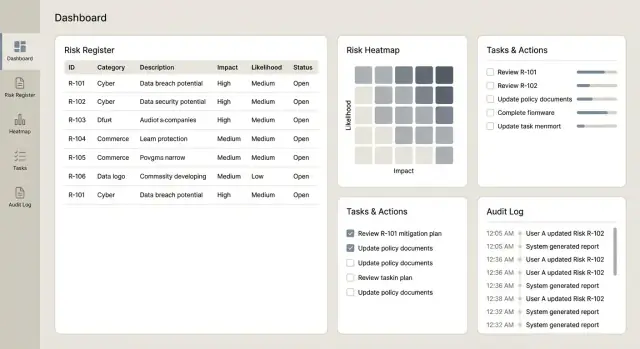
Dashboards and reports are where an operational risk tracking app proves its value: they turn a long register into clear decisions for owners, managers, and committees. The key is to make the numbers traceable back to the underlying scoring rules and records.
Dashboards people will actually use
Start with a small set of high-signal views that answer common questions quickly:
- Top risks by residual score (with the ability to switch to inherent)
- Trends over time (e.g., residual risk trend by month/quarter)
- Residual vs. inherent distribution, including a simple “before vs. after controls” view
- A risk heatmap (likelihood × impact) that links each cell to the underlying risks
Make each tile clickable so users can drill down into the exact list of risks, controls, incidents, and actions behind the chart.
Operational views for day-to-day management
Decision dashboards are different from operational views. Add screens focused on what needs attention this week:
- Overdue actions (by owner/team, with days overdue)
- Upcoming reviews (risks or controls due for review)
- Failed control tests (recent failures, severity, and open remediation)
- Incident frequency (counts and rates over time, with filters by process/category)
These views pair well with reminders and task ownership so the app feels like a workflow tool, not just a database.
Exports that work for committees and audits
Plan exports early, because committees often rely on offline packs. Support CSV for analysis and PDF for read-only distribution, with:
- Filters (business unit, category, owner, status)
- Date ranges (incidents in period, actions created/closed in period)
- Clear labels (inherent vs. residual, version dates, and applied filters)
If you already have a governance pack template, mirror it so adoption is easy.
Consistency and performance at scale
Ensure each report definition matches your scoring rules. For example, if the dashboard ranks “top risks” by residual score, that must align with the same calculation used on the record and in exports.
For large registers, design for performance: pagination on lists, caching for common aggregates, and async report generation (generate in the background and notify when ready). If you later add scheduled reports, keep links internal (e.g., save a report configuration that can be reopened from /reports).
Plan Integrations and Data Migration
Integrations and migration determine whether your operational risk tracking app becomes the system of record—or just another place people forget to update. Plan them early, but implement incrementally so you can keep the core product stable.
Start with the workflows people already use
Most teams don’t want “another task list.” They want the app to connect to where work happens:
- Jira or ServiceNow to create and track remediation actions (and sync status back)
- Slack or Microsoft Teams for alerts when a risk is escalated, a review is due, or evidence is requested
- Email reminders for periodic reviews and approvals (especially useful for occasional users)
A practical approach is to keep the risk app as the owner of risk data, while external tools manage execution details (tickets, assignees, due dates) and feed progress updates back.
Seed your risk register from spreadsheets—safely
Many organizations begin with Excel. Provide an import that accepts common formats, but add guardrails:
- Validation rules (required fields, date formats, numeric ranges)
- Duplicate detection (e.g., same risk title + process + owner) with a “merge/skip” choice
- Taxonomy enforcement (business unit, process, risk category) to prevent messy reporting later
Show a preview of what will be created, what will be rejected, and why. That one screen can save hours of back-and-forth.
API basics that reduce future pain
Even if you start with only one integration, design the API as if you’ll have several:
- Keep consistent endpoints and naming (e.g., /risks, /controls, /actions)
- Ensure audit logging on writes (who changed what, when, and from where)
- Add rate limiting and clear error codes so integrations fail gracefully
Handle failures with retries and visible status
Integrations fail for normal reasons: permission changes, network timeouts, deleted tickets. Build for this:
- Queue outbound requests and retry with backoff
- Record an integration status on each linked item (“Synced,” “Pending,” “Failed”)
- Provide actionable messages (“ServiceNow token expired—reconnect”) and a manual “Retry now”
This keeps trust high and prevents silent drift between the register and execution tools.
Test, Launch, and Improve Over Time
A risk tracking app becomes valuable when people trust it and use it consistently. Treat testing and rollout as part of the product, not a final checkbox.
Build a practical testing strategy
Start with automated tests for the parts that must behave the same every time—especially scoring and permissions:
- Unit tests for scoring: verify likelihood/impact calculations, thresholds, rounding, and edge cases (e.g., “N/A”, missing fields, overrides)
- Workflow tests for approvals: ensure state changes follow your rules (draft → submitted → approved), including reassignment and rejection paths
- Permission tests: confirm viewers can’t edit, owners can’t approve their own submissions (if that’s your policy), and admins can audit without breaking segregation of duties
Run user acceptance testing (UAT) with real scenarios
UAT works best when it mirrors actual work. Ask each business unit to provide a small set of sample risks, controls, incidents, and actions, then run typical scenarios:
- create a risk, link controls, and submit for approval
- update after an incident and attach evidence
- complete an action and verify reporting changes
Capture not just bugs, but confusing labels, missing statuses, and fields that don’t match how teams talk.
Pilot rollout before going company-wide
Launch to one team first (or one region) for 2–4 weeks. Keep the scope controlled: a single workflow, a small number of fields, and a clear success metric (e.g., % of risks reviewed on time). Use feedback to adjust:
- field names and required fields
- approval steps and ownership rules
- reminder timing and escalation
Training, documentation, and adoption
Provide short how-to guides and a one-page glossary: what each score means, when to use each status, and how to attach evidence. A 30-minute live session plus recorded clips usually beats a long manual.
Build faster with Koder.ai (optional)
If you want to get to a credible v1 quickly, a vibe-coding platform like Koder.ai can help you prototype and iterate on workflows without a long setup cycle. You can describe screens and rules (risk intake, approvals, scoring, reminders, audit log views) in chat, then refine the generated app as stakeholders react to real UI.
Koder.ai is designed for end-to-end delivery: it supports building web apps (commonly React), backend services (Go + PostgreSQL), and includes practical features like source-code export, deployment/hosting, custom domains, and snapshots with rollback—useful when you’re changing taxonomies, scoring scales, or approval flows and need safe iteration. Teams can start on a free tier and move up to pro, business, or enterprise as governance and scale requirements grow.
Keep the app healthy after launch
Plan ongoing operations early: automated backups, basic uptime/error monitoring, and a lightweight change process for taxonomy and scoring scales so updates stay consistent and auditable over time.
FAQ
How do we prevent the app from becoming a “dumping ground” for anything risky?
Start by writing a crisp definition of “operational risk” for your organization and what is out of scope.
A practical approach is to use four buckets—process, people, systems, external events—and add a few examples for each so users can classify items consistently.
What’s a realistic v1 scope for an operational risk tracking web app?
Keep v1 focused on the smallest set of workflows that create reliable data:
- A risk register with required fields and ownership
- Basic scoring (e.g., likelihood × impact)
- Action tracking with due dates and reminders
- Simple reports/exports for oversight
Defer complex taxonomy management, custom workflow builders, and deep integrations until you have consistent usage.
Who should we involve when gathering requirements?
Involve a small but representative set of stakeholders:
- Business unit owners (day-to-day risk updates)
- Risk/Compliance (terminology, scoring, reporting needs)
- Internal audit (evidence, approvals, auditability)
- IT/Security (access control, retention, integrations)
- Executive consumers (summary views and trends)
This helps you design for real workflows rather than hypothetical features.
How do we translate our current spreadsheet process into app workflows?
Map the current workflow end-to-end (even if it’s email + spreadsheets): identify → assess → treat → monitor → review.
For each step, document:
- Who can create/update/approve
- What “done” means (required fields, evidence)
- What triggers reviews (time-based, incident-based, threshold-based)
Turn these into explicit states and transition rules in the app.
What terminology and fields should every risk record include?
Standardize a risk statement format (e.g., “Due to cause, event may occur, leading to impact”) and define mandatory fields.
At minimum, require:
- Cause/event/impact
- Risk owner (and accountable team)
- Status
- Identified date, last assessed date, next review date
This prevents vague entries and improves reporting quality.
How should we implement risk scoring so it’s consistent and auditable?
Use a simple, explainable model first (commonly 1–5 Likelihood and 1–5 Impact, with Score = L × I).
Make it consistent by:
- Writing plain-language definitions for each value
- Defining thresholds for Low/Medium/High (and what each level triggers)
- Keeping the calculation visible (avoid “black-box” adjustments)
If teams can’t score consistently, add guidance before adding more dimensions.
What data model decisions matter most for traceability?
Separate point-in-time assessments from the “current” risk record.
A minimal schema usually includes:
- Risks, Assessments, Controls, Incidents/Events, Actions
- Join tables for Risk ↔ Controls and Risk ↔ Incidents
- Comments and Attachments linked to core records
This structure supports traceability like “which incidents led to a rating change?” without overwriting history.
What should we include in the audit trail and version history?
Use an append-only audit log for key events (create/update/delete, approvals, ownership changes, exports, permission changes).
Capture:
- Who acted, when, on what object
- Field-level diffs (old → new)
- Optional “reason for change” notes
Provide a filterable, read-only audit log view and export from it while logging the export event too.
How should we handle evidence attachments and retention?
Treat evidence as first-class data, not just files.
Recommended practices:
- Store file metadata (uploader, timestamp, linked record)
- Version uploads; don’t silently overwrite
- Add retention/deletion dates and access classification
- Restrict sensitive evidence more tightly than the parent record when needed
This supports audits and reduces accidental exposure of sensitive content.
What are the key security and access control requirements for a risk app?
Prioritize SSO (SAML/OIDC) if your organization already has an identity provider, then layer role-based access control (RBAC).
Practical security requirements:
- Roles aligned to responsibilities (owner, approver, auditor/read-only, admin)
- Least-privilege permissions per object and action
- Encryption in transit, secure sessions, and admin activity logging
- Optional restrictions by business unit or record for sensitive incidents
Keep permission rules understandable so users know why access is granted or denied.