

How to Build a Web App for Managing Operational Runbooks
Step-by-step guide to building a web app for runbooks: data model, editor, approvals, search, permissions, audit logs, and integrations for incident response.
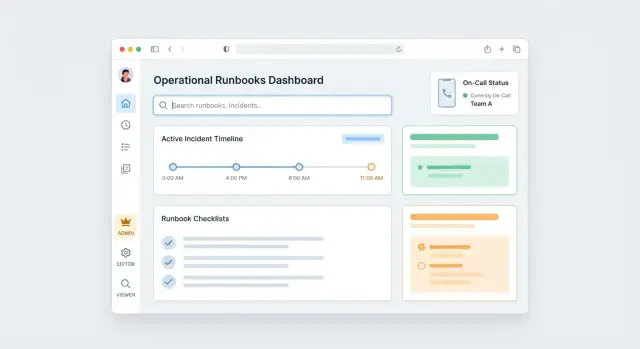
Clarify goals and who the app is for
Before you choose features or a tech stack, align on what a “runbook” means in your organization. Some teams use runbooks for incident response playbooks (high-pressure, time-sensitive). Others mean standard operating procedures (repeatable tasks), scheduled maintenance, or customer-support workflows. If you don’t define the scope up front, the app will try to serve every document type—and end up serving none of them well.
Define your runbook types (and what “good” looks like)
Write down the categories you expect the app to hold, with a quick example for each:
- Incident playbooks: “API latency spike” steps, escalation paths, rollback instructions
- SOPs: “Provision a new customer,” “Rotate credentials,” “Weekly capacity check”
- Maintenance tasks: “Database patching,” “Certificate renewal”
Also define minimum standards: required fields (owner, services affected, last reviewed date), what “done” means (every step checked off, notes captured), and what must be avoided (long prose that’s hard to scan).
Identify target users and their constraints
List the primary users and what they need in the moment:
- On-call engineers: speed, clarity, low friction while multitasking
- Operations/support: consistent processes, fewer handoffs, clear definitions
- Managers/leads: visibility into coverage, review cadence, and ownership
Different users optimize for different things. Designing for the on-call case usually forces the interface to stay simple and predictable.
Set outcomes and measurable success metrics
Pick 2–4 core outcomes, such as faster response, consistent execution, and easier reviews. Then attach metrics you can track:
- Time to find the right runbook (search-to-open)
- Completion rate for recurring tasks
- Incident time-to-mitigation when a playbook exists vs. not
- Review cadence: % of runbooks reviewed in the last 90 days
These decisions should guide every later choice, from navigation to permissions.
Capture requirements from real operational workflows
Before you choose a tech stack or sketch screens, watch how operations actually work when something breaks. A runbook management web app succeeds when it fits real habits: where people look for answers, what “good enough” means during an incident, and what gets ignored when everyone is overloaded.
Start with the pain you’re fixing
Interview on-call engineers, SREs, support, and service owners. Ask for specific recent examples, not general opinions. Common pain points include scattered docs across tools, stale steps that no longer match production, and unclear ownership (nobody knows who should update a runbook after a change).
Capture each pain point with a short story: what happened, what the team tried, what went wrong, and what would have helped. These stories become acceptance criteria later.
Inventory existing sources and import needs
List where runbooks and SOPs live today: wikis, Google Docs, Markdown repos, PDFs, ticket comments, and incident postmortems. For each source, note:
- Format and structure (tables, checklists, screenshots, links)
- Volume and “must keep” history
- Required metadata (service, environment, severity, owner)
This tells you whether you need a bulk importer, a simple copy/paste migration, or both.
Map the end-to-end runbook flow
Write down the typical lifecycle: create → review → use → update. Pay attention to who participates at each step, where approvals happen, and what triggers updates (service changes, incident learnings, quarterly reviews).
Identify compliance and audit expectations
Even if you’re not in a regulated industry, teams often need answers to “who changed what, when, and why.” Define minimum audit trail requirements early: change summaries, approver identity, timestamps, and the ability to compare versions during incident response playbook execution.
Design the data model for runbooks and versions
A runbook app succeeds or fails based on whether its data model matches how operations teams actually work: many runbooks, shared building blocks, frequent edits, and high trust in “what was true at the time.” Start by defining the core objects and their relationships.
Core objects
At minimum, model:
- Runbook: title, summary, status (draft/published/archived), severity/use-case flags, last_reviewed_at.
- Step: ordered items within a runbook (with optional decision branches).
- Tag: lightweight labeling for search and filtering.
- Service: what the runbook applies to (payments, API, data pipeline).
- Owner: person/team responsible for accuracy.
- Version: immutable snapshot of a runbook at a point in time.
- Execution: a recorded “run” of a runbook during an incident or routine task.
Relationships that reflect operations
Runbooks rarely live alone. Plan links so the app can surface the right doc under pressure:
- Runbook ↔ Service (many-to-many): a service can have multiple runbooks; a runbook can cover multiple services.
- Runbook ↔ Incident type / alert rule: store references to alert identifiers or incident categories so integrations can suggest the right playbook.
- Runbook ↔ Tags: for cross-cutting concerns (database, customer-impacting, rollback).
Versioning: draft vs. published
Treat versions as append-only records. A Runbook points to a current_draft_version_id and a current_published_version_id.
- Editing creates new draft versions.
- Publishing “promotes” a draft to published (creating a new immutable published version).
- Retain old versions for audit and postmortems; consider a retention policy only for drafts, not published versions.
Storing rich content and attachments
For steps, store content as Markdown (simple) or structured JSON blocks (better for checklists, callouts, and templates). Keep attachments out of the database: store metadata (filename, size, content_type, storage_key) and put files in object storage.
This structure sets you up for reliable audit trails and a smooth execution experience later.
Plan the feature set and the user journeys
A runbook app succeeds when it stays predictable under pressure. Start by defining a minimum viable product (MVP) that supports the core loop: write a runbook, publish it, and reliably use it during work.
MVP: the minimum you need to be useful
Keep the first release tight:
- List / library: browse runbooks by service, team, and tag.
- View: a clean read-only page that loads fast and prints well.
- Create: start from scratch with a title, summary, and ordered steps.
- Edit: draft changes without affecting the published version.
- Publish: a clear action that makes a version “official.”
- Search: full-text search across titles, summaries, and step text.
If you can’t do these six things quickly, extra features won’t matter.
“Nice to have” later (don’t block the first release)
Once the basics are stable, add capabilities that improve control and insight:
- Templates for common incident types and recurring maintenance.
- Approvals and reviewers for high-risk systems.
- Executions (checklists) to record what was done and when.
- Analytics like most-used runbooks, stale content, and searches with no results.
Layout: three primary workspaces
Make the UI map match how operators think:
- Runbook Library: find and filter quickly.
- Editor: draft, revise, and preview the published view.
- Execution View: a focused “do the steps” mode with progress tracking.
A simple page map (predictable navigation)
- /runbooks (library)
- /runbooks/new
- /runbooks/:id (published view)
- /runbooks/:id/edit (draft editor)
- /runbooks/:id/versions
- /runbooks/:id/execute (execution mode)
- /search
Design user journeys around roles: an author creating and publishing, a responder searching and executing, and a manager reviewing what’s current and what’s stale.
Build a runbook editor that keeps steps clear and repeatable
A runbook editor should make the “right way” to write procedures the easiest way. If people can create clean, consistent steps quickly, your runbooks stay usable when stress is high and time is short.
Pick an editor style that matches your users
There are three common approaches:
- Markdown editor: fast for experienced operators, great for keyboard-first workflows, but easier to drift into inconsistent formatting.
- Block editor: structured content (steps, callouts, links) with good readability; usually the best balance for mixed teams.
- Form-based steps: each step is a form with specific fields (action, expected result, owner, links). This produces the most consistent output and is ideal when you need strict repeatability.
Many teams start with a block editor and add form-like constraints for critical step types.
Model steps as first-class objects
Instead of a single long document, store a runbook as an ordered list of steps with types such as:
- Text (context)
- Command (with copy button and optional “expected output”)
- Link (to dashboards, tickets, docs)
- Decision (if/then branching)
- Checklist (multiple sub-items)
- Caution note (high-visibility warnings)
Typed steps enable consistent rendering, searching, safer reuse, and better execution UX.
Add guardrails that prevent “mystery steps”
Guardrails keep content readable and executable:
- Required fields (e.g., every command step needs a command and environment)
- Validation (broken links, empty placeholders, missing prerequisites)
- Preview that matches execution mode so authors see what responders will see
- Formatting rules (limit headings, standardize naming like “Verify…”, “Rollback…”, “Escalate…”)
Make reuse effortless
Support templates for common patterns (triage, rollback, post-incident checks) and a Duplicate runbook action that copies structure while prompting users to update key fields (service name, on-call channel, dashboards). Reuse reduces variance—and variance is where mistakes hide.
Add approvals, ownership, and review reminders
Operational runbooks are only useful when people trust them. A lightweight governance layer—clear owners, a predictable approval path, and recurring reviews—keeps content accurate without turning every edit into a bottleneck.
Design a simple review flow
Start with a small set of statuses that match how teams work:
- Draft: being written or updated
- In review: waiting on feedback from specific reviewers
- Approved: ready, but not yet visible to everyone (optional buffer)
- Published: the version used during incidents and routine work
Make transitions explicit in the UI (e.g., “Request review”, “Approve & publish”), and record who performed each action and when.
Add ownership and review due dates
Every runbook should have at least:
- Primary owner: accountable for correctness
- Backup owner: coverage for vacations and rotations
- Review due date (or “review every X days”): so runbooks don’t silently rot
Treat ownership like an operational on-call concept: owners change as teams change, and those changes should be visible.
Require change summaries for edits
When someone updates a published runbook, ask for a short change summary and (when relevant) a required comment like “Why are we changing this step?” This creates shared context for reviewers and reduces back-and-forth during approval.
Plan notifications without locking into one provider
Runbook reviews only work if people get nudged. Send reminders for “review requested” and “review due soon,” but avoid hard-coding email or Slack. Define a simple notification interface (events + recipients), then plug in providers later—Slack today, Teams tomorrow—without rewriting core logic.
Handle authentication and permissions safely
Operational runbooks often contain exactly the kind of information you don’t want broadly shared: internal URLs, escalation contacts, recovery commands, and occasionally sensitive configuration details. Treat authentication and authorization as a core feature, not a later hardening task.
Start with simple RBAC
At minimum, implement role-based access control with three roles:
- Viewer: can read runbooks and use execution mode.
- Editor: can create and update runbooks they’re allowed to access.
- Admin: can manage permissions, teams/services, and global settings.
Keep these roles consistent across the UI (buttons, editor access, approvals) so users don’t have to guess what they can do.
Scope access by team or service (and optionally by runbook)
Most organizations organize operations by team or service, and permissions should follow that structure. A practical model is:
- Users belong to one or more teams.
- Runbooks are tagged to a service (owned by a team).
- Permissions are granted at the team/service level.
For higher-risk content, add an optional runbook-level override (e.g., “only Database SREs can edit this runbook”). This keeps the system manageable while still supporting exceptions.
Protect sensitive steps
Some steps should be visible only to a smaller group. Support restricted sections such as “Sensitive details” that require elevated permission to view. Prefer redaction (“hidden to viewers”) over deleting content so the runbook still reads coherently under pressure.
Keep authentication flexible
Even if you start with email/password, design the auth layer so you can add SSO later (OAuth, SAML). Use a pluggable approach for identity providers and store stable user identifiers so switching to SSO doesn’t break ownership, approvals, or audit trails.
Make runbooks easy to find under pressure
When something is broken, nobody wants to browse documentation. They want the right runbook in seconds, even if they only remember a vague term from an alert or a teammate’s message. Findability is a product feature, not a nice-to-have.
Build search that behaves like your on-call brain
Implement one search box that scans more than titles. Index titles, tags, owning service, and step content (including commands, URLs, and error strings). People often paste a log snippet or alert text—step-level search is what turns that into a match.
Support tolerant matching: partial words, typos, and prefix queries. Return results with highlighted snippets so users can confirm they’ve found the right procedure without opening five tabs.
Add filters that cut noise instantly
Search is fastest when users can narrow the context. Provide filters that reflect how ops teams think:
- Service (or system/component)
- Severity (SEV levels, priority)
- Environment (prod/stage/dev, region)
- Team/owner
- Last reviewed date (or “review overdue”)
Make filters sticky across sessions for on-call users, and show active filters prominently so it’s clear why results are missing.
Teach the system synonyms and real incident language
Teams don’t use one vocabulary. “DB,” “database,” “postgres,” “RDS,” and an internal nickname might all mean the same thing. Add a lightweight synonym dictionary that you can update without redeploying (admin UI or config). Use it at query time (expand search terms) and optionally at indexing time.
Also capture common terms from incident titles and alert labels to keep synonyms aligned with reality.
Design a runbook view for scanning, not reading
The runbook page should be information-dense and skimmable: a clear summary, prerequisites, and a table of contents for steps. Show key metadata near the top (service, environment applicability, last reviewed, owner) and keep steps short, numbered, and collapsible.
Include a “copy” affordance for commands and URLs, and a compact “related runbooks” area to jump to common follow-ups (e.g., rollback, verification, escalation).
Implement execution mode for incidents and routine tasks
Execution mode is where your runbooks stop being “documentation” and become a tool people can rely on under time pressure. Treat it like a focused, distraction-free view that guides someone from first step to last, while capturing what actually happened.
A focused UI: steps, status, and time
Each step should have a clear status and a simple control surface:
- A checkbox or Mark complete button (plus Skip when appropriate)
- Step states like Not started / In progress / Blocked / Done
- Optional timers: a run-level timer (since execution started) and step-level timers (time spent)
Small touches help: pin the current step, show “next up,” and keep long steps readable with collapsible details.
Notes, links, and evidence—captured in the moment
While executing, operators need to attach context without leaving the page. Allow per-step additions such as:
- Freeform notes (what you saw, what you tried, why you chose a path)
- Links to dashboards, tickets, or chat threads
- Evidence attachments (screenshots, logs, command output)
Make these additions timestamped automatically, and preserve them even if the run is paused and resumed.
Branching and escalation paths
Real procedures aren’t linear. Support “if/then” branching steps so a runbook can adapt to conditions (e.g., “If error rate > 5%, then…”). Also include explicit Stop and escalate actions that:
- Mark the run as escalated/blocked
- Prompt for who was contacted and why
- Optionally generate a handoff summary for the next responder
Store execution history for learning
Every run should create an immutable execution record: runbook version used, step timestamps, notes, evidence, and final outcome. This becomes the source of truth for post-incident review and for improving the runbook without relying on memory.
Add audit trails and change history you can trust
When a runbook changes, the question during an incident isn’t “what’s the latest version?”—it’s “can we trust it, and how did it get here?” A clear audit trail turns runbooks into dependable operational records instead of editable notes.
What to log (and why it matters)
At minimum, log every meaningful change with who, what, and when. Go one step further and store before/after snapshots of the content (or a structured diff) so reviewers can see exactly what changed without guessing.
Capture events beyond editing, too:
- Publishing: draft → published, published → archived, rollbacks
- Approval decisions: who approved/rejected, timestamp, optional comment
- Ownership changes: reassignment of the runbook owner or team
This creates a timeline you can rely on during post-incident reviews and compliance checks.
Audit views that work under pressure
Give users an Audit tab per runbook showing a chronological stream of changes with filters (editor, date range, event type). Include “view this version” and “compare to current” actions so responders can quickly confirm they’re following the intended procedure.
If your organization needs it, add export options like CSV/JSON for audits. Keep exports permissioned and scoped (single runbook or a time window), and consider linking to an internal admin page like /settings/audit-exports.
Retention rules and tamper resistance
Define retention rules that match your requirements: for example, keep full snapshots for 90 days, then retain diffs and metadata for 1–7 years. Store audit records append-only, restrict deletion, and record any administrative overrides as auditable events themselves.
Connect the app to alerts, incidents, and chat tools
Your runbooks become dramatically more useful when they’re one click away from the alert that triggered the work. Integrations also reduce context switching during incidents, when people are stressed and time is tight.
Start with a simple integration contract (webhooks + APIs)
Most teams can cover 80% of needs with two patterns:
- Incoming webhooks from alerting/incident tools to your app (create or update an “incident context,” suggest runbooks).
- Outgoing webhooks or API calls from your app back to those tools (post the chosen runbook link, status updates, and key decisions).
A minimal incoming payload can be as small as:
{
  "service": "payments-api",
  "event_type": "5xx_rate_high",
  "severity": "critical",
  "incident_id": "INC-1842",
  "source_url": "https://…"
}
Deep links: take responders to the right runbook instantly
Design your URL scheme so an alert can point directly to the best match, usually by service + event type (or tags like database, latency, deploy). For example:
- Link to a specific runbook:
/runbooks/123 - Link to an execution mode view with context:
/runbooks/123/execute?incident=INC-1842 - Link to a search preset:
/runbooks?service=payments-api&event=5xx_rate_high
This makes it easy for alerting systems to include the URL in notifications, and for humans to land on the right checklist without extra searching.
Chat notifications and sharing during an incident
Hook into Slack or Microsoft Teams so responders can:
- Post the selected runbook link to the incident channel
- Share a short summary (“What we’re following, who owns it, current step”)
- Keep the runbook visible as decisions are made
If you already have docs for integrations, link them from your UI (for example, /docs/integrations) and expose configuration where ops teams expect it (a settings page plus a quick test button).
Deploy, secure, and iterate without slowing operations
A runbook system is part of your operational safety net. Treat it like any other production service: deploy predictably, protect it from common failures, and improve it in small, low-risk steps.
Hosting, backups, and disaster recovery
Start with a hosting model your ops team can support (managed platform, Kubernetes, or a simple VM setup). Whatever you choose, document it in its own runbook.
Backups should be automatic and tested. It’s not enough to “take snapshots”—you need confidence you can restore:
- Database backups on a schedule (and before major upgrades)
- Encrypted backups with restricted access
- A routine restore test (e.g., monthly) into a separate environment
For disaster recovery, decide your targets up front: how much data you can afford to lose (RPO) and how quickly you need the app back (RTO). Keep a lightweight DR checklist that includes DNS, secrets, and a verified restore procedure.
Performance basics that prevent friction
Runbooks are most valuable under pressure, so aim for fast page loads and predictable behavior:
- Caching for read-heavy endpoints (runbook lists, templates)
- Pagination and filtering for search results and audit views
- Rate limiting on authentication and write actions to reduce abuse and accidental overload
Also log slow queries early; it’s easier than guessing later.
A testing strategy that protects trust
Focus tests on the features that, if broken, create risky behavior:
- Permission checks (role-based access control, ownership, approvals)
- Editor behavior (step ordering, templates, validations)
- Versioning (diffs, publish flow, rollback)
Add a small set of end-to-end tests for “publish a runbook” and “execute a runbook” to catch integration issues.
Ship iteratively, not all at once
Pilot with one team first—ideally the group with frequent on-call work. Collect feedback in the tool (quick comments) and in short weekly reviews. Expand gradually: add the next team, migrate the next set of SOPs, and refine templates based on real usage rather than assumptions.
Speed up delivery with Koder.ai (without changing your ownership model)
If you want to move from concept to a working internal tool quickly, a vibe-coding platform like Koder.ai can help you prototype the runbook management web app end-to-end from a chat-driven specification. You can iterate on core workflows (library → editor → execution mode), then export the source code when you’re ready to review, harden, and run it within your standard engineering process.
Koder.ai is especially practical for this kind of product because it aligns with common implementation choices (React for the web UI; Go + PostgreSQL for the backend) and supports planning mode, snapshots, and rollback—useful when you’re iterating on operationally critical features like versioning, RBAC, and audit trails.
FAQ
What should we define before building a runbook management app?
Define the scope up front: incident response playbooks, SOPs, maintenance tasks, or support workflows.
For each runbook type, set minimum standards (owner, service(s), last reviewed date, “done” criteria, and a bias toward short, scannable steps). This prevents the app from becoming a generic document dump.
Which success metrics work best for a runbook web app?
Start with 2–4 outcomes and attach measurable metrics:
- Time to find the right runbook (search-to-open)
- Completion rate for recurring tasks
- Incident time-to-mitigation with vs. without a playbook
- % reviewed in the last 90 days
These metrics help you prioritize features and detect whether the app is actually improving operations.
How do we gather requirements that match real on-call behavior?
Watch real workflows during incidents and routine work, then capture:
- Specific “pain stories” (what happened, what was tried, what failed)
- Where runbooks currently live (wikis, repos, docs, tickets)
- The lifecycle (create → review → use → update) and who owns each step
Turn those stories into acceptance criteria for search, editing, permissions, and versioning.
What data model do we need for runbooks, steps, and services?
Model these core objects:
- Runbook, Step, Tag, Service, Owner
- Version (immutable snapshots)
- Execution (a recorded run)
Use many-to-many links where reality demands it (runbook↔service, runbook↔tags) and store references to alert rules/incident types so integrations can suggest the right playbook quickly.
How should versioning work (draft vs. published)?
Treat versions as append-only, immutable records.
A practical pattern is a Runbook pointing to:
current_draft_version_idcurrent_published_version_id
Editing creates new draft versions; publishing promotes a draft into a new published version. Keep old published versions for audits and postmortems; consider pruning only draft history if needed.
What features belong in the MVP versus later releases?
Your MVP should reliably support the core loop:
- Library/list
- Fast read-only view
- Create + edit (draft)
- Publish
- Full-text search
If these are slow or confusing, “nice-to-haves” (templates, analytics, approvals, executions) won’t get used under pressure.
How do we design an editor that produces clear, repeatable steps?
Pick an editor style that matches your team:
- Markdown: fast for power users, easier to drift into inconsistent formatting
- Block editor: strong readability with structure
- Form-based steps: highest consistency (great for strict procedures)
Make steps first-class objects (command/link/decision/checklist/caution) and add guardrails like required fields, link validation, and a preview that matches execution mode.
What should “execution mode” include for incident response and routine tasks?
Use a distraction-free checklist view that captures what happened:
- Step states (Not started / In progress / Blocked / Done)
- Mark complete/skip controls
- Per-step notes, links, and evidence attachments (timestamped)
- Branching (if/then) and explicit “stop & escalate” actions
Store each run as an immutable execution record tied to the runbook version used.
How do we make runbooks easy to find in seconds during an incident?
Implement search as a primary product feature:
- Index titles, tags, service, and step content (commands, URLs, error strings)
- Support partial matches and typos
- Add filters that reflect ops reality (service, severity, environment, owner, last reviewed)
- Maintain a lightweight synonym dictionary to match real incident language
Also design the runbook page for scanning: short steps, strong metadata, copy buttons, and related runbooks.
How should we handle permissions, governance, and audit trails safely?
Start with simple RBAC (Viewer/Editor/Admin) and scope access by team or service, with optional runbook-level overrides for high-risk content.
For governance, add:
- Clear ownership (primary + backup)
- Review due dates and reminders
- Change summaries on edits
- A minimal approval flow (Draft → In review → Published)
Log audits as append-only events (who/what/when, publish actions, approvals, ownership changes) and design auth to accommodate future SSO (OAuth/SAML) without breaking identifiers.