

How to Build a Web App for Product Roadmaps & Requests
Learn how to plan, design, and build a web app for product roadmaps and feature requests, including data models, workflows, APIs, and rollout tips.
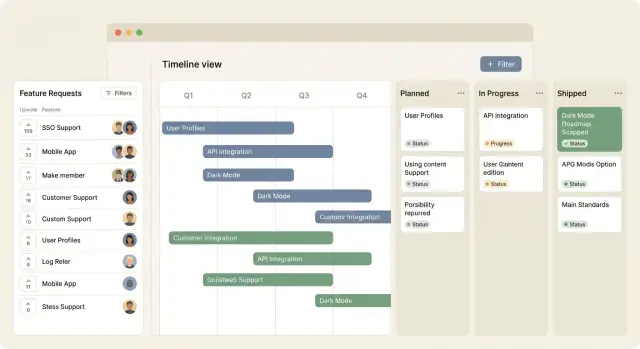
What You’re Building and Who It’s For
A product roadmap + request portal is a web app that turns scattered feedback into a clear plan people can trust. It should do three things well: show what’s planned (visibility), explain why it matters (alignment), and capture new input without chaos (intake).
What the portal should accomplish
At the simplest level, you’re building two connected surfaces:
- A public-facing view where people can see what’s Now / Next / Later (or similar) and understand current direction.
- A request intake board where users can submit ideas, vote, and add context—so you don’t rely on email threads and meeting notes.
The key outcome isn’t “more feedback.” It’s faster decisions with fewer repeats, plus a shared story you can point to when someone asks, “Is this on the roadmap?”
Who uses it (common roles)
Most roadmap apps serve the same core groups, even if you name them differently:
- Customers / external users: submit requests, vote, subscribe for updates, and check status.
- Internal teams (support, sales, success, marketing): log customer requests, attach revenue or urgency context, and track progress.
- Admins (product owners): triage submissions, merge duplicates, set statuses, and publish roadmap updates.
Decide early whether visitors can browse anonymously or must sign in to vote—this choice has a big impact on adoption and moderation.
Typical views you’ll build
Keep the initial navigation obvious and task-focused:
- Public roadmap: a clean, readable list or board of initiatives with short descriptions and status.
- Request board: a searchable list of ideas with voting and commenting.
- Admin triage: a private workspace for reviewing new submissions, tagging, merging duplicates, and changing status.
MVP vs later (scope control)
For an MVP, focus on: submit → categorize → prioritize → publish status. Ship the smallest set of features that makes the workflow real.
Save for later: complex scoring models, full SSO, multi-product roadmaps, custom fields per workspace, and advanced analytics. A tight MVP is easier to maintain and more likely to get used—then you can evolve it based on real patterns in requests.
Requirements and MVP Scope
Before you pick a stack or draw screens, define the smallest version of the product roadmap web app that proves it’s useful. A clear MVP keeps you shipping, not debating.
Core MVP use cases
Your first release should cover the loop from “idea” to “outcome”:
- Submit a request: a simple form with title, description, optional category, and who submitted it.
- Vote: a basic voting system (one vote per user per request) so the most common needs rise.
- Comment: lightweight discussion to add context and support feature-request triage.
- Track status: visible states like Under review → Planned → In progress → Shipped so people don’t ask repeatedly.
If you can do these four reliably, you already have feature request management that many teams can run with.
Define success metrics
Pick 2–4 measurable outcomes to validate the MVP:
- Fewer duplicate requests (e.g., reduce “same idea” submissions by 30% via search + voting).
- Faster triage (median time from submission to first status change).
- Higher engagement (percentage of active users who vote or comment each month).
These metrics guide roadmap prioritization and prevent “nice-to-have” features from dominating.
Constraints to capture early
Write down constraints as requirements, not assumptions:
- Team size and available hours per week
- Timeline (e.g., 4–6 weeks to MVP)
- Budget (including email, hosting, and analytics)
- Hosting preferences (cloud vs on-prem) and compliance needs
Non-goals (for now)
To avoid scope creep, explicitly defer items like: full project management, complex OKR planning, multi-tenant billing, advanced reporting, and deep integrations. You can add those after the MVP proves demand and your workflow is stable.
Public vs Internal: Visibility and Permissions
Before you build screens or APIs, decide who can see what. This one choice shapes your data model, moderation needs, and even how people behave when submitting requests.
Pick your portal type
A public portal is great for transparency and community engagement, but it invites noise and requires stronger moderation.
A semi-public portal (login required) works well for B2B: customers can see progress, but you can gate access by account, contract tier, or domain.
An internal-only portal is best when requests contain sensitive context (security, pricing, partner names) or when you want to avoid public commitments.
Decide what’s safe to show publicly
Start with the smallest “public surface area” and expand later. Common public fields:
- Title and a short description (sanitized)
- Status (with clear definitions)
- High-level category (e.g., Integrations, Reporting)
Be careful with ETA. If you show dates, users will treat them as promises. Many teams choose:
- No ETA at all, or
- A broad window (“Q2”) plus a disclaimer, or
- ETA visible only to logged-in customers
Make statuses do expectation management
Statuses should communicate intent, not internal tasks. For example:
- Under Review: we’ve seen it; no commitment yet
- Planned: committed, but schedule may shift
- In Progress: actively being built
- Shipped: available
- Won’t Do: closed with a short rationale
Moderation rules for sensitive requests
Plan policies upfront:
- Auto-hide posts with emails, company names, or logs
- Allow moderators to edit titles/descriptions without changing the original submission record
- Provide a “make private” option when a request reveals confidential details
- Limit who can change statuses and visibility (typically PMs/admins)
Getting visibility and permissions right early prevents trust issues later—both internally and with users.
Key Screens and UX Flow
A roadmap/requests app succeeds when people can answer three questions quickly: What’s planned? What’s being considered? Where do I add feedback? Your UX should keep those answers one click away.
1) Roadmap view (the “why I’m here” screen)
Start with a clean roadmap that works for different teams:
- Now / Next / Later columns for a simple, executive-friendly view
- Timeline mode when dates matter (with clear “target” vs “committed” wording)
- Kanban-style statuses (Idea → Planned → In Progress → Shipped) for delivery-focused teams
Each card should show: title, status, owner, and a small signal like vote count or customer count.
2) Feature requests list (the “submit and browse” hub)
This is where most users live. Make it fast:
- Search-first header with filters for category, status, and sort (Most votes, Newest, Recently updated)
- A visible “Suggest a feature” button that opens a short form
- Inline hints for potential duplicates while typing (reduces clutter early)
3) Request detail page (the “single source of truth”)
A request page should feel like a mini case file:
- Votes (and who can vote), comments, and links (tickets, docs)
- A clear current status plus a status history timeline
- Optional tags like affected plan, customer segment, or competitor reference
4) Admin triage view (the “keep it tidy” cockpit)
Admins need a queue with strong controls: filters (new/unreviewed, high-impact), bulk actions, merge duplicates, assign an owner, and set the next status. The goal is to move items from “noise” to “decision-ready” in minutes, not days.
Data Model: Tables You’ll Need
A clean data model keeps your roadmap app flexible as you add voting, triage, and reporting. Start with a few core tables, then add linking tables for relationships.
Core entities
At minimum, you’ll want:
- users: id, name, email, created_at (plus profile fields)
- workspaces (or orgs) and optionally projects: separates customers/teams and product areas
- requests: the heart of the system (title, description, status, source, priority hints)
- votes: a record per user per request (supports 1 vote, weighted votes, or “upvote + downvote” later)
- comments: discussion and clarifications on a request
- roadmap_items: planned work (epic/feature) with target quarter/date, owner, and current phase
Keep timestamps consistent across tables: created_at, updated_at, and optional deleted_at for soft deletes.
Relationships you’ll almost always need
Requests and roadmap items rarely map 1:1. Model it explicitly:
- request_roadmap_items: join table so one request can link to multiple roadmap items (and one roadmap item can satisfy many requests)
- tags + request_tags: many-to-many tags for themes like “billing,” “mobile,” or “security”
Also consider attachments (linked to comments or requests) if you expect screenshots.
Statuses, shipping, and history
Use enums or reference tables for status (e.g., new → under_review → planned → in_progress → shipped → archived). Add milestone timestamps on requests/roadmap items such as shipped_at and archived_at so reporting doesn’t rely on guesswork.
For an audit trail, create a simple request_events (or status_changes) table: request_id, actor_user_id, from_status, to_status, note, created_at. This answers “who changed this and when?” without digging through logs.
Authentication, Roles, and Abuse Controls
Authentication is where a roadmap app either feels effortless or frustrating. Start simple, but design it so you can tighten access and add enterprise options later.
Sign-in options (start small, leave room to grow)
For an MVP, support email + password and/or magic links (one-time sign-in links sent to email). Magic links reduce forgotten-password support and work well for occasional users.
Plan for SSO (Google Workspace, Okta, Microsoft) later—especially if you’ll sell to internal teams. Even if you don’t build SSO now, store users in a way that can map multiple identity providers to the same account.
Role-based access control (RBAC)
Define roles early so you don’t hardcode permissions into screens:
- Viewer: can browse the roadmap and request list.
- Contributor: can submit requests and comment.
- Moderator: can edit titles/tags, merge duplicates, hide spam, and move items through statuses.
- Admin: can manage settings, roles, and integrations.
Keep permissions explicit (e.g., can_merge_requests), even if you expose them as simple roles in the UI.
Privacy choices: anonymous vs verified
Decide what’s allowed without an account:
- Anonymous votes increase participation, but invite manipulation.
- Verified accounts improve data quality and make it easier to follow up.
A practical compromise is: allow anonymous browsing, require an account to vote or comment, and optionally let users upvote without commenting as the lowest-friction action.
Abuse controls (so public pages don’t become a spam magnet)
Protect public endpoints (request submission, voting, commenting) with:
- Rate limits per IP and per account (stricter for anonymous traffic).
- Email verification before counting votes.
- Basic spam defenses (honeypot field, slow down repeated actions, optional CAPTCHA only after suspicious behavior).
Document these rules in your settings and admin area so you can tune them without redeploying—especially if you later introduce tier-based limits on requests, votes, or visibility.
Workflow: From Idea to Shipped Feature
A roadmap app lives or dies by its workflow. If people can’t see what happens after they submit a request, they’ll stop submitting—or worse, they’ll submit the same thing again.
1) Request intake (make it easy, but structured)
Start with a simple request form that captures enough context to act:
- Title + short description (required)
- “Problem to solve” or “Why this matters” (required)
- Impact (who is affected, frequency) (recommended)
- Company/team, plan tier, or account ID (for B2B) (optional)
- Attachments (optional): screenshots, short videos, links to tickets
After submission, show a confirmation page with the request URL so users can share it internally and follow updates.
2) Triage (turn raw feedback into usable signals)
Triage is where requests become manageable:
- Validate: is this a bug, a support issue, or a feature?
- Tag: product area, platform, customer segment, urgency
- Merge duplicates: keep one “canonical” request and attach duplicates as references
- Ask clarifying questions: comment back with specific prompts (“What’s your current workaround?”)
Keep triage lightweight by using a status like New → Needs Info → Under Review.
3) Prioritization (make decisions visible)
When moving items to Under Review or Planned, store a short rationale. Users don’t need a full scoring model; they need a clear explanation (“High churn risk for Segment A” or “Unblocks reporting feature set”).
4) Delivery loop (close the feedback cycle)
As work progresses, move the request through In Progress → Shipped. Automatically notify followers when status changes, and include release notes links (for example, to /changelog). Closing the loop builds trust—and reduces repeat requests.
Backend and API Design
A roadmap app backend is mostly “CRUD plus rules”: create requests, attach votes and comments, convert a request into a roadmap item, and control who can see what. A clean API makes the frontend simpler and keeps integrations possible later.
REST vs GraphQL: choosing what fits
REST is usually the quickest path for small teams: predictable endpoints, easy caching, and straightforward logging.
GraphQL can be great when your UI has many “compose-a-dashboard” screens and you’re tired of adding new endpoints. The tradeoff is extra complexity (schema, resolvers, query performance, authorization at field level).
A good rule: start with REST unless you already have GraphQL experience or you expect many different clients (web, mobile, partner portal) with very different data needs.
Core endpoints you’ll want
Keep nouns consistent and model relationships explicitly:
GET /api/requestsandPOST /api/requestsGET /api/requests/:idandPATCH /api/requests/:idPOST /api/requests/:id/votesandDELETE /api/requests/:id/votes/meGET /api/requests/:id/commentsandPOST /api/requests/:id/commentsGET /api/roadmap-itemsandPOST /api/roadmap-itemsPATCH /api/roadmap-items/:id(status, target quarter, owner)GET /api/users/me(and admin-only user management if needed)
Consider an action endpoint for state changes that aren’t simple edits, e.g. POST /api/requests/:id/convert-to-roadmap-item.
Filtering, search, sorting
Most screens need the same patterns: ?page=2&pageSize=25&sort=-voteCount&status=open&tag=api&query=export. Start with database text search (or a hosted search later) and design consistent query parameters across resources.
Webhooks / events for integrations
Even if you don’t build integrations now, define events like request.created, vote.created, roadmap_item.status_changed. Expose webhooks with signed payloads:
{ "event": "roadmap_item.status_changed", "id": "evt_123", "data": { "roadmapItemId": "rm_9", "from": "planned", "to": "shipped" } }
This keeps notifications, Slack, and CRM syncing out of your core request handlers.
Frontend Implementation Choices
A roadmap and feature-request app lives or dies by how quickly people can scan, vote, and understand status. Your frontend should optimize for clarity and speed of iteration.
Choose a stack you can ship with
React, Vue, and Svelte can all work well. The bigger decision is how fast your team can deliver consistent UI. Pair your framework with a component library (e.g., MUI, Chakra, Vuetify, or a well-designed Tailwind kit) so you’re not hand-building tables, modals, and forms. Consistent components also reduce UX drift as the app grows.
If you already have a design system, use it—even a basic set of tokens (colors, spacing, typography) will make the product feel coherent.
If your goal is to ship the MVP extremely fast (especially for internal tools), a vibe-coding approach can be a practical shortcut. For example, Koder.ai lets you build web apps through a chat interface and then export source code—useful for quickly standing up the request board, admin triage screens, and a clean React UI without spending weeks on scaffolding.
Data fetching and state: keep it predictable
Feature requests involve lots of small interactions (vote, watch, comment, change status). Use a query/caching library (React Query, SWR, or Vue Query) to keep server state centralized and avoid “why didn’t the list update?” bugs.
For votes, consider optimistic updates: update the count immediately, then reconcile with the server response. If the server rejects the action (rate limit, permissions), roll back and show a clear message.
Accessibility is part of UX quality
Ensure keyboard navigation across lists, dialogs, and dropdowns. Use clear labels, visible focus states, and sufficient contrast. Status indicators should never rely on color alone—include text like “Planned” or “In progress.”
Performance basics that matter
Requests lists can get long. Use list virtualization for large tables, lazy-load secondary panels (like comment threads), and avoid heavy media uploads inline. If you show avatars, keep them small and cached.
For a simple rollout path, start with a single-page app and add server rendering later if SEO becomes a goal (see /blog/roadmap-tool-mvp).
Prioritization and Duplicate Management
A roadmap app becomes valuable when it helps you decide what to build next—and keeps feedback tidy enough to trust. Two mechanics do most of the work: prioritization (how items rise to the top) and duplicate handling (how you avoid splitting signal across look-alike requests).
Voting models that don’t get gamed
Pick a voting system that matches your customers:
- One vote per user: simplest and easiest to explain.
- Weighted votes: give more influence to power users, admins, or paid tiers. If you do this, show the weight clearly to avoid confusion.
- Per-organization limits: prevent one large account from flooding the board. Example: each organization gets 20 votes total, distributed across requests.
Combine votes with lightweight abuse controls (rate limits, email verification) so voting stays meaningful.
Scoring beyond raw votes
Votes are popularity, not priority. Add a score that blends:
- Impact (who benefits, revenue/risk reduction)
- Effort (engineering + design + support)
- Strategic fit (alignment with near-term goals)
- Confidence (quality of evidence)
Keep the math simple (even a 1–5 scale) and let PMs override with a short note.
Handling duplicates without losing history
Define merge rules: choose a canonical request, move comments to it, and preserve vote counts by transferring voters to the canonical item (while preventing double voting).
Transparency without overpromising
Show why something was prioritized: “High impact for Enterprise + low effort + aligns with Q2 goal.” Avoid dates unless you’re committed—use statuses like “Under review,” “Planned,” and “In progress.”
Notifications and Integrations
Notifications keep requests from stalling. The trick is to notify only when something meaningful changes, and to give users control so you don’t train them to ignore your app.
Email notifications (external)
Email is best for events that users may want to track without being logged in:
- Status changes (e.g., “Planned” → “In Progress” → “Shipped”) with a short note and a link back to the request.
- New comments on a request a user follows.
- Mentions (e.g., @name) to pull someone into a discussion.
Add basic preferences: per-project opt-in, and toggles for status updates vs. comment activity. For public users, keep emails transactional and concise—no marketing unless you explicitly separate it.
In-app notifications (internal)
For admins and contributors, a simple bell/queue works well:
- “Needs triage” for new requests.
- “Reply needed” when a stakeholder asks a question.
- “High-impact change” when priority or status is edited.
Make each notification actionable (one click to the request, pre-filtered view, or comment thread).
Integrations (minimal sync)
Start with linking, not full bi-directional sync. Minimal integrations that deliver real value:
- Slack: send updates to a channel, and allow
/requestcreation via a simple form. - Jira / Linear / GitHub Issues: store an external issue key/URL, show status, and optionally create the issue from your app.
Define a clear “source of truth”: your app owns request discussion and voting, while the tracker owns engineering execution. Document this in your UI and pricing page (/pricing), and point teams to workflow guidance at /blog/roadmap-best-practices.
Reporting, Analytics, and Data Lifecycle
Reporting is how your roadmap app proves it’s helping—not just collecting feedback. Start with a small set of metrics that encourage good behavior.
What to measure (and why)
Track request volume (are you getting enough signal), top themes (what people actually want), time-to-triage (how quickly PMs respond), and ship rate (how many requests lead to delivered work). Add a simple “status aging” view—how long items sit in New or Under review—to spot backlog rot.
Dashboards PMs will actually use
A useful dashboard answers: “What changed since last week?” Show trends by tag/theme, customer segment, and customer type (e.g., self-serve vs enterprise). Include:
- Top requests by votes and by impacted accounts (to avoid popularity-only decisions)
- Volume over time (spikes after releases, outages, or campaigns)
- Conversion funnel: submitted → triaged → planned → shipped
Keep drill-downs one click away: from a chart to the underlying requests.
Exports and BI-friendly access
Offer CSV exports for lists and charts, plus a read-only API endpoint for analytics tools. Even a basic /api/reports/requests?from=...&to=...&groupBy=tag goes a long way.
Data retention and deletion
Define retention rules early: keep request history for reporting, but respect privacy. When a user is deleted, anonymize their profile while keeping aggregated counts. For deleted requests, consider a soft-delete with “excluded from analytics” flags so your trends don’t silently shift.
Testing, Deployment, and Maintenance
Shipping a roadmap and requests app isn’t just “deploy once and forget.” The workflows are subtle (duplicate handling, vote totals, status changes), so a small testing and release discipline will save you from surprising users.
Testing plan that matches real behavior
Start with unit tests around anything that “calculates”:
- Scoring/prioritization rules (e.g., votes + plan tier weight + recency)
- Permission checks (“can this user edit this request?”)
- Status transitions (e.g., Proposed → Planned → In Progress → Shipped)
Then add a few integration tests that mirror how the product is used:
- Create request → triage → mark duplicate → merge votes/comments → notify watchers
- Publish/unpublish a roadmap item and confirm visibility rules for public vs internal viewers
Staging, releases, and safer changes
Use a staging environment that runs on a copy of production configuration (but not production data). For changes that affect what customers see on the public roadmap, use feature flags so you can:
- Roll out to internal users first
- Enable by segment (e.g., one workspace)
- Roll back instantly without redeploying
Security checklist (baseline)
Cover the basics early:
- Server-side input validation (never trust the browser)
- CSRF protection on state-changing actions
- XSS prevention: escape user-generated content, restrict rich text
- Secure cookies (HttpOnly, Secure, SameSite) and short-lived sessions
Operational readiness
Have a simple runbook before launch:
- Automated backups and a tested restore process
- Monitoring for uptime and queue/cron health
- Error tracking for frontend and backend, with alerts on spikes
Treat maintenance like product work: fix bugs fast, review logs weekly, and schedule dependency updates so they don’t pile up.
FAQ
What’s the smallest MVP for a roadmap + feature request portal?
Start with submit → vote → comment → status.
- Request form (title, description, optional category)
- One vote per user per request
- Comment thread for clarifications
- Simple statuses like Under review → Planned → In progress → Shipped
Anything beyond that (SSO, scoring models, deep integrations) can come later once you see real usage patterns.
What problem does a product roadmap and request portal actually solve?
It reduces repeat questions and scattered feedback by creating a single source of truth.
You get:
- Fewer duplicate requests (search + voting consolidates demand)
- Faster triage (clear queue and statuses)
- Better alignment (public “why/what’s next” narrative)
The goal isn’t more feedback—it’s faster decisions with less noise.
Should the portal be public, semi-public, or internal-only?
A practical starting point is:
- Anonymous browsing (low friction)
- Login required to vote/comment (higher data quality)
- Moderator/admin-only status changes (prevents chaos)
If you’re B2B, consider gating access by email domain or workspace membership so sensitive context stays private.
Should I show ETAs on the public roadmap?
Avoid precise dates unless you can reliably hit them. Users treat ETAs as promises.
Safer options:
- No ETA; use statuses only
- Broad windows like “Q2” with a disclaimer
- Show ETAs only to logged-in customers
If you do show dates, label them as target vs committed and keep the wording consistent.
What statuses work best for managing expectations?
Use statuses that communicate intent (not internal tasks) and add a short note when closing the loop.
Good baseline:
- New or Under review (seen, no commitment)
- Planned (committed, timing may shift)
- In progress (actively building)
- Shipped (available, link to release notes)
- Won’t do (closed with a brief rationale)
This reduces “Any update?” follow-ups.
What should be on a feature request detail page?
Design it as a “case file” so users and admins don’t need extra context elsewhere:
- Vote count + who can vote
- Comments for clarifying questions
- Clear current status + status history
- Links to related tickets/docs
- Tags (theme, segment, platform)
Make the URL shareable so stakeholders can rally around one canonical request.
How should I handle duplicate feature requests?
Model duplicates explicitly so you don’t split signal across multiple entries.
Recommended approach:
- Choose one canonical request
- Move/merge comments into the canonical thread (or keep references)
- Transfer voters to the canonical request while preventing double-voting
- Keep an audit trail of the merge
This keeps vote totals meaningful and reduces clutter long-term.
What database tables are essential for this kind of app?
At minimum you’ll want:
users,requests,votes,comments,roadmap_items- Join tables like
request_roadmap_items(many-to-many) - Tags via
tags+request_tags - An audit table like
request_eventsorstatus_changes
Include consistent timestamps (created_at, updated_at) and consider soft deletes (deleted_at) for safer moderation.
REST or GraphQL—what’s better for a roadmap portal?
For an MVP, REST is usually the fastest and simplest to operate.
Core endpoints to plan for:
GET/POST /api/requests,GET/PATCH /api/requests/:idPOST /api/requests/:id/votes,DELETE /api/requests/:id/votes/meGET/POST /api/requests/:id/commentsGET/POST/PATCH /api/roadmap-items
Add an action endpoint for non-trivial workflows (e.g., converting a request to a roadmap item).
How do I prevent spam and abuse in a public feature request board?
Protect submission, voting, and commenting without adding too much friction.
Baseline defenses:
- Rate limits per IP and per account
- Email verification before counting votes
- Honeypots and progressive friction (CAPTCHA only when suspicious)
- Moderator tools to hide/edit sensitive content and make items private
Also keep permissions explicit (RBAC) so only the right roles can merge requests or change statuses.