

How to Build a Web App for Internal Tool Reliability Tracking
Learn how to design and build a web app that tracks internal tool reliability with SLIs/SLOs, incident workflow, dashboards, alerts, and reporting.
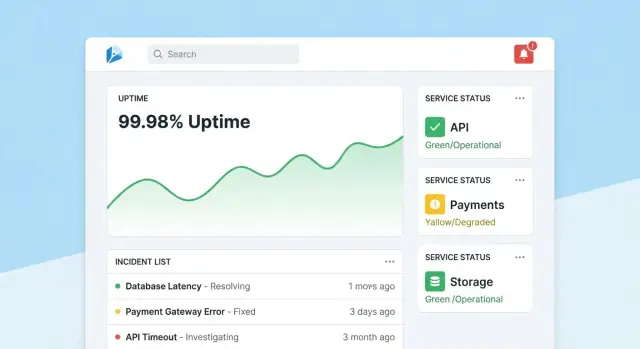
Set goals and scope for reliability tracking
Before you pick metrics or build dashboards, decide what your reliability app is responsible for—and what it is not. A clear scope prevents the tool from turning into a catch‑all “ops portal” that nobody trusts.
Define what you’re tracking
Start by listing the internal tools the app will cover (e.g., ticketing, payroll, CRM integrations, data pipelines) and the teams that own or depend on them. Be explicit about boundaries: “customer-facing website” might be out of scope, while “internal admin console” is in.
Agree on what “reliability” means here
Different organizations use the word differently. Write down your working definition in plain language—typically a mix of:
- Availability: can people access it when needed?
- Latency: is it fast enough to be usable?
- Errors: does it fail in ways users notice (timeouts, job failures, bad responses)?
If teams disagree, your app will end up comparing apples to oranges.
Decide the outcomes you want
Pick 1–3 primary outcomes, such as:
- Faster detection of issues (shorter “time to notice”)
- Clearer reporting for managers and stakeholders
- Fewer repeat incidents through better follow-up
These outcomes will later guide what you measure and how you present it.
Identify users and roles
List who will use the app and what decisions they make: engineers investigating incidents, support escalating issues, managers reviewing trends, and stakeholders needing status updates. This will shape terminology, permissions, and the level of detail each view should show.
Choose the reliability metrics that matter (SLIs/SLOs)
Reliability tracking only works if everyone agrees on what “good” means. Start by separating three similar-sounding terms.
SLIs vs SLOs vs SLAs (plain English)
An SLI (Service Level Indicator) is a measurement: “What percent of requests succeeded?” or “How long did pages take to load?”
An SLO (Service Level Objective) is the target for that measurement: “99.9% success over 30 days.”
An SLA (Service Level Agreement) is a promise with consequences, usually external-facing (credits, penalties). For internal tools, you’ll often set SLOs without formal SLAs—enough to align expectations without turning reliability into contract law.
Pick a small, consistent SLI set per tool
Keep it comparable across tools and easy to explain. A practical baseline is:
- Uptime/availability: was the tool reachable?
- Response time: how fast did key pages or endpoints respond?
- Error rate: what share of checks or requests failed (5xx, timeouts, known failure states)?
Avoid adding more until you can answer: “What decision will this metric drive?”
Choose time windows that match how people think
Use rolling windows so scorecards update continuously:
- 7 days: catches regressions quickly
- 30 days: monthly reporting and trends
- 90 days: stability over quarters
Define incidents with clear severity levels
Your app should turn metrics into action. Define severity levels (e.g., Sev1–Sev3) and explicit triggers such as:
- Sev1: tool down or critical workflow blocked for X minutes
- Sev2: major degradation (e.g., error rate above Y% for Z minutes)
- Sev3: minor issues or intermittent failures
These definitions make alerting, incident timelines, and error budget tracking consistent across teams.
Plan your data sources and ingestion approach
A reliability tracking app is only as credible as the data behind it. Before building ingestion pipelines, map every signal you’ll treat as “truth” and write down what question it answers (availability, latency, errors, deploy impact, incident response).
Map the data sources you already have
Most teams can cover the basics using a mix of:
- Status checks / synthetic probes (uptime and basic response time)
- Metrics (latency percentiles, error rates, saturation)
- Logs (error counts, top failing endpoints)
- Traces (where latency is spent across dependencies)
- Ticketing/incident tools (incident start/end, severity, owner, postmortem links)
Be explicit about which systems are authoritative. For example, your “uptime SLI” might be sourced only from synthetic probes, not server logs.
Decide push vs. pull (and how often)
- Pull works well for APIs (Prometheus, cloud monitoring, ticketing): your app polls on a schedule.
- Push is better for high-volume events (deploys, incidents, alerts): systems send webhooks/events to your app.
Set update frequency by use case: dashboards may refresh every 1–5 minutes, while scorecards can be computed hourly/daily.
Normalize identifiers and ownership
Create consistent IDs for tools/services, environments (prod/stage), and owners. Agree on naming rules early so “Payments-API”, “payments_api”, and “payments” don’t become three separate entities.
Retention and privacy
Plan what to keep and for how long (e.g., raw events 30–90 days, daily aggregates 12–24 months). Avoid ingesting sensitive payloads; store only metadata needed for reliability analysis (timestamps, status codes, latency buckets, incident tags).
Design the data model and database schema
Your schema should make two things easy: answering day-to-day questions (“is this tool healthy?”) and reconstructing what happened during an incident (“when did symptoms start, who changed what, what alerts fired?”). Start with a small set of core entities and make relationships explicit.
Core entities (start minimal)
- Tool/Service: the internal tool being tracked (name, description, environment, criticality).
- Check: a specific uptime or synthetic check tied to a tool (type, target URL, schedule, enabled).
- Metric: time-series datapoints (latency, success rate, error count) associated with a tool or check.
- SLO: the target and evaluation window (e.g., 99.9% over 30 days) plus error budget settings.
- Incident: a reliability-impacting event (severity, status, start/end, summary).
- Event: a timeline record for incidents (state changes, notes, alert received, mitigation applied).
- Owner: a team or individual responsible for the tool.
Relationships that keep queries simple
A practical baseline is:
- Tool has many Checks (and can have many SLOs).
- Check has many Metrics (or metric streams).
- Incident belongs to Tool, and Incident has many Events for the timeline.
- Tool belongs to Owner (or many-to-many if shared ownership is common).
This structure supports dashboards (“tool → current status → recent incidents”) and drill-down (“incident → events → related checks and metrics”).
Audit fields and tagging
Add audit fields everywhere you need accountability and history:
created_by,created_at,updated_atstatusplus status change tracking (either in theEventtable or a dedicated history table)
Finally, include flexible tags for filtering and reporting (e.g., team, criticality, system, compliance). A tool_tags join table (tool_id, key, value) keeps tagging consistent and makes scorecards and rollups much easier later.
Select a tech stack and deployment model
Your reliability tracker should be boring in the best way: easy to run, easy to change, and easy to support. The “right” stack is usually the one your team can maintain without heroics.
Start with what your team already ships
Pick a mainstream web framework your team knows well—Node/Express, Django, or Rails are all solid options. Prioritize:
- Clear conventions (so new contributors don’t get lost)
- Good libraries for auth, background jobs, and charts
- Predictable upgrade paths
If you’re integrating with internal systems (SSO, ticketing, chat), choose the ecosystem where those integrations are easiest for you.
If you want to accelerate the first iteration, a vibe-coding platform like Koder.ai can be a practical starting point: you can describe your entities (tools, checks, SLOs, incidents), workflows (alert → incident → postmortem), and dashboards in chat, then generate a working web app scaffold quickly. Because Koder.ai commonly targets React on the frontend and Go + PostgreSQL on the backend, it maps well to the “boring, maintainable” default stack many teams prefer—and you can export the source code if you later move to a fully manual pipeline.
Database first, then add supporting pieces
For most internal reliability apps, PostgreSQL is the right default: it handles relational reporting, time-based queries, and auditing well.
Add extra components only when they solve a real problem:
- Cache (e.g., Redis) if dashboards are slow or you’re rate-limited by upstream APIs
- Queue/background jobs (Redis + worker, Sidekiq, Celery, BullMQ) for polling uptime, sending notifications, and generating reports
Hosting and deployment model
Decide between:
- Internal cloud / Kubernetes when you need tighter network access to internal services
- PaaS when you want simpler ops and fast iteration
Whichever you choose, standardize dev/staging/prod and automate deployments (CI/CD), so changes don’t silently alter reliability numbers. If you use a platform approach (including Koder.ai), look for features like environment separation, deployment/hosting, and fast rollback (snapshots) so you can safely iterate without breaking the tracker itself.
Configuration management you can trust
Document configuration in one place: environment variables, secrets, and feature flags. Keep a clear “how to run locally” guide and a minimal runbook (what to do if ingestion stops, the queue backs up, or the database hits limits). A short page in /docs is often enough.
Design the UX: dashboards, drill-downs, and workflows
A reliability tracking app succeeds when people can answer two questions in seconds: “Are we okay?” and “What do I do next?” Design screens around those decisions, with clear navigation from overview → specific tool → specific incident.
Homepage: a fast health read
Make the homepage a compact command center. Lead with an overall health summary (e.g., number of tools meeting SLOs, active incidents, biggest current risks), then show recent incidents and alerts with status badges.
Keep the default view calm: highlight only what needs attention. Give every tile a direct drill-down to the affected tool or incident.
Tool page: from status to action
Each tool page should answer “Is this tool reliable enough?” and “Why/why not?” Include:
- Current SLO status with a simple pass/fail and remaining error budget
- Charts for uptime, latency, or error rate over selectable time ranges
- Recent changes (deploys, config edits, check updates) so patterns are obvious
- Runbooks and owners: a prominent “What to do” section with links and contacts
Design charts for non-experts: label units, mark SLO thresholds, and add small explanations (tooltips) rather than dense technical controls.
Incident page: shared context and timeline
An incident page is a living record. Include a timeline (auto-captured events like alert fired, acknowledged, mitigated), human updates, impacted users, and actions taken.
Make updates easy to publish: one text box, predefined status (Investigating/Identified/Monitoring/Resolved), and optional internal notes. When the incident is closed, a “Start postmortem” action should prefill facts from the timeline.
Admin pages: ownership and consistency
Admins need simple screens to manage tools, checks, SLO targets, and owners. Optimize for correctness: sensible defaults, validation, and warnings when changes affect reporting. Add a visible “last edited” trail so people trust the numbers.
Implement authentication, permissions, and audit trails
Reliability data only stays useful if people trust it. That means tying every change to an identity, limiting who can make high-impact edits, and keeping a clear history you can refer back to during reviews.
Authentication: use what your company already uses
For an internal tool, default to SSO (SAML) or OAuth/OIDC via your identity provider (Okta, Azure AD, Google Workspace). This reduces password management and makes onboarding/offboarding automatic.
Practical details:
- Enforce MFA via the IdP (don’t re-implement it).
- Map IdP groups to app roles on login.
- Set short session lifetimes and support manual sign-out.
Permissions: role-based access with “protected actions”
Start with simple roles and add finer-grained rules only when needed:
- Viewer: read-only dashboards and scorecards for stakeholders.
- Editor: create/update checks, incidents, and notes.
- Admin: manage SLO definitions, thresholds, integrations, and user/role mappings.
Protect actions that can change reliability outcomes or reporting narratives:
- Only Admins can change SLO targets, alert thresholds, or data-source mappings.
- Restrict who can close incidents or mark them “resolved,” and require a resolution summary.
Audit trails: immutable history of change
Log every edit to SLOs, checks, and incident fields with:
- who did it (user + role)
- when it happened (timestamp)
- what changed (before/after values)
- where it came from (UI, API, automation)
Make audit logs searchable and visible from the relevant detail pages (e.g., an incident page shows its full change history). This keeps reviews factual and reduces back-and-forth during postmortems.
Build monitoring checks and uptime collection
Monitoring is the “sensor layer” of your reliability app: it turns real behavior into data you can trust. For internal tools, synthetic checks are often the fastest path because you control what “healthy” means.
Define synthetic checks per tool
Start with a small set of check types that cover most internal apps:
- HTTP ping: confirm the service responds (status code, TLS, basic headers).
- Endpoint validation: hit a known URL and validate something meaningful (expected JSON shape, a key string in HTML, or a health endpoint payload).
- Login-free “smoke” path: if possible, test one read-only flow that reflects user experience (e.g., load the dashboard page and verify it renders).
Keep checks deterministic. If a validation can fail because of changing content, you’ll create noise and erode confidence.
Collect uptime and latency (and store it wisely)
For each check run, capture:
- Timestamp (start and end)
- Result: up/down/unknown
- Latency: total duration (and optionally DNS/connect/TTFB if you measure it)
- Reason: error code, timeout, validation failure, or exception message
Store data either as time-series events (one row per check run) or as aggregated intervals (e.g., per-minute rollups with counts and p95 latency). Event data is great for debugging; rollups are great for fast dashboards. Many teams do both: keep raw events for 7–30 days and rollups for longer-term reporting.
Treat outages vs. missing data explicitly
A missing check result should not automatically mean “down.” Add an explicit unknown state for cases like:
- the checker worker is stopped
- network partition between checker and target
- configuration removed mid-run
This prevents inflated downtime and makes “monitoring gaps” visible as their own operational issue.
Run checks on schedule with background jobs
Use background workers (cron-like scheduling, queues) to run checks at fixed intervals (e.g., every 30–60 seconds for critical tools). Build in timeouts, retries with backoff, and concurrency limits so your checker doesn’t overload internal services. Persist every run result—even failures—so your uptime monitoring dashboard can show both current status and a reliable history.
Create alerting and notification flows
Alerts are where reliability tracking turns into action. The goal is simple: notify the right people, with the right context, at the right time—without flooding everyone.
Tie alerts to SLOs (not just thresholds)
Start by defining alert rules that map directly to your SLIs/SLOs. Two practical patterns:
- Burn-rate alerts: page when error budget is being consumed fast enough that you’ll miss the SLO unless something changes.
- Threshold breaches: warn when a metric crosses a clear boundary (e.g., availability drops below 99.5% over 15 minutes).
For each rule, store the “why” alongside the “what”: which SLO is impacted, the evaluation window, and the intended severity.
Make notifications actionable
Send notifications through the channels your teams already live in (email, Slack, Microsoft Teams). Every message should include:
- A one-line summary (service + symptom + severity)
- A direct link to the relevant dashboard view (e.g., /services/payments?window=1h)
- A link to an incident page if one is created (e.g., /incidents/123)
Avoid dumping raw metrics. Provide a short “next step” like “Check recent deploys” or “Open logs.”
Reduce noise with dedupe, grouping, and quiet hours
Implement:
- Deduplication (same alert fingerprint → update existing thread)
- Grouping (one incident can collect multiple related alerts)
- Quiet hours and routing rules so low-severity alerts don’t wake on-call
Support escalation and on-call routing
Even in an internal tool, people need control. Add manual escalation (button on the alert/incident page) and integrate with on-call tooling if available (PagerDuty/Opsgenie equivalents), or at least a configurable rotation list stored in your app.
Add incident management and postmortem features
Incident management turns “we saw an alert” into a shared, trackable response. Build this into your reliability app so people can move from signal to coordination without jumping between tools.
One-click incident creation
Make it possible to create an incident directly from an alert, a service page, or an uptime chart. Pre-fill key fields (service, environment, alert source, first seen time) and assign a unique incident ID.
A good default set of fields keeps this lightweight: severity, customer impact (internal teams affected), current owner, and links to the triggering alert.
Status lifecycle and collaboration
Use a simple lifecycle that matches how teams actually work:
- Open → Investigating → Mitigated → Resolved
Each status change should capture who made the change and when. Add timeline updates (short, timestamped notes), plus support for attachments and links to runbooks and tickets (e.g., /runbooks/payments-retries or /tickets/INC-1234). This becomes the single thread for “what happened and what we did.”
Postmortems with action items
Postmortems should be fast to start and consistent to review. Provide templates with:
- Summary, impact, detection, and root cause
- Contributing factors (including process gaps)
- What worked / what didn’t
- Follow-ups with owners and due dates
Tie action items back to the incident, track completion, and surface overdue items on team dashboards. If you support “learning reviews,” allow a “blameless” mode that focuses on system and process changes rather than individual mistakes.
Reporting and reliability scorecards
Reporting is where reliability tracking becomes decision-making. Dashboards help operators; scorecards help leaders understand whether internal tools are improving, which areas need investment, and what “good” looks like.
What to include in a scorecard
Build a consistent, repeatable view per tool (and optionally per team) that answers a few questions quickly:
- SLO compliance over time: show the current period (week/month/quarter) and a trend line against the SLO target.
- Top unreliable tools: rank by missed SLO, highest downtime minutes, or worst error-budget burn.
- MTTR: median and p90 time-to-restore, so a single long incident doesn’t hide a pattern.
- Incident counts: total incidents plus severity breakdown (e.g., Sev1–Sev3), with a comparison to the previous period.
Where you can, add lightweight context: “SLO missed due to 2 deployments” or “Most downtime from dependency X,” without turning the report into a full incident review.
Filters that make leadership reporting usable
Leaders rarely want “everything.” Add filters for team, tool criticality (e.g., Tier 0–3), and time window. Ensure the same tool can appear in multiple rollups (platform team owns it, finance relies on it).
Summaries and exports
Provide weekly and monthly summaries that can be shared outside the app:
- One-click CSV export for spreadsheets
- Clean PDF export for status reviews
Keep the narrative consistent (“What changed since last period?” “Where are we over budget?”). If you need a primer for stakeholders, link to a short guide like /blog/sli-slo-basics.
Security, data quality, and operational hardening
A reliability tracker quickly becomes a source of truth. Treat it like a production system: secure by default, resistant to bad data, and easy to recover when something goes wrong.
Protect the app surface area
Lock down every endpoint—even “internal-only” ones.
- Validate inputs at the boundary (types, ranges, allowed enums, max payload sizes) and reject unknown fields.
- Add rate limiting per user/service token to prevent noisy clients from overwhelming ingestion or dashboards.
- Use parameterized queries and safe ORM patterns to avoid injection issues.
Secrets and access control
Keep credentials out of code and out of logs.
Store secrets in a secret manager and rotate them. Give the web app least-privilege database access: separate read/write roles, restrict access to only the tables it needs, and use short-lived credentials where possible. Encrypt data in transit (TLS) between browser↔app and app↔database.
Data quality guardrails
Reliability metrics are only useful if the underlying events are trustworthy.
Add server-side checks for timestamps (timezone/clock skew), required fields, and idempotency keys to deduplicate retries. Track ingestion errors in a dead-letter queue or “quarantine” table so bad events don’t poison dashboards.
Operational basics (don’t skip)
Automate database migrations and test rollbacks. Schedule backups, regularly restore-test them, and document a minimal disaster recovery plan (who, what, how long).
Finally, make the reliability app itself reliable: add health checks, basic monitoring for queue lag and DB latency, and alert when ingestion silently drops to zero.
Rollout plan and iteration roadmap
A reliability tracking app succeeds when people trust it and actually use it. Treat the first release as a learning loop, not a “big bang” launch.
Start with a focused pilot
Pick 2–3 internal tools that are widely used and have clear owners. Implement a small set of checks (for example: homepage availability, login success, and a key API endpoint) and publish one dashboard that answers: “Is it up? If not, what changed and who owns it?”
Keep the pilot visible but contained: one team or a small group of power users is enough to validate the flow.
Collect feedback where it hurts
In the first 1–2 weeks, actively gather feedback on:
- What feels confusing (metric names, charts, filters, definitions)
- What’s noisy (alerts that don’t map to user impact)
- What’s missing (ownership, runbooks, links to incidents)
Turn feedback into concrete backlog items. A simple “Report an issue with this metric” button on each chart often surfaces the fastest insights.
Iterate with integrations and automation
Add value in layers: connect to your chat tool for notifications, then your incident tool for automatic ticket creation, then CI/CD for deploy markers. Each integration should reduce manual work or shorten time-to-diagnosis—otherwise it’s just complexity.
If you’re prototyping quickly, consider using Koder.ai’s planning mode to map the initial scope (entities, roles, and workflows) before generating the first build. It’s a simple way to keep the MVP tight—and because you can snapshot and roll back, you can iterate on dashboards and ingestion safely as teams refine definitions.
Define success metrics and expand
Before rolling out to more teams, define success metrics like dashboard weekly active users, reduced time-to-detect, fewer duplicate alerts, or consistent SLO reviews. Publish a lightweight roadmap in /blog/reliability-tracking-roadmap and expand tool-by-tool with clear owners and training sessions.
FAQ
What’s the first step before building dashboards for reliability tracking?
Start by defining the scope (which tools and environments are included) and your working definition of reliability (availability, latency, errors). Then pick 1–3 outcomes you want to improve (e.g., faster detection, clearer reporting) and design the first screens around the core decisions users need to make: “Are we okay?” and “What do I do next?”
What’s the difference between SLIs, SLOs, and SLAs for internal tools?
An SLI is what you measure (e.g., % successful requests, p95 latency). An SLO is the target for that measurement (e.g., 99.9% over 30 days). An SLA is a formal promise with consequences (often external-facing). For internal tools, SLOs usually provide alignment without the overhead of SLA-style enforcement.
Which metrics should I track for most internal tools?
Use a small baseline set that stays comparable across tools:
- Availability/uptime (reachable when needed)
- Latency/response time (fast enough to use)
- Error rate (timeouts, 5xx, job failures, known bad states)
Add more only if you can name the decision it will drive (alerting, prioritization, capacity work, etc.).
What time windows work best for SLO reporting?
Rolling windows keep scorecards continuously up to date:
- 7 days: spot regressions quickly
- 30 days: monthly reporting
- 90 days: quarter-level stability
Pick windows that match how your org reviews performance so the numbers feel intuitive and get used.
How do I define incidents and severity levels in a consistent way?
Define explicit severity triggers tied to user impact and duration, such as:
- Sev1: tool down or critical workflow blocked for X minutes
- Sev2: major degradation (error rate above Y% for Z minutes)
- Sev3: minor/intermittent issues
Write these rules down in the app so alerting, incident timelines, and reporting stay consistent across teams.
What data sources should a reliability tracking app ingest?
Start by mapping which system is the “source of truth” for each question:
- Synthetic checks for uptime and basic response time
- Metrics for latency percentiles and error rates
- Logs/traces for debug context
- Ticketing/incident tools for incident metadata
Be explicit (e.g., “uptime SLI comes only from probes”), otherwise teams will argue about which numbers count.
When should I use push vs. pull ingestion?
Use pull for systems you can poll on a schedule (monitoring APIs, ticketing APIs). Use push (webhooks/events) for high-volume or near-real-time events (deploys, alerts, incident updates). A common split is dashboards refreshing every 1–5 minutes, while scorecards compute hourly or daily.
What’s a practical database schema for reliability tracking?
You’ll typically need:
- Tool/Service (owner, environment, criticality)
- Check (what gets probed, schedule)
- Metric (time-series points or rollups)
- SLO (target + evaluation window)
- Incident (severity, start/end, status)
- Event (timeline entries)
- Owner (team/person)
Make relationships explicit (tool → checks → metrics; incident → events) so “overview → drill-down” queries stay simple.
How do I add permissions and audit trails people will trust?
Log every high-impact edit with who, when, what changed (before/after), and where it came from (UI/API/automation). Combine that with role-based access:
- Viewer: read-only
- Editor: create/update checks and incident updates
- Admin: change SLO targets, thresholds, integrations
These guardrails prevent silent changes that undermine trust in your reliability numbers.
How should I handle missing monitoring data in uptime calculations?
Treat missing check results as a separate unknown state, not automatic downtime. Missing data can come from:
- checker worker stopped
- network partition between checker and target
- config changed mid-run
Making “unknown” visible prevents inflated downtime and surfaces monitoring gaps as their own operational problem.