

How to Build a Coaching Website With Online Scheduling
Learn how to create a coaching website that wins trust and lets clients book and pay online. Includes pages, copy tips, scheduling setup, and launch steps.
Clarify your offer and booking goals
Before you touch a template or connect a calendar, get clear on what you’re selling and what “success” looks like. A coaching website with scheduling works best when it’s designed around one primary decision: book, inquire, or subscribe.
Define your niche and one primary action
Start with a simple statement: who you help, what you help them achieve, and in what context. “I help new managers lead confident 1:1s” is easier to act on than “I help people grow.”
Then choose the single action you want most visitors to take. For many coaches, that’s booking a consultation. For others, it’s joining a waitlist or downloading a lead magnet. Keep everything else as a secondary path so your site doesn’t feel like a menu.
List your offers (and how they’re booked)
Write down your current offers and decide how each should be scheduled:
- 1:1 sessions (single appointment)
- Packages (multiple sessions purchased together)
- Group calls (limited seats)
- Workshops (fixed date/time)
This is also the moment to decide what you won’t offer yet. Fewer choices usually means more bookings.
Decide what must be automated
Circle what needs to run without back-and-forth emails.
Booking confirmation, reminders, intake forms, and payments are the typical “must automate” items. If you plan to sell packages, decide whether clients should book all sessions at once or one at a time.
Choose simple success metrics
Pick 2–4 numbers to track for the first month:
Bookings per week, inquiry rate (inquiries/visits), email sign-ups, and show-up rate are all useful. With those targets set, every page and every button can be judged by one question: does it increase the right kind of booking?
Plan the core pages (and what each must do)
Before you write copy or choose tools, map the handful of pages your site needs to guide a visitor from “Is this for me?” to “I’m booked.” A coaching website works best when each page has one clear job—and a single next step.
Homepage: clarify the promise and route people to booking
Your homepage should answer three questions within a few seconds: who you help, what outcome they can expect, and how to start.
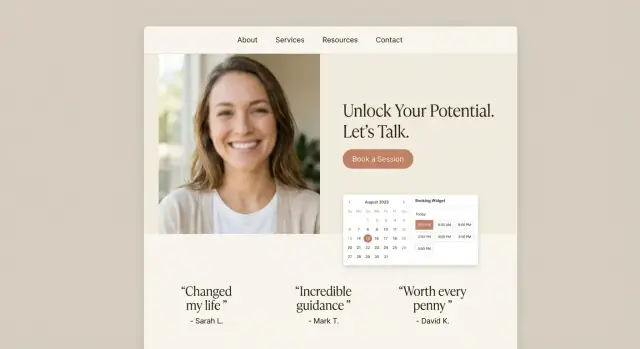
Include one primary call-to-action (CTA) like “Book a consultation” that repeats in the header and again after you explain your offer. Add a brief proof element (a testimonial, a client count, or a short case result) to reduce hesitation.
Services page: make options easy to compare
List your coaching options in plain language: what the package is for, how it works, how long it lasts, and what’s included (sessions, support between calls, resources, etc.).
If you offer multiple tiers, show a simple pricing structure and add a recommendation (“Most clients start with…”). Each option should link into the same booking flow so people don’t get stuck deciding what to do next.
About page: build credibility and create fit
Your About page isn’t a full life story—it’s reassurance. Share your approach, what you believe about coaching, and who you work best with. Include 2–3 credibility signals (certifications, experience, recognizable clients, or results).
Contact page: keep it simple (with a backup)
Use a short form for non-booking questions and include a backup email for people who prefer it. Avoid making “Contact” the main path to becoming a client.
Booking page: remove friction
Make booking the easiest action on the site: use an embedded scheduler or a dedicated booking flow. Confirm what happens next (confirmation email, intake form, and how you’ll meet).
Write website copy that builds trust and drives bookings
Your copy has one job: help the right person feel understood, feel safe, and take the next step—booking time with you. Keep it specific, calm, and action-oriented.
Lead with outcomes (not your bio)
Start your page with an outcome-first headline that answers: “Why should I book?” A simple structure is:
Book a clarity session to [desired outcome]—without [common pain].
Examples:
- “Book a clarity session to turn your ideas into a 90-day plan—without feeling overwhelmed.”
- “Book a strategy call to price your coaching offer confidently—without second-guessing.”
Then add 2–3 short sentences describing who it’s for, what you’ll do in the session, and what they’ll walk away with.
Add proof (without hype)
Trust grows from specifics. Use testimonials that mention measurable or tangible changes (even small ones), and pair them with context:
- “After two sessions, I had a weekly routine I could actually stick to.”
If you don’t have testimonials yet, use anonymized “case examples,” your relevant credentials, and your process. Avoid exaggerated promises—clear expectations convert better than big claims.
Reduce risk with trust builders
Make it easy to say “yes” by answering practical concerns:
- A short FAQ (who it’s for, session length, what happens next)
- Policies (rescheduling/cancellation)
- A brief privacy note (how you handle intake form info)
Link to details where helpful (e.g., /faq or /privacy).
Keep your call-to-action consistent
Pick one primary CTA label and use it everywhere—header button, hero section, and service blocks. “Book a Session” is clearer than mixing “Schedule a Call,” “Book Now,” and “Get Started.” Consistency reduces hesitation and keeps the booking flow feeling straightforward.
Pick the right website platform for a scheduling-based business
Your platform choice matters less for “design freedom” and more for whether you’ll actually keep the site updated. A coaching site is a living tool: you’ll tweak offers, adjust availability, and refine your booking flow.
Website builder, CMS, or all‑in‑one?
- Website builders (Squarespace, Wix, etc.) are easiest to maintain. You get templates, simple editing, and fewer moving parts.
- CMS (WordPress) offers flexibility and ownership, but you’ll spend more time on plugins, updates, and occasional troubleshooting.
- All‑in‑one coaching platforms can bundle pages, scheduling, payments, and sometimes a client portal—great if you want fewer tools, but make sure you like their page editor and checkout.
If you’re not planning to hire ongoing help, choose the option you can confidently edit in 15 minutes on a random Tuesday.
A fast path if you want a custom site (without a classic dev pipeline)
If you want a more tailored flow than most templates allow—custom booking logic, packages, intake steps, or a lightweight client portal—consider building with a vibe-coding platform like Koder.ai. You can describe what you want in chat (pages, CTAs, scheduling flow, payments, and forms) and generate a working web app quickly, then iterate as your offer evolves.
This approach can be especially useful if you:
- want a React-based site with a custom booking experience (not just an embed)
- need more control over packages and follow-ups
- prefer quick iteration with features like snapshots and rollback while you refine messaging
Embedded scheduler vs. hosted scheduling page
You typically have two ways to handle bookings:
- Embed the scheduler on your site so clients book without leaving your pages. This can feel seamless, but it needs to load quickly and look good on mobile.
- Send clients to a hosted scheduling page (from your booking system). This is often more reliable and faster to set up, but it’s one extra step away from your site.
A practical approach: start with a hosted scheduling page, then embed later if you want a more integrated feel.
Non‑negotiable essentials
Confirm your platform supports: mobile-friendly pages, SSL (https), fast hosting, and a simple editor you won’t dread using.
Plan for what you’ll add next
Even if you’re starting lean, choose a platform that can grow with you: a blog, email capture, online payments, and optionally a client portal for resources and session details.
Set up your domain, branding, and site structure
A coaching website feels “real” when the basics are tidy: a custom domain, consistent visuals, and a structure that makes booking obvious.
Domain + professional email
Buy a domain that matches your name or niche (e.g., janedoe.coach, brightcareercoaching.com). Keep it short, easy to spell, and avoid hyphens if you can.
Then connect the domain to your website platform and set up a professional email like name@yourdomain. It boosts trust immediately—and it keeps client communication separate from your personal inbox.
A simple brand kit (so everything looks cohesive)
You don’t need a full rebrand to look polished. Create a lightweight brand kit you can reuse everywhere:
- 2–3 colors (one primary, one neutral, one accent for buttons)
- 1–2 fonts (a clean heading font + an easy-to-read body font)
- Photo style (consistent lighting, backgrounds, and expressions—friendly and approachable works well)
Use your accent color for calls-to-action like “Book a Call,” so visitors learn what to click.
Site structure and navigation that guides bookings
Keep navigation simple and predictable. For most coaches, this set works well:
- Home: who you help + outcomes + a clear “Book” button
- Work With Me: services, packages, pricing, FAQs
- About: your story, credibility, approach, and values
- Book: scheduling page (the shortest path to an appointment)
- Contact: a fallback option for questions
If you offer multiple services, “Work With Me” should help people self-select, while “Book” stays focused on scheduling.
Mobile-first design
Most people will find you on a phone. Design accordingly:
- Use large buttons and obvious spacing
- Keep sections short (scanners first, readers second)
- Write in small, readable paragraphs
- Ensure the booking button appears early and repeats naturally
A clean setup here makes every later step—copy, scheduling, payments—work better.
Configure your scheduling system (the essentials)
Your scheduling setup is where “nice website” turns into “clients can actually book.” Keep it simple, predictable, and aligned with how you coach.
1) Define your session types (what clients can book)
Start with a small menu of appointments so clients don’t get stuck deciding.
Common options:
- Intro call (15–30 min): a low-commitment first step
- Standard session (50–60 min): your main coaching appointment
- Follow-up / check-in (20–30 min): shorter sessions for ongoing clients
Give each type a clear name and one-sentence description. If you serve different audiences (career vs. leadership), consider separate booking links later—don’t overload the first version.
2) Set availability rules that protect your energy
Availability is more than “working hours.” Add guardrails so your calendar stays usable:
- Working hours: choose your real coaching windows (not your whole day)
- Buffers: 10–15 minutes before/after sessions to prep and write notes
- Minimum notice: e.g., 12–24 hours to prevent last-minute surprises
If you only coach on certain days, make that explicit. Consistency reduces reschedules.
3) Make time zones and meeting location crystal clear
Enable time zone detection so clients book in their local time by default, and display the time zone on the confirmation.
Also state the “location” clearly:
- Zoom / Google Meet (recommended)
- Phone call (who calls whom?)
- In-person (include the city/area)
4) Turn on confirmations and reminders
At minimum, send an automated booking confirmation and a reminder (e.g., 24 hours and/or 1 hour before). If SMS is available, use it as an optional add-on—email alone is usually enough to start.
5) Set cancellation and reschedule rules (and show them before booking)
Write a short policy clients can understand: the cutoff time, any fees, and how to reschedule. Display it directly in the booking flow so expectations are set before anyone clicks “Confirm.”
Integrate calendars and video meeting links
When your website takes bookings, your calendar setup is what keeps everything sane. A clean integration prevents double-booking, avoids awkward “Sorry, I’m not actually free” emails, and makes the whole experience feel professional.
Connect the calendars you actually use
Most scheduling tools can sync with Google Calendar, Outlook/Microsoft 365, or iCloud. Connect the calendar where your real life lives (client sessions, personal commitments, travel), not a “clean” calendar you forget to update.
If you run multiple calendars (for example: Personal + Business), consider connecting both so the booking tool can check availability across them.
Decide how conflicts should work
Before you publish your booking link, choose conflict rules that match your workflow:
- Busy blocks: If you’re marked busy anywhere, the time slot should disappear.
- Multiple calendars: Let any connected calendar block availability (safer for solos).
- Team calendars (if applicable): If you have associate coaches, set rules for round-robin vs. client choice.
A small decision here saves a lot of rescheduling later.
Test the “weird” cases (they’re not that weird)
Edge cases are where booking systems usually break:
- Add travel time buffers before/after sessions.
- Create recurring events (weekly commitments) and confirm they block correctly.
- Add holidays and time off so clients can’t book during breaks.
- Confirm time zones display correctly for you and the client.
Do a quick dry run by making a test booking and checking whether the calendar event lands where you expect.
Add video meeting links automatically
If you coach online, automate the meeting link so you don’t manually create Zoom/Google Meet calls.
Most tools can add a unique link to every confirmed booking and place it in:
- the calendar invite
- the confirmation email
- reminders
If you prefer manual instructions (for example, you use a private room link), include clear steps in the confirmation message—keep it short, and put the link on its own line so it’s easy to find.
Add payments, packages, and pricing on the booking flow
A booking flow works best when clients can understand the cost, pick the right option, and pay without emailing back and forth. Your goal is to reduce “Wait—how much is this?” moments.
Decide what’s paid (and why)
Start by choosing whether your first touchpoint is free or paid:
- Free consults can be great for high-ticket, selective work—position it as a fit call with a clear time limit.
- Paid strategy sessions filter for serious buyers and compensate you for prep time. If you offer this, explain what they’ll walk away with (e.g., a written action plan or recording).
Be consistent: if the session is paid, show the price on the booking page and again at checkout.
Payments, currency, and receipts
Enable the payment methods your clients actually use—typically card payments, plus any local options if your audience expects them. Confirm your currency and whether tax is included.
Where your tools support it, turn on automatic invoices/receipts. This reduces admin work and reassures clients immediately after purchase.
Package options that don’t overwhelm
Offer a small set of choices that map to common needs:
- Single session (lowest commitment)
- Bundle (e.g., 3 or 6 sessions with a clear savings)
- Monthly retainer (ongoing support, best for accountability)
Keep package names plain and outcome-oriented. If you include extras (email support, resources, between-session check-ins), list them right next to the price.
Refunds and late cancellations (no surprises)
Put your policies directly in the booking flow—near the pay button and in the confirmation email. State:
- Refund terms (if any)
- Rescheduling window (e.g., 24–48 hours)
- Late cancellation/no-show fee
Clarity here protects your time and makes clients feel they’re dealing with a professional process, not a negotiation.
Collect client info with intake forms (without friction)
Your intake form should make the first session better—not feel like homework. The goal is to collect just enough context to prepare, set expectations, and reduce back-and-forth, while keeping the booking flow fast.
What to ask (and what to postpone)
Start with short, high-signal questions:
- Goals: “What would make this a successful coaching outcome in 90 days?”
- Challenges: “What’s getting in the way right now?”
- Relevant history: “Have you worked with a coach/mentor before?” (Yes/No + one optional sentence)
- Preferred times: a simple prompt like “Best days/times for sessions” (even if you offer time slots, this helps with recurring bookings).
Keep it to 5–8 questions. If you need a detailed assessment, send it after the booking (or after payment) so it doesn’t slow down conversion.
Consent and expectations (without legal overload)
Add clear checkboxes near the end:
- “I agree to the Privacy Policy and Terms.”
- If applicable: “I consent to session recording.” (Only if you actually record, and explain why.)
Link to your policies using relative URLs (for example, /privacy and /terms).
Make the info usable for you
Don’t let answers disappear into a form tool. Configure your system so submissions:
- Email you a copy (or your assistant).
- Sync to your CRM (as notes or custom fields).
- Attach to the booking record, so you can open the appointment and see context instantly.
A good intake form feels quick for the client—but saves you minutes before every call and makes your coaching noticeably more personal.
Automate reminders and follow-ups for a smooth client experience
A great booking flow doesn’t end when someone picks a time. The real client experience is what happens next—and automation is how you deliver it consistently, even on busy weeks.
Define your post-booking journey
Map the moments you want every client to experience after they book:
Confirmation → Prep → Session → Follow-up.
Your scheduling tool can usually trigger emails (or SMS) at each step. Keep the sequence simple and predictable so clients never wonder what to do next.
Send pre-session instructions (and a short agenda)
Set one email to go out immediately after booking (or 24 hours before). Include:
- The meeting link or location details
- What to prepare (e.g., “bring one goal and one current challenge”)
- A short agenda (2–4 bullet points)
- How to reschedule, plus your policy link (/policies)
This reduces no-shows and helps clients arrive ready, which makes your sessions feel more valuable.
Create follow-up templates that make rebooking easy
After each session, send a follow-up message using a template you can personalize in under a minute:
- Key notes (1–3 takeaways)
- “Homework” or a small next step
- The direct link to book the next session (your main booking page, e.g., /book)
If you offer packages, include a quick reminder of what’s left and the best next appointment type.
Use a thank-you page for resources and downloads
Instead of cramming everything into an email, link clients to a clean thank-you page after booking. It can host:
- A short “how to prepare” checklist
- FAQs
- Worksheets, PDFs, or recommended resources
This keeps your messages short, reduces support questions, and gives clients one reliable place to find what they need.
Optimize for conversions and SEO (without complexity)
A coaching website doesn’t need fancy tricks to convert—just clarity, confidence, and a friction-free booking path. Make sure every important page answers two questions fast: “Is this for me?” and “What do I do next?”
A quick bookings conversion checklist
- Put a clear CTA above the fold (for example: “Book a free 15‑minute consult”). Repeat it at least once mid-page.
- Show a clear price (or a clear “starting at” range). If pricing depends on scope, explain what affects it.
- Add a short FAQ near the booking button: who it’s for, how sessions work, rescheduling policy, and what happens after booking.
SEO basics you can actually maintain
Keep SEO simple by organizing your services logically:
- Aim for one service per page (e.g., “Career Coaching,” “Leadership Mentoring”). This keeps messaging focused and helps search engines understand what you offer.
- Use clear headings (one H1 per page, then H2s for sections like outcomes, process, and FAQ).
- Use descriptive URLs (e.g., /career-coaching instead of /services-2).
Add lightweight schema
If your platform supports it, add schema to improve how your pages appear in search results:
- LocalBusiness (if you serve a local area)
- Service (for each coaching offer)
- FAQ (for your booking questions)
Track what matters
Set up analytics so you know what’s working:
- Page views on key pages (home, service pages, booking page)
- Clicks on “Book” buttons
- Completed bookings (as a conversion event)
This gives you a clean feedback loop: adjust copy, page structure, or pricing presentation based on real booking behavior—not guesswork.
Test, launch, and maintain your coaching website
Before you announce your new site, test it like a client who has never met you. A coaching website with online scheduling isn’t “done” until the booking flow works smoothly from first click to calendar invite.
Run end-to-end booking tests
Do at least three complete test bookings (or ask a friend to do one) and document what happens at each step:
- Mobile booking: find the “Book” button, choose a time, complete the flow without pinching/zooming
- Payment: confirm the correct package/price, tax rules (if any), and receipts
- Confirmation: check the thank-you page, confirmation email, and any next-step instructions
- Calendar invite: verify time zone, location/video link, and that reminders fire as expected
If anything feels confusing, fix the copy or reduce steps—small friction costs real bookings.
Check accessibility basics
You don’t need an audit to cover the essentials. Scan key pages and forms for readable font sizes, good color contrast, and keyboard-friendly fields (tabbing through should work). Clear error messages matter: “Please enter your phone number” beats “Invalid input.”
Create a practical launch checklist
Before launch, click every menu item and important button. Confirm policies are easy to find (cancellation, rescheduling, privacy), and that your thank-you pages match what you promise (e.g., “You’ll receive an intake form within 5 minutes”). Also check for broken links and any placeholder text.
Keep maintenance simple
Set a monthly 20-minute routine:
- Update availability and blackout dates
- Add one new testimonial or case note (with permission)
- Review your booking analytics and top exit points
- Update plugins/platform settings and confirm emails still send
If you’re iterating fast (new packages, new landing pages, new flows), prioritize a setup that makes changes low-risk. For example, platforms that support versioning—like snapshots and rollback—make it easier to test improvements without worrying you’ll break your booking path.
Small, consistent upkeep prevents surprise issues and keeps your coaching calendar reliably full.
FAQ
What is the single most important goal for a coaching website with scheduling?
Start with one primary action (most often booking a consultation) and design every page around moving the right visitors to that step.
Keep secondary actions (contact form, email signup) available but visually quieter so your site doesn’t feel like a menu.
How do I define my niche so the website drives more bookings?
A simple niche statement includes:
- Who you help
- What outcome you help them achieve
- In what context (role, situation, stage)
Example: “I help new managers lead confident 1:1s” is easier to understand—and book—than a broad promise.
Which offers should I list on my site, and how should they be booked?
Keep choices small and clear. Common offer types include:
- 1:1 single sessions
- Multi-session packages
- Group calls (limited seats)
- Workshops (fixed date/time)
Decide how each is booked (one at a time vs. all sessions upfront) and remove anything you’re “not offering yet” to reduce decision fatigue.
What parts of the coaching booking process should I automate first?
Automate the steps that usually create email back-and-forth:
- Booking confirmation
- Reminders
- Intake form delivery/collection
- Payments and receipts
If you sell packages, also automate tracking what’s remaining and make rebooking easy (e.g., link back to /book).
What core pages does a coaching website with online scheduling need?
A lean, effective structure is:
- Home: outcome + primary CTA
- Work With Me / Services: options, pricing, who it’s for
- About: approach + credibility + fit
- Book: the shortest path to scheduling
- Contact: backup for non-booking questions
Each page should have one clear job and one next step.
How should I write homepage copy that gets clients to book?
Use an outcome-first headline, then quickly clarify:
- Who it’s for
- What happens in the session
- What they leave with
Avoid leading with your bio. Keep paragraphs short and make the CTA label consistent (e.g., “Book a consultation” everywhere).
Should I embed my scheduler or send people to a hosted booking page?
Both can work—choose based on reliability and setup speed:
- Hosted scheduling page: fastest to launch, often more reliable
- Embedded scheduler: feels seamless, but must load well on mobile
A practical approach is to start hosted, then embed later if you want a more integrated experience.
What scheduling settings prevent chaos and protect my time?
Use a small set of appointment types so clients don’t get stuck deciding, such as:
- Intro call (15–30 min)
- Standard session (50–60 min)
- Follow-up/check-in (20–30 min)
Add guardrails like buffers, minimum notice, and explicit coaching days to protect your calendar and reduce reschedules.
How do I prevent double-booking and time zone mistakes?
Test the common failure points before launch:
- Time zone detection and display
- Calendar conflict rules (busy blocks across connected calendars)
- Buffers, recurring events, holidays/time off
- Automatic Zoom/Google Meet link creation
Do at least one full test booking on mobile and confirm the calendar invite + reminders work end-to-end.
What should I include in an intake form without hurting conversions?
Keep it short and high-signal (aim for 5–8 questions):
- 90-day goal
- Current challenge
- Relevant history (simple yes/no + optional detail)
- Preferred days/times
If you need a deeper assessment, send it after booking (or after payment). Include consent checkboxes and link to /privacy and /terms.