

Build a Website Ready for AI Crawlers and LLM Indexing
Learn how to structure content, metadata, crawl rules, and performance so AI crawlers and LLM tools can discover, parse, and cite your pages reliably.
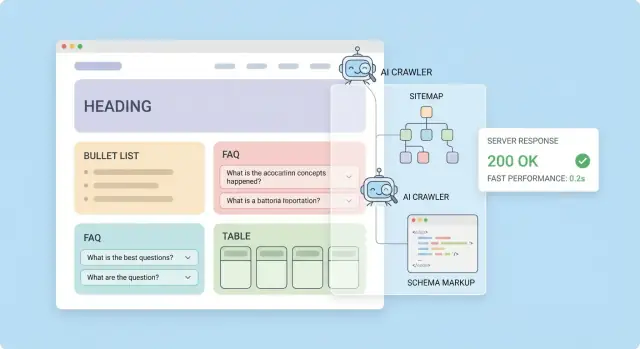
What “AI-Optimized” Really Means
“AI-optimized” is often used as a buzzword, but in practice it means your website is easy for automated systems to find, read, and reuse accurately.
When people say AI crawlers, they usually mean bots operated by search engines, AI products, or data providers that fetch web pages to power features like summaries, answers, training datasets, or retrieval systems. LLM indexing typically refers to turning your pages into a searchable knowledge store (often “chunked” text with metadata) so an AI assistant can retrieve the right passage and cite or quote it.
The real goals
AI optimization is less about “ranking” and more about four outcomes:
- Discovery: crawlers can reach your important URLs reliably.
- Parsing: your content is readable without guesswork (clean HTML, predictable structure).
- Attribution/citation: it’s obvious who wrote it, when it was updated, and what sources support it.
- Retrieval quality: passages are self-contained, specific, and easy to match to a question.
Set expectations (and what you can control)
No one can guarantee inclusion in any particular AI index or model. Different providers crawl differently, respect different policies, and refresh on different schedules.
What you can control is making your content straightforward to access, extract, and attribute—so if it’s used, it’s used correctly.
What you’ll implement by the end
- A crawlable site with clear access rules (robots and meta directives)
- Clean URL and canonical practices to reduce duplicates
- Sitemaps and internal links that surface key pages quickly
- Content formatted into “chunks” that machines can interpret
- Structured data to label what each page is about
- A simple
llms.txtfile to guide LLM-focused discovery - Performance and server responses that avoid crawler timeouts
- Trust signals (authors, dates, sources, ownership) that support citation
- A testing routine to verify what bots actually see
If you’re building new pages and flows quickly, it helps to choose tooling that doesn’t fight these requirements. For example, teams using Koder.ai (a chat-driven vibe-coding platform that generates React frontends and Go/PostgreSQL backends) often bake in SSR/SSG-friendly templates, stable routes, and consistent metadata early—so “AI-ready” becomes a default, not a retrofit.
Content Structure That LLMs Can Parse Easily
LLMs and AI crawlers don’t interpret a page the way a person does. They extract text, infer relationships between ideas, and try to map your page to a single, clear intent. The more predictable your structure is, the fewer wrong assumptions they need to make.
What an “ideal” page looks like
Start by making the page easy to scan in plain text:
- A clear H1 that matches the page’s main promise
- Short sections with descriptive headings
- Minimal sidebar noise and fewer “floating” callouts that interrupt the main narrative
A useful pattern is: promise → summary → explanation → proof → next steps.
Add a TL;DR for fast understanding
Place a short summary near the top (2–5 lines). This helps AI systems quickly classify the page and capture the key claims.
Example TL;DR:
TL;DR: This page explains how to structure content so AI crawlers can extract the main topic, definitions, and key takeaways reliably.
Keep one primary topic per page
LLM indexing works best when each URL answers one intent. If you mix unrelated goals (e.g., “pricing,” “integration docs,” and “company history” on one page), the page becomes harder to categorize and may surface for the wrong queries.
If you need to cover related but distinct intents, split them into separate pages and connect them with internal links (e.g., /pricing, /docs/integrations).
Define ambiguous terms and add context
If your audience could interpret a term multiple ways, define it early.
Example:
AI crawler optimization: preparing site content and access rules so automated systems can reliably discover, read, and interpret pages.
Use consistent naming for entities
Pick one name for each product, feature, plan, and key concept—and stick to it everywhere. Consistency improves extraction (“Feature X” always refers to the same thing) and reduces entity confusion when models summarize or compare your pages.
Headings, Lists, and Tables: Make Pages Chunk-Friendly
Most AI indexing pipelines break pages into chunks and store/retrieve the best-matching pieces later. Your job is to make those chunks obvious, self-contained, and easy to quote.
Use a clear H1–H3 hierarchy
Keep one H1 per page (the page’s promise), then use H2s for the major sections someone might search for, and H3s for subtopics.
A simple rule: if you could turn your H2s into a table of contents that describes the full page, you’re doing it right. This structure helps retrieval systems attach the right context to each chunk.
Write headings that stand alone
Avoid vague labels like “Overview” or “More info.” Instead, make headings answer the user’s intent:
- “Pricing and what’s included”
- “Supported file formats and size limits”
- “How long setup takes (typical timelines)”
When a chunk is pulled out of context, the heading often becomes its “title.” Make it meaningful.
Prefer short paragraphs, lists, and tables
Use short paragraphs (1–3 sentences) for readability and to keep chunks focused.
Bullet lists work well for requirements, steps, and feature highlights. Tables are great for comparisons because they preserve structure.
| Plan | Best for | Key limit |
|---|---|---|
| Starter | Trying it out | 1 project |
| Team | Collaboration | 10 projects |
Add FAQ for direct answers
A small FAQ section with blunt, complete answers improves extractability:
Q: Do you support CSV uploads?
A: Yes—CSV up to 50 MB per file.
Include “Next steps” and “Related reading”
Close key pages with navigation blocks so both users and crawlers can follow intent-based paths:
- Next steps: /pricing, /signup
- Related reading: /blog/technical-seo-for-ai, /docs/sitemaps
Rendering: Ensure Content Exists Without JavaScript
AI crawlers don’t all behave like a full browser. Many can fetch and read raw HTML immediately, but struggle (or simply skip) executing JavaScript, waiting for API calls, and assembling the page after hydration. If your key content only appears after client-side rendering, you risk being “invisible” to systems doing LLM indexing.
HTML crawling vs. JavaScript-rendered pages
With a traditional HTML page, the crawler downloads the document and can extract headings, paragraphs, links, and metadata right away.
With a JS-heavy page, the first response might be a thin shell (a few divs and scripts). The meaningful text shows up only after scripts run, data loads, and components render. That second step is where coverage drops: some crawlers won’t run scripts; others run them with timeouts or partial support.
Prefer server-rendered (or hybrid) for critical content
For pages you want indexed—product descriptions, pricing, FAQs, docs—favor:
- Server-Side Rendering (SSR): content is in the initial HTML response
- Static generation (SSG/ISR): prebuilt HTML with periodic refreshes
- Hybrid rendering: server-render the main content, enhance with JS for interactivity
The goal isn’t “no JavaScript.” It’s meaningful HTML first, JS second.
Don’t hide important text behind “invisible” UI
Tabs, accordions, and “read more” controls are fine if the text is in the DOM. Problems happen when tab content is fetched only after a click, or injected after a client-side request. If that content matters for AI discovery, include it in the initial HTML and use CSS/ARIA to control visibility.
Quick tests to spot rendering gaps
Use both of these checks:
- View Source: shows the HTML delivered by the server (what many crawlers see)
- Inspect Element: shows the post-JS DOM (what a real browser ends up with)
If your headings, main copy, internal links, or FAQ answers appear only in Inspect Element but not in View Source, treat it as a rendering risk and move that content into server-rendered output.
Crawl Access Controls: robots.txt and Meta Robots
AI crawlers and traditional search bots both need clear, consistent access rules. If you accidentally block important content—or allow crawlers into private or “messy” areas—you can waste crawl budget and pollute what gets indexed.
robots.txt: the site-wide traffic controller
Use robots.txt for broad rules: what entire folders (or URL patterns) should be crawled or avoided.
A practical baseline:
- Allow/Disallow: block non-public areas like
/admin/,/account/, internal search results, or parameter-heavy URLs that generate near-infinite combinations. - Crawl-delay: only add if your server struggles with bot traffic. Many major bots ignore it, so don’t rely on it as your main throttle.
- Sitemap directive: point crawlers to your canonical sitemap location so discovery is predictable.
Example:
User-agent: *
Disallow: /admin/
Disallow: /account/
Disallow: /internal-search/
Sitemap: /sitemap.xml
Important: blocking with robots.txt prevents crawling, but it doesn’t always guarantee a URL won’t appear in an index if it’s referenced elsewhere. For index control, use page-level directives.
Meta robots and X-Robots-Tag: page-level index decisions
Use meta name="robots" in HTML pages and X-Robots-Tag headers for non-HTML files (PDFs, feeds, generated exports).
Common patterns:
- Thin or utility pages (filters, sort variants, print views):
noindex,followso links still pass through but the page itself stays out of indexes. - Private or sensitive areas: don’t rely on
noindexalone—protect with authentication, and consider also disallowing crawl. - Duplicate versions (e.g., preview URLs):
noindexplus proper canonicalization (covered later).
A simple environment rule set (prod vs. staging)
Document—and enforce—rules per environment:
- Production: crawlable by default; block only clearly non-public or low-value areas.
- Staging/preview: require login; also add
noindexglobally (header-based is easiest) to avoid accidental indexing.
If your access controls affect user data, make sure the user-facing policy matches reality (see /privacy and /terms when relevant).
Canonical URLs, Duplicates, and Redirect Hygiene
If you want AI systems (and search crawlers) to reliably understand and cite your pages, you need to reduce “same content, many URLs” situations. Duplicates waste crawl budget, split signals, and can cause the wrong version of a page to be indexed or referenced.
Create clean, stable URLs
Aim for URLs that stay valid for years. Avoid exposing unnecessary parameters such as session IDs, sorting options, or tracking codes in indexable URLs (for example: ?utm_source=..., ?sort=price, ?ref=). If parameters are required for functionality (filters, pagination, internal search), ensure the “main” version is still accessible at a stable, clean URL.
Stable URLs improve long-term citations: when an LLM learns or stores a reference, it’s far more likely to keep pointing to the same page if your URL structure doesn’t change every redesign.
Use canonical tags to collapse duplicates
Add a <link rel="canonical"> on pages where duplicates are expected:
- Product variants that share most content
- Filtered category views
- Tracking parameter versions
Canonical tags should point to the preferred, indexable URL (and ideally that canonical URL should return a 200 status).
Redirect hygiene: simple and predictable
When a page moves permanently, use a 301 redirect. Avoid redirect chains (A → B → C) and loops; they slow down crawlers and can lead to partial indexing. Redirect old URLs directly to the final destination, and keep redirects consistent across HTTP/HTTPS and www/non-www.
Only use hreflang for true equivalents
Implement hreflang only when you have genuinely localized equivalents (not just translated snippets). Incorrect hreflang can create confusion about which page should be cited for which audience.
Sitemaps and Internal Linking for Reliable Discovery
Sitemaps and internal links are your “delivery system” for discovery: they tell crawlers what exists, what matters, and what should be ignored. For AI crawlers and LLM indexing, the goal is simple—make your best, cleanest URLs easy to find and hard to miss.
Build XML sitemaps that only list the right URLs
Your sitemap should include only indexable, canonical URLs. If a page is blocked by robots.txt, marked noindex, redirected, or isn’t the canonical version, it doesn’t belong in the sitemap. This keeps crawler budgets focused and reduces the chance that an LLM picks up a duplicate or outdated version.
Be consistent with URL formats (trailing slashes, lowercase, HTTPS) so the sitemap mirrors your canonical rules.
Split large sitemaps and use a sitemap index
If you have lots of URLs, split them into multiple sitemap files (common limit: 50,000 URLs per file) and publish a sitemap index that lists each sitemap. Organize by content type when it helps, e.g.:
/sitemaps/pages.xml/sitemaps/blog.xml/sitemaps/docs.xml
This makes maintenance easier and helps you monitor what’s being discovered.
Use lastmod as a trust signal, not a deployment timestamp
Update lastmod thoughtfully—only when the page meaningfully changes (content, pricing, policy, key metadata). If every URL updates on every deploy, crawlers learn to ignore the field, and genuinely important updates may be revisited later than you’d like.
Internal links: make your site navigable like a map
A strong hub-and-spoke structure helps both users and machines. Create hubs (category, product, or topic pages) that link to the most important “spoke” pages, and ensure each spoke links back to its hub. Add contextual links in copy, not just in menus.
If you publish educational content, keep your main entry points obvious—send users to /blog for articles and /docs for deeper reference material.
Structured Data: Help Machines Understand Your Pages
Structured data is a way to label what a page is (an article, product, FAQ, organization) in a format machines can read reliably. Search engines and AI systems don’t have to guess which text is the title, who wrote it, or what the main entity is—they can parse it directly.
Choose the right Schema.org type
Use Schema.org types that match your content:
- Article (blog posts, news, guides)
- FAQPage (question/answer sections)
- HowTo (step-by-step instructions)
- Product (pricing pages, product detail pages)
- Organization (your company identity)
Pick one primary type per page, then add supporting properties (for example, an Article can reference an Organization as the publisher).
Keep markup aligned with what users see
AI crawlers and search engines compare structured data to the visible page. If your markup claims an FAQ that isn’t actually on the page, or lists an author name that’s not shown, you create confusion and risk having the markup ignored.
For content pages, include author plus datePublished and dateModified when they’re real and meaningful. This makes freshness and accountability clearer—two things LLMs often look for when deciding what to trust.
If you have official profiles, add sameAs links (e.g., your company’s verified social profiles) to your Organization schema.
Example: Article JSON-LD
{
  "@context": "https://schema.org",
  "@type": "Article",
  "headline": "Build a Website Ready for AI Crawlers and LLM Indexing",
  "author": { "@type": "Person", "name": "Jane Doe" },
  "datePublished": "2025-01-10",
  "dateModified": "2025-02-02",
  "publisher": {
    "@type": "Organization",
    "name": "Acme",
    "sameAs": ["https://www.linkedin.com/company/acme"]
  }
}
Finally, validate with common testing tools (Google’s Rich Results Test, Schema Markup Validator). Fix errors, and treat warnings pragmatically: prioritize the ones tied to your chosen type and key properties (title, author, dates, product info).
llms.txt: A Simple Guide for LLM-Oriented Discovery
An llms.txt file is a small, human-readable “index card” for your site that points language-model-focused crawlers (and the people configuring them) to the most important entry points: your docs, key product pages, and any reference material that explains your terminology.
It’s not a standard with guaranteed behavior across all crawlers, and you shouldn’t treat it as a replacement for sitemaps, canonicals, or robots controls. Think of it as a helpful shortcut for discovery and context.
Where to place it
Put it at the site root so it’s easy to find:
/llms.txt
That’s the same idea as robots.txt: predictable location, quick fetch.
What to include (and what to avoid)
Keep it short and curated. Good candidates:
- Primary entry points: product overview, pricing, getting started
- Documentation hubs: docs home, API reference, SDK guides, tutorials
- Glossary / terminology: a page that defines your domain terms and preferred naming
- Policies that matter for reuse: licensing, attribution expectations, data usage notes
Also consider adding brief style notes that reduce ambiguity (for example, “We call customers ‘workspaces’ in our UI”). Avoid long marketing copy, full URL dumps, or anything that conflicts with your canonical URLs.
Here’s a simple example:
# llms.txt
# Purpose: curated entry points for understanding and navigating this site.

## Key pages
- / (Homepage)
- /pricing
- /docs
- /docs/getting-started
- /docs/api
- /blog

## Terminology and style
- Prefer “workspace” over “account”.
- Product name is “Acme Cloud” (capitalized).
- API objects: “Project”, “User”, “Token”.

## Policies
- /terms
- /privacy
Keep it aligned with sitemaps and canonicals
Consistency matters more than volume:
- Only list URLs you want discovered and cited.
- Make sure listed pages return 200 and have the correct canonical.
- If a page is replaced, update the link rather than relying on redirects.
- Don’t include URLs blocked by
robots.txt(it creates mixed signals).
Lightweight maintenance process (quarterly)
A practical routine that stays manageable:
- Quarterly review (15 minutes): click every link in
llms.txtand confirm it’s still the best entry point. - After major releases: add/remove doc hubs when you restructure navigation.
- Tie to existing checks: update
llms.txtwhenever you update your sitemap or change canonicals.
Done well, llms.txt stays small, accurate, and genuinely useful—without making promises about how any particular crawler will behave.
Performance and Server Responses That Crawlers Like
Crawlers (including AI-focused ones) behave a lot like impatient users: if your site is slow or flaky, they’ll fetch fewer pages, retry less often, and refresh their index less frequently. Good performance and reliable server responses increase the odds that your content is discovered, re-crawled, and kept up to date.
Speed and uptime: what crawlers “feel”
If your server frequently times out or returns errors, a crawler may back off automatically. That means new pages can take longer to show up, and updates may not be reflected quickly.
Aim for steady uptime and predictable response times during peak hours—not just great “lab” scores.
Improve TTFB and reduce payload
Time to First Byte (TTFB) is a strong signal of server health. A few high-impact fixes:
- Use CDN caching for public pages, and enable origin caching where possible.
- Turn on compression (Brotli or gzip) for HTML, CSS, and JavaScript.
- Keep HTML lean: avoid shipping huge inline scripts or excessive tracking tags.
- Resize and compress images so pages don’t require heavy downloads just to understand the content.
Even though crawlers don’t “see” images like people do, large files still waste crawl time and bandwidth.
Return the right HTTP status codes
Crawlers rely on status codes to decide what to keep and what to drop:
- 200 for valid pages with content.
- 301 for permanent moves (and keep redirect chains short).
- 404 when a page doesn’t exist.
- 410 when a page is intentionally removed and should be dropped faster.
- Handle 5xx carefully: fix root causes quickly, and consider a lightweight fallback page only if it still returns the correct error code.
Don’t hide core content behind logins
If the main article text requires authentication, many crawlers will only index the shell. Keep core reading access public, or provide a crawlable preview that includes the key content.
Rate limiting without blocking legitimate crawls
Protect your site from abuse, but avoid blunt blocks. Prefer:
- Token-bucket rate limits with reasonable bursts
- Allowlists for known crawler IP ranges (when available)
- Clear 429 responses with
Retry-Afterheaders
This keeps your site safe while still letting responsible crawlers do their job.
Trust Signals: Sources, Authors, and Clear Ownership
“E‑E‑A‑T” doesn’t require grand claims or fancy badges. For AI crawlers and LLMs, it mostly means your site is clear about who wrote something, where facts came from, and who is accountable for maintaining it.
Make sourcing obvious (and verifiable)
When you state a fact, attach the source as close to the claim as possible. Prioritize primary and official references (laws, standards bodies, vendor docs, peer‑reviewed papers) over secondhand summaries.
For example, if you mention structured data behavior, cite Google’s documentation (“Google Search Central — Structured Data”) and, when relevant, the schema definitions (“Schema.org vocabulary”). If you discuss robots directives, reference the relevant standards and official crawler docs (e.g., “RFC 9309: Robots Exclusion Protocol”). Even if you don’t link out on every mention, include enough detail that a reader can locate the exact document.
Show authorship and editorial ownership
Add an author byline with a short bio, credentials, and what the author is responsible for. Then make ownership explicit:
- A clear site owner (company/legal entity) in the footer
- A contact page with real channels (not just a form)
- An About page explaining your mission and editorial process (see /about)
Keep claims specific—and keep receipts
Avoid “best” and “guaranteed” language. Instead, describe what you tested, what changed, and what the limits are. Add update notes at the top or bottom of key pages (e.g., “Updated 2025‑12‑10: clarified canonical handling for redirects”). This creates a maintenance trail that both humans and machines can interpret.
Maintain a consistent glossary
Define your core terms once, then use them consistently across the site (e.g., “AI crawler,” “LLM indexing,” “rendered HTML”). A lightweight glossary page (e.g., /glossary) reduces ambiguity and makes your content easier to summarize accurately.
Testing, Monitoring, and Ongoing Improvements
An AI-ready site isn’t a one-time project. Small changes—like a CMS update, a new redirect, or a redesigned navigation—can quietly break discovery and indexing. A simple testing routine keeps you from guessing when traffic or visibility shifts.
Watch the signals that indicate discovery problems
Start with the basics: track crawl errors, index coverage, and your top-linked pages. If crawlers can’t fetch key URLs (timeouts, 404s, blocked resources), LLM indexing tends to degrade quickly.
Also monitor:
- Pages that suddenly drop out of index coverage
- Important URLs that stop receiving internal links
- Unexpected spikes in “duplicate” or “excluded” pages
Check releases like a reliability engineer
After launches (even “small” ones), review what changed:
- Redirects: are old URLs correctly sending users and bots to the new location?
- Canonicals: did templates change and start pointing canonicals to the wrong place?
- Sitemaps: are they still valid, up to date, and free of broken URLs?
A 15-minute post-release audit often catches issues before they become long-term visibility losses.
Test how your pages get summarized
Pick a handful of high-value pages and test how they’re summarized by AI tools or internal summarization scripts. Look for:
- Missing definitions (the “what is this?” sentence isn’t clear)
- Headings that don’t match the page’s actual sections
- Key details buried in long paragraphs without labels
If summaries are vague, the fix is usually editorial: stronger H2/H3 headings, clearer first paragraphs, and more explicit terminology.
Create a recurring “AI readiness” checklist
Turn what you learn into a periodic checklist and assign an owner (a real name, not “marketing”). Keep it living and actionable—then link the latest version internally so the whole team uses the same playbook. Publish a lightweight reference like /blog/ai-seo-checklist and update it as your site and tooling evolve.
If your team ships fast (especially with AI-assisted development), consider adding “AI readiness” checks directly into your build/release workflow: templates that always output canonical tags, consistent author/date fields, and server-rendered core content. Platforms like Koder.ai can help here by making those defaults repeatable across new React pages and app surfaces—and by letting you iterate via planning mode, snapshot, and rollback when a change accidentally impacts crawlability.
Small, steady improvements compound: fewer crawl failures, cleaner indexing, and content that’s easier for both people and machines to understand.
FAQ
What does “AI-optimized” actually mean for a website?
It means your site is easy for automated systems to discover, parse, and reuse accurately.
In practice, that comes down to crawlable URLs, clean HTML structure, clear attribution (author/date/sources), and content written in self-contained chunks that retrieval systems can match to specific questions.
Can you guarantee my content will be included in AI indexes or models?
Not reliably. Different providers crawl on different schedules, follow different policies, and may not crawl you at all.
Focus on what you can control: make your pages accessible, unambiguous, fast to fetch, and easy to attribute so that if they’re used, they’re used correctly.
How do I make sure AI crawlers can read my content if my site uses JavaScript?
Aim for meaningful HTML in the initial response.
Use SSR/SSG/hybrid rendering for important pages (pricing, docs, FAQs). Then enhance with JavaScript for interactivity. If your main text only appears after hydration or API calls, many crawlers will miss it.
How can I quickly check whether my content is invisible to some crawlers?
Compare:
- View Source: what the server returns (what many crawlers extract).
- Inspect Element: the post-JS DOM (what a full browser sees).
If key headings, main copy, links, or FAQs show up only in Inspect Element, move that content into server-rendered HTML.
When should I use robots.txt vs meta robots vs X-Robots-Tag?
Use robots.txt for broad crawl rules (e.g., block /admin/), and meta robots / X-Robots-Tag for indexing decisions per page or file.
A common pattern is noindex,follow for thin utility pages, and authentication (not just noindex) for private areas.
What’s the best way to handle duplicate URLs, parameters, and redirects?
Use a stable, indexable canonical URL for each piece of content.
- Add a
rel="canonical"where duplicates are expected (filters, parameters, variants). - Use 301 redirects for permanent moves.
- Avoid redirect chains and keep canonicals pointing to 200 pages.
This reduces split signals and makes citations more consistent over time.
What should (and shouldn’t) go in my XML sitemap for AI-friendly discovery?
Include only canonical, indexable URLs.
Exclude URLs that are redirected, noindex, blocked by robots.txt, or non-canonical duplicates. Keep formats consistent (HTTPS, trailing slash rules, lowercase), and use lastmod only when content meaningfully changes.
What is llms.txt and how should I use it?
Treat it like a curated “index card” that points to your best entry points (docs hubs, getting started, glossary, policies).
Keep it short, list only URLs you want discovered and cited, and ensure every link returns 200 with the correct canonical. Don’t use it as a replacement for sitemaps, canonicals, or robots directives.
How do I structure content so LLMs retrieve the right passages?
Write pages so chunks can stand alone:
- One primary intent per URL
- Clear H1→H2→H3 hierarchy
- A short TL;DR near the top
- Headings that are specific (not “Overview”)
- Short paragraphs, lists, and tables for constraints and comparisons
This improves retrieval accuracy and reduces wrong summaries.
What trust signals most improve accurate attribution and citation by AI systems?
Add and maintain visible trust signals:
- Author byline + bio
datePublishedand meaningfuldateModified- Sources close to factual claims
- Clear site ownership and contact paths
- Structured data (e.g., Article/Organization) that matches what users see
These cues make attribution and citation more reliable for both crawlers and users.