

How to Build a SaaS Comparison and Alternatives Hub Website
Learn how to plan, build, and grow a SaaS comparison and alternatives hub: site structure, templates, SEO, data sourcing, UX, and monetization.
Set Goals, Niche, and Success Metrics
Before you pick tools or start publishing pages, get painfully clear about what your hub is for. SaaS comparison sites fail most often because they try to be everything to everyone—then end up with thin pages, unclear positioning, and metrics that don’t map to business value.
Define the hub’s purpose
Decide what your default page type will be:
- Comparisons (e.g., “A vs B”): best for high-intent searches and direct decision-making.
- Alternatives (e.g., “Alternatives to X”): great for capturing churned or dissatisfied users.
- Reviews (single-product deep dives): useful for trust-building and long-tail SEO.
You can support all three, but choose a primary focus first. It influences your data fields, templates, and editorial workload.
Choose a niche you can actually win
A clear niche makes your content more specific, your recommendations more credible, and your SEO easier.
Pick one axis (or two at most):
- Role-based: “tools for recruiters,” “software for RevOps.”
- Industry-based: “construction project management tools.”
- Category-based: “help desk software,” “email marketing platforms.”
A practical test: can you name the top 15 products in your niche without research? If not, narrow down.
Pick success metrics that match your business model
Avoid vanity metrics as your primary KPI. Choose a small set you’ll track weekly:
- Organic traffic to comparison pages (leading indicator).
- Outbound clicks to vendors (purchase intent).
- Email signups / demo requests (owned audience + monetization flexibility).
- Revenue (affiliate, sponsorship, lead gen)—tracked per page and per category.
Also define a baseline for quality, such as “pages ranking in top 10 for at least 20 target queries” or “CTR from tables above 8%.”
Decide what you will not cover
Write your “no list” early to prevent scope creep. Examples:
- Unsupported categories (e.g., no cybersecurity until year two).
- Unsupported regions/languages (e.g., US/EU only).
- Unsupported pricing models (e.g., exclude enterprise-only vendors if your audience is SMB).
Publishing these boundaries can even build trust—consider a short “What we cover” note on /about.
Information Architecture and URL Structure
A SaaS comparison hub lives or dies by how quickly people can orient themselves: “Where am I, what can I compare next, and how do I get to the answer?” Your information architecture (IA) should mirror real user intent and keep URLs predictable for both readers and search engines.
Map the core page types
Start with a small set of scalable page types and design templates around them:
- Category pages (e.g., “Email Marketing Software”) that introduce the category, key criteria, and top picks.
- Product pages with a short summary, use cases, pricing notes, pros/cons, and links to relevant comparisons.
- Comparison pages (“A vs B”) where the main decision happens.
- Alternatives pages (“Alternatives to X”) for visitors who already know one tool but want options.
- Blog guides for broader education and long-tail queries, feeding internal links back to money pages.
Plan the user path (and design for it)
A common path is: search → category → comparison → product → outbound click.
Build templates that make each step effortless:
- Category pages should surface “Top comparisons” and “Most compared products.”
- Comparison pages should link to both product pages and “More comparisons in this category.”
- Product pages should highlight “X vs Y” and “Top alternatives to X.”
Keep URL rules short and consistent
Use a simple, repeatable URL system:
- Categories:
/category/email-marketing/ - Products:
/product/mailchimp/ - Comparisons:
/compare/mailchimp-vs-convertkit/ - Alternatives:
/alternatives/mailchimp/ - Guides:
/blog/how-to-choose-email-marketing-software/
Avoid changing URL patterns later—it creates redirect work and can dilute link equity.
Define repeatable internal link blocks
To make your hub feel connected, standardize internal link modules across templates:
- Breadcrumbs (e.g.,
/category/… → /product/…) - Related comparisons (always 4–8 links)
- Alternatives list on product pages
- Popular categories block in the footer
These repeated blocks improve navigation, distribute authority, and ensure every new page you publish immediately joins the wider system.
Design Your Data Model (Products, Criteria, Categories)
Before you write content or design templates, decide what “things” your site will store and how they relate. A clear data model lets you publish consistent product pages, generate comparison pages quickly, and avoid messy one-off fields that break later.
1) The “Product” model (the core record)
A Product is the SaaS tool a reader is evaluating. Keep it opinion-light in the core fields, and store judgments (scores, pros/cons) in the Comparison model.
Helpful Product fields:
- Name and tagline (one sentence that fits in cards and tables)
- Categories (one primary category + optional secondary categories)
- Pricing tiers (free trial, free plan, starting price, billing period, and a short note like “per seat”)
- Regions (where it’s available, languages supported, data residency if relevant)
- Integrations (either a list or a link to an integrations directory page)
Also consider “meta” fields that support publishing: logo, launch year, company size fit (SMB/mid-market/enterprise), and last-verified date.
2) The “Comparison” model (context-specific evaluation)
Comparisons are where your criteria scores and editorial notes live. This can represent “Product A vs Product B” or “Product X in category Y.”
Include:
- Criteria scores (numeric or labeled, e.g., 1–5)
- Short notes per criterion (why the score is what it is)
- Pros/cons (tight bullets, not marketing copy)
- Target audience (who it’s best for, and who should skip it)
This keeps one Product record reusable across many pages without rewriting the same judgments.
3) The “Vendor” model (the real-world company)
Vendors change names, URLs, and policies over time, so separate the company from the product where it helps.
Store:
- Website URL, demo/trial link, and sales contact
- Support options (email/chat/phone, hours, SLA if published)
- Security and trust links (status page, security page, compliance pages)
Required vs optional fields (so pages don’t look empty)
Decide upfront what’s required to publish a page (e.g., name, category, tagline, pricing summary, vendor website) versus optional “nice-to-have” fields. This protects quality: your templates stay complete even when some data is missing, and your team knows what “done” means.
Choose a Platform and Tech Stack
Your platform choice determines how fast you can publish, how easily you can maintain hundreds (or thousands) of similar pages, and whether advanced search/filter experiences will feel smooth or frustrating.
Three common routes (and when they fit)
No-code (e.g., Webflow) is great if you want to ship quickly, control design tightly, and keep the setup simple. It works well for smaller hubs or curated lists, but can get tricky when you need complex filtering, heavy programmatic page generation, or deep editorial workflows.
CMS (e.g., WordPress) is a solid middle ground when you need familiar content editing, roles/permissions, and lots of plugins. It can scale, but you’ll want to be disciplined about performance (plugin bloat is real) and plan how you’ll model comparisons so you’re not hand-building tables on every page.
Framework (e.g., Next.js) is best when your hub depends on:
- Fast, app-like filtering and search
- Programmatic page generation (alternatives, “X vs Y”, category pages)
- A structured database and reusable templates
This route needs more engineering upfront, but usually pays off once you’re publishing at volume.
If you want the flexibility of a custom stack without committing to a long legacy build, a vibe-coding platform like Koder.ai can be a practical middle path: you can describe your page types, data entities (products, categories, comparisons), and filters in chat, then generate a working React-based front end with a Go + PostgreSQL backend. That’s especially useful for comparison hubs because so much of the work is repeatable (templates, table components, internal link modules), and you’ll likely iterate quickly as you learn what converts.
Prioritize speed, editing, and search
Comparison hubs win on usability: pages must load fast, tables should render instantly, and filtering should feel responsive.
On the content side, ensure editors can update pricing, features, and notes without touching layout. Look for a CMS (or headless CMS) that supports structured fields and repeatable components, so your content template stays consistent.
Plan for a database-like content model
Even if you start small, assume you’ll manage many similar pages. Choose a system that can handle structured entities (products, categories, criteria, pros/cons) and relationships between them—without copy-paste.
Add analytics and cookie tooling early
Set up analytics and consent/cookie tools at the beginning so you don’t retrofit tracking later. Decide what matters (table interactions, filter usage, outbound clicks) and document events from day one. Centralize this in your template layer and refine it later in /analytics and /privacy.
Create Page Templates That Scale
Templates are what turn a “nice site” into a scalable hub. If every new product or “X vs Y” page requires bespoke layout decisions, you’ll slow down, introduce inconsistencies, and make SEO and conversion testing harder.
1) Product page template (the evergreen building block)
Your Product template should be stable enough to support hundreds of tools without edits. A practical structure:
- Overview: one-paragraph summary + screenshots/video slot (optional)
- Best for: 2–4 clear use cases (e.g., “small teams,” “enterprise security”)
- Key features: scannable list grouped by theme
- Pricing: plan table + “last checked” date
- FAQs: answers that handle objections (setup time, support, integrations)
Include reusable CTAs like “Visit website” and “See alternatives,” linking to /alternatives/<product>.
2) Alternatives page template (intent-focused navigation)
Alternatives pages should satisfy “I’m switching” intent quickly:
- Top alternatives list (ranked or categorized) with 2–3-line summaries
- Comparison tips: what to evaluate, common pitfalls, and which criteria matter most
Keep the page consistent so users can compare across different products without re-learning the layout.
3) Comparison page template (decision support)
For “X vs Y” and multi-product comparisons, standardize:
- Criteria table (the same labels across pages when possible)
- Verdict: concise recommendation + trade-offs
- Who should choose what: “Choose A if…, choose B if…”
4) Reusable UI components
Create components you can drop into any template: badges (“Best Value”), score cards, feature lists, and consistent CTAs. This makes future redesigns easier and enables clean A/B tests on the same modules across many pages.
Build a Fair Comparison Methodology
A comparison hub only works if readers believe the rankings reflect reality—not who paid most. Your methodology should be simple enough to scan, consistent across pages, and specific enough that two editors would score the same product similarly.
Choose criteria that fit the category (8–15)
Pick 8–15 criteria per category so tables stay readable while still covering what matters. For a helpdesk category, “ticket automation” and “SLA tools” make sense; for email marketing, they don’t.
Common criteria that translate well across many SaaS categories:
- Ease of use
- Pricing (entry plan + scaling)
- Integrations
- Core feature depth
- Setup time
- Support quality
- Security/compliance
- Reporting/analytics
- Team/collaboration features
Make scoring explainable (and repeatable)
Avoid “vibes-based” ratings. Define what earns each score or tier, and base it on evidence you can cite internally (docs, demo accounts, pricing pages, release notes, user feedback).
Methodology (example block to place on every page):
How we score products
- Each product is evaluated on 10 criteria relevant to this category.
- Each criterion is scored 0–5 using a written rubric (0 = not supported, 3 = standard, 5 = best-in-class).
- The overall score is a weighted average (weights are the same across all products on this page).
- Notes and sources are recorded for every score so we can update quickly when products change.
Avoid fake precision
When data is uncertain (or varies by plan), don’t publish overly specific numbers. Use ranges or tiers such as:
- Pricing: “$”, “$$”, “$$$” or “From $29–$99/mo”
- Ease of use: “Beginner-friendly / Intermediate / Advanced”
- Integrations: “50+ / 200+ / 500+” (when exact counts shift)
This reads more honest and reduces maintenance churn.
Add “last updated” and a changelog
Trust increases when readers can see freshness. Include a Last updated date on every comparison page and a short changelog (even 2–4 bullets):
- Updated pricing tiers for Product A
- Added new integration count for Product B
- Adjusted “Security” score after SOC 2 release
If you want a consistent layout, bake the methodology block, last updated, and changelog into your page template so it ships everywhere by default.
Collect Data and Keep It Updated
A comparison hub is only as useful as its accuracy. Treat data collection like an ongoing product, not a one-time writing task. The goal is simple: every claim on a page should be traceable to a source you can re-check quickly.
Where to source trustworthy data
Start with primary sources whenever possible:
- Vendor documentation (feature descriptions, limitations, API/support details)
- Pricing pages (plans, usage tiers, add-ons, annual discounts)
- Changelogs and release notes (new features, deprecations)
- Help centers (how features work in practice, setup requirements)
- User feedback (reviews, community forums) to capture common pain points—clearly separated from factual specs
When you use user feedback, summarize patterns rather than quoting isolated opinions, and avoid presenting sentiment as fact.
Build an update process (and stick to it)
Create a lightweight cadence that matches how fast vendors change:
- Monthly checks for pricing, plan names, and major feature availability
- Quarterly reviews for deeper items (integrations list, security pages, support SLAs)
- Ad-hoc updates when a vendor ships a big release or changes pricing tiers
A simple internal tracker (spreadsheet or database) should store: page URL, last verified date, next check date, and responsible owner.
Log sources so verification is fast
For each product claim, store the source link and a short note (e.g., “Pricing verified on 2025-12-10; Pro plan includes SSO”). This lets writers and editors validate updates without re-researching from scratch.
Handle unknowns without guessing
If you can’t confirm a detail, label it clearly as “Not disclosed” or “Unknown” and, if helpful, add a note like “Vendor does not publish this publicly.” Being explicit builds trust—and prevents quiet inaccuracies that hurt credibility.
UX for Comparison Tables, Filters, and CTAs
A comparison hub succeeds when people can answer one question quickly: “Which option fits me?” Your UX should reduce scanning effort, make tradeoffs obvious, and keep the next step clear.
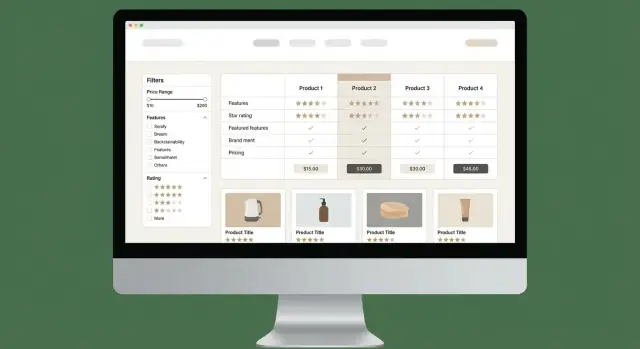
Make tables easy to scan (and trust)
Design your comparison tables for fast reading:
- Use a sticky table header so column names stay visible while scrolling.
- Keep the first column (“Product” or “Criteria”) frozen on desktop, with clear row labels (avoid vague labels like “Support”).
- Add tooltips for terms (e.g., “SSO,” “SOC 2,” “seat-based pricing”) so non-experts don’t have to leave the page to understand the basics.
- Visually group rows (Pricing, Security, Integrations) and use subtle separators to prevent “wall of data” fatigue.
When you use icons (checkmarks, dots), pair them with text for clarity and accessibility. A small “Notes” cell can explain nuances like “Available on enterprise plan only.”
Filters that match real buying decisions
Filters should reflect the decisions users actually make—not your internal data model. Start with:
- Must-have features (multi-select) and a quick “Hide products missing these” toggle
- Budget (monthly range or “Free / Under $50 / Under $200 / Enterprise”)
- Company size (Solo, SMB, Mid-market, Enterprise)
- Region (data residency, local billing, language support)
Show the number of matches and keep filter state visible. If someone shares a URL, preserve filters via query params so the page is still useful.
Balanced CTAs that don’t feel pushy
Give users multiple “next steps” based on intent:
- Primary: Visit website
- Secondary: See pricing
- Contextual: Compare (pins two products side-by-side)
Keep CTAs consistent in wording and placement. If you use affiliate links, label them plainly and link to your disclosure (e.g., /disclosure).
Mobile-first patterns for dense comparisons
On mobile, replace wide tables with summary cards per product, a quick verdict (“Best for teams under 50,” “Best budget pick”), and collapsible sections for criteria groups. Add jump links to “Key differences,” “Pricing,” and “FAQ” so users can move without endless scrolling.
SEO Strategy for Alternatives and “X vs Y” Pages
Search is usually the main acquisition channel for a SaaS comparison site, so your SEO plan should start with query intent, not just product lists. Alternatives and “X vs Y” pages work because they map to high-intent research moments—your job is to publish pages that match those moments with clarity and originality.
Keyword research that reflects how people choose
Build keyword clusters around:
- “<Product> alternatives” (switching intent)
- “<Product A> vs <Product B>” (direct evaluation)
- “best <category> for <use case>” (shortlist intent)
- “<category> for <industry>” and “<category> for <team size>” (fit intent)
Prioritize terms where you can offer real differentiation: pricing breakdowns, feature coverage, integrations, and constraints (e.g., “best CRM for nonprofits”).
Programmatic pages, but with real uniqueness
It’s fine to use templates, but avoid copy-pasting intros, pros/cons, and conclusions across pages. Write:
- A unique intro that states who the page is for and what decision it helps with
- A clear methodology note (what you compared and why)
- A verdict that explains the trade-off (not just “A is better”)
Even small original details (pricing caveats, setup time, support quality) help pages stand on their own.
Schema and internal linking that amplifies relevance
Add schema only when the content truly matches:
Productfor product entitiesReviewwhen you provide an actual rating and editorial evaluationFAQPageonly for real Q&A on the page
Use internal linking rules to create a crawlable, logical path:
Category pages → product pages → “X vs Y” comparisons → deeper guides.
For example: /category/email-marketing → /product/mailchimp → /compare/mailchimp-vs-klaviyo → /blog/how-to-choose-email-marketing-software.
Editorial Workflow, Trust, and Compliance
A comparison hub lives or dies on trust. Readers are making purchase decisions, vendors are watching your claims, and search engines increasingly reward transparency. The goal is simple: make it obvious how you evaluate tools, where your data comes from, and how you handle conflicts of interest.
Editorial guidelines (what you will and won’t say)
Create a short internal style guide and enforce it across every “Alternatives” and “X vs Y” page.
- Tone: neutral, practical, and specific. Prefer “best for…” framing over absolute winners.
- Banned claims: avoid statements you can’t verify (e.g., “#1,” “industry-leading,” “guaranteed to increase revenue,” “used by everyone”). Don’t imply endorsements from vendors unless you have written permission.
- Evidence rules: every non-obvious claim should be traceable to a source—vendor docs, pricing pages, public changelogs, independent benchmarks, or direct written confirmation.
- Fairness: explain trade-offs. If a tool is strong in one area but weak in another, say so.
- Freshness: include “Last updated” on pages and define what triggers an update (pricing changes, feature launches, product rebrands, policy changes).
A repeatable review workflow
A lightweight workflow reduces errors and makes updates routine:
Draft → Fact check → Publish → Scheduled update
- Draft: writer fills the template, includes sources, notes any assumptions, and flags unknowns.
- Fact check: a second person verifies pricing, plan limits, integrations, and key differentiators against sources. Anything unverified is reworded (“according to vendor docs…”) or removed.
- Publish: add a “How we chose” or “Methodology” snippet, ensure internal links to category hubs, and confirm affiliate disclosure placement.
- Scheduled update: set a calendar reminder (e.g., every 60–90 days for high-traffic pages). Track vendor change logs so you can update sooner when needed.
Trust pages you should publish early
These pages act as your public operating manual and reduce reader skepticism:
- /about: who runs the site, your experience, and what you cover.
- /contact: an easy way to report errors or request updates.
- /methodology: how you score tools, how you test, and what you don’t do.
- /editorial-policy: sourcing rules, conflict-of-interest handling, correction policy, and update cadence.
Link to these from your footer and (briefly) from high-intent comparison pages.
Affiliate disclosure and outbound tracking
If you monetize with affiliate links, be direct and consistent. Add a short disclosure near the first outbound link and/or near the comparison table CTA (not buried only in the footer). Keep the language plain: you may earn a commission, it doesn’t affect your rankings (only say this if it’s true), and you aim for editorial independence.
Also ensure tracked outbound links are labeled clearly (e.g., “Visit site”), and maintain a record of affiliate relationships so your fact-checker knows where bias could slip in.
Analytics, Testing, and Conversion Optimization
A comparison hub succeeds when visitors actually use it: they filter, scan tables, and click through to try a product. Analytics helps you see where people hesitate, what they trust, and which pages quietly underperform.
Track the actions that signal intent
Start with a small set of events that map to real decisions, not vanity metrics. In addition to pageviews, track:
- Filter use (which filters are used most, and which combinations lead to clicks)
- Table scroll depth (how far users get before leaving—especially on mobile)
- CTA clicks (e.g., “Visit site,” “Get pricing,” “See alternatives”)
- Outbound clicks (to vendor sites and affiliate links, separated from internal clicks)
If you can, add a simple dimension like page type and device so you can compare performance consistently.
Build dashboards by page type
Comparison hubs behave differently depending on the page:
- Category pages (e.g., “Email marketing tools”) should drive discovery: filters used, clicks into product pages, and “top pick” engagement.
- Product pages (single tool profiles) should drive confidence: time on page, FAQ opens, outbound clicks.
- “X vs Y” pages should drive decisions: table interactions and CTA click-through rate.
Keeping dashboards separated by page type prevents misleading averages and makes it obvious where to focus.
Run A/B tests that improve clarity
Prioritize tests that reduce effort for the reader:
- CTA wording and placement (“Visit website” vs “Try free”)
- Table layout (sticky headers, fewer columns by default, “expand specs”)
- “Top pick” highlighting (badge vs short callout vs no highlight)
Run one meaningful change at a time, and define success upfront (e.g., outbound click rate, not just clicks).
Use Search Console to find “almost working” pages
Search Console is a goldmine for quick wins. Look for pages with high impressions but low CTR and improve titles/meta descriptions to better match intent (e.g., “Best alternatives to X” vs “X competitors”), and ensure the first screen shows a clear summary and a visible table.
Optimization is a loop: measure → learn → adjust → repeat. Over time, small improvements compound into higher trust and more conversions.
Monetization and Long-Term Growth Plan
A comparison hub can earn well, but only if monetization is planned early and kept aligned with reader trust. The goal is simple: make money without turning every page into an ad.
Monetize without breaking the experience
Affiliate programs are usually the starting point. Use them where you can track conversions reliably and where the offer is relevant to the page (e.g., an “Alternatives to X” page linking to tools that actually fit that buyer intent). Keep affiliate disclosures clear and consistent.
Add sponsorship slots as your traffic grows. Instead of selling “anything anywhere,” package predictable placements like:
- “Featured pick” (clearly labeled) on a category page
- Newsletter sponsorship (if you have one)
- “Top integration” placement in an integrations directory
For B2B categories, lead gen can outperform affiliate revenue. Consider a “Request quotes” or “Get matched” CTA only where it makes sense (high-value categories, longer sales cycles). Keep it optional and transparent: users should know they’re submitting details to be contacted.
Create a vendor intake form (and reduce maintenance)
Set up a simple vendor intake form for updates and corrections. Ask for:
- Product name, URL, pricing page link
- Key features and limitations
- Supported platforms, integrations, compliance claims
- Proof links (docs pages, release notes)
Route submissions to a dedicated inbox and publish an “Update policy” page (e.g., what you verify, how quickly you review). This reduces stale pages and gives vendors a structured way to help you stay accurate.
Plan growth beyond “more pages”
Scale by expanding useful site areas:
- Add new categories methodically (based on search demand and revenue potential)
- Build integrations directories (e.g., “Tools that integrate with Slack”)
- Create use-case hubs (e.g., “Best tools for agencies,” “for SOC 2 teams”)
Support these hubs with practical guides on /blog—setup checklists, migration guides, “how to choose” explainers, and buyer’s guides. These articles build trust, attract links, and feed internal linking back to your comparison pages.
If you want sponsors, publish a simple media kit page and keep your pricing and placement rules consistent—brands pay more when the inventory is clear and the audience is well-defined.
FAQ
What should be the primary goal of a SaaS comparison hub?
Start by choosing a primary page type—comparisons, alternatives, or reviews—and tie it to one business goal (affiliate revenue, lead gen, newsletter growth, or brand authority). Then pick 2–4 weekly KPIs that map to that goal, such as:
- Organic sessions to comparison pages
- Outbound clicks to vendor sites
- Email signups / demo requests
- Revenue per page/category
How do I choose a niche that’s realistic to compete in?
Pick one clear niche axis (or two max): role, industry, or software category. A quick test: if you can’t name ~15 relevant products without researching, the niche is still too broad.
Narrow niches make your criteria more specific, your recommendations more credible, and your SEO easier.
What URL structure works best for comparisons and alternatives pages?
Use predictable, repeatable URL patterns so pages are easy to understand and scale:
- Categories:
/category/email-marketing/ - Products:
/product/mailchimp/ - Comparisons:
/compare/mailchimp-vs-convertkit/ - Alternatives:
/alternatives/mailchimp/ - Guides:
/blog/how-to-choose-email-marketing-software/
Avoid changing patterns later—redirects add work and can dilute SEO value.
What data model should I use for products and comparisons?
Model your site like a small database with three core entities:
- Product: mostly factual fields (tagline, pricing summary, regions, integrations)
- Comparison: context-specific scoring, notes, pros/cons, and audience fit
- Vendor: company-level items (website, trial/demo links, support, security pages)
This prevents rewriting the same judgments on every product page and keeps updates manageable.
Which product fields should be required versus optional?
Define “required” fields so templates never look empty. For example:
- Required: name, category, tagline, pricing summary, vendor website, last-verified date
- Optional: screenshots, launch year, detailed integrations list, data residency notes
Publish only when required fields are complete, and explicitly label unknowns as “Unknown” or “Not disclosed.”
Should I build on Webflow, WordPress, or Next.js?
Choose based on how much structure and scale you need:
- No-code (Webflow): fastest to ship; best for smaller curated hubs; filtering and programmatic scale can get tricky.
- CMS (WordPress): good editor experience and plugins; requires discipline for performance and structured comparison tables.
- Framework (Next.js): best for programmatic pages, fast filtering/search, and structured data; higher engineering cost upfront.
If you plan hundreds+ pages with heavy filtering, a framework + structured CMS usually wins long-term.
What templates do I need to scale to hundreds of pages?
Build stable templates for the main page types:
- Product: overview, best-for, key features, pricing (with last checked), FAQs, CTAs
- Alternatives: top alternatives list + what to evaluate
- Comparison (X vs Y): criteria table, verdict, “choose A if / choose B if”
Add reusable modules (breadcrumbs, related comparisons, alternatives list) so every new page immediately connects into the hub.
How do I create a fair, repeatable scoring methodology?
Use 8–15 category-specific criteria and define a rubric for each score (e.g., 0–5). Keep scoring evidence-based (docs, demo accounts, pricing pages, release notes), and store notes/sources per criterion.
Avoid fake precision by using tiers or ranges when details vary by plan (e.g., “50+ integrations” or “From $29–$99/mo”).
How do I keep pricing and feature data accurate over time?
Set an update cadence and track it like a product:
- Monthly: pricing, plan names, major feature availability
- Quarterly: integrations, security/compliance pages, support SLAs
- Ad-hoc: big releases, rebrands, pricing changes
Maintain an internal tracker with URL, last verified date, next check date, and an owner. Store source links for every key claim so re-checking is fast.
What analytics should I track to improve conversions on comparison pages?
Track intent actions and optimize by page type:
- Events: filter usage, table interactions/scroll depth, CTA clicks, outbound clicks
- Dashboards: separate category, product, and X vs Y pages so metrics aren’t misleading
- Tests: one change at a time (CTA wording/placement, table layout, highlight styles), measure success by outbound click rate or qualified signups
Use Search Console to find pages with high impressions but low CTR and improve titles/meta + above-the-fold clarity.