

How to Build a Website for a Technical Comparison Matrix
Learn how to plan, design, and build a website that hosts a technical decision comparison matrix with clear criteria, scoring, filters, and SEO-friendly pages.
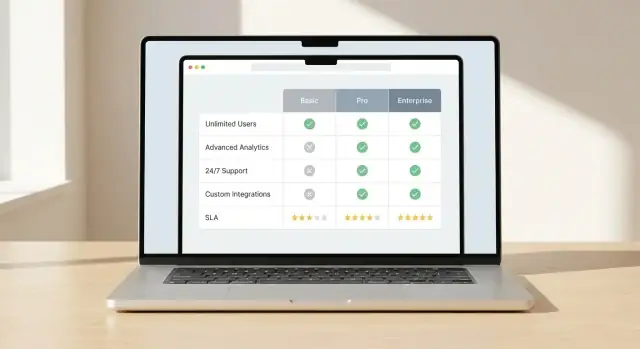
Clarify the goal and audience
A comparison matrix is only as useful as the decision it helps someone make. Before you design tables, filters, or scoring, get specific about who will use the site and what they’re trying to decide. This prevents a common failure mode: building a beautiful grid that answers questions nobody is asking.
Identify primary users (and their constraints)
Different audiences interpret the same “feature comparison” very differently:
- Buyers / product leaders want clarity, a shortlist fast, and a defensible rationale.
- Engineers want implementation details: APIs, SDKs, integration effort, limits, performance, and gotchas.
- Procurement / security cares about risk: compliance, certifications, data residency, contracts, and vendor stability.
Pick a primary audience for the first version. You can still support secondary users, but the site’s default views, terminology, and priorities should reflect the main user group.
List the decisions your site should support
Write down the concrete decisions the matrix must enable. Examples include:
- Choosing one tool for a new project
- Building a vendor shortlist for an RFP
- Replacing an existing system with minimal migration risk
- Validating whether a solution meets non-negotiable requirements
These decisions inform which criteria become top-level filters, which become “details,” and which can be omitted.
Define success metrics that match those decisions
Avoid vague goals like “increase engagement.” Choose metrics that reflect decision progress:
- Time to shortlist (e.g., from landing to a saved comparison)
- Conversion actions (demo requests, signups, downloads)
- Completion rate for key flows (filter → compare → export)
- Quality signals (fewer support questions, higher confidence ratings)
Decide what “technical” means for your audience
“Technical evaluation” can include many dimensions. Align on what matters most for your users, such as:
- APIs and integrations (coverage, rate limits, webhooks, connectors)
- Security and compliance (SSO, audit logs, SOC 2, encryption)
- Pricing and packaging (tiers, usage-based costs, hidden add-ons)
- Operations (deployment model, monitoring, SLAs, support)
Document these priorities in plain language. This becomes your north star for later choices: data model, scoring rules, UX, and SEO.
Design the data model for comparisons
Your data model determines whether the matrix stays consistent, searchable, and easy to update. Before you design screens, decide what “things” you’re comparing, what you’re measuring, and how you’ll store proof.
Start with core entities
Most technical comparison sites need a small set of building blocks:
- Vendors/Products: the items being compared (often both: a vendor can offer multiple products).
- Categories: groupings such as “Security,” “Integrations,” or “Pricing.”
- Criteria: individual rows in the matrix (e.g., “SAML SSO,” “Export formats,” “Uptime SLA”).
- Evidence: what supports a value (docs quote, screenshot reference, contract note, test result).
- Sources: where evidence came from (public doc, sales email, customer interview, internal test).
Model criteria as reusable objects and store each vendor/product’s value as a separate record (often called an “assessment” or “criterion result”). That lets you add new vendors without duplicating the criteria list.
Choose the right data type per criterion
Avoid forcing everything into plain text. Pick a type that matches how people will filter and compare:
- Boolean (Yes/No) for availability
- Numeric for limits and performance (and store units)
- Text for nuance (keep it short; add longer notes elsewhere)
- Multi-select for lists like supported platforms or compliance standards
Also decide how to represent “Unknown,” “Not applicable,” and “Planned,” so blanks don’t read as “No.”
Plan for change: versions and timestamps
Criteria evolve. Store:
- Effective dates (when a value was verified)
- Last reviewed timestamp per criterion result
- Optional criteria versions so renaming or splitting criteria doesn’t break history
Separate public facts from internal notes
Create fields (or even a separate table) for internal commentary, negotiation details, and reviewer confidence. Public pages should show the value and the evidence; internal views can include candid context and follow-up tasks.
Plan site structure and URLs
A comparison matrix site succeeds when visitors can predict where things live and how to get there. Decide on an information architecture that mirrors how people evaluate options.
Create a consistent category tree
Start with a simple, stable taxonomy that won’t change every quarter. Think in “problem areas” rather than vendor names.
Examples:
- Monitoring
- CI/CD
- IAM
- Data Warehousing
- API Gateways
Keep the tree shallow (usually 2 levels is enough). If you need more nuance, use tags or filters (e.g., “Open-source,” “SOC 2,” “Self-hosted”) rather than deep nesting. This helps users browse confidently and prevents duplicate content later.
Plan your core page types
Design your site around a few repeatable page templates:
- Category hub: explains the category, lists products, highlights common criteria, and offers “compare” entry points.
- Product page: a single vendor/tool profile with capabilities, limitations, pricing notes, integrations, and “best for” guidance.
- Comparison page: side-by-side view for two or more products, with criteria rows, scoring (if used), and notes.
Add supporting pages that reduce confusion and build credibility:
- Methodology (how you score, what you test, how often you update)
- Glossary (define criteria and acronyms)
- Contact (corrections, partnerships, data sources)
Choose URL patterns that scale
Pick URL rules early so you don’t create messy redirects later. Two common patterns:
- Comparisons:
/compare/a-vs-b(or/compare/a-vs-b-vs-cfor multi-way) - Categories:
/category/ci-cd
Keep URLs short, lowercase, and consistent. Use the product’s canonical name (or a stable slug) so the same tool doesn’t end up as both /product/okta and /product/okta-iam.
Finally, decide how filtering and sorting affects URLs. If you want shareable filtered views, plan a clean query-string approach (e.g., ?deployment=saas&compliance=soc2) and keep the base page usable without any parameters.
Define criteria, scoring, and weighting rules
A comparison matrix only helps people decide if the rules are consistent. Before you add more vendors or criteria, lock down the “math” and the meaning behind every field. This avoids endless debates later (“What did we mean by SSO support?”) and makes your results defensible.
Standardize criteria names and definitions
Start with a canonical list of criteria and treat it like a product spec. Each criterion should have:
- A clear name (short, scannable, and unique)
- A definition that removes ambiguity
- The scope (what’s included/excluded)
- The evidence you expect to support a score (docs, screenshots, test results)
Avoid near-duplicates such as “Compliance” vs “Certifications” unless the distinction is explicit. If you need variants (e.g., “Encryption at rest” and “Encryption in transit”), make them separate criteria with separate definitions.
Add scoring guidelines people can follow
Scores are only comparable if everyone uses the same scale. Write scoring rubrics that fit the criterion:
- 1–5 scale when partial support matters (common for usability, maturity, integrations)
- Pass/Fail when it’s binary (supports SAML? yes/no)
- Numeric values when measurement is direct (price, latency, max retention)
Define what each point means. For example, “3” might be “meets the requirement with limitations,” while “5” is “meets the requirement with advanced options and proven deployments.” Also specify whether “N/A” is allowed and when.
Decide weightings (or decide to avoid them)
Weighting changes the story your matrix tells, so choose intentionally:
- Default weights: good for an “editorial” ranking; document the rationale.
- Custom user weights: best for diverse audiences; let users adjust and see totals update.
- No weights: safest when you want neutrality; focus on side-by-side differences.
If you support custom weights, define guardrails (e.g., weights must sum to 100, or use low/medium/high presets).
Handle unknowns and missing data
Missing data is inevitable. Document your rule and apply it everywhere:
- Use “Unknown” when you couldn’t confirm (and keep it distinct from “No”).
- Decide whether unknowns score as 0, neutral, or excluded from totals.
- Record why it’s unknown (vendor didn’t respond, feature unclear, not tested).
These policies keep your matrix fair, repeatable, and trustworthy as it grows.
Create a UX pattern that makes differences obvious
Your comparison UI succeeds or fails on one thing: whether a reader can quickly see what’s meaningfully different. Decide on a primary comparison view and a set of visual cues that make contrasts jump off the page.
Choose your primary view (and stick to it)
Pick one main pattern and design everything around it:
- Table matrix for deep, row-by-row feature comparison across many options.
- Card comparison for summarizing a few options with clear pros/cons and key specs.
- Hybrid when you need both: cards for the “top line,” with a matrix below for details.
Consistency matters. If users learn how differences are shown in one area, the same rules should apply everywhere.
Make differences visually obvious
Avoid forcing people to scan every cell. Use deliberate highlights:
- Emphasize deltas, not sameness (e.g., bold the values that differ).
- Add “only in A” or “missing in B” indicators for features that exist in one option but not another.
- Use subtle background shading for the “most important” criteria so the eye lands there first.
Keep color meaning simple and accessible: one color for “better,” one for “worse,” and a neutral state. Don’t rely on color alone—include icons or short labels.
Support long tables without losing context
Long matrices are normal in technical evaluation. Make them usable:
- Sticky headers so column names stay visible.
- Sticky first column so criteria labels don’t disappear.
- Column pinning so readers can lock one vendor and scroll others.
Design for mobile from day one
Mobile users won’t tolerate tiny grids. Offer:
- Horizontal scrolling with clear affordances (fade edges, “swipe to compare”).
- Row grouping (Performance, Security, Pricing) with collapsible sections.
- “Comparison snapshots” that show 5–8 key criteria first, with “view full matrix” for depth.
When differences are easy to spot, readers trust the matrix—and keep using it.
Build filtering, sorting, and side-by-side comparison
A comparison matrix only feels “fast” when people can narrow the list and see meaningful differences without scrolling for minutes. Filtering, sorting, and side-by-side views are the core interaction tools that make that possible.
Filters that match how people decide
Start with a small set of filters that reflect real evaluation questions, not just what’s easy to store. Commonly useful filters include:
- Category (e.g., monitoring, CI/CD, data warehouse)
- Platform (web, mobile, desktop, API-only)
- Pricing tier (free, starter, enterprise)
- Deployment model (SaaS, self-hosted, hybrid)
Design filters so users can combine them. Show how many items match as they filter, and make it obvious how to clear filters. If some filters are mutually exclusive, prevent invalid combinations instead of showing “0 results” with no explanation.
Sorting that answers “what should I look at first?”
Sorting should reflect both objective and audience-specific priorities. Provide a few clear options such as:
- Best score (based on your scoring rules)
- Most features (count of supported criteria)
- Newest update (latest verified review or product update)
If you show a “best score,” display what that score represents (overall vs. category score) and allow users to switch the scoring view. Avoid hidden defaults.
Side-by-side comparison (2–5 items)
Let users select a small set (typically 2–5) and compare them in a fixed column layout. Keep the most important criteria pinned near the top, and group the rest into collapsible sections to reduce overwhelm.
Make the comparison shareable with a link that preserves selections, filters, and sort order. That enables teams to review the same shortlist without recreating it.
Export options when they fit the job
Exports can be valuable for internal review, procurement, and offline discussion. If your audience needs it, offer CSV (for analysis) and PDF (for sharing). Keep exports focused: include selected items, chosen criteria, timestamps, and any notes about scoring so the file isn’t misleading when viewed later.
Add evidence, transparency, and trust signals
Readers will only use your matrix to make decisions if they trust it. If your pages make strong claims without showing where the data came from—or when it was checked—users will assume it’s biased or outdated.
Attach a source to every claim
Treat each cell as a statement that needs evidence. For anything factual (pricing tier limits, API availability, compliance certifications), store a “source” field alongside the value:
- Vendor documentation reference (page title or section)
- Release note reference (version/date)
- Your internal test result (test name, environment, timestamp)
In the UI, make the source visible without clutter: a small “Source” label in a tooltip or an expandable row works well.
Show “last verified” and ownership
Add metadata that answers two questions: “How current is this?” and “Who stands behind it?”
Include a “Last verified” date for each product (and optionally for each criterion), plus an “Owner” (team or person) responsible for review. This is especially important for fast-changing items like feature flags, integrations, and SLA terms.
Use confidence indicators for gray areas
Not everything is binary. For subjective criteria (ease of setup, quality of support) or incomplete items (vendor hasn’t published details), show confidence levels such as:
- High: measured or clearly documented
- Medium: partially documented or inferred
- Low: anecdotal or unverified
This prevents false precision and encourages readers to dig into the notes.
Provide a change log for meaningful updates
On each product page, include a small change log when key fields change (pricing, major features, security posture). Readers can quickly see what’s new, and returning stakeholders can trust they’re not comparing stale information.
Set up content management and update workflows
A comparison matrix is only as useful as it is current. Before you publish the first page, decide who can change data, how those changes get reviewed, and how you’ll keep scoring consistent across dozens (or thousands) of rows.
Choose where the comparison data lives
Start by picking the “source of truth” for your matrix data:
- CMS: Best when non-technical editors need to manage vendors, features, notes, and evidence. A structured CMS (with custom fields) keeps entries consistent.
- Database: Best when your matrix is interactive and frequently queried (filters, sorting, personalized views). It can still be edited through an admin interface.
- Static files + build step (CSV/JSON in a repo): Best for smaller teams that want strong versioning and predictable releases. Changes ship when you run a build and redeploy.
The key isn’t the technology—it’s whether your team can update it reliably without breaking the matrix.
Define update workflows (review, approvals, audit trail)
Treat changes like product releases, not casual edits.
A practical workflow looks like this:
- Draft: An editor adds or updates a vendor’s details, scores, and notes.
- Review: A subject-matter reviewer checks accuracy and confirms that the criteria were applied correctly.
- Approval & publish: A final owner approves and publishes the change.
- Audit trail: Record who changed what and why (including a short rationale).
If you expect frequent updates, add lightweight conventions: change requests, a standard “reason for update” field, and scheduled review cycles (monthly/quarterly).
Create validation rules to prevent inconsistent scoring
Validation prevents silent drift in your matrix:
- Limit scores to allowed values (for example, 0–5 or “Yes/No/Partial”).
- Require a note or evidence reference when a score changes.
- Lock computed fields (like weighted totals) so editors can’t manually override them.
- Flag conflicts, such as “Not supported” paired with a high score.
Plan import pipelines for large datasets
Manual editing doesn’t scale. If you have many vendors or frequent data feeds, plan for:
- CSV import for bulk updates (new vendors, new criteria columns, score refreshes).
- API sync when data originates elsewhere (pricing tables, product catalogs, internal tooling).
- Dry runs that preview changes and highlight validation errors before publishing.
When your workflow is clear and enforced, your comparison matrix stays trustworthy—and trust is what makes people act on it.
Implement the technical architecture
A comparison matrix feels simple on the surface, but the experience depends on how you fetch, render, and update lots of structured data without delays. The goal is to keep pages fast while making it easy for your team to publish changes.
Choose a rendering approach
Pick a model based on how often your data changes and how interactive the matrix is:
- Static generation: Pre-build pages from your data. Great for speed and stability when updates are scheduled (daily/weekly).
- Server-side rendering (SSR): Build pages on request. Useful when data changes frequently or depends on user context.
- Hybrid: Pre-build stable pages, and load interactive matrix data via an API. Often the best fit for vendor comparisons.
Make the matrix fast at scale
Matrix tables get heavy quickly (many vendors × many criteria). Plan for performance early:
- Pagination or “load more” for long vendor lists
- Row/column virtualization so only visible cells render
- Caching at multiple layers (API responses, server output, and browser cache)
- Precomputed aggregates (overall scores, category totals) so the UI isn’t recalculating everything on the fly
Implement search across vendors and criteria
Search should cover vendor names, alternative names, and key criteria labels. For relevance, index:
- vendor name + synonyms
- criteria names + short descriptions
- tags/categories (e.g., “security”, “pricing”, “open source”)
Return results that jump users directly to a vendor row or a criteria section, not just a generic results page.
Instrument analytics for real decisions
Track events that show intent and friction:
- compare actions (add/remove vendor, open side-by-side)
- filter and sort changes
- exports (CSV/PDF) and copy actions
- outbound clicks (request demo, documentation, contact)
Capture the active filters and compared vendor IDs in the event payload so you can learn which criteria drive decisions.
Accelerate delivery with a build platform (when it makes sense)
If you want to ship a comparison site quickly—without spending weeks on scaffolding, CRUD admin screens, and basic table UX—a vibe-coding platform like Koder.ai can be a practical shortcut. You can describe your entities (products, criteria, evidence), required workflows (review/approval), and key pages (category hub, product page, compare page) in chat, then iterate on the generated app.
Koder.ai is especially relevant if your target stack matches its defaults: React on the web, Go on the backend with PostgreSQL, and optional Flutter if you later want a mobile companion for “saved comparisons.” You can also export source code, use snapshots/rollback while you tune scoring logic, and deploy with custom domains when you’re ready to publish.
Make comparison pages SEO-friendly
Comparison pages are often the first touchpoint for high-intent visitors (“X vs Y”, “best tools for…”, “feature comparison”). SEO works best when each page has a clear purpose, a stable URL, and content that’s genuinely distinct.
Write unique titles, intros, and summaries
Give every comparison page its own page title and on-page H1 that matches the intent:
- “Vendor A vs Vendor B: API, Security, Pricing, and Support”
- “Best ETL Tools for Healthcare: Compliance, Connectors, and Cost”
Open with a short summary that answers: who this comparison is for, what’s being compared, and what the headline differences are. Then include a compact verdict section (even if it’s “best for X, best for Y”) so the page doesn’t feel like a generic table.
Use structured data carefully
Structured data can improve how your pages appear in search results when it reflects visible content.
- Use Product markup for individual product/vendor pages (name, brand, offers where accurate).
- Use FAQ markup only if you include a real FAQ section with questions and answers users would ask.
Avoid stuffing every page with schema types or adding fields you can’t support with evidence. Consistency and accuracy matter more than volume.
Prevent duplicate content in large matrices
Filtering and sorting can create many near-identical URLs. Decide what should be indexable and what should not:
- Set canonical URLs for the “primary” version of each comparison.
- Handle URL parameters (filters/sorts) so they don’t generate duplicate indexable pages.
- If you have location- or segment-specific variants, make sure each one adds meaningful unique context.
Build an internal linking system that mirrors decisions
Help search engines and people navigate the same way they evaluate:
- Category hubs → product pages → comparison pages
- Comparison pages → referenced product pages and related comparisons (e.g., “similar vendors”, “alternatives”)
Use descriptive anchor text (“compare pricing model”, “security features”) rather than repetitive “click here”.
Plan sitemap and indexation rules
For big matrices, your SEO success depends on what you don’t index.
Include only high-value pages in your sitemap (hubs, core products, curated comparisons). Keep thin, auto-generated combinations out of indexation, and monitor crawl stats so search engines spend time on pages that actually help users decide.
Test, launch, and maintain the matrix
A comparison matrix only works if it stays accurate, easy to use, and trustworthy. Treat launch as the start of an ongoing cycle: test, release, learn, and update.
Test for decision speed (not just clicks)
Run usability tests that focus on the real outcome: can users decide faster and with more confidence? Give participants a realistic scenario (for example, “pick the best option for a 50-person team with strict security needs”) and measure:
- Time to a shortlist
- Whether they understand why one option wins
- Where they hesitate (filters, scoring, missing data)
Validate accessibility and table behavior
Comparison UIs often fail basic accessibility checks. Before launch, verify:
- Keyboard navigation works across filters, tabs, and cells
- Contrast meets guidelines for text, badges, and “winner” highlights
- Table semantics are correct (headers, row/column labels), so screen readers can interpret the matrix
Verify data accuracy and edge cases
Spot-check the most-viewed vendors/products and the most important criteria first. Then test edge cases:
- “N/A” vs “No” vs “Unknown” handling
- Ties in scoring and how they’re explained
- Filters that return zero results (do you guide users back?)
Launch with a maintenance plan
Set expectations internally and publicly: data changes.
- Monthly verification for pricing, availability, and key claims
- Quarterly review of criteria and weightings to match how people actually decide
Create a feedback loop
Define how users can report issues or suggest updates. Offer a simple form with category options (data error, missing feature, UX issue) and commit to response targets (for example, acknowledge within 2 business days). Over time, this becomes your best source of “what to fix next.”
FAQ
What’s the first step before building a technical comparison matrix website?
Start by defining the primary audience and the concrete decision they’re trying to make (shortlist, replacement, RFP, validation of requirements). Then choose criteria and UX defaults that match that audience’s constraints.
A good internal check: can a user go from landing page to a defensible shortlist quickly, without learning your whole scoring system?
How do I make the comparison trustworthy instead of looking biased?
Treat each cell as a claim that needs support. Store evidence alongside the value (docs section, release note, internal test) and show it in the UI via tooltips or expandable notes.
Also display:
- Last verified date
- Owner/reviewer
- Confidence level for subjective or unclear items
What data model works best for a comparison matrix site?
Use core entities that keep comparisons consistent:
- Vendors/Products
- Categories
- Criteria (reusable rows)
- Criterion results/assessments (product-specific values)
- Evidence + Sources
Model criteria as reusable objects, and store each product’s value separately so you can add vendors without duplicating the criteria list.
How should I choose data types for criteria values?
Use data types that match how people will filter and compare:
- Boolean (Yes/No)
- Numeric (store units)
- Short text (for nuance)
- Multi-select (platforms, standards)
Define explicit states for Unknown, Not applicable, and Planned so blank cells don’t get interpreted as “No.”
What core pages should a comparison matrix website include?
Use a small set of repeatable templates:
- Category hub (overview + entry points to compare)
- Product page (profile, best-for, limits, pricing notes)
- Comparison page (side-by-side table + notes)
Support credibility and clarity with methodology, glossary, and contact/corrections pages.
How do I structure URLs for comparisons and filtered views?
Pick URL patterns that scale and stay consistent:
- Comparisons:
/compare/a-vs-b(and-vs-cfor multi-way) - Categories:
/category/ci-cd
If you support shareable filtered views, keep the base page stable and use query strings (e.g., ?deployment=saas&compliance=soc2). Also plan canonical URLs to avoid duplicate SEO pages from filters and sorts.
How do I define scoring rules that stay consistent over time?
Write a rubric per criterion and choose a scoring style that fits:
- Pass/Fail for binary requirements
- 1–5 when partial support matters
- Numeric when it’s directly measurable
Document how unknowns affect totals (0 vs neutral vs excluded) and apply the rule consistently across the site.
Should I use weighted scoring or avoid weights altogether?
Weighting changes the story, so decide intentionally:
- Default weights for an editorial ranking (document why)
- User-adjustable weights for diverse audiences
- No weights when you want neutral side-by-side comparison
If you allow custom weights, add guardrails (e.g., weights sum to 100, presets like low/medium/high).
What filtering and comparison features matter most for usability?
Design around speed to shortlist:
- Filters that match real evaluation questions (deployment, pricing tier, platform)
- Sorting options that are explainable (best score, newest update, most features)
- Side-by-side comparison for 2–5 items
- Shareable comparison links that preserve selections and filters
Consider CSV/PDF export if your audience needs procurement/offline review, and include timestamps and scoring notes so exports aren’t misleading later.
How do I keep the matrix fast when there are many vendors and criteria?
Common performance levers for large matrices:
- Pagination or “load more” for long lists
- Row/column virtualization for big tables
- Caching (API, server output, browser)
- Precomputed aggregates (overall/category totals)
A practical approach is hybrid rendering: prebuild stable pages, then load interactive matrix data via an API so the UI stays fast while data remains updateable.