

How to Build a Website That Works Like a Sales Funnel
Learn how to design a website that guides visitors from first click to purchase with clear pages, CTAs, lead capture, email follow-up, and tracking.
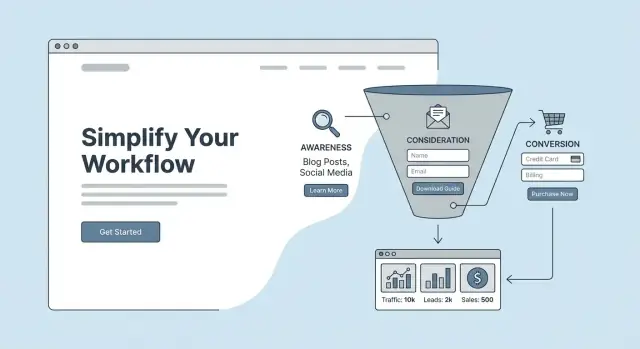
What It Means for a Website to Act Like a Sales Funnel
A “website as a funnel” isn’t a site with lots of pages—it’s a site with a clear path. Every important page answers two questions for the visitor: Where am I right now? and What should I do next? Instead of hoping people explore, you guide them step-by-step from first visit to a meaningful action.
A path, not just pages
Think of your website sales funnel as a sequence of small commitments. The goal isn’t to push everyone to “Buy now” immediately—it’s to match the next step to the visitor’s readiness and reduce confusion.
A typical funnel looks like this:
- Attention: someone discovers you (ads, search, social, referrals).
- Interest: they understand what you do and who it’s for.
- Decision: they compare options, look for proof, and check details.
- Action: they book, buy, request a quote, or sign up.
Why clarity beats “more features”
Many sites add more menus, more services, more buttons, and more widgets—then wonder why conversions stall. Extra features often create extra decisions, and extra decisions create drop-offs. A funnel-style site is the opposite: fewer competing options, clearer messaging, and stronger calls to action that move people forward.
A repeatable process you can improve
A funnel site isn’t something you “finish” once. You build a first version, watch what happens (clicks, form starts, drop-offs), and improve one step at a time. Small changes—like tightening a headline, simplifying a form, or aligning a page to a specific traffic source—can steadily raise your website conversion rate over weeks and months.
If speed is your bottleneck, consider building and iterating funnel pages with a rapid workflow. For example, Koder.ai lets you create and refine web applications (including landing-page flows) through a chat interface, then export source code, deploy, and use snapshots/rollback to safely test changes without derailing your live funnel.
Start With One Clear Audience and One Primary Goal
A website can’t guide people confidently if it’s trying to speak to everyone at once. The fastest way to make your site feel like a funnel is to pick one specific audience and one primary action you want them to take.
Define your ideal customer in plain language
Keep this simple enough that a teammate could repeat it without notes:
- Role: Who are they? (e.g., “operations manager at a 20–100 person company”)
- Goal: What are they trying to achieve quickly? (e.g., “reduce support tickets”)
- Pain point: What’s frustrating or risky right now? (e.g., “tools don’t integrate, data gets messy”)
If you can’t describe them in one sentence, your homepage and offers will usually drift into vague claims.
Choose 1–2 actions you want them to take
Decide the top outcome for the site. Common primary goals:
- Book a call / demo
- Buy a product
- Request a quote
You can support secondary actions (like “subscribe” or “follow”), but don’t give them equal visual weight. If everything is important, nothing is.
List the objections that stop the decision
Write down the top 3–5 reasons they hesitate, such as:
- “Will this work for my situation?”
- “How much time will this take?”
- “What’s the real cost (including hidden fees)?”
- “Can I trust you with my money/data?”
These objections should directly shape your copy, FAQs, proof, and guarantees.
Commit to one primary offer per funnel
Pick one main offer that matches the audience and goal (for example, “Free 20-minute audit” or “Starter plan”). Avoid bundling every service on one page. Clarity beats variety when you’re trying to move someone forward.
Map Your Funnel: Entry, Nurture, Conversion, Follow-Up
Before you design pages or write copy, sketch the path you want a visitor to take. A simple funnel map keeps your website focused and prevents “wandering” pages that look nice but don’t move people forward.
1) Draft a basic funnel map
Start with three or four steps. For most small businesses, this is enough:
- Entry pages: where people first land (blog posts, homepage, a landing page)
- Middle (nurture) pages: where they learn and compare (case studies, product/service details, FAQs)
- Conversion page: where they take the main action (checkout, booking, request a quote)
- Follow-up: what happens after (thank-you page, email sequence, onboarding)
Write it as a simple chain, for example:
SEO blog post → service page → booking page → confirmation + email reminders
2) Match traffic sources to intent
Not all visitors arrive with the same mindset, so don’t send every traffic source to the same page.
- Ads often target high intent (“buy,” “book,” “get a quote”), so send traffic to a focused landing page that matches the ad promise.
- SEO visitors may be researching. Let them enter via helpful content and then guide them to a clear next step.
- Referrals usually have higher trust. A strong “start here” page or a tailored offer page can work well.
3) Decide where email fits
Your email list can sit:
- Before purchase (lead magnet → nurture → sale) when decisions take time
- After purchase (post-purchase onboarding, upsell, reviews) when you want retention
- Both, if you have multiple offers or a longer customer journey
4) Pick 2–3 metrics to watch
Keep measurement simple at first. Track:
- Conversion rate (by page and by traffic source)
- Leads or bookings (volume and quality)
- Revenue per visitor (to see what traffic actually pays off)
Once you have this map, every new page should have a job: move someone one step closer to the conversion.
Build a Homepage That Sends People Down One Path
Your homepage shouldn’t try to be a brochure for everything you do. Its job is to quickly answer “Is this for me?” and then guide the right visitor to the next best step.
Start with a clear value proposition
In the first screen (before scrolling), spell out:
- Who it’s for (the specific customer type)
- What it helps them do (the outcome)
- Why you (what’s different or better)
For example: “For independent financial coaches who want more qualified discovery calls—without spending hours on social media.” That’s much more directional than a generic “We help you grow.”
Add proof that makes the promise believable
Once you’ve made a claim, support it with evidence visitors can scan in seconds. Depending on what you truly have, that might include:
- Short testimonials focused on results (not praise)
- A concrete outcome: “Average time-to-booking reduced from 5 days to 24 hours”
- Mini case-study snippets with a link to learn more
- Recognizable client logos only if they’re accurate and allowed
Keep proof close to the top so people don’t have to hunt for reassurance.
Show “how it works” in three simple steps
A quick “How it works” block reduces uncertainty and prevents people from bouncing to figure it out elsewhere. Aim for three steps that match your funnel path, such as:
- Choose the right plan or offer
- Share a few details (form)
- Get a call/quote/instant checkout
This also sets expectations—an underrated conversion lever.
Reduce confusion with navigation and one primary CTA
If your homepage offers five equally loud options, it forces visitors to decide—and many won’t. Instead:
- Pick one primary call to action (e.g., “Book a call” or “Get a quote”)
- Use secondary links sparingly (e.g., “See pricing,” “Read case studies”)
- Keep navigation simple; hide or de-emphasize low-priority pages
A good test: if someone reads the headline and looks at the buttons, it should be obvious what to do next.
Make the path continue below the fold
As visitors scroll, each section should either build confidence (proof, benefits, FAQs) or push toward the same next step (CTA). Repeat that primary CTA at natural decision points so the homepage behaves like the top of your website sales funnel—not a dead end.
Create Landing Pages for Each Offer and Traffic Source
A homepage has to serve many visitors. A landing page can do one job extremely well: convert someone with a specific intent into the next step of your funnel.
Match one page to one intent and one offer
If your visitor clicked an ad for “Book a demo,” don’t send them to a generic page that also promotes your newsletter, free trial, and webinar. Create a dedicated page that answers one question: “Should I take this exact action right now?”
Common pairs that deserve their own landing pages:
- Google Search ad → “Get a quote” page (high intent)
- LinkedIn ad → “Download the guide” page (mid intent)
- Partner referral → “Special offer for X audience” page (warm trust)
- Email campaign → “Register for the webinar” page (time-bound)
A simple landing page structure that converts
Most effective landing pages follow a familiar flow:
- Headline that repeats the promise from the ad/email
- Benefits (what they get, not what you do)
- Proof (testimonials, logos, numbers, short case snippet)
- Primary CTA (one action, repeated a few times)
- FAQ to handle objections (pricing, timing, what happens next)
Long-form vs short-form: when to use each
Use short-form when the offer is low-friction (newsletter, simple signup) or your audience already trusts you (warm email list, strong referral).
Use long-form when the offer is expensive, complex, or unfamiliar (consulting package, high-ticket service, switching providers). More context reduces hesitation and improves your website conversion rate.
Keep “message match” tight
Make the first screen feel like a continuation of what they just saw:
- Same key phrase from the ad/email in the headline
- Same offer name and outcome
- Similar visual style (color, product shot, or topic image)
This consistency improves sales funnel website design because visitors don’t have to re-figure out whether they’re in the right place—and they’re more likely to follow your calls to action.
Use Calls to Action That Fit Each Funnel Stage
A call to action (CTA) isn’t just a button—it’s a decision prompt. The best CTAs match what a visitor is ready to do right now, instead of forcing a “Buy” moment too early.
Match the CTA to intent
Think in stages and write CTAs that feel like the next logical step:
- Learn: “See how it works”, “Watch the 2‑minute demo”, “Read the guide”
- Compare: “Compare plans”, “See pricing”, “View case studies” (e.g., link to /pricing)
- Try: “Start free trial”, “Get the template”, “Download the checklist”
- Book: “Book a call”, “Schedule a demo”, “Check availability”
- Buy: “Buy now”, “Choose this plan”, “Complete checkout”
If someone is still exploring, “Book a call” can feel like pressure. If they’re already convinced, “Read more” can feel like a dead end.
Make buttons obvious and specific
Clarity beats cleverness. Use action + outcome: “Get my quote” is stronger than “Submit.” Keep the primary CTA visually dominant (color, size, whitespace) and ensure it reads well on mobile.
Also remove doubt inside the CTA when relevant: “Start free trial (no card)” can outperform “Start free trial” if payment anxiety is a common blocker.
Place CTAs where decisions happen
Put CTAs at natural decision points: near the top for confident visitors, after benefits and proof in the middle, and again at the end once objections are handled. For long pages, a sticky CTA can help—only if it doesn’t cover content or distract.
Avoid competing CTAs
Each page should have one primary action. Secondary links are fine, but they should visually step back. Two equally loud CTAs split attention and reduce clicks on both.
Capture Leads With Forms, Lead Magnets, and Thank-You Pages
Most visitors aren’t ready to buy on the first visit. Lead capture gives you a “yes” that’s smaller than a purchase—so you can keep the conversation going.
Pick a lead magnet that’s quick and specific
A strong lead magnet solves a small, real problem fast. Think “one clear win,” not a full course.
Examples:
- A one-page checklist (e.g., “Homepage Fixes You Can Do in 20 Minutes”)
- A template (brief, proposal, email script)
- A short calculator or quiz with instant results
- A mini-audit framework (“score your site in 10 questions”)
The best test: could someone use it within 5–10 minutes of downloading?
Keep your form short (and intentional)
Every extra field lowers sign-ups. Ask only what you will actually use right away.
A good default is:
- Email (required)
- First name (optional, if you’ll personalize)
If you truly need more (like phone), say why. Otherwise, save it for later steps.
Add trust signals right next to the form
Reduce hesitation at the exact decision point. Add a simple privacy note and set expectations:
- “No spam. Unsubscribe anytime.”
- “We’ll send the download link immediately.”
- “We’ll only use this to send the guide and related tips.”
If relevant, include one small proof point near the form (a testimonial snippet, client logos, or a “used by 2,000+ teams” line).
Don’t waste the thank-you page
A confirmation message is good; a next step is better. Your thank-you page should continue the funnel with one clear CTA, such as:
- “Watch the 3-minute walkthrough”
- “See pricing and packages” (/pricing)
- “Book a 15-minute fit check”
Keep it focused: one next action, no distractions.
Write Copy That Moves Visitors From Interest to Trust
Great funnel copy doesn’t just “describe your business.” It guides a visitor through a simple mental journey: “This is my problem → this is the outcome I want → I believe you can get me there.”
Use benefit-first messaging (problem → outcome → how)
Start with the visitor’s situation, not your features.
- Problem: Name the costly frustration they recognize immediately.
- Outcome: Paint the after-state in plain language (time saved, fewer mistakes, more confidence).
- How you deliver: Explain your approach at a high level—specific enough to feel real, simple enough to skim.
Example structure for a hero section:
- Headline: “Get qualified leads without spending hours chasing follow-ups.”
- Subhead: “Our automated booking flow screens prospects and fills your calendar with the right calls.”
- Supporting line: “Set up in a day. Works with your current tools.”
Make it scannable by design
Most visitors scan first, then read.
Use short paragraphs (1–3 lines), clear headings, and a few tight bullet lists to summarize key points (what’s included, who it’s for, what happens next). If a page looks dense, trust drops—even if the content is good.
A helpful pattern:
- What you get (3–5 bullets)
- How it works (3 simple steps)
- Who it’s for / not for (sets expectations and reduces refunds)
Add proof responsibly
Trust rises when proof is specific and believable. Use:
- Testimonials that mention a concrete result or experience
- Small “case snapshots” (before/after, timeframe, what you changed)
- Logos or numbers only if they’re accurate and current
Avoid exaggerated claims. If you offer a guarantee, state the exact terms—and only if you can honor them.
Answer objections with a short FAQ
On key pages (especially landing pages and pricing), include 4–6 FAQs that address real hesitation:
- “How long does setup take?”
- “What if I don’t have X?”
- “Is this month-to-month?”
- “What happens after I sign up?”
The goal isn’t to win an argument—it’s to remove uncertainty so the next step feels safe.
Design the Supporting Pages That Remove Buying Friction
Even the best landing page can stall if visitors can’t quickly answer basic questions: “What do you offer?”, “How much is it?”, “Will this work for me?”, and “What happens next?” Supporting pages exist to remove that hesitation—so the main funnel pages don’t have to carry the entire burden.
The must-have pages (and what each should do)
At minimum, make these pages easy to find and easy to scan:
- /pricing: Clear options, what’s included, and a direct next step.
- Product/Service page: What you do, who it’s for, outcomes, and process.
- About: Why you, proof of credibility, and how you work.
- /contact: Simple ways to reach you (and what to expect after).
- FAQ: The “objection remover” for common concerns.
Make pricing feel simpler (not cheaper)
Pricing confusion kills momentum. Instead of one long list of features, use packages and label them by fit (e.g., “Best for new businesses” vs. “Best for growing teams”). For each option, include:
- What’s included (plain language)
- Who it’s for (one sentence)
- A recommended next step (link to /contact or the relevant checkout/booking page)
Guide choices with internal links and decision helpers
Don’t make visitors hunt. Use “Start here” blocks and comparison sections that point people to the right path:
- “Not sure which plan?” → link to /pricing
- “Want to see examples?” → link to /blog/case-studies (or your closest equivalent)
- “Ready to talk?” → link to /contact
The goal is simple: every supporting page should answer a question and gently route the visitor back toward a decision.
Add Email Follow-Up to Turn Leads Into Customers
Most visitors won’t buy on their first visit—even if they like what you offer. Email follow-up is how your website keeps the conversation going after someone downloads a lead magnet, requests a quote, or starts a trial.
What to automate (so nothing slips)
Automate emails that are time-sensitive or easy to forget:
- Welcome sequence right after someone signs up (sets expectations and delivers what they asked for)
- Reminder emails for incomplete actions (unfinished booking, didn’t confirm email, didn’t schedule the call)
- Lead follow-up when someone requests info (answer common questions and show the next step)
- Cart/checkout recovery if you sell online (a short series that brings them back to finish)
Automation doesn’t mean “spam.” It means fast, consistent follow-up that matches what your website promised.
A simple email flow you can copy
Here’s a basic sequence that fits most funnels:
-
Email 1: Deliver the lead magnet (immediate)
- Provide the download/link and summarize what they’ll get.
- Next step: “Reply with your #1 question” or “See the 2-minute checklist”.
-
Email 2: Educate (Day 1–2)
- One useful tip or quick win related to the lead magnet.
- Next step: “Watch the demo”, “Compare plans” (/pricing), or “Book a call”.
-
Email 3: Build trust (Day 3–4)
- Short story, testimonial, or case study with specific results.
- Next step: “Start your trial” or “Get a quote”.
-
Email 4: Invite action (Day 5–7)
- Make a clear offer and remove a common objection (time, risk, setup).
- Next step: a single primary CTA—buy, book, or start.
Keep your message consistent
Your emails should mirror your on-site promise: same offer name, same benefits, and the same primary CTA. If your landing page pushes “Book a call,” don’t switch to “Buy now” in email unless you explain the shift. Every email should have one clear next step and link back to the most relevant page (not your homepage).
Optimize Checkout or Booking for Fewer Drop-Offs
Checkout (or a booking flow) is where interested visitors become customers—and where many abandon. The goal is to make the final steps feel fast, obvious, and safe.
Simplify the path to purchase
Every extra field and click creates doubt or friction. Keep the flow tight:
- Use as few steps as possible (ideally one page, or a short “Details → Payment → Confirm” flow).
- Remove non-essential fields (do you really need company name, phone number, or full address for a digital product?).
- Show clear totals early: price, tax, delivery fees (if any), and the final amount.
- Offer guest checkout where it makes sense; account creation can happen after purchase.
Add reassurance at the moment it matters
People hesitate right before paying. Add small reassurance near the “Pay” or “Book” button—where eyes naturally pause.
Include only what’s relevant:
- Delivery or turnaround timelines (e.g., “Ships in 2–3 business days” or “You’ll receive access immediately”).
- Refund/return policy if applicable, linked as a short, plain-language snippet (e.g., “30-day returns. See details → /returns”).
- What happens next after booking (e.g., “You’ll pick a time on the next screen”).
Use microcopy to prevent errors
Microcopy reduces form mistakes and keeps momentum.
Examples that work well:
- Card field: “Name on card (as shown)”
- Phone field: “Optional—only used for delivery updates”
- Date field: “MM / YY” with inline validation like “Please enter a valid month”
- Coupon field: “Have a code? Apply” (don’t overemphasize discounts)
Create strong post-purchase steps
After payment or booking, your confirmation page should do more than say “Thanks.”
- Confirm the next step: receipt sent, booking details, access info, or shipping expectations.
- Start onboarding immediately (a simple checklist or “What to do first”).
- Add an upsell only if it’s genuinely relevant and doesn’t distract from completion (e.g., “Add priority support” for a service, not random products).
Track Performance and Improve the Funnel Over Time
A funnel-style website is never “done.” The difference between an average site and a high-converting one is simple: the best sites measure what happens, then make small improvements consistently.
Set up basic tracking (so you’re not guessing)
Start by tracking a few actions that show intent—not just traffic.
At minimum, measure:
- Page views on key pages (homepage, landing pages, pricing, checkout/booking)
- Form submits (contact, quote, demo, download)
- Purchases or bookings (your core conversion)
- Key clicks like “Call,” “Email,” “Get a quote,” or “Start checkout”
If you can, add event tracking for scroll depth or button clicks on your main CTA. This helps you spot where people lose interest.
Build a simple dashboard you’ll actually use
Keep reporting focused on the path that matters:
Traffic source → landing page → conversion
For example: “Google Ads → /landing/free-estimate → form submit rate.” When you view results this way, you’ll quickly see which sources bring serious leads and which pages need work.
Run small A/B tests (one change at a time)
Avoid big redesigns based on opinions. Test small elements that affect decisions:
- Headline (outcome-focused vs. feature-focused)
- CTA text (“Get pricing” vs. “See plans”)
- Hero section (shorter, clearer message)
- Form length (fewer fields often increases submits)
Let each test run long enough to collect meaningful data, then keep the winner.
If you’re iterating quickly, tooling matters. With Koder.ai, teams can prototype alternative funnel steps (new landing page variants, pricing-page layouts, onboarding flows), deploy them fast, and roll back instantly if a test underperforms—useful when you’re optimizing a high-traffic funnel and want speed without risky “big bang” changes.
Schedule a monthly funnel review
Once a month, review your key pages, conversion rates, and drop-off points. Make one or two changes based on what the numbers say, document the result, and repeat. Over a few months, these small iterations compound into a much stronger funnel.
FAQ
What does it mean for a website to “work like a sales funnel”?
A website acts like a sales funnel when each important page has a single job: clarify where the visitor is and guide them to the next step.
Practically, that means fewer competing options, clear CTAs, and a mapped path like entry → nurture → conversion → follow-up.
Why does clarity usually convert better than adding more features?
A funnel site reduces decisions. When you add more menus, offers, and buttons, you often add more hesitation.
Aim for:
- One primary offer per funnel
- One primary CTA per page
- Supporting pages that answer objections and route back to the decision
How do I choose the right audience and primary goal for my site?
Pick:
- One clear audience (role + goal + pain point)
- One primary goal (book, buy, request a quote)
Then write your homepage and key pages as if you’re talking to that audience only. You can add secondary audiences later, but start narrow for faster improvements.
How do I identify and handle the objections that block conversions?
List the top 3–5 reasons people hesitate, such as:
- “Will this work for my situation?”
- “How long will this take?”
- “What’s the real total cost?”
- “Can I trust you with my money/data?”
Then address them directly with proof, clear terms, short FAQs, and process details near the CTA.
What’s a basic website funnel map I can start with?
Use a simple chain like:
Traffic source → entry page → nurture page(s) → conversion page → thank-you + email follow-up
Example:
- SEO article → service page → booking page → confirmation + reminders
This map keeps every page accountable: it either builds confidence or moves the visitor forward.
Should I send all traffic to my homepage?
Because intent differs by source.
- Ads: often high intent; send to a focused landing page that matches the ad promise.
- SEO: often research; let visitors enter via helpful content, then guide to a clear next step.
- Referrals: higher trust; a “start here” or tailored offer page can work well.
Avoid sending everything to the homepage by default.
What should my homepage include to behave like the top of a funnel?
Do three things above the fold:
- Say who it’s for
- Promise a clear outcome
- Show why you with quick proof
Then drive one next step with a primary CTA (e.g., “Book a call”) and repeat it at natural decision points as visitors scroll.
When do I need dedicated landing pages instead of a general page?
Use landing pages when you have a specific offer + a specific traffic source (ads, email campaigns, partner referrals).
A practical structure:
- Headline that matches the ad/email
- Benefits
- Proof
- One primary CTA (repeated)
- Short FAQ to remove hesitation
How do I choose the right call to action (CTA) for each page?
Match the CTA to readiness:
- Learn: “See how it works”
- Compare: “See pricing” (e.g., /pricing)
- Try: “Download the checklist”
- Book: “Schedule a demo”
- Buy: “Complete checkout”
On any single page, keep one primary action and make secondary links visually quieter.
What metrics should I track to improve my website funnel over time?
Start simple with 2–3 metrics:
- Conversion rate by page and traffic source
- Leads/bookings (volume and quality)
- Revenue per visitor
Then improve one step at a time (headline clarity, fewer form fields, better message match, tighter CTA). Small changes compound over weeks and months.