

Cash on delivery confirmation flow to cut fraud and RTO
Reduce COD fraud and returns-to-origin with a cash on delivery confirmation flow using OTP, address checks, and WhatsApp confirmations without losing sales.
Why COD creates fraud and RTO in plain terms
Cash on delivery (COD) feels safe for shoppers because they do not pay upfront. For sellers, it creates a different kind of risk: you spend money to pack and ship before you know the buyer is real, reachable, and willing to accept the parcel.
COD problems usually fall into a few buckets. Some are true fraud (someone places orders to waste your money or test stolen phone numbers). Some are “fake orders” where the details are made up and nobody intends to receive anything. Others are not malicious: the buyer used a wrong address, is not home, or stops answering calls when the courier arrives.
RTO (returns to origin) is what happens when the shipment fails and comes back to your warehouse. With prepaid orders, a buyer is already committed. With COD, the buyer can simply refuse the package or disappear, and the cost lands on you: forward shipping, return shipping, and lost time in inventory.
The goal of a cash on delivery confirmation flow is simple: confirm intent and confirm deliverability early, while keeping checkout easy. You do not need to “interrogate” every shopper. You just need lightweight checks that catch the common failure reasons before shipping.
Here are practical signals you can confirm before you hand the parcel to a courier:
- Phone number works (OTP can be received and entered)
- Buyer is reachable (quick confirmation via SMS or WhatsApp reply)
- Address is deliverable (validated format, correct postcode, clear house number)
- Order looks consistent (same name-phone-address patterns, not random strings)
- Risk is acceptable (high-value or high-RTO areas get stronger checks)
When these signals are verified early, fewer packages go out “blind,” and RTO drops without turning checkout into a long form that scares away real customers.
What to measure before you change anything
Before you add OTPs or WhatsApp checks, get a clear baseline. A cash on delivery confirmation flow can reduce RTO, but it can also add friction. If you do not measure both sides, you might “fix” RTO while quietly losing good orders.
Start with a simple weekly dashboard (daily is even better if volumes are high). Track these core metrics using the same definitions every time:
- RTO rate (RTO orders / shipped COD orders)
- Cancellation rate (customer cancel before shipping)
- Delivery success rate (delivered / shipped)
- Fraud loss (confirmed fraud cost, not “suspected”)
- Conversion impact (COD checkout completion rate)
Add two operational metrics that teams feel immediately: time-to-ship (order placed to first dispatch attempt) and contact rate (how often support or delivery staff had to call).
Then break results down so you can target rules instead of punishing everyone. The same rule that helps in one city can hurt in another. Common cuts that reveal patterns are: acquisition channel (ads vs organic), city or PIN cluster, first-time vs repeat buyers, basket value bands, and high-risk SKUs.
Define success before you launch changes. Pick targets and a time window, like “reduce COD RTO from 18% to 14% within 4 weeks, while keeping COD checkout conversion within 1 percentage point of baseline.” Also decide what you will not sacrifice (for example, time-to-ship cannot increase by more than 6 hours).
Finally, set up a clean experiment: run the new flow on a segment first, keep a control group, and log every step (attempted confirmation, succeeded, failed, bypassed). Without that event trail, you will not know what actually moved the numbers.
Design principles for COD confirmation that do not hurt sales
A good cash on delivery confirmation flow feels like a safety check, not a test. The goal is to confirm intent and fix bad details early, while keeping honest customers moving.
Keep the UI minimal and predictable. Most shoppers only need: COD selection, phone number, delivery address, then one clear confirmation step. Avoid extra screens that look like payment steps, because they create doubt and drop-offs.
Match friction to risk. If an order looks normal (returning customer, valid address, typical cart size), use the lightest check. If it looks risky (new user, high value, mismatch city and pincode, many failed COD attempts), add stronger confirmation. The customer should not feel punished for being new, so keep the first check quick.
Use microcopy that answers one question: “Why are you asking me this?” Say it plainly, like: “We will send a one-time code to confirm your COD order and reduce failed deliveries.” Don’t mention fraud unless you truly need to.
Make edits easy without restarting checkout. Let people:
- Change phone number and resend the code
- Edit address fields from the confirmation screen
- Save the corrected address as the default
- Switch to prepaid if COD is delayed
Example: a customer types the wrong apartment number. If you let them edit it right on the confirmation step, you prevent a failed delivery without adding another page or forcing them to re-enter everything.
Step-by-step flow: from checkout to confirmed COD order
Start at checkout with a quick risk score. Keep it simple: new customer, high order value, risky PIN or city, mismatch between name and phone, and past RTO on the same phone or address. This score decides how much friction you add, not whether you accept the order.
Use one of these confirmation paths, based on the score and your category:
- Low risk: confirm instantly and place the COD order
- Medium risk: WhatsApp tap-to-confirm (or SMS fallback)
- High risk: OTP confirmation before you accept COD
- Very high risk: manual review or require prepaid
In the UI, show a clear status after checkout: “Pending confirmation” with one action button (Confirm on WhatsApp or Enter OTP). Avoid asking for multiple confirmations.
On the backend, create the order in a PENDING_COD_CONFIRMATION state, but do not reserve scarce inventory forever. Set an expiration timer (for example 15-30 minutes). If it expires, auto-cancel and release inventory.
Once confirmed, lock what matters. Freeze phone number, delivery address, and COD eligibility so the customer cannot edit them without re-confirming. If they change address or phone, drop back to PENDING_COD_CONFIRMATION and issue a new token.
This cash on delivery confirmation flow works best when every state change is recorded (who confirmed, channel used, time, IP/device when available). That makes support, disputes, and RTO analysis much easier later.
OTP confirmation rules (UI and backend) that actually work
An OTP can be the cleanest way to confirm a cash on delivery confirmation flow, but it is not always the best first step. If the order is low risk, a simple click-to-confirm can keep checkout fast and still reduce fake orders.
Use click-to-confirm when you already trust the buyer signal, and reserve OTP for higher risk cases:
- Returning customer with past successful deliveries: click-to-confirm is usually enough.
- New customer, high order value, or unusual quantity: OTP before you accept the order.
- High RTO pincodes or frequent address edits: OTP (and consider a second check).
- Poor phone quality signals (invalid format, repeated numbers): OTP or manual call.
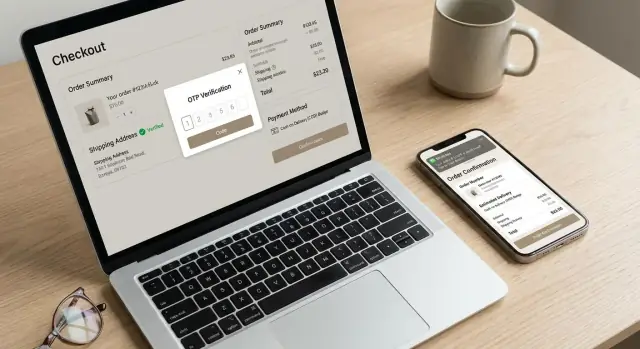
For OTP UX, keep it boring and predictable. Use 6 digits, show a clear countdown, and say what happens next after success. Expire codes in 5 minutes, allow resend after 30 to 45 seconds, and stop resends after 3 tries. If OTP fails, offer one fallback that saves the order: “Request a call” or “Confirm on WhatsApp,” but only after the user has tried at least once.
Abuse is what breaks OTP systems. Treat OTP like a security control, not a form field. Rate-limit by phone number, device, and IP. Bind the OTP to a single checkout session token so a code cannot be reused in a different session. Lock verification after 5 wrong attempts and cool down for 15 minutes.
On the backend, store the minimum you need, but store it correctly:
- Save only a hashed OTP (never plain text), with salt.
- Store attempt_count, resend_count, created_at, expires_at.
- Tie it to order_id + session_id, and invalidate on success.
- Write an audit log event for send, verify success, verify fail, and lock.
- Alert on patterns like many numbers from one IP or many failed attempts per device.
A simple rule of thumb: if the user can brute-force it, you have not built an OTP flow, you have built a guessing game.
Address validation that reduces failed deliveries
Most “failed delivery” COD returns start with a weak address, not a bad rider. The goal is to catch issues early, while the shopper is still motivated to fix them. Done well, this supports your cash on delivery confirmation flow without adding friction for good customers.
Start with clean formatting. Validate phone length and country code, and block obviously wrong pincodes or ZIP codes. Make key fields specific: street, house or building number, area, city, and a landmark (optional, but helpful for hard-to-find locations). If you operate in pincode-based regions, always check that pincode and city match.
On the backend, score “address completeness” and flag risky patterns. Common red flags include very short street lines, repeated characters (like “aaaa”), emoji-only landmarks, or missing house number. Also watch for copy-pasted placeholders (“near temple”, “home”) that appear across many orders.
A simple normalization layer reduces courier confusion. Auto-capitalize, remove extra spaces, normalize locality spellings, and suggest the right city when pincode is known. If the shopper types a known misspelling, offer the common version instead of rejecting the order.
When you do change something, show it clearly and ask for confirmation. For example: “We updated ‘Andheri w’ to ‘Andheri West’ based on your pincode.” Allow an override, but require a reason like “new area not listed” so you can review patterns.
Checks that usually pay off fast:
- Require house or building number for COD above a set value
- Block orders with pincode-city mismatch until corrected
- Warn (do not block) on missing landmark for apartments
- Detect gibberish and ask to re-enter
- Save validated addresses for one-tap reuse next time
WhatsApp confirmation flow that is simple and secure
WhatsApp works well for COD because it feels personal and gets seen fast. The key is to keep the message short, easy to read on a small screen, and written in the customer’s local language when possible. One message should do one job: confirm the order.
A practical cash on delivery confirmation flow sends a WhatsApp message right after checkout (or within 1 minute) with the order summary: items count, total payable on delivery, city, and a masked phone number. Avoid long product names and extra marketing text.
Use clear actions, not free-form replies
Give customers a few obvious choices so they do not need to type. For most stores, four actions cover 95% of cases:
- Confirm COD
- Change address
- Switch to prepaid
- Cancel order
If they tap “Change address”, send them to a simple form (or guided chat) that asks only what you need: house number, street, landmark, and pin code. After change, send a fresh confirmation prompt.
Make the confirm action hard to spoof
Do not treat “Yes” or “Confirm” text as proof. Each action should carry a signed token that your backend verifies. Use a short expiry (for example 15-30 minutes), mark tokens as one-time use, and bind them to the order ID plus the customer phone number. If the token is invalid or expired, respond with a new confirmation request and keep the order in a “Pending confirmation” state.
Handle edge cases cleanly. If the user replies with text, auto-respond with the same buttons. If WhatsApp is not available or messages are blocked, fall back to SMS or an IVR call, and show an in-checkout banner telling them how to confirm. If there is no confirmation after a set window, cancel or hold the order based on risk rules, not at random.
When to restrict COD without losing good customers
Blanket COD bans usually backfire. The goal is to keep COD available for most shoppers, but add friction only where your data says it saves you money. A good cash on delivery confirmation flow can do that without making honest buyers feel punished.
Start by nudging, not blocking. If prepaid is allowed in your market, offer a small, clear incentive at checkout (for example, a tiny discount or faster dispatch). Keep the message simple: “Pay online and we ship today.” Avoid dark patterns or confusing fees.
Then limit COD only for high-risk combinations, not single traits. Risk often shows up when multiple signals stack up, like:
- First-time buyer + high order value
- Known high-RTO pin code + bulky item
- Mismatch between name and phone history on your store
- Multiple failed COD attempts from the same number
- Unusually large quantity of a fast-resale product
For these segments, consider “soft gates” before you remove COD. Two options tend to work well: post-order verification (quick confirmation) or partial prepayment.
Partial prepayment is powerful, but it must feel fair. Tell the buyer exactly why and how much, and keep it small (think “token amount” to confirm intent). Don’t apply it to loyal repeat customers who have successful deliveries.
If an order is risky, verify after the order is placed instead of blocking checkout for everyone. Example: a first-time buyer places a high-value COD order to a pin code with high RTO. You accept the order, but hold it in “Pending verification” and ask for WhatsApp or OTP confirmation within a time window. If they confirm, dispatch. If they do not, auto-cancel and free inventory.
Tools like Koder.ai can help you implement these rules as clear order states and backend checks, so support and operations do not end up guessing what happened.
Backend rules and order state machine to avoid messy operations
A clean COD confirmation system breaks when ops cannot tell what to ship, what to hold, and what to cancel. The fix is a strict order state machine that every channel follows (checkout, WhatsApp, OTP, support calls). This is where a cash on delivery confirmation flow either stays reliable or turns into manual firefighting.
Keep states few and final. A practical set is: pending-confirmation (created, not verified yet), confirmed (safe to pack), expired (no confirmation in time), cancelled (user or system), shipped (handed to courier). Do not invent side states like "confirmed-but-not-really". If you need nuance, store it as metadata, not a new state.
Idempotency matters because customers tap twice, messages arrive late, and webhooks retry. Use one idempotency key per confirmation attempt (for example, order_id + channel + attempt_number) and make state transitions atomic. If an order is already confirmed or shipped, a repeated OTP or WhatsApp reply should return the same result and never create a second shipment.
Retries should be planned, not improvised. Message delivery can fail, so log every send and response, and keep clear windows: allow OTP resends after a short cooldown, cap total sends, and stop after the order expires. For webhooks, accept duplicates safely and verify signatures before changing state.
Store confirmation data as events so you can audit and tune rules later:
- confirmation_events: channel, timestamp, success/fail, raw response
- risk_score_snapshot: score at checkout and at confirmation time
- reason_codes: why expired/cancelled (no reply, invalid OTP, carrier block)
- actor: customer, system, support agent
- versioned rules: which risk and timing rules were applied
Example: if a WhatsApp reply arrives after expiry, keep the event, but do not move the order from expired to confirmed. Instead, require a new confirmation attempt so ops does not ship by mistake.
Common mistakes that increase RTO or hurt conversion
The fastest way to break a cash on delivery confirmation flow is to treat every shopper like a fraudster. If you force OTP confirmation for all COD orders, you will catch some bad actors, but you also add friction for loyal customers. Many will abandon checkout or ignore the message, and your “confirmed” rate drops.
Another common miss is weak OTP hygiene. If you do not rate-limit OTP requests, attackers can spam a phone number, drain your SMS budget, or brute-force codes. Even without attacks, allowing endless resends trains people to wait for “one more code,” which slows confirmation and pushes orders into the shipping window.
Address changes are a quiet RTO multiplier. If the customer edits the address after they confirmed COD, and you do not re-check risk, your team ships an order that no longer matches the verified details. That is how “confirmed” orders still fail at the doorstep.
The last operational mistake is not making confirmation status impossible to ignore. If there is no clear expiry time, or your warehouse can pick unconfirmed COD orders, you will ship hope instead of certainty.
Here are the patterns that usually cause the most damage:
- OTP for everyone, instead of only high-risk or first-time COD buyers
- No rate limits on resend, verify attempts, or per-IP and per-phone thresholds
- Allowing address or phone edits after confirmation without triggering re-confirmation
- No hard “do not ship” gate tied to confirmation state and expiry
- Vague UI copy, so customers do not know why they are confirming or how long it takes
A simple example: a buyer confirms, then changes “Street 12” to “Street 21” in support chat. If you ship without re-confirming, the rider reaches the wrong place, and you pay RTO on a preventable error.
Quick checklist for your COD confirmation setup
Use this as a final pre-ship gate. If any item fails, keep the order in a “pending confirmation” state instead of pushing it to packing.
- Confirmed before shipping: the order has a positive confirmation (OTP or WhatsApp reply) tied to the order ID, with a clear confirmation timestamp and who/what confirmed it.
- Address validated: the address fields are complete (name, house number, street, locality, city, state, pincode), pincode matches city/state, and obvious “fake” patterns (test, asdf, 12345) are blocked or flagged.
- Phone is reachable: phone number format is valid, it is not recently used across many different names/addresses, and you have a fresh “reachability” signal (recent OTP delivered or WhatsApp delivered/read).
- High-risk orders get stronger checks: risky combinations (high order value, first-time buyer, mismatch between pincode and city, repeated cancellations, multiple orders to same phone) automatically route to stricter confirmation or manual review before any label is printed.
- Ops can act fast: every pending order has a reason code (no OTP, OTP failed, address mismatch, high-risk rule, unreachable phone), an owner/queue, and an SLA (for example, auto-cancel after 24-48 hours with a customer message).
A simple rule of thumb: your cash on delivery confirmation flow should “stop the line” only when the signal is weak. For everyone else, keep it quick: one clear prompt, one action to confirm, and no repeated nags that push real buyers away.
If you track one thing daily, make it the share of COD orders that reach “confirmed” within 15 minutes of checkout, then compare RTO for confirmed vs unconfirmed orders.
Example: reducing RTO for a high-risk COD order
A first-time buyer places a high-value COD order (for example, $180) and the checkout shows a mismatch: the pincode maps to a different city than what they typed. This is a common pattern behind fake orders and failed deliveries.
Right after checkout, the site shows a friendly message: “Please confirm your COD order to reserve it.” The buyer gets a WhatsApp message with the order summary and two buttons: Confirm address or Fix address. Most real buyers tap within a minute.
They tap Fix address and correct the city name (or choose from a short suggested list). The confirmation screen then asks for a quick re-check of house number and landmark, and offers “Send OTP instead” if WhatsApp is not available.
On the backend, the order is created but not released to shipping yet. It follows a simple decision path:
- Risk score spikes because it is first-time, high-value, and pincode-city mismatch.
- Order state becomes HOLD_FOR_CONFIRMATION with a 30-minute timer.
- If WhatsApp is confirmed (and the corrected address passes validation), state moves to CONFIRMED_COD and the ship hold is released.
- If WhatsApp is not confirmed, send OTP to the phone; successful OTP also moves it to CONFIRMED_COD.
- If neither happens before the timer ends, cancel or switch to prepaid-only retry (based on your policy).
For the buyer, the added friction is one quick tap and sometimes a small edit, not a long form. For operations, the warehouse only sees confirmed COD orders. In practice, this cash on delivery confirmation flow cuts fake COD attempts and reduces RTO while keeping genuine buyers moving.
Next steps: roll out safely and iterate fast
Treat your COD confirmation flow like a product change, not a policy change. Small tweaks in timing or wording can move both conversion and RTO, so ship in controlled steps and watch the numbers daily.
Start with a staged rollout. Pick the highest-risk slice first (new users, high AOV, mismatch between pin code and city, repeated failed deliveries), then expand once you see stability.
- Enable confirmation only for high-risk orders for 1 to 2 weeks
- Add a fallback channel (for example, WhatsApp if SMS OTP fails)
- Gradually lower the risk threshold as RTO improves
- Keep a manual override for support on edge cases
- Freeze changes during big sale days, then resume after
Run focused A/B tests. Test one variable at a time: copy tone (firm vs friendly), timer length (5 vs 15 minutes), and channel order (WhatsApp first vs SMS first). Also test when you ask: immediately after checkout vs a few minutes later. Measure not just confirmation rate, but cancel rate, delivery success, and support contacts.
Write a short internal playbook so ops and support handle the same scenario the same way. Keep it simple and actionable:
- When to retry confirmation and when to cancel
- What counts as a valid address fix vs a risky change
- How to handle customer callbacks and consent
- Escalation rules for repeat offenders and suspected fraud
If you want to prototype UI screens and backend rules quickly, you can build the flow in Koder.ai using chat, iterate with real event logs, and export the source code when you are ready to ship it in your stack.
FAQ
Why does COD lead to more RTO orders?
COD raises RTO because the seller ships before the buyer pays. If the buyer refuses the parcel, gives an unusable address, or cannot be reached, the seller pays for both delivery attempts and the return.
What should I verify before shipping a COD order?
Start with a valid phone number, a complete address, and a quick intent check. Use stronger verification only when signals such as high value, a new buyer, or a pincode-city mismatch raise risk.
Should every COD customer receive an OTP?
No. Let low-risk and repeat buyers place COD orders with little or no extra work. Reserve OTP for orders with stacked risk signals, such as unusual quantities, past failed deliveries, or a high-risk delivery area.
What makes a COD OTP flow secure and easy to use?
Keep it simple: use a six-digit code, expire it after about five minutes, allow resend after 30 to 45 seconds, and cap resends at three. Limit verification attempts and bind each code to one order and checkout session.
How can address validation reduce failed COD deliveries?
Ask for street, house or building number, locality, city, and pincode. Check that the pincode matches the city, flag obvious filler text, and let shoppers correct errors before you send the order to packing.
How should a WhatsApp COD confirmation work?
Send one short message after checkout with the order total and clear actions: confirm COD, change address, switch to prepaid, or cancel. Each action should use a short-lived, one-time token that your backend verifies.
What happens if the buyer does not confirm a COD order?
Create the order as pending confirmation and set a short expiry, often 15 to 30 minutes. Do not release it to shipping until the buyer confirms; then cancel expired orders and release any held inventory.
Which order states do I need for COD confirmation?
Use a small set of clear states: pending confirmation, confirmed, expired, cancelled, and shipped. Make confirmation changes atomic, log every event, and prevent the warehouse from shipping anything still pending or expired.
When should I restrict COD instead of blocking it for everyone?
Avoid blanket COD bans. First offer prepaid as a simple option, then use post-order confirmation or a small partial payment for combinations such as a first-time buyer, high order value, and a history of RTO in that area.
Which metrics show whether a COD confirmation flow is working?
Track RTO rate, delivery success, cancellation rate, COD checkout completion, fraud loss, time to ship, and contact rate. Compare results by buyer type, city or pincode cluster, basket value, channel, and product category.