

Category page sorting defaults for new items and bestsellers
Category page sorting defaults that balance new arrivals and bestsellers, with A/B tests for fashion, beauty, and electronics catalogs.
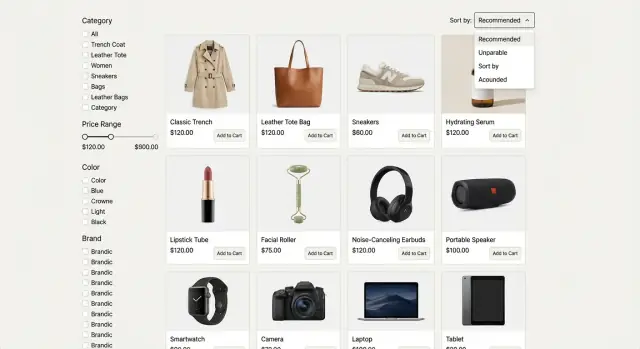
Why sorting choices change what shoppers buy
Sorting isn't a small preference. It decides what shoppers see first, what they never see, and what they assume your store is “about” in that moment. The same catalog can feel fresh, premium, or bargain-heavy based on the first 8-12 products shown.
That’s why the default sort on a category page is a conversion decision. Change the order and you change which items earn clicks, product-page views, add-to-carts, and purchases.
The core tradeoff is discovery vs proof. “New” helps shoppers find what’s fresh and can lift repeat visits. “Bestsellers” reduces risk by putting socially validated items up front. Most stores need both, just not everywhere.
Your goal should drive the default. If the target is revenue, lead with items that sell well and carry healthy margin. If it’s conversion rate, reduce decision effort with proven winners. If it’s AOV, surface items that pair well or sit at higher price points. If returns are hurting, avoid leading with products that disappoint after delivery.
Catalog size and purchase cycle determine how sharp the “new vs proven” tension feels. Fashion with weekly drops often benefits from “New arrivals” in repeat-visit categories. A small electronics catalog usually converts better when it leads with “Best selling” because shoppers are doing focused research.
A beauty category with 2,000 SKUs can bury launches if it defaults to bestseller forever. But a “New” default can also overexpose unreviewed items and hurt trust. The best default matches how shoppers buy in that category, and it’s something you can measure and adjust without guessing.
Sorting basics: what each option signals to shoppers
Sorting isn’t just a control. It’s a promise. The default order tells shoppers what matters most right now: freshness, popularity, savings, or budget fit.
Common options and the expectation behind them:
- Featured / Recommended: “Show me what you want me to buy first.” This works only if it feels curated (not random) and stays consistent.
- New arrivals: “Show me what just dropped.” People expect truly recent items, not older products that were re-stocked or re-tagged.
- Best sellers / Popular: “Show me what other people are buying.” People expect recent momentum, not last year’s hero SKU that keeps winning because it has the most reviews.
- Price: low to high / high to low: “Let me control my spend.” Shoppers often use this to sanity-check the range before filtering.
- Top rated: “Show me safe choices.” This works only if you have enough reviews; otherwise it can surface niche items with a few perfect ratings.
Defaults matter most when shoppers are undecided. If they already know what they want (a specific shade, size, or storage), they’ll ignore sorting and go straight to filters. In beauty, shade and skin type often beat any sort. In fashion, size availability can matter more than “new.” In electronics, storage, screen size, and compatibility usually decide the shortlist.
A simple rule: you should be able to explain the default in one plain sentence, like “Newest items first,” or “Most purchased this week first.” If you can’t explain it without qualifiers, it’s too complex for a default and should be an optional sort instead.
Make “New” and “Bestseller” measurable (so rules don’t drift)
“New” and “Bestseller” sound obvious, but teams quietly change what they mean over time. Pick one definition, document it, and stick to it.
For “New,” the cleanest definition is usually first in-stock date (the first time it could be purchased). Use publish date only if you routinely launch product pages before inventory is ready.
For “Bestseller,” choose one metric that matches how you run the business: units sold (fair across price points), orders (useful when quantities vary), or revenue (best when margin and AOV matter). Then lock a lookback window so the label reflects recent demand.
A simple starting point:
- Fashion: 14 days
- Beauty: 30 days
- Electronics: 7-14 days
Add guardrails so one viral SKU doesn’t take over. Think in rows and variety. Cap how often a single SKU can appear, limit brand dominance, and group close variants so the first screen doesn’t look repetitive.
Define exclusions so the list stays useful. Most teams exclude out-of-stock items, bundles that muddy comparisons, and heavily discounted clearance if the goal is “what’s truly selling,” not “what’s being liquidated.”
Sorting defaults for fashion categories
Fashion is visual, trend-driven, and sensitive to fit. A practical default is usually a blended ranking: lead with proven sellers to reduce risk, but keep a steady flow of fresh items so the page doesn’t feel stale. This works best when it’s rules-based, not hand-curated.
A practical default that balances bestsellers and new
A good starting point is “Bestsellers first, with protected slots for New.” Think in rows, not individual items. Reserve 1 tile in every 4-8 products for a new arrival, as long as it’s actually buyable in common sizes.
Keep the logic simple and measurable: rank by recent sales (often 14-28 days), apply a modest boost to new items, and only boost when size coverage is healthy (for example, 60-70% of core sizes in stock). Downrank SKUs with high return rates in fit-sensitive categories, and enforce variety (colors, silhouettes, and price points) so the first screen doesn’t collapse into near-duplicates.
Example: a shopper opens “Summer Dresses.” The first row shows top sellers, but one spot is a new drop that still has S, M, and L available. The next rows stay diverse, so it isn’t five beige midi dresses in a row.
When to use different defaults (dresses vs basics)
Not every fashion category behaves the same. Dresses, outerwear, and occasion wear benefit from stronger bestseller signals and stronger return downranking. Basics (tees, socks, underwear) often do better with availability-first rules because shoppers want their size now.
If you’re building sorting logic into your storefront app, keep the rules in one place and log “why” each item ranked where it did. Later tests and fixes get much easier.
Sorting defaults for beauty categories
Beauty shoppers often arrive with a goal: replace a favorite, fix a problem, or try what everyone’s talking about. A strong default rewards proven products but still gives launches a fair shot.
A practical starting point is bestsellers first, but only when they clear a rating floor (for example, 4.2+ with enough reviews to be meaningful). That keeps the top of the page from being driven by discounting or short-term hype.
New launches deserve a boost, but not forever. Boost for a short window (often 7-14 days), then let sales, add-to-cart rate, and returns determine where they land.
Variants can quietly break ranking. If every shade is a separate item, reviews get diluted and winners get buried. Group shades under one product card and default the visible shade to the best performer (sales and low returns), not the first shade in the catalog.
Quality signals matter. If you track complaint reasons like shade mismatch or damaged-on-arrival, use them to gently downrank items that create repeat disappointment, even if they sell well.
When shoppers filter, shift the sort toward intent. If someone filters skincare by a concern (acne, dryness, sensitivity), boost products strongly tagged to that concern and backed by solid ratings.
Sorting defaults for electronics categories
Electronics shoppers want confidence and compatibility. A good default reduces the risk of buying the wrong item, not just the effort of scrolling. The default should match how “risky” the purchase feels.
For higher-price, higher-regret categories (laptops, TVs, cameras), start with quality signals. “Top rated” often works better than “Bestsellers” because shoppers worry about defects, missing features, and returns. For lower-price, low-regret items (cables, chargers, cases), “Bestsellers” tends to win because people want the popular, safe pick.
A simple set of defaults:
- High-consideration items: Top rated (with a minimum review count)
- Impulse add-ons: Bestsellers
- New tech launches: New arrivals for a short window, then revert to Top rated
- Refurbished/used: Best value (price and rating) if you have it, otherwise Bestsellers
Availability matters. If an item is backordered or has long ship times, gently downrank it so “in stock, ships soon” items surface earlier. Keep it subtle: don’t hide desirable items, but don’t let sold-out products clog the first row.
Accessories are tricky. Show compatible accessories after the main list is stable (for example, after the first 12-24 products) or in a separate module. That avoids a charger outranking a laptop just because it’s cheap and sells a lot.
Finally, avoid “spec spam.” More specs listed shouldn’t equal a higher rank. Use outcomes people trust (ratings, returns, verified compatibility), not raw spec count.
Step by step: build a sorting rule that’s easy to maintain
A default only works if you can explain it, keep it current, and prevent weird results when data gets messy. Treat it like a small policy: one owner, clear inputs, predictable updates.
A simple 5-step recipe
- Pick one primary metric (conversion rate, revenue per visitor, margin, or returns rate) and write it down.
- Choose a default per category type (trend-led, replenishment, giftable, high-consideration) and add a one-sentence reason.
- Set time windows and refresh cadence: define what counts as “New” and “Bestseller,” and refresh daily unless there’s a reason not to.
- Add guardrails: demote low-stock or long-ship items, require a minimum review count before “Top rated” changes order, and clamp extreme price outliers.
- Set tie-breakers in a fixed order, such as availability first, then rating, then margin, then recency.
Example tie-breaker: if two items have the same bestseller score, show the one with more sizes in stock. If availability is equal, prefer higher ratings, then newer launch date.
A/B tests that usually reveal quick wins
Teams argue about “new arrivals vs bestsellers sorting” because both can work. A/B tests settle it, as long as the rule is simple and you measure the same outcomes each time (revenue per visitor, add-to-cart rate, and return rate).
Start by testing the default itself: pure bestsellers vs bestsellers with a controlled new-items boost. Keep the boost limited so shoppers still see proven products first.
Quick-win tests to run one at a time:
- Pure bestsellers vs bestsellers with a new-items boost
- New-items share on page 1: 10% vs 20% vs 30%
- Freshness window for the boost: last 7 vs 14 vs 30 days
- Rating floor on bestsellers: none vs 4.0+ vs 4.3+
- Separate rules for mobile vs desktop (above-the-fold matters more on small screens)
Keep tests clean: exclude out-of-stock items from boosted slots, avoid mixing traffic sources that behave differently (paid vs organic), and run long enough to cover weekday and weekend behavior.
If you implement this logic in a tool like Koder.ai, keep the rule in one place and log which version each shopper saw. That makes wins easier to repeat across categories.
Common mistakes to avoid with new vs bestseller sorting
Many teams pick a default once, then keep tweaking it until it stops making sense. Watch for these traps.
Comparing “new” and “bestseller” on different time scales is a common failure. If “new” means last 7 days but “bestseller” uses 12 months, the bestseller list will barely move while “new” churns. Keep windows comparable (for example, 14 or 28 days) or normalize by daily exposure so old items don’t win by inertia.
Another quiet killer is boosting new items that shoppers can’t buy. In fashion that’s missing core sizes; in beauty it’s one shade left; in electronics it’s out of stock or long ship times. “New” should be eligible only if it’s sellable now.
Manual pins and sponsored placements can also break logic. A couple of pinned cards are fine, but if pins ignore filters, bypass out-of-stock rules, or crowd out the algorithm, the rest of the sort becomes noise. Keep pins limited and rule-compliant.
Bestseller labels get messy if you don’t subtract returns, cancellations, or fraud. That’s how a high-return item keeps ranking even when customers don’t keep it.
Don’t change multiple things at once. If you switch the default sort, adjust filters, and add a new badge in the same release, you won’t know what moved conversion.
Quick checklist before you ship a new default
Before you change a default sort, run a quick reality check. The default is a promise about what shoppers will see first, and it should stay true across devices, regions, and busy weeks.
Checklist:
- Can a shopper explain the default in one sentence?
- Are the top results buyable in the shopper’s region (in-stock rate, delivery eligibility, ship times)?
- Do genuinely new items appear near the top without scrolling? On mobile, that often means 2-4 new arrivals in the first screen.
- Are near-duplicates limited on page 1 (shade tweaks, storage swaps, color-only repeats)?
- Do you have a fallback for edge cases (low-data categories, brand-new launches, sale peaks)?
Example: if “bestsellers” drives your sneakers category but the first row is half sold out in common sizes, shoppers bounce. A better default might be “bestselling, in stock” with a small boost for new drops so the page still feels fresh.
Write down the edge-case plan in one place. For low-data categories, use “newest” until you have enough sales. For launches, temporarily pin a small set of new items. For sale peaks, cap how much discount can dominate the first page so you don’t hide core products.
Example: one set of defaults for a three-department store
Imagine a mid-size online store with three departments: fashion (seasonal drops and sizes), beauty (repeat buys and bundles), and electronics (higher price points, fewer SKUs, clear specs). Inventory is mixed: some items are always in stock, others are limited, and a few have inconsistent availability.
A simple plan is to set per-department defaults, then apply shared guardrails so results don’t drift. That keeps the experience predictable for shoppers and manageable for your team.
Default plan (by department)
Start with these defaults and let shoppers switch sorts (price, rating) when needed.
- Fashion: New arrivals for trend-led categories; Bestsellers for basics and replenishable items
- Beauty: Bestsellers for most categories; New arrivals mainly for “new” hubs, seasonal collections, or brand launches
- Electronics: Bestsellers for broad categories (headphones, TVs); Featured (curated) for spec-heavy categories where guidance matters (laptops, cameras)
- Shared guardrails: push out-of-stock items down, avoid variants missing key info (shade/size/spec), cap near-duplicates on the first row
Those guardrails matter because “New” can accidentally become “newly restocked,” and “Bestseller” can get stuck on old winners that no longer convert.
First A/B tests to run
Run a few experiments that answer clear questions:
- Fashion: New arrivals vs Bestsellers on a seasonal category (watch returns)
- Beauty: Bestsellers vs “Trending now” (bestsellers with a recency boost) on skincare
- Electronics: Bestsellers vs Featured (curated) on laptops
If results conflict (conversion rises but margin drops), pick a rule ahead of time. A common choice is contribution margin per session, not conversion alone. If margin data lags, use a temporary tie-breaker like AOV and refund/return rate, then rerun longer.
Next steps: write the rules on one page, review weekly with a small dashboard, and change one lever at a time.
Next steps: document, test, and automate the boring parts
When a default works, the next risk is drift. Someone adds a “temporary” boost, a hidden tie-breaker, or a new badge, and three months later nobody can explain why the page looks different. A short written spec keeps the default stable while still leaving room to improve.
Keep the spec to one page:
- Goal and success metric
- Inputs (sales window, inventory, margin, rating count, freshness window)
- Tie-breakers in order
- Exceptions (out of stock, low review count, launches, regulated items)
- Owner and review cadence
Set a review rhythm by category speed. Fast-moving areas (fashion drops, seasonal beauty sets) often need weekly checks. Slower categories can be monthly. The key is consistency: use the same small set of metrics every time so “improvements” don’t turn into random tweaks.
For testing, use an experiment calendar and record every change, even small ones like adjusting the bestseller window from 7 to 14 days. Avoid overlapping tests on the same category page, and note major promos and new collections since they can mask results.
If you want to prototype faster, Koder.ai can help you generate the pieces you need from chat: a React admin view, a Go backend with PostgreSQL for storing rules and assignments, and platform features like snapshots and rollback. That keeps versioning and experimentation mechanics under control while your team focuses on the merchandising decisions.
FAQ
Why does the default sort on a category page matter so much?
Default sorting decides what shoppers see first, so it shifts clicks, add-to-carts, and purchases. If the first screen looks too risky (unknown items) or too stale (same old winners), people bounce or stop exploring.
A good default reduces decision effort for undecided shoppers and makes the category feel “right” for what they came to do.
When should I default to New arrivals vs Bestsellers?
Use New arrivals when the category is driven by freshness and repeat visits (like trend-led fashion drops or brand launches). Use Bestsellers/Popular when shoppers want a safe, proven pick (like replenishable beauty or low-regret accessories).
If you’re unsure, start with Bestsellers with a small, controlled boost for New so the page feels fresh without sacrificing trust.
How do I define “New” and “Bestseller” so they stay consistent over time?
Define it once and don’t let it drift.
- New: usually first in-stock date (first time it was actually purchasable)
- Bestseller: pick one primary metric (units sold, orders, or revenue) and a fixed lookback window
Then refresh on a predictable cadence (often daily) so “new” and “popular” stay truthful.
What lookback window should I use for bestsellers in each department?
Start with a simple lookback window that matches buying speed:
- Fashion: 14 days (often 14–28)
- Beauty: 30 days
- Electronics: 7–14 days
Keep the window consistent across tests so you’re comparing sorting logic fairly, not comparing “recent” to “all-time.”
How do I stop one viral SKU (or one brand) from dominating page 1?
Use guardrails so one SKU doesn’t take over the first screen:
- Cap repeats of near-identical variants (colors, storage sizes, shades)
- Limit brand dominance in the first row
- Ensure variety across price points and styles
- Exclude or downrank out-of-stock and long-ship items
Think in rows: “This row should look diverse” is easier to maintain than perfect item-by-item rules.
Should new items be boosted even if stock is limited?
Only boost “new” items that are actually buyable now.
- Fashion: require healthy size coverage (for example, most core sizes available)
- Beauty: avoid boosting items where only one unpopular shade is left
- Electronics: downrank backorders or long ship times
If shoppers click “new” and keep hitting sold-out pages, trust drops fast.
When does “Top rated” work better than “Bestsellers”?
Use Top rated only when ratings are meaningful.
Practical rule: require a minimum review count (so a product with three 5-star reviews doesn’t outrank a proven favorite). Then use a rating floor (for example, 4.2+) when mixing “bestseller” and “top rated” signals.
If you don’t have enough reviews, prefer Bestsellers plus availability guardrails.
How should I handle variants like shades, sizes, and storage options in sorting?
If each shade is its own SKU, reviews and sales split across variants and your ranking becomes noisy. The clean fix is to group variants under one product card and choose a default variant to display (often the best performer by sales and low returns).
This keeps the first screen from being 8 nearly identical items and makes ratings more trustworthy.
What A/B tests usually produce quick wins for sorting defaults?
Run one clean test at a time and track a small set of outcomes.
Good starter A/B tests:
- Pure Bestsellers vs Bestsellers + new-items boost
- New-items share on page 1: 10% vs 20% vs 30%
- Freshness window for the boost: 7 vs 14 vs 30 days
- Rating floor on bestsellers: none vs 4.0+ vs 4.3+
Measure revenue per visitor, add-to-cart rate, and return rate so you don’t “win” on conversion but lose on refunds.
How can I implement and maintain sorting rules without constant manual tweaking?
Keep the rules centralized and versioned, and log why each product ranked where it did (inputs + tie-breakers). That makes debugging, testing, and rollbacks straightforward.
In Koder.ai, you can prototype the workflow quickly (admin UI, rule storage, and assignments) and use snapshots/rollback so experiments don’t turn into permanent messy tweaks.