

Claude Code for Flutter UI iteration: a practical workflow
Claude Code for Flutter UI iteration: a practical loop to turn user stories into widget trees, state, and navigation while keeping changes modular and easy to review.
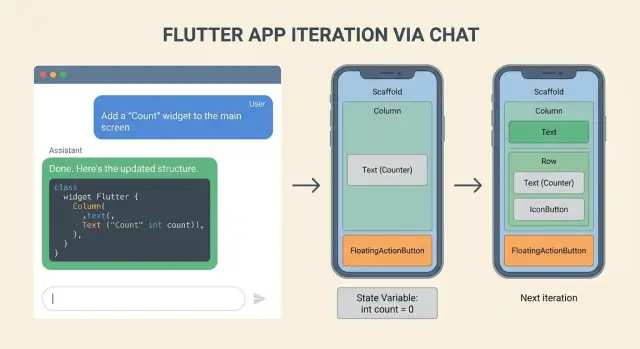
The problem: fast UI iteration that does not turn into chaos
Fast Flutter UI work often starts well. You tweak a layout, add a button, move a field, and the screen gets better quickly. The trouble shows up after a few rounds, when speed turns into a pile of changes nobody wants to review.
Teams usually run into the same failures:
- The widget tree grows without a plan, so a "small" change forces edits across many files.
- State gets bolted onto UI code, making rebuilds unpredictable and bugs harder to trace.
- Navigation logic gets scattered (a push here, a pop there) until flows stop matching how users actually move through the app.
- Naming drifts, components get duplicated, and nobody is sure which widget is the "real" one.
- Diffs become huge, so reviewers skim, issues slip through, and regressions show up later.
A big cause is the "one big prompt" approach: describe the whole feature, ask for the full set of screens, and accept a large output. The assistant tries to help, but it touches too many parts of the code at once. That makes changes messy, hard to review, and risky to merge.
A repeatable loop fixes this by forcing clarity and limiting blast radius. Instead of "build the feature," do this repeatedly: pick one user story, generate the smallest UI slice that proves it, add only the state needed for that slice, then wire navigation for one path. Each pass stays small enough to review, and mistakes are easy to roll back.
The goal here is a practical workflow for turning user stories into concrete screens, state handling, and navigation flows without losing control. Done well, you end up with modular UI pieces, smaller diffs, and fewer surprises when requirements change.
Turn user stories into a clear UI spec you can build
User stories are written for humans, not widget trees. Before you generate anything, convert the story into a small UI spec that describes visible behavior. "Done" should be testable: what the user can see, tap, and confirm, not whether the design "feels modern."
A simple way to keep scope concrete is to break the story into four buckets:
- Screens: what changes, what stays as-is.
- Components: what new UI pieces appear, and where they live.
- States: loading, success, error, empty, and what each one shows.
- Events: taps, swipes, pull-to-refresh, back navigation, retries.
If the story still feels fuzzy, answer these questions in plain language:
- Which screens change, and which stay the same?
- What new components appear, and where do they belong?
- What states exist, and what does each state show?
- What events drive state changes?
- What is the acceptance check you can do in 30 seconds after running the app?
Add constraints early because they guide every layout choice: theme basics (colors, spacing, typography), responsiveness (phone portrait first, then tablet widths), and accessibility minimums like tap target size, readable text scaling, and meaningful labels for icons.
Finally, decide what is stable versus flexible so you do not churn the codebase. Stable items are things other features depend on, like route names, data models, and existing APIs. Flexible items are safer to iterate on, like layout structure, microcopy, and the exact widget composition.
Example: "As a user, I can save an item to Favorites from the detail screen." A buildable UI spec could be:
- The detail screen shows a bookmark icon.
- Tapping toggles saved state.
- While saving, show a small progress indicator.
- On failure, show an inline error with a Retry action.
- Navigation stays the same (no new routes).
That is enough to build, review, and iterate without guessing.
Set up the iteration loop so diffs stay small
Small diffs are not about working slower. They make each UI change easy to review, easy to undo, and hard to break. The simplest rule: one screen or one interaction per iteration.
Pick a tight slice before you start. "Add an empty state to the Orders screen" is a good slice. "Rework the whole Orders flow" is not. Aim for a diff a teammate can understand in a minute.
A stable folder structure also helps you keep changes contained. A simple, feature-first layout prevents you from scattering widgets and routes across the app:
lib/
  features/
    orders/
      screens/
      widgets/
      state/
      routes.dart
Keep widgets small and composed. When a widget has clear inputs and outputs, you can change layout without touching state logic, and change state without rewriting UI. Prefer widgets that take plain values and callbacks, not global state.
A loop that stays reviewable:
- Write a 3 to 6 line UI spec for the slice (what appears, what taps do, what loading/error looks like).
- Generate or edit only the minimum files needed (often one screen and one or two widgets).
- Run the screen, then do one cleanup pass (naming, spacing, removing unused props).
- Commit with a message that matches the slice.
Set a hard rule: every change must be easy to revert or isolate. Avoid drive-by refactors while you are iterating on a screen. If you notice unrelated problems, write them down and fix them in a separate commit.
If your tool supports snapshots and rollback, use each slice as a snapshot point. Some vibe-coding platforms like Koder.ai include snapshots and rollback, which can make experimentation safer when you're trying a bold UI change.
One more habit that keeps early iterations calm: prefer adding new widgets over editing shared ones. Shared components are where small changes turn into big diffs.
Step-by-step: generate a widget tree from a user story
Fast UI work stays safe when you separate thinking from typing. Start by getting a clear widget tree plan before generating code.
-
Ask for a widget tree outline only. You want widget names, hierarchy, and what each part shows. No code yet. This is where you catch missing states, empty screens, and odd layout choices while everything is still cheap to change.
-
Ask for a component breakdown with responsibilities. Keep each widget focused: one widget renders the header, another renders the list, another handles empty/error UI. If something needs state later, note it now but do not implement it yet.
-
Generate the screen scaffold and stateless widgets. Start with a single screen file with placeholder content and clear TODOs. Keep inputs explicit (constructor params) so you can plug in real state later without rewriting the tree.
-
Do a separate pass for styling and layout details: spacing, typography, theming, and responsive behavior. Treat styling as its own diff so reviews stay simple.
A prompt pattern that works
Put constraints up front so the assistant does not invent UI you cannot ship:
- Target devices (phone only, tablet too, orientation)
- Design constraints (Material 3, existing theme colors, spacing rules)
- Navigation expectations (back behavior, deep links if any)
- Acceptance criteria (what must be visible and tappable)
- Existing code boundaries (which files/widgets must stay, naming conventions)
Concrete example: the user story is "As a user, I can review my saved items and remove one." Ask for a widget tree that includes an app bar, a list with item rows, and an empty state. Then request a breakdown like SavedItemsScreen, SavedItemTile, EmptySavedItems. Only after that, generate the scaffold with stateless widgets and fake data, and finally add styling (divider, padding, and a clear remove button) in a separate pass.
Add state handling without bloating the UI code
UI iteration falls apart when every widget starts making decisions. Keep the widget tree dumb: it should read state and render, not contain business rules.
Start by naming the states in plain words. Most features need more than "loading" and "done":
- Loading (first load or refresh)
- Empty (no data yet)
- Error (failed request, permission denied)
- Success (data ready)
- Partial input (form started, but not valid)
Then list events that can change the state: taps, form submit, pull-to-refresh, back navigation, retry, and "user edited a field." Doing this upfront prevents guesswork later.
Keep state separate from widgets
Pick one state approach for the feature and stick to it. The goal is not "the best pattern," it is consistent diffs.
For a small screen, a simple controller (like a ChangeNotifier or ValueNotifier) is often enough. Put the logic in one place:
- Inputs: events from the UI (submit, refresh, edit)
- Output: a single state object the UI can render
- Side effects: API calls and navigation requests
Before you add code, write the state transitions in plain English. Example for a login screen:
"When the user taps Sign in: set Loading. If the email is invalid: stay in Partial input and show an inline message. If the password is wrong: set Error with a message and enable Retry. If success: set Success and navigate to Home."
Then generate the minimal Dart code that matches those sentences. Reviews stay simple because you can compare the diff to the rules.
Add testable rules for invalid inputs
Make validation explicit. Decide what happens when inputs are invalid:
- Do you block submit or allow it and show errors?
- Which fields show errors, and when?
- Does back navigation discard partial input or keep it?
When those answers are written down, your UI stays clean and the state code stays small.
Design navigation flows that match real user behavior
Good navigation starts as a tiny map, not a pile of routes. For each user story, write down four moments: where the user enters, the most likely next step, how they cancel, and what "back" means (back to the previous screen, or back to a safe home state).
Start with a route map, then lock down what travels between screens
A simple route map should answer the questions that usually cause rework:
- Entry: which screen opens first, and from where (tab, notification, deep link)
- Next: the main forward path after the primary action
- Cancel: where the user lands if they abandon the flow
- Back: whether back is allowed, and what it should preserve
- Fallback: where to go if required data is missing
Then define the parameters passed between screens. Be explicit: IDs (productId, orderId), filters (date range, status), and draft data (a partially filled form). If you skip this, you'll end up stuffing state into global singletons or rebuilding screens to "find" context.
Plan for deep links and "return a result" patterns
Deep links matter even if you do not ship them on day one. Decide what happens when a user lands mid-flow: can you load missing data, or should you redirect to a safe entry screen?
Also decide which screens should return results. Example: a "Select Address" screen returns an addressId, and the checkout screen updates without a full refresh. Keep the return shape small and typed so changes stay easy to review.
Before coding, call out edge cases: unsaved changes (show a confirm dialog), auth required (pause and resume after login), and missing or deleted data (show an error and a clear way out).
Make UI changes reviewable and modular
When you iterate fast, the real risk is not "wrong UI." It is unreviewable UI. If a teammate cannot tell what changed, why it changed, and what stayed stable, every next iteration gets slower.
A rule that helps: lock the interfaces first, then allow the internals to move. Stabilize public widget props (inputs), small UI models, and route arguments. Once those are named and typed, you can reshape the widget tree without breaking the rest of the app.
Prefer small, stable seams
Ask for a diff-friendly plan before generating code. You want a plan that says which files will change and which must remain untouched. That keeps reviews focused and prevents accidental refactors that change behavior.
Patterns that keep diffs small:
- Keep public widgets thin: accept only the data and callbacks they need, and avoid reaching into singletons.
- Move business rules out of widgets early: put decisions in a controller or view model, and have the UI render state.
- Once a UI piece stops changing every hour, extract it into a reusable widget with a clear, typed API.
- Keep route arguments explicit (a single argument object is often cleaner than many optional fields).
- Add a short change log to your PR description: what changed, why, and what to test.
A concrete example reviewers like
Say the user story is "As a shopper, I can edit my shipping address from checkout." Lock route args first: CheckoutArgs(cartId, shippingAddressId) stays stable. Then iterate inside the screen. Once the layout settles, split it into AddressForm, AddressSummary, and SaveBar.
If state handling changes (for example, validation moves from the widget into a CheckoutController), the review stays readable: UI files mostly change rendering, while the controller shows the logic change in one place.
Common mistakes and traps when iterating with an AI assistant
The fastest way to slow down is to ask the assistant to change everything at once. If one commit touches layout, state, and navigation, reviewers cannot tell what broke, and rolling back gets messy.
A safer habit is one intent per iteration: shape the widget tree, then wire state, then connect navigation.
Mistakes that create messy code
One common problem is letting generated code invent a new pattern on every screen. If one page uses Provider, the next uses setState, and the third introduces a custom controller class, the app becomes inconsistent quickly. Pick a small set of patterns and enforce them.
Another mistake is putting async work directly inside build(). It may look fine in a quick demo, but it triggers repeated calls on rebuilds, flicker, and hard-to-track bugs. Move the call into initState(), a view model, or a dedicated controller, and keep build() focused on rendering.
Naming is a quiet trap. Code that compiles but reads like Widget1, data2, or temp makes future refactors painful. Clear names also help the assistant produce better follow-up changes because intent is obvious.
Guardrails that prevent the worst outcomes:
- Change one of: layout, state, or navigation per iteration
- Reuse the same state pattern across the feature
- No network or database calls inside
build() - Rename placeholders before adding more functionality
- Prefer extracting widgets over adding more nesting
The nesting trap
A classic visual-bug fix is adding another Container, Padding, Align, and SizedBox until it looks right. After a few passes, the tree becomes unreadable.
If a button is misaligned, first try removing wrappers, using a single parent layout widget, or extracting a small widget with its own constraints.
Example: a checkout screen where the total price jumps when loading. An assistant might wrap the price row in more widgets to "stabilize" it. A cleaner fix is reserving space with a simple loading placeholder while keeping the row structure unchanged.
Quick checklist before you commit the next UI iteration
Before you commit, do a two-minute pass that checks user value and protects you from surprise regressions. The goal is not perfection. It is making sure this iteration is easy to review, easy to test, and easy to undo.
Commit-ready checklist
Read the user story once, then verify these items against the running app (or at least against a simple widget test):
- Widget tree matches the story: Key elements from the acceptance criteria exist and are visible. Text, buttons, and empty space feel intentional.
- All states are reachable: Loading, error, and empty states are not just sketched in code. You can trigger each one (even with a temporary debug flag) and it looks acceptable.
- Navigation and back behavior make sense: Back returns to the expected screen, dialogs close correctly, and deep links (if used) land in a sensible place.
- Diffs stay small and owned: Changes are limited to a small set of files with clear responsibility. No drive-by refactors.
- Rollback is clean: If you revert this commit, other screens still build and run. Remove temporary flags or placeholder assets that could break later.
A quick reality check: if you added a new Order details screen, you should be able to (1) open it from the list, (2) see a loading spinner, (3) simulate an error, (4) see an empty order, and (5) press back to return to the list without weird jumps.
If your workflow supports snapshots and rollback, take a snapshot before bigger UI changes. Some platforms like Koder.ai support this, and it can help you iterate faster without putting the main branch at risk.
A realistic example: from user story to screens in three iterations
User story: "As a shopper, I can browse items, open a details page, save an item to favorites, and later view my favorites." The goal is to move from words to screens in three small, reviewable steps.
Iteration 1: focus only on the browse list screen. Create a widget tree complete enough to render but not tied to real data: a Scaffold with an AppBar, a ListView of placeholder rows, and clear UI for loading and empty states. Keep state simple: loading (shows a CircularProgressIndicator), empty (shows a short message and maybe a Try again button), and ready (shows the list).
Iteration 2: add the details screen and navigation. Keep it explicit: onTap pushes a route and passes a small parameter object (for example: item id, title). Start the details page as read-only with a title, a description placeholder, and a Favorite action button. The point is to match the story: list -> details -> back, without extra flows.
Iteration 3: introduce favorites state updates and UI feedback. Add a single source of truth for favorites (even if it is still in-memory), and wire it into both screens. Tapping Favorite updates the icon immediately and shows a small confirmation (like a SnackBar). Then add a Favorites screen that reads the same state and handles the empty state.
A reviewable diff typically looks like this:
browse_list_screen.dart: widget tree plus loading/empty/ready UIitem_details_screen.dart: UI layout and accepts navigation paramsfavorites_store.dart: minimal state holder and update methodsapp_routes.dart: routes and typed navigation helpersfavorites_screen.dart: reads state and shows empty/list UI
If any one file becomes "the place where everything happens," split it before moving on. Small files with clear names keep the next iteration fast and safe.
Next steps: make the loop repeatable across features
If the workflow only works when you are "in the zone," it will break the moment you switch screens or a teammate touches the feature. Make the loop a habit by writing it down and putting guardrails around change size.
Create a reusable prompt template
Use one team template so every iteration starts with the same inputs and produces the same kind of output. Keep it short but specific:
- User story + acceptance criteria (what "done" means)
- UI constraints (design system, spacing, components you must reuse)
- State rules (where state lives, what can be local vs shared)
- Navigation rules (routes, deep links, back behavior)
- Output rules (files to touch, tests to update, what to explain in the diff)
This reduces the odds of the assistant inventing new patterns mid-feature.
Define "small" so diffs stay predictable
Pick a definition of small that is easy to enforce in code review. For example, cap each iteration to a limited number of files, and separate UI refactors from behavior changes.
A simple set of rules:
- No more than 3 to 5 files changed per iteration
- One new widget or one navigation step per iteration
- No new state management approach introduced mid-loop
- Every change must compile and run before the next iteration
Add checkpoints so you can undo a bad step quickly. At minimum, tag commits or keep local checkpoints before major refactors. If your workflow supports snapshots and rollback, use them aggressively.
If you want a chat-based workflow that can generate and refine Flutter apps end to end, Koder.ai includes a planning mode that helps you review a plan and expected file changes before applying them.
FAQ
How do I keep a Flutter UI iteration small enough to review?
Use a small, testable UI spec first. Write 3–6 lines that cover:
- What appears (key widgets/components)
- What the tap does (one primary interaction)
- What loading/error/empty look like
- How you can verify it in 30 seconds
Then build only that slice (often one screen + 1–2 widgets).
What’s the best way to turn a user story into a buildable UI spec?
Convert the story into four buckets:
- Screens: what changes vs stays the same
- Components: new widgets and where they live
- States: loading, empty, error, success (what each shows)
- Events: taps, back, retry, refresh, form edits
If you can’t describe the acceptance check quickly, the story is still too fuzzy for a clean UI diff.
What should I ask an AI assistant for first: code or structure?
Start by generating only a widget tree outline (names + hierarchy + what each part shows). No code.
Then request a component responsibility breakdown (what each widget owns).
Only after that, generate the stateless scaffold with explicit inputs (values + callbacks), and do styling in a separate pass.
Why does the “one big prompt” approach usually create messy diffs?
Treat it as a hard rule: one intent per iteration.
- Iteration A: widget tree/layout
- Iteration B: state wiring
- Iteration C: navigation wiring
If a single commit changes layout, state, and routes together, reviewers won’t know what caused a bug, and rollback gets messy.
How do I add state without bloating my widget code?
Keep widgets “dumb”: they should render state, not decide business rules.
A practical default:
- Create one controller/view-model that owns events and async work
- Expose a single state object (loading/empty/error/success)
- UI reads state and calls callbacks (retry, submit, toggle)
Avoid putting async calls in build()—it leads to repeated calls on rebuild.
Which UI states should I plan for on most screens?
Define states and transitions in plain English before coding.
Example pattern:
- Loading: show spinner / skeleton
- Empty: show message + action (like Retry)
- Error: show inline error + Retry
- Success: render content
Then list events that move between them (refresh, retry, submit, edit). Code becomes easier to compare against the written rules.
How do I keep navigation flows from getting scattered and inconsistent?
Write a tiny “flow map” for the story:
- Entry: where the user comes from
- Next: the main forward step
- Cancel: where they land if they abandon
- Back: what back should preserve or discard
- Fallback: what happens if required data is missing
Also lock down what travels between screens (IDs, filters, draft data) so you don’t end up hiding context in globals.
What folder structure helps keep UI changes contained?
Default to feature-first folders so changes stay contained. For example:
lib/features/<feature>/screens/lib/features/<feature>/widgets/lib/features/<feature>/state/lib/features/<feature>/routes.dart
Then keep each iteration focused on one feature folder and avoid drive-by refactors elsewhere.
How do I make my Flutter UI more modular without over-engineering it?
A simple rule: stabilize interfaces, not internals.
- Keep public widget props small and typed
- Prefer passing values + callbacks over reading global state
- Keep route arguments explicit (often a single args object)
- Extract a widget once it stops changing every hour
Reviewers care most that inputs/outputs stayed stable even if the layout moved around.
What’s a quick pre-commit checklist for a safe UI iteration?
Do a two-minute pass:
- Can you trigger loading, empty, error, success and do they look acceptable?
- Does back return where you expect (no weird jumps)?
- Did you change only a small set of files with clear ownership?
- Are there any temporary flags/placeholders that could break later?
If your workflow supports it (for example snapshots/rollback), take a snapshot before a bigger layout refactor so you can revert safely.