

Claude Code git hooks for safer commits and faster reviews
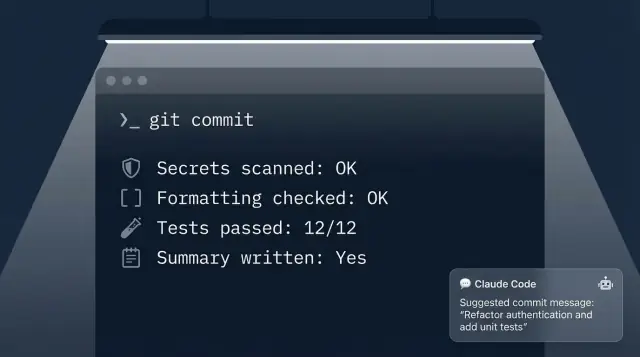
Claude Code git hooks can stop secrets, enforce formatting, run the right tests, and write short commit summaries for faster reviews.
Why commit-time automation matters
Most review pain doesn't come from “hard” code. It comes from avoidable mistakes that slip into a commit: a debug flag left on, an unformatted file that creates noisy diffs, a missing test update, or a secret copied into a config. Each one is small, but together they turn a clean review into a slow back-and-forth.
Commit-time automation is the easiest place to stop that. When checks run right before a commit is created, they catch problems while the change is still fresh in your head. Fixing a mistake takes seconds because you're already in the context of the work. Compare that to finding it two days later in a pull request, after more commits have piled on and the reviewer has to ask what happened.
Git hooks are a practical tool for this because they run locally, without waiting on CI. But they aren't magic. Hooks can be skipped, misconfigured, or inconsistent across machines if your team doesn't standardize them. They also can't guarantee quality on their own. Think of them as guardrails, not gates.
Where hooks help most is preventing “review tax”, the repetitive, low-value feedback that keeps showing up. Common examples include sensitive strings that look like tokens, formatting and lint noise, basic “did you run the right tests?” checks, and small context summaries that help a reviewer understand intent.
This is where Claude Code git hooks fit nicely: they can do the boring verification work and add a bit of human-readable context at the exact moment you commit.
Expectation-setting matters. Keep local hooks fast and predictable so people don't hate them. Quick checks belong on your laptop; slow checks belong later. A good split is seconds at commit time and minutes in CI. If a hook regularly takes long enough that someone reaches for “skip”, it stops protecting your repo.
A simple example: you change one module and refactor a couple functions. Without automation, a reviewer sees 400 lines moved around, no tests mentioned, and has to ask basic questions. With commit-time checks, the commit is formatted, a relevant test set has been run, and the commit message includes a short summary. The review starts where it should: on the design, not the cleanup.
What Claude Code adds to git hooks
Git hooks are great for simple checks, but they usually stop at yes-or-no rules: “is the file formatted?” or “did you run the linter?”. Claude Code can add a lightweight layer of judgment by reading your staged diff and a few related files, then making decisions that better match how humans review changes.
With Claude Code git hooks, the hook can look at what you actually changed, not just what exists in the repo. That makes automation more selective. It can focus on touched modules, edited config files, and new environment variables, instead of treating every commit like a full build.
Practical tasks where “read the diff and think” pays off:
- Flag likely secrets (API keys, tokens, private keys), even when they're slightly obfuscated or split across lines.
- Enforce formatting with context, like only running formatters on staged files and warning when a formatter would cause huge unrelated churn.
- Suggest or require tests based on what changed (for example, “you touched payment logic, run these unit tests”) instead of “run everything”.
- Generate a short reviewer summary from the diff: what changed, why, risk areas, and what to verify.
Constraints matter because a slow hook becomes a skipped hook. Keep the goal small: add guardrails that catch common mistakes early, not a second CI system on every commit.
Speed and reliability first
A good rule is: if it can't finish in a few seconds, it probably belongs in CI or a pre-push hook. Many teams run quick local checks at commit time and leave heavier test suites for later.
Plan for failure modes. If a model call times out, decide whether to block the commit or fall back to a simpler check. A fallback keeps the workflow predictable and avoids training people to disable hooks.
Privacy and offline vs online
Some setups call a hosted model; others run in a more isolated environment. Decide what code can leave a developer machine (if any), and limit what you send. The staged diff plus a small set of referenced files is often enough.
If you work with sensitive repositories, be explicit about where the analysis runs and what gets logged. A concrete example: if a commit adds a new config value like STRIPE_SECRET=..., the hook can stop the commit, explain what looks risky, and suggest moving it to a secret manager or local env file before it ever reaches the remote repo.
Pick the right hooks and keep them fast
Git hooks are only useful if people keep them turned on and don't learn to dread commits. The trick is choosing the right hook for the right job and keeping anything slow out of the hot path.
A simple map of where checks usually belong:
- pre-commit: fast, local checks that block obvious problems (formatting, secrets scan, quick lint)
- commit-msg: checks that only need the message (ticket ID, length, conventional format)
- pre-push: heavier work that's still worth catching before it hits the shared repo (slower tests, type checks, build)
When you add Claude Code git hooks, treat them like a helpful reviewer who shows up instantly, not a bottleneck. Put anything that needs network calls, full test suites, or long analysis into pre-push or CI, not pre-commit.
A practical way to decide what runs where is to sort checks by speed and impact. If it catches high-risk issues (like leaked keys) and can run in a second or two, it belongs in pre-commit. If it takes 30 to 90 seconds, move it to pre-push or run it only when certain files change.
Teams also need a clear stance on enforcement. For a solo repo, opt-in hooks can be fine. For a team repo, it's common to enforce the basics (secrets, formatting, commit message rules) and keep heavier checks advisory locally, while CI stays the final gate.
Hook output matters more than people think. A hook that fails should say what happened and what to do next. Keep messages short and specific. Show the exact file and line when possible, give one clear fix command, explain how to bypass only for true emergencies (and when not to), and avoid huge logs unless the user asks for “verbose.”
Example: if you export a project from Koder.ai and start committing locally, a fast pre-commit hook can catch a copied API token immediately, while pre-push runs the slower “only tests for changed modules” rule before anyone else sees the branch.
Block secrets before they get committed
A secret is anything that lets someone act as you or access private systems. Think API tokens, OAuth client secrets, cloud keys, database passwords, private webhook URLs, signing keys, and even “temporary” test credentials. One accidental commit can end up in a fork, a CI log, or a pasted diff, and then it's no longer temporary.
The easiest win is scanning only what you're about to commit. A hook should check staged changes (the index), not your whole repo. That keeps it fast and avoids noise from old files you didn't touch. It also makes the feedback feel fair: “this commit includes a problem” instead of “your repo once had a problem.”
Common things to flag early include high-entropy tokens (long random-looking strings), known key formats (AWS keys, GitHub tokens, JWTs), patterns like password=... or api_key: ... in config, private URLs with embedded credentials, and .env files or copied production configs.
False positives happen, especially with test data, hashes, or example docs. Build in an allowlist so people can move on without disabling the whole check. Keep the allowlist narrow: exact file paths for fixtures, or explicit markers like “dummy” or “example” that your detector recognizes.
When a secret is found, fail the commit with a message that tells people what to do next. Claude Code git hooks can make this friendlier by producing a short explanation based on the diff, but the key is clear, safe next actions:
ERROR: Possible secret detected in staged file: config/app.yaml (line 12)
Reason: looks like an API token
Next steps:
1) Remove it from the change or move it to env vars
2) Rotate the token (assume it is compromised)
3) Re-stage and retry commit
If this is a false positive, add a narrow allowlist rule in .secrets-allowlist
A concrete example: someone updates a backend config and adds a TEMP_API_KEY so a feature works in dev. The hook stops the commit, suggests moving it to an environment variable, and reminds them to rotate if it was real. That's a small interruption that prevents a big cleanup later.
Enforce formatting without slowing people down
Formatting fights waste reviewer time, but slow hooks are a fast way to get hooks disabled. The sweet spot is simple rules, one tool per language, and only touching what's about to be committed.
Pick a single formatter per language and make it the source of truth. Two formatters that disagree (or a formatter plus a linter that also rewrites code) will create noisy diffs and endless churn. Keep it boring: one JS/TS formatter, one Go formatter, one Dart formatter. Then make sure everyone runs the same versions so the hook output is stable across machines.
The biggest speed win is formatting only staged files. Formatting the whole repo on every commit is the main reason teams complain about pre-commit. A staged-only approach also keeps the diff focused on what you changed, which is exactly what reviewers want.
A practical set of choices that keeps commits quick:
- Run formatting on staged files only.
- Use auto-fix for safe changes (spacing, quotes, import order).
- Fail fast when a human decision is needed (like a rule that might change behavior).
- Keep formatter output quiet unless it changed something.
- Cache when possible, but never at the cost of correctness.
Auto-fix vs fail is a team preference, but a mixed approach works well. Auto-fix is great for mechanical edits because it avoids the “commit, fail, re-run, commit again” loop. Failing can be better when you want people to see the issue and choose a direction. If you do fail, print one instruction anyone can follow in 10 seconds.
Standardize the small stuff that causes cross-platform noise. Line endings and trailing whitespace are the usual offenders, especially when people switch between Windows, macOS, and CI.
A simple policy that rarely causes pain:
- Enforce LF line endings in the repo.
- Strip trailing whitespace on modified lines.
- Ensure files end with a newline.
- Skip formatting for generated files and vendor directories.
Where Claude Code git hooks can help is in the glue: detecting which staged files need which formatter, running them in the right order, and explaining failures in plain language. For example, if someone stages a Go file and a TS file, the hook can format each with the correct tool, re-stage the results, and then output a short note like “2 files reformatted, no behavior changes”. Reviewers see cleaner diffs, and developers don't feel punished for committing often.
Require tests for what you changed
A simple rule makes commits safer without making them painful: only run the tests that match what you actually staged. When the hook looks at the staged diff (not your working tree), it avoids false alarms from half-finished files.
Start by detecting which areas were touched. Most repos already have a natural structure: packages, services, apps, or modules. A hook can read git diff --cached --name-only, then map those paths to a small set of test commands.
Here are a few mapping rules that stay understandable when you come back to them later:
web/orfrontend/-> runnpm test(or the smallest targeted command you have)api/orserver/-> run backend unit tests (skip integration by default)mobile/-> run fast widget/unit tests, not full device suitesdb/ormigrations/-> run migration linting plus a small schema checkshared/-> run the shared package tests, plus any consumers that are quick
If you use Claude Code git hooks, you can go one step further: have Claude look at the staged filenames and propose a minimal test set, then the hook runs those commands. Keep the final decision rule-based, though, so the team can predict what will happen.
Split the workload between commit and push. Commits should stay fast so people don't start bypassing hooks. A practical pattern is:
- On commit: run a quick, selective set (lint + unit tests for touched modules)
- On push: run a wider set (integration, end-to-end smoke, cross-module tests)
- In CI: run the full suite and enforce coverage gates
Flaky and slow tests need an explicit policy, or your hook becomes noise. Agree as a team on what blocks a commit vs what only warns. A workable approach is to block on clear failures (formatting, unit tests that are normally stable), warn on known flaky tests with a short message, and move slow suites to push/CI. If a test is flaky, treat that as a bug: track it, fix it, and remove the warning mode as soon as it's stable again.
Generate short reviewer summaries at commit time
A good diff isn't always easy to review. A short commit-time summary can turn a 10-minute read into a 2-minute check, especially when changes touch multiple files or include refactors.
The idea is simple: when you run git commit, your hook asks Claude Code to read the staged diff and produce a 3 to 6 line note that answers the questions reviewers always have: what changed, why it changed, how risky it is, and how it was tested.
A simple summary template
Keep the output tight and consistent so reviewers learn to trust it:
- What: one sentence on the main change (not a file list)
- Why: the user problem or bug being fixed
- Risk: low, medium, or high with one reason
- Testing: what you ran (or say “not run”)
- Notes: migrations, flags, rollout steps, or anything review-critical
You can put this directly into the commit message (for example, as a short footer), or save it into a file that your team copies into the pull request description. Commit message works well when you want the context to travel with the change. A separate file works better if your team prefers clean, conventional commit subjects.
Don’t leak secrets in the summary
A summary tool should be stricter than a reviewer. Before sending any diff content to the model, filter out lines that match patterns like API keys, private keys, tokens, .env values, and credentials. Also filter common headers and cookies if your repo includes captured HTTP traffic. When the hook detects sensitive patterns, it can redact the lines or fall back to a generic summary like “credentials-related changes redacted”.
Example: you update a billing endpoint and touch three files. The staged diff is noisy due to renames, but the summary says: “Adds idempotency key handling for charge creation to prevent double billing. Reason: retries caused duplicate charges. Risk: medium (payment path). Testing: unit tests for billing service, manual request replay.” That's exactly what a reviewer needs, without reading every line first.
Example workflow: one commit, fewer surprises
You fix a small bug and tweak a config in the same commit. The bug is a one-line change in billing/tax.go. The config change updates config/staging.yaml to point at a new endpoint.
You run git commit -am "Fix tax rounding". Your Claude Code git hooks kick in and do a quick set of checks, in a predictable order.
First, the secret scan looks at what changed, not your whole repo. It flags that the staging config includes something that looks like a real API key.
ERROR: Possible secret detected in config/staging.yaml:12
Pattern: api_key=sk_live_...
Fix: remove the key and use an env var reference (e.g., API_KEY)
Override: set ALLOW_SECRETS=1 (not recommended)
You replace the value with an environment variable reference, then commit again.
Next, formatting runs only where it matters. If your Go file isn't formatted, it fails with a short hint like “run gofmt on billing/tax.go”. You run the formatter, and the hook passes in seconds.
Then the test gate runs a targeted set. Because you touched billing/, it runs the billing unit tests only (not the full suite). If one test fails, the hook shows the exact command to reproduce locally. You fix the rounding edge case and re-run the same tests.
Finally, the hook generates a reviewer summary from the diff. It's short and specific, like:
- What changed: Fix rounding in tax calculation for values ending in .005
- Config: staging now reads API key from env var
- Tests: billing unit tests passed
- Risk: affects billing totals, but limited to tax rounding path
What the reviewer sees is a commit that's already clean: no leaked secrets, consistent formatting, and tests that match the change. They also get a ready-made summary, so they can focus on the logic instead of hunting for intent.
Common mistakes and how to avoid them
The fastest way to make hooks fail is to make them painful. If a hook takes long enough to break someone's flow, people will bypass it with --no-verify or delete it. Keep anything heavy out of pre-commit and run it in CI or on demand.
A practical rule: pre-commit should feel like a typo check, not a test suite. If you want smarter checks from Claude Code git hooks, use them to decide what to run, not to run everything.
1) Hooks that are too slow
Make hooks fast by default and strict only when needed. For example, run quick format + secret scan on every commit, but run tests only for affected modules.
A simple speed budget that works well:
pre-commit: 1 to 5 seconds totalcommit-msg: under 1 second- Anything longer: move to
pre-pushor CI
2) AI output without clear rules
AI is great at suggestions, not policy. If you ask an AI to “review the diff” without rules, you get different results each time. Define what the hook must do (and what it must never do). For example: it can generate a reviewer summary, but it can't rewrite code unless a formatter already produced deterministic changes.
3) Staged vs unstaged confusion
Many hooks accidentally scan your working tree, then fail the commit because of changes you didn't stage. That feels unfair.
Avoid it by always using staged content as input. A good test: edit a file, stage only half, and verify the hook reports only what's staged.
4) Too many false positives
If every commit triggers a warning, warnings become noise. Tune patterns, add allowlists for known safe strings, and downgrade “maybe” findings to a warning with a clear fix.
Concrete example: if your secret scanner flags test keys in fixtures/, add a rule to ignore that folder, but keep blocking real keys in app config files.
Quick checklist and next steps
If you want Claude Code git hooks to help without annoying your team, the goal is simple: catch real problems early, stay quiet when everything is normal, and keep the commit loop quick.
A practical checklist that works for most repos:
- Keep pre-commit under a few seconds for most changes. If it gets slow, people will bypass it.
- Only scan, format, and lint staged files. Anything else belongs in pre-push or CI.
- Block obvious secrets (API keys, private keys, tokens). For “maybe” cases, warn and let the developer confirm.
- Require targeted tests on commit for touched modules, then run broader tests on push or CI.
- Add a short, consistent commit summary so reviewers know what changed and what to focus on.
A small detail that pays off: make the reviewer summary look the same every time. A simple template is enough, and it trains reviewers to scan quickly.
Review summary:
- What changed: <1-2 bullets>
- Risky areas: <files/modules>
- Tests run: <command or “not run + why”>
Next steps that keep this easy to adopt:
- Prototype the flow in a sandbox project first, then copy it into the real repo once it feels right.
- Start with “warn only” mode for a week, measure false positives, then switch the most reliable checks to “block.”
- Add escape hatches for emergencies (for example, allow skipping a hook with a clear reason in the commit message), and log when it happens.
- Move anything heavy (full test suites, deep secret scanning, dependency audits) to pre-push or CI so commits stay fast.
If you like building tooling in a chat-first way, Koder.ai (koder.ai) can be handy for generating the small helper scripts around your hooks and iterating safely with snapshots and rollback before you export the source code into your repo.
FAQ
What are the best checks to run at commit time?
Start with the repeat offenders that waste reviewer time:
- Secret scanning on staged changes
- Formatting only for staged files
- Fast lint (or type check) for touched files
- A short reviewer summary generated from the diff
Keep anything slow (full test suite, deep static analysis) for pre-push or CI.
Which git hook should I use for what—pre-commit, commit-msg, or pre-push?
A good default is:
pre-commitfor fast checks that look at staged changes (secrets, formatting, quick lint, selective unit tests)commit-msgfor commit message rules (length, format, ticket ID)pre-pushfor slower but still local checks (broader tests, builds)
If a check regularly takes more than a few seconds, move it later.
If hooks can be skipped, are they still worth it?
Treat commit-time hooks as guardrails, not your only enforcement.
- Use local hooks to catch mistakes early and reduce review noise.
- Still enforce the real “must pass” rules in CI, because hooks can be skipped or misconfigured.
A practical policy is: hooks help developers; CI protects the main branch.
How do I scan for secrets without making commits slow?
Scan the staged diff (the index), not the whole repo.
- It’s faster.
- It’s fairer (it flags what you’re about to commit, not old files).
- It reduces noise from unrelated history.
If you need a full-repo scan, run it on a schedule or in CI.
What should I do about false positives from secret detection?
Block when the match is high-confidence (real key formats, private key blocks, obvious password= values in config). Warn when it’s ambiguous.
Also add a narrow allowlist for known safe cases, such as:
- Specific fixture paths
- Clearly marked example strings (e.g.,
DUMMY_KEY)
If people see constant false alarms, they’ll disable the hook.
How can I enforce formatting without annoying the team?
Format only staged files, and use one formatter per language.
Practical defaults:
- Auto-fix safe formatting changes, then re-stage
- Fail with one clear command when a human decision is needed
- Skip generated/vendor directories
This keeps diffs clean without turning every commit into a long rewrite.
How do I “require tests for what changed” without running everything?
Map touched paths to a small set of fast test commands.
Example approach:
- Detect changed areas via
git diff --cached --name-only - Run only the unit tests for those modules
- Leave integration/e2e for
pre-pushor CI
This keeps commits quick while still catching the most common breakages early.
What should a commit-time reviewer summary include?
Keep it short and consistent (3–6 lines). A simple template:
- What changed
- Why
- Risk (low/medium/high + one reason)
- Testing (what you ran, or “not run”)
You can append it to the commit message or save it as text output for the PR description.
How do I avoid leaking sensitive code or secrets when using AI in hooks?
Redact before sending anything to a model, and be conservative.
- Strip lines that look like tokens, secrets,
.envvalues, private keys, cookies, or auth headers - If sensitive patterns are present, fall back to a generic summary (e.g., “credentials-related lines redacted”)
- Send only the staged diff plus minimal referenced context
Default to “share less,” especially in private repos.
How do I keep hooks from becoming flaky or slowing down commits?
Make hooks predictable and fast:
- Set a time budget (e.g., 1–5 seconds for
pre-commit) - Add clear error messages: file, line, and one fix command
- Decide a failure policy for timeouts (block, warn, or fallback)
- Log “skips” sparingly so people don’t hide bypasses
If the hook feels flaky or slow, developers will reach for --no-verify.