

Coat drive drop-off tracker to see totals by location
Coat drive drop-off tracker helps you log donations at each drop-off site, avoid manual counting, and see accurate totals per location in minutes.
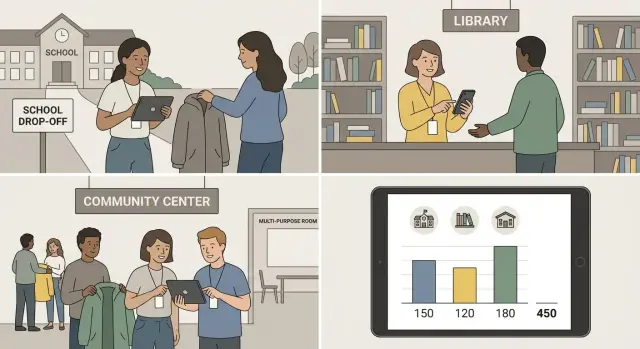
Why manual counting breaks down in a coat drive
Coat drives often end with rough estimates because the work happens in bursts. Bags arrive at different times, different people handle them, and nobody wants to stop the line to count. By the time someone tries to do a final count, some coats have already been moved, combined, or handed out.
There’s also a timing problem: the numbers you need most are needed during the drive, not after it. If you only know totals at the end, you can’t decide where to send extra boxes, which location needs another pickup, or whether you’re on track for your goal.
Manual methods usually fail in a few predictable ways:
- Delays: bags pile up until “counting time,” then volunteers get tired and rush.
- Double counts: a bag gets counted at drop-off, then counted again at the sorting site.
- Missing bags: a pickup happens, but nobody notes how many bags left the location.
- Mixed locations: coats from two sites end up in the same trunk, and the split is guessed later.
- Unclear definitions: one person counts “coats,” another counts “bags,” another counts “donations.”
Per-location totals aren’t a fancy report. Day to day, they answer basic questions without digging through texts: How many coats are currently attributed to the Library bin? What did the High School add this week? Which grocery store bin needs an earlier pickup because it’s filling faster?
A coat drive drop-off tracker works when it makes the right thing the easy thing. For volunteers, success looks like logging a drop-off in seconds and moving on. For organizers, it looks like totals that update as pickups and drop-offs happen, with fewer follow-up calls.
Example: a volunteer at a community center sees three bags added to the lobby bin. They jot it down on paper, but the paper stays in a pocket until the end of the shift. Another volunteer later counts the same bags before pickup, and the sorter counts them again after unloading. Nobody did anything “wrong,” but the total is now inflated and the location credit is unclear.
What you should log at each drop-off point
A good coat drive drop-off tracker starts with a few fields that every volunteer can fill out in under a minute. If it takes longer, people skip steps and totals drift.
Keep your minimum fields simple:
- Location (use a fixed name like “Library - Front Desk”)
- Date and time (auto-filled is best)
- Quantity (a whole number)
- Item type (coat, jacket, kids coat, gloves, hats)
Once that’s working, add only what you’ll actually use later without slowing anyone down. Helpful extras include volunteer name, condition (new, gently used, worn), size range (kids, adult), and a short note for anything unusual. Photos can help settle confusion, but keep them optional so logging never gets blocked.
Bags vs individual coats (avoid the #1 mix-up)
Pick one primary counting unit for totals: individual items. If someone drops off “2 bags,” don’t log “2” unless you truly mean two items.
A practical approach is to log an estimated item count and add a note like “2 bags, rough count.” If you can’t open the bag, don’t inflate totals. Log 0 items with a note like “sealed bag, needs counting,” then update later once it’s counted.
Rules for what counts as one entry
Use one entry per drop-off moment, not per donor.
- One entry = one volunteer check-in at one location at one time
- Combine similar items in the same entry (example: 8 coats + 3 hats)
- If you update a count later, edit the original entry instead of creating a new one
- If items move locations, log a transfer separately from donations
- If you’re unsure, add a note instead of guessing
Pick a workflow that volunteers can actually follow
The best tracker is the one people will use when they’re busy, cold, and juggling bags of donations.
First, choose when data gets logged:
- Right at drop-off: usually more accurate because each handoff is captured once, close to when it happens. You get live location donation totals, but you need a phone or tablet at each site and consistent habits.
- Later from paper sheets: can feel easier during high-traffic events, but it creates extra work and introduces missing sheets, unclear handwriting, and duplicate entries.
Tool choices usually fall into three buckets:
- Shared spreadsheet: flexible, but easy to edit the wrong row and awkward on a phone.
- Simple form: fast for volunteers and cleaner data, but you need a plan for edits.
- Simple app: helpful when you have many locations, want roles/permissions, offline support, or an edit history.
Whatever you pick, keep a few things consistent for everyone: location naming, what counts as a “coat” vs “other,” and how to handle bags (ideally avoid bags unless you also record an estimated item count).
A quick rule of thumb:
- 1 to 3 locations, 1 weekend: a form is usually enough.
- 4 to 10 locations, 1 to 3 weeks: a form plus a shared dashboard view works well.
- 10+ locations or a month-long drive: consider a simple app so rules and corrections are built in.
Set up your tracker in 30 minutes
You don’t need a fancy system to start. A simple table (spreadsheet) or a basic form that writes into a table is enough, as long as everyone logs the same way.
Start by defining your drop-off locations as a fixed list, not free text. This is where totals usually go wrong, because “Main Library” and “Library - Main” become two different places.
A fast naming pattern is: City + site + room. For example, “Riverside - Community Center - Lobby” and “Riverside - Community Center - Gym.” If two labels look similar, rename them now.
Next, decide what you’re counting and in what unit. If you mix “bags” and “coats” in the same tracker, you’ll spend the end of the drive arguing about what the totals mean. Pick categories you’ll actually use (adult coats, kids coats, blankets is a good start), and decide whether entries record items only or whether you’ll track bags in a separate field.
A simple 30-minute setup plan:
- Create a Locations list with clear names you will reuse.
- Create Category options (adult, kids, blankets) and one unit rule (items only, or bags only).
- Create an Entry table with date/time, location, category, quantity, volunteer name.
- Add basic checks so the form can’t be submitted with missing location or category.
- Decide who can edit past entries and who can only add new ones.
Keep validation strict but friendly: no blank location, no negative numbers, and quantities must be whole numbers. If you allow edits, limit them to one lead volunteer per shift so corrections stay consistent.
How to log donations at the drop-off point (step by step)
The goal at a drop-off point is speed and consistency. A simple form is enough, as long as everyone logs the same few details the same way.
Step-by-step logging
- Choose the location first. Pick the exact drop-off site name from a short list (not free-typed). Date and time should be captured automatically.
- Enter the count using a quick counting rule. If volunteers are counting individual coats, use quick tallies (groups of 5) and type the final number once. If coats arrive in bags, agree on a simple estimate rule ahead of time (for example, a full standard bag = X coats) and log the count using that rule.
- Add a short note only when something is unusual. Keep notes brief and optional. Good notes: “box overflow, left 2 bags next to bin,” “wet bag, set aside,” or “bin moved to lobby.”
- Confirm the submission before walking away. After hitting submit, make sure a “saved” message appears (or the entry shows in today’s list). This 3-second check prevents most missing logs.
If the device is offline
Offline happens, especially in basements and busy lobbies. Use a simple fallback so nothing gets lost:
- Write the count on a paper sheet with location + time, then enter it when back online.
- If your tool supports it, save entries locally and sync later.
- Avoid duplicate entries by adding a quick note like “offline log,” and enter it only once when connected.
Seeing totals per location without manual counting
Once donations are logged at the drop-off table, totals should be something you can read, not rebuild. A good coat drive drop-off tracker gives you two views: each location’s total (so you know what to pick up and where to focus) and a grand total (so you can report progress fast).
Location totals and a clear grand total
Keep every log entry tied to a single location name that never changes (for example, “North Library” instead of switching between “Library North” and “North Branch”). Then totals are just a grouped view: items per location, plus one overall sum.
If you want more useful numbers, add one extra field: item type (adult coat, kids coat, hats, gloves). That lets you report “1,240 items total, including 310 kids coats,” without extra counting.
Daily and weekly rollups sponsors can understand
Sponsors and community partners usually want quick updates on a schedule. Set one cut-off time each day (like 6 pm) and pull a daily rollup. For longer drives, a weekly rollup helps you show momentum.
A rollup view should include:
- Total items today and total items to date
- Top 3 locations by donations
- Locations with zero donations (to check if logging happened)
- Kids vs adult coats (if you track categories)
- Notes on pickups or bin capacity issues
Spot outliers before they become bad reports
Totals are your early warning system. If one location jumps from 20 a day to 400 in an hour, it might be real, but it often means a duplicate entry, the wrong location selected, or someone logging “bags” as “coats.” On the other side, sudden zeros usually mean a shift forgot to log or the location name changed.
For end-of-drive thank-you posts and nonprofit donation reporting, export a one-page summary: dates, total items, totals by location, and a short highlight (for example, “Downtown Gym led with 312 items”).
Prevent duplicates and make corrections safely
Duplicates are the fastest way to inflate your counts, especially when multiple people are logging at the same table. A simple rule helps: every drop-off gets one unique entry ID created the same way, every time.
A simple ID rule that volunteers can follow
Keep it easy enough to do on paper and in a form. One practical pattern is: location code + date + time (to the minute) + volunteer initials. If two submissions still collide, add an “A/B” suffix.
When someone submits the same drop-off twice, don’t delete anything right away. Instead, mark one entry as a duplicate and reference the entry you’re keeping (for example, “Duplicate of ID: LIB-0118-1452-JS”). Your totals should only include entries marked “active.”
Correct without losing context
Corrections happen: a volunteer typed 5 coats but it was 15, or picked the wrong location. The safest approach is to edit with a short reason and keep the original details visible.
If your tracker supports it, store:
- Original value and corrected value
- Who changed it
- When it changed
- A short reason (example: “misread tally sheet”)
- Status (active, duplicate, void)
For a lightweight approval flow, assign roles: volunteers can submit entries and flag issues, and one shift lead (or organizer) confirms edits once or twice a day. This keeps the coat drive volunteer log accurate without slowing down the line.
Common mistakes that ruin your totals
Most coat drives lose accuracy for the same few reasons. The problem is rarely the math. It’s unclear definitions and habits that make good data impossible, even with donation drop-off tracking.
Mixing bags and individual coats in the same column is the most common trap. A volunteer writes “3” meaning three trash bags, another writes “3” meaning three coats, and your totals become meaningless. Decide on one unit for your main log (usually individual items). If you accept bag counts, record them in a separate field, and only convert to items when you have a clear rule.
Location names also quietly break reporting. “Main,” “Main Office,” and “HQ” look close, but they split your location donation totals into three buckets. Use an approved list of exact location names and make volunteers select from it.
Logging after the fact from memory is another consistent problem. When volunteers wait until the end of a shift, you get missing entries, rounded numbers, and duplicate guesses. Logging at the drop-off moment isn’t “extra work.” It’s how you keep totals believable.
Edits can corrupt your numbers, too. If people overwrite totals directly, you lose the history of what changed and why. The safer pattern is simple: change entries, and let totals calculate automatically.
Finally, define what happens when bins are emptied or coats are transferred. If a school moves coats to a warehouse, you can accidentally count them twice: once at the school, once when they arrive.
Simple rules that prevent most errors
Write these rules at the top of your tracker and repeat them in volunteer training:
- Log coats as individual items; track bags separately (never in the same field).
- Use a fixed list of location names (no free typing).
- Log on pickup or drop-off, not later.
- Change entries, not totals (totals are calculated).
- When transferring coats, record it as a transfer event, not a new donation.
Example: a volunteer at “Main Office” empties the lobby bin into two bags and drives them to the community center. If they log “2” as donations at the community center, your totals jump incorrectly. If they log a transfer from “Main Office” to “Community Center,” your drive stays accurate and auditable.
Quick checklist for a smooth coat drive
A coat drive runs best when every drop-off point follows the same simple rules. The goal isn’t perfect data. The goal is data you can trust enough to make decisions and share totals with confidence.
- Before you launch: confirm your location names exactly as they should appear (no nicknames). Pick donation categories you’ll actually use (for example: adult coats, kids coats, accessories). Write one counting rule and stick to it, like: “Count each item at the moment it’s bagged for storage.”
- During the drive: set a daily 5-minute check. Scan for missing locations, dates with no entries, or a sudden spike that looks off.
- Volunteer handoff: decide where the logging device lives (a clipboard tablet at the front desk, a shared phone, or a laptop in a locked office). Make one person per shift responsible for logging.
- Corrections: agree on how fixes happen. A good rule is: edits are allowed only by a coordinator, and every correction needs a short note like “double entry removed” or “bag recount.”
- End of drive: set a clear cutoff time. After that, lock entries, export your summary, and write down any known gaps (for example: “Library box overflowed on Saturday, counts estimated”).
Example: tracking a multi-location community coat drive
A neighborhood group runs a two-week coat drive with five drop-off spots: a library, a high school, a coffee shop, a church, and a gym. Volunteers rotate every few days, so the organizer uses a simple coat drive drop-off tracker that everyone can update from their phone.
Each entry includes location, date, volunteer name, and quantity. Most sites log individual coats, but the gym prefers to record sealed bags because they collect after hours. To keep totals clean, the tracker supports both styles by adding a field for “unit” (coats or bags) and a standard conversion note for that one location (for example, 1 bag = about 12 coats, based on the gym’s bag size).
Midway through week two, the organizer notices the coffee shop total jumps by 30 coats overnight. A quick check shows two entries with the same pickup time and the same volunteer name. One was created when the volunteer’s phone lost signal and they re-submitted later.
The organizer fixes it without guessing: they mark the later entry as “duplicate,” add a short note (“re-submitted after signal drop”), and keep it in the log for transparency. The totals automatically update, and the audit trail stays intact.
On the last day, the organizer pulls a final report that’s easy to share with partners and sponsors:
- Total coats per location (plus converted bag totals)
- Daily totals to spot spikes and slow days
- Top drop-off points by volume
- Notes for exceptions (duplicates, corrections, damaged items)
They use the location totals to plan the pickup route, send a thank-you message to the highest-performing sites, and decide where to place extra bins next year.
Next steps: turn your tracker into a simple app
A spreadsheet is fine when you have one or two drop-off points and one person cleaning up the data. It starts to crack when you have many locations, multiple volunteers per shift, and you need updates throughout the day. If you’re seeing repeated rows, missing location names, or you can’t answer “How many coats are at Site B right now?” without a phone call, it’s time to consider a lightweight app.
A simple app doesn’t need to be fancy. The basic screens are usually: a quick “Log drop-off” form, a location selector, a running total, and a small “Fix a mistake” flow for authorized people.
If you build your own tool, prioritize a few practical features: roles/permissions (so not everyone can edit past entries), an edit history, and exports for nonprofit donation reporting.
If you want to build an internal tracker through a chat-based workflow, Koder.ai (koder.ai) is one option. It’s a vibe-coding platform that can generate a web app with a backend from your description, and it supports code export, deployment/hosting, custom domains, and snapshots/rollback - useful when you’re iterating with volunteers in the field.
A practical rollout plan keeps risk low:
- Pilot at one busy location for a weekend.
- Keep the spreadsheet as a backup, but treat the app as the source of truth.
- Fix the confusing parts (usually the location picker and the “undo” flow).
- Train two super-volunteers per site.
- Expand to all sites once the pilot totals match your real counts.
FAQ
Why do coat drive totals get so inaccurate when we count at the end?
Manual counting breaks when donations arrive in bursts and items move between bins, cars, and sorting tables. The safest fix is to log each drop-off or pickup once, at the moment it happens, and let totals update automatically from those entries.
What’s the minimum info we should log at each drop-off?
Log a fixed location name, the date and time (auto-filled if possible), an item count as a whole number, and an item type such as adult coat, kids coat, hats, or gloves. Add a short note only when something is unusual so volunteers can submit in seconds.
Should we track bags or individual coats?
Use one primary unit for totals, usually individual items, and stick to it. If you must accept bags, record them separately or log an estimated item count with a note so you don’t mix “2 bags” with “2 coats” in the same field.
What counts as one log entry, and when should we edit vs add a new one?
One entry should represent one volunteer check-in at one location at one time. If you later learn the count was wrong, edit that original entry with a brief reason instead of creating a second entry that can inflate totals.
Is it better to log donations immediately or at the end of a shift?
Right at drop-off is usually the most accurate because it captures the handoff once and avoids memory-based rounding later. If your site is too busy, use paper as a temporary fallback and enter it the same day with a clear time stamp to reduce duplicates.
How do we keep location names from ruining the totals?
Free-typed names create accidental duplicates like “Main Library” and “Library Main,” which splits totals. Use a short, approved list that volunteers select from, and keep naming consistent with a simple pattern such as city, site, and room.
What should volunteers do if the device is offline?
Use a simple offline rule: write location, time, and counts on a paper sheet, then enter it once when you’re back online. Add a short note like “offline log” so a second volunteer doesn’t re-enter the same moment later.
How do we prevent double counting across drop-off, pickup, and sorting?
Duplicates usually happen when someone submits twice after a signal drop or when a bag is counted at multiple stages. Give each entry a simple unique ID pattern and, when duplicates happen, mark one as duplicate rather than deleting it so the history stays clear.
What should we do when a location total suddenly jumps or drops to zero?
A sudden spike often means the wrong location was selected, bags were logged as items, or a duplicate entry was created. Treat spikes as a quick review task: check the time, volunteer name, and notes, then correct the original entry with a short reason so totals stay believable.
When should we switch from a spreadsheet to a simple app, and how could Koder.ai help?
A form or spreadsheet works for a small, short drive, but it gets hard when you have many locations, multiple volunteers, and frequent corrections. If you need roles, edit history, and a live dashboard, a lightweight app is a better default, and Koder.ai can generate one from a chat description with exports, hosting, and rollback so you can iterate safely during the drive.