

Community ride share board: a simple, safer way to carpool
Build a community ride share board for events: offer rides, list available seats, and share contact details safely with clear rules and simple posting.
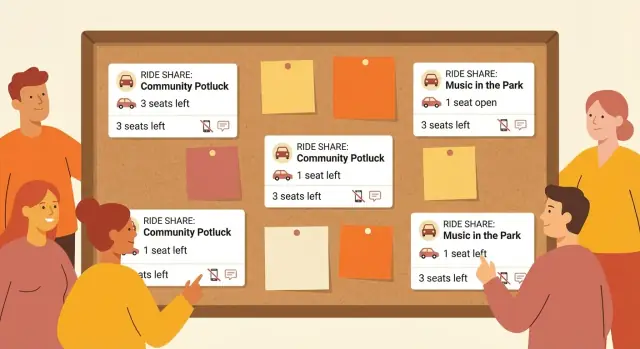
Why a ride share board helps (and group chats often do not)
Group chats feel like the fastest way to organize carpools. Everyone is already there, messages are instant, and it seems good enough. Then the date gets closer, more people join, and the chat turns into a scrolling puzzle.
The core problem is that chat is built for conversation, not for matching rides. Key details get buried under replies, reactions, and side topics. Someone offers two seats at 6:15, another person asks about leaving at 6:30, and five minutes later the plan changes, but the old message is still sitting there.
When you rely on one long chat thread, a few things tend to happen:
- Seats and times change, but older messages stay visible and confuse people.
- Pickup details get scattered across replies.
- Two drivers think they’re taking the same person, or one rider ends up with no ride.
- People share phone numbers publicly, then regret it.
- Last-minute updates disappear in unrelated chatter.
A community ride share board fixes this by turning every offer or request into a clear post with the same structure each time. Instead of asking five follow-up questions, you scan one place and quickly see who’s going, when, from where, and how many seats are available.
It also lowers the social pressure. People who don’t want to keep up with a busy chat can still post a request. Drivers can share availability without getting pulled into a long thread.
A simple board keeps ride details in one place, reduces back-and-forth, and makes it easier to share contact info in a safer way.
What a simple community ride share board includes
A good community ride share board does one job: help drivers and riders match quickly without turning into a noisy group chat. Keep it focused on the few details people need to decide, “Does this work for me?”
At the center are two post types.
Driver offers and rider requests
Driver offers should make it easy to understand where the car is coming from, where it’s roughly going, and how many people can join. You don’t need a full address to start matching. “North side” or “near the library” is usually enough until you confirm privately.
Rider requests are the mirror image. A rider should be able to share their general area, the time window they need, and how many seats they need (usually one). A short note like “I can meet at a common pickup spot” helps drivers feel more comfortable.
To keep the board simple, use a small set of required fields:
- Driver posts: event name/date (or recurring route), general start area, general destination area, departure time window, seats available.
- Rider posts: event name/date (or recurring route), general pickup area, needed arrival time (or departure window), seats needed.
- Both: one-way or round trip.
Optional fields can help without raising risk, like “can do a short detour,” “bringing sports gear,” “needs wheelchair space,” or “happy to split parking.”
Event-specific vs ongoing boards
Some communities do best with an event-specific board. It stays clean because posts expire after the date. This works well for concerts, school events, meetups, and volunteer days.
An ongoing board fits repeating needs, like weekly services, sports practice, or a regular commute. If you choose this, add one rule that keeps things from getting messy: posts should be refreshed regularly so old offers don’t confuse people.
Keep it safe by design
A community ride share board shouldn’t require sensitive info up front. Don’t make phone numbers or exact home addresses required fields. Start with general areas and time windows, then move to private confirmation once both people agree it’s a match.
If you build the board with a tool like Koder.ai, you can enforce consistent fields (required vs optional) so posts stay clear and safer by default.
Fields to collect: keep it short, clear, and useful
A community ride share board works best when every post answers the same basic questions. Ask for too much and people won’t post. Ask for too little and matching turns into a long back-and-forth.
Start with a small set of fields that help someone decide in a few seconds whether a ride could work. Keep anything sensitive (exact addresses, phone numbers) out of the main post until both sides agree.
The minimum that makes matching easy
These fields cover most real-world needs without turning the form into paperwork:
- Seats available (plus a quick luggage note if it matters, like “2 seats, small bags only”)
- Departure time window (a range like “leave between 4:30-5:15 pm,” not one exact minute)
- Pickup area (neighborhood, landmark, or nearby cross streets, not an exact address at first)
- Return trip (yes/no) with its own time window
- Preferences and needs (accessibility needs, quiet ride, pets ok/not ok, scent-free request)
Time windows matter. People run late. Events end unpredictably. A range sets expectations and reduces frustration.
Small details that prevent awkward trips
Seat count sounds simple, but it’s where many mismatches happen. Encourage posters to mention anything that affects space: car seat needs, bulky items (folding chairs, coolers), and whether the trunk is already full.
For pickup, “Downtown library parking lot” is enough to start. Once a rider and driver confirm, they can agree on the exact spot in a private message.
Return trips shouldn’t be implied. Many people can offer a ride there but not back. Treat it as a separate decision so nobody ends up stranded.
One short “expectations” field also helps. Notes like “quiet ride, no calls” or “happy to chat” let people self-sort and keep the ride more comfortable.
If you’re building the form yourself (for example, in Koder.ai), keep the first version strict: essentials plus an optional notes box. You can always add more later once you see what your community actually asks for.
How to share contact details safely
A ride share board works best when it helps people coordinate without forcing anyone to post personal info to the whole community. A simple rule: start with messages inside the board, then switch to phone or direct contact only when both sides feel comfortable.
Avoid showing phone numbers or personal emails on the public post. Instead, let riders send a request to the driver privately. If your board doesn’t have built-in messaging, you can still keep things safer with a “contact via organizer” step where a trusted admin passes along details after both people agree.
Share exact pickup details only after the match is confirmed. Public street addresses create safety issues and also cause confusion when plans change. Keep the public post general (neighborhood, landmark, or “near the library”), then share the exact meet spot in private.
A few practical rules keep things safe without adding friction:
- Public post: first name, general area, number of seats, and time window.
- Private message: exact pickup point, phone number (optional), and any accessibility needs.
- Confirm clearly: “Yes, I can take you” and “Yes, I’m taking that seat.”
- One seat, one confirmation: avoid vague “maybe” holds.
- If anything feels off, stop and report.
Basic moderation helps more than people expect. Add a “Report this post” option and a way to flag messages for an admin. Even for a small community, write down what happens next: who reviews reports, how fast, and what leads to removing a post.
Set expectations for the awkward stuff, too. Ask posters to confirm the night before and message as soon as plans change. A simple standard prevents most frustration: confirm by a set time, cancel as early as possible, and if someone no-shows twice, they lose posting privileges.
Example: Maya offers a ride to a Saturday fundraiser and lists “2 seats, leaving 9:30-9:45, pickup near North Park.” Two people message her through the board, she confirms one seat each, then shares her exact pickup corner and a phone number only after both reply “confirmed.”
Step by step: set up the board in an afternoon
Start by deciding what you’re solving today. Keep the scope small and people will actually use it. A strong first version is one board for one event (or one weekend). Once that works, expand to a season or a broader set of community events.
Write a few posting rules that fit on one screen. Focus on helping matches happen fast while preventing unsafe sharing. Be clear about what to include (route, time window, seats, pickup options) and what not to share (home address, full legal name, personal ID numbers).
Then decide who can post. Member-only posting reduces spam and surprises, but open posting can work for small, trusted groups if someone is actively moderating. If you’re unsure, start member-only and let people request access.
Choose how you’ll moderate before the first post goes live. Pre-approval can feel safer for new boards and larger groups, but it slows things down. After-the-fact review is faster, but only works if someone checks reports quickly and removes posts that break the rules.
A simple plan is enough:
- Set the scope (this event only, the next 4 weeks, or ongoing).
- Publish a short set of posting rules.
- Decide posting access (members-only or open).
- Pick a moderation approach (pre-approval or review + reporting).
- Set retention so old posts disappear after the event.
Retention matters. If yesterday’s rides stay visible, riders will message the wrong driver and drivers will keep getting pings. A practical rule is: remove posts 24 hours after the event ends, and remove duplicates sooner.
Example: your neighborhood is going to a Saturday festival. You create a board for that single day, require a meetup point (like a grocery store parking lot), allow only logged-in members to post, and set moderation to after-the-fact with a clear reporting option. On Sunday morning, everything clears so the board is ready for the next event.
If you want this as a lightweight web app instead of a shared document, Koder.ai can help you describe the form, moderation flow, and post expiry in chat, then export the source code when you’re ready.
Posting templates that make matching faster
A ride share board works best when posts look similar. People can scan quickly, compare options, and message the right person without a long back-and-forth. The goal isn’t perfect detail. It’s just enough detail to match.
Template: offering a ride (driver)
- Tag: Offering
- From (area):
- To (event/location):
- Date:
- Time window: (ex: leaving 4:30-5:15pm)
- Seats available:
- Return trip: Yes/No (if yes, leaving window)
- Pickup notes: (ex: can meet at the library parking lot)
- Ride notes: (ex: no smoking, small bags only)
- Status: Open / Pending / Full / Canceled
Example: Offering | From: Northside | Leaving 4:30-5:15pm | 2 seats | Return: Yes, 9:30-10:00pm | Meet: library lot | Status: Open.
Template: need a ride (rider)
- Tag: Need a ride
- From (area):
- To (event/location):
- Date:
- Time window: (earliest - latest)
- Flexibility: Flexible / Somewhat flexible / Not flexible
- Return trip needed: Yes/No (if yes, time window)
- Notes: (ex: can meet anywhere on Main St)
- Status: Open / Pending / Matched / Canceled
Example: Need a ride | From: East Hill | Can leave 5:00-6:00pm | Flexible | Return: Yes, 9:00-10:30pm | Status: Open.
If your board supports tags, keep them simple: Offering, Need a ride, and Return trip. Always include a status label so people don’t waste time messaging a post that’s already Full or no longer happening.
Common mistakes and how to avoid them
A community ride share board only works if it stays clear, current, and safe. Most problems come from small details people skip when they’re posting in a hurry.
The biggest safety mistake is sharing too much personal data in public. Don’t post exact home addresses, last names, driver’s license details, or any ID numbers. Use broad pickup areas (like “North library parking lot”), then share the exact meet spot privately once both sides agree.
Confusion also comes from posts that don’t include basics. “Leaving around 6, I have room” triggers five follow-up questions. Make seat count and time window required. “2 seats, leaving 5:30-6:00 pm” is easy to match.
Mixing multiple events on one board without clear labels gets messy fast. If your board covers a school play, a sports game, and a fundraiser in the same week, require an event name and date in every post. If you can, separate by event or add a simple filter so people don’t reply to the wrong ride.
Old posts cause no-shows and wasted time. Set a rule that posts expire after the event (or after 24 hours). If you can’t auto-expire, assign one person to archive or remove them.
A quick list of common issues and fixes:
- Private info in posts: keep pickup zones general; share details privately.
- Missing seat count or time range: require seats + leave/return window.
- No event label: require event name + date.
- Stale posts: expire, archive, or delete quickly.
- No moderation plan: define basic rules and a reporting path.
For disputes, spam, or inappropriate messages, you don’t need a long policy, but you do need a plan. Decide who can remove posts, how reports are handled, and what gets someone blocked. Keep it simple: one moderator (plus a backup), one “be respectful” rule, and one clear way to report a post.
If you’re building the board as a small app, add three guardrails early: required fields, post expiration, and a “report” button. Those prevent most problems before they start.
Quick checklist before you launch
Before you share the board with everyone, test it like you’re a brand new member. Open it on your phone, scan the newest posts, and ask: can I find a ride in 30 seconds without guessing?
Launch checklist (5 fast checks)
- The event name and date are easy to spot (so screenshots still make sense).
- Seats and timing are written in plain language (including a time window).
- Contact details stay private by default.
- People can mark a ride as full, canceled, or no longer needed without friction.
- Old posts don’t linger after the event.
Do one real-world dry run
Create two test posts: one driver offering two seats and one rider looking for a lift. Then try matching them using only what’s written. If you still need to ask basic questions like “Which event is this for?” or “Are you leaving at 4 or 6?” tweak the post format.
A simple standard works well:
- Line 1: event name + date
- Line 2: route or meetup point
- Line 3: seats + time window
If you’re building the board as a small web app, add three controls people will actually use: “Mark full,” “Cancel,” and “Edit time.” Tools like Koder.ai can help you put those basics together quickly, but the bigger win is the habit: fewer fields, clearer posts, and private contact by default.
A realistic example: coordinating rides to a local event
It’s Saturday, and there’s a community concert that starts at 6 pm. People are coming from a few nearby neighborhoods, and the usual group chat is already noisy: “Anyone driving?” “I can take one person.” “Where should we meet?”
Instead, the organizer uses one place for ride offers and requests, with the same format for everyone.
Jordan, a driver from Maple Heights, posts an offer: leaving around 5:15 pm, three seats available, and a preferred meetup spot near the grocery store parking lot. Jordan adds two helpful notes: “No kids seats available” and “Heading back around 9:15 pm, but flexible.”
Within an hour, two riders add requests. Sam writes that they can meet anywhere along the main road and are fine arriving 10-15 minutes early. Priya adds that they’re near the library, can walk to the grocery store meetup point, and can share a ride back or find another return option.
Because the posts are structured, the match is obvious without a long back-and-forth. The board shows who has seats, who needs them, and what “flexible” really means.
Before anyone shares phone numbers, the board keeps contact details limited. Once Jordan confirms they can take Sam and Priya, they move to a private message for final details (exact pickup spot, car description, and a quick “I’m here” text).
To keep it safer, the private message includes only what’s needed: first names, a pickup time window, a public meetup point, and a simple confirmation like “blue sedan, plate ends 42.”
The outcome is quieter, clearer, and less stressful. The public thread stays tidy with one confirmed ride, fewer repeated questions, and no personal details left hanging in a big group chat.
Next steps: keep it simple, then improve it
Treat your first community ride share board like a pilot. Pick one upcoming event, run it once, and keep the rules easy to follow.
After the event, collect quick feedback while it’s fresh. Ask what felt confusing, which fields people skipped, and what they had to message about anyway. If many riders ignore a field, it may be unnecessary or unclear. If many drivers leave something blank, add a short example under the field (like “2 seats” or “leaving 5:30-6:00 pm”).
Then decide what you actually need next: sign-in, moderation, and auto-expiry.
- Sign-in reduces spam but adds friction.
- Moderation can be as simple as one person checking reports daily.
- Auto-expiry prevents old ride offers from creating confusion.
When you’re ready to add features, prioritize the ones that reduce back-and-forth: notifications for changes, recurring events, a simple way to mark a ride as full without deleting it, and a clear history per event.
If your group outgrows a shared doc or form, a small custom board app can be a good next step. With Koder.ai (koder.ai), you can describe the screens and rules in chat, then deploy and iterate with options like snapshots and rollback.
Improve in small steps. Add one change, run one more event, and only keep what people actually use.
FAQ
Why is a ride share board better than just using a group chat?
Group chats are great for quick talk, but bad for tracking changing details. A board keeps each ride offer or request in a consistent format, so seats, times, and pickup areas don’t get buried under new messages.
What information should every ride post include?
Make two post types: driver offers and rider requests. Each post should include the event/date, general pickup area, time window, seat count, and whether a return trip is available or needed.
Should people post an exact departure time or a time window?
Ask for a time range, not a single exact time. A window sets expectations, reduces missed connections, and makes it easier to match people who are “close enough” on timing.
How do we handle pickup locations without sharing home addresses?
Use a general area or public landmark in the post, then share the exact spot privately after both sides agree. This keeps the board safer and prevents confusion when plans change.
What’s the safest way to share contact details?
Don’t require phone numbers or personal emails on the public post. Let people coordinate through private messages in the board, or use an organizer to pass details only after a match is confirmed.
How do we prevent two drivers from thinking they’re taking the same rider?
Have both people confirm clearly in writing before counting the seat as taken. A simple “Yes, I’m taking you” and “Confirmed” avoids double-booking and prevents “maybe” holds.
Should return trips be included in the same post?
Treat the return as a separate choice and make it explicit. Many drivers can offer a ride there but not back, so the board should show return timing and availability clearly.
Is it better to make the board event-specific or ongoing?
Run an event-specific board when you want it to stay clean and automatically become irrelevant after the date. Use an ongoing board for repeating needs, but require posts to be refreshed so old offers don’t linger.
How do we stop stale posts from causing problems?
Expire or remove posts shortly after the event ends so people don’t message outdated offers. Even without automation, assigning one person to archive old posts prevents most confusion.
What’s the simplest feature set for a first version of the board?
Start with required fields, post status (open, full, canceled), and post expiration. If you build it in Koder.ai, you can enforce consistent fields and add simple controls like edit time and mark full, then export the source code when you’re ready.