

How to Create a Mobile App for Digital Queue Tickets
Learn how to plan, design, and build a mobile app for digital queue tickets: user flows, backend basics, notifications, QR codes, and launch tips.
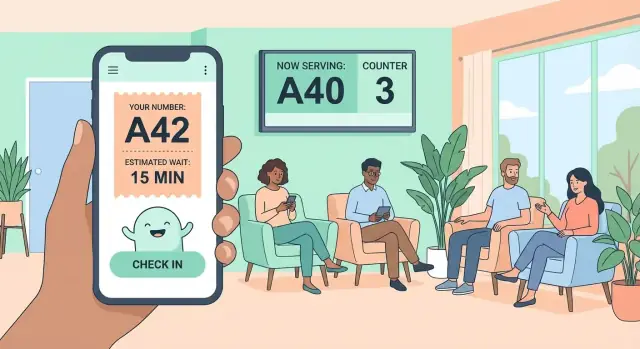
What a Digital Queue Ticket App Does
A digital queue ticket app is a “take a number” system on a phone (often paired with a kiosk and/or a staff tablet). Instead of people standing in a physical line, visitors get a ticket number, see their place in the queue, and wait wherever it’s convenient—nearby, in a seating area, or even outside.
Who Uses It (and Why)
Most deployments have three user groups:
- Customers/visitors: take a ticket, track progress, and get called when it’s their turn.
- Frontline staff: call the next ticket, route people to the right counter, and handle exceptions.
- Managers/admins: configure services and opening hours, and review queue analytics.
Where It’s Used Most
Digital queue tickets are common anywhere walk-ins arrive in bursts:
- Clinics and labs (check-in, payments, test results)
- Banks and credit unions (tellers, account services)
- Government offices (licenses, permits, registrations)
- Retail service desks (returns, repairs, consultations)
- Restaurants and venues (virtual waiting room for seating)
What the App Is Trying to Achieve
The goal isn’t only a shorter wait—it’s a better wait and a smoother operation:
- Shorter perceived wait by letting people wait comfortably and transparently
- Fewer visible lines and less crowding at entrances and counters
- Clearer order and fairness (“who’s next?” is always answered)
- Better staff planning through live workload and peak-time insights
This guide walks through product choices and technical basics—without heavy jargon—so you can plan an MVP that works in the real world.
Use Cases and Success Metrics
Before you design screens or pick a tech stack, get clear on who the system is for, what problem it solves, and how you’ll measure success.
Common use cases
Digital queue tickets shine wherever physical lines create friction:
- Clinics and public services (walk-ins with multiple service desks)
- Retail service counters (returns, repairs, customer support)
- Restaurants and venues (virtual waiting room for seating)
- Banks, telecom, and utilities (many request types with different handling times)
The pain points are usually the same: long lines, uncertainty about how long it’ll take, missed turns when people step away, and crowding near the counter.
Success metrics to track
Define a baseline first (how things work today), then measure improvements:
- Average wait time and 95th percentile wait (captures peak-time pain)
- Throughput (customers served per hour/per staff member)
- No-show rate (tickets called but not present)
- Abandonment rate (people who take a number but leave)
- Customer satisfaction (quick in-app rating or short survey)
Constraints you should plan for
- Internet reliability: decide what happens if Wi‑Fi drops (staff-only fallback, cached status, clear messaging).
- Device access: some visitors won’t install an app—plan alternatives (web link, kiosk, or staff-issued ticket).
- Accessibility: large text, screen-reader support, high contrast, and a flow that works without fine motor gestures.
Pick the Right Queue Model for Your Business
Before you build features, decide what kind of line you’re managing. The queue model affects ticket creation, wait-time estimates, staff workflows, and what users expect.
Choose your core model
Most businesses fit into one of these:
- Walk-in ticketing: customers “take a number” and wait. Great for quick, variable-length services (retail help desk, pharmacy, government counters).
- Appointments: customers book a time slot. Best when service duration is predictable and capacity planning matters (clinics, salons).
- Hybrid: a virtual waiting room for walk-ins plus scheduled appointments.
A simple rule: if customers often ask “how long will this take?”, walk-in needs strong wait estimates. If they ask “what time can I come?”, appointments matter more.
Decide where tickets are issued
Ticket issuance drives adoption and accessibility:
- Mobile-only: fastest to launch, lowest hardware cost, ideal if most customers already use smartphones.
- Kiosk + mobile: supports walk-ups and reduces staff workload; a kiosk can print a QR code queue ticket or show a short code.
- Staff-issued: helpful when customers are less tech-savvy or when intake requires triage (e.g., selecting a service category).
Define queue rules early
Write down the rules your queue management app must enforce:
- Priorities: VIP, elderly, emergencies, scheduled vs walk-in.
- Categories/services: separate lines per service, or one line with routing.
- Transfers: moving a ticket between counters without losing its history.
Plan fallbacks for downtime
Systems fail. Decide how you’ll operate in manual mode: staff-issued paper numbers, offline ticket lists, or a “serve next” flow that still works if real-time updates are unavailable.
Map the User Journeys (Customer, Staff, Admin)
Map the three main journeys: customers who want speed and clarity, staff who need quick controls, and admins who keep the system accurate. Clear flows also help define what “done” looks like for your MVP.
Customer journey: from arrival to service
A typical customer flow is:
- Pick a location (or confirm they’re at the right venue) and choose a service.
- Get a ticket (number + estimated wait) and a simple way to return to it.
- Track position in line and see what to do next (“You’re 3rd; be ready in ~6 min”).
- Get called, confirm they’re on the way, then complete the visit.
Design for “low attention” moments: people may be juggling kids, bags, or poor reception. Make the ticket screen readable, persistent, and one-tap to reopen.
Staff journey: fast actions with minimal taps
Staff should be able to run the queue without thinking:
- Call next customer.
- Skip and recall (with a reason, if needed).
- Mark served or no-show.
- Add notes (optional) for special cases (“needs wheelchair access”).
The key is speed: staff shouldn’t search, type, or navigate deep menus during busy periods.
Admin journey: setup and control
Admins configure the business rules that make the queue feel fair:
- Services offered, counters/rooms, opening hours, and capacity.
- Priority rules (e.g., seniors, pre-booked customers, VIP).
- Exception handling policies (how long a ticket stays valid).
Edge cases to plan early
Decide what happens when customers arrive late, take multiple tickets, cancel, or when a counter closes unexpectedly. Writing these rules down early prevents inconsistent staff decisions and frustrated customers later.
Design the MVP Feature Set
An MVP for a queue management app should do one job extremely well: create a ticket, show progress, and help staff move the line along. Everything else (marketing pages, fancy themes, deep integrations) can wait.
MVP principle: fewer screens, clearer labels
People open a take a number app when they’re in a hurry. Keep language simple and status labels unmistakable—think: “You are 5th”, “Estimated wait: 12–18 min”, “Now serving: A-24”. Avoid hidden gestures, and avoid forcing logins unless you truly need them.
Minimal customer experience
Keep the customer side small:
- Ticket view: ticket number, queue name, timestamp, and a big status (“You are 5th”).
- Queue status: “Now serving”, position updates, and basic wait-time messaging.
- Notification settings: toggle SMS/push, plus “notify me when I’m next”.
- Help: where to go, what to do when called, and how to cancel.
Minimal staff experience
Staff need speed and clarity at the counter:
- Current ticket + next actions: Next, Recall, Skip.
- Reason codes for Skip/Recall (e.g., “No show”, “Wrong counter”, “Customer asked to wait”). These become vital later for queue analytics.
Minimal admin experience
Admins should be able to set things up without developer help:
- Create/manage queues (walk-in vs simple appointment blocks if needed).
- Manage counters/locations.
- Staff roles and permissions.
- Basic reporting: tickets served, average wait, no-shows.
If you’re trying to ship quickly with a small team, platforms like Koder.ai can help you prototype this MVP end-to-end in a chat-driven workflow (customer ticketing UI + staff console + admin dashboard), then export the source code when you’re ready to own and extend it.
Ticket Creation and QR Codes
Ticket creation is the moment your queue management app earns trust: it must be fast, unambiguous, and hard to game. Define a ticket identifier that works on a small phone screen and also reads well aloud at the counter.
Choose a ticket ID format people can understand
Keep the visible identifier short. A common pattern is a prefix + number (for example, A-042 for walk-ins, B-105 for another service). If you need more scale, add a hidden unique ID in the backend, while the customer-facing code stays human-friendly.
Add QR codes for instant verification
Generate a QR code on ticket creation and show it on the ticket screen (and optionally in a confirmation email/SMS). QR codes help in three practical ways:
- Fast check-in at a kiosk or reception scanner
- Staff verification to pull up the right ticket without searching
- Self-service flows where customers scan to confirm arrival
The QR payload should be minimal (for example: ticket ID + a signed token). Avoid encoding personal data directly in the QR.
Fraud prevention and basic rules
Digital tickets are easy to screenshot, so add guardrails:
- Expire tickets after a configurable window
- Allow one active ticket per device/phone (configurable for families)
- Rotate or invalidate QR tokens after check-in or when the ticket is canceled
Make it offline-friendly
Even with weak connectivity, the customer should still see their ticket. Cache the ticket details locally (code, QR, creation time, service type) and show the last known info with a clear note like “Updated 6 min ago”. When the app reconnects, refresh and re-validate the QR token automatically.
Real-Time Queue Status and Wait-Time Estimates
A digital queue tickets experience lives or dies on one screen: “Where am I in line, and how long will it take?” Your queue management app should make this effortless at a glance.
What users actually look for
Show the current number being served, the customer’s position, and an estimated wait time. If you support multiple counters or services, include which line they’re in (or which service type) so the status feels credible.
Also show a clear “You’re up soon” state (for example, when there are 3–5 people ahead) so people stop wandering and start paying attention.
Estimation methods (pick what matches your operation)
Wait-time estimates can be simple and still useful:
- Average service time: total time / customers served. Easy to implement, good for stable flows.
- Moving average (last 10–30 tickets): adapts when staffing or demand changes.
- Per-service averages: separate estimates by service type (returns vs. new account), ideal when handling time varies.
If you have multiple staff members, factor in the number of active servers—otherwise the estimate will drift.
Handle uncertainty honestly
Avoid promising exact minutes. Show ranges like 10–20 min or labels such as “About 15 min”. When variance is high (complex services, uneven staffing), display a confidence hint like “Times may vary.”
How often to update
Real-time is best: the moment a ticket is called, everyone’s position should refresh. If real-time isn’t available yet, use periodic polling (for example, every 15–30 seconds) and show “Last updated” so the app feels transparent.
Notifications That Reduce No-Shows
Notifications are where a queue management app can quietly save the day: fewer missed turns, smoother service, and less frustration for customers and staff. The key is to send messages that are timely, specific, and easy to act on.
Pick the right triggers
Start with triggers that match how your line actually moves:
- “Almost your turn”: send when the customer is, for example, 3–5 positions away or ~5–10 minutes out.
- “Now serving”: send the moment their ticket is called.
- “Counter changed”: send when staff reroute them (e.g., “Go to Counter 4 instead of Counter 2”).
Keep triggers based on both position and estimated time, since queues don’t always move steadily.
Choose channels (and get consent right)
Offer channels based on customer needs and local expectations:
- Push notifications: best default for app users (fast, free).
- SMS: great fallback when the app isn’t installed or for high no-show environments, but costs money.
- Email: useful for longer waits or follow-ups; usually not ideal for “now serving.”
Make consent explicit (“Text me updates”) and allow customers to change preferences at any time.
Reduce missed turns with snooze + reminders
Give customers a simple snooze option (e.g., “Remind me again in 2 minutes”) and automatically resend a gentle reminder if they don’t acknowledge “now serving” within a short window. Staff should see a clear status like “Notified / Confirmed / No response” to decide whether to recall or skip.
Build for accessibility
Not everyone notices notifications the same way. Add:
- Sound and vibration toggles (separately)
- Large text option for ticket status screens
- Clear contrast and plain-language messages (avoid abbreviations)
A good notification isn’t just an alert—it’s a clear instruction: who’s being called, where to go, and what to do next.
Architecture Basics (App, Backend, and Real-Time Updates)
A digital queue ticket system is simple on the surface—“take a number, see your place, get called”—but it works best when the architecture is modular. Think in three parts: the customer-facing app, the staff/admin tools, and a backend that acts as the single source of truth.
App options: native, cross‑platform, or web
You can ship the front end in a few ways:
- Native (iOS/Android): best performance and deep device features (push notifications, camera scanning), but you maintain two codebases.
- Cross‑platform (React Native/Flutter): one codebase with near-native feel; a common choice.
- Responsive web app: fastest to launch and easiest to share via a link/QR code; great for basics, with optional installability (PWA).
A pragmatic pattern is: start with a responsive web app for ticketing + status, then add native wrappers if you need stronger notifications and kiosk integrations.
Backend essentials: keep queue state authoritative
Your backend should own the truth for digital queue tickets and staff actions. Core services/components typically include:
- Ticket service: create/cancel/expire tickets, issue a token/QR code, enforce rules (one active ticket per phone, etc.).
- Queue state: track positions per service line, called tickets, and virtual waiting room capacity.
- Staff actions: call next, skip, recall, mark served, transfer to another service.
- Audit log: record who did what and when (useful for disputes and compliance).
If you’re building with a rapid prototyping workflow (for example, using Koder.ai), this separation still matters: you’ll iterate faster when ticketing, staff actions, and analytics are cleanly defined—even if the UI and backend are generated and refined via chat.
Real-time updates: WebSockets, SSE, or polling
For live queue status and wait-time changes, prefer WebSockets or Server-Sent Events (SSE). They push updates instantly and reduce refresh spam.
For an MVP, polling (e.g., every 10–20 seconds) can work—just design the API so you can later swap in real-time without rewriting screens.
Data storage basics (what you’ll actually save)
At minimum, plan tables/collections for:
- Queues/services: configuration (hours, average service time, appointment vs walk-in queue rules)
- Tickets: current status + QR code queue ticket reference
- Ticket history: timestamps for analytics (created, called, served, no-show)
- Staff accounts & permissions: roles for kiosks, agents, and admins
Security, Privacy, and Permissions
A queue management app often works best when it asks for almost nothing from customers. Many successful digital queue tickets are anonymous: the user gets a ticket number (and maybe an optional name or phone), and that’s it.
Roles and authentication (staff vs admin)
Treat staff and admins as authenticated users with clear permissions. A practical baseline is email/password with forced strong passwords and optional multi-factor authentication.
If you serve enterprise locations, consider single sign-on (SSO) as an upgrade later (SAML/OIDC), so managers can use existing accounts.
Role-based access control (RBAC) keeps daily operations safe:
- Staff: call next ticket, transfer tickets, mark as served/no-show, pause a queue
- Admin/Manager: edit queue settings, business hours, notification templates, view analytics, manage locations
Security practices that prevent common incidents
Use HTTPS everywhere (including internal APIs), store secrets securely, and validate every input—especially anything encoded in a QR code queue ticket.
Add rate limiting to stop abuse (e.g., someone generating thousands of tickets), and use server-side checks so a client can’t “skip ahead” by editing requests.
Logging matters: record suspicious activity (failed logins, unusual ticket creation spikes), but avoid logging sensitive fields.
Privacy: retention and transparency
Decide what ticket history you truly need for support and queue analytics. For many businesses, storing:
- ticket timestamps (created/served/no-show)
- service type
- location/queue ID
…is enough.
If you collect phone numbers for queue notifications, set a clear retention policy (e.g., delete or anonymize after X days) and document it in your privacy notice. Keep data access limited to the roles that need it, and make exports an admin-only action.
Admin Dashboard and Analytics
A digital queue is only as good as your ability to monitor it and act quickly when things go off track. The admin dashboard turns “tickets” into operational insight—across locations, services, and staff—without requiring spreadsheets.
Metrics worth tracking from day one
Start with a small set of metrics that directly reflect customer experience and throughput:
- Served per hour (overall and per counter)
- Wait time distribution (median, 90th percentile, and outliers)
- Drop-offs / abandon rate (tickets created but never served)
- Peak times by day and time block
These numbers help answer practical questions: Are we getting faster, or just moving the bottleneck? Are long waits happening all day, or only at specific times?
Dashboards that match how you run the business
Design views that mirror real decisions managers make. Common breakdowns:
- Per location (compare branches fairly)
- Per service (e.g., returns vs. new accounts)
- Per counter or staff member (training needs and load balancing)
- By day/time (staffing and hours planning)
Keep the default view simple: “today’s performance” with clear indicators for long waits and rising drop-offs.
Operational tools (not just charts)
Analytics should trigger action. Add:
- Exportable reports (CSV/PDF) for weekly reviews
- Alerts for long waits (threshold-based, per service/location)
- Staffing recommendations based on forecasted peaks (even simple rules like “add 1 counter when 90th percentile wait exceeds 25 minutes”)
If you want a deeper foundation, see /blog/queue-analytics-basics.
Testing, Pilot Launch, and Iteration
A queue management app succeeds or fails on reliability under pressure. Before you promote your digital queue tickets publicly, prove the system works at peak load, notifications are dependable, and staff can run the flow without guesswork.
Build a practical test plan
Test “busy day” reality, not just happy paths:
- Load and stress tests: simulate peak ticket creation, rapid status updates, and many customers checking wait-time estimates at once.
- Notification reliability: verify push/SMS delivery across carriers and device types, including delayed delivery and users who disable notifications.
- Edge cases: duplicate tickets, canceled tickets, customers arriving after being called, phone battery dies mid-wait, staff calling the next person while the network blips, and QR codes that are damaged or printed small.
- Recovery drills: restart backend services and confirm queues, positions, and audit logs recover correctly.
Run a pilot rollout (small, measurable, honest)
Start with one location or one service line. Keep the queue model consistent during the pilot so you’re evaluating the app, not changing policies weekly.
Collect feedback from the people who feel problems first:
- Staff: speed of calling next, ability to fix mistakes quickly, clarity of customer status.
- Customers: whether the wait-time estimate feels accurate enough, and whether notifications arrive with enough time to return.
Define success metrics ahead of time: no-show rate, average wait, time-to-serve per ticket, and staff-reported friction.
Make onboarding effortless
Use simple signage at entry points with a large QR code and a one-line instruction (“Scan to take a number”). Add a fallback: “Ask the desk if you need help.”
Create a short staff checklist: opening the queue, handling walk-ins without smartphones, transferring or canceling tickets, and closing the queue at end of day.
Launch checklist and iteration plan
Before release, prepare:
- App store assets (screenshots, clear description, privacy notes)
- A support channel (email or in-app form) with expected response times
- Monitoring and alerts for queue update failures and notification drop-offs
- A weekly iteration cadence: review analytics, triage pain points, ship small fixes fast
FAQ
How do I choose between walk-in, appointment, or hybrid queue models?
Start with walk-in ticketing if customers arrive unpredictably and service time varies. Choose appointments when duration is predictable and capacity planning matters. Use a hybrid model if you must serve both without frustrating either group.
A practical test: if customers ask “how long will this take?” you need strong walk-in estimation; if they ask “what time can I come?” appointments are the priority.
Do customers need to install an app to use digital queue tickets?
Plan for at least one “no install” path:
- A responsive web app (link/QR) for ticketing and status
- A kiosk for walk-ups
- Staff-issued tickets for accessibility or triage
You can still offer a native app later for stronger push notifications and scanning, but don’t make installation a blocker for joining the queue.
What’s a good ticket number format for a digital queue system?
Keep it short, readable, and speakable. A common pattern is prefix + number (e.g., A-042) per service or queue.
In the backend, use a separate unique ID for integrity and analytics; the customer-facing code stays human-friendly.
What should a QR code contain in a queue ticket app?
Use a QR code to retrieve and verify the ticket quickly (kiosk check-in, receptionist scanning, staff lookup).
Keep the QR payload minimal, such as:
- ticket ID
- a signed token (so it can’t be forged)
Avoid encoding personal data directly in the QR.
How do I prevent fraud or people taking multiple tickets?
Define explicit rules and enforce them server-side:
- Expire tickets after a configurable window
- Limit to one active ticket per phone/device (with an optional “family” override)
- Rotate/invalidate QR tokens after check-in or cancelation
Also add rate limiting to prevent automated ticket spam.
How should I calculate estimated wait time in the MVP?
For an MVP, prioritize clarity over complexity:
- Average service time for stable flows
- Moving average (last 10–30 tickets) for changing staffing/demand
- Per-service averages when different request types vary a lot
If multiple staff are serving, factor in the number of active servers, or your estimates will drift.
What notifications matter most to reduce no-shows?
Send fewer, better messages tied to how the queue actually moves:
- “Almost your turn” (e.g., 3–5 positions away or ~5–10 minutes)
- “Now serving” the moment the ticket is called
- “Counter changed” when staff reroute the customer
Offer push as the default, and SMS as a fallback (with explicit consent) when no-shows are costly.
What happens if the internet drops or real-time updates fail?
Design the core operations to degrade gracefully:
- Customer sees the cached ticket and “Last updated X min ago”
- Staff has a fallback flow to keep serving (e.g., a local list or manual mode)
- Reconnect automatically and reconcile status when the network returns
Decide this policy early so staff behavior stays consistent under pressure.
Should I build a web app, cross-platform app, or native apps?
Pick based on speed-to-launch and real-time needs:
- Responsive web app (PWA): fastest sharing via QR/link; great for ticketing + status
- Cross-platform (React Native/Flutter): one codebase with good device features
- Native: best deep integrations, but two codebases
A pragmatic approach is web-first for ticketing/status, then add native wrappers if push reliability and kiosk/scanner integrations become critical.
Which analytics should an admin dashboard track from day one?
Track a small set that maps to experience and throughput:
- Average and 90th/95th percentile wait
- Served per hour (overall and per counter)
- No-show and abandonment rates
- Peak times by day/time block
Use the dashboard to trigger action (alerts/exports). If you want a deeper foundation, see /blog/queue-analytics-basics.