

Create a B2B Lead Qualification Funnel Website That Converts
Learn how to plan, design, and optimize a B2B website that captures, qualifies, and routes leads using clear CTAs, smart forms, scoring, and analytics.
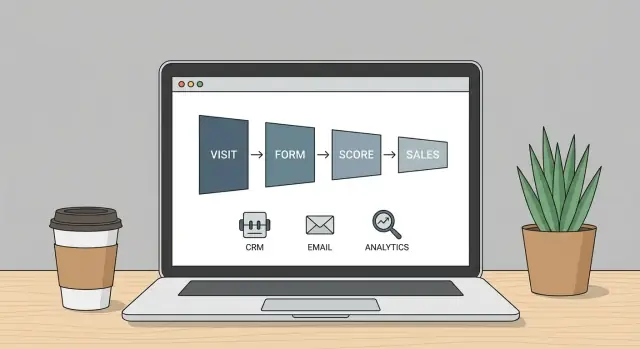
Set the Funnel Goal and Qualification Definition
Before you change your pages, forms, or messaging, get specific about what the website funnel is supposed to produce. A lead qualification funnel site isn’t just “more leads”—it’s the right leads moving to the next step with minimal back-and-forth.
Pick one primary funnel goal
Choose the action that best matches your sales motion and buying cycle:
- Book a demo (best for high-touch, complex products)
- Request a quote (pricing depends on scope, volume, or configuration)
- Start a trial (product-led or evaluation-led growth)
- Contact sales (when users need help deciding the right path)
If you try to push all four equally on every page, you’ll get muddled data and inconsistent lead quality. It’s fine to offer secondary options, but define one “north star” conversion.
Define success metrics you’ll actually manage
Pick a small set of metrics tied to revenue outcomes:
- Qualified leads per week/month (not total submissions)
- Demo rate (demo bookings ÷ qualified visits)
- Cost per qualified lead (especially if you run paid campaigns)
These become your baseline for future improvements and help marketing and sales agree on what “good” looks like.
Agree on what “qualified” means (fit + intent)
Create a shared definition that includes:
- Fit: company size, industry, geography, tech stack, budget range
- Intent: urgency, active project, stakeholder alignment, buying timeline
Write it down in one place (even a simple internal doc) so your site, forms, and routing logic can support it consistently.
Identify the decision-makers you must enable
Most B2B deals involve multiple roles. Clarify who you need to satisfy:
- Buyer (owns the problem)
- Champion (drives internal momentum)
- Approver (exec or budget owner)
- Procurement (security, legal, vendor onboarding)
Once these are defined, you can tailor CTAs, proof points, and form questions to the people most likely to move the deal forward.
Identify Your ICP, Use Cases, and Deal Breakers
A lead qualification funnel works best when you decide, in plain language, who the website is for—and who it’s not for. This makes your messaging clearer, your forms shorter, and your sales team happier.
Write a simple ICP (Ideal Customer Profile)
Keep your ICP to one paragraph your whole team can repeat. Include:
- Industry: the verticals you win most often (and those you avoid)
- Company size: employees and/or revenue range
- Region: countries, time zones, languages, compliance boundaries
- Tech stack: must-have tools (e.g., Salesforce, HubSpot, SAP) and “no-go” systems
Example: “Mid-market logistics and manufacturing companies in North America (200–2,000 employees) using Microsoft 365 and a modern CRM.”
Define your top use cases (pain → outcome)
Your site should reflect the jobs buyers are trying to get done—not your product modules. List the most common:
- Pain points: what’s broken today (manual reporting, slow approvals, unreliable data)
- Desired outcomes: what success looks like (faster cycle times, fewer errors, better visibility)
When you can name the use case, you can build pages and forms that filter by intent.
Surface objections that stop demos and form fills
Common blockers include unclear pricing expectations, uncertainty about implementation effort, security concerns, “not sure it fits our stack,” or fear of spammy follow-up. Address these early with short answers near the CTA.
Separate must-haves vs nice-to-haves
Create two lists for qualification:
- Must-have: budget range, required integration, minimum team size, compliance needs
- Nice-to-have: preferred features, ideal timeline, optional integrations
This prevents disqualifying good leads while still protecting sales time.
Map the Website Funnel From First Visit to Sales Handoff
A B2B qualification funnel website isn’t “a set of pages”—it’s a sequence of decisions you’re guiding visitors through. Before you write copy or design layouts, map the path from first visit to a clean sales handoff.
Start with the stage-by-stage journey
Write your funnel as a simple chain:
Visitor → relevant content → clear CTA → form/booking → qualification → sales pipeline handoff.
For each stage, decide two things: what the visitor needs (clarity, proof, specifics) and what you need (signal of fit, contactability, intent).
Assign pages to each stage
Most B2B sites use a few page types to cover the funnel:
- Homepage: fast context (who it’s for, what problem you solve) and a primary CTA.
- Solutions/Use case pages: deeper relevance and “is this for me?” validation; link to a matching conversion action.
- Resources (blog, guides, webinars): capture early-stage interest and build trust.
- Pricing (or “pricing approach”): high-intent filtering; answer common objections before the form.
The goal is coverage: every high-traffic page should have a logical next step—either a conversion CTA or a softer fallback.
Plan what happens after conversion
Your funnel continues after the click.
On the thank-you page, don’t stop at “we’ll be in touch.” Provide a clear next action: confirm what happens next, set expectations (response time), and offer optional acceleration (e.g., book a time).
Then align follow-up:
- confirmation email (instant)
- routing to the right owner (based on answers)
- calendar booking when appropriate
Define fallback paths for low-intent visitors
Not everyone is ready to talk to sales. Build intentional “soft conversions” so you don’t lose them:
- newsletter signup
- guide download
- “compare options” checklist
These should live where indecision happens (pricing, long-form resources, bottom of solutions pages) and keep the relationship moving toward qualification without forcing it.
Create Messaging That Supports Qualification
Your website copy shouldn’t just persuade—it should help the right buyers self-identify and move forward, while gently steering mismatched leads away from booking time with sales.
Start with a one-sentence value proposition
Draft a single sentence that connects your ICP’s problem to a clear outcome. Keep it concrete and tied to a pain you know they already feel.
Example pattern:
“We help [ICP] reduce [pain] by [mechanism], so they can [outcome] in [timeframe].”
This forces specificity and prevents generic claims that attract everyone (and qualify no one).
Build a message hierarchy that guides scanning
Most visitors skim. Give them a predictable structure that answers questions in the order they have them:
- Headline: the primary outcome (what changes after using you)
- Subhead: who it’s for and how you do it (one sentence)
- Proof: numbers, logos, short testimonial, or a concrete mini case result
- CTA: one next step that matches the page intent (not always “Book a demo”)
When this hierarchy is consistent across key pages, people qualify themselves faster because they don’t have to work to understand what you do.
Match copy to intent level
Top-of-funnel pages should focus on problem clarity and early trust. High-intent pages (pricing, product, integration, comparison) should be direct about fit.
For high-intent pages, include “fit statements” such as:
- “Best for teams with…”
- “Not a fit if…”
- “Works especially well when you already have…”
Use specific language that signals real outcomes
Replace vague benefits with measurable impact:
- Time saved: “Cut onboarding from 6 weeks to 2.”
- Risk reduced: “Audit-ready logs for every change.”
- Revenue impact: “Increase qualified pipeline by improving lead routing accuracy.”
Specificity builds trust—and it also filters out prospects who won’t value what you’re selling.
Design the Site Structure and Navigation for Conversions
A high-converting qualification funnel site isn’t “more pages.” It’s the right pages, arranged so visitors can quickly self-identify, build confidence, and take the next step without hunting.
Start with the minimum set of pages
Build only what you need to answer three questions: What do you do? Who is it for? What should I do next? A common lean structure looks like:
- Homepage (positioning + primary CTA)
- Solutions/Use cases (why it matters, outcomes, proof)
- Industries or Roles (helps visitors self-sort)
- Pricing or “How it works” (sets expectations and filters)
- Case studies (proof for your best-fit segments)
- Book a call / Request a demo (conversion page)
If a page doesn’t help someone qualify in or out, it’s a candidate for removal or consolidation.
Put high-intent CTAs where people expect them
Make the primary action predictable and consistent. Use the same CTA wording across the site (for example, “Book a demo”). Place it:
- In the top navigation (right side)
- In the hero section
- Near the end of key pages after proof and details
Also consider a softer secondary CTA (like “See pricing” or “View case studies”) for visitors who aren’t ready.
Create clear routes for different audiences
Visitors should be able to click once and feel “this is for me.” Add obvious entry points by:
- Role (e.g., Marketing, RevOps, Sales)
- Industry (e.g., SaaS, Manufacturing, Professional Services)
- Use case (e.g., qualify inbound leads, route demos, reduce no-shows)
Use navigation labels that match how buyers talk—not internal team terms.
Eliminate dead ends
Every page should guide to a next step: a relevant CTA, a related page, or a comparison route (“Not sure? See /pricing” or “Explore /case-studies”). If someone hits the bottom and stops, the funnel breaks.
A simple rule: each page should have one primary conversion goal and one logical next click.
Build Landing Pages That Pre-Qualify Leads
Landing pages shouldn’t just “collect leads”—they should help the right people raise their hand, and help the wrong people self-select out. The goal is clarity: who this offer is for, what outcome it delivers, and what happens next.
Choose the pages based on traffic sources
Start by listing how people will arrive. You’ll usually need separate landing pages for:
- Paid ads (tight message match to each ad group)
- Outbound sequences (personalized angle, quick credibility)
- Partners (co-branded positioning, shared proof)
- Events/webinars (specific follow-up offer tied to the session)
These pages can share a template, but the headline and proof should mirror the promise that got the click.
One page = one offer
A common conversion killer is giving visitors three different CTAs (demo, download, “talk to sales”) and hoping they pick the “right” one. Make each landing page commit to a single primary offer—like a demo, a fixed-scope assessment, or a downloadable checklist.
Support the offer with a simple structure:
- What you help with (in plain language)
- Who it’s for (industry, team size, workflow)
- What they get (deliverables, timeline, examples)
- What success looks like (specific outcomes)
Put trust near the CTA (not only at the bottom)
Visitors decide whether to click the CTA before they scroll. Add trust elements close to the first CTA: recognizable customer logos, one short testimonial, and 2–3 proof points (e.g., “Cut onboarding time by 30%,” “SOC 2 Type II,” “Works with Salesforce”). Keep them scannable.
Use pricing/packaging to filter for fit
You don’t need a full pricing table, but you do need a fit filter. Add a “Starting at…” range, minimum engagement, or “Best for…” packaging so bargain-hunters don’t flood your calendar—without scaring off qualified buyers who just need a ballpark.
If you already have it, link to /pricing as a secondary path under the CTA (not competing with it).
Create Smart Forms and Booking Flows
Your forms and booking flow are where “interest” turns into a qualified conversation—or friction. The goal isn’t to ask everything up front; it’s to collect just enough to route the lead correctly and offer the next step that matches their intent.
Match the form to intent
Not every visitor is ready to talk to sales. Use two core form types:
- Short forms (high volume): newsletter, webinar, product updates, “get pricing PDF.” Ask for name + work email (and maybe company).
- Longer forms (high qualification): demo, assessment, “talk to sales.” Add the minimum fields that determine fit and routing.
A simple rule: if the CTA promises a conversation, earn that conversation with better qualification.
Ask only what improves routing (and remove the rest)
For sales-ready flows, fields that typically pull their weight:
- Role / team (buyer vs influencer)
- Company size (or revenue band)
- Primary use case (dropdown)
- Timeline (this month / this quarter / exploring)
If a field doesn’t change what happens next (routing, prioritization, or the page you show), delete it.
Reduce friction with progressive steps
Multi-step forms often outperform long single pages because they feel faster. Start with low-effort fields (email, company) and move to qualification (use case, size). Keep steps short, show progress, and allow “Back” without losing inputs.
Make validation helpful, not punitive
Use real-time validation for common issues (typos, missing “@”, unsupported formats). Error messages should tell users exactly how to fix the issue (e.g., “Please use a work email so we can route you to the right team”).
Decide when to book a meeting vs “we’ll reach out”
Show calendar booking when:
- the lead meets basic fit (size/use case)
- you have coverage for their region/time zone
- you can offer relevant meeting types (demo vs discovery)
Otherwise, confirm the request with “We’ll reach out,” set expectations (“within 1 business day”), and route to the right follow-up path (e.g., /thank-you/demo-request).
Add Lead Scoring and Qualification Logic
Lead scoring is the “traffic cop” of your funnel: it helps your website decide who should be routed to sales now, who should be nurtured, and who is a poor fit. The key is to keep the logic simple enough that both marketing and sales can explain it in one minute.
Start with explicit vs. implicit signals
Use two categories of signals so you don’t overvalue either form fills or browsing behavior.
- Explicit signals (who they are): company size, industry, geography, role/seniority, budget range, timeline.
- Implicit signals (what they do): high-intent page views (pricing, integrations, security), repeat visits, time on key pages, booking attempts, webinar attendance.
A practical rule: explicit signals determine fit, implicit signals determine intent.
Build a simple scoring model (with thresholds)
Create a points model with three outcomes and clear thresholds:
- Disqualify: not a fit (e.g., outside target industry, too small/large, competitor, student).
- MQL (Marketing Qualified Lead): fit looks good, intent is emerging.
- SQL (Sales Qualified Lead): fit + strong intent; route to sales.
Example scoring:
- Company size in range: +20
- Target industry: +15
- Job role is decision maker: +15
- Viewed pricing page: +10
- Returned within 7 days: +10
- Requested a demo: +30
Decide what to do with “not yet” leads
Don’t treat MQLs as “failed SQLs.” Route them into a helpful path:
- Recommend the next best resource (case study, ROI calculator, implementation guide).
- Offer a lighter CTA (newsletter, webinar, checklist) instead of “book a call.”
- Add them to a nurture track and re-score as they engage.
Make the rules understandable—and auditable
Document scoring rules in a short one-pager and review them with sales monthly. If someone asks, “Why did this lead go to sales?” you should be able to answer with 2–3 concrete signals, not a black box.
Build Trust Signals That Reduce Friction
Trust signals are the “silent sales reps” on your site. They reduce the perceived risk of raising a hand, sharing contact details, or booking time with your team—especially when the buyer doesn’t know you yet.
Choose proof that answers “Are you for real?”
Start with proof that matches your buyer’s decision criteria, not just what looks impressive.
Customer logos work best when they’re recognizable to your target audience (or clearly in the same industry). Pair them with a short line that frames relevance, such as “Used by 200+ teams in logistics and manufacturing.”
Case studies should include context and outcomes. A metric without the baseline is easy to dismiss. Instead of “35% faster,” try “Cut onboarding time from 3 weeks to 2 weeks (35%) for a 50-person sales org.”
Address risk head-on (before the form)
Most friction comes from uncertainty: implementation effort, data security, and whether the product will fit.
Create a clear security and privacy hub (e.g., /security) that explains:
- Data handling basics (encryption, access controls, retention)
- Subprocessors (if relevant) and where data is stored
- Who can see customer data and under what conditions
If uptime and reliability matter, state your expectations and where you report it (or link to a status page). For implementation, outline the approach in plain language: typical timeline, what your team handles vs. what the customer provides, and what “day one value” looks like.
Keep compliance helpful, not legal theater
Include the compliance foundations your market expects (privacy, data processing, and basic governance). Don’t overpromise. A simple statement like “We support DPA requests and provide documentation on request” is more credible than vague claims.
Put social proof where decisions happen
Place proof closest to conversion moments:
- Near lead capture forms (“Trusted by…”, short testimonial, or a relevant metric)
- Near pricing (“ROI” snippet, case study link, or guarantee/terms summary)
- Near demo CTAs (one-sentence outcome + role/title of the customer)
When trust signals sit next to the action, they work like reassurance at the exact moment the buyer hesitates.
Integrate CRM, Routing, and Follow-Up Automation
Your website can qualify leads all day, but if the data doesn’t land in the right place—and fast—you’ll still lose deals. This section is about connecting your forms and booking flows to your CRM so routing and follow-up happen automatically, consistently, and in a way sales actually trusts.
Start with the CRM fields you need (then work backward)
Before touching integrations, list the exact CRM fields required to route and prioritize leads correctly. Typical examples include company name, website, email, role, country/state, employee count, industry, product interest, and “reason for inquiry.”
Keep it practical: if a field won’t change what happens next (routing, messaging, qualification status), don’t collect it on the website.
Define routing rules that match how you sell
Routing is where most funnels quietly break. Decide rules that reflect your sales org, such as:
- Territory (country/state/region)
- Company size (SMB vs mid-market vs enterprise)
- Industry (regulated vs non-regulated, vertical teams)
- Product line (different AE teams or specialists)
Make these rules explicit in a simple one-pager so marketing, ops, and sales interpret them the same way.
Automate follow-up so every lead gets the right next step
Set up auto-responses that match the offer and the intent:
- Demo request → calendar confirmation + what to expect next
- Resource download → direct link + “recommended next” CTA (e.g., book a consult)
- Pricing inquiry → acknowledgement + timeline for response
Use personalization sparingly (name, company, product interest). The goal is clarity and speed, not cleverness.
Alert sales instantly for high-intent leads
Not every lead needs a human immediately—high-intent ones do. Create alerts for signals like “Book a demo,” “Pricing page inquiry,” “Enterprise size,” or “High fit + urgent timeline.” Send instant notifications to the right owner (Slack/email/CRM task) with the key context included.
Document the handoff so nothing slips
Write down the handoff process: what counts as a qualified lead, where it appears in the CRM, who owns first response, and the expected SLA. Include edge cases (unknown territory, missing size, duplicates). A documented handoff turns your funnel from “best effort” into a predictable system.
If you’re building the funnel from scratch, shorten the build cycle
Many teams get stuck at this stage because “the funnel” spans too many moving parts—pages, forms, routing logic, and integrations—so it drags into a long web project.
If your goal is to ship a working qualification funnel fast (and iterate with real data), a vibe-coding approach can help. For example, Koder.ai lets teams create web apps through a chat interface, which can be a practical way to prototype or build funnel components (landing pages, multi-step forms, internal qualification dashboards) and then deploy, host, and export source code when you’re ready to formalize the stack.
Optimize UX and Conversion Rate Step by Step
Conversion optimization works best when it’s treated as a series of small, controlled improvements—not a single redesign. Pick one high-intent path (for example: a core landing page → form/booking → thank-you page) and make it measurably better before touching everything else.
Start with the first things to test
Prioritize tests that can move results without changing your entire site:
- Headline: Does it state who it’s for and what outcome they get?
- CTA text: “Book a demo” vs “See if you qualify” vs “Get pricing”—choose language that matches intent.
- Form length: Reduce fields until lead quality drops; don’t assume “shorter is always better.”
- Proof placement: Move testimonials, logos, or security notes closer to the moment of hesitation (near the CTA or form).
Run one primary test at a time so you can tell what caused the change.
Use a speed + mobile usability checklist
Landing pages are often where conversion wins (or losses) happen—especially on mobile.
- Page loads quickly on cellular connections
- Tap targets are easy (buttons, form fields)
- Form inputs use the right keyboard (email, phone)
- No pop-ups that block the CTA
- Key message + primary CTA are visible without heavy scrolling
Keep high-intent pages single-minded
On pages meant to capture or qualify leads, avoid competing actions. A “Demo,” “Contact,” “Pricing,” and “Download” cluster forces people to decide how to engage instead of whether to engage.
Use one primary CTA, and if needed, a secondary link that’s clearly lower priority (for example, “Not ready? View case studies”).
Personalize cautiously—only where it clarifies
Personalization can help when it reduces confusion: industry-specific examples, role-based outcomes, or a tailored CTA. Keep it limited to places where it makes the choice easier, not more complex. If segmentation isn’t reliable, stick to plain, specific messaging that fits your ICP.
Measure What Works and Iterate After Launch
Launch is the start of the qualification funnel—not the finish. Once real prospects hit the site, you’ll learn which messages attract the right accounts, which pages create noise, and where qualified buyers drop off. The goal is to turn those observations into small, frequent improvements.
Track the actions that signal intent
Set up analytics to capture the moments that reflect buying momentum, not just page views. At minimum, track:
- Form submissions (including which form and which page)
- Booked meetings (successful scheduling confirmation)
- Pricing page clicks and key pricing interactions (e.g., opening plan details)
Make sure each event is tied to a session, a source/medium, and (where possible) a company identifier so you can analyze quality—not only volume.
Connect lead source to qualification outcome
Traffic is not the KPI; qualified opportunities are. Push lead source data into your CRM and report on outcomes like:
- Which channels generate Sales-Qualified Leads (SQLs)
- Time from first visit → conversion → sales acceptance
- Lead-to-opportunity rate by channel and by landing page
This closes the loop between marketing activity and sales results, and it prevents you from scaling channels that simply create form fills.
Build a simple funnel dashboard
Keep the dashboard easy to read and consistent week to week:
Traffic → conversions → qualified leads → pipeline
Include both counts and rates (conversion rate, SQL rate, opportunity rate). A small drop at the top can be less important than a big drop in qualified lead rate.
Review regularly with sales and iterate
Schedule recurring reviews (biweekly or monthly) with sales to validate what “qualified” really looks like in practice. Use real call notes and outcomes to refine:
- Qualification rules (what gets fast-tracked vs. nurtured)
- Content gaps (questions prospects ask that the site doesn’t answer)
- Pages that attract the wrong audience (and how to reposition them)
Treat changes as experiments: adjust one thing, measure the impact, and keep a changelog so you know what actually improved the funnel.
If you’re iterating quickly, consider keeping a lightweight “planning mode” for funnel changes (what you’ll test, what you expect to happen, and how you’ll measure it). Whether you implement that in your existing stack or in a build environment like Koder.ai, the key is the same: ship small changes, track outcomes, and continuously tighten the connection between fit, intent, and sales handoff.
FAQ
What’s the first step to building a B2B lead qualification funnel website?
Start by choosing one primary conversion that matches your sales motion: Book a demo, Request a quote, Start a trial, or Contact sales. Then align supporting pages, forms, and follow-up around that “north star” so lead quality and reporting stay consistent.
How do we define what a “qualified lead” is?
“Qualified” should combine fit and intent.
- Fit: industry, company size, region, tech stack, budget range
- Intent: urgency, active project, stakeholder alignment, buying timeline
Document the definition in a shared internal doc so your site copy, forms, scoring, and routing all reflect the same standard.
Which success metrics matter most for a qualification funnel site?
Pick metrics tied to revenue outcomes, not just volume:
- Qualified leads per week/month
- Demo rate (demo bookings ÷ qualified visits)
- Cost per qualified lead (especially for paid acquisition)
Use these as your baseline before you start changing pages so you can measure real improvement.
How detailed should our ICP be for the website?
Write a one-paragraph ICP your whole team can repeat. Include:
- Industry (and industries you avoid)
- Company size (employees and/or revenue)
- Region (countries/time zones/compliance)
- Tech stack (must-haves and no-go systems)
A clear ICP improves messaging clarity and reduces unqualified submissions.
How do we map pages to each stage of the website funnel?
Map the funnel as a simple sequence: Visitor → relevant content → clear CTA → form/booking → qualification → sales handoff.
Then assign page types to stages (homepage, solutions/use cases, resources, pricing) and ensure each high-traffic page has a logical next step—either a conversion CTA or a softer fallback.
What messaging patterns help qualify the right buyers (and repel the wrong ones)?
Use a consistent scan-friendly structure:
- Headline: outcome
- Subhead: who it’s for + how it works
- Proof: metrics/logos/testimonial
- CTA: one next step that matches the page intent
Add clear fit statements like “Best for…” and “Not a fit if…” on high-intent pages to help buyers self-qualify.
What’s the minimum site structure needed for a high-converting qualification funnel?
A lean structure usually covers qualification without extra clutter:
- Homepage
- Solutions/use case pages
- Industries or roles pages
- Pricing (or “pricing approach/how it works”)
- Case studies
- A dedicated demo/contact conversion page
If a page doesn’t help someone qualify in/out or take a next step, consolidate or remove it.
How long should our forms be, and what fields should we ask for?
Match form depth to intent:
- Short forms for low-friction actions (newsletter/webinar): name + work email (maybe company)
- Longer forms for sales conversations (demo/assessment): role, company size, use case, timeline
Keep only fields that change routing or next steps. If it doesn’t affect what happens next, delete it.
When should we let leads book a meeting vs. saying “we’ll reach out”?
Use calendar booking when the lead meets basic fit and you have coverage (region/time zone) and relevant meeting types.
Otherwise, show “We’ll reach out” with a clear SLA (e.g., “within 1 business day”) and route them into the correct follow-up path using their form answers.
How should we set up lead scoring and routing without creating a black box?
Keep scoring explainable with fit vs. intent:
- Fit (explicit): size, industry, geography, role, budget, timeline
- Intent (implicit): pricing/integrations/security views, repeat visits, booking attempts, webinar attendance
Set simple thresholds for Disqualify, MQL, and SQL, and review the rules with sales monthly so routing stays trusted and auditable.