

Create an Equipment Rental Web App: Availability & Damage Logs
Plan and build an equipment rental web app with real-time availability, reservations, check-in/out, and damage tracking to speed up billing and reduce disputes.
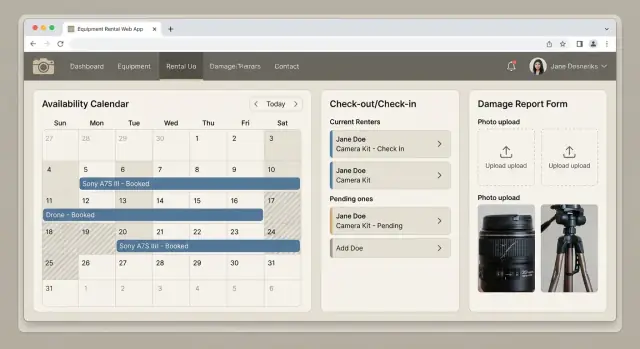
Define the Goals and Scope for Your Rental Web App
Before you write a line of code, get specific about the problems your equipment rental web app must solve on day one—and what can wait. A clear scope prevents feature creep and ensures the first release actually reduces daily headaches.
The problems you’re solving (and why they matter)
Most rental operations feel the pain in three places:
- Double-bookings: two sales reps promise the same asset because availability is unclear or updated late.
- Missing items: a kit returns incomplete, but nobody notices until the next booking.
- Unclear damage responsibility: damage is discovered, but there’s no record of pre-rental condition or who last handled the item.
Your initial scope should focus on eliminating these failure points with reliable rental availability tracking, a check-in check-out system, and a simple damage tracking workflow.
Define what “availability” means for your business
Availability is not just “is it in stock?” Decide the rules your app will enforce:
- Per item vs. per quantity: do you rent unique serialized assets (one tripod) or count-based inventory (50 chairs)?
- Per location: can an item be booked from multiple depots, or does it need transfer time?
- Per time window: do you rent by day, by hour, and do you block buffer time for prep/cleaning?
Writing these definitions down early will guide your rental inventory management and prevent expensive rewrites later.
Define what “damage tracking” includes
Damage tracking should be more than a free-text note. At minimum, decide whether you will capture:
- Condition notes at check-out and check-in
- Photos (before/after) attached to an item, asset, or booking
- Estimated cost and whether it’s billable
- Responsibility (customer, internal handling, unknown)
- Status (reported → reviewed → in repair → ready)
Choose simple success metrics
Pick a few measurable outcomes for the first release:
- Fewer booking conflicts and manual overrides
- Faster turnaround between check-in and next check-out
- Fewer write-offs due to missed damage or missing items
These metrics keep your equipment rental software features aligned with real operational wins—not just a longer feature list.
Identify Users and Core Workflows
Before you design screens or tables, get clear on who will use the equipment rental web app and what they need to accomplish in a normal day. This keeps your availability and damage features grounded in real operations, not assumptions.
User types to support
Most rental businesses need at least these roles:
- Admin/Owner: manages settings, pricing rules, item catalog, user accounts, reporting.
- Staff (counter/warehouse): creates reservations, checks items out and in, records condition.
- Dispatcher/Driver: prepares orders, loads/unloads, confirms delivery/pick-up times.
- Customer (optional portal): requests quotes, views bookings, signs documents, reports issues.
Even if you don’t build a customer portal at first, design workflows so adding one later doesn’t force a data-model rewrite.
Map the core workflow end-to-end
A typical lifecycle looks like:
Quote → reservation → pick-up/delivery → check-out → return → inspection → billing
Note where rental availability tracking and damage updates must happen:
- Availability is reserved at reservation, consumed at check-out, and released at check-in (or after inspection, depending on your policy).
- Damage is recorded during inspection (and often at check-out as pre-existing condition).
Keep release 1 focused
For your first build, define “must-haves”:
- Prevent double-booking by item/asset and date/time
- Check-out/check-in with a clear status (out, returned, in repair)
- Damage log with notes and photos
Nice-to-haves: e-signatures, automated deposits, customer self-serve, integrations.
Write acceptance criteria (“done”)
Examples:
- A staff user cannot confirm a reservation if any required asset is already booked for the same time window.
- A returned item cannot be booked again until it’s checked in and marked “available.”
- A damage report always links to a specific rental, item/asset, and includes a status (reported → assessed → repaired).
Design the Data Model: Items, Assets, Locations, and Kits
A clean data model is the foundation of rental inventory management. If you get this right early, your equipment rental web app can support accurate rental availability tracking, fast checkouts, and reliable damage history without messy workarounds.
Start with clear rental objects
Most rental businesses need four core concepts:
- Category: how you group things (e.g., “Lighting”, “Generators”).
- Item (product type): the thing customers rent (e.g., “Sony FX6 Camera”).
- Asset instance: the specific unit you own (e.g., FX6 Serial #123). This is essential for serialized gear.
- Kit / bundle: a rentable set made of multiple items/assets (e.g., “Interview Kit” with camera, lenses, mic, tripod).
This separation lets your rental booking calendar show availability at the right level: items can show “3 available,” while assets can show exactly which unit is free.
Key fields to track (practical, not theoretical)
At the asset level, store:
- Serial number (and/or internal asset ID)
- Barcode/QR code value (for scanning)
- Current location
- Status (available, reserved, checked out, in repair, retired)
- Condition grade (e.g., A/B/C) plus notes
- Reference to photos (for condition proofs)
At the item level, store marketing and pricing details used by rental billing and invoicing (name, description, base rate, replacement value).
Quantities vs. unique assets
Model consumables (gaffer tape, batteries sold-as-consumed) as an item with a quantity on hand. Model serialized gear as one item with many asset instances. This keeps your check-in check-out system realistic and prevents phantom stock.
Locations that match real operations
Treat location as a first-class object: warehouse, store, job site, truck, or a third-party partner. Each asset should have exactly one “current location,” so transfers and returns update availability correctly—and so kits can be validated before departure.
Build Availability Logic That Prevents Double-Bookings
Availability is the heart of an equipment rental web app. If two customers can book the same unit for the same time window, everything else (check-out, billing, reputation) suffers.
Use one “source of truth” for availability
Treat availability as a calculated result, not a field someone can manually edit.
Your system should compute “free vs. blocked” from time-based records such as:
- Reservations (confirmed bookings)
- Maintenance windows (repairs, inspections)
- Operational holds (internal use, quarantine, missing item)
If it blocks usage, it must be represented as a record on the same timeline. This keeps your rental availability tracking consistent and auditable.
Prevent overlaps with clear time-window rules
Define overlap rules once and reuse them everywhere (API, admin UI, booking UI):
- A reservation blocks an item from start to end.
- Add buffers (e.g., 30–120 minutes) for cleaning, testing, and paperwork.
- Support delivery/pickup slots so bookings align to real operations (e.g., pickup 9–11, return 3–5).
When a new reservation is requested, check it against all blocking records with buffers applied. If any overlap exists, reject it or offer alternative times.
Handle partial availability (quantities and fleets)
Many rental inventory management setups include:
- Quantity-based items (e.g., “10 folding chairs”)
- Multi-unit fleets (e.g., 6 identical generators with individual serial numbers)
For quantity-based items, compute remaining quantity per time slice. For fleets, allocate specific units (or allocate at check-out if your process allows it) while still preventing overbooking at the pool level.
Edge cases your logic must support
Plan for real-world edits:
- Early returns free inventory sooner (and can unlock same-day bookings).
- Late returns extend blocking and trigger conflict alerts.
- Extensions require the same overlap check as a new booking.
- Cancellations should release inventory, but keep a history for reporting and billing disputes.
This availability core will power the rental booking calendar and later connect cleanly to your check-in check-out system and rental billing and invoicing.
Create an Availability Calendar and Booking UI
A calendar is where most rental teams “feel” whether the system is trustworthy. Your goal is to make it fast to answer three questions: what’s available, what’s booked, and why something isn’t available.
Calendar views that fit daily work
Offer day/week/month views for planning, plus a simple list view for the front desk. The list view is often fastest when staff are answering calls: it should show item name, next available date/time, and current booking/customer.
Keep the calendar readable: color-code booking statuses (reserved, checked out, returned, maintenance) and let users toggle layers (e.g., “show maintenance blocks”).
Search and filters that reduce clicks
Add a search bar (by item name, asset tag, kit name), then filters that match how teams think:
- Category (lights, audio, tools)
- Location (warehouse, branch, truck)
- Dates (pickup/return)
- Availability (available, partially available, unavailable)
- Condition status (OK, needs inspection, damaged)
A practical detail: when users change dates, preserve their other filters so they don’t have to rebuild the view.
Fast booking flow: from dates to reservation
Design the default flow as: select dates → see available items → confirm reservation.
After date selection, show results in two groups: “Available now” and “Unavailable.” For available items, allow quantity selection (for fungible inventory) or asset selection (for serialized gear). Keep the confirmation step short: customer, pickup/return times, location, and notes.
Make conflicts obvious (and actionable)
When something is blocked, don’t just say “unavailable.” Show:
- What is blocking availability (another reservation, checked-out order, maintenance hold)
- When it ends (return time, scheduled maintenance completion)
- A quick link to the blocking record (e.g., /orders/123)
This clarity prevents double-bookings and helps staff propose alternatives instantly.
Implement Check-Out and Check-In With Audit Trails
Check-out and check-in are where rental inventory management either stays reliable or slowly drifts into “we think it’s here somewhere.” Treat these steps as first-class workflows, with an audit trail that explains what happened, when, and who confirmed it.
Check-out workflow (handover)
At check-out, the goal is to lock the booking to the real-world handover and capture the item’s starting condition.
- Confirm items being handed over (including accessories and parts)
- Capture condition notes (e.g., “minor scuffs on left panel”)
- Take photos and attach them to the check-out record
- Capture a signature (optional) to acknowledge receipt
If you support kits (one booking with multiple items), allow a “check out all” action plus per-item overrides. Once confirmed, trigger auto-status updates: reserved → checked out. This status should immediately affect rental availability tracking so the same unit can’t be handed out twice.
Check-in workflow (return)
Check-in should be optimized for speed, but still structured enough to avoid disputes later.
- Confirm what was returned vs. missing parts
- Record meter readings when relevant (hours, mileage, cycles)
- Add photos of the returned condition (especially if something looks off)
After check-in, update status to returned or inspection needed (if staff flagged anything). This creates a clean handoff into your damage tracking workflow without forcing every return through a full inspection.
Audit trails and document attachments
Every check-out/check-in event should write an immutable activity log: timestamp, user, location, device (optional), and the exact fields changed. Attach documents directly to the transaction (not just the customer): rental agreement, delivery notes, and customer ID where allowed by policy. This makes issues resolvable later—without digging through messages or shared drives.
Add Damage Tracking: Reports, Photos, and Repair Status
Damage tracking shouldn’t feel like an afterthought or a pile of vague notes. If your app captures the right details at the right moment—especially during check-in—you get faster decisions, fewer disputes, and cleaner billing.
Standardize inspections with category checklists
Start by defining an inspection checklist per equipment category so staff don’t rely on memory. A camera lens checklist might include front/rear element condition, focus ring smoothness, mount pins, and caps included. A power tool checklist could include cord/battery condition, safety guards, and abnormal noise. Trailers might require tire tread, lights, hitch lock, and VIN plate.
In the UI, keep it quick: a few required checkbox items, optional notes, and a “pass/fail” summary. The goal is consistency, not paperwork.
Make damage reports structured (and photo-first)
When a problem is found, staff should create a damage report directly from the check-in screen. Useful fields include:
- Severity (minor / moderate / major)
- Description (what happened and where)
- Photos (multiple angles; include a close-up and a wider context shot)
- Parts needed (free-text plus optional catalog selection)
- Estimated cost (initial estimate; updated later)
Store metadata with each photo: who uploaded it, when, and which device/account. This makes reports credible and searchable.
Link damage to the rental contract and timestamps
Always associate the damage report with the rental contract (or booking) and keep timestamps for “checked out,” “checked in,” and “damage reported.” That connection helps answer: Was the item already damaged? Did it worsen? Who had it last?
If you capture a “condition at checkout” snapshot (even just a checklist + photos), you reduce back-and-forth when customers question charges.
Track repair status from discovery to resolution
Use a simple status flow so everyone knows what to do next:
reported → reviewed → repair scheduled → resolved → billed/waived
Each transition should record who changed it and why. By the time you reach billing, the app should already have the evidence (photos), the context (contract link), and a clear decision trail (status history).
Connect Availability and Damage Data to Billing
Billing is where your availability and damage logs turn into real money—without becoming a manual spreadsheet project. The key is to treat every booking as a source of billable “events” that your app can price consistently.
Map operational events to billing lines
Start by defining which events create charges and when they become final. Common paths include:
- Normal rental fees: generated from the booked time window (daily, hourly, weekly) and the items/kits on the booking.
- Late fees: triggered when check-in happens after the scheduled end time (or after a grace period).
- Cleaning fees: added when check-in staff flags “needs cleaning” (or when certain item categories always require it).
- Damage fees: generated from damage reports tied to the booking and specific assets.
A practical rule: availability decides what can be booked; check-out/check-in decides what was actually used; damage logs decide what’s chargeable beyond the base rental.
Decide how damage charges are calculated
Damage billing can get sensitive, so pick a method that matches how you operate:
- Flat fee: quickest. For example, “broken lens cap = $15.” Works well when damages are predictable.
- Parts + labor: best for repair-based operations. Store parts cost, labor hours, labor rate, and optionally vendor invoice references.
- Approval workflow: safest for high-value gear. Create a draft damage charge that must be approved internally (or by the customer) before it can be invoiced.
Whatever method you choose, link each damage charge back to:
- booking ID
- asset ID
- damage report (photos, notes)
- repair status (pending, in repair, resolved)
This makes disputes easier to handle and keeps billing auditable.
Invoices, receipts, and payment status
Generate an invoice from the booking plus any post-return charges (late/cleaning/damage). If you support deposits, show them clearly as separate lines and apply them as credits when appropriate.
At minimum, store payment state on the invoice:
- pending (sent but unpaid)
- paid (fully paid)
- refunded (partially or fully)
Keep invoice and receipt links available from the booking and customer profile so staff can answer “what did we charge and why?” in one screen.
If you want customers to self-serve, route them to clear next steps like /pricing for plan details or /contact for onboarding and payment setup.
Reporting and Dashboards for Daily Operations
A rental team doesn’t need more data—they need answers in one screen: what’s going out, what’s coming back, what’s late, and what’s not rentable. Build dashboards that support quick decisions, then let users drill down to the underlying bookings, items, and damage reports.
The “Today” operations dashboard
Start with a single page that loads fast and is usable on a tablet at the counter.
Include these high-signal widgets:
- Upcoming pickups/returns (today + next 1–3 days), grouped by time and location
- Items overdue with “days late” and the last known customer/job
- Items under repair with status (reported → assessed → in repair → ready), ETA, and who owns the next step
Each widget should link to a filtered list view (e.g., “Overdue in Location A”) so staff can take action without re-searching.
Damage analytics that drive prevention
Damage reporting is only valuable if you can spot patterns:
- Most damaged categories (e.g., lighting vs. power tools)
- Repeat issues (same failure mode across multiple units)
- Cost over time: repair cost, write-offs, and downtime days
A simple “Top 10 issues” table often beats a complex chart. Add a date range selector and location filter for fast comparisons.
Utilization and idle time
Track days rented vs. idle per category and per location. This helps you answer: should you buy more, move stock, or retire underused gear?
Exports without copy/paste
Provide one-click CSV exports for accounting and audits: overdue list, repair costs, and utilization summaries. Include stable IDs (item ID, booking ID) so spreadsheets can be reconciled later.
Permissions, Security, and Data Integrity Basics
If your app tracks reservations, condition notes, and charges, security isn’t just about hackers—it’s also about preventing accidental (or unauthorized) changes that quietly break availability and billing.
Roles and permissions (keep it simple)
Start with a few clear roles and grow later:
- Admin: manages settings, users, tax/rates, and can override anything.
- Ops/Manager: can create/edit reservations, adjust availability (e.g., mark items “out of service”), approve damage charges.
- Staff: can run check-out/check-in and add condition notes/photos, but can’t change pricing or delete reservations.
- Read-only (optional): customer service or accountants who need visibility without edit rights.
Make “high-impact” actions require elevated permission: editing reservation dates, forcing availability, waiving fees, and approving/voiding damage charges.
Audit logs: your safety net
An audit trail helps resolve disputes and internal confusion. Log:
- who changed reservation dates, quantities, and assigned items
- who edited fees, discounts, deposits, and damage charges
- who updated condition notes and uploaded/deleted photos
Keep logs append-only (no edits), and show them inline on the reservation and damage report screens.
Customer data privacy by design
Store only what you need to complete a rental: contact info, billing fields, and any required IDs. Avoid saving sensitive documents unless necessary. Limit who can view customer details, and set retention rules (e.g., delete inactive customer records after a defined period). If you offer exports, restrict them to managers/admins.
Backups and recovery
Plan for accidental deletion and device loss. Use automated daily backups, tested restores, and role-based deletion (or “soft delete” with restore). Document a short recovery checklist in an internal page like /help/recovery so staff aren’t guessing under pressure.
Tech Stack and Architecture Choices for a Maintainable App
A maintainable rental app is less about “perfect” technology and more about choosing tools your team can ship and support. The simplest way to keep risk low is to start with a staff-only MVP (inventory, availability, check-out/check-in, damage reports). Once that’s stable, add a customer portal (self-service bookings, deposits, payments) as a second phase.
Start small: staff-only MVP first
For an MVP, prioritize:
- One internal web app (staff login)
- A single source of truth for availability and condition
- A clean audit trail for check-outs, check-ins, and damage
This reduces edge cases (guest users, payment failures, cancellations) while you validate workflows.
Stack options (and tradeoffs)
Pick what your team already knows, then optimize later:
- Django / Rails (monolith): Fast to build CRUD and admin tools; great for staff workflows. Less flexibility if you later split services.
- Node.js (Express/Nest) + React: Strong frontend flexibility; more choices to make (and maintain) across tooling.
- Laravel (PHP): Productive for forms and dashboards; large ecosystem.
For most rental businesses, a monolith with a relational database is the easiest to keep consistent (availability rules, audit logs, billing).
If you want to accelerate the first version, a vibe-coding platform like Koder.ai can help you build a staff-facing React app with a Go backend and PostgreSQL from a structured chat prompt—then export the source code when you’re ready to own and extend it. Features like planning mode, snapshots, and rollback are also useful when availability logic changes and you need safe iterations.
Architecture that stays tidy
Use a few simple boundaries:
- UI layer (web app)
- API/service layer (business rules: availability, check-in/out, damage)
- Database (transactions, constraints)
Put “hard rules” (no double-bookings, required check-in fields, status transitions) in the service layer and database constraints—not just in the UI.
API design basics (keep it boring)
Design predictable endpoints:
GET/POST /items,GET/POST /assets(individual serialized units)GET/POST /reservations,POST /reservations/{id}/cancelPOST /checkouts,POST /checkinsPOST /damage-reports,PATCH /damage-reports/{id}
Even if you build a monolith, treating these as clear “contracts” keeps later integrations and a customer portal easier.
Integrations worth planning for
- Barcode/QR scanning (web camera or handheld scanners)
- Email/SMS notifications (pickup reminders, overdue alerts)
- Accounting tools (export invoices/payments to QuickBooks/Xero)
If you want inspiration for what features to implement first, see /blog/equipment-rental-mvp-features.
Testing, Launch, and Iteration Plan
Testing and rollout are where an equipment rental web app turns from “looks good” into “works every day.” Focus on the paths that can break rental availability tracking and the damage tracking workflow under real operational pressure.
Test the critical booking edge cases
Start with scenarios that cause double-bookings or incorrect charges:
- Overlapping bookings (same item, same time) and near-overlaps (end time equals start time)
- Timezone and daylight-saving changes, especially if you rent across locations
- Booking extensions (extend while checked out; extend after a partial return)
- Partial returns (kit returned missing one asset; or only some quantities returned)
If you use a rental booking calendar, verify it matches the underlying availability rules—not just what the UI “suggests.”
Operational testing where staff actually work
Warehouse and field conditions can be harsh. Test on phones with:
- Poor connection or brief offline periods
- Rapid scanning and check-in check-out system flows (barcode/camera)
- Conflict handling (two people trying to check in the same asset)
Make sure actions create reliable audit trails even when a request is retried.
Rollout plan: low risk, high learning
Reduce disruption by rolling out in stages:
- Migrate current inventory into your rental inventory management data model (items, assets, locations, kits).
- Train staff using real examples: check-out, check-in, and logging damage with photos.
- Start with one location or one category of equipment before expanding.
Iterate after launch
Plan quick improvements based on real usage: add scheduling buffers, improve inspection checklists, and automate reminders (upcoming returns, overdue, damage follow-up). Tie these updates to billing rules so rental billing and invoicing stays consistent as processes evolve.
If you’re shipping fast, build in a habit of versioned releases and easy rollback—whether that’s through your own deployment pipeline or tooling that supports snapshots and quick restores (Koder.ai, for example, includes snapshots/rollback alongside deployment and hosting), so availability and billing changes don’t create long outages.
FAQ
What should be in version 1 of an equipment rental web app?
Start with the operational pain points that cost you money immediately:
- preventing double-bookings with reliable time-window availability
- fast check-out/check-in with clear statuses
- structured damage reports (notes + photos + status)
Push “nice-to-haves” (e-signatures, customer portal, integrations) to a later phase so release 1 actually gets adopted.
How do I define “availability” so it matches real rental operations?
Write down explicit rules before building anything:
- whether inventory is serialized assets (unique units) or quantity-based stock
- whether availability is per location (and whether transfers need lead time)
- the time granularity (hourly vs daily) and any buffers for prep/cleaning
Then enforce those same rules in the API and database so the UI can’t “accidentally” overbook.
What’s the best way to prevent double-bookings in the system?
Treat availability as a calculated result from time-based records, not a manually editable field.
Common blocking records:
- confirmed reservations
- check-outs (if you treat “out” differently than “reserved”)
- maintenance/repair windows
- operational holds (quarantine, missing parts, internal use)
If it blocks usage, it should exist on the same timeline so conflicts are auditable.
Should I track equipment as items, assets, or both?
Use separate concepts:
- Item (product type): what you rent (e.g., “Generator Model X”)
- Asset instance: the specific unit you own (serial/tag)
Model quantity-based inventory as items with counts, and serialized gear as items with many assets. This lets you show “3 available” while still tracking exactly which unit was used and its damage history.
How should kits/bundles work for check-out and returns?
Create a kit/bundle object made of multiple required components (items or specific assets).
In workflows:
- allow “check out all” plus per-component overrides
- validate returns against the kit checklist to catch missing parts immediately
- decide whether availability is reserved at the kit level, the component level, or both (component-level is usually safer)
When should returned items become available again—at check-in or after inspection?
Pick one policy and implement it consistently:
- release at check-in: fastest reuse, but risks re-renting uninspected gear
- release after inspection: reduces disputes and missed damage, but can reduce same-day availability
A practical compromise is to mark returns as returned or inspection needed, and only allow “inspection needed” items to be booked if a manager explicitly overrides.
What data should a damage report include to be usable in disputes?
Minimum useful structure:
- condition notes at check-out and check-in
- photo attachments (before/after) tied to the transaction
- severity and estimated cost (even if rough)
- responsibility (customer/internal/unknown)
- a simple status flow (e.g., reported → reviewed → in repair → resolved)
Always link the report to both the booking and the asset so you can answer “who had it last?” quickly.
How do I connect availability, check-in/out, and damage logs to billing?
Create billable lines from real events:
- base rental: from the booked time window and items
- late fees: from actual check-in time vs scheduled end (with grace rules)
- cleaning fees: from check-in flags
- damage fees: from approved damage reports tied to specific assets
Keep each charge linked back to booking ID + asset ID + evidence (notes/photos) so billing is explainable and auditable.
What permissions and security controls matter most for a rental app?
Start with a few roles and protect high-impact actions:
- Admin: settings/users/tax/rates/overrides
- Manager/Ops: reservation edits, holds, approvals/waivers
- Staff: check-out/check-in, condition notes, damage creation
- Read-only: visibility without edits
Require elevated permission for changing reservation dates, forcing availability, deleting records, and approving/voiding damage charges. Back it up with append-only audit logs.
What should I test before launching an equipment rental web app?
Focus testing on the paths that create costly errors:
- overlapping bookings (including edge cases where end time equals start time)
- extensions, cancellations, early/late returns
- partial returns (kits missing parts, partial quantities)
- concurrency (two staff acting on the same asset)
- timezone/DST if you operate across locations
Roll out gradually (one location or category first), and keep a shortlist of next features—like barcode scanning or a customer portal—based on actual usage (see also /blog/equipment-rental-mvp-features).