

Create an Internal Announcements Web App With Read Receipts
Learn how to plan, build, and launch a web app for internal announcements with read receipts, roles, targeting, and simple analytics.
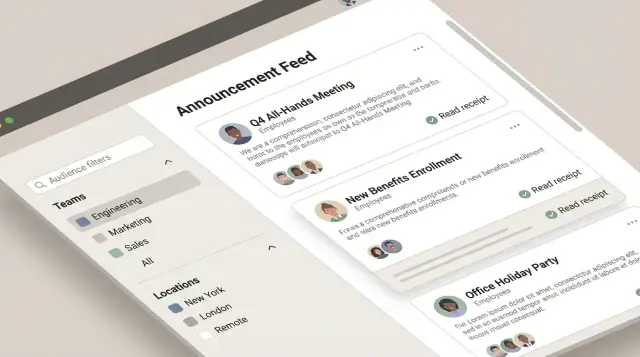
Define the Use Case and Success Metrics
An internal announcements web app solves a simple but costly problem: important updates get missed, and nobody can confidently answer, “Did everyone see this?” Email threads, chat channels, and intranet posts create noise, and accountability gets blurry—especially for policy changes, security notices, office closures, and benefits deadlines.
With read receipts built in, the outcome shifts from “we sent it” to “we can confirm it was read.” That clarity helps teams act faster, reduces repeat questions, and gives HR and managers a reliable way to follow up without guessing.
Who this app is for
This isn’t just an HR tool. It’s an employee communications system used by different groups for different reasons:
- HR: policy updates, open enrollment reminders, mandatory training notices
- IT/Security: incident communications, password rotation prompts, phishing alerts
- Managers/Operations: shift changes, office access updates, process changes
- All employees: a single, predictable place to read what matters and acknowledge it
The key is that every audience benefits: publishers know what happened, and employees know where to look so they don’t miss critical announcements.
Core outcome: clear reach + confirmed reads
Define the app’s purpose in one sentence: deliver key announcements to the right employees and confirm who read them.
That implies a few product decisions you’ll make later (targeting, role-based access control, audit trail), but keep the “why” crisp. If you can’t explain why a read receipt matters for your organization, you’ll struggle to decide what data to store and what reporting to build.
Success metrics to track from day one
Pick metrics that reflect both delivery effectiveness and employee behavior:
- Reach rate: What percentage of the intended audience successfully received the announcement (e.g., saw it in-app, got a notification, or appeared in their feed)?
- Read rate: What percentage of the targeted audience has a recorded read receipt?
- Time-to-read: How long it takes from publishing to first read, and to 80–90% read.
Set targets by announcement type. A “free lunch Friday” post and a “new security requirement” post shouldn’t share the same goal. For critical messages, you might aim for 95% read within 24–48 hours, and use that target to shape notifications and follow-ups later.
If you want a north-star metric, use: % of critical announcements read by the full target audience within the required timeframe.
Gather Requirements and Set Feature Scope
A clear scope prevents your announcements app from turning into a “do-everything” portal. Start by writing down who will use it (comms, HR, IT, managers, every employee) and what success looks like (e.g., critical updates acknowledged within 24 hours).
Separate must-haves from nice-to-haves
Define a first release that solves the core problem: publishing targeted announcements and confirming they were read.
Must-have features (v1):
- Create and publish announcements
- Basic formatting (title + body) and scheduling (optional)
- Targeting by teams, locations, departments, or all-hands
- Read receipts: per user, per announcement, with timestamps
- Simple admin controls (who can publish)
- Basic search and an audit-friendly activity log (who published/edited)
Nice-to-have features (later):
- Rich editor (tables, embeds), attachments, and templates
- Approvals (draft → review → published)
- Reactions/comments
- Multi-language content
- Advanced analytics and exports
If you want to validate scope quickly, a fast prototype can de-risk the hard parts (targeting, receipt logic, dashboards) before you invest in a full build. For example, teams often use Koder.ai to spin up an internal web app via chat—then iterate on the flows (feed, detail view, acknowledge) and export the source code once the requirements are stable.
Define announcement types and rules
Different announcements need different expectations. Agree on a small set of types up front:
- General: newsletters, culture updates. No forced acknowledgment.
- Urgent: safety incidents, office closures. Require acknowledgment and escalate reminders.
- Policy: handbook updates, compliance notices. Require acknowledgment and keep an audit trail.
- IT maintenance: outages, planned downtime. Time-bound and often targeted by location/team.
For each type, capture required fields (expiry date, acknowledgment required, priority) and who is allowed to publish.
Lock down read receipt expectations early
Be specific so engineering and stakeholders align:
- What counts as “read”: opening the announcement, scrolling to bottom, or clicking “Acknowledge”
- Timestamps to store: first viewed, acknowledged, and (optionally) last viewed
- Edge cases: multiple devices, offline viewing, and edited announcements (do receipts reset?)
This scope document becomes your build plan and your change-control reference when new requests arrive.
Design User Roles and Permissions
Clear roles and permissions keep announcements trustworthy, prevent accidental company-wide posts, and make read receipts defensible when questions arise later.
Recommended roles
Admin manages the system: user provisioning, org settings, retention rules, and integrations. Admins don’t need to author announcements day to day.
Publisher creates and publishes announcements. This is typically Comms, HR, or IT.
Manager can draft or request announcements for their team and view receipts for announcements they own (or for their reporting line).
Employee reads announcements and can acknowledge them (if required). Employees generally shouldn’t see other people’s receipts.
Auditor (optional) has read-only access to published announcements, audit trail, and exports for compliance reviews.
Permission set (keep it explicit)
At minimum, define permissions for: create, edit, publish, archive, view receipts, and export. Implement permissions at the action level (not just by role) so you can adapt later without rewriting logic.
A practical default:
- Publishers: create/edit/publish/archive; view receipts; export.
- Managers: create/edit (their drafts); publish only for pre-approved categories (or not at all); view receipts for their scope.
- Admins: manage users/settings; can publish only in emergencies (logged).
- Auditors: view receipts + export; no create/edit/publish.
Separation of duties
If approvals matter, separate drafting from publishing:
- Managers can draft; Publishers approve and publish.
- For sensitive topics (policy, security), require a second approver before publish.
Edge cases to decide early
- Contractors: limit visibility to specific audiences; restrict exports.
- Terminated users: immediately revoke access, but keep their receipt history for reporting.
- Guest accounts: time-bound access and restricted categories.
Document these rules in a short “access policy” page and link it internally (e.g., /help/access-policy).
Map the User Experience and Core Screens
Before you sketch features, sketch moments: what an employee needs to do in under 10 seconds, and what an admin needs to do without training. A clear UX also reduces “I didn’t see it” disputes once you add read receipts.
Core screens (keep the first version small)
Login should be frictionless: single button sign-in (if available), clear error states, and a direct path back to where the user left off.
Feed is the home base. Prioritize scannability: title, short preview, category/tag, targeting badge (optional), and status (Unread/Read/Acknowledgement required). Add a simple filter for Unread and a search bar.
Announcement detail is where receipts are earned. Show the full content, attachments/links, and an obvious read state. Automatic “read on open” is tempting, but consider accidental opens. If acknowledgements are required, separate “Read” from “Acknowledge” with clear wording.
Compose should feel like a lightweight editor: title, body, audience selector, publish timing, and preview. Keep advanced options collapsed.
Admin can start as a single page: manage users/roles, create groups, and view announcement performance.
Critical flows to test early
- Publishing: draft → preview → publish (or schedule) → confirmation
- Reading: open from feed/notification → read state updates → optional acknowledgement
- Search: keyword search across titles and bodies, with clear “no results” messaging
Accessibility and mobile-first basics
Use readable typography, strong contrast, and visible focus outlines. Ensure all actions work by keyboard.
Design for quick mobile reads: large tap targets, a sticky “Acknowledge” button (when needed), and loading states that don’t block the content.
Plan the Data Model (Including Audience Targeting)
A clear data model makes read receipts reliable, targeting predictable, and reporting fast. You don’t need dozens of tables—just a few well-chosen entities and rules about how they relate.
Core entities (what you store)
At minimum, model these:
- User: an employee account (id, name, email, status)
- Group/Team: a department or location-based group (id, name)
- Announcement: the message itself
- Audience: who should receive it (the targeting definition)
- Receipt: one row per user per announcement to track delivery/read status
- Attachment: optional files linked to an announcement
Announcement fields that support real workflows
For Announcement, include:
- title and body (store body as rich text or Markdown, but keep it consistent)
- priority (e.g., normal/important/urgent) so the UI and notifications can behave differently
- publish_at (scheduled publishing)
- expire_at (stop showing after a deadline)
Also consider metadata you’ll want later: created_by, updated_by, status (draft/scheduled/published), and timestamps. This supports auditing without extra tables.
Audience targeting: three practical approaches
Targeting is where many internal tools get messy. Pick a strategy early:
-
Explicit user list: store the exact set of user IDs for an announcement.
Best for small, precise audiences. Harder to manage for large orgs.
-
Group filters: store rules like “Team = Support” or “Location = Berlin.”
Best for recurring patterns, but audiences can change as people move teams.
-
Snapshots (recommended for receipts): store filters for authoring, then resolve them at publish time into a fixed list of recipients.
This keeps reporting and receipts stable: the people who were targeted at publish time stay the audience, even if someone changes teams later.
Read receipts depend on the right indexes
Receipts can grow quickly. Make them easy to query:
- Add a unique index on (announcement_id, user_id) in the receipts table.
This prevents duplicates and makes common screens fast (e.g., “Did Alex read this?” or “How many reads does Announcement #42 have?”).
Implement Read Receipts Correctly
Read receipts sound simple (“did they read it?”), but the details determine whether your reporting is trusted. Start by defining what “read” means in your organization—then implement that definition consistently.
Define what counts as “read”
Pick one primary signal and stick to it:
- Opened the announcement detail view (most common; easy to measure)
- Scrolled through the content (better signal for long posts, but harder to implement reliably)
- Clicked an “Acknowledge” button (strongest signal because it’s explicit)
Many teams track both read and acknowledged: “read” is passive, “acknowledged” is an intentional confirmation.
Store receipts as first-class records
Create a dedicated receipt record per user per announcement. Typical fields:
user_idannouncement_idread_at(timestamp, nullable)acknowledged_at(timestamp, nullable)
Optional diagnostics like device_type, app_version, or ip_hash should be added only if you truly need them and have policy approval.
To avoid double counting, enforce a unique constraint on (user_id, announcement_id) and treat receipt updates as upserts. This prevents inflated “read” numbers from repeated opens, refreshes, or notification clicks.
Handle edits without confusing people
Announcements often get updated. Decide upfront whether edits should reset receipts:
- Minor edits (typos, formatting): keep receipts.
- Material changes (policy updates): consider versioning.
A simple approach is to store an announcement_version (or content_hash) on the receipt. If the version changes and the change is marked “requires re-acknowledgement,” you can clear acknowledged_at (and optionally read_at) while keeping an audit trail of past versions.
Done well, receipts become a reliable measure—without turning into surveillance or noisy, inconsistent data.
Choose a Simple, Maintainable Tech Stack
A maintainable internal announcements web app is less about chasing the newest tools and more about picking well-supported pieces your team can run for years. Aim for a stack with strong documentation, a large talent pool, and straightforward hosting.
Recommended baseline: web framework + relational database
A proven baseline is a mainstream web framework paired with a relational database:
- Framework options: Django, Ruby on Rails, Laravel, ASP.NET, or Express/NestJS.
- Database options: PostgreSQL (great default) or MySQL.
Relational databases make it easier to model announcements, audiences, and receipt records with clear relationships, constraints, and reporting-friendly queries.
If you prefer to move faster with a modern default stack, Koder.ai commonly generates React frontends with a Go backend and PostgreSQL—useful when you want a maintainable baseline without hand-wiring every CRUD screen and permission check from scratch.
API style: REST endpoints for announcements and receipts
Even if you’re building a server-rendered app, define clean REST endpoints so the UI and future integrations stay simple:
GET /announcements(list + filters)POST /announcements(create)POST /announcements/{id}/publish(publish workflow)POST /announcements/{id}/receipts(mark read)GET /announcements/{id}/receipts(reporting views)
This keeps responsibilities clear and makes auditing easier later.
Real-time needs: websockets or polling (optional)
Real-time is nice, not required. If you need instant “new announcement” badges, consider:
- Simple polling every 30–60 seconds (often enough)
- WebSockets/SSE for larger organizations or high urgency
Start with polling; upgrade only if users notice delays.
File storage for attachments
Avoid storing large files in your database. Prefer object storage (e.g., S3-compatible) and keep only metadata (filename, size, URL, permissions) in the database. If attachments are rare and small, you can begin with local storage and migrate later.
Build Authentication and Secure Access
Authentication is the front door to your announcements app—get it right early so every later feature (targeting, receipts, analytics) inherits the same trust model.
Choose an auth method: SSO vs. email/password
For most workplaces, SSO is the default because it reduces password risk and matches how employees already sign in.
- SSO (SAML or OIDC): Best for companies with an identity provider (Okta, Azure AD, Google Workspace). You’ll typically receive verified attributes (email, name) and sometimes group/department claims you can map to roles.
- Email/password (only if allowed): Simpler to start, but increases security responsibility (password storage, resets, MFA expectations). If you must support it, use a proven library and require strong passwords plus optional MFA.
Sessions, tokens, and expiry
Pick one approach and be consistent across the app:
- Server sessions (cookie-based): Easy to reason about. Use
HttpOnly,Secure, andSameSite=Lax/Strictcookies. Rotate session IDs on login and privilege changes. - JWT/OIDC access tokens: Useful for APIs and SPAs. Keep access tokens short-lived (e.g., 15 minutes) and use refresh tokens with rotation and revocation.
Define both idle timeout and absolute session lifetime so shared devices don’t stay logged in indefinitely.
Authorize every endpoint (especially receipts)
Authentication proves identity; authorization proves permission. Enforce authorization checks on:
- Every create/edit/publish announcement endpoint
- Every receipt write endpoint (a user can only mark their own read status)
- Every receipt report/export endpoint (limit to admins/managers as policy dictates)
Treat these checks as mandatory server-side rules—not UI hints.
Rate limiting and basic abuse protection
Even internal apps need guardrails:
- Rate limit login attempts and receipt-writing endpoints to prevent brute force and noisy clients.
- Add CSRF protection for cookie-based sessions.
- Log security events (failed logins, token refresh failures, permission denials) to support auditing.
Create the Announcement Composer and Publishing Workflow
A good composer is less about fancy formatting and more about preventing mistakes. Treat every announcement like a mini-publishing process: clear ownership, predictable states, and a way to fix issues without editing history into a mess.
Draft → Review → Publish → Archive
Use a simple, visible status model:
- Draft: author can edit freely; not visible to employees.
- Review: optional checkpoint for HR/Legal/IT; reviewers can comment or request changes.
- Published: content is locked (or edits require a new version); it becomes eligible for delivery rules.
- Archived: hidden from default views but retained for search and audit needs.
To keep accountability, store who moved it between states and when (an audit trail that’s easy to read later).
Scheduling and expiration
Scheduling avoids “send it now” pressure and supports global teams.
- publish_at: the announcement becomes visible at this time; before then, it behaves like a draft for everyone except permitted admins.
- expire_at: after this time, it’s no longer shown in the main feed and stops triggering notifications. Keep it accessible via archive/search for reference.
Make the UI explicit: show the current timezone, and warn if expire_at is earlier than publish_at.
Keep formatting simple
Pick one content format and stick to it:
- Plain text is safest but limiting.
- Markdown offers light structure with minimal complexity.
- Rich text looks friendly but can create inconsistent styling and messy copy/paste.
For most teams, basic Markdown (headings, bullets, links) is a practical middle ground.
Attachments: clear rules, fewer surprises
If you support attachments, set expectations upfront:
- Allowed file types (e.g., PDF, PNG/JPG, DOCX)
- Size limits (per file and per announcement)
- Filename sanitization and download permissions
If virus scanning is available in your storage provider, enable it; otherwise, at least restrict executable types and log uploads for follow-up.
Add Delivery and Notification Options
Delivery is the bridge between “we published an announcement” and “employees actually saw it.” Aim for a few clear channels, consistent rules, and easy-to-understand preferences.
How people discover new announcements
Start with an in-app experience: a “New” badge in the header, an unread count, and a feed that highlights unread items first. This keeps the system self-contained and avoids relying on inboxes.
Then add email notifications for users who don’t live in the app all day. Keep emails short: title, first line, and a single button that links to the announcement detail page.
Push notifications can be optional (and later), because they add complexity across devices. If you do add them, treat push as an extra channel—not the only one.
Notification preferences that make sense
Give users control without making settings overwhelming:
- Preferences per user: “In-app only,” “Email,” (and “Push” if supported)
- Preferences per category: e.g., HR, IT, Operations
A simple rule works well: default everyone to in-app + email for high-importance categories, and let users opt down (except for legally required notices).
Urgent announcements and acknowledgments
Urgent posts should be visually distinct and can be pinned to the top until read. If policy requires it, add an “Acknowledge” button separate from a normal read receipt, so you can report on explicit confirmation.
Preventing spam and notification fatigue
Add guardrails: throttle bulk emails, require elevated permissions to send urgent notifications, and provide admin controls like “limit urgent posts per week” and “preview recipient count before sending.” This keeps the notification system trusted rather than ignored.
Reporting and Analytics for Read Receipts
Read receipts only become useful when they answer practical questions: “Did this reach the right people?” and “Who still needs a nudge?” Keep reporting simple, fast to understand, and limited to what publishers actually need.
Publisher dashboard: the core counts
Start with a single dashboard view per announcement that shows three numbers:
- Delivered (eligible users where delivery was attempted)
- Read (users who opened/acknowledged, depending on your definition)
- Unread (delivered minus read)
If you store events, calculate these counts from your receipt table rather than mixing logic into the UI. Also include a small “last updated” timestamp so publishers trust what they’re seeing.
Filters that match how organizations work
Add filters that reflect real operational slices, without turning the app into a BI tool:
- Team/department
- Location/site
- Role
- Date range (for announcements and for reads)
When filters are applied, keep the same delivered/read/unread summary so it’s easy to compare segments.
Export: shareable, minimal, and safe
CSV export is helpful for audits and follow-ups, but it should include the least data needed. A good default is:
- Announcement ID/title
- Target segment (as stored)
- User identifier (often employee ID, not email)
- Read status and timestamp (if any)
Avoid exporting device details, IP addresses, or full user profiles unless you have a clear policy and approval.
Avoid overreach: ops support, not surveillance
Position receipts as a way to confirm critical messages (policy changes, safety notices, outages), not to track productivity. Consider showing managers aggregated stats by default and requiring elevated permission for user-level drill-down, with an audit trail of who accessed it.
Privacy, Testing, Deployment, and Next Steps
Privacy and reliability determine whether people trust your announcements app. Read receipts are especially sensitive: they can easily feel like “tracking” if you collect more than you need or keep it forever.
Privacy: minimize and explain
Start with data minimization: store only what you need to prove a receipt happened. For many teams that’s a user ID, announcement ID, timestamp, and the client source (web/mobile)—not IP addresses, GPS data, or detailed device fingerprints.
Define retention policy options up front:
- Keep receipts for a fixed period (e.g., 90/180/365 days), then delete automatically.
- Keep receipts only while an announcement is active, then purge after it expires.
- Allow stricter retention for sensitive departments.
Document this in a short, plain-language privacy note inside the app (link it from /settings).
Audit trail: accountability without noise
Maintain an audit trail for key actions: who published, edited, archived, or restored an announcement, and when. This helps resolve disputes (“Was this changed after it went out?”) and supports internal compliance.
Testing checklist (what usually breaks)
Test the highest-risk paths:
- Permissions: authors vs. admins vs. viewers; verify role-based access control for editing and reporting.
- Targeting accuracy: confirm only intended audiences can view and receive notifications.
- Receipt accuracy: opening the announcement writes a receipt once (no duplicates), across devices and browsers.
Deployment basics
Use separate environments (dev/staging/prod), run database migrations safely, and set up monitoring and backups. Track errors and job failures (notifications, receipt writes) so issues surface quickly.
If you’re using a platform approach, prioritize the operational features you’ll need in practice—repeatable deployments, environment separation, and rollback. (For example, Koder.ai supports deployment/hosting plus snapshots and rollback, which can reduce risk while you iterate on internal workflows.)
Next improvements
Common upgrades: multilingual announcements, reusable templates, and integrations (Slack/Teams, email, HR directory sync).
FAQ
Why build an internal announcements app instead of using email or chat?
A read receipt answers the operational question: who actually saw (and possibly acknowledged) a critical message. It reduces follow-up guesswork for things like policy changes, security notices, office closures, and benefits deadlines, and it turns “we sent it” into “we can confirm it was read.”
What success metrics should we track from day one?
Good v1 metrics are:
- Reach rate: % of the intended audience that successfully received/was eligible to see it.
- Read rate: % with a recorded
read_at(oracknowledged_at). - Time-to-read: time to first read and time to 80–90% read.
Set different targets by announcement type (e.g., urgent/security vs. culture/news).
What features are must-haves for the first release (v1)?
A solid v1 scope typically includes:
- Create/edit/publish (and optionally schedule) announcements
- Audience targeting (teams/locations/departments/all-hands)
- Read receipts per user per announcement with timestamps
- Basic roles/permissions for who can publish and who can view receipts
- Search plus an audit-friendly activity log
Keep “nice-to-haves” (approvals, templates, reactions, advanced analytics) for later unless you truly need them immediately.
Which user roles and permissions do we need to prevent mistakes?
Start with clear roles and explicit permissions:
- Admin: org settings, user provisioning, retention, integrations
- Publisher: create/edit/publish/archive; view receipts; export
- Manager: draft/request; limited publishing; view receipts for their scope
- Employee: read and (if required) acknowledge; no access to others’ receipts
- Auditor (optional): read-only access to published content, receipts, and exports
Define permissions by action (create/edit/publish/archive/view receipts/export), not just by role name.
What should count as “read” versus “acknowledged”?
Pick one primary definition and apply it consistently:
- Opened detail view (simple, common)
- Scrolled (stronger signal for long posts, harder to implement reliably)
- Clicked “Acknowledge” (strongest, explicit confirmation)
Many teams track both: read_at for passive reads and acknowledged_at for required confirmations.
How should we store read receipts so reporting stays reliable?
Use a dedicated receipts table with one row per user per announcement:
user_id,announcement_idread_at(nullable)acknowledged_at(nullable)- Optional minimal diagnostics only if needed
Enforce a unique constraint/index on (announcement_id, user_id) and write receipts as upserts to avoid duplicates from refreshes or multiple devices.
What happens to read receipts when an announcement is edited?
Decide upfront how edits affect receipts:
- Minor edits (typos/formatting): keep existing receipts
- Material changes (policy/security): version the content and optionally require re-acknowledgement
A practical pattern is storing an announcement_version (or content_hash) and clearing acknowledged_at only when the publisher marks the change as “requires re-acknowledgement,” while keeping an audit trail of what changed and when.
What’s the best approach to audience targeting for announcements?
Targeting options generally fall into:
- Explicit user list: precise but harder to manage at scale
- Group filters: flexible but audiences shift as employees move teams
- Snapshots (recommended): store filters for authoring, then resolve to a fixed recipient list at publish time
Snapshotting keeps receipts and reporting stable: the audience is “who was targeted at publish time,” not “who matches the filter today.”
How do we secure the app and protect read-receipt endpoints?
Use SSO (SAML/OIDC) if you can; it reduces password risk and aligns with existing identity management. Regardless of auth method:
- Enforce server-side authorization on every endpoint (especially receipt writes and receipt reports)
- Ensure users can only mark their own receipts
- Limit receipt drill-down to approved roles/scopes
- Add CSRF protection (for cookie sessions) and rate limiting for login/receipt endpoints
Treat authorization as a required backend rule, not a UI setting.
How do we handle privacy, retention, and avoiding “employee tracking” concerns?
Keep receipts useful without becoming surveillance:
- Minimize data: user ID + announcement ID + timestamps is often enough
- Set retention: purge receipts after a fixed window (e.g., 90/180/365 days) or after expiration
- Control access: aggregated stats by default; user-level drill-down only with elevated permission
- Audit access: log who exported or viewed user-level receipt data
Include a short, plain-language privacy note inside the app (e.g., linked from /settings).