

Create a Law Firm Website With Practice Areas and Contact Forms
Learn how to build a law firm website with clear practice area pages and secure contact forms, including structure, copy, SEO, and launch checklist.
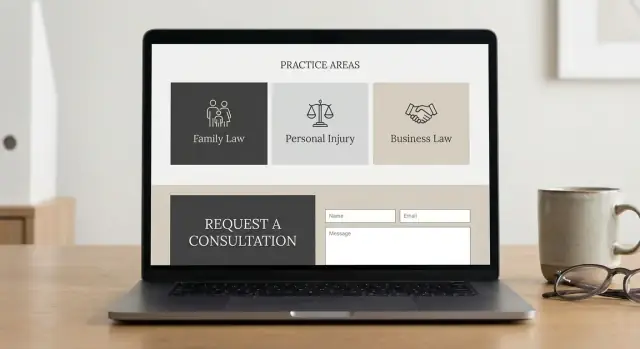
Clarify goals, audience, and success metrics
Before you think about colors, fonts, or even which pages to build first, get clear on what the website is supposed to do for your firm. That decision shapes everything—from the practice areas you feature to the fields you put in your contact form.
Pick one primary goal (and a secondary)
Most law firm sites succeed when they prioritize a single action:
- Phone calls (common for urgent matters like criminal defense)
- Consultation requests (scheduled intake for family law, estate planning, business)
- Lead screening (pre-qualifying details before you spend time on a call)
Choose your primary goal, then one secondary goal (for example, calls first, form submissions second). If you try to optimize for everything, you’ll usually optimize for nothing.
Define your audiences in plain terms
Write down who you’re trying to serve and what they care about. Typical groups include:
- Potential clients (need reassurance, pricing expectations, clear next steps)
- Referrals (other attorneys or professionals who want quick credibility signals)
- Current clients (need easy access to contact info, directions, and what to expect)
If your firm serves multiple client types, decide which one you want the homepage to speak to first.
Choose 3–8 priority practice areas
Start with the practice areas that bring the best mix of revenue, volume, and fit for your team. You can always add more later, but early focus helps you:
- create stronger, more specific pages
- avoid a confusing navigation menu
- track results practice area by practice area
Decide what counts as a conversion
Be specific and measurable. Common conversions include:
- form submissions (general or practice-area specific)
- click-to-call taps on mobile
- booked consultations (if you use scheduling)
- live chat leads (if you use chat)
Set ownership, timeline, and budget guardrails
Assign one person to “own” updates (even if a vendor builds the site). Set a realistic timeline, a budget range, and a monthly plan for small improvements—because the firms that win treat the website as an active business tool, not a one-time project.
Plan the site structure and navigation
A clear structure helps visitors quickly answer two questions: “Do you handle my problem?” and “How do I talk to you?” Before writing copy or choosing design details, sketch a simple sitemap and decide what must be reachable in one or two clicks.
A practical law firm sitemap
For most firms, a straightforward set of core pages works best:
- Home
- About (team, approach, values)
- Practice Areas (hub page) → individual Practice Area pages
- Results / Case Studies (only what you can ethically share)
- Resources / Blog (guides, checklists, updates)
- FAQ
- Contact
Add “trust” pages that support decision-making without cluttering the main navigation:
- Reviews / Testimonials
- Credentials (awards, memberships, speaking)
- Bar admissions (and jurisdictions you’re licensed in)
Navigation labels that make sense to non-lawyers
Avoid internal jargon. Visitors shouldn’t need to decode menu items. Good, plain-language labels include:
- “Practice Areas” (instead of “Services” or “Capabilities”)
- “Case Results” (instead of “Representative Matters”)
- “Fees & Payment” or “Pricing” (if you can discuss it)
- “Contact” or “Request a Consultation”
If you serve multiple regions, consider a top-level “Locations” or “Areas We Serve” link—especially when local search matters.
Place quick actions where people look
Make it easy to reach you from every page:
- A persistent Call button (especially on mobile)
- Email (if appropriate for your intake process)
- A primary CTA like Request Consultation in the header and on key pages
On long pages (like practice areas), repeat the CTA mid-page and at the end so visitors don’t have to scroll back up.
Supporting pages worth planning early
Map the pages that reduce friction and pre-qualify leads:
- Locations served (one overview page or separate city pages)
- Fees / billing / payment options (where applicable)
- How the process works (what happens after someone contacts you)
Once this structure is set, it becomes much easier to build consistent practice area pages and contact flows without creating a confusing menu.
Design practice area pages that convert
Practice area pages often decide whether a visitor contacts you or keeps searching. Treat them as “decision pages”: clear, specific, and easy to act on.
Start with a Practice Areas hub
Create a main Practice Areas page that works like a directory. Keep it skimmable: short summaries (2–4 lines) for each service, plus a clear link to the full page. Add a simple “Talk to a lawyer” call-to-action that points to /contact.
Use one consistent template per practice area
Build one page per practice area and keep the layout consistent so visitors know where to look. A reliable structure also helps your team update pages over time.
Include these sections (in plain language headings):
- Who we help: the types of clients and situations you handle
- Common issues: questions people search for (e.g., “What if the insurer denies my claim?”)
- How the process works: a short, step-by-step overview of what happens next
- Possible outcomes: what clients may expect (without promises)
- FAQs: concise answers that reduce anxiety and objections
Avoid heavy legal jargon. If you must use a legal term, define it in one sentence.
Make it easy to take the next step
Place a call-to-action near the top and again after the process/FAQ section. Use specific, low-pressure wording like “Request a consultation” or “Ask a question.” If you offer multiple locations, add a “Serving” line with a link to your local pages.
Strengthen internal linking
Add internal links between related services and resources. For example, a “Car Accidents” page can link to “Personal Injury,” “Wrongful Death,” and a helpful guide in /blog/what-to-bring-to-a-consultation. This keeps visitors moving and signals relevance to search engines.
Write core pages that build trust
Your core pages do the heavy lifting: they answer “Can you help me?” and “Can I trust you?” without sounding salesy. Focus on clarity, specificity, and an approachable voice.
Homepage: make the first 10 seconds count
Start with a plain-language value proposition that matches your ideal client’s situation (not your résumé). Follow it with a short list of your top practice areas—linked to the relevant pages—so visitors can self-select quickly.
Add a “Why choose us” section with concrete differentiators (e.g., “Former prosecutor,” “Spanish-speaking team,” “Flat-fee options for X matters”). Include social proof where it’s verifiable: bar associations, memberships, and awards that can be checked. If you cite ratings or reviews, use the exact platform name and avoid cherry-picking or exaggeration.
Close each major block with a clear call to action (CTA) that sets the tone: “Request a consultation” or “Send a message,” not “Win your case.”
Attorney bio pages: credibility plus comfort
Bio pages should balance credentials with humanity. Include education, bar admissions, courts, and relevant experience. Add speaking engagements, publications, and community involvement if they’re current.
Write in a warm, direct voice that makes it easier to reach out (“You’ll work directly with…”). A simple headshot and a short “What clients can expect” paragraph often reduces anxiety.
About page: explain how you work
Tell your firm’s story briefly, then spend more space on your service approach: how intake works, how you communicate, and typical timelines.
Set expectations without guarantees. Examples:
- “We aim to respond to new inquiries within 1 business day.”
- “Next steps usually include a conflict check and an initial call to understand your situation.”
These pages should leave visitors feeling informed, respected, and confident enough to take the next step.
Create secure, user-friendly contact forms
Your contact form is often the moment a visitor turns into a lead. For a law firm, it should feel simple, reassuring, and safe—without asking for unnecessary details.
Choose the right form type (and label it clearly)
Avoid one “catch-all” form if you serve different needs. Common options:
- General inquiry (quick questions, referrals)
- Consultation request (scheduling-focused)
- Case evaluation (a bit more context about the matter)
- Document upload (optional, and only when truly needed)
If you offer multiple practice areas, let visitors pick a practice area from a dropdown so you can route the request correctly.
Keep fields minimal and reduce friction
Every extra field lowers submissions. In many cases, the essentials are enough:
- Name
- Email and/or phone
- Practice area
- Brief message
If you need permission to contact someone (or you operate in jurisdictions with stricter consent rules), add a simple consent checkbox. Keep the wording plain, and link to your /privacy-policy.
Protect against spam without punishing real people
Law firm forms attract bots. Use layered protection that stays mostly invisible:
- Honeypot field (bots fill it, humans don’t)
- CAPTCHA only if spam persists
- Rate limiting to block repeated submissions from the same source
Also limit file uploads (if enabled) by size and type, and scan uploads server-side.
Provide clear confirmations and set expectations
After submission, show an on-page thank-you message that explains next steps (e.g., “We’ll respond within 1 business day”). An email receipt can reassure the person, but avoid including sensitive details in the email body.
Route leads reliably (with a backup plan)
Send notifications to a monitored inbox and, ideally, sync to your CRM or intake tool. Add a fallback if email fails: store submissions in your admin panel, log delivery status, and alert staff when messages bounce. If you use a third-party intake system, link it from /contact so users can still reach you if the form has an issue.
Handle compliance, privacy, and accessibility basics
A law firm website should make it easy for people to reach you—without creating misunderstandings or unnecessary risk. A few small additions (placed in the right spots) can protect both the firm and potential clients while improving trust.
Set expectations with a clear disclaimer
Add a plain-English disclaimer near your contact form and on your “Contact” page explaining that submitting a form or sending an email does not create an attorney-client relationship. Keep it short and visible (not hidden in a footer only). For example: “Do not send confidential information. An attorney-client relationship is not formed unless and until we confirm engagement in writing.”
This helps prevent accidental conflicts and makes it clear when representation actually starts.
Be careful about what your first form collects
Your initial lawyer contact form should focus on routing and basic screening—not gathering sensitive facts. Ask for essentials like name, contact details, practice area, and a brief non-confidential summary.
Also guide users on what not to include. A simple line above the message box such as “Please don’t include sensitive details (SSNs, account numbers, medical records)” reduces the chance you receive information you shouldn’t have before conflicts are checked.
Privacy policy, cookies, and transparency details
If you collect personal data through forms, analytics, chat tools, or scheduling widgets, publish a Privacy Policy and link it from the footer sitewide. If you use cookies or tracking that requires notice/consent in your jurisdiction, include a cookie notice and ensure it matches what your tools actually do.
For credibility and clarity, include your office address, phone number, and hours (often in the header and footer). It reassures visitors they’re contacting a real, reachable firm.
Accessibility basics that reduce friction (and risk)
Accessibility isn’t only a compliance issue—it directly affects conversion. At minimum:
- Use clear form labels (not placeholder-only text)
- Ensure sufficient color contrast for text and buttons
- Support keyboard navigation (tabbing through menus and fields)
- Provide helpful error messages (e.g., “Enter a valid phone number”) and don’t rely on color alone
These changes make your site easier for everyone, including users on mobile and people using assistive technology.
Design and UX tips for law firm sites
A law firm website should feel calm, clear, and easy to use—especially for someone who’s stressed and scanning on a phone. Good UX reduces friction and increases the chances a visitor actually reaches out.
Go mobile-first (not “mobile later”)
Most prospective clients will land on your site from search on a phone. Design for small screens first:
- Use a sticky call button and a clear “Request a Consultation” button in the header.
- Keep sections short with generous spacing and readable fonts (avoid tiny text and long blocks).
- Place key info early: who you help, where you serve, and the next step (call or form).
Speed and simplicity beat flashy effects
Fast pages are a UX feature. Heavy animations and too many scripts can slow load times and hurt conversions.
- Compress and resize images; avoid huge hero photos.
- Enable lazy loading for below-the-fold media.
- Keep third-party widgets to a minimum (each one can add delay and visual noise).
Make calls-to-action consistent and frequent
Every key page should make the next step obvious. Use the same primary CTA wording sitewide—e.g., “Request a Consultation” or “Call Now”—and repeat it naturally:
- Top of page (above the fold)
- Mid-page after benefits or process
- End of page with a final prompt and link to /contact
Use repeatable page patterns
Consistency lowers cognitive load. Create a standard layout for practice areas and FAQs so visitors instantly know where to find answers.
A good practice area pattern: overview → who it’s for → outcomes/benefits → process → FAQs → CTA.
Show credibility without clutter
Trust signals help, but too many can feel chaotic. Choose a few strong elements and place them thoughtfully:
- Bar admissions, awards, and memberships (selective, current)
- A small set of testimonials/reviews (with context)
- A brief attorney bio highlight near CTAs
The goal is a site that guides visitors confidently—without distractions—toward contacting you.
SEO for practice areas and local search
Great law firm SEO starts with matching how people actually search: “divorce lawyer near me,” “DUI attorney in Austin,” or “estate planning consultation.” Your site should make it easy for Google (and clients) to understand what you do and where you do it.
Local SEO essentials
If you serve a specific city or region, connect your website to your Google Business Profile (GBP). Add a visible link to your GBP where appropriate (often in the footer or Contact page), and make sure your NAP—name, address, and phone number—matches everywhere: your website, GBP, directories, and social profiles.
Use a consistent format (including suite numbers, abbreviations, and phone formatting). Even small variations can weaken local signals.
Practice-area SEO: one topic per page
Create one focused page per practice area. Avoid cramming multiple services onto a single page “for SEO.” A clean structure helps search engines understand relevance and helps clients self-select.
Write naturally using the terms clients use, and add a short FAQ section that answers real questions (fees, timelines, eligibility, what to bring). Helpful FAQs can earn more visibility and reduce unqualified inquiries.
On-page checklist (quick wins)
- Title tag: include the service + location when relevant (e.g., “DUI Defense Attorney in Phoenix | Firm Name”)
- Meta description: a clear benefit + next step (consultation, call, or contact form)
- Headings: one H1 per page, use H2s for sections like “How we help,” “Process,” and “FAQs”
- Image alt text: describe the image plainly (not keyword stuffing)
Schema markup (only if it’s accurate)
Structured data can clarify your services and location. Common options:
LocalBusiness(orLegalServicewhere appropriate)Attorney(for individual lawyer profiles)FAQPage(only for FAQs visible on the page)
{
  "@context": "https://schema.org",
  "@type": "LegalService",
  "name": "Firm Name",
  "telephone": "+1-555-555-5555",
  "address": {
    "@type": "PostalAddress",
    "streetAddress": "123 Main St",
    "addressLocality": "City",
    "addressRegion": "ST",
    "postalCode": "00000"
  }
}
Location pages: quality over quantity
Create location pages only when you have a real office presence or a clearly defined service area you can support. Thin “City + practice area” pages can backfire; one strong page that matches your actual coverage usually performs better.
Select tools, hosting, and integrations
The best toolset is the one your firm can actually maintain. Start by deciding how much control you need, who will update the site, and how quickly you want to launch.
Choose a platform (plain pros/cons)
WordPress is a common choice for law firms because it’s flexible and you can add features like intake forms and SEO tools.
- Pros: lots of templates, good SEO options, easy to add practice area pages over time.
- Cons: requires ongoing updates and basic security hygiene.
Website builders (like Squarespace, Wix, Webflow) can work well for smaller firms that want simplicity.
- Pros: faster setup, hosting is usually included, fewer moving parts.
- Cons: some limits on advanced forms, integrations, and fine-grained SEO control.
Custom development is best when you need a unique design, complex intake workflows, or strict integration requirements.
- Pros: tailored experience, performance optimizations, custom intake logic.
- Cons: higher cost, you’ll rely on a developer for changes unless a CMS is included.
If you want the speed of a builder but the flexibility of custom development, a vibe-coding platform like Koder.ai can be a practical middle path: you describe the pages and intake workflow in a chat interface, iterate quickly, and still keep control via source code export. This is especially useful when your site needs more than brochure pages—e.g., structured consultation requests, admin views for submissions, or multi-location routing—without waiting weeks for every change.
Hosting and security must-haves
No matter the platform, prioritize basics that protect client inquiries:
- SSL (HTTPS) on every page, especially your lawyer contact form and client intake forms.
- Backups (automatic daily is ideal) and a tested restore process.
- Updates for the CMS, themes, and plugins.
- Security layer: a reputable security plugin and/or web application firewall where applicable.
If you’re building something custom (or semi-custom), look for workflow features that reduce operational risk—such as snapshots and rollback—so you can revert quickly if an update breaks a form. (Koder.ai includes snapshots/rollback and supports deployment/hosting, which can make iterative improvements safer.)
Analytics you can act on
Set up GA4 or a privacy-friendly alternative. Track the outcomes that matter:
- Contact form submissions
- Phone clicks/call tracking (with clear consent where required)
- Appointment booking completions
Integrations: only what you’ll use
Integrate sparingly to keep the site fast and reliable. Common options:
- Scheduling (for consultation requests)
- Live chat (if someone will respond promptly)
- CRM (to route leads and reduce missed follow-ups)
- Email marketing (only if you send updates and have consent)
Content management and approvals
Decide upfront who edits pages, who approves legal website copywriting, and how changes are documented. A simple workflow (editor → attorney approval → publish) plus a small change log prevents outdated practice area pages and inconsistent contact details.
Prepare supporting content and legal pages
Before launch, make sure the “supporting” pieces of your site are in place. These pages don’t win cases, but they do reduce friction, build confidence, and keep your intake process organized.
Essential pages visitors expect
At minimum, publish and link these pages in your footer (and keep them easy to find):
- /contact — your primary conversion page (phone, email, address, hours, and a clear call to action)
- /privacy-policy — explain what you collect, why, how you store it, and how people can request deletion
- /terms (optional) — helpful if you offer online payments, downloads, or appointment scheduling
- /accessibility (optional) — a brief statement of your approach, known limitations, and a contact method for help
Make sure your privacy language matches what your forms actually do (file uploads, cookies/analytics, CRM integrations, etc.).
Set up email so leads don’t get lost
Use a domain-based inbox (e.g., [email protected]) rather than a free address. Configure SPF/DKIM for deliverability, then add routing rules so new inquiries trigger a backup (e.g., forward to a secondary inbox or create an internal notification). If more than one person handles intake, use role-based addresses like intake@ and referrals@.
Create a simple resource plan tied to practice areas
You don’t need a massive blog—start with a small, repeatable plan: one FAQ-style post per practice area per month. Add internal links from practice pages to helpful resources, for example: /blog/how-to-choose-a-personal-injury-lawyer.
Plan ongoing updates
Set a cadence for updates that signal credibility and freshness: new verdicts/settlements (where appropriate), short articles, refreshed attorney bios, and expanding FAQs based on real intake calls.
Launch checklist and quality assurance
A law firm website launch is less about “going live” and more about verifying that visitors can find you, trust you, and contact you without friction. Run a short quality assurance pass before (and right after) launch so you don’t discover problems when a prospective client is already trying to reach you.
Security and reliability checks
Confirm the basics that protect client inquiries and keep the site stable:
- SSL is active (site loads as https://) and there are no mixed-content warnings.
- Contact forms and client intake forms are tested end-to-end: submit, receive email, and verify the data is correct.
- Backups are scheduled (daily is typical) and you know how to restore.
- Form submissions go to the right inbox(es), and you have a backup routing (e.g., a second recipient or ticketing tool) so messages don’t get missed.
Performance and usability checks
Small issues can quietly kill conversions:
- Test on mobile: menus, tap targets, and click-to-call phone links.
- Check for broken links, especially in navigation and practice area pages.
- Compress oversized images and confirm key pages load quickly on cellular data.
Conversion and messaging checks
Make it easy to take the next step:
- Primary CTA is visible above the fold (e.g., “Request a consultation”).
- Form confirmation works (on-page message and/or email confirmation).
- If you use disclaimers (no attorney-client relationship, no legal advice), ensure they display near the form and on /contact.
SEO launch checks
Before you invite traffic, verify search engines can read the site:
- Pages are indexable (no accidental noindex), sitemap exists, and robots.txt is correct.
- Canonical URLs are set to prevent duplicates.
Soft launch, then full launch
Do a soft launch to a small internal group first (staff, trusted colleagues). Fix issues, then fully launch and submit your sitemap in your search tools.
Measure results and improve over time
A law firm website isn’t “done” after launch. The best-performing sites treat measurement as part of client service: you learn what helps people reach you quickly—and remove what slows them down.
Set up reporting that matches your practice areas
Start with a simple dashboard that answers: Which practice areas generate consultations? Track:
- Leads by practice area (which page the visitor came from before contacting you)
- Traffic sources (Google organic, Google Business Profile, referrals, ads)
- Top pages and their next-step rate (how often visitors click “Call,” “Email,” or “Request a consultation”)
If you use Google Analytics, also track key events: phone clicks, form submissions, and “thank you” page views.
Call tracking without confusing clients
Call tracking can show which channels drive calls, but keep it client-friendly:
- Use one tracking number per channel, not multiple rotating numbers on the same page
- Ensure the tracking number forwards instantly to your real office line
- Display your primary number consistently on Contact and footer areas to build recognition
Improve forms by finding drop-off points
Review where people abandon your contact form. Common fixes:
- Remove non-essential fields (ask for details after you reply)
- Replace vague prompts (“Tell us about your case”) with clearer guidance and examples
- Add reassurance near the submit button (response time, confidentiality note, no obligation)
A/B test small changes (not full redesigns)
Test one element at a time: CTA text, the hero message on a practice area page, or a trust block (bar admissions, reviews, case types handled). Keep tests running long enough to collect meaningful data.
Monthly maintenance habits
Each month: update plugins/themes, review security alerts, check broken links, and refresh key pages with new FAQs or recent outcomes (when permitted). A small, consistent routine prevents slow creep in performance and risk.
If you’re making frequent improvements—new practice areas, revised intake questions, additional locations—consider a workflow that makes iteration cheap and reversible. Tools like Koder.ai are built for that style of continuous website improvement: you can plan changes, generate updates through chat, and roll back quickly if something impacts conversions.
FAQ
What’s the first decision to make before designing a law firm website?
Pick one primary action you want most visitors to take (usually phone calls or consultation requests), then one secondary action (like form submissions or lead screening). Make every major page support that goal with a consistent CTA (e.g., “Request a Consultation”) and remove distractions that don’t help someone take the next step.
What pages should a law firm website include at minimum?
Use a practical core set of pages:
- Home
- About (firm + attorney bios)
- Practice Areas hub → individual practice area pages
- Results / Case Studies (only what you can ethically share)
- Resources / Blog
- FAQ
- Contact
Add supporting “trust” pages like Reviews/Testimonials, Credentials, and Bar Admissions if they help decision-making without cluttering navigation.
How should we label navigation so prospective clients understand it?
Use plain-language labels that match how non-lawyers think and search. Examples:
- “Practice Areas” (not “Capabilities”)
- “Case Results” (not “Representative Matters”)
- “Fees & Payment” or “Pricing” (if you can discuss it)
- “Contact” or “Request a Consultation”
Keep the menu short and make key pages reachable in 1–2 clicks.
How do we structure practice area pages so they convert?
Create a Practice Areas hub that lists services like a directory (2–4 lines each + links). Then build one focused page per practice area using a consistent template:
- Who you help
- Common issues/questions
- How the process works (step-by-step)
- Possible outcomes (no promises)
- FAQs
Add a CTA near the top and again later so visitors don’t have to hunt for /contact.
What should the homepage include to build trust quickly?
Treat the homepage like a “first 10 seconds” page:
- A plain-language value proposition tied to client problems
- Links to your top practice areas
- A short “Why choose us” section with verifiable differentiators (e.g., languages spoken, fee structures where appropriate)
- Trust signals that can be checked (bar associations, memberships)
- A clear CTA (not hype like “Win your case”)
The goal is clarity and comfort, not a résumé dump.
What fields should a law firm contact form ask for (and avoid)?
Collect only what you need to route and respond:
- Name
- Email and/or phone
- Practice area (dropdown helps routing)
- Brief message
Add a clear note telling people not to send confidential details, plus a disclaimer that submitting the form does not create an attorney-client relationship. Link to /privacy-policy near the form if you collect personal data.
How can we reduce spam on contact forms without hurting conversions?
Use layered protection that’s mostly invisible to real users:
- Honeypot field
- Rate limiting
- CAPTCHA only if spam persists
If you allow uploads, restrict file size/types and scan files server-side. Also store submissions in an admin panel or database as a backup in case email delivery fails.
What compliance, privacy, and accessibility elements are most important?
At a minimum:
- A visible disclaimer on /contact (and near forms) that no attorney-client relationship is formed by submission
- Guidance not to send confidential info
- A clear /privacy-policy linked sitewide (footer)
- Accurate cookie/analytics disclosures where required
- Accessibility basics: real form labels, good contrast, keyboard navigation, and clear error messages
These steps reduce risk and improve user confidence.
What should we measure to know if the site is working?
Track actions that match your goals:
- Form submissions (and thank-you page views)
- Click-to-call taps on mobile
- Appointment booking completions (if used)
- Live chat leads (if used)
Set these up as events in analytics (e.g., GA4). Also report leads by practice area so you can see which pages actually generate consultations.
What are the most important website launch checks for law firms?
Run a short pre-launch QA:
- Test HTTPS/SSL and fix mixed-content warnings
- Submit test contact forms end-to-end and confirm delivery (with a backup route)
- Check mobile menus, tap targets, and click-to-call links
- Fix broken links, compress oversized images, and confirm key pages load fast
- Confirm SEO basics: indexable pages, sitemap, and correct robots.txt
A soft launch to staff first helps catch issues before prospects do.