

How to Create a Mobile App for Capturing User Feedback
Learn how to plan, design, and build a mobile app that captures in-the-moment feedback, works offline, protects privacy, and turns responses into action.
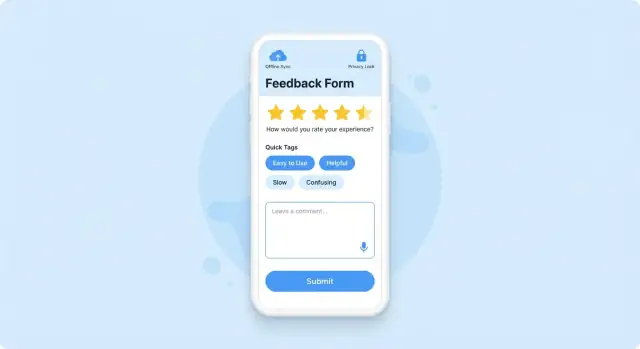
What a Mobile Feedback Capture App Should Do
Mobile feedback capture means collecting opinions, ratings, and issue reports directly from people on their phones—right when an experience is fresh. Instead of relying on long email surveys later, the app helps you gather short, contextual input tied to a specific moment (after a visit, after using a feature, at checkout).
When it’s useful
It’s most valuable when timing and context matter, or when your users aren’t sitting at a desk. Common use cases include:
- Product feedback: in-app surveys, quick “Was this helpful?” prompts, feature requests, lightweight NPS in mobile app flows.
- Field service: technicians capture customer satisfaction, notes, photos, and signatures—even with offline feedback collection.
- Events: session ratings, speaker feedback, venue issues, and real-time sentiment.
- Retail: checkout experience, stock availability reports, store cleanliness, staff interactions.
- Healthcare check-ins: waiting time feedback, patient experience, follow-up needs (with careful privacy for feedback apps).
What “good” looks like
A mobile feedback capture app should make it easy to:
- Ask the right question at the right moment (in-app prompt, QR code, kiosk mode, or push notification surveys—used sparingly).
- Capture structured and unstructured data (ratings + comments + optional tags like location, store, or device type).
- Support attachments when needed (photos for issues, screenshots for bugs).
- Route feedback to action (notify the right team, create tickets, and track status).
Start with an MVP, then iterate
Set expectations early: the first version shouldn’t try to measure everything. Build a small, focused MVP (one or two feedback flows, a clear data model, basic reporting). Then iterate based on response quality: completion rate, comment usefulness, and whether teams can actually act on what you collect.
If you want to move fast on the first version, consider prototyping the flows with a vibe-coding tool like Koder.ai. It can help you stand up a working React web admin dashboard, a Go/PostgreSQL backend, and even a Flutter mobile client from a chat-driven plan—useful when you’re validating UX, triggers, and the data schema before investing in deeper custom engineering.
Done well, the outcome is simple: better decisions, faster issue discovery, and higher customer satisfaction—because feedback arrives while it still matters.
Goals, Audience, and Success Metrics
Before you sketch screens or pick survey questions, get specific about who will use the app and why. A feedback app that works for customers sitting on a couch will fail for field agents standing in the rain with one hand free.
Define your primary users and environments
Start by naming your primary audience:
- Customers: want fast, low-effort ways to share opinions, report issues, or request features.
- Employees (support, sales, store staff): need structured inputs tied to a case, account, or location.
- Field agents / technicians: often need offline feedback collection, quick photo/voice notes, and reliable syncing later.
Then list the environments: on-site, on-the-go, in a store, on unstable networks, or in regulated settings (healthcare, finance). These constraints should shape everything from form length to whether you prioritize one-tap ratings over long text.
Pick 2–3 core goals (and say “no” to the rest)
Most teams try to do too much. Choose two or three primary goals, such as:
- Measure satisfaction (e.g., CSAT or NPS in mobile app)
- Collect bug reports (steps to reproduce, device info, screenshots)
- Validate features (quick polls after a new release)
If a feature doesn’t serve those goals, park it for later. Focus helps you design a simpler experience and makes your reporting clearer.
Choose success metrics that match the job
Good metrics turn feedback app development into a measurable product, not a “nice-to-have.” Common metrics include:
- Response rate: % of people who start and submit (especially for in-app surveys and push notification surveys)
- Completion time: how long it takes to finish a typical flow
- Actionable rate: % of submissions that result in a concrete next step
- Time-to-triage: time from submission to being seen and categorized by the team
Define “actionable” for your team
“Actionable” should be explicit. For example: a message is actionable if it can be routed to an owner (Billing, Product, Support), triggers an alert (crash spike, safety issue), or creates a follow-up task.
Write this definition down and align on routing rules early—your app will feel smarter, and your team will trust the analytics for feedback that follow.
Choose the Right Feedback Methods
The best mobile feedback capture apps don’t rely on a single survey template. They offer a small set of methods that fit different user moods, contexts, and time budgets—and they make it easy to choose the lightest option that still answers your question.
Match the method to the question
If you need a fast, quantifiable signal, use structured inputs:
- Ratings (1–5 stars / thumbs up-down): great for “How was this?” moments after a completed action.
- NPS (0–10): best for relationship-level sentiment (“How likely are you to recommend us?”), typically as an occasional pulse check—not after every task.
- CSAT (1–5): strong after a specific interaction like onboarding, a delivery, or a support resolution.
- Quick polls (single choice): useful for making product decisions (“Which option do you prefer?”) without asking users to type.
When you need nuance, add open-ended options:
- Open-text: the simplest way to learn “why,” but keep it optional.
- Photo/video: helpful for reporting real-world issues (damaged item, UI bug screenshot, in-store experience).
- Voice notes: good for accessibility and speed when typing is inconvenient.
Match the method to the moment
Ask right after meaningfully completing a task, after a purchase, or once a support ticket is closed. Use periodic pulse checks for broader sentiment, and avoid interrupting users mid-flow.
Keep it short, then branch
Start with one question (rating/NPS/CSAT). If the score is low (or high), show optional follow-ups like “What’s the main reason?” and “Anything else to add?”
Plan for multilingual feedback
If your audience spans regions, design feedback prompts, answer choices, and free-text handling for multiple languages from day one. Even basic localization (plus language-aware analytics) can prevent misleading conclusions later.
Capture Flows: When and How You Ask
Getting feedback is less about adding a survey and more about choosing the right moment and channel so users don’t feel interrupted.
Pick the right trigger
Start with a small set of triggers and expand once you see what works:
- In-app prompt: best after a meaningful action (completed a task, finished onboarding, reached a milestone).
- Push notification: useful for follow-ups (e.g., “How did your delivery go?”), but only when the user has opted in.
- Email/SMS link: good for transactional moments or when users aren’t active in-app.
- QR code / kiosk mode: ideal for physical locations, events, or support desks where feedback should be instant.
A helpful rule: ask closest to the experience you want to measure, not at random times.
Prevent “over-asking” with controls
Even relevant prompts become annoying if they repeat. Build in:
- Frequency caps (e.g., one survey per 14–30 days, or per feature)
- A clear Remind me later option that snoozes the ask for a defined window
- A dismiss path that respects the user’s decision (don’t show the same prompt again immediately)
Use smart targeting (without creeping people out)
Targeting increases response rates and improves data quality. Common inputs include:
- User segments: new users vs. power users, free vs. paid, language, device type.
- Feature usage: ask about a feature right after it’s used.
- Recent events: support ticket resolved, subscription canceled, checkout completed.
- Location (only if appropriate): for store visits or on-site services, with clear value explained.
Design fallbacks for denied permissions
Assume some users will deny notifications, location, or camera access. Provide alternative paths:
- If notifications are off, use in-app banners or an inbox-style message center.
- If location is denied, let users choose a site/store manually.
- If camera is denied (e.g., for QR), allow manual code entry or a simple “Start feedback” button.
Well-designed capture flows make feedback feel like a natural part of the experience—not an interruption.
UX Patterns That Increase Response Rates
Good feedback UX reduces effort and uncertainty. Your goal is to make answering feel like a quick, safe “tap-and-done” moment, not another task.
Design for one-thumb speed
Most people respond while holding a phone in one hand. Keep primary actions (Next, Submit, Skip) within easy reach and use large tap targets.
Prefer taps over typing:
- Use multiple choice, sliders, star ratings, and quick “reason chips” (e.g., “Too slow”, “Confusing”, “Missing feature”).
- If you need text, offer short prompts (“What happened?”) and keep the field compact.
- Add smart defaults (last used category, recent device info) so users don’t re-enter basics.
Keep questions clear and lightweight
Use labels that describe what you want, not what the form field is:
- “How easy was it to check out?” instead of “Satisfaction score”.
- “What should we improve?” instead of “Comments”.
Minimize typing by splitting long prompts into two steps (rate first, explain second). Make “Why?” follow-ups optional.
Prevent drop-off with reassurance
People quit when they feel trapped or unsure how long it will take.
- Show progress hints (“1 of 3”) or keep it to a single screen when possible.
- Clearly label optional questions and provide a visible Skip.
- For longer text, autosave drafts so users can return without losing work.
Accessibility basics that boost completion
Accessibility improvements often increase response rates for everyone:
- Support Dynamic Type and avoid cramped layouts.
- Ensure sufficient contrast and don’t rely on color alone.
- Add descriptive screen reader labels for ratings, toggles, and error states.
Gentle validation and friendly errors
Validate as users go (e.g., required email format) and explain how to fix issues in plain language. Keep the Submit button visible and disable it only when necessary, with a clear reason.
Data Model and Form Design
A feedback app lives or dies on how cleanly it captures answers. If your data model is messy, reporting becomes manual work and question updates turn into fire drills. The goal is a schema that stays stable while your forms evolve.
Start with a clear response schema
Model every submission as a response that contains:
- response_id (UUID), created_at (timestamp), and optional submitted_at
- form_id and form_version
- An array of answers:
{question_id, type, value} - locale (e.g., en-US) so you can compare responses across languages
- Minimal device/app info (app version, OS version). Avoid collecting anything you won’t use.
Keep answer types explicit (single choice, multi-select, rating, free text, file upload). This makes analytics consistent and prevents “everything is a string.”
Plan for versioning (before you ship)
Questions will change. If you overwrite a question’s meaning but reuse the same question_id, old and new answers become impossible to compare.
A simple rule set:
question_idstays tied to a specific meaning.- If meaning changes, create a new
question_id. - Increment
form_versionwhenever you reorder, add, or remove questions.
Store the form definition separately (even as JSON) so you can render the exact form version later for audits or support cases.
Capture context carefully
Context turns “I had an issue” into something you can fix. Add optional fields such as screen_name, feature_used, order_id, or session_id—but only when it supports a clear workflow (like support follow-up or debugging).
If you attach IDs, document why, how long you keep them, and who can access them.
Add routing metadata (make it explainable)
To speed up triage, include lightweight metadata:
- category tags (billing, bug, UX, feature request)
- urgency (low/medium/high)
- Optional sentiment (user-selected, or algorithmic if you can explain it)
Avoid “black box” labels. If you auto-tag, keep the original text and provide a reason code so teams trust the routing.
Architecture and Tech Stack Decisions
Your tech choices should support the feedback experience you want—fast to ship, easy to maintain, and dependable when users report issues.
Platform strategy: native, cross-platform, or PWA
If you need the best performance and tight OS features (camera, file picker, background upload), native iOS/Android can be worth it—especially for attachment-heavy feedback.
For most feedback products, a cross-platform stack is a strong default. Flutter and React Native let you share UI and business logic across iOS and Android while still accessing native capabilities when needed.
A PWA (web app) is fastest to distribute and can work well for kiosk or internal employee feedback, but access to device features and background sync can be limited depending on the platform.
Backend building blocks you’ll likely need
Even “simple” feedback needs a reliable backend:
- API to submit and retrieve feedback (plus authentication)
- Database for responses, users, tags/status, and audit history
- File storage for screenshots, photos, and logs (with secure access links)
- Admin dashboard for triage, assignment, and exports
Keep the first version focused: store feedback, view it, and route it to the right place.
If your goal is speed with a maintainable baseline, Koder.ai’s default architecture (React on the web, Go services, PostgreSQL, and Flutter for mobile) maps well to typical feedback app development needs. It’s especially useful for quickly generating an internal admin panel and API scaffolding, then iterating on form versions and routing rules.
Build vs buy: choose what differentiates you
Third-party tools can shorten development time:
- Form builder / in-app surveys for common patterns like NPS in mobile app
- Analytics for funnels and response rates
- Crash reporting if you’re also collecting bug reports
Build your own where it matters: your data model, workflows, and reporting that turns feedback into action.
Integrations (without exploding scope)
Plan a small set of integrations that match your team’s workflow:
- Helpdesk/CRM ticket creation
- Slack alerts for urgent feedback
- Data warehouse exports for deeper analytics
Start with one “primary” integration, make it configurable, and add more after launch. If you want a clean path, publish a simple webhook first and grow from there.
Offline Mode, Sync, and Reliability
Offline support isn’t a “nice to have” for a mobile feedback capture app. If your users collect feedback in stores, factories, events, planes, trains, or rural areas, connectivity will drop at the worst moment. Losing a long response (or a photo) is a quick way to lose trust—and future feedback.
Design for “offline first” capture
Treat every submission as local by default, then sync when possible. A simple pattern is a local outbox (queue): each feedback item is stored on-device with its form fields, metadata (time, location if permitted), and any attachments. Your UI can immediately confirm “Saved on this device,” even with zero signal.
For attachments (photos, audio, files), store a lightweight record in the queue plus a pointer to the file on the device. This makes it possible to upload the text response first and add media later.
Queueing, retries, and safe syncing
Your sync engine should:
- Upload in small steps (e.g., create feedback record → upload attachments → mark complete) to support partial uploads.
- Retry failures with exponential backoff (wait 1s, 2s, 4s, 8s…) so you don’t drain battery or overload servers.
- Use idempotency keys per submission (a unique token) so if the app retries, the server won’t create duplicates.
If a user edits a saved draft that’s already syncing, avoid conflicts by locking that specific submission during upload, or by versioning (v1, v2) and letting the server accept the newest version.
Make sync status visible and actionable
Reliability is also a UX problem. Show clear states:
- Saved locally (safe to close the app)
- Uploading (with progress for large files)
- Sent (timestamp and confirmation)
- Failed (what happened, and next steps)
Include a “Try again” button, a “Send later on Wi‑Fi” option, and an outbox screen where users can manage pending items. This turns shaky connectivity into a predictable experience.
Privacy, Security, and Compliance Basics
A feedback app is often a data-collection app. Even if you only ask a couple of questions, you may be handling personal data (email, device IDs, recordings, location, free-text that includes names). Building trust starts with limiting what you collect and being clear about why you collect it.
Collect less, document more
Start with a simple data inventory: list every field you plan to store and the purpose for it. If a field doesn’t directly support your goals (triage, follow-up, analytics), remove it.
This habit also makes later compliance work easier—your privacy policy, support scripts, and admin tools will all align with the same “what we collect and why.”
Consent and user control
Use explicit consent where required or where expectations are sensitive—especially for:
- Audio/video recordings
- Location
- Identifiers that can be tied to a person (email, account ID)
Give people clear choices: “Include screenshot,” “Share diagnostic logs,” “Allow follow-up.” If you use in-app surveys or push notification surveys, include a simple opt-out path in settings.
Secure transport and storage
Protect data in transit with HTTPS/TLS. Protect data at rest with encryption (on your server/database) and store secrets safely on-device (Keychain on iOS, Keystore on Android). Avoid putting tokens, emails, or survey responses in plain text logs.
If you integrate analytics for feedback, double-check what those SDKs collect by default and disable anything unnecessary.
Retention and deletion workflows
Plan how long you keep feedback and how it can be deleted. You’ll want:
- A retention rule (e.g., delete raw recordings after X days)
- A user-request flow (export/delete their data)
- Admin tools to purge data when needed
Write these rules down early, and make them testable—privacy isn’t only a policy, it’s a product feature.
Turning Feedback Into Action with Reporting
Collecting feedback is only useful if your team can act on it quickly. Reporting should reduce confusion, not add another place to “check later.” The goal is to turn raw comments into a clear queue of decisions and follow-ups.
A simple triage workflow that doesn’t stall
Start with a lightweight status pipeline so every item has a home:
- New → just arrived, not reviewed yet
- Categorized → tagged to a theme (billing, onboarding, bugs, feature request)
- Assigned → owner + due date (even if it’s “review next sprint”)
- Resolved → fixed, declined, or merged into an existing initiative
This workflow works best when it’s visible inside the app’s admin view and consistent with your existing tools (e.g., tickets), but it should still function on its own.
Views that answer real questions
Good reporting screens don’t show “more data.” They answer:
- What’s changing? New themes emerging this week vs. last week.
- What’s urgent? High-severity bug reports, spikes in negative sentiment, or churn-risk segments.
- What’s recurring? Duplicate issues and repeated complaints that deserve a single consolidated task.
Use grouping by theme, feature area, and app version to spot regressions after releases.
Dashboards for trends, themes, and segments
Dashboards should be simple enough to scan in a standup:
- Trends over time: NPS/CSAT movement, volume of feedback, top categories by week.
- Top themes: most frequent tags with example quotes for context.
- Segment comparisons: new vs. returning users, free vs. paid, region, device type.
When possible, let users drill down from a chart to the underlying submissions—charts without examples invite misinterpretation.
Close the loop (and earn more feedback)
Reporting should trigger follow-through: send a short follow-up message when a request is addressed, link to a changelog page like /changelog, and show status updates (“Planned,” “In progress,” “Shipped”) when appropriate. Closing the loop increases trust—and response rates the next time you ask.
Testing, Launch, and Iteration Plan
Shipping a feedback capture app without testing it in real conditions is risky: the app might “work” in the office, but fail where feedback actually happens. Treat testing and rollout as part of product design, not a last step.
Test with real users in real contexts
Run sessions with people who match your audience and ask them to capture feedback during normal tasks.
Test in realistic conditions: poor network, bright sun, noisy environments, and one-handed use. Watch for friction points like the keyboard covering fields, unreadable contrast outdoors, or people abandoning because the prompt appears at the wrong time.
Validate your analytics before launch
Analytics is how you’ll learn which prompts and flows work. Before releasing widely, confirm event tracking is accurate and consistent across iOS/Android.
Track the full funnel: prompts shown → started → submitted → abandoned.
Include key context (without collecting sensitive data): screen name, trigger type (in-app, push), survey version, and connectivity state. This makes it possible to compare changes over time and avoid guessing.
Run a controlled rollout
Use feature flags or remote config so you can turn prompts on/off without an app update.
Roll out in stages:
- Internal beta (team + support)
- Small user segment (e.g., 1–5%)
- Wider release as metrics look healthy
During early rollout, watch crash rates, time-to-submit, and repeated retries—signals that the flow is unclear.
Create a practical iteration plan
Make improvements continuously, but in small batches:
- Improve questions (remove ambiguity, shorten wording)
- Refine targeting (ask at high-intent moments, avoid interrupting)
- Reduce friction (fewer fields, smart defaults, faster submit)
Set a cadence (weekly or biweekly) to review results and ship one or two changes at a time so you can attribute impact. Keep a changelog of survey versions and link each version to analytics events for clean comparisons.
If you’re iterating quickly, tools like Koder.ai can also help: its planning mode, snapshots, and rollback are handy when you’re running rapid experiments on form versions, routing rules, and admin workflows—and you need a safe way to test changes without destabilizing production.
FAQ
What should be the first step when building a mobile feedback capture app?
Start by picking 2–3 core goals (e.g., measure CSAT/NPS, collect bug reports, validate a new feature). Then design a single, short capture flow that directly supports those goals and define what “actionable” means for your team (routing, alerts, follow-ups).
Avoid building a “survey platform” first—ship a narrow MVP and iterate based on completion rate, comment usefulness, and time-to-triage.
Which feedback methods work best on mobile?
Use structured inputs (stars/thumbs, CSAT, NPS, single-choice polls) when you need fast, comparable signals.
Add open-ended input when you need the “why,” but keep it optional:
- Short text for quick context
- Photos/screenshots for real-world issues or UI bugs
- Voice notes when typing is inconvenient or for accessibility
When should the app ask for feedback to get better responses?
Trigger prompts right after a meaningful event:
- Task completion (onboarding done, feature used)
- Transaction moments (checkout, delivery)
- Support resolution (ticket closed)
For broader sentiment, use periodic pulse checks. Avoid interrupting users mid-flow or asking at random times—timing and context are the difference between useful feedback and noise.
How do you prevent users from feeling spammed by feedback prompts?
Add controls that respect the user:
- Frequency caps (e.g., one survey per 14–30 days, or per feature)
- A Remind me later option with a real snooze window
- A Dismiss path that doesn’t resurface the same prompt immediately
This protects response rates over time and reduces annoyance-driven low-quality answers.
What UX patterns increase completion rates in mobile surveys?
Design for one-thumb, tap-first completion:
- Use large tap targets and simple choices (chips, sliders, stars)
- Ask one question first, then branch to optional follow-ups
- Show progress (“1 of 3”) or keep it on one screen
- Make optional questions clearly skippable
If you need text, keep prompts specific (“What happened?”) and fields short.
What data model should a feedback app use to keep reporting clean?
A stable schema usually treats each submission as a response with:
response_id, timestampsform_idandform_versionanswers[]as{question_id, type, value}localeplus minimal app/device info you’ll actually use
Keep answer types explicit (rating vs. text vs. multi-select) so reporting stays consistent and you don’t end up with “everything is a string.”
How do you handle survey changes without breaking analytics?
Version forms from day one:
- Keep a
question_idtied to a single meaning - If the meaning changes, create a new
question_id - Increment
form_versionwhen you add/remove/reorder questions
Store the form definition separately (even as JSON) so you can render and audit exactly what users saw when they submitted feedback.
How should offline mode and syncing work for mobile feedback?
Use an offline-first approach:
- Save submissions to a local outbox queue by default
- Sync later in steps (create record → upload attachments → mark complete)
- Retry with exponential backoff
- Use idempotency keys to prevent duplicates on retries
In the UI, show clear states (Saved locally, Uploading, Sent, Failed) and provide “Try again” plus an outbox screen for pending items.
What privacy and security basics should a feedback app include?
Collect less data, and be explicit about why you collect it:
- Use consent for sensitive items (location, audio/video, identifiers)
- Encrypt in transit (TLS) and at rest; store secrets in Keychain/Keystore
- Avoid putting feedback content in logs
- Define retention and deletion workflows (including user requests)
If you use analytics SDKs, review what they collect by default and disable anything unnecessary.
How do you turn collected feedback into action with reporting and workflows?
Make feedback easy to act on with a simple pipeline:
- New → Categorized → Assigned → Resolved
Then provide reporting that answers:
- What changed this week vs. last?
- What’s urgent (spikes, high severity, churn-risk segments)?
- What repeats (duplicates worth consolidating)?
Close the loop when possible—status updates and links like /changelog can increase trust and future response rates.