

How to Create a Mobile App for Group Travel Coordination
Learn how to create a mobile app for group travel coordination: core features, MVP scope, UX tips, data needs, and a step-by-step build plan.
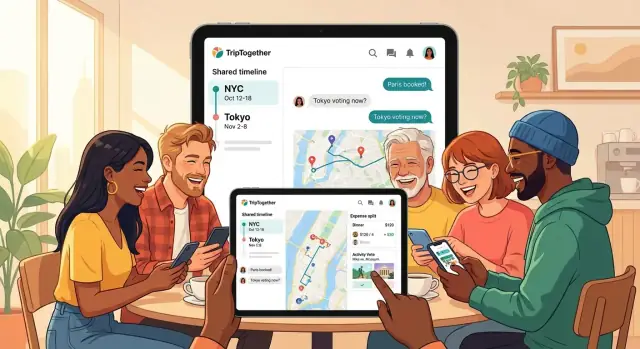
Define the Problem and Your Target Group
A group travel app isn’t just a prettier itinerary. “Group travel coordination” means handling two realities at once: planning before the trip, and adapting during the trip when plans change. The best travel coordination app reduces chaos when someone’s flight is delayed, the weather flips, or the group suddenly wants a different restaurant.
What you’re actually coordinating
Most groups struggle with the same moving parts:
- Shared information (dates, bookings, addresses, confirmation numbers)
- Decisions (where to stay, what to do next, who’s joining)
- Updates (time changes, meeting points, cancellations)
- Money (who paid, who owes, how to settle)
If your app doesn’t address these, it becomes “just another chat.”
Who the app is for
Be specific about your primary audience, because their needs differ:
- Friends planning weekends and festivals (fast decisions, lightweight tools)
- Families traveling with kids (clear schedules, simple sharing, less noise)
- Tour groups (structured plans, leader roles, announcements)
- Work retreats (permission controls, attendance, receipts)
This choice shapes everything from onboarding to whether you prioritize in-app group chat, a shared itinerary app, or an expense splitting feature.
Key problems and success metrics
Your core problems are usually scattered info, last-minute changes, and messy money tracking. Define success in measurable terms, for example:
- Fewer messages needed to finalize plans (e.g., “decision reached in under 5 minutes”)
- Fewer missed meetups (“late arrivals reduced by 30%”)
- Faster decisions (poll participation rate, time-to-decision)
- Higher clarity (people can find the latest plan in two taps)
These metrics will guide your MVP travel app scope and keep features focused.
Choose the Main Scenario and Trip Types
A group travel app can’t optimize for everything at once. Separate the experience into before-trip planning, during-trip coordination, and post-trip wrap-up. Your first release should focus on one phase as the “home base,” then add the others over time.
Pick one primary scenario
Choose the situation where your app will be opened most often:
- Before-trip planning: collecting ideas, agreeing on dates, building a shared itinerary structure.
- During-trip coordination: meeting up, last-minute changes, “where are we going next?” decisions.
- Post-trip wrap-up: expense splitting, receipts, settling balances, sharing outcomes.
If you’re building a travel coordination app for frequent usage, “during-trip” often produces the clearest must-have moments (notifications, meeting points, quick polls).
Decide which trip types you serve first
Trip types change requirements more than most teams expect:
- Weekend getaway: fast decisions, fewer items, minimal complexity.
- Multi-city trip: heavier itinerary management, transport timing, handoffs between days.
- Festival/event: meeting points, schedule blocks, “who’s where,” optional location sharing for trips.
- Road trip: route changes, stops, car assignments, flexible timing.
Pick one trip type as your design anchor and use it to define defaults (time blocks, map views, decision cadence).
Clarify group size and roles
State your assumptions: “best for 3–10 people” vs. “15+.” Define roles like organizer (creates structure, sends prompts) and participants (vote, confirm, add suggestions). Clear roles reduce friction and guide your permissions model.
Identify must-have moments
List the moments your app must nail—usually voting, reminders, and meeting points. If those flows feel effortless, your MVP will feel useful even with a smaller feature set.
List Core Features for a First Version (MVP)
Your MVP should prove one thing: a group can plan and run a trip from the app without getting lost in scattered messages and spreadsheets. Keep the feature set tight, but complete enough to support a real weekend trip.
1) A shared trip space (the “home” for the group)
Start with a single trip screen that contains the essentials: members, simple roles (organizer vs. participant), invite links, and a few basic settings (currency, time zone, trip dates). The goal is to make joining frictionless while keeping enough control for the person coordinating.
2) An itinerary builder people will actually use
Build an itinerary that supports days, activities, times, notes, and lightweight attachments (like a PDF ticket or a screenshot). The key MVP requirement is clarity: everyone should be able to answer “Where are we going next?” in two taps.
3) Conversation tied to the plan
General chat is useful, but the MVP should prioritize comments attached to itinerary items (e.g., “Lunch at 1pm: can we push to 1:30?”). This keeps decisions and context from disappearing into a long chat history.
4) Expense tracking with a simple split
Implement the basics: who paid, amount, category, and who shares it. Provide a simple “who owes who” summary—skip complex balances, multi-currency optimization, and advanced reimbursements for now. You’re validating the core pain point: avoiding awkward post-trip math.
5) Map view for places and meeting points
Include a map that shows saved places from the itinerary plus a couple of meeting points (hotel, station, “rally spot”). It doesn’t need advanced routing—just a reliable way to see what’s nearby and where to meet.
6) Notifications that prevent missed updates
Add push notifications for changes (time edits, new items, cancellations) and simple reminders (“Leave in 30 minutes”). Make them configurable per trip so groups don’t mute your app entirely.
If you’re unsure what to cut, keep what supports coordination during the trip, and postpone “nice-to-have” features to a later iteration (see /blog/test-launch-iterate).
Design the Data Model in Plain English
A “data model” is simply a clear agreement on what your app needs to remember. If you describe it in everyday language first, you’ll avoid painful rewrites later.
Start with people (accounts)
Each person can have an account linked to email, phone number, or social login. Decide early whether you allow guest mode.
Guest mode reduces friction (great for inviting friends quickly), but it creates trade-offs: guests may lose access if they change phones, can’t easily recover their profile, and make it harder to manage permissions or prevent spam. A common compromise is “guest now, account later” (let them upgrade seamlessly).
Trips are the container
A Trip is the home for everything:
- Title (“Italy 2026”)
- Dates (start/end)
- Destination (city/region; can be multiple later)
- Time zone (critical for correct times when people travel)
- Currency (so expenses add up consistently)
Itinerary items are building blocks
An Itinerary Item is anything scheduled or worth tracking:
- Time range (e.g., 10:00–12:00, or “all day”)
- Location (place name + map point when available)
- Notes (what to bring, meeting spot)
- Links (tickets, reservations)
- Attachments (PDF tickets, screenshots)
Design so items can exist even without a location or exact time—real plans are messy.
Expenses and settlements
An Expense needs:
- Payer (who paid)
- Participants (who shares it)
- Amount and currency
- Category (food, transport)
A Settlement is a record of “Alex paid Sam $20” so the group can close out balances without redoing math.
Messages: where conversations live
Keep trip-level threads for general chat (“arrival times?”) and item-level threads for specifics (“meet at Gate B?”). This prevents important details from getting buried.
Plan the User Experience and App Structure
A group travel app succeeds when it removes coordination friction. Your UX goal is simple: let people answer the common questions (when, where, who’s in, how much) with as few taps as possible.
Onboarding that finishes before people lose interest
Design onboarding so a trip can be created, friends invited, and dates proposed in under 2 minutes. Default to the fastest path:
- Create trip → name + destination (optional) → date options (or “dates TBD”)
- Invite via link or contacts, with clear roles (organizer vs. member)
- First screen after onboarding shows what to do next (e.g., “Pick dates” or “Add first activity”)
A structure people can memorize
Use a familiar tab layout so users don’t hunt for features. A clean baseline is:
- Itinerary (schedule and decisions)
- Map (places and meet-up points)
- Chat (conversation tied to the trip)
- Expenses (who paid, who owes)
- Files (tickets, PDFs, confirmations)
Keep each tab focused: the Itinerary shouldn’t feel like a chat feed, and Expenses shouldn’t hide inside settings.
Fast add flows (the “+” button matters)
Add one prominent action button that offers quick actions: Add activity, Add expense, Quick poll. Each should fit on one screen, with smart defaults (date = today, currency = trip default, participants = “everyone”).
Time zones and accessibility basics
Show times in local time, and add the user’s time when it prevents confusion (for example, during planning before arrival). Use readable text, strong color contrast, and large tap targets—especially for group decisions made on the go.
Build Coordination Tools (Polls, Availability, Decisions)
Group trips often fail on tiny coordination gaps: “Which day are we going?”, “Who’s free?”, “Did we decide this already?”. Your app can remove that friction with a small set of structured tools that sit alongside chat.
Polls and voting (fast, structured decisions)
Add lightweight polls for the common choices: date/time, activity, and quick yes/no. Keep the poll UI simple: a question, options, and a clear “winning” state. Let people change their vote until the poll closes, and support a default close rule (for example, auto-close after 24 hours or when everyone votes).
A useful detail: show who has not voted yet. That reduces “anyone else?” messages without pressuring people in chat.
Shared availability (from opinions to a workable plan)
For scheduling, a basic “can/can’t” per proposed time slot is often enough. The key is to avoid complex calendars in v1.
Design it as: organizer proposes 3–6 slots → each member marks Can or Can’t (optionally “Maybe”) → the app highlights the best slot by count. Keep availability tied to the trip’s time zone and display it clearly to prevent accidental mismatches.
Decision logs (stop re-litigating choices)
Every poll result and finalized slot should create a visible decision entry: what was decided, when, and by whom. Pin the latest decisions in a “Trip Decisions” view so new joiners can catch up instantly.
Conflict handling and trust signals
Edits are inevitable. Add “last updated by” labels on key items (time, meeting place, reservation notes), and keep a small version history for reversions. If two people edit at once, show a friendly conflict prompt instead of silently overwriting changes.
Add Maps, Places, and (Optional) Location Sharing
Maps are where group plans stop being abstract and start being actionable. A strong approach is to treat maps as a “view” of what the group already decided: saved places, meet-up points, and today’s plan.
Place search and shared saved lists
Start with simple place search (name + category) and let the group save items into shared lists like Food, Sights, and Hotels. Keep each saved place lightweight: name, address, link/ID from the provider, notes (“book ahead”), and a tag like “Must-do.”
To reduce chaos, let people vote or “star” places rather than creating long comment threads.
Meet-up pins with clear instructions
Add a dedicated “Meet-up point” pin type. Each pin should have a short instruction field (e.g., “Main entrance, under the clock”) and a time window. This avoids the classic “I’m here” problem when there are multiple entrances or levels.
Optional location sharing (privacy-first)
If you add location sharing for trips, make it strictly opt-in and user-controlled:
- Time-limited sharing (e.g., 1 hour, today only)
- Share with the whole group or specific people
- One-tap pause/stop, with clear status (“Sharing until 6:00 PM”)
Offline maps strategy
Assume weak signal. Cache key areas (city center + neighborhoods on the itinerary) and store itinerary addresses locally so the map can still show pins and basic context.
Directions handoff
Don’t rebuild navigation. Provide a “Get directions” button that opens the native maps app (Apple Maps/Google Maps) with the destination pre-filled. This keeps your app focused on coordination, not turn-by-turn routing.
Implement Expenses and Simple Settlements
Money is where group trips often get tense. Your goal for a first version isn’t perfect accounting—it’s making it easy to capture costs quickly and agree on a fair “who owes whom” summary.
Expense entry that people will actually use
Keep the “add expense” flow fast enough to do at a café table:
- Receipt photo (optional): let users snap a picture for reference. Treat OCR as a later upgrade; storing the image plus a total is already valuable.
- Quick splits: default to “split equally among selected people,” with one-tap toggles to include/exclude members.
- Unequal splits: support simple modes like shares (e.g., Alex 2 shares, Sam 1 share) and exact amounts.
- Rounding options: allow “round up/down” to the nearest 1 unit (or 0.50) so totals don’t create annoying cents.
Multi-currency without headaches
Trips cross borders, and so do charges. A practical approach:
- Store a base currency for the trip (picked by the organizer).
- Each expense has its own currency field and amount.
- Save the exchange rate used (manual entry is fine for MVP) and the converted amount in base currency.
This keeps calculations stable even if rates change later.
Simple settlements: “who pays whom”
After expenses are entered, generate a suggested settlement that minimizes transfers (e.g., “Jordan pays Mia $24, Mia pays Lee $18”). Show it as a clear list, not a spreadsheet.
Keep it transparent: tap a settlement line to see which expenses contributed to that balance.
Export for organizers
Some groups want a backup. Add a lightweight export: CSV download and/or email summary (totals per person, balances, and settlements). This also helps if the group wants to settle outside the app.
Make It Real-Time with Sync and Notifications
Real-time sync is what makes a group travel app feel “alive.” When someone edits the dinner reservation, adds a new expense, or a poll closes, everyone should see it without pulling down to refresh. That’s how you avoid refresh anxiety—people stop asking “is this the latest plan?” and start trusting the app.
What should update in real time
Focus on the items that create confusion when they’re stale:
- Itinerary changes (time, place, who’s going)
- Poll status and final decisions
- Expenses and settlements
- Chat highlights (if you have in-app group chat)
Behind the scenes, the simplest rule is: one shared source of truth per trip, with immediate updates across devices and clear conflict handling (e.g., “Alex updated this 2 minutes ago”).
Push notifications that help (not annoy)
Notifications should be actionable and predictable:
- Change alerts: “Hotel check-in moved to 3:00 PM”
- Meeting reminders: “Leave in 20 minutes to catch the train”
- New poll results: “Dinner vote is in: Sushi Bar”
Keep messages short, include the trip name, and deep-link into the exact screen (itinerary item, expense, or poll) so users don’t have to hunt.
Give users control: toggles + quiet hours
Large groups can get noisy fast, so build controls early:
- Per-trip toggles (mute one trip without muting all)
- Per-category toggles (itinerary changes vs. chat vs. expenses)
- Quiet hours (e.g., 10 PM–7 AM), with exceptions for urgent alerts
A good default: notify on “changes that affect the plan,” but let everything else be opt-in.
Support Offline Use and Unreliable Connections
Group trips happen in airports, subway tunnels, mountain towns, and roaming zones where coverage is patchy. Your app should still be useful when the network is slow—or missing entirely.
Offline-first basics (what should always work)
Start by making the “read” experience dependable. At minimum, cache the latest itinerary, saved places, and the most recent expenses on the device so people can open the plan and keep moving.
A simple rule: if a screen is critical for the next hour of the trip, it should load from local storage first, then refresh when possible.
Edits, conflicts, and clear expectations
Offline editing is where things get tricky. Decide early what happens when two people change the same item.
For a first version, use understandable conflict rules:
- Last write wins for low-risk fields (e.g., note text), with a visible “Updated by Alex” activity log.
- Merge when possible for additive changes (e.g., adding checklist items).
- Ask the user when it’s ambiguous (e.g., two different times set for the same booking): show both versions and let the group pick.
Background sync + “last synced” indicators
Sync should run quietly in the background, but users need clarity. Add a small status line like “Last synced: 10:42” and show a subtle warning when someone is viewing stale data.
Queue changes locally and sync them in order. If sync fails, keep the queue and retry with backoff rather than blocking the app.
Low-connectivity optimization
Keep the app lightweight under weak connections:
- Resize and compress images before upload, and load thumbnails first.
- Use retry queues for uploads (photos, receipts), with a manual “Try again” button.
- Avoid re-downloading the whole trip; fetch only what changed.
Handle Privacy, Security, and Permissions
Group trips get messy when people aren’t sure what others can see or do. Clear privacy controls, basic security hygiene, and simple role-based permissions prevent awkward moments (and support tickets) later.
Privacy choices (what’s visible to the group)
Default to sharing less, and let users opt in. For each trip, make visibility explicit:
- Location: Off / “Share when active” / Always (with an obvious indicator when on)
- Phone and contact details: Show to everyone, only to organizer, or hidden
- Payments and expenses: Let people hide personal notes and receipt images while still contributing totals
Add a “Preview as other member” view so users can quickly confirm what the group sees.
Security basics you should not skip
Keep the baseline simple and standard:
- Encryption in transit (HTTPS/TLS) for all API calls
- Secure authentication: email + magic link or OAuth; optional 2FA for organizers
- Secure storage for tokens/keys on the device (Keychain/Keystore)
- Backups and recovery: database backups with access controls and tested restore procedures
Permissions and admin controls
Most group travel apps need only a few roles:
- Organizer/Admin: invite/remove members, change dates, edit key plans, lock the trip
- Member: vote in polls, add expenses, suggest places, chat
Support trip locking (freeze itinerary/expenses after settlement) and keep an audit log of major actions (member removed, trip locked, settlement finalized).
Data retention and deletion
Set expectations in plain language: what’s stored, for how long, and why. Provide:
- Delete trip (removes itinerary, chat, expenses, and shared locations)
- Remove my data (account deletion and export)
- Clear timelines for deletion of backups and logs
Make these controls easy to find in Trip Settings—not buried in a legal page.
Pick a Tech Approach and Plan the Build
Your tech choices should match your team’s skills and MVP scope. A group travel app is mostly “glue”: accounts, trip data, chat-like updates, maps, receipts, and notifications. The goal is to ship a reliable first version quickly, then improve.
Cross-platform vs. native
If you need both iOS and Android from day one, cross-platform is often the fastest path:
- Native (Swift/Kotlin): Best performance and platform polish, but you’ll maintain two codebases.
- React Native: Great if your team already knows JavaScript/TypeScript; strong ecosystem and fast iteration.
- Flutter: Consistent UI across devices and strong performance; a good choice if you’re comfortable with Dart.
A simple rule: pick the option your team can ship and maintain confidently—features and stability matter more than “perfect” tech.
Backend: managed services vs. a custom API
For an MVP, managed backends (Firebase/Supabase/AWS Amplify) can save weeks: auth, databases, file storage, and push messaging are available out of the box.
A custom API (your own server + database) gives more control over data, costs, and complex logic, but adds engineering and operations overhead. Many teams start managed, then migrate parts to a custom API as needs grow.
Prototyping faster with a vibe-coding workflow
If your biggest risk is time-to-first-usable-build, consider a vibe-coding platform like Koder.ai to prototype the core flows (trip space, itinerary, polls, expenses) from a chat-driven spec. Teams often use this approach to:
- Create a working web app quickly (commonly React on the front end)
- Stand up a backend with sensible defaults (often Go + PostgreSQL)
- Iterate on UX copy and edge cases with short feedback loops
Even if you later refactor or rebuild parts, shipping an end-to-end MVP earlier makes your beta learning cycle dramatically more valuable.
Media storage (photos, receipts) and costs
Receipts and trip photos get expensive if you’re not careful. Store media in object storage, generate smaller thumbnails for the app, and set retention rules (for example, compress originals after 30 days). Track storage and bandwidth costs early so surprises don’t hit later.
Analytics and crash reporting from day one
Add analytics and crash reporting immediately so you learn what real groups do and where the app breaks. Track key events like “created trip,” “voted in poll,” “added expense,” and notification opens—without collecting more personal data than you need.
A practical QA checklist
Before release, test:
- Multiple devices and screen sizes (including older phones)
- Key OS versions you plan to support
- Edge cases: spotty internet, time zone changes, duplicate taps, app reinstall, large groups, and long trips
Treat your build plan as a roadmap, not a promise—leave room for fixes and a second MVP pass.
Test with Real Groups, Launch, and Iterate
A group travel app only proves itself when real people use it under real pressure: delayed trains, spotty Wi‑Fi, and friends who don’t reply. Before you polish every edge, put your travel coordination app into the hands of a few groups and watch what they actually do.
Beta plan: recruit real trips, not “testers”
Start with 5–10 groups who already have a trip booked in the next 2–6 weeks. Aim for different trip types (weekend city break, road trip, festival) so your trip planner mobile app gets varied use.
Ask them to:
- Create one trip and invite everyone
- Add at least 10 itinerary items and 3 places
- Record a few shared expenses and mark who paid
During the trip, capture feedback in context: a short in-app prompt after key moments (first invite accepted, first itinerary edit, first expense added) plus one 15-minute call after they return.
What to measure (simple, meaningful metrics)
Skip vanity numbers early. Track signals that your app is doing its job:
- Activation: % of new trip creators who add at least one itinerary item
- Invites sent and accepted (do groups actually get everyone in?)
- Itinerary edits per trip (are plans getting updated, not just created?)
- Expenses added and settlements attempted (does the expense splitting feature get used?)
Add lightweight event tracking, and review a single dashboard weekly. One “why” interview can explain a hundred data points.
App Store readiness
Your listing should explain the value in one breath: “Plan together, decide faster, and keep costs fair.” Prepare:
- 5–8 screenshots that show the core flow (create trip → invite → itinerary → expenses)
- Keywords aligned with intent (e.g., group travel app, travel coordination app, shared itinerary app)
- Clear privacy copy, especially if you support in-app group chat or location sharing for trips
Monetization (without painting yourself into a corner)
A safe starting point is freemium limits: number of trips, trip members, or premium features like advanced settlements and exports. You can also explore “premium groups” (admins pay for extra tools) or paid trip templates for common scenarios.
If you build in public, you can also turn content into growth: for example, Koder.ai runs an earn-credits program for creators—useful if you’re documenting your build and want to offset tooling costs.
Iterate with a focused roadmap
Ship improvements that remove friction first, then add expansion features. A practical next wave:
- Calendar integrations for confirmed plans
- Shared packing lists to cut repeated questions
- A document wallet for tickets and reservations
Keep each release tied to one outcome: fewer missed decisions, fewer duplicate messages, and fewer awkward money conversations.
FAQ
What should a group travel app focus on first: planning, coordination, or expense splitting?
Start by picking one “home base” phase:
- Before-trip planning (dates, ideas, itinerary drafting)
- During-trip coordination (meet-ups, last-minute changes, quick decisions)
- Post-trip wrap-up (expenses, settlements, exports)
For most groups, during-trip provides the clearest must-have moments: meeting points, reminders, and change notifications.
What are the must-have MVP features for a first version?
A tight MVP that supports a real weekend trip usually includes:
- One shared trip space (members, roles, dates, time zone, currency)
- A shared itinerary (days, activities, notes, attachments)
- Comments tied to itinerary items (not just a generic chat)
- Basic expenses + simple split and a “who owes who” summary
- A map view for places and meet-up points
- Notifications for changes and reminders
Why not just build an in-app group chat and call it done?
General chat becomes a long timeline where decisions get buried. Instead, keep:
- Trip-level chat for broad topics (arrival times, general questions)
- Item-level threads for specifics ("Dinner 7pm: move to 7:30?")
This structure preserves context and makes it easier to find the latest plan without scrolling.
What success metrics should I track for a travel coordination app?
Define success in coordination outcomes, not downloads. Practical MVP metrics include:
- Time-to-decision (e.g., poll closes with a choice in under 5 minutes)
- Reduced missed meetups (late arrivals down by a target %)
- Clarity (users find “what’s next” in two taps)
- Engagement with structure (poll participation, itinerary edits per trip)
These metrics keep scope focused and prevent building “nice-to-have” features too early.
What data model entities do I need to avoid painful rewrites later?
At minimum, model:
- Account (email/phone/social login; optional guest mode)
- Trip (title, dates, time zone, base currency, members/roles)
- Itinerary Item (time range, location optional, notes, links, attachments)
- Poll/Decision (options, votes, status, result)
- Expense (payer, participants, amount, currency, split method)
- Settlement (who paid whom, amount, references)
- Messages (trip-level and item-level threads)
Design itinerary items to work even with missing time or location—real plans aren’t neat.
How should an MVP handle multi-currency expenses?
Use a pragmatic approach:
- Set a base currency per trip
- Store each expense with its original currency + amount
- Save the exchange rate used and the converted base amount
This keeps totals stable even if rates change later, and it avoids recalculating old expenses with new rates.
Should my app include location sharing, and how do I do it safely?
Make sharing strictly opt-in and easy to understand:
- Time-limited options (1 hour, today only)
- Share with everyone or specific members
- One-tap pause/stop with a visible status (e.g., “Sharing until 6:00 PM”)
Default to location off, and clearly signal when it’s on to prevent privacy surprises.
What should still work when users have weak or no internet?
Prioritize reliability for the next hour of the trip:
- Cache itinerary, saved places, and recent expenses locally
- Load from local storage first, then refresh when online
- Queue edits and sync later
- Show a Last synced indicator and warnings for stale views
For conflicts, keep rules simple: last-write-wins for low-risk fields, merge additive changes, and prompt users when it’s ambiguous.
How do I design notifications so users don’t mute the app?
Prevent missed updates without turning the app into spam:
- Notify on plan-impacting changes (time edits, cancellations, meeting reminders)
- Deep-link notifications to the exact item (itinerary entry, poll, expense)
- Add controls early:
- Per-trip mute
- Per-category toggles (itinerary vs chat vs expenses)
- Quiet hours with exceptions for urgent alerts
How should I beta test a group travel app with real users?
Start with 5–10 groups that already have a trip in the next 2–6 weeks. Give them concrete tasks:
- Create one trip and invite everyone
- Add ~10 itinerary items and a few places
- Record a few shared expenses and attempt settlement
Collect feedback in context (short in-app prompts after key actions) and do a brief post-trip interview. Track activation (trip created → first itinerary item), invites accepted, itinerary edits, and expenses added.