

How to Create a Habit Tracking Mobile App for Daily Goals
Learn how to plan, design, and build a habit tracking mobile app with daily goals, reminders, streaks, analytics, and privacy—step by step from MVP to launch.
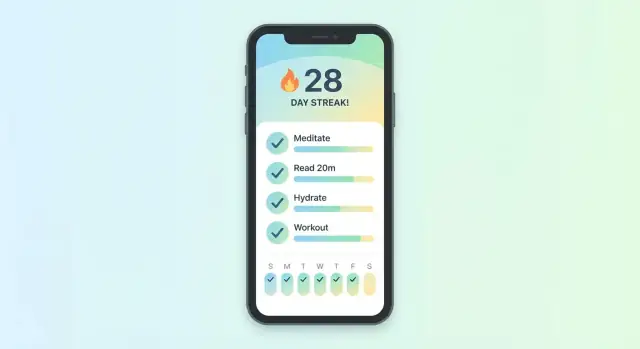
What You’re Building: Habits, Daily Goals, and Progress
A habit tracking app helps people repeat a behavior consistently and see evidence of that consistency over time. It’s less about “being productive” in a general sense, and more about making a small commitment feel concrete: Did I do the thing today? How often am I doing it? Am I improving?
Just as importantly, a habit tracker is not a full project manager, a medical device, or a social network by default. If you try to bundle task boards, calendars, journaling, coaching, and communities into version one, you’ll bury the core loop that users actually return for:
log → see progress → feel motivated → repeat.
Who this guide is for
This guide is written for founders, product leads, and first-time builders who want to ship a practical habit tracking MVP without getting stuck on edge cases or overbuilding. You don’t need to be an engineer to follow the product decisions, and you’ll come away with a clearer sense of what to build first.
What users want out of a habit tracker
People download a daily goals app hoping for three outcomes:
- Consistency: turning good intentions into a repeatable routine.
- Accountability: a gentle nudge (or a visible record) that makes skipping harder.
- Measurable progress: clear signals that effort is adding up, even when results are slow.
Your app should make these outcomes feel effortless—especially on low-motivation days.
Examples of habits you’ll likely support
Most habit tracking apps end up serving a mix of categories:
- Health: walk 8,000 steps, drink water, take vitamins, stretch.
- Learning: practice a language, read 10 pages, complete a lesson.
- Work: inbox zero, write for 30 minutes, plan the day.
- Self-care: meditate, journal, go outside, bedtime routine.
Different habits may be “yes/no,” counted (e.g., glasses of water), or time-based (e.g., 20 minutes). A strong foundation is designing for the simplest daily check-in while leaving room to expand later.
Define Your Target Users and Core Use Cases
A habit tracking app succeeds when it’s built around a specific person and a few repeatable moments in their day. If you try to serve everyone—beginners, athletes, therapists, corporate teams—you’ll likely ship a confusing tool that feels slow and generic.
Pick one primary user (start narrow)
Choose the main person you’re designing for right now. Common candidates:
- Beginner: wants structure, simple guidance, and quick wins.
- Busy professional: needs speed, smart reminders, and low mental load.
- Student: cares about routines, deadlines, and motivation.
- Coach/client: needs shared goals, check-ins, and accountability.
You can support other groups later, but an MVP should optimize for one.
Name the core problems you’re solving
Write down the top 2–3 problems your user feels weekly. For habit apps, these usually fall into:
- Forgetfulness (“I intended to do it, then the day disappeared”)
- Lack of motivation (“I start strong, then stop”)
- Unclear goals (“What does ‘be healthier’ mean today?”)
This list keeps you honest when feature ideas appear (community feeds, challenges, AI plans). If a feature doesn’t reduce one of these pains, it’s not essential.
Decide the app’s main “job”
Habit apps tend to win by doing one job extremely well:
- Reminders: prompt action at the right time, with minimal annoyance.
- Planning: help users define habits and fit them into real schedules.
- Tracking: make logging effortless and progress easy to understand.
- Coaching: provide guidance, check-ins, and reflection.
Pick your primary job and make everything else supportive.
Write 3–5 concrete user stories
Use simple, timed, “in-the-moment” stories. Examples:
- “I want to track drinking water in 10 seconds so I actually keep doing it.”
- “I want a reminder only when I’m likely available, so I don’t ignore it.”
- “I want to see my weekly progress at a glance, so I know what to adjust.”
- “I want to set a habit as ‘3 times per week,’ so I don’t fail on busy days.”
- “I want to recover after missing a day without losing everything, so I stay motivated.”
These stories become your filter for MVP features, onboarding, and screen design.
Scope the MVP and Success Metrics
A habit tracking app can grow into a big product quickly—journals, communities, AI coaching, meal plans. Your MVP should do one thing extremely well: help a user set a goal and follow through long enough to feel progress.
Decide what “daily goals” means (for your first version)
Be explicit, because your tracking logic, UI, and analytics depend on it. Common definitions:
- Task-based goals: “Drink water,” “Read 10 pages” (check-in = done/not done).
- Habit count goals: “Do 3 habits today” (progress = number completed).
- Time-based goals: “Meditate 10 minutes” (progress = minutes tracked).
Pick one as your default in the MVP. You can support other types later.
Optimize for 1–2 habit types first
Choose the simplest schedules you can validate:
- Simple daily habit: repeat every day, one tap to complete.
- Flexible schedule (optional second): e.g., “3x per week” or specific weekdays.
Resist supporting monthly goals, custom intervals, and complex rules until you see strong retention.
Must-have vs. nice-to-have features
Must-have (MVP): create a habit, set a schedule, daily check-in, streak/progress view, basic reminders, edit/pause habit, local/cloud save.
Nice-to-have (later): widgets, advanced stats, social accountability, challenges, tags, notes, templates, integrations (Health/Calendar), AI coaching.
Set measurable success metrics
Define success before you build:
- Activation rate: % of new users who create at least one habit and complete the first check-in within 24 hours.
- Week-4 retention: % who return and check in during week 4 (a strong signal your app is sticking).
- Streak/progress health: median streak length, % of users reaching 3-day and 7-day streaks, and “habit survival” (habits still active after 14/28 days).
With these metrics, every feature decision becomes simpler: if it doesn’t improve activation or retention, it’s not MVP.
Core Features for a Habit Tracking MVP
Your MVP should prove one thing: people can set a habit and reliably log it with minimal effort. If a feature doesn’t directly support that loop, it can wait.
1) Habit creation that fits real life
Start with a simple “Add habit” flow that captures only what’s needed to track consistently:
- Name (clear, action-based: “Walk 10 minutes”)
- Schedule (daily, specific weekdays, or custom frequency)
- Goal type: Yes/No (did it), Count (e.g., 8 glasses), or Time (e.g., 15 minutes)
- Reminders (time(s) and days). Keep reminders optional so users don’t feel pressured.
A small but important touch: let users choose a goal time window (morning/afternoon/evening) or a specific time, so the app can organize the day in a way that feels natural.
2) Quick check-in flow (the “one-tap” moment)
Daily logging is the heart of retention. Make the default action fast:
- One tap to mark done
- A secondary action to edit the entry (adjust count/time)
- A clear option to skip (with a gentle optional “reason” prompt). Skips reduce guilt and help users return tomorrow.
Aim for a home screen where today’s habits are visible immediately—no digging.
3) Streaks and history people actually use
You don’t need complex charts to start. Provide two views that answer common questions:
- Calendar history for each habit (visual consistency, missed days, pattern spotting)
- Weekly summary (completed vs planned, plus a simple trend indicator)
Also show the current streak and “best streak” to create momentum without shaming.
4) Basic onboarding with templates
Onboarding should reduce decision fatigue:
- Offer a handful of habit templates (sleep, movement, hydration, reading)
- Ask users to set reminders and preferred goal times
- Let them start with 1–3 habits; more can be added later
5) Offline-first basics (log anywhere)
People check in on commutes, in gyms, or with spotty reception. Your MVP should:
- Allow logging without a connection
- Queue changes and sync later
- Resolve sync conflicts in a simple way (e.g., “latest edit wins” with timestamps)
This single decision protects the core promise: the app works when the user needs it.
UX and UI Principles That Improve Daily Use
A habit app succeeds when it feels effortless at the exact moment someone is busy, tired, or distracted. That means your UI should optimize for “open → act → close” in seconds.
Make “mark done” the fastest action
Your primary CTA should be immediately visible on the Today/Home screen, with one-tap completion. Avoid hiding it behind habit detail pages or menus.
When possible, support quick actions like long-press on a habit to mark Done, or swipe options for Skip and Reschedule. Keep confirmations optional—users who trust the app don’t want extra taps.
Use clear, human language
Use labels that match real intent: Done, Skip, Reschedule. Avoid jargon like “log entry,” “complete instance,” or “defer.” If you need explanations, add lightweight helper text (one short sentence) rather than tooltips everywhere.
Design the key screens (and keep them predictable)
Focus your polish on four screens:
- Onboarding: minimal steps, quick win, templates.
- Home/Today: the action hub (progress at a glance, fast completion).
- Habit details: schedule, reminders, history—nothing extra.
- Insights: simple patterns and gentle feedback, not charts for chart’s sake.
Users should always know where they are and what to do next.
Accessibility basics that also improve conversion
Readable text, strong contrast, and large tap targets make daily use smoother for everyone. Aim for comfortable thumb reach, clear spacing, and obvious states (completed vs. pending). Also ensure color isn’t the only way you communicate status.
Reduce setup friction with short forms and templates
Keep forms short: habit name, frequency, optional reminder. Offer templates like “Drink water,” “Stretch,” or “Read 10 minutes” so new users can start in under a minute.
If you’re planning pricing, consider how UX changes with paywalls—keep core daily actions uninterrupted and move upgrades to natural moments. See /pricing for patterns that don’t disrupt routine.
Reminders and Notifications Users Won’t Hate
Notifications can make a habit tracking app feel helpful—or intrusive. The goal isn’t to “ping” people into compliance; it’s to support routines with respectful timing, clear intent, and easy control.
The notification types that actually help
Use a small set of messages with distinct purposes:
- Scheduled reminders: “Time for your 10-minute walk.” These should be predictable and tied to the user’s chosen time.
- Gentle nudges: If a habit is often skipped, a softer prompt like “Want to do it now or reschedule?” can reduce guilt and increase follow-through.
- Missed check-in follow-ups: A short end-of-day check-in (“Did you do it today?”) works well when it’s optional and not accusatory.
Avoid spam with limits and control
Give users the steering wheel:
- Frequency caps (e.g., no more than 1–2 notifications per habit per day)
- Quiet hours and weekend rules
- Custom timing per habit, plus “snooze” and “reschedule” actions
When people can tune notifications, they’re more likely to keep them on.
Time zones, travel, and daylight savings
If someone travels, reminders should follow their current local time. Handle daylight savings shifts so a 7:00 AM reminder doesn’t drift or fire twice. This sounds minor, but it’s a common source of “your app feels buggy” frustration.
Build for reliability (and failure)
Plan for what happens when notifications are disabled or blocked. Detect it, explain it plainly, and offer alternatives:
- Home screen widgets for quick check-ins
- An in-app daily checklist that’s visible on open
- Optional email summaries for people who prefer inbox over push
A good reminders system feels like a preference—not a punishment.
Motivation: Streaks, Rewards, and Accountability
Motivation features should help users show up on ordinary days—not pressure them into perfection. The best habit apps make progress feel visible, forgiving, and personal.
Streaks: useful, but never a trap
Streaks can be great for simple, daily habits (drink water, morning walk) because they create a clear “don’t break the chain” cue. But they can also create stress when life gets messy.
Design streaks with recovery in mind:
- Offer a “streak pause” (travel, illness) or one optional “save” per month.
- Show consistency alongside streaks (e.g., “12/14 days”) so one miss doesn’t feel like failure.
- Let users turn streaks off for habits where they’re not helpful.
Badges and milestones that actually matter
Badges work best when they’re limited and tied to real milestones. Instead of flooding users with achievements, focus on a small set:
- First week completed
- 10 check-ins on a habit
- “Back on track” badge after returning from a missed day
This keeps rewards meaningful and avoids turning the app into noise.
Accountability without the awkwardness
Social features should be optional. Not everyone wants their goals public.
Consider lightweight choices:
- Optional sharing (export a weekly summary)
- One accountability partner with simple check-ins
- Small groups with clear boundaries (no spammy feeds)
Personalization and encouraging copy
Motivation improves when the app adapts to the person: goal type, difficulty level (easy/standard/hard), preferred reminder times, and habit templates (e.g., “2-minute version” for busy days).
Use encouraging copy that normalizes slip-ups: “Missed yesterday? Start fresh today—your progress still counts.” That single line can keep someone from uninstalling.
Data Model and Tracking Logic (Without Overengineering)
A habit app succeeds when tracking feels effortless and consistent. That starts with a simple data model and a few clear rules for “did I do it today?”—without trying to predict every future feature.
A practical MVP data model
At minimum, you need:
- User: id, timezone, notification preferences.
- Habit: id, title, active flag, start date, optional color/icon.
- Schedule: habit_id plus a recurrence rule (daily, weekdays, or custom interval).
- Goal target (optional per habit): “1 time/day,” “10 minutes,” or “2 glasses.”
- Log entry: habit_id, date (stored as a local “habit day”), value (boolean or number), timestamp, and source (manual/notification).
- Reminder: habit_id, time, days applicable, enabled.
Keep logs append-only where possible. Instead of recalculating history constantly, write what happened on a date and derive streaks/progress from those entries.
Recurring schedules without pain
Support three patterns early:
- Daily: every day.
- Weekdays: Mon–Fri.
- Custom interval: every N days starting from the habit’s start date.
Store schedules as a small rule set rather than generating thousands of future “occurrences.”
Common edge cases (decide your rules upfront)
- Skipped days: treat as “no log” vs. an explicit “skipped” state. “Skipped” is useful for reducing guilt and supporting recovery.
- Backfilling: allow users to log yesterday (or the past week) to reduce churn.
- Editing mid-week: version the schedule (effective_from date). Don’t rewrite old days; apply the new rule going forward.
Sync strategy: local first, cloud second
Make the app usable offline: save to local storage immediately, then sync in the background. Use stable IDs and “last updated” timestamps to resolve conflicts. If two edits collide, prefer the newest log, but surface a gentle “we merged changes” note when needed.
Export and backup (even if not in MVP)
Plan for a basic CSV/JSON export later and at least one backup path (cloud account sync or device backup). Knowing users can leave increases trust—and paradoxically can improve retention.
Choose Your Tech Stack and Build Approach
Your tech stack should match your MVP scope, your team’s skills, and how fast you need to ship—not what’s trendy. A habit tracking app looks simple, but it touches daily usage, offline reliability, and notifications, which can change the “best” choice.
Platform choice: iOS, Android, or both?
- Start with one platform if you’re validating demand and want to iterate quickly. Choose the platform where your target users already are (e.g., iOS for higher willingness to pay in many categories; Android for broader reach).
- Build for both if your audience is split (e.g., workplace programs, schools) or if habit sharing/accountability requires friends on different devices.
Build approach: native vs cross-platform vs wrapper
- Native (Swift/Kotlin): best performance and deepest OS integration; higher cost if you maintain two codebases.
- Cross-platform (Flutter/React Native): a strong default for an MVP that needs iOS + Android with one team, while still supporting notifications and local storage well.
- Web-based wrapper: fastest to demo, but often weaker for offline-first behavior, smooth UI, and notification reliability—usually not ideal for a daily-use habit product.
Backend: what you actually need
Even an MVP benefits from a lightweight backend for:
- Accounts and sync across devices
- Event tracking (e.g., habit created, reminder enabled, check-in completed)
- Notifications orchestration (especially if you later add “smart” reminders)
Build vs. buy the basics
Avoid building commodity pieces early:
- Use managed auth (OAuth/SSO later)
- Use standard push notification services
- Use an established analytics tool so you’re not guessing retention
If you want to ship faster: a practical “vibe-coding” option
If your main constraint is speed (common for first-time founders), tools like Koder.ai can help you get a real MVP into users’ hands without setting up a traditional, multi-repo engineering pipeline. You describe the product in a chat-style interface, iterate in “planning mode,” and can generate a full app stack—commonly React for web, Go + PostgreSQL for backend/data, and Flutter for mobile—plus deployment and hosting, with source code export if you want to move to a custom workflow later.
This doesn’t remove the need for good product decisions (your MVP scope still matters), but it can reduce the time between “idea” and “first cohort testing.”
Plan for future features without locking yourself in
If coaching, content, or integrations (Apple Health/Google Fit) are on the roadmap, pick a stack that supports background tasks, permissions, and data export. You don’t need to build those now—but your architecture should make adding them realistic, not a rewrite.
Privacy, Security, and Trust Basics
Trust is a feature. If people worry that their routines, health goals, or “failed days” could leak, they won’t stick around—no matter how good your habit tracker is.
Collect only what you truly need
Start with data minimization: track habits, schedules, and progress—avoid asking for full name, date of birth, contacts, or precise location unless you can clearly justify it. If you offer optional features (like syncing with Health data), keep them opt-in and usable without them.
Make permissions feel fair and understandable
When requesting permissions (notifications, Health data, photos, location), explain:
- what you’ll use it for
- what you won’t use it for
- how to change it later
Use a short, plain-language pre-permission screen before the system prompt. This reduces confusion and improves opt-in rates without being pushy.
Security basics you shouldn’t skip
Even an MVP needs baseline protections:
- Encrypt data in transit (HTTPS/TLS) for all API calls
- Use secure storage for tokens/credentials (Keychain on iOS, Keystore on Android)
- Store passwords safely (hash + salt via proven libraries; never plain text)
- Rate-limit login attempts and support strong password rules (or passwordless sign-in)
Privacy essentials: deletion, backups, recovery
Let users delete their account and associated data from within the app. Be clear about what “delete” means (immediate vs. within X days, what remains in backups, etc.). Provide a safe account recovery path (email, verified device) without exposing sensitive data.
A simple pre-launch privacy checklist
Before launch, confirm you have:
- A clear Privacy Policy linked in onboarding and settings (e.g., /privacy)
- A data inventory: what you collect, why, where it’s stored, who can access it
- Account deletion and export (if applicable)
- Incident plan: who responds if something goes wrong
Getting these basics right makes your habit tracking app feel reliable—and reliability drives retention.
Analytics and Feedback Loops to Improve Retention
Retention in a habit tracking app improves when you understand where users drop off and why they stop checking in. The goal isn’t “more data”—it’s a small set of signals you can act on every week.
Define a simple event vocabulary
Start with a handful of key events that represent real progress through the app:
- Onboarding complete (user finished setup)
- Habit created (first habit added)
- Check-in logged (daily completion recorded)
These three alone let you see whether the problem is acquisition-to-activation (people never create a habit) or activation-to-retention (people create habits but don’t return).
Track retention that matches habit behavior
For habit products, returning is the product. Make day-based retention your baseline:
- Day-1 return rate (did they come back tomorrow?)
- Day-7 return rate (did it become weekly behavior?)
- Day-30 return rate (is it sticking?)
Pair this with “check-in frequency” so you can distinguish between someone who opens the app and someone who actually logs progress.
Measure habit success, not just usage
Look at completion rate by habit type (e.g., fitness vs. reading) and by reminder settings (morning vs. evening, with/without notifications). You’ll often find one habit category quietly failing because the default schedule doesn’t fit real life.
Run small, safe experiments
Keep tests simple and focused:
- Notification timing (e.g., 7:30am vs. 9:00am)
- Onboarding templates (pre-built habit suggestions vs. blank slate)
Change one thing at a time, measure day-7 retention and completion rate, and roll back quickly if results dip.
Ask for feedback at the right moment
Avoid prompting on day 1. A better trigger is after a small win—like after 3 check-ins or after completing onboarding + first check-in. Keep it lightweight (“What made this hard today?”) and offer an easy path to contact support or leave a note, not a long survey.
Testing, Launch, and Monetization Strategy
A habit tracking app lives or dies on reliability. If a reminder fires at the wrong time, or a streak resets due to a sync bug, people won’t give you a second chance. Treat testing and launch as part of the product—not an afterthought.
A practical testing checklist
Focus on the flows users repeat every day:
- Schedules & time zones: reminders should behave correctly across daylight savings, travel, and “quiet hours.”
- Notifications: permission states (allowed/denied), tapping actions (mark done, snooze), and duplicate alerts.
- Offline behavior: logging habits without internet, then syncing later without losing or duplicating entries.
- Edge cases: missed days, editing a habit’s schedule mid-week, deleting a habit with history, and restoring purchases.
A small set of “golden test accounts” with known expected results makes regression testing faster each release.
Beta rollout that produces usable feedback
Start with a limited invite-only beta (friends-of-friends is fine), but gather structured feedback:
- Ask users to complete 3–5 tasks (create a habit, log for 3 days, set reminders).
- Use a short form with ratings + one open question.
- Add an in-app link to /support for bug reports, including device model and OS version.
App store readiness
Before submission, prepare:
- Clear screenshots that show daily logging and progress
- A plain-language description and privacy summary
- A simple support page (/support) and FAQ
Monetization options that fit habit apps
Common choices:
- Free with limits (e.g., 3 habits) + paid unlock
- Subscription for advanced features (insights, widgets, backups)
- One-time purchase for “Pro”
Whatever you choose, be explicit about what’s free and what’s paid.
If you’re considering growth loops, pairing monetization with advocacy can work well: for example, Koder.ai runs programs where users can earn credits by creating content or referring others—mechanisms like that can be adapted to habit apps as long as they don’t interrupt the daily check-in flow.
Post-launch plan
Expect fast iteration: ship bug fixes quickly, review feedback weekly, and maintain a small roadmap with clear prioritization (retention-impacting fixes first, nice-to-haves later).
FAQ
What is the core purpose of a habit tracking MVP?
An MVP habit tracker should prove one loop: create a habit → get reminded (optional) → log in seconds → see progress → repeat. If a feature doesn’t directly improve activation (first habit + first check-in) or retention (week 2–4 check-ins), it can wait.
How do I choose the right target user and use cases for a habit app?
Start with one primary user (e.g., busy professionals) and write 3–5 time-bound user stories like “I want to check in in 10 seconds.” Then list the top pains you’re solving (forgetfulness, motivation, unclear goals) and reject features that don’t reduce those pains.
Which habit goal type should I support first: yes/no, count, or time?
Pick one default goal type for v1:
- Yes/No (fastest, best for “did I do it?”)
- Count (e.g., glasses of water)
- Time (e.g., minutes meditated)
You can still design your data model to allow additional types later, but keep the first version consistent to avoid UI and logic complexity.
What are the must-have features for a habit tracking MVP?
A practical MVP set is:
- Create a habit (name, schedule, optional reminder)
- Today screen with one-tap Done
- Skip (optionally with a reason)
- Streak + simple history (calendar or weekly summary)
- Edit/pause a habit
- Offline logging + sync
Nice-to-have features like widgets, communities, AI coaching, and integrations are best postponed until you see strong retention.
How do I design a check-in flow people will actually use daily?
Make the default action one tap on the Today/Home screen. Good patterns include:
- Swipe actions for Done / Skip / Reschedule
- Optional edit for count/time after marking done
- No mandatory confirmations for trusted users
The goal is “open → act → close” in a few seconds, especially on low-motivation days.
What notification strategy works without annoying users?
Keep notifications predictable and user-controlled:
- One scheduled reminder at the user’s chosen time
- Optional end-of-day “Did you do it?” follow-up
- Caps, quiet hours, and easy snooze/reschedule
Also plan for failure modes: detect when notifications are disabled and rely on an in-app daily checklist (and optionally widgets or email summaries).
How should I handle time zones, travel, and daylight savings?
Treat time as a product decision:
- Store a user timezone and compute a “habit day” based on local time
- When a user travels, reminders should follow the current local time
- Handle daylight savings so reminders don’t drift or fire twice
Test these scenarios explicitly (travel, DST change, quiet hours) because they’re common sources of “the app is buggy” churn.
How can I use streaks without making users feel punished for missing a day?
Use streaks as motivation, not punishment:
- Show consistency metrics like 12/14 days alongside streaks
- Offer a recovery option (pause/sick mode or a limited streak save)
- Allow streaks to be turned off per habit
This reduces the “I missed one day, so I quit” effect while keeping momentum for users who like streaks.
What data model and tracking logic should I use without overengineering?
A minimal, durable model usually includes:
- Habit (title, active flag, start date)
- Schedule (rule-based recurrence; don’t generate future occurrences)
- Log entry (habit_id, date as habit-day, value, timestamp)
- Reminder (time, days, enabled)
Keep logs close to append-only and version schedules with an effective date so edits don’t rewrite history.
Which analytics and success metrics matter most for a habit app?
Focus on metrics tied to the core loop:
- Activation: create 1 habit + first check-in within 24 hours
- Retention: day-1/day-7/day-30 return rates (plus actual check-ins)
- Habit survival: habits still active after 14/28 days
Instrument a small event vocabulary (onboarding complete, habit created, check-in logged), then run small experiments (onboarding templates, reminder timing) and measure day-7 retention impact.