

How to Create a Mobile App for Personal Knowledge Snippets
A step-by-step guide to planning and building a mobile app for saving knowledge snippets: features, UX, data model, search, sync, privacy, and launch.
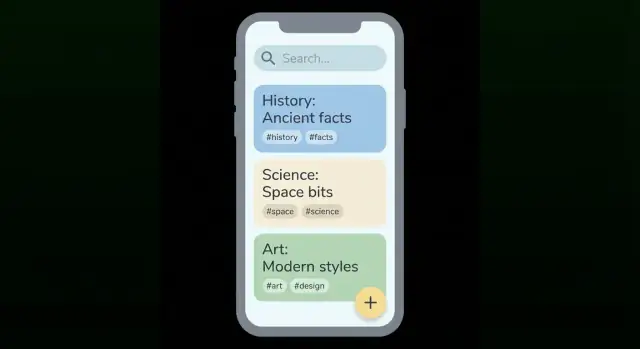
Define the Goal and Audience
A “knowledge snippet” is a small, self-contained note you can capture in seconds and understand later. Think: a quote from a book, a lesson from a meeting, a quick idea for an article, a link with one sentence of context, or a mini checklist you want to reuse. In a great PKM app, each snippet stands on its own—more like a knowledge card than a long document.
The core problem you’re solving
Most people don’t fail because they can’t take notes. They fail because their notes are slow to capture, hard to find, and rarely reused. Your app’s promise should be simple:
- Capture fast (no friction in the moment)
- Find later (even when you only remember a vague detail)
- Reuse often (turn snippets into actions, writing, study material, or decisions)
Choose one primary audience and one main use case
Pick a “first home” for the product. For example:
- Students: capture lecture takeaways and quotes; review before exams
- Professionals: capture meeting learnings and decision rationales; reuse in future projects
- Creators: capture ideas and references; turn them into drafts
Choose one main use case—such as quick capture notes during busy moments—and design everything around that.
Define success metrics early
Good goals are measurable. Examples:
- Capture time: average time to save a snippet (e.g., under 10 seconds)
- Retrieval time: time to find a snippet you’ve seen before (e.g., under 30 seconds)
- Weekly active use: how many users capture and retrieve each week
Common pitfalls to avoid
The fastest way to derail a mobile note app is to add too much too soon, ship weak search, or let organization get messy. Start narrow, keep capture effortless, and treat “find later” as a first-class feature—not an afterthought.
Map the Snippet Lifecycle
A personal knowledge snippets app lives or dies by how smoothly a snippet moves from “I don’t want to forget this” to “I can find and use this later.” Before screens and features, map the lifecycle as a simple, repeatable loop.
A simple lifecycle flow
Think in five steps:
- Capture: get the thought in with minimal friction.
- Organize: add just enough structure to make it retrievable.
- Retrieve: search, filter, or browse to pull it back at the right moment.
- Review: revisit important items so they don’t disappear into the pile.
- Share: export or send a snippet when it becomes useful to someone else (or your future self).
Pick a “home” view that matches real behavior
Your home view sets the tone for the whole product. Common options:
- Inbox: everything starts here until it’s processed.
- Today: a small set of resurfaced snippets plus anything recently captured.
- Library: a calm browse-first approach where users search or navigate categories.
If you expect lots of quick capture, Inbox is usually the most forgiving.
Decide how snippets should look
Display impacts scanning speed. A list is compact and familiar, cards can show richer context (source, tags, highlights), and a timeline emphasizes “when” you captured something. Choose one default and add a toggle only if it truly serves different use cases.
Define when a snippet is “done”
Users need a clear finish line. For example, a snippet is done when it’s:
- given a short title (even auto-suggested),
- assigned at least one tag or placed in a folder,
- optionally linked to a related snippet,
- moved out of Inbox (or marked “Saved”).
Add lightweight review habits
Make maintenance feel small: a daily “Inbox zero” prompt and a weekly “highlights” review that surfaces starred or most-used snippets. Keep it optional, quick, and satisfying.
Choose V1 Features vs Nice-to-Haves
A snippets app succeeds or fails on speed and reliability. For V1, aim for a small set of features you can make feel effortless. Everything else can wait until you’ve watched real people use it.
Must-have features (V1)
Start with the actions people will do dozens of times a week:
- Quick add (one-tap to a clean editor)
- Edit and delete
- Search that returns results fast
- Tags (basic, flexible labeling)
- Favorites (a simple way to pin what matters)
If any of these feel slow or confusing, extra features won’t save the experience.
Nice-to-haves (post-V1)
These can be valuable, but they add design and engineering complexity:
- Attachments (PDFs, files)
- Web clipper
- Voice notes / dictation workflows
- Highlights (from books/articles)
- Reminders
A good rule: if a feature needs new screens, background processing, or complicated permissions, it’s probably not V1.
Define your “snippet types” early
Even in V1, decide what a snippet is so your UI and data model stay consistent. Common types include:
- Text
- Link
- Quote
- Image
- Checklist
You can still store them in one list, but types help you choose sensible defaults (e.g., a Quote template with author/source fields).
Set clear limits and accessibility basics
Write down what V1 will not do (for example: no folders, no attachments, no reminders). This keeps build time controlled and reduces scope creep.
Also include accessibility basics from day one: adjustable font size, sufficient contrast, and comfortable tap targets—small details that make a mobile note app feel welcoming and usable.
Design Quick Capture That People Will Use
If people can’t save a thought the moment it appears, they won’t build a habit—and your app won’t collect enough “raw material” to become useful. Quick capture is less about fancy features and more about removing hesitation.
Aim for 2–3 taps from anywhere
Design your primary capture flow so it works even when the user is distracted.
A few proven entry points:
- Floating action button inside the app for instant “new snippet”
- Home-screen widget for one-tap capture (text, voice, or photo)
- Lock-screen shortcut for the fastest possible entry
The rule: the user shouldn’t need to decide where something belongs before they can save it.
Use templates without making it feel like “forms”
Templates help users capture consistent, reusable knowledge cards—especially for repeat scenarios—without forcing them into rigid structure.
Examples:
- Book note: Quote + page + takeaway
- Meeting takeaway: Decision + next step + owner
- Quote: Quote + author + why it matters
Keep templates lightweight: pre-fill labels and fields, but let users ignore anything they don’t need.
Choose default fields that earn their keep
For personal knowledge snippets, start with a small set of fields that improve retrieval later:
- Title (optional; allow auto-title from first line)
- Body (the main content)
- Tags (fast, flexible categorization)
- Source (optional: book, person, URL text, location)
- Date (automatic)
If a field doesn’t help search, organization, or recall, consider moving it off the capture screen and into “More options.”
Remove common friction points
Micro-friction kills capture. Fix it with defaults and smart behavior:
- Autofill the last used tag(s) for the next note
- Offer recent tags as one-tap chips
- Use smart suggestions (e.g., suggest “meeting” on weekdays 9–5, or suggest tags based on keywords)
- Provide a single “Save” gesture (keyboard submit, swipe, or prominent button)
Also consider a “Quick save” mode: save immediately, then let users refine tags later.
Plan offline-first capture with later sync
Capture must work without thinking about connectivity. Store new snippets locally first, then sync in the background when the device is online.
Design for:
- Clear feedback: “Saved” should mean saved locally, even offline
- Background sync retries (without the user babysitting it)
- Safe handling of edits made before sync (you’ll define conflicts later, but capture should never block)
When quick capture is fast, forgiving, and consistent, users will trust your mobile note app enough to use it daily—and that’s what turns quick capture notes into lasting personal knowledge snippets.
Create an Organization System: Tags, Folders, and Metadata
Your organization system should feel invisible: quick to apply, easy to trust, and forgiving when people change their minds later.
Pick a simple structure (and stick to it)
For a snippets app, a tags-first approach usually beats a deep folder tree. Folders push people to decide “where it belongs” at capture time, which slows them down. Tags let one snippet belong to multiple themes (e.g., writing, productivity, quotes) without duplication.
If you still want folders, keep them shallow and optional—think “Inbox / Library / Archive”—and use tags for meaning.
Tag rules that prevent chaos
Define clear, app-enforced rules so tags stay consistent:
- Lowercase by default (
machine learningnotMachine Learning). - Allow spaces, but set a max length (e.g., 24–32 characters).
- Auto-trim extra spaces and normalize punctuation.
- Prevent true duplicates (
aivsAI) and offer suggestions as users type. - Support aliasing or merging to fix earlier choices (e.g., merge
uiintodesign).
Small details matter: a tag picker with recent tags and autocomplete reduces friction dramatically.
Optional metadata that stays out of the way
Keep metadata lightweight and mostly automatic. Useful fields include:
- Source URL
- Author / speaker
- Topic (if you want a single “primary topic” separate from tags)
- Context (where/why it matters: “for next talk,” “client example,” “book notes”)
Make metadata editable, but don’t force it during capture.
Smart collections and bulk actions
Add “smart collections” so users don’t have to manually curate everything: untagged, saved this week, favorites, and “recently edited” are high-value.
Plan bulk actions early: multi-select to tag multiple snippets, archive in batches, and merge/rename tags without breaking existing items.
Build Search and Retrieval for Real Life
A snippets app succeeds or fails at the moment you try to find something you saved weeks ago. Treat search as a core workflow, not a bonus feature.
Start with fast full-text search
Begin with full-text search across both the title and body. It should feel instant, even with thousands of notes. Make the search box easy to access (top of the main screen, plus a persistent shortcut), and remember the last query so users can pick up where they left off.
Small details matter: search should handle multi-word queries, ignore case, and match partial words so typing “auth” can find “authentication.”
Add filters that match how people remember
People rarely recall the exact wording—they remember context. Add lightweight filters that narrow results without forcing complex queries:
- Tag (single or multiple)
- Date range (today, last week, custom)
- Type (e.g., text, link, image, checklist)
- Favorites or pinned
Keep filters one tap away from the results list, and show active filters clearly so users don’t get “missing results” confusion.
Quick actions from results
Search results shouldn’t be a dead end. Add quick actions directly on each result: open, copy, share, and favorite. This turns search into a working surface—great for grabbing a code, quote, address, or template while you’re on the move.
Ranking that feels obvious
A simple ranking formula goes far: exact matches first, then a mix of recency and favorites. If a user starred a snippet, it should show up near the top even if it’s older.
Plan for upgrades later
Once basics are reliable, you can improve quality with fuzzy matching (typos), synonym support, and highlighted matches in results. These upgrades are only valuable after speed and predictability are solid.
Plan the Data Model and Storage
A snippets app lives or dies by how safely it stores notes when the network is flaky, the phone is low on storage, or the user is switching devices. Start with a simple, offline-first storage plan that won’t paint you into a corner later.
Pick a reliable local database
For mobile, a local database is the backbone of offline notes. Choose something proven and well-supported on iOS/Android, and treat the on-device database as the “source of truth” for day-to-day use. Even if you plan to sync later, users should be able to capture and search their snippets without waiting on a connection.
Sketch the core entities
Keep the first version small and clear:
- Snippet: the main content (text), type (idea/quote/task), and optional source fields.
- Tag: a reusable label (e.g., “marketing”, “books”).
- SnippetTag: a join table so each snippet can have many tags.
- Attachment: photos, PDFs, audio, or files tied to a snippet.
- User: even if you start single-user, this helps future sync or multiple profiles.
IDs and timestamps that support sync
Give every record a stable unique ID (not just an auto-increment integer). Add timestamps like createdAt, updatedAt, and a clear lastEditedAt field used for conflict resolution later. This also improves sorting (“recently edited”) and auditability.
Plan attachment storage and limits
Store attachments as files on-device and keep only metadata (path, mime type, size) in the database. Decide size limits early (per file and total), and consider an optional cloud copy later without breaking the model.
Add exports early to reduce lock-in
Support basic export formats from the start—CSV, JSON, and Markdown cover most needs. Even a simple “Export all snippets” reduces anxiety and makes your app easier to trust.
Decide on Sync, Offline Mode, and Conflict Handling
Sync is where a “simple notes app” can suddenly feel unreliable—especially for personal knowledge snippets, where people expect ideas to be safe, searchable, and available everywhere. Make a few clear decisions early so your app behaves predictably.
Pick a sync strategy
For a mobile note app, you generally have two options:
- Account-based sync: users sign in, and snippets sync across devices. This fits “sync across devices” expectations and makes device upgrades painless.
- Device-only: everything stays on one device (optionally with local backups). This is simpler and can appeal to privacy-first users, but it limits usefulness for many.
A practical middle ground is to start with account-based sync, but keep the core app usable without an account.
Define offline behavior
Assume the network will fail. Your offline notes experience should be fully functional:
- Users can create and edit quick capture notes while offline.
- Changes are stored locally and sync later in the background.
- The UI should show subtle status (e.g., “Syncing…” / “Last synced 2 hours ago”) without nagging.
Decide what gets synced
Be explicit about what travels between devices:
- Snippets (text, timestamps)
- Tags and search metadata (so results match across devices)
- Attachments (if you support them) and how large files behave on cellular
- Settings (theme, default capture mode, export preferences)
If you can’t sync everything at first, sync the snippet content and tags before anything else.
Handle conflicts in a human-friendly way
Conflicts happen when the same snippet is edited on two devices before syncing. Common approaches:
- Last-write-wins: easiest, but can overwrite a user’s best version.
- Simple merge UI: when conflicts occur, show “Version A” and “Version B” with timestamps, and let the user keep one or combine them.
For knowledge cards, a lightweight merge screen is often worth it: people care about preserving small insights.
How to test sync issues
Don’t wait for real users to find edge cases. Build a small test checklist:
- Create/edit notes in airplane mode, then reconnect.
- Switch between Wi‑Fi and cellular mid-edit.
- Simulate a flaky network (slow connections, timeouts) and confirm retries don’t duplicate snippets.
- Edit the same snippet on two devices and force a conflict.
When sync feels boring and predictable, users trust your PKM app—and keep capturing.
Address Privacy and Security Early
A snippets app quickly becomes a private archive. Treat privacy and security as core features from the first prototype, not a “later” polish item. It’s much easier to make good choices early than to retrofit them after users trust you with their knowledge.
Know what counts as sensitive
Even if you’re not storing “official” secrets, personal knowledge snippets often include:
- Personal notes (health, finances, relationships, work context)
- Links that reveal interests, employer tools, or private documents
- Screenshots (which may contain emails, addresses, account numbers, or chats)
This affects how you handle storage, syncing, support, and analytics.
Add simple, visible protection
Start with protections that users understand immediately:
- App lock: passcode and biometric unlock (Face ID / fingerprint) where supported
- Auto-lock after inactivity
- Secure storage where available (for example, storing encryption keys and tokens in the platform’s secure container)
Also be careful with previews: consider hiding snippet content in the app switcher and in push notifications by default.
Define privacy settings up front
Make privacy choices explicit and reversible:
- Analytics opt-in (off by default is a clear, user-friendly stance)
- Clear controls for what gets synced vs kept only on-device
- Data export (so users can leave with their notes)
- Account deletion flow that explains what happens to synced data and how long it may take
Backups and recovery (without overpromising)
Users will ask, “What if I lose my phone?” Plan a story for recovery: device backups, optional account-based sync, and restore flows. Be honest about limits (for example, if a user loses a key or disables sync, recovery may not be possible).
Simple user security guidelines
Add a short checklist in onboarding or settings:
Use a strong account password, enable device lock, don’t share unlock codes, and keep your OS updated. Your app can do a lot, but user habits still matter.
Design the UI and Navigation
A snippets app succeeds when it feels effortless: capture quickly, find later, and stay oriented. Your UI should make the “next obvious step” clear at every moment—especially when someone is busy or distracted.
A simple navigation model
A bottom tab bar works well for a mobile note app because it anchors the experience and reduces hunting:
- Inbox: the default landing spot for new, unprocessed snippets.
- Search: one-tap access to retrieval (people remember they need something, not where it was filed).
- Library: your curated, organized collection—tags, folders, and saved views.
- Settings: account, privacy, sync status, export, and preferences.
Keep each tab focused. If “Library” starts to feel like a second inbox, you’ll create confusion instead of structure.
Empty states that teach without lecturing
Most users will meet your app through an empty screen. Use these moments to guide behavior:
- In Inbox, explain “Capture now, organize later” and show a one-tap example tag.
- In Search, suggest queries like a tag search (“#research”) or a phrase (“meeting notes”).
- In Library, clarify the difference between tags and folders in a single sentence.
Onboarding should be skippable, but the hints should remain discoverable (for example, a small “How this works” tip).
Microinteractions that save time
Small gestures reduce friction and make quick capture notes feel lightweight:
- Swipe a snippet to favorite or archive.
- Long-press to add tags, move, copy text, or share.
- Show subtle confirmations (e.g., “Saved” or “Tagged”) so users trust the app.
Accessibility and consistency
Support dynamic type, clear contrast, and meaningful screen reader labels. Ensure keyboard navigation works where relevant (especially search and editing).
Finally, define a mini design system—colors, typography, spacing, and reusable components (cards, tag chips, buttons). Consistency makes knowledge cards easier to scan, and scanning is what turns a pile of snippets into usable knowledge.
Choose the Build Approach and Tech Stack
Your build approach should match what you’re trying to prove, how fast you need to move, and who will maintain the app after the first release. A “personal knowledge snippets” app sounds simple, but features like offline notes, search, and sync can raise the technical bar quickly.
Pick a build path that fits your constraints
Native (Swift for iOS, Kotlin for Android) is the best choice when you want top performance, the smoothest UI, and the deepest access to device features. The trade-off is higher cost (often two codebases) and more specialized hiring.
Cross-platform (Flutter, React Native) is a strong default for a PKM app: one shared codebase, solid performance, and faster iteration. The main trade-offs are occasional platform-specific work and long-term dependency management.
No-code / low-code tools can be great for prototypes of a “mobile note app” concept—especially to validate quick capture notes and navigation. Expect limits once you add offline mode, complex tags and search, or sync across devices.
If you want the speed of a chat-driven build process without sacrificing code ownership, a vibe-coding platform like Koder.ai can be a practical middle option: you describe flows (capture, tagging, search, sync states) in plain language, generate a working web or mobile app foundation, and still export the source code for review and long-term maintenance.
Align tech with your team and timeline
Choose what your team can ship confidently:
- If you have one mobile developer, cross-platform can reduce risk.
- If you already have iOS and Android specialists, native may be straightforward.
- If you’re pre-funding, a prototype-first approach can help you test demand before heavy engineering.
Plan integrations early (even if you add them later)
Most MVP mobile apps need a few “plumbing” pieces:
- Authentication (email, Apple/Google sign-in)
- Push notifications (reminders, spaced review for knowledge cards)
- Analytics (capture → save → retrieve funnels, feature usage)
Run a prototype phase before committing
Build clickable mockups (for example, key flows like capture, tagging, and retrieval), then do 5–10 user interviews. Ask people to add real snippets during the session; you’ll quickly learn whether your capture and organization feel natural.
Document decisions for future you
Write down why you chose the stack, what you postponed (for example, advanced search), and the expected trade-offs. This saves time when new contributors join or when you revisit offline notes and privacy decisions later.
Ship an MVP, Test, Launch, and Improve
Shipping a personal knowledge snippets app is less about building everything and more about proving the core loop: quick capture → organize lightly → find it later. A tight MVP helps you learn what people actually save and how they try to retrieve it.
Set an MVP timeline (prototype → beta → launch)
Pick milestones you can hit in weeks, not quarters. For example: a clickable prototype to validate navigation, a beta that supports daily use, and a launch build with solid stability. Keep the MVP scope narrow: fast capture, basic tags, and reliable search.
If you’re trying to compress the first iteration, consider building a “thin but real” MVP that focuses only on the loop above. Teams sometimes use Koder.ai to stand up the baseline app quickly (React on the web, Go + PostgreSQL on the backend, and Flutter for mobile where needed), then refine UX and edge cases based on beta feedback.
Test what matters with a focused QA checklist
Before you invite beta users, verify the experiences that make or break a mobile note app:
- Capture speed: from lock screen to saved snippet in a few taps
- Search accuracy: typos, partial matches, and tags returning expected results
- Offline edits: create and edit offline notes without data loss
- Sync across devices: changes merging correctly and quickly
Collect beta feedback without creating friction
Make it easy to speak up: an in-app “Send feedback” action, a lightweight prompt after someone has created a handful of knowledge cards, and a simple way to report bugs with context (what they expected vs what happened).
Prepare launch assets and support basics
Have screenshots that show quick capture notes, tags and search, and an example snippet detail view. Write an app store description that explains the benefit in plain language. Provide a minimal support page: FAQs, contact, and privacy for notes.
Iterate after launch with small, steady wins
Track the top issues (crashes, slow search, sync conflicts) and commit to small weekly improvements. Users trust note apps that feel stable—and get better without changing how they work every month.
FAQ
What exactly is a “knowledge snippet” in a PKM app?
A knowledge snippet is a small, self-contained note you can capture quickly and understand later—like a quote, meeting takeaway, idea, link with context, or a reusable checklist.
Design it to stand alone (like a card), so it can be searched, resurfaced, and reused without needing a long document around it.
How do I choose the first audience and use case for a snippets app?
Pick one primary audience (students, professionals, or creators) and one main use case (for example: quick capture during busy moments).
Then optimize every early decision for that use case—capture flow, home screen, default fields, and search—so the product feels focused instead of generic.
Which success metrics matter most early on?
Use measurable targets tied to the core promise:
- Capture time: average time to save a snippet (e.g., < 10 seconds)
- Retrieval time: time to find a previously seen snippet (e.g., < 30 seconds)
- Weekly active capture + retrieval: users who both save and later find notes
If retrieval isn’t happening, your app is becoming a storage bin instead of a knowledge tool.
What is the recommended snippet lifecycle to design around?
A simple lifecycle is:
- Capture (fast, minimal friction)
- Organize (light structure like tags)
- Retrieve (search + filters)
- Review (optional resurfacing)
- Share/Export (when it becomes useful elsewhere)
Mapping this loop early helps you avoid building “extra features” that don’t improve the core flow.
What should be included in V1 vs saved for later?
For V1, prioritize the actions users do dozens of times a week:
- Quick add (one-tap to editor)
- Edit/delete
- Fast full-text search
- Basic tags
- Favorites/pin
Defer anything that adds lots of UI, permissions, or background complexity (attachments, web clipper, reminders, advanced highlights) until the basics feel effortless.
How do I design quick capture that people will actually use?
Aim for 2–3 taps from anywhere and avoid forcing organization decisions mid-capture.
High-impact entry points include:
- In-app floating action button
- Home-screen widget
- Lock-screen shortcut
Consider “quick save now, refine later” so users never lose a thought because tagging felt slow.
Should I use tags, folders, or both for organizing snippets?
A tags-first system is usually best for snippets because it avoids the “where does this go?” pause.
If you include folders, keep them shallow and optional (e.g., Inbox / Library / Archive) and use tags for meaning. Add guardrails like lowercase normalization, autocomplete, duplicate prevention, and tag merge/aliasing to prevent chaos.
What makes search and retrieval “good enough” for real-life use?
Start with fast full-text search across title + body that feels instant.
Then add filters that match how people remember context:
- Tags (single/multi)
- Date ranges
- Type (text/link/image/checklist)
- Favorites
Also add quick actions on results (copy/share/favorite) so search becomes a working surface, not a dead end.
How should offline mode work in a mobile snippets app?
Use an offline-first approach: save to a local database immediately and sync later in the background.
Key behaviors:
- “Saved” should mean saved locally, even without internet
- Background retries should not duplicate notes
- Edits made offline should never block the user
Offline capture is a trust feature—if it fails once, people stop using the app in critical moments.
How do I approach sync, conflicts, and privacy without overcomplicating V1?
Define two things early: what syncs and how conflicts resolve.
Practical defaults:
- Sync snippets + tags first; add attachments/settings later if needed
- Show subtle status (“Last synced…”) without nagging
- Handle conflicts with either last-write-wins (simple) or a two-version merge screen (safer for important notes)
Also bake in basics like app lock (biometrics/passcode), hiding content in app switcher previews, analytics opt-in controls, and easy export (CSV/JSON/Markdown) to reduce lock-in.